Use this template
A great project checklist is the simplest project management tool there is - and one of the most effective. With Trupeer, you can save hours on project management by starting with a free project checklist template, customizing it with your brand guidelines, and turning checklists into video updates that align teams across phases.
What is a project checklist template, and what should it do?
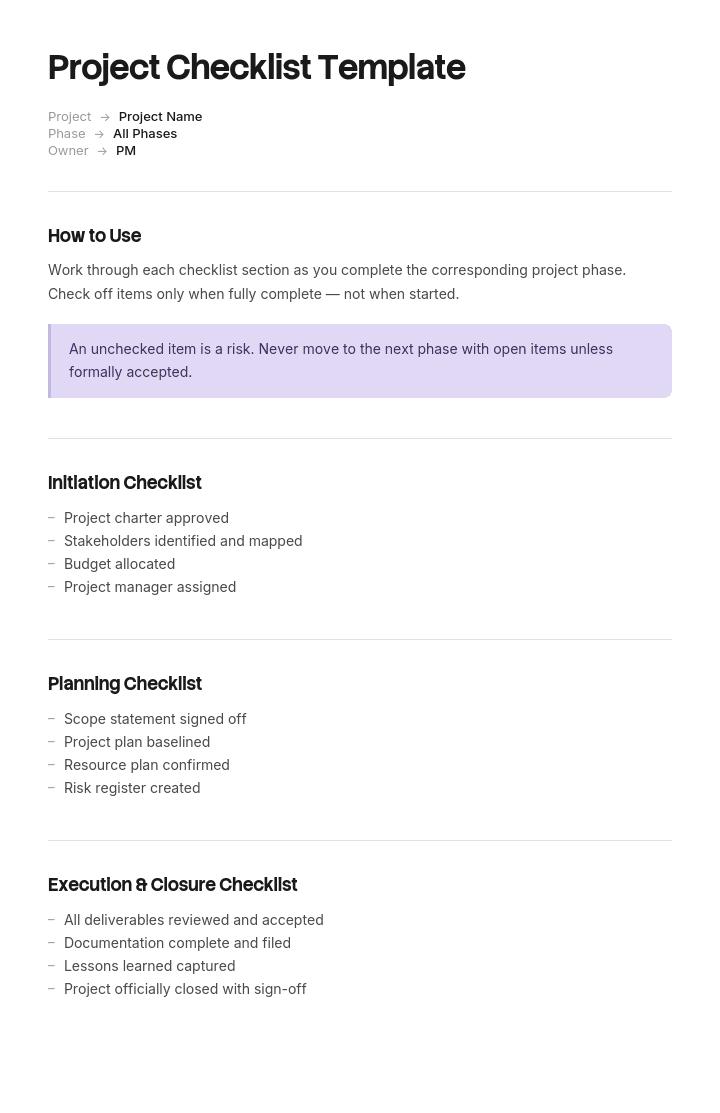
A project checklist is a list of things that must happen at defined points in a project: at kickoff, before planning is signed off, before go-live, at closure.
A template gives you the items and the grouping. Search for one and you will be offered a great many, almost all organised the same way: one checklist per phase, items grouped by the phase they belong to.
That grouping is the problem, and it is worth being precise about why. A checklist can do one of two things. It can act as a control, which means it stops something happening until items are complete. Or it can act as a record, which means it documents that things happened.
Both are legitimate and only one of them prevents anything. Most project checklists are described as the first and used as the second.
A checklist that records is not a control
Here is a test that takes an hour if your project management tool holds timestamps.
For a sample of closed projects, compare the date each checklist item was ticked against the date the phase it belongs to ended.
Items ticked before the phase ended were plausibly doing something. Items ticked afterwards were not: whatever they were supposed to prevent had already happened or already failed to happen, and the tick recorded a fact rather than changing one.
The pattern is nearly universal and it gets worse as the project goes on. Kickoff items are usually ticked on time, because the project is new, everybody is available and the enthusiasm is high. Closure items are ticked late, in batches, by one person, days or weeks after the project was declared finished.
A checklist completed in batches after the event is a form. That is not a criticism of the people completing it, who are doing the only thing available to them by that point. It is a criticism of when the items were scheduled.
How to customize this template in Trupeer
Step 1: Open the Templates Section
Go to the Templates section from the main navigation.

Step 2: Select and Open a Template
Click on any template you want to work with to open it.

Step 3: Expand the Template View
If needed, expand the template view to see the full layout and details clearly.

Step 4: Edit the Template
Click on Edit to start modifying the selected template.

Within the editor, you can:
Add new sections
Define or update formatting rules
Add a logo and adjust its position and related settings
Step 5: Save Your Customized Template
After making all necessary changes, click Save to store the updated template as your own.

Step 6: Preview and Fine-Tune the Template
When you want to see how your customized template looks, open the Preview.

From the preview screen, you can continue to make adjustments directly if needed, ensuring the template appears exactly as you want.
With a project checklist template you can:
Save hours on tracking: Skip the blank page with a structure built for project execution.
Cover every phase: Built-in sections for kickoff, execution, launch and closure.
Stay on-brand: Apply your logo, fonts and colors using Trupeer's brand kit.
Standardize across projects: Use the same template for every initiative.
Reduce dropped balls: Checklists prevent skipped steps in critical processes.
Reach global teams: Translate project checklists into 65+ languages with one click.
The last responsible moment for every checklist item
The fix is to re-sort the whole checklist against a different question.
For each item, ask: what is the last moment at which completing this could still change the outcome?
That is not the same as the phase it is conventionally reported in. It is usually earlier, sometimes much earlier, and occasionally it turns out to be later than the phase it currently sits in, which means the item is being completed on no information.
A few examples of the gap.
"Legacy system decommissioning complete" is a closure item. Its last responsible moment is at planning, when you decide who owns the decommissioning, what has to be migrated and what the cutover looks like. Left to closure, the only available action is to tick it or not.
"Lessons learned captured" is a closure item. Its last responsible moment is continuously during delivery, because the lessons are forgotten within weeks and the people who learned them have moved on.
"Benefits owner confirmed" is usually a closure item. Its last responsible moment is at initiation, because if nobody will own the benefit there is a question about whether the project should start.
"Handover recipient named" is a closure item whose last responsible moment is at planning, because the recipient should be involved in designing what they will receive.
Re-sort every item this way and the shape of the checklist changes substantially. Most of what sits at closure moves earlier. A few things stay, and they are genuinely final.
How to re-sort your checklist by actionability
Item, as usually grouped | Conventional phase | Last responsible moment | Why |
|---|---|---|---|
Benefits owner confirmed | Closure | Initiation | If nobody will own it, the project's justification is in question |
Handover recipient named | Closure | Planning | The recipient should shape what they receive |
Decommissioning plan agreed | Closure | Planning | Needs migration and cutover design, not a tick |
Documentation complete | Closure | Continuously through delivery | Written at the end means written from memory |
Lessons captured | Closure | Continuously through delivery | The detail is gone within weeks |
Final costs reconciled | Closure | Closure | Genuinely cannot happen earlier |
Resources released | Closure | Closure | Genuinely final |
Project record archived | Closure | Closure | Genuinely final |
Success criteria agreed | Planning | Initiation, in the brief | Deciding it later means it fits the plan rather than the problem |
Risk register populated | Planning | Initiation | The largest risks are visible before planning starts |
Run this on your own list rather than adopting the table. The exercise takes a morning with two or three people who have run projects, and the argument it produces about individual items is where the value is.
Two things usually fall out. A substantial share of closure items move, which is the main finding. And a handful of early items get deleted, because their last responsible moment is later and they were being completed on guesswork purely to satisfy a gate.
Why the closeout checklist is always the weakest
Closeout is scheduled at the moment of least energy and least leverage, and it carries the items with the longest tail of consequence.
By the time a project reaches closure, the team is partly dispersed. The project manager is already on the next thing. The sponsor's attention moved when delivery finished. There is no budget left and no meeting in the diary. Whatever remains is a form to be completed by one person.
Meanwhile the items sitting there are the ones that cost money quietly for years: legacy systems not switched off, licences not cancelled, handovers not accepted, benefits nobody owns, documentation nobody wrote.
There are two workable responses and only one of them is realistic.
The unrealistic one is to try harder at closure, usually by escalating or by making the checklist mandatory. This produces batch-ticking rather than completion.
The realistic one is to move the items to where they can be done. Almost everything on a closure checklist has an earlier last responsible moment. What remains at closure should be short, genuinely final, and completable by one person in an afternoon, because that is the resource that will actually be available.
Free project checklist template: the items and their moments
Copy from here. The structure is by moment rather than by phase.
Header. Project, sponsor, project manager, current phase, gate keeper.
For each item: the item, the moment it must be complete by, who is accountable, the evidence required, and whether it is a gate or a record.
At initiation. Problem stated with a number, referencing the project brief. Sponsor named and confirmed. Benefits owner named and confirmed, in writing. Success criteria agreed as measures. Top three risks identified. Budget authority confirmed. Decision to proceed recorded.
At planning. Scope boundary agreed and documented. Handover recipient named and involved. Decommissioning approach agreed where something is being replaced. Procurement lead times confirmed, per our procurement management plan template. Dependencies on other teams agreed with those teams. Documentation owner named.
Continuously during delivery. Documentation kept current rather than written at the end. Lessons captured as they occur. Handover material built as the thing is built. Changes to scope recorded with approval.
Before go-live. Cutover procedure written and rehearsed, per our method of procedure template. Rollback tested and timed. Support team trained and ready. Communications sent. Acceptance criteria met and evidenced.
At closure, and only genuinely final things. Final costs reconciled. Contracts closed. Resources released. Project record archived. Formal closure recorded. Benefits review date set with the named owner.
Gate register. Which items are gates, who can hold them, and what they hold.
Copy to here.
The PMO whose closure items were ticked after closure
Braemore Group is a financial services firm whose project office runs around forty projects a year. It had four phase checklists: initiation with twenty two items, planning with thirty one, delivery with eighteen and closure with twenty six. Ninety seven items in total, with completion reported to the board at ninety four percent.
Somebody compared the tick dates against the phase end dates for eighteen closed projects.
Initiation items were ticked a median four days before the phase ended. Planning, two days before. Delivery, one day before.
Closure items were ticked a median of eleven days after the project had been formally declared closed. On several projects, six of the twenty six closure items were ticked on the same day in a single batch by the project manager.
Three specific items were checked against reality.
Lessons learned session held. Ticked on seventeen of the eighteen projects. Actually held on six. Nobody had asked about the other eleven.
Benefits owner confirmed and handover complete. Ticked on all eighteen. When the project office contacted the named benefit owners six months later, nine of the eighteen did not know they owned a benefit.
Decommission legacy system. Ticked on four projects where the legacy system was demonstrably still running. One of them was still consuming forty one thousand pounds a year in licences two years after the project closed. Across the eighteen projects, unretired legacy costs came to about a hundred and twenty seven thousand pounds a year.
The root cause was not carelessness. It was that closure items were scheduled at closure, when the team had dispersed, the project manager was on the next project, and the only remaining action available was to complete the form.
The re-sort took a morning. Of the twenty six closure items, nineteen moved earlier: decommissioning approach agreed at planning, handover recipient named at planning, lessons captured continuously, benefits owner confirmed at initiation with a signature. Seven stayed at closure, all genuinely final. Eleven initiation items were deleted, because their last responsible moment was later and they were being answered on guesswork.
Over the following twelve months and twenty one projects, closure items were ticked a median two days before formal closure. Lessons sessions were actually held on seventeen of twenty one. Nineteen of twenty one benefit owners knew they owned a benefit at the six month check. Legacy decommissioning was completed on every project where it applied.
The checklist got shorter and started working.
Project checklist variants: kickoff, planning, delivery, closeout
The conventional set, and what each is genuinely for once you accept the argument above.
Kickoff. Confirming the project should start: sponsor, problem, benefits owner, budget authority, success measures. This is the checklist most worth having as a hard gate, because stopping a project here is cheap and stopping it later is not.
Planning. Confirming the approach is sound and the commitments are real: scope boundary, dependencies agreed with the teams they depend on, lead times, handover recipient. Most of what is conventionally at closure belongs here.
Delivery. Should be short and mostly continuous rather than a gate. Documentation current, changes approved, lessons captured.
Go-live or implementation. The genuine gate, and the one where holding the project has real value. Cutover, rollback, support readiness, acceptance.
Closeout. Short and final. Costs, contracts, resources, archive, benefits review date.
Construction and regulated variants. Where statutory sign-offs, inspections and handover documentation are prescribed, the checklist follows the obligation rather than this structure, and our operation and maintenance manual template covers the handover deliverable specifically.
How to write a project checklist people actually use
Start from what has gone wrong. Look at the last ten projects and list what was missed, late or discovered too late. Those are your items, and they will be a shorter and more specific list than any published template.
For each, establish the last responsible moment rather than the phase it feels like it belongs to.
Decide whether it is a gate or a record, and say so on the item. Mixing them without labelling is what makes people treat everything as a record.
Name who is accountable, as a role, and what evidence counts. "Handover complete" with no evidence definition gets ticked. "Handover complete, evidenced by recipient's written acceptance" does not.
Then cut. Every item that has never caught anything and never will should go, because a long checklist teaches people to tick rather than to check.
How many items should a project checklist have?
Fewer than you have. For a medium-sized project, something in the range of thirty to fifty items across the whole life of the project is workable, with the majority at initiation and planning where they can still change something.
The number matters less than the ratio of gates to records. A checklist that is entirely records will not prevent anything. A checklist that is entirely gates will stall projects and get bypassed. Somewhere around a fifth of items being genuine gates is a reasonable balance, concentrated at kickoff and go-live.
The reliable warning sign of a checklist that has grown past usefulness is batch-ticking, which is what the timestamp test finds. If items are being completed in groups on the same day, the list has stopped being read item by item.
Who holds the gate, and what they can hold
A gate only works if somebody can hold it and something is worth holding.
Name the gate keeper per gate, and make it somebody outside the project team. A project manager gating their own project has an obvious conflict, and the gates that matter are precisely the ones a project under time pressure wants to pass.
Then be specific about what is held. Progression to the next phase. Release of the next tranche of budget. Permission to go live. Assignment of the project manager to their next project, which is a genuinely effective lever for closure items and one almost nobody uses.
Where nothing can be held, the item is a record and should be labelled as one rather than described as a gate. Pretending otherwise is what teaches everybody that gates are advisory.
Can I get a project checklist template in Excel or Word?
Excel, and it is not close. A checklist needs one row per item with columns for the item, the moment it is due by, accountable role, gate or record, evidence required, date completed and the date the phase ended. That last pair is what makes the timestamp test possible, and the test is the most useful thing on this page.
Add a conditional format flagging any item completed after its phase ended, and a count of items completed in batches on the same date. Both take minutes and both tell you whether the checklist is working.
Word suits the narrative around it: what each gate means, who holds it, and what happens when one is held. That belongs with your project governance documents rather than with the list.
PDF for the completed checklist archived with the project record at closure, exported from the live sheet.
How to make handover items possible during delivery
The single largest group of items that should move earlier is documentation and handover, and there is a practical reason they do not: writing them during delivery competes with delivering, and delivering wins.
So the items sit at closure, where they are written from memory by somebody with no time, or not written at all and ticked anyway.
Trupeer AI changes the economics enough to make the move realistic. Whoever builds or configures something records it once as they go, and the output is a written guide and a video from the same pass with the steps and screens already captured. Handover material accumulates during delivery rather than being manufactured afterwards.
Record it. Brand it. Translate it. Trupeer it.
That also improves what the recipient gets. A handover assembled from recordings made at the time is accurate in a way that one written at closure never is, and it means the handover item can be evidenced rather than asserted. Where the handover is a whole role rather than a system, our knowledge transfer SOP covers running it properly, and the material lives in your knowledge base in consistent branding. Setup instructions are in the document template setup guide.
Frequently Asked Questions
Is there a free project checklist template in Excel?
Excel is the right format and the structure above builds into a sheet directly. There is no gated download and no form. The two columns worth adding to whatever you already use are the phase end date beside the completion date, and a gate or record marker, since together they tell you whether the checklist is doing anything.
Is there a free project checklist template in Word?
Word suits the governance document explaining the gates rather than the checklist itself. A checklist in Word cannot flag items completed after their phase ended, which is the analysis that matters, so most teams end up moving it to a spreadsheet within a quarter.
Is there a free project checklist template in PDF?
Export the completed checklist at closure as part of the project record. Keep the working version editable, because items move between phases as you learn where their last responsible moment actually is.
Is there a project kickoff checklist template?
Kickoff is the checklist most worth having as a hard gate: sponsor confirmed, problem stated with a number, benefits owner named in writing, budget authority confirmed, success measures agreed. Six to ten items. Stopping a project at kickoff is cheap, which is why this is the gate with the best return.
Is there a project closeout checklist template?
Yes, and the argument of this page is that it should be much shorter than most. Final costs reconciled, contracts closed, resources released, project record archived, formal closure recorded, benefits review date set. Everything else conventionally listed at closure has an earlier last responsible moment and belongs there instead.
Who should own the project checklist?
The project office or whoever owns project governance owns the list. Individual gates need a keeper outside the project team, because the gates that matter are the ones a project under pressure wants to pass. A project manager gating their own project is a gate in name only.
How often should the checklist be reviewed?
Review the list itself annually against what went wrong on recent projects, deleting items that have never caught anything and adding items for failures that recurred. Run the timestamp test yearly too, since batch-ticking creeps back and it is the earliest sign the list has stopped being read.
What is the difference between a project checklist and a project plan?
A plan describes the work: scope, schedule, resources and dependencies, which our IT project plan template covers. A checklist describes the conditions that must be satisfied at defined points regardless of what the work is. The plan is specific to one project and the checklist is standard across all of them, which is why the checklist is worth investing in once.

