4.8/5
ハウツーガイドジェネレーター
画面録画を瞬時にプロ仕様のハウツーガイドに変換
今すぐガイドを作成

Trupeerの「ハウツーガイド生成ツール」は、画面録画を包括的でプロフェッショナルな手順ガイドへ自動変換することで、説明コンテンツの作成方法を革新します。手作業での執筆や書式設定に何時間もかかる従来のドキュメント作成手法とは異なり、当社のAI搭載プラットフォームは、録画したワークフローを、スクリーンショット、ステップごとの手順、カスタマイズ可能な書式を備えた洗練された文章ガイドへと変換します。ハウツーガイド作成における根本的な課題は、常にその時間のかかる性質にあります。スクリーンショットを撮影し、詳細な説明を書き、内容を整え、すべてのドキュメントで一貫性を保つ必要があります。
Trupeerが他のドキュメント作成ツールと一線を画すのは、二重出力のアプローチです。画面を録画するか既存の録画をアップロードすると、当社のAIは文章ドキュメントを作成するだけでなく、プロフェッショナルに編集された動画チュートリアルも生成します。つまり、1回の録画セッションから、視覚的な学習素材と文章による学習素材の両方を得られます。高度なAIは画面キャプチャを処理し、つなぎ言葉を削除し、見やすさのためにズーム効果を追加し、実演したワークフローを反映した包括的な文章手順を生成します。ハウツーガイド生成ツールを支える技術は、コンピュータビジョン、自然言語処理、自動動画編集を組み合わせています。AIは録画の各フレームを解析し、主要な操作やインターフェース要素を識別し、それらを明確で実行しやすい文章手順へと変換します。
ハウツーガイド生成ツールはどのように動作するのか?
プロセスはワークフローのキャプチャから始まります。方法は2つあり、Trupeerの組み込み画面録画ツールで直接録画するか、既存の画面録画をアップロードします。当社のAI搭載キャプチャシステムはMacとPCの両方でシームレスに動作し、OSに関係なく高品質な録画を保証します。ライブ録画時には、システムは画面上の操作だけでなく、各アクションの文脈も解析します。
ステップ1:ワークフローを録画またはアップロードする
まず、Trupeerのインターフェースから画面を直接録画するか、既存の未編集録画をアップロードします。当社のシステムはさまざまな動画形式をサポートし、処理用に入力を自動最適化します。ライブ録画の場合は、キャプチャ範囲を選択し、録画をクリックして、自然な流れで手順を実演するだけです。AIは高い動画品質を保ちながら、すべての操作、クリック、ナビゲーションのステップを取得します。

ステップ2:AI処理と強化
録画が完了するかアップロードされると、TrupeerのAIは直ちにコンテンツの処理を開始します。システムは背景ノイズを除去し、ナレーションがある場合はつなぎ言葉を取り除き、重要なインターフェース要素を強調するためにインテリジェントなズーム効果を追加します。同時に、AIは視覚コンテンツを解析して操作の順序を理解し、それに対応する文章ドキュメントの生成を開始します。

ステップ3:自動ドキュメント生成
AIは、録画された操作を解釈することで、包括的な文章手順を作成します。ソフトウェアのインターフェースを識別し、使用している特定のツールや機能を認識し、実演したプロセスを反映したステップバイステップの手順を生成します。システムは、各アクションについて自然言語による説明を作成し、必要に応じて文脈の説明や役立つヒントも含めます。

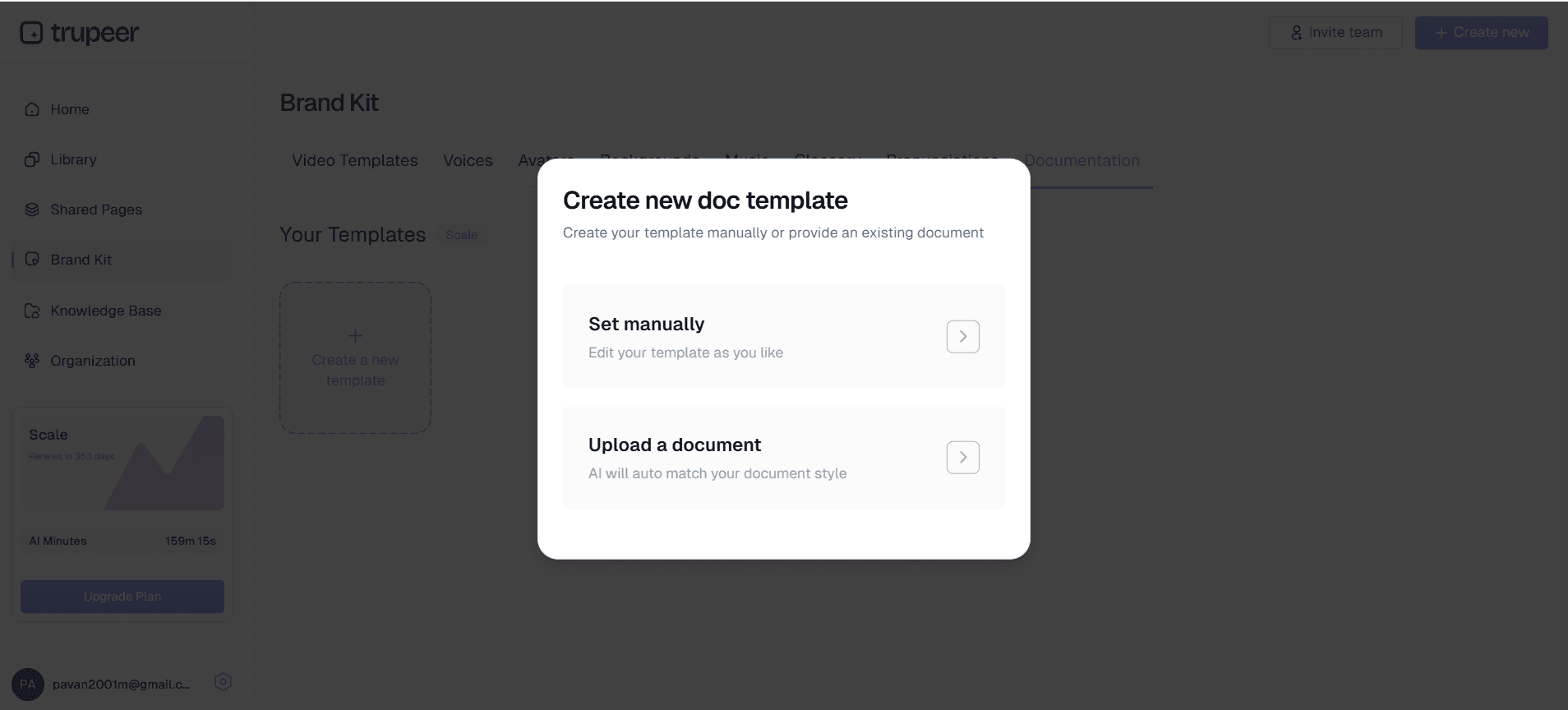
ステップ4:テンプレート適用と書式設定
生成されたドキュメントは、選択したテンプレートを使って自動的に書式設定されます。Trupeerのドキュメントテンプレートは、一貫したスタイル、適切な見出し階層、プロフェッショナルな見た目を保証します。これらのテンプレートは、ブランドガイドライン、好みの書式スタイル、組織の標準に合わせてカスタマイズでき、保存して今後すべてのドキュメントで再利用できます。
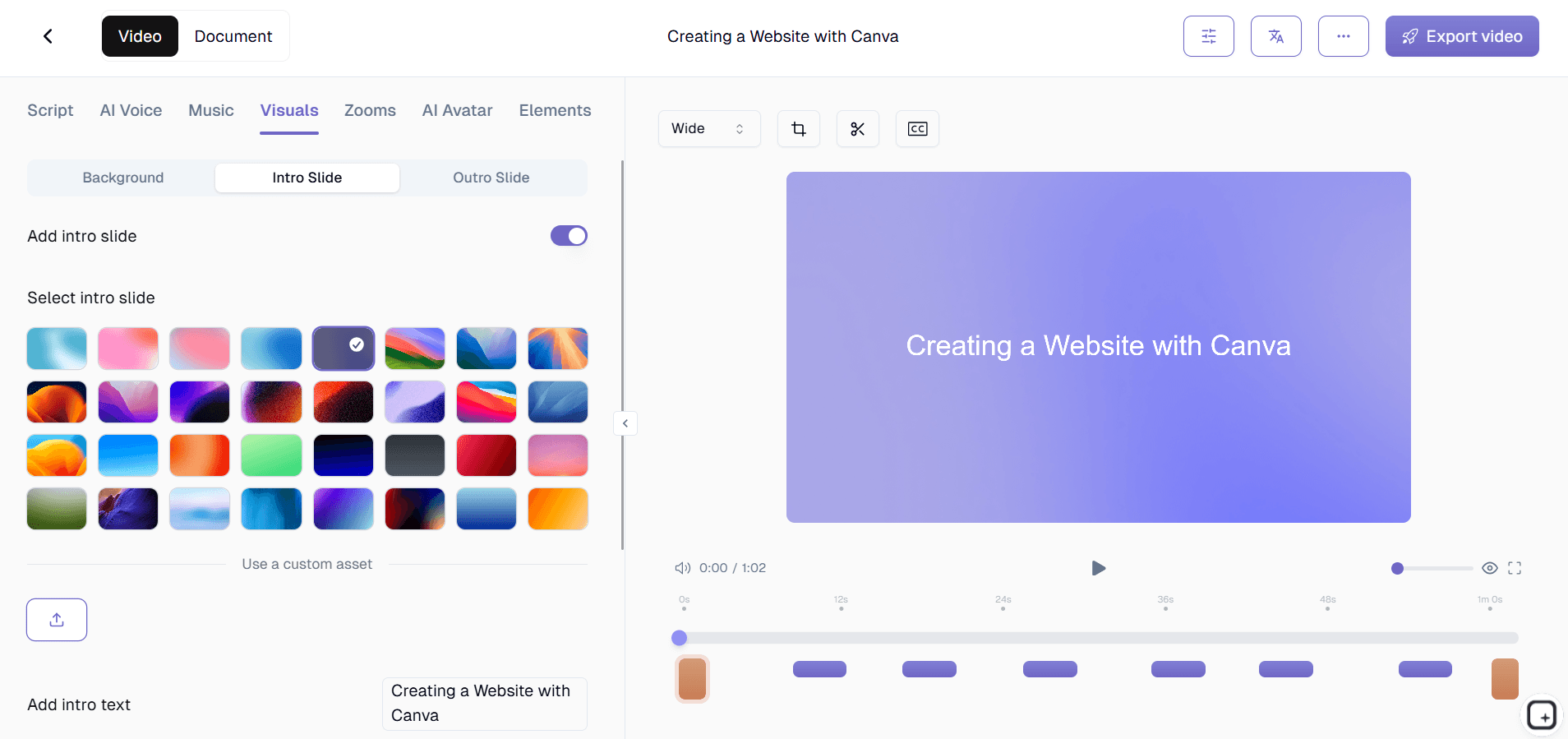
ステップ5:ブランディングと仕上げ
最終ステップでは、ブランドキットを動画と文章ドキュメントの両方に適用します。これには、会社のカラー、ロゴ、動画用のカスタムイントロとアウトロの追加、そして生成されるすべてのコンテンツでの視覚的一貫性の確保が含まれます。その結果、すぐに共有できる、またはナレッジベースに統合できるプロフェッショナルでブランド化されたドキュメントが完成します。
主な機能と能力
AI搭載のコンテンツ認識は、当社のハウツーガイド生成ツールを単なる画面録画ツールから際立たせます。システムは、画面で何が起きているかを記録するだけでなく、操作の文脈も理解します。ボタンをクリックしたり、メニューを移動したり、フォームに入力したりすると、AIはこれらの操作を認識し、適切な文章説明を作成します。このインテリジェントな解析は、さまざまなソフトウェアプラットフォームやアプリケーションに対応しており、あらゆるワークフロードキュメントのニーズに十分対応できる柔軟性を持っています。この技術は当社の動画翻訳機能とシームレスに統合され、1回の録画から多言語ドキュメントを作成できます。
カスタマイズ可能なドキュメントテンプレートは、組織全体で一貫性がありプロフェッショナルに見えるガイドの基盤を提供します。これらのテンプレートは見た目のスタイルだけではなく、標準的な見出し階層、手順やプロセスの一貫した書式、よく使うドキュメント要素のプレースホルダーセクションなどの構造要素も含みます。AI Screen Recorderのプロセス、技術手順、トレーニング資料など、さまざまな種類のガイド用に複数のテンプレートを作成できます。一度保存すれば、これらのテンプレートはすべてのガイドが組織の基準に自動的に従うことを保証します。
二重出力生成により、すべての録画セッションから洗練された動画コンテンツと包括的な文章ドキュメントの両方が生成されます。このアプローチは、時間投資の価値を最大化し、異なる学習の好みや用途に対応する複数のコンテンツ形式を提供します。動画出力にはノイズ除去やズーム効果などのAI強化がすべて含まれ、文章ガイドは検索可能でアクセスしやすく、簡単に更新・参照できます。両方の出力は、ブランドキット機能によってブランディングとメッセージの一貫性を保ちます。
マルチプラットフォーム統合機能により、生成したガイドを必要な場所で活用できます。社内ナレッジベース、顧客向けヘルプセンター、トレーニング資料のいずれを構築する場合でも、ドキュメントは一般的なプラットフォームと互換性のある形式で出力されます。システムは、既存のドキュメントシステム、学習管理プラットフォーム、コンテンツ管理システムにシームレスに統合できる、きれいなHTML、Markdown、または整形済みテキストを生成します。
高度な編集・強化機能により、技術的な専門知識がなくても最終出力を調整できます。自動生成されたテキストの調整、手順の順序変更、追加の文脈や注意事項の追加、視覚的な表示のカスタマイズが可能です。AIの提案は、元のデモの自然な流れを維持しながら、明瞭さと完全性の向上に役立ちます。これらの編集機能は、完全なコンテンツ作成のコントロールを実現する当社の包括的なツールスイートと連携して動作します。
なぜハウツーガイド生成ツールを使うべきなのか?
劇的な時間: 節約は、Trupeerのハウツーガイド生成ツールを使う最も即効性のあるメリットです。
従来のドキュメント作成: は、計画、執筆、書式設定、スクリーンショットの取得、レビューの反復を考慮すると、1ガイドあたり3〜5時間かかることがあります。
当社の: システムでは、同等品質のドキュメントが1回の画面録画から数分で生成されます。
この効率向上により、チームは最新のドキュメントを維持し、包括的なトレーニングマニュアル生成ツールやガイドを作成し、リソースを圧迫することなくプロセス変更に迅速に対応できます。
すべての: ドキュメントにおける一貫性は、標準化されたテンプレートとAI搭載の生成を使うことで自動化されます。
人が作成するドキュメント: は、著者の執筆スキルや利用可能な時間によって、スタイル、深さ、品質がしばしば異なります。
ハウツーガイド生成ツールは誰が使えるのか?
コンテンツ制作者とテクニカルライターは、当社の生成ツールがもたらす効率向上と一貫性の改善から大きな恩恵を受けます。個別のガイドを一から作成するのに何時間も費やす代わりに、より高次のコンテンツ戦略と品質保証に集中できます。システムは、ドキュメント作成の時間のかかる部分を処理しながら、これらの専門家が求めるプロフェッショナル基準を維持します。コンテンツチームは、より包括的なAI Video Editorや文章資料を作成でき、コンテンツ全体のアウトプットと影響力を高められます。
マーケティングチームは、二重出力機能を活用して、魅力的な製品デモと詳細な機能説明を同時に作成します。新機能や新製品のローンチ時には、マーケティング担当者は包括的な製品ウォークスルーを録画し、すぐにSNS用の動画コンテンツとWebサイト統合用の詳細な文章ガイドの両方を得られます。この効率は、複数のコンテンツ形式で一貫したメッセージが重要となるAI Screen Recorderキャンペーンで特に価値があります。
教育者や研修担当者は、包括的な学習素材を作成する際に、自動生成プロセスが非常に役立つと感じます。社内研修プログラム、オンラインコース、教育リソースのいずれを作成する場合でも、教育者はコンテンツの書式設定ではなく、教育設計に集中できます。視覚的・文章的な学習素材を両方作成できるシステムは、すべての教材で指導の一貫性を保ちながら、さまざまな学習スタイルを支援します。
プロダクトチームは、この生成ツールを使って、実際に製品開発に追随する技術ドキュメントを作成・維持します。機能が変わり新しい機能が追加されるたびに、プロダクトマネージャーは新しいワークフローを録画することでドキュメントを迅速に更新できます。このアプローチにより、ユーザーガイド、社内手順、技術ドキュメントが古くならず、ユーザーを苛立たせる陳腐な参照資料ではなく、正確で役立つ状態を保てます。
営業担当者は、このシステムを利用して、見込み客向けにパーソナライズされた製品デモや詳細な機能説明を作成します。動画プレゼンテーションと文章によるフォローアップ資料の両方を素早く生成できるため、営業プロセスが効率化され、見込み客には好みの形式で包括的な情報を提供できます。このアプローチは、初回デモから詳細な評価、導入計画まで、営業サイクル全体を支援します。
中小企業のオーナーや起業家は、ドキュメント作成に多大な時間を割かずにプロフェッショナルな成果を得られる点を高く評価します。顧客向けオンボーディング資料、社内手順、製品チュートリアルなどを作成する場合でも、中小企業のオーナーは大企業のドキュメント基準に匹敵する高品質なコンテンツを作成できます。テンプレートシステムにより、複数のチームメンバーがドキュメント作成に参加しても一貫性が保たれます。
ハウツーガイド生成ツールを使うためのベストプラクティス
録画セッションの前に、主要な手順を整理し、画面がきれいで整っていることを確認してください。不要なアプリケーションを閉じ、デスクトップ上の気が散る要素を片付け、実演に必要なファイルやデータを準備します。こうした準備により、より焦点の定まったドキュメントを生成できる、よりきれいな録画が得られます。カバーする主要なステップの簡単なアウトラインを作成することも検討してください。これは論理的な流れを保ち、録画中に重要な詳細を見落とさない助けになります。
画面録画にナレーションを含める場合は、明瞭で自然に話してください。AIは視覚情報と音声情報の両方を処理して、より包括的なドキュメントを作成します。自然な話し方と明確な説明は、文脈に適した文章手順をAIが生成するのを助けます。無音の録画を好む場合でも、複雑な手順や、視覚的な操作だけでは分かりにくい重要事項については、簡単な口頭説明を追加することを検討してください。
テンプレートのカスタマイズ機能を活用して、組織全体で一貫したドキュメント基準を確立してください。最初に、ブランドガイドライン、好みの書式スタイル、標準的な情報設計を反映したテンプレートの設定に時間をかけます。これらのテンプレートを設定して保存すれば、今後のすべてのドキュメントが、誰が作成してもプロフェッショナルな一貫性を保てます。追加のテンプレート最適化戦略についてはガイドセクションを参照してください。
編集機能を活用して、AI生成コンテンツを洗練・強化してください。自動生成は優れた土台を提供しますが、状況に応じた情報、起こりうる問題への警告、関連リソースへのリンクを追加することで、最終的なドキュメント品質が向上します。目標はAIの作業を置き換えることではなく、あなたの特定の知識と経験に基づく独自の価値を加える追加に注力して、内容を強化することです。
複数形式の出力を活用し、ガイドの動画版と文章版をどのように使うかを計画してください。初期トレーニングや複雑な手順には動画版を使い、素早い参照やトラブルシューティングには文章ドキュメントを使うことを検討します。この戦略的なアプローチにより、各録画セッションの価値を最大化し、さまざまな用途やユーザーの好みに対応する包括的なリソースを提供できます。
関連ツールを探す
Trupeer のハウツーガイドジェネレーターを選ぶ理由
即時ドキュメント作成
AI搭載のコンテンツ生成で、画面録画をプロフェッショナルな文書ガイドへ自動変換します。
動画とテキストを同時に出力
1回の録画セッションから、洗練されたチュートリアル動画と包括的な書面ドキュメントの両方を入手できます。
カスタマイズ可能なプロフェッショナルテンプレート
すべてのドキュメントで一貫した書式とプロフェッショナルな見栄えを実現するために、ブランドテンプレートを使用してください。
数分でプロフェッショナルなハウツーガイドを作成
ステップ 1
画面ワークフローを記録する
ステップ 2
AI は文書化されたドキュメントを生成します
ステップ 3
テンプレートを適用して共有する
よくある質問
ハウツーガイド生成ツールは、通常の画面録画と何が違うのですか?
ハウツーガイド生成ツールは、動画ファイルだけでなく、録画内容から包括的な文書を自動的に作成します。AI を使用して、あなたの操作を分析し、動画コンテンツとともに手順ごとの書面による指示を生成します。
既存の録画をアップロードしてドキュメントを生成できますか?
はい、既存の画面録画をアップロードできます。すると、当社のAIがそれらを処理して、プロフェッショナルなドキュメントを作成します。自動ガイド生成の恩恵を受けるために、当社のプラットフォームで新しく録画する必要はありません。
AI生成のドキュメントはどのくらい正確ですか?
AI は、視覚的な操作、インターフェース要素、および音声ナレーションを分析することで高い精度を実現します。生成されたコンテンツを確認して編集し、特定の要件を満たし、必要な追加のコンテキストが含まれていることを確認できます。
生成をどのように導くかに最も適したプロセスの種類は何ですか?
ソフトウェアのチュートリアル、ワークフローのデモンストレーション、トレーニング手順、その他の画面ベースのプロセスは非常に適しています。プロセスがより構造化され、順序立っているほど、AIはより明確で整理されたドキュメントを生成できます。
生成されたガイドの形式やブランドをカスタマイズできますか?
もちろんです。お好みの書式、スタイル、色、ブランド要素を使って、カスタムテンプレートを作成できます。これらのテンプレートは保存して、すべてのドキュメントで再利用できるため、一貫したプロフェッショナルな प्रस्त示を実現できます。


