4.8/5
Free Procedural Text Generator
Automatically create step-by-step guides, workflows, and instructions from videos. Trupeer’s AI adds visuals and voiceovers for clear, accurate procedures.
Get started for free

Trupeer's Procedural Text Generator transforms video content into structured, actionable procedural instructions with screenshots, step descriptions, and voiceovers automatically. This AI tool creates professional training manuals, troubleshooting guides, and how-to documents from recordings without manual transcription or formatting.
The realistic use case worth grounding the page in. A technical writer at a manufacturing company has a 45-minute training video showing the assembly procedure for a new product line. Old workflow: open the video in a separate window, watch it once for context, watch it again with the document open, transcribe each step, screenshot the right frames in a screen capture tool, paste them into a Word document, format the procedural text into a structured manual, send for review. So 6-8 hours per training video. Multiply by 12 SKUs and the documentation always lags 2-3 sprints behind the actual product launches. The Trupeer flow flips this: upload the video, the AI extracts the sequential steps with timestamps, generates annotated screenshots at each step, structures the procedural document with table of contents and sections, exports the finished document. The 6-8 hours of writer time collapses into roughly 30 minutes of review-and-edit before publishing.
Why Procedural Text Generator is required?
Creating procedural documentation demands hours of video review, manual transcription, screenshot capture, and formatting across multiple tools. Technical writers waste time rewriting steps while missing key actions from source videos. Inconsistent instruction formats confuse learners and increase support demands. Training teams struggle with outdated manuals that don't reflect current processes. Non-native speakers find dense procedural text overwhelming without visual aids. Updating guides requires complete recreation when workflows change, stalling compliance and onboarding efforts.
The specific moment this matters. Wednesday morning, the operations team realizes the safety procedure documentation hasn't been updated since the equipment got replaced last quarter. Audit is in 6 weeks. Old documentation references buttons that don't exist anymore. Writer team has 14 other procedures in the backlog. Manually rewriting all of them from the new training videos would take a month of dedicated writing time the team doesn't have. So either the audit finds inconsistencies, or somebody works weekends through August, or the procedures get rushed and quality suffers. Tools that automate the extraction-and-structuring step take this trade-off off the table. The procedural document gets generated from the training video, the writer reviews and polishes rather than starts from scratch, and the 14-procedure backlog clears in a week instead of a month.
What this Procedural Text Generator does
Trupeer's generator analyzes videos using computer vision and NLP to identify key steps, capture precise screenshots, generate clear descriptions, and structure complete procedural documents. AI adds safety warnings, troubleshooting sections, and interactive elements while maintaining consistent formatting across all outputs.
Worth being clear about scope. The AI works on the video you upload. So procedural documents reflect what the video actually showed, not what the AI guessed should be in the procedure. This matters for compliance-grade work where the procedural text needs to match the demonstrated procedure exactly. Worth being honest about what doesn't get auto-generated: domain-specific compliance language, regulatory citations, safety standards specific to industry frameworks (ISO 9001, FDA 21 CFR Part 11, OSHA standards). Those need human review by someone who knows the regulatory framework. The AI handles the "what happens in the video and how do I structure it as procedural steps" question. The compliance review handles the "does this meet our specific regulatory requirements" question. Both layers exist in a working procedural documentation workflow.
Core Capabilities
Extract sequential steps from videos with timestamp accuracy
Generate annotated screenshots highlighting critical actions
Create structured manuals with table of contents and sections
Add voiceovers and interactive elements automatically
How Trupeer’s Procedural Text Generator works
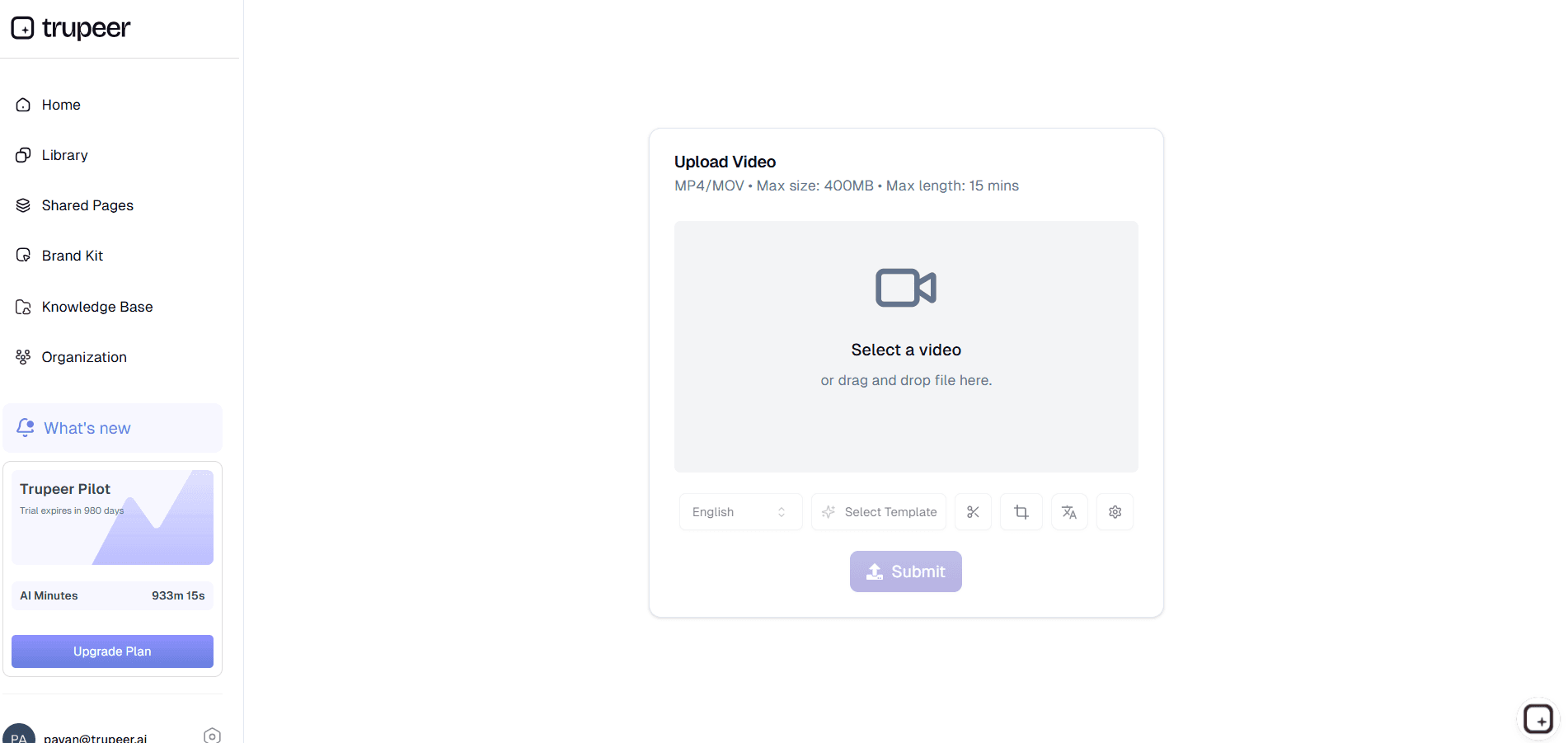
Step 1: Upload Your Video
Share training session, demo, or process recording for analysis.
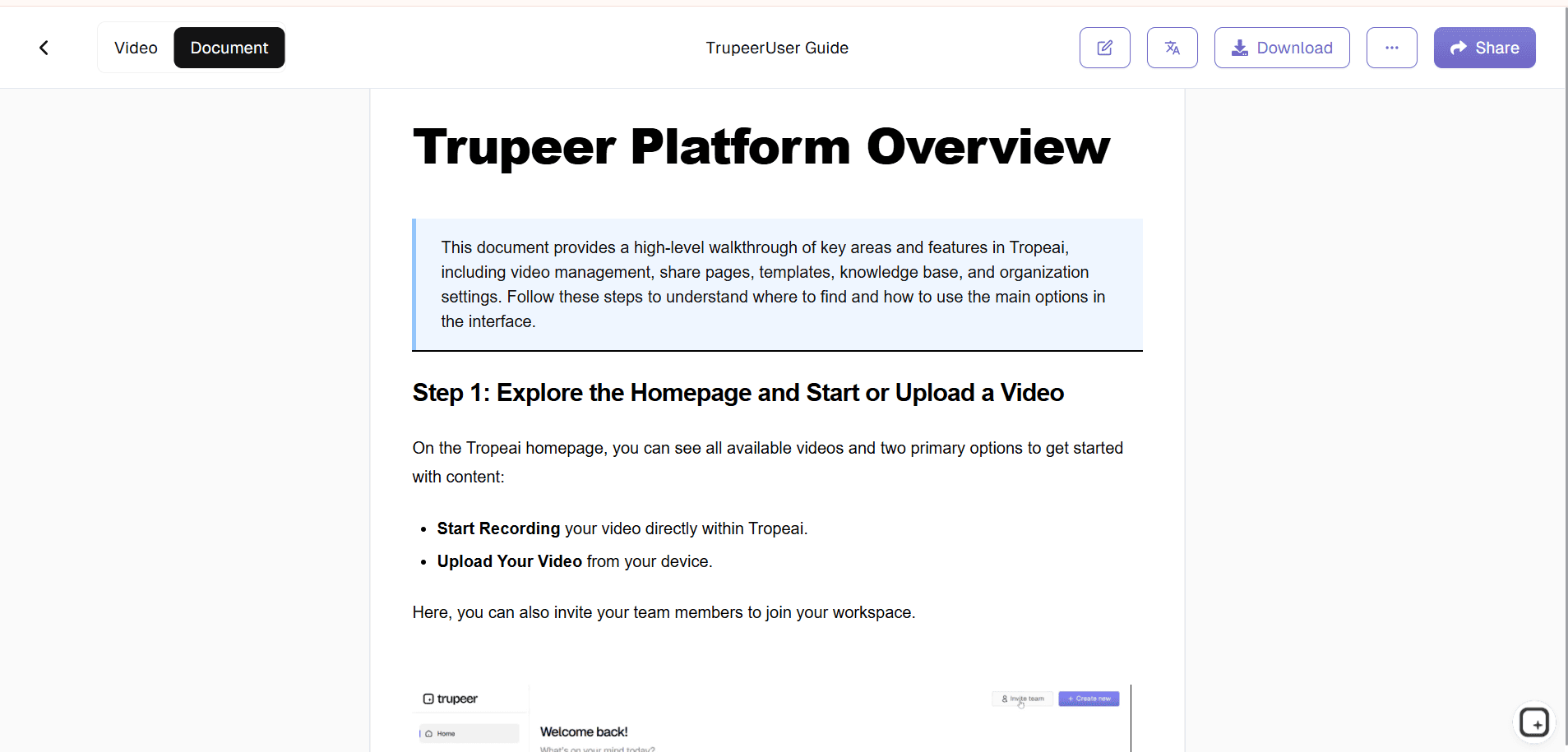
Step 2: AI Generates Content
Tool extracts steps, screenshots, and builds procedural document.
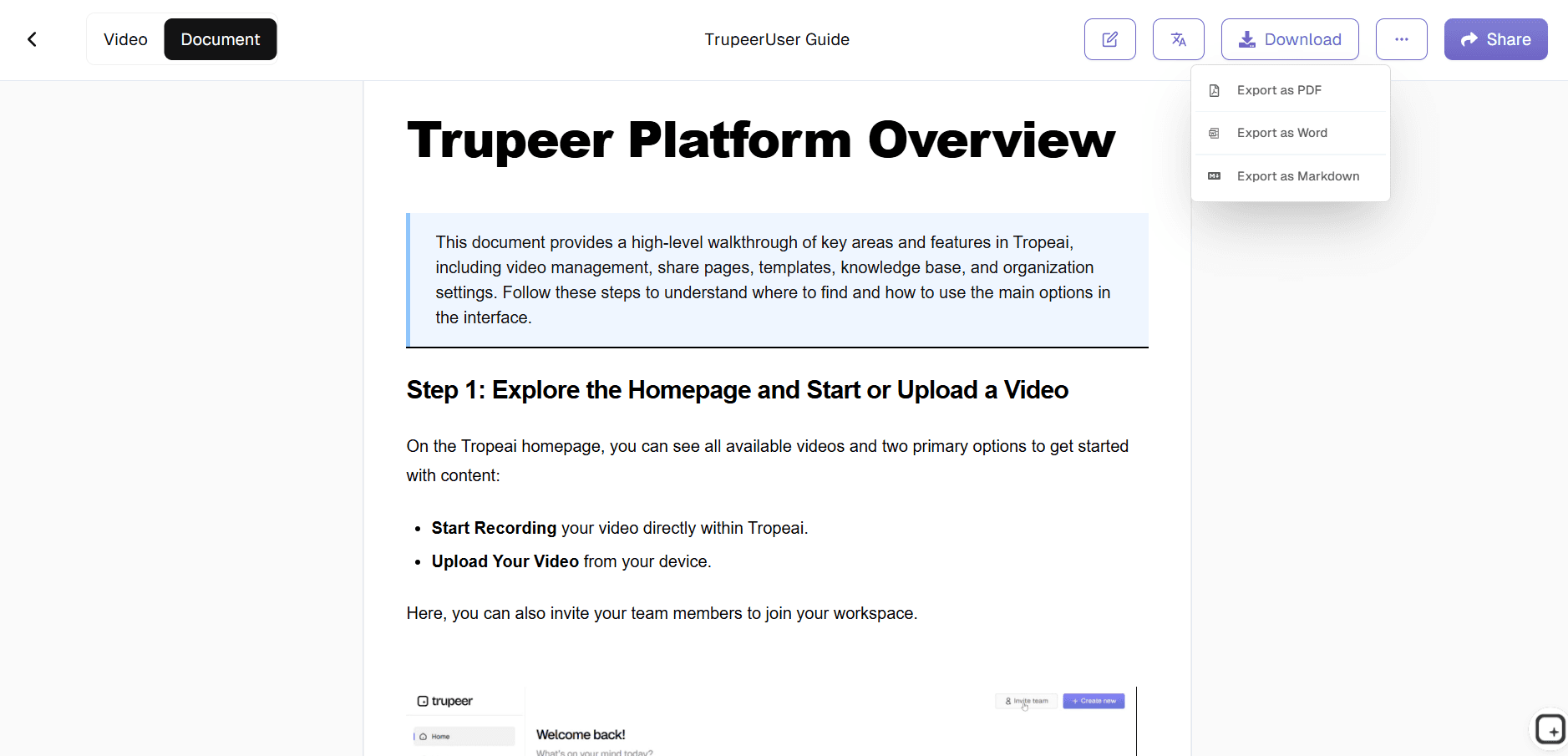
Step 3: Customize & Export
Edit details then publish your complete instructional guide.
Who this Trupeer’s Procedural Text Generator is for
Essential for teams converting visual processes into accessible written instructions efficiently.
Technical Trainers:
Transform recorded sessions into reference manuals employees actually use, complete with screenshots and step-by-step breakdowns that reduce training time by 60%Software Documentation Teams:
Generate user guides from demo videos automatically, ensuring every UI interaction gets captured with precise annotations and troubleshooting sectionsCustomer Support Managers:
Create self-service troubleshooting guides from support call recordings, cutting ticket volume through clear visual instructions customers can follow independentlyProduct Instruction Writers:
Build multilingual product manuals from demonstration footage, enabling global distribution with localized text while maintaining visual consistencyCompliance Officers:
Document safety procedures and regulatory workflows from training videos, creating audit-ready materials with warnings and verification steps built-in
Key Features of Trupeer’s Procedural Text Generator
Professional instructional content from raw video without writing, design, or transcription work.
AI-Powered Step Extraction:
Uses computer vision to identify and sequence every critical action from video with 98% accuracy, capturing timestamps, UI elements, and decision points automatically for complete process coverage. What "every critical action" means in practice. The AI watches for click events, screen transitions, timer-based pauses where something gets read aloud, and verbal cues like "next" or "then" in the narration. Each gets captured as a discrete step in the procedural document. Timestamps preserve the original video reference for anyone who wants to verify a step against the source recording. Worth being honest about scope: highly dense procedural workflows with multiple parallel actions (mixing two ingredients while monitoring a third gauge) sometimes need human reorganization to read cleanly as sequential text. For most single-track procedural workflows, the auto-extracted sequence is usable as-is.Smart Visual Integration:
Generates perfectly timed screenshots with intelligent cropping, annotations, and highlight overlays that focus learner attention on key interactions without manual image editing. The screenshot work is where most manual procedural writing dies. Old way: watch the video, pause at the right moment, screenshot, crop, annotate, paste into the document. Repeat 30 times for a typical procedural document. New way: the AI handles the timing, crops to the relevant UI region, and applies highlight overlays to the specific element each step references. Cursor highlights at click moments. Arrow callouts on the right button. So 30 manual screenshot operations turn into zero. The writer reviews what was captured, swaps out any that need adjustment, and ships.Customizable Procedural Templates:
Creates multiple document types training manuals, troubleshooting guides, installation instructions with auto-generated table of contents, safety warnings, and FAQ sections tailored to industry standards. The realistic scope. The AI applies the structural template (table of contents, section headers, step formatting, callout boxes for warnings) based on which template gets selected for the document type. The "safety warnings tailored to industry standards" claim is worth being specific about: the AI doesn't auto-generate regulatory-specific warnings (OSHA, FDA, ISO). It generates the structural slot for warnings, which a human can populate with the right regulatory text. If the team needs auto-populated industry-specific compliance language, that probably requires a specialized compliance tool, not a generic procedural text generator. Trupeer covers the structural and visual side; humans handle the regulatory specificity.Interactive & Voice-Enabled Output:
Adds embedded audio narration synced to each step plus clickable elements for digital guides, enabling hands-free learning and accessibility compliance across web, PDF, and LMS platforms. Worth being clear about which elements are interactive in which output formats. In the Shared Page (Trupeer's branded URL hosting both video and written document), the video player has timestamps that link to specific sections. The written document has clickable chapter navigation. In the exported MP4 file, the video plays linearly; there's no clickable interactivity baked into the MP4 itself. In the PDF/DOCX written document, links work where they're set up, but the document is otherwise standard. So "clickable elements for digital guides" works in the Shared Page context but doesn't fully apply to standalone MP4 or PDF files. Worth setting expectations on this with prospects who land here expecting Mindstamp-style interactive video overlays.Multi-Language & Version Control:
Automatically translates procedural text into 30+ languages while preserving visual accuracy, with one-click regeneration when source videos update to maintain current documentation. The mechanics in practice. Generate the procedural document in the source language first. Then translate to any of the 65+ supported languages from one button. Translation applies to the written text, the screenshot annotations, and the voiceover if the document includes one. The "one-click regeneration when source videos update" claim is real: when the source video gets re-recorded (UI changed, procedure updated), the procedural document regenerates from the new video automatically. So procedural documents stay in sync with the current procedure rather than drifting out of date over quarters.
When this tool fits, and when it doesn't
Worth being honest about scope. Trupeer's procedural text generator fits when the work involves: recording a workflow and producing a structured procedural document from that recording. Most of the common use cases land here naturally: software training documentation, employee onboarding procedures, customer support troubleshooting guides, equipment operation manuals, IT runbooks, standard operating procedures for ops teams. The video-in, procedural-document-out flow handles all of these from the same tool.
The tool isn't built for: generating procedural documents from text input alone (no video to extract from), creating procedural workflows for highly regulated environments where every term has legal meaning (the AI handles structure, not legal precision), or building interactive simulations where the trainee performs actions and the system responds. Course authoring tools (Articulate Storyline, iSpring) handle the simulation-and-assessment side. Regulatory documentation platforms (compliance-specific tools that ship with FDA, ISO, or industry-specific templates) handle the legal-precision side. Trupeer's procedural text generator covers the much larger middle ground where the documentation just needs to accurately reflect what was demonstrated in a training video.
Explore Related Tools
Benefits of Using Procedural Text Generator
AI-Powered Step Extraction
Trupeer intelligently identifies and organizes important steps from video content, saving time and reducing errors.
Customizable & Interactive Content
Add, remove, or adjust steps, visuals, and voiceovers to create procedural guides tailored to your audience’s preferences.
Free & Accessible for Everyone
Get started instantly without cost. Trupeer’s Free Procedural Text Generator helps creators, educators, and businesses streamline their instructional content.
Generate Procedural Texts with Trupeer
Step 1
Upload Your Video
Step 2
Generate & Edit with Trupeer
Step 3
Download or Share
Frequently Asked Questions
Is this Procedural Text Generator free?
Yes, core procedural document generation available at no cost.
What inputs does Procedural Text Generator support?
Training videos, demos, screen recordings for step extraction.
What formats can Procedural Text Generator export?
PDF, HTML5, DOCX, interactive web guides with voiceovers.
How accurate is Procedural Text Generator step detection?
98% accuracy using computer vision and NLP analysis.
Can I customize Procedural Text Generator outputs?
Yes, edit steps, visuals, voiceovers, and document styling.
More Tools


