4.8/5
Free Steps Recorder Software
Professional Process Documentation Made Simple
Start Recording Free

Trupeer's steps recorder software revolutionizes how businesses create process documentation and training materials. Unlike traditional screen recording tools that simply capture your screen, our AI-powered platform transforms your raw recordings into polished, professional documentation that actually gets used by your team. The biggest challenge with process documentation isn't capturing the steps - it's creating materials that are clear, consistent, and accessible to your entire organization. Most teams struggle with outdated screenshots, lengthy written procedures that nobody reads, or low-quality screen recordings that confuse more than they help. Trupeer's screen recorder solves this by automatically generating both video and written documentation from a single recording session.
What sets Trupeer apart from other steps recorder software is our intelligent AI processing. When you record your screen or upload an existing recording, our system doesn't just save the file - it analyzes every action, removes background noise and filler words, adds smart zoom effects to highlight important areas, and generates comprehensive written guides that match your recording perfectly. This dual output approach means you can satisfy different learning preferences within your team while maintaining consistency across all your documentation.
How Does Steps Recorder Software Work?
The beauty of Trupeer's steps recorder software lies in its simplicity and intelligent automation. You don't need technical expertise or expensive equipment to create professional-quality documentation that actually helps your team succeed.
Step 1: Capture Your Process
Start by either recording your screen directly through our AI screen recorder or uploading an existing recording you've already made. Our platform supports various file formats, so you're not locked into using only our recording tool. Simply walk through your process naturally, explaining each step as you would to a colleague sitting beside you.

Step 2: AI Enhancement and Processing
Once your recording is complete, Trupeer's AI immediately begins processing your content. The system automatically removes background noise, eliminates "um" and "uh" filler words, and adds intelligent zoom effects that draw attention to the areas where you're clicking or typing. This happens without any input from you - the AI recognizes the important moments and enhances them accordingly.

Step 3: Automatic Documentation Generation
While the AI polishes your video, it simultaneously analyzes your actions and narration to create comprehensive written documentation. This isn't just a transcript - it's a structured, step-by-step guide that captures the logical flow of your process and presents it in a format that's easy to follow and reference later.

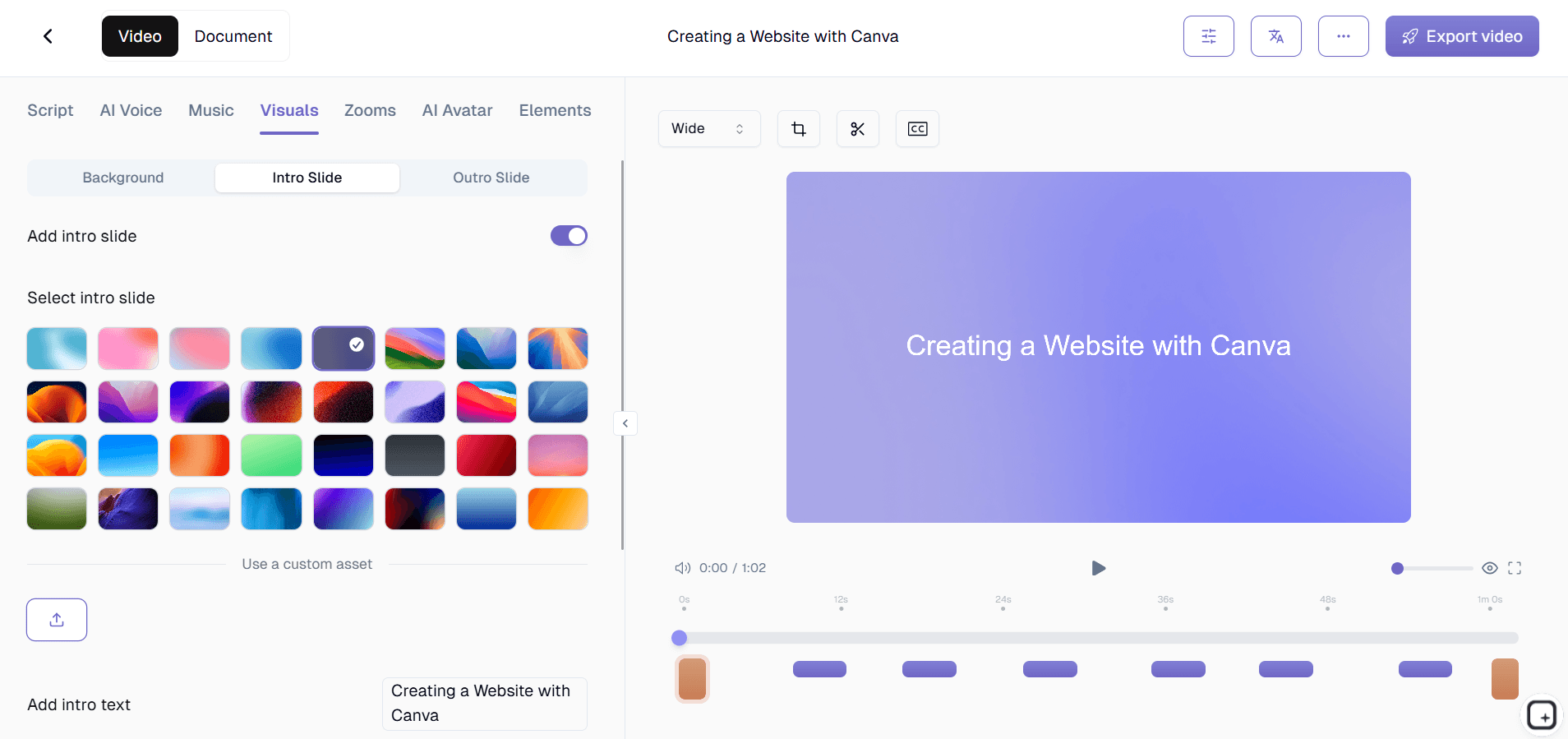
Step 4: Customization and Branding
Apply your organization's brand kit to ensure consistent visual identity across all your documentation. Add your logo, company colors, and standard intro/outro sequences. You can also customize the documentation format using our template system, ensuring all your guides follow the same structure and styling conventions.
Step 5: Multi-Format Export and Sharing
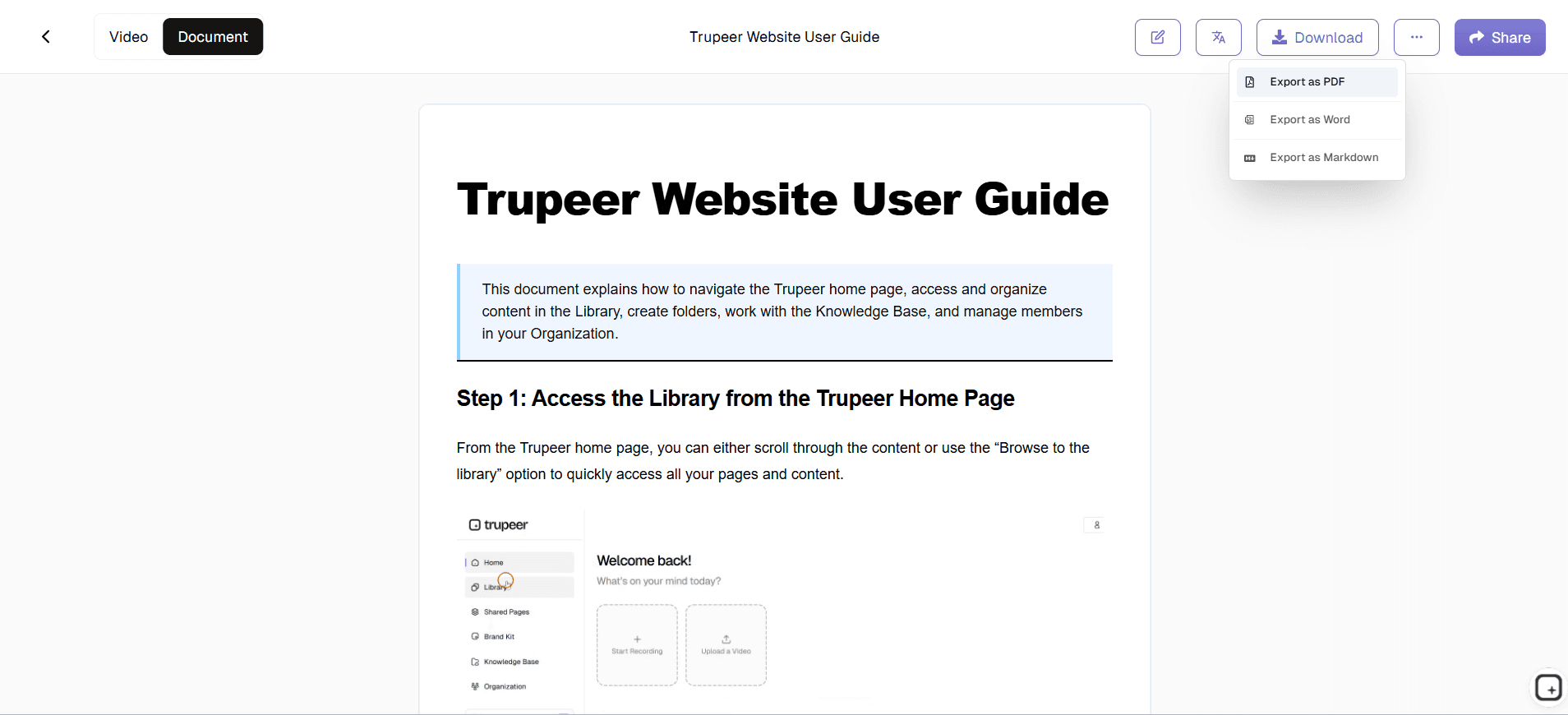
Export your content as a polished video, comprehensive written guide, or both. Share via secure links, embed directly into your knowledge base or learning management system, or download files for offline distribution. The flexibility ensures your documentation reaches your audience in their preferred format and location.
Key Features and Capabilities
Trupeer's steps recorder software includes powerful features designed to streamline your documentation workflow and ensure consistent, professional results every time you create new materials.
Intelligent Screen Recording: Our recording technology captures not just your screen, but understands the context of your actions. It automatically focuses on important interface elements and maintains high quality even during rapid movements or complex multi-screen workflows. The best screen recording software should make the technical aspects invisible, and that's exactly what we've achieved.
AI-Powered Video Enhancement: Beyond basic recording, our AI editor transforms raw footage into polished content automatically. It removes distracting background noise, eliminates speech hesitations, and adds professional zoom effects that guide viewer attention to the right places at the right times. This means even spontaneous recordings can become professional-grade documentation without manual editing.
Automatic Documentation Generation: Perhaps our most powerful feature, this capability converts your screen recording into structured written guides that complement your video content. The AI understands the logical flow of processes and creates documentation that teams can reference quickly without watching entire videos. This is particularly valuable for creating SOP creation software workflows.
Template System and Consistency: Maintain brand consistency and documentation standards across your entire organization. Create templates that define formatting, structure, and styling preferences, then apply them automatically to new content. This ensures that whether one person or fifty people are creating documentation, everything follows the same professional standards and organizational conventions.
Multi-Language Support: Expand your documentation's reach with automatic video translation capabilities. This feature is especially valuable for global teams or customer-facing documentation where language barriers might prevent effective knowledge transfer. The system maintains the original timing and visual elements while providing accurate translations.
Integration and Workflow Compatibility: Trupeer's steps recorder software integrates seamlessly into existing workflows. Whether you're supporting customer success initiatives, creating AI Screen Recorder materials, or developing internal training resources, our platform connects with your existing tools and processes rather than requiring you to change how your team already works.
Why Should You Use Steps Recorder Software?
The decision to implement professional steps recorder software can transform how your organization creates, maintains, and distributes knowledge. The benefits extend far beyond simple screen capture into real business improvements that affect your bottom line.
Dramatic Time Savings: Traditional documentation creation involves multiple steps - recording, editing, writing, formatting, and revision cycles. With Trupeer's automated approach, you eliminate most of these manual processes. What once took hours or days now happens in minutes, freeing your team to focus on higher-value activities while still maintaining comprehensive documentation standards.
Consistent Professional Quality: Every piece of documentation your team creates will meet the same professional standards, regardless of who creates it or their technical expertise. This consistency builds trust with your audience and reflects positively on your organization's attention to detail and commitment to quality communication.
Improved Knowledge Retention and Transfer: When team members leave or processes change, the knowledge usually goes with them. Professional documentation created with steps recorder software preserves institutional knowledge in formats that new team members can easily consume and understand. This reduces onboarding time and minimizes the disruption when personnel changes occur.
Enhanced Training Videos and Learning Materials: Quality documentation directly impacts learning outcomes. Clear, well-structured guides with accompanying video demonstrations help learners grasp concepts faster and retain information longer. This is particularly valuable for complex software implementation processes where mistakes can be costly.
Scalable Documentation Processes: As your organization grows, your documentation needs grow proportionally. Steps recorder software lets you scale content creation without proportionally scaling your content team. New team members can create professional documentation immediately, and established processes can be documented consistently across different departments and locations.
Improved Customer and User Experience: When your documentation is clear, current, and professionally presented, it reduces support requests and improves user satisfaction. Customers can solve problems independently, and your support team can focus on complex issues rather than answering basic questions that good documentation would address.
Who Can Use Steps Recorder Software?
Trupeer's steps recorder software serves diverse professionals and organizations who need to create, share, and maintain process documentation efficiently and professionally.
Content Creators and Educators: Whether you're creating online courses, tutorial content, or educational materials, steps recorder software helps you produce professional content efficiently. The automatic enhancement features ensure your recordings meet professional standards, while the documentation generation creates supplementary materials that enhance learning outcomes. Educational content creators particularly benefit from the ability to AI Video Editor for broader audience reach.
Marketing and Sales Teams: Modern sales processes often require demonstrating complex products or services through video presentations. Steps recorder software enables marketing teams to create consistent AI Screen Recorder that sales professionals can customize for specific prospects. The documentation component ensures sales teams have written materials that support their video presentations and provide prospects with reference materials.
Customer Success and Support Teams: Reducing support ticket volume while improving customer satisfaction requires proactive documentation. Customer success teams use steps recorder software to create comprehensive help resources that customers can access independently. The dual video and written format accommodates different learning preferences and provides multiple ways for customers to find solutions to their problems.
Product and Development Teams: Technical teams need to document processes, create user guides, and maintain internal procedures. Steps recorder software bridges the gap between technical knowledge and accessible documentation. Development teams can quickly document new features, create internal process guides, and generate user-facing materials without requiring dedicated technical writing resources.
Training and Human Resources Professionals: Employee onboarding and ongoing training require current, comprehensive materials that accommodate different learning styles. HR professionals use steps recorder software to create consistent training materials that new hires can reference during their initial weeks and beyond. The template system ensures training materials maintain consistent messaging and branding across different departments and roles.
Small Business Owners and Entrepreneurs: Limited resources mean small businesses need tools that provide maximum value with minimal complexity. Steps recorder software enables small business owners to create professional documentation that supports their operations, trains their staff, and serves their customers without requiring specialized skills or additional staff dedicated to content creation.
Best Practices for Using Steps Recorder Software
Maximizing the value of your steps recorder software investment requires understanding both the technical capabilities and the strategic approaches that produce the best results for your organization and audience.
Plan Your Recording Sessions: Before you start recording, outline the key steps and decision points in your process. This preparation helps you create more focused, logical documentation that viewers can follow easily. Consider your audience's existing knowledge level and include appropriate context without overwhelming them with unnecessary detail.
Speak Clearly and Naturally: Since the AI will process both your actions and narration, speak in a conversational tone that matches how you'd explain the process to a colleague. The automatic filler word removal means you don't need to worry about perfect speech, but clear articulation helps the AI generate better written documentation.
Leverage Template Consistency: Take time to create and refine documentation templates that match your organization's standards and user needs. Consistent formatting makes your documentation library more professional and easier for users to navigate, regardless of who created individual pieces.
Regular Content Updates: Processes evolve, and your documentation should evolve with them. Establish regular review cycles to ensure your documented processes remain current and accurate. The efficiency of steps recorder software makes updates less burdensome than traditional documentation maintenance.
Explore Advanced Features: Take advantage of capabilities like brand kits for professional consistency and translation features for broader accessibility. These advanced features can significantly expand the value and reach of your documentation efforts without proportional increases in effort or complexity.
Explore Related Tools
Why Choose Trupeer's Steps Recorder Software
AI-Powered Enhancement
Automatic noise removal, filler word elimination, and intelligent zoom effects
Dual Format Output
Generate both polished videos and comprehensive written documentation simultaneously
Professional Branding
Apply consistent brand elements and templates across all documentation
Get Started with Trupeer's Steps Recorder
Step 1
Record your screen workflow
Step 2
AI enhances automatically
Step 3
Export video and documentation
Frequently Asked Questions
What makes steps recorder software different from regular screen recording?
Steps recorder software like Trupeer automatically generates written documentation alongside your video recording. It also enhances the video with AI-powered editing features like noise removal and smart zoom effects.
Can I upload existing recordings to the steps recorder software?
Yes, Trupeer accepts existing screen recordings and applies the same AI enhancement and documentation generation features. You don't need to re-record content you already have.
How accurate is the automatically generated documentation?
Trupeer's AI analyzes both your screen actions and narration to create highly accurate step-by-step guides. The documentation captures the logical flow of your process, not just a transcript.
Can I customize the format of my documentation output?
Absolutely. Trupeer offers customizable templates that let you define formatting, styling, and structure preferences. You can also apply your brand kit for consistent visual identity.
Is steps recorder software suitable for technical documentation?
Yes, steps recorder software excels at technical documentation by automatically capturing complex processes and presenting them in both visual and written formats that accommodate different learning styles.
More Tools



