4.8/5
Free Work Plan Generator
Document the work plans your team actually executes. Record the workflow once, AI generates the procedural playbook with steps, screenshots, and a matching video walkthrough. Built for operations teams shipping repeatable processes.
Get started for free

Trupeer's Work Plan Documentation tool turns recorded workflows into structured procedural playbooks that operations teams use to execute work plans consistently. Record the workflow on screen, talk through the steps the way you would during training a new team member, and the AI generates a written work plan document with screenshots inline plus a matching video walkthrough. The output ships to the team via a Shared Page link, gets embedded in the project management tool the team already uses (Asana, Jira, Monday.com, Notion, Confluence), or downloads as PDF or Word for distribution through the team's existing channels.
Worth being clear about scope upfront. This isn't a Gantt chart generator. It's not a task-assignment-and-dependency tool. If the team needs to plan deliverables, assign owners, and track timelines, the right tools for that work are Asana, Monday.com, Linear, ClickUp, Notion, and similar project management platforms. Trupeer covers a different layer of the work plan: the procedural documentation that describes how each step in the work plan actually gets executed. The two layers complement each other. The PM tool answers "what's being done, by whom, by when." Trupeer answers "how exactly is this step performed."
Why Work Plan Generator is required?
A common pattern in operations teams. The work plan exists in Asana with 40 tasks assigned across the team. The deadlines are set. The owners are assigned. The dependencies are mapped. But when each owner sits down to execute their assigned task, half of them aren't sure how to do it. The senior team member who designed the work plan knows the procedures by heart, but those procedures live in muscle memory, not in documentation anyone else can follow. So the work plan that looked complete in Asana stalls on day three when three different owners hit the same "wait, how do I actually do this step?" question.
The other common pattern: the work plan is for a recurring process the team runs every quarter. Product launch. End-of-month closing. Customer onboarding cycle. New hire ramp. The first time the work plan runs, the senior team member who knows the process executes most of it personally. Second time, they teach somebody else, who also does it acceptably. Third time, somebody new joins the team and tries to follow the work plan in Asana, but the actual procedures only exist in the heads of the two people who've run it before. Process drift compounds across quarters. The fourth quarterly run looks different from the first.
Both patterns share the same root cause: work plans without procedural documentation underneath them stall when execution requires more than just task assignment. Trupeer fixes the procedural documentation layer specifically. Record the actual procedures once, the documentation exists. Anyone assigned a task in the work plan can open the matching procedural document, follow the steps, ship the work.
What this Work Plan Generator does
Trupeer's work plan documentation tool takes screen recordings of how each step in a work plan actually gets executed and generates the procedural documents that team members reference when running the work plan. The AI handles three jobs in the same processing pass:
First, it extracts the sequential steps from the recording with timestamps, captures annotated screenshots at each click, and generates the matching written instructions. So a 6-minute recording of "how to run the quarterly close in NetSuite" becomes a written procedural document with 14 numbered steps and screenshots at each one. Total writing time: roughly zero. It's the same idea behind the change management plan template capture the recording once and reuse it instead of redoing the work.
Second, it produces a matching video walkthrough of the same procedure. The same recording that fed the written document also produces the polished video version with filler words removed, zoom effects timed to click moments, and brand kit styling applied automatically. Both formats ship from the same source.
Third, the procedural document and video get organized into a knowledge base structure with sections and chapters, with visibility settings per article (public, organization-only, selected domains, invite-only). So the operational work plan documentation lives in a structured library the team can actually navigate, not as 80 unconnected docs scattered across Google Drive.
Core Capabilities:
Generate written procedural documents from screen recordings with screenshots and numbered steps inline
Produce matching video walkthroughs from the same source recording
Organize procedural documents into sections and chapters with search across the library
Visibility settings per document: public, organization-only, selected domains, invite-only
Export to PDF, Word, or MP4. Embed Shared Page links into Asana, Jira, Monday.com, Notion, Confluence, or any platform that accepts iframe embeds
Translate documents to 65+ languages on paid tiers, applied to both written guide and video voiceover in one job
How Trupeer's Work Plan Generator works
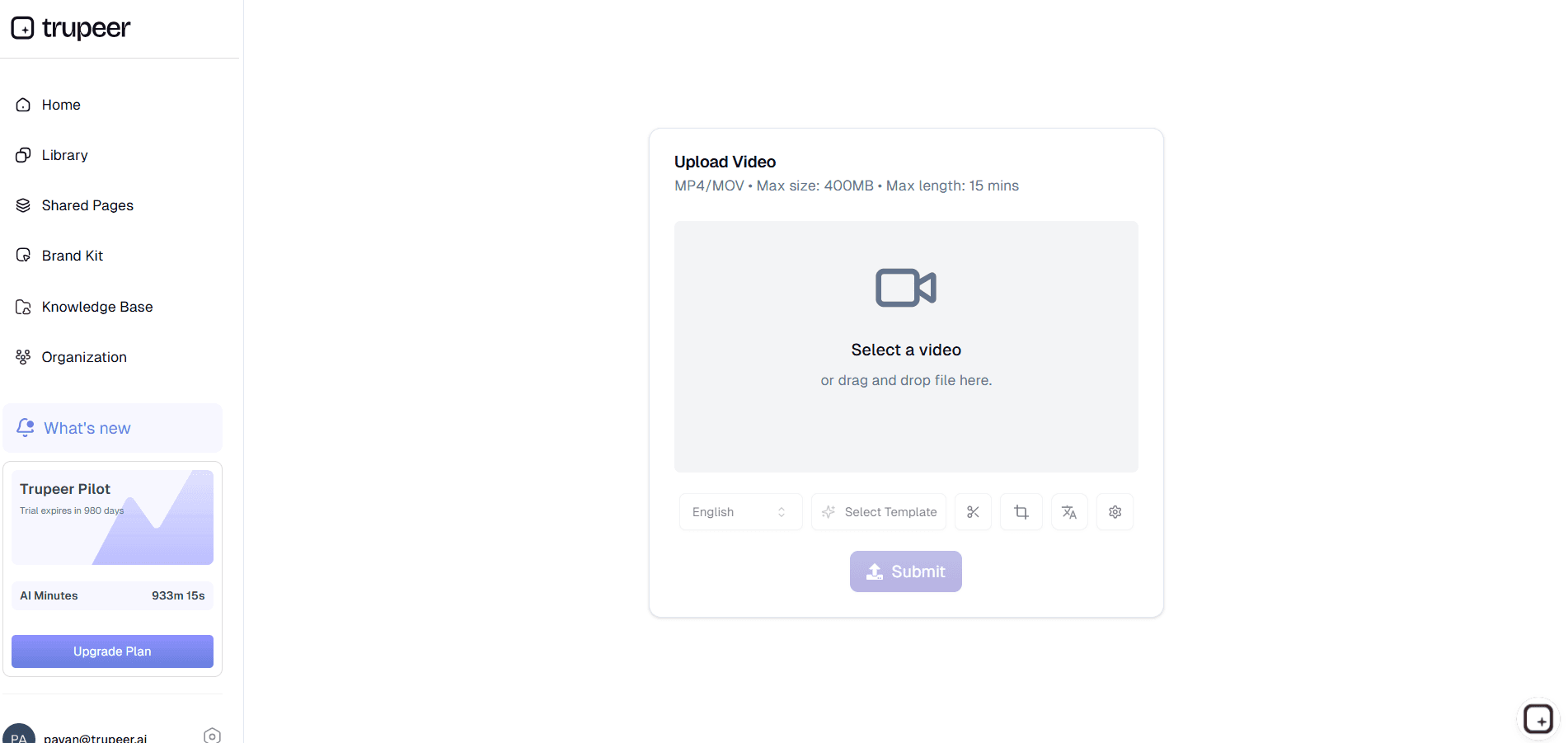
Step 1: Record the procedure
Open the workflow you want to document. Hit record in the browser. Walk through the steps the way you'd teach a new team member. Talk while you click. Stop recording when done. Total time investment: about as long as actually executing the procedure once.
Step 2: AI generates the documentation
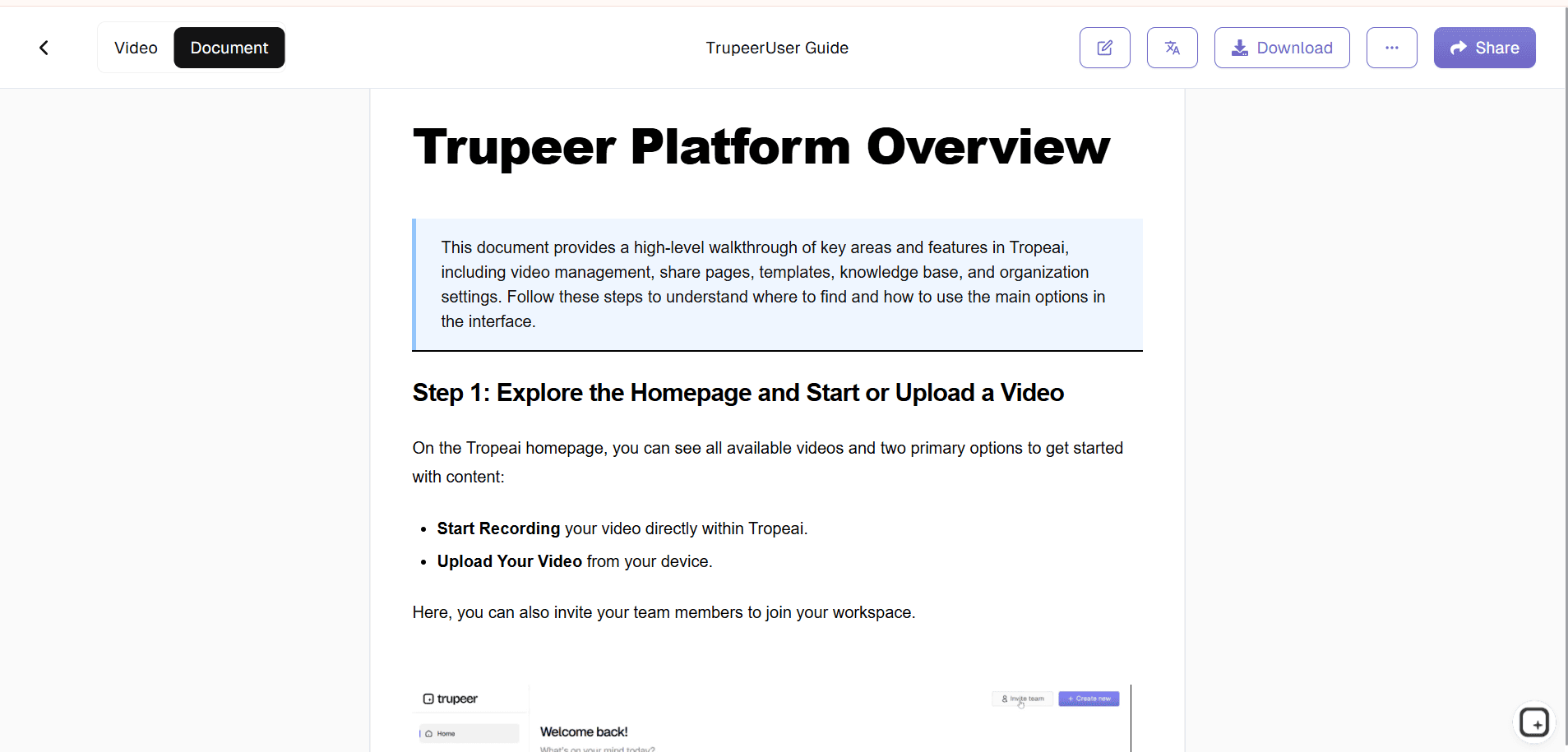
The AI processes the recording. Filler words removed. Cursor jitter smoothed. Zoom effects timed to click moments. Brand kit applied. Written procedural document generated with screenshots inline and numbered steps. Matching video version produced. Total AI processing: usually 5-15 minutes depending on recording length.
Step 3: Organize and share
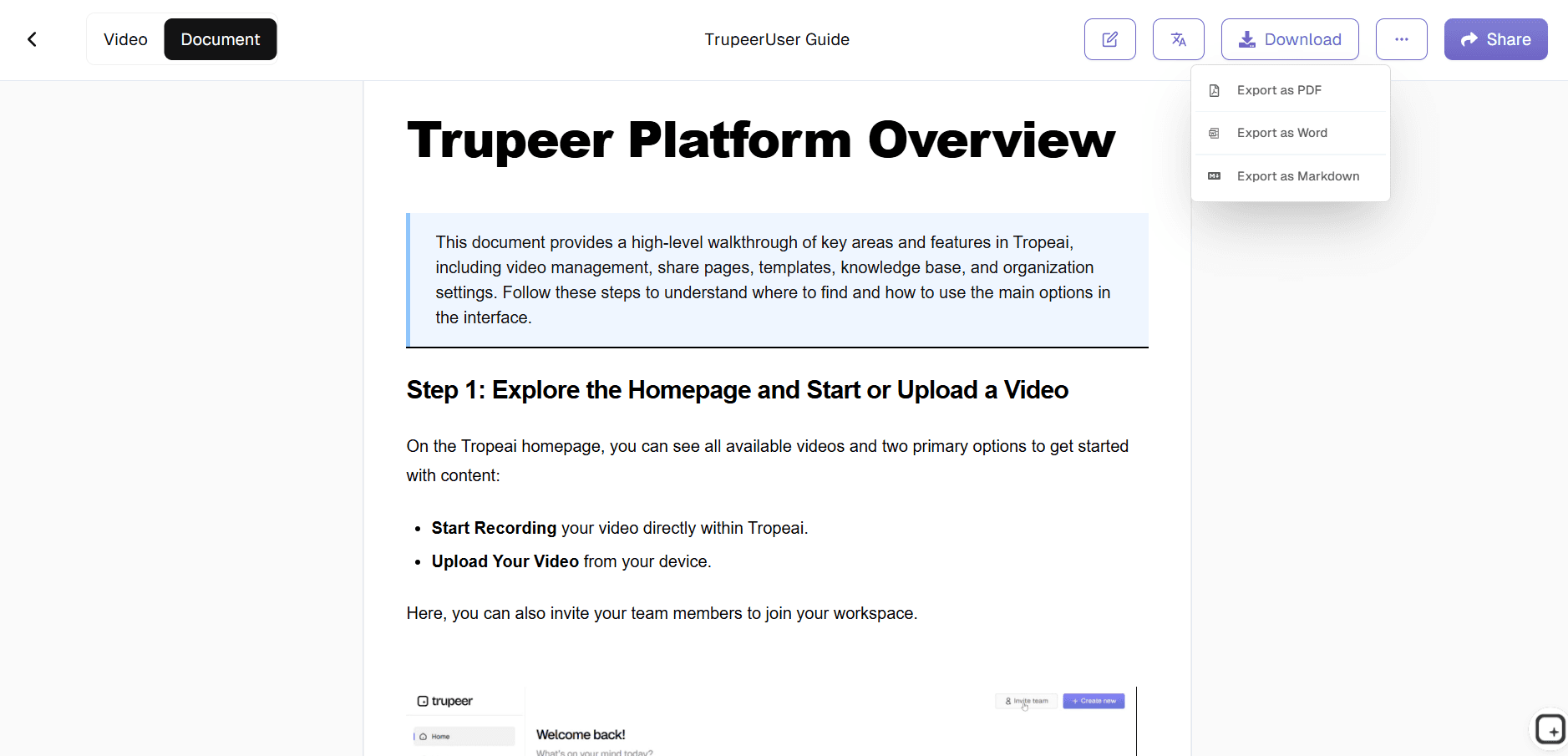
Review the auto-generated document, make any edits, organize it into the knowledge base sections that match the work plan's structure. Share via Shared Page link, embed in the team's PM tool, or download as PDF or Word. Updates work by re-recording one changed step when the procedure shifts.
Who this Trupeer's Work Plan Generator is for
Trupeer's work plan documentation tool serves teams that need to document the procedural layer underneath their work plans. The PM tool handles the task layer. Trupeer handles the procedural layer that explains how tasks actually get executed.
Operations Managers: Document the recurring processes the team runs every quarter (close, launch, onboarding cycle) so the same process runs the same way regardless of who's executing it that quarter. Process drift across quarters stops happening because the documentation enforces consistency.
Project Managers: Pair the Asana, Monday, or Linear work plan with the matching procedural documentation that explains how each assigned task actually gets executed. Team members assigned tasks open the embedded Trupeer link, follow the procedure, mark the task complete. The "wait, how do I do this step?" question stops stalling work plans.
Team Leads: Document the work plan procedures the team runs together so new team members can execute their assigned tasks independently in their first sprint. Onboarding time per task drops because the procedural documentation removes the "let me sit with you while you do this for the first time" requirement.
Implementation and Customer Success Managers: Document the customer onboarding work plan once, run it consistently with every new customer. Standard work plan procedures for activation, configuration, training, and adoption all live in the documentation library, accessed by Shared Page links shared with each customer.
Compliance and Audit Teams: Document the procedures referenced in SOX, ISO 27001, or industry-specific compliance work plans. Auditors get procedural documentation showing exactly how each control gets executed, with screenshots and the matching video walkthrough.
Key Features of Trupeer's Work Plan Generator
Screen-recording-based procedural documentation: The AI watches the click sequence in the recording and generates the matching written procedural document with numbered steps and screenshots inline. So the writing-and-screenshotting work that traditionally consumed 4-8 hours per procedure drops to roughly zero.
Matching video walkthrough from the same source: The same recording produces both the written procedural document and the polished video version. Filler words removed, cursor jitter smoothed, zoom effects timed to click moments, brand kit styling applied. So the team member who reads the document and the team member who watches the video both get the procedure from the same source content.
Knowledge base with sections and chapters: Organize procedural documents into the structure that matches the team's work plans. The Q4 close work plan has procedural documents for each of its phases. The customer onboarding work plan has procedural documents for each onboarding step. Search across the library returns the right document when somebody types a query.
Visibility per document: Operational work plan documents stay organization-only. Customer-facing onboarding procedures shared with the customer's team get selected-domains visibility. Compliance-sensitive procedures stay invite-only. Set visibility per document, change it later without rebuilding anything.
65+ language translation on paid tiers: Translate procedural documents and matching videos for global teams executing the same work plan across multiple regions. Translation applies to written content, voiceover, and on-screen text in screenshots, all in one job.
Updates by re-recording one changed step: When the underlying procedure changes (system UI update, workflow refinement, regulatory requirement change), re-record just the affected step. The AI re-processes that segment. Both the video and the written document update in place. Maintenance cost stays low.
Where Trupeer fits in the work plan tooling stack
The work plan tooling stack has three distinct layers worth understanding. The planning layer covers Gantt charts, task assignment, dependency mapping, resource allocation, and timeline tracking. Tools like Asana, Monday.com, ClickUp, Linear, Smartsheet, Wrike, and Microsoft Project cover this layer. They're built for "what's being done, by whom, by when." Trupeer doesn't replace any of these.
The execution layer covers the actual procedural documentation that explains how each task in the work plan gets done. This is where Trupeer fits. Some teams cover this layer with Confluence pages, Notion docs, or Google Docs that get manually written from memory. Some teams skip this layer entirely and let procedures live in senior team members' heads (which is what breaks consistency over time). Trupeer covers this layer by generating the procedural documentation from screen recordings of the actual work, so the documentation reflects what really happens rather than what somebody half-remembered six weeks later.
The hosting and search layer covers where procedural documents live and how team members find them. Trupeer's built-in knowledge base covers this for teams that don't already have one. For teams running Notion, Confluence, Document360, or similar tools, Trupeer feeds into the existing setup: produce the procedural document in Trupeer, embed the Shared Page link or paste the written guide into the existing system. So Trupeer doesn't force the team to migrate documentation infrastructure. It produces content that works in whatever hosting system the team already uses.
Best practices for documenting work plans
Record during the actual procedure, not after. The trick that turns work plan documentation from "thing we should do someday" to "thing that happens automatically": record the procedure during the time it's already being executed. The first time the quarterly close runs, the senior team member running it records it. The first time a new customer goes through onboarding, the implementation manager records the procedure with them. Documentation gets created as a side effect of the work, not as a separate scheduled writing project that always slips.
Structure the work plan's procedural docs to match the PM tool's task structure. If the work plan in Asana has 12 tasks, the procedural documentation library should have 12 corresponding documents (or merged where it makes sense). So when a team member opens task 7 in Asana and clicks the embedded Trupeer link, they land directly on the document for that task. Not on a sprawling 80-page playbook they have to navigate.
Set up the custom glossary with operational terminology on day one. Operational work plans use specific terminology consistently. Internal system names. Internal acronyms (RCA, EOM, MSO, P0). Vendor names. Add these to the glossary upfront. The AI uses the glossary to spell these correctly in transcripts and written guides. Doing it before the first batch of procedures beats finding and replacing terminology errors across 30 published documents.
Use templates for recurring work plan types. The team running quarterly close, customer onboarding, and product launch work plans should have three different document templates set up. Each template captures the structure that work-plan-type uses. Every procedural document generated for a quarterly close uses the close template. Every customer onboarding document uses the onboarding template. So the procedural library stays consistent across recurring work plans.
Explore Related Tools
Benefits of Using Trupeer’s Work Plan Generator
AI-Driven Task Organization
Automatically identifies tasks, deadlines, and responsibilities from video content, saving time and improving project planning accuracy.
Visual & Audio Enhancements
Add images and voiceovers to your work plan to make it easier to understand and follow for team members at all levels.
Customizable for Any Project
Personalize steps, timelines, and instructions to reflect your organization’s unique workflows, ensuring relevance and effectiveness.
Generate Work Plans with Trupeer
Step 1
Upload Your Video
Step 2
Generate & Edit
Step 3
Download & Share
Frequently Asked Questions
1. What is a Work Plan Generator, and are there examples of online tools?
A Work Plan Generator is an online tool that automatically creates structured project plans with tasks, timelines, milestones, and deliverables. Examples of online tools include Trupeer’s AI-powered Work Plan Generator, which helps individuals and teams build professional work plans in minutes.
2. Is Trupeer a Work Plan Generator online free generator tool for work plans?
Yes. Trupeer offers a Work Plan Generator online free generator tool for work plans that allows users to create and export essential plans without upfront cost. Advanced collaboration and automation features are available in the Pro version.
3. How does the AI Work Plan Generator work?
Simply enter your project name, objectives, and timeline. The AI Work Plan Generator analyzes your input and generates a step-by-step work plan with task breakdowns, dependencies, deadlines, and milestones.
4. Is Trupeer’s Work Plan Generator suitable for teams and businesses?
Absolutely. This Work Plan Generator is designed for startups, enterprises, and project teams. It includes collaboration features like task assignments, comments, progress tracking, and shared dashboards.
5. Can I export or share my work plan easily?
Yes. The Work Plan Generator online free generator tool for work plans allows you to download plans in PDF, DOCX, or Excel formats, or share them via a direct link for seamless collaboration.
More Tools


