4.8/5
Digital Guide Maker
Transform Your Documentation Process with AI-Powered Digital Guide Creation
Create Your Digital Guide

Trupeer's digital guide maker is an AI-powered platform that revolutionizes how you create comprehensive digital guides and documentation. Unlike traditional documentation tools that require manual writing and formatting, Trupeer automatically transforms your screen recordings into polished digital guides complete with step-by-step instructions, screenshots, and professional formatting. This innovative approach eliminates the time-consuming process of creating guides from scratch, allowing you to produce high-quality documentation in minutes rather than hours.
What sets Trupeer apart from traditional digital guide makers is our intelligent automation. While other platforms require you to manually write content or upload text files, our AI screen recorder captures your actual workflow and converts it into comprehensive documentation. The AI doesn't just transcribe what happens on screen - it understands context, identifies important steps, and creates logical flow in your digital guides.
How Does Digital Guide Maker Work?
The digital guide maker process is designed for maximum efficiency while maintaining professional quality output. The system works through a sophisticated five-step process that transforms raw screen activity into polished, branded documentation that's ready for immediate use or further customization. The same documentation can feed straight into the ai study guide maker, so you're not putting it together separately.
Step 1: Record or Upload Your Content
Begin by either using Trupeer's built-in screen recorder to capture your workflow in real-time, or upload an existing screen recording that you want to transform into a digital guide. The platform supports various video formats and can process recordings of any length, from quick feature demonstrations to comprehensive training sessions.

Step 2: AI Analysis and Enhancement
Once your recording is in the system, Trupeer's AI performs comprehensive analysis of every frame, identifying user interactions, interface elements, and workflow patterns. The AI automatically enhances the video by removing background noise, eliminating filler words from audio, and adding strategic zoom effects to highlight important actions, creating a professional viewing experience.

Step 3: Automated Documentation Generation
The AI simultaneously generates written documentation by analyzing the recorded actions and creating step-by-step instructions. This process includes automatic screenshot capture at crucial moments, action descriptions, and logical organization of information into digestible sections that follow best practices for how to create a guide.

Step 4: Template Application and Customization
Apply your saved documentation templates to ensure consistent formatting, styling, and structure across all your digital guides. These templates can include your preferred layout, font choices, color schemes, and section organization. You can also apply your brand kits to maintain visual consistency with logos, colors, and branded elements.
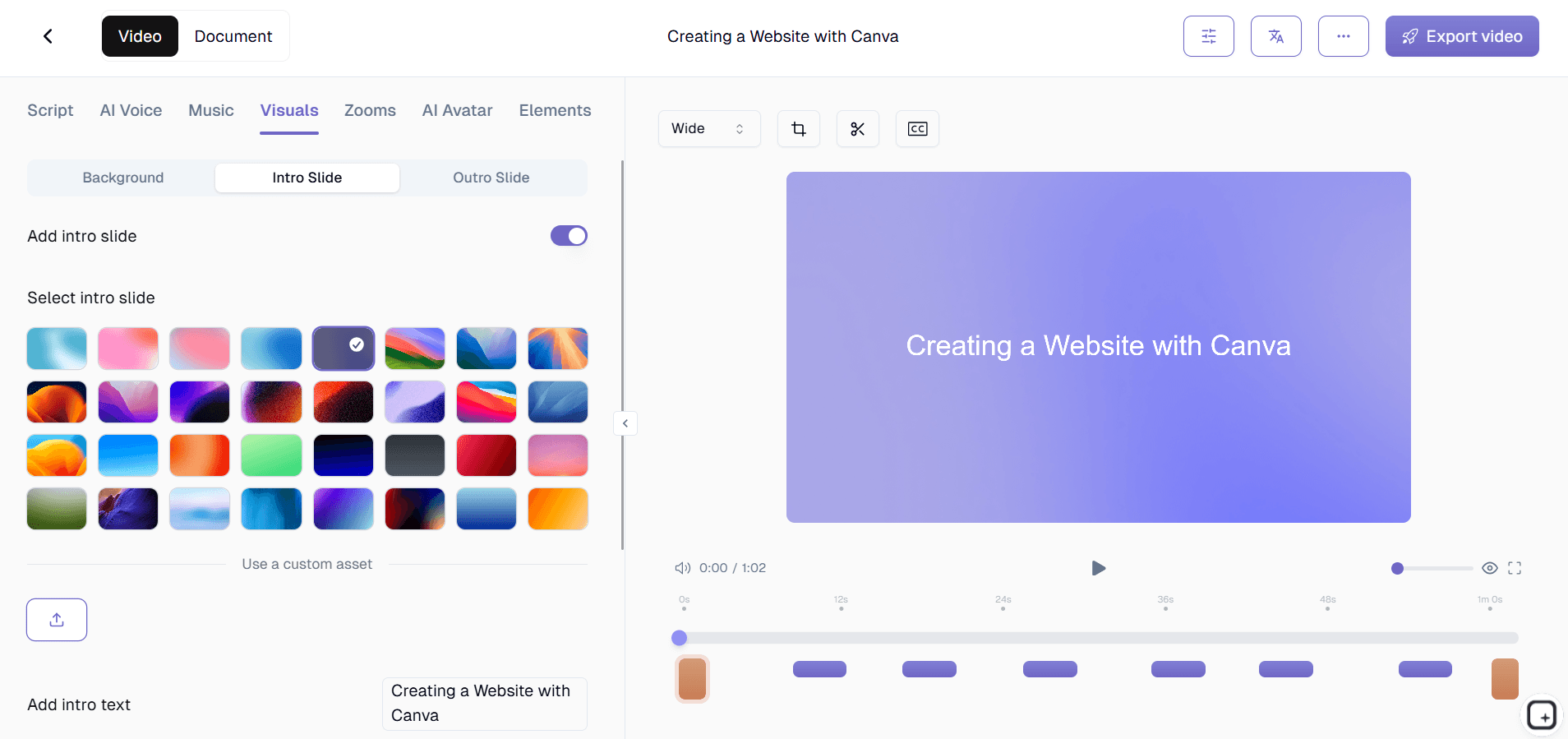
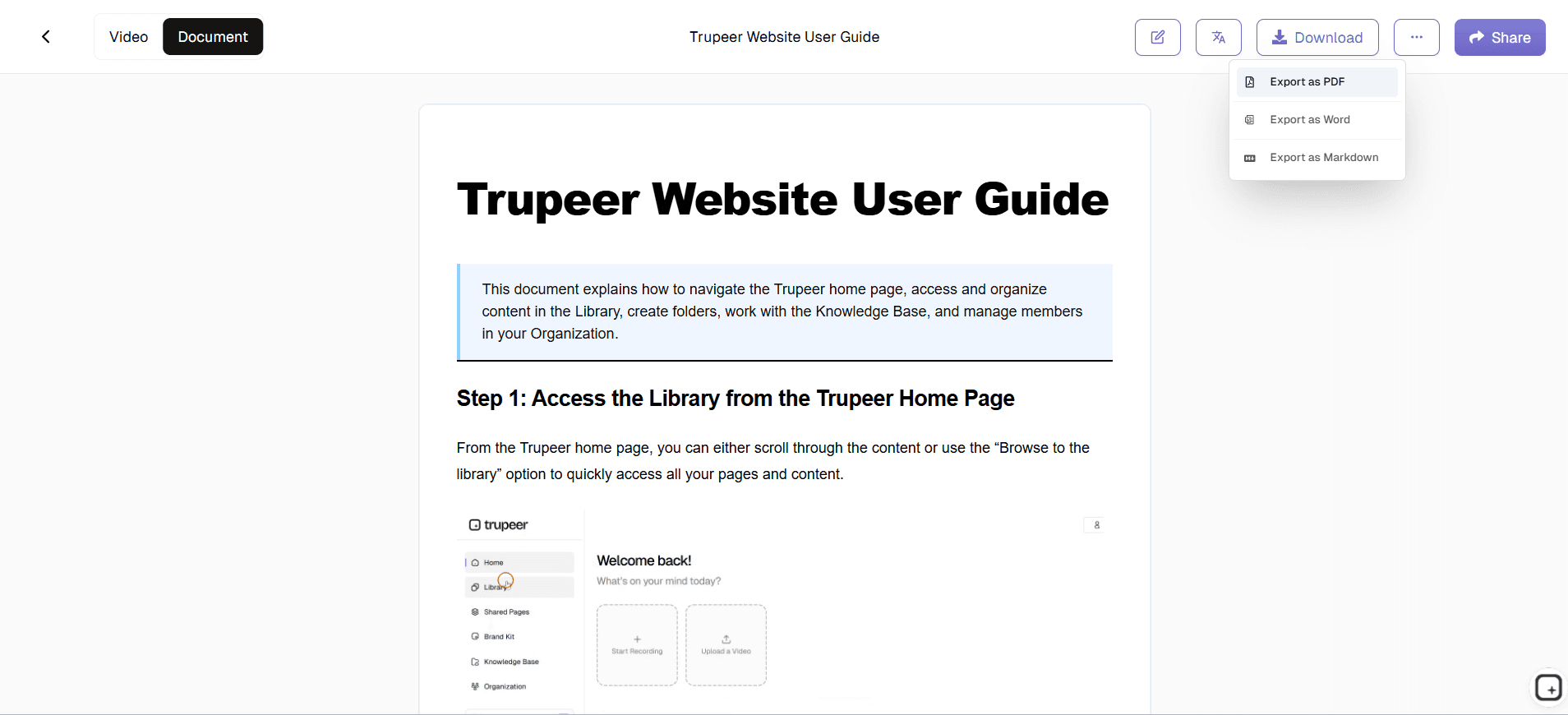
Step 5: Multi-format Export and Sharing
Export your completed digital guide in multiple formats including polished video, written documentation, or both. The platform provides easy sharing options through direct links, embed codes for websites, or downloadable files that can be integrated into existing knowledge bases or training platforms.
Key Features and Capabilities
The digital guide maker offers a comprehensive suite of features designed to streamline documentation creation while maintaining professional quality and consistency across all your content.
AI-Powered Content Generation: The platform automatically converts screen recordings into detailed written instructions, eliminating manual transcription and writing tasks. This feature integrates seamlessly with our AI video editing capabilities to provide enhanced audio quality and visual improvements that make your guides more engaging and professional. The mechanics in plain terms. The AI watches the click sequence in your recording. Click into Settings, navigate to API Keys, generate a new key. The written guide that comes out lists those three steps with screenshots at each click. Filler words from the narration removed automatically. Cursor jitter smoothed. Zoom effects timed to the moments that matter. Brand kit applied. Total writing time per guide: roughly zero. Total review time before publishing: 5 to 10 minutes if you're picky about tone.
Customizable Documentation Templates: Save and reuse templates with your preferred formatting, styling, and structural elements to ensure consistency across all documentation projects. These templates can include predefined sections, formatting rules, and organizational structures that match your company's documentation standards and technical documentation requirements. The benefit compounds across a guide library. Set up the template once with the heading hierarchy, step format, screenshot caption style, brand styling for callouts. Every digital guide generated after that follows the same template automatically. So the 12 guides shipped across the year all look like they came from the same publisher, not from 12 different individuals with mismatched formatting choices. Worth doing this on day one. Retrofitting existing guides to a new template costs real time.
Multi-language Support: Expand your guide's reach with automatic translation capabilities that convert both video content and written documentation into multiple languages. This feature is particularly valuable for global teams and organizations serving international audiences, ensuring your digital guides remain accessible regardless of language barriers. The translation workflow in practice. Generate the digital guide in English first. Then translate to Spanish, German, Portuguese, Japanese, or any combination of 65+ supported languages. Translation applies to the video voiceover, the written content, the screenshots' on-screen text, and the captions, all in one job. So a customer education team supporting users in four markets ships the same guide in four languages from one source recording. Worth being honest about the limits: highly specialized vocabulary (legal disclaimers, jurisdiction-specific compliance terms) sometimes needs a local-language reviewer. For most product content, the AI translation ships as-is.
Brand Integration: Apply your company's visual identity consistently across all digital guides using custom brand kits that include logos, color schemes, fonts, and branded intro/outro sequences. This ensures every guide reinforces your brand while maintaining professional presentation standards. For customer-facing digital guides, brand consistency matters more than internal teams realize. A guide without consistent typography, colors, and intro slide signals that the content was thrown together. A guide with proper branding signals that the team takes the content seriously. The brand kit applies all of these elements automatically across every page of every guide. Even when six different team members contributed to the underlying recordings, the output looks like it came from one editorial source.
Flexible Export Options: Generate output in various formats including standalone videos, written PDF guides, web-friendly HTML documents, or combined multimedia presentations. This flexibility allows you to adapt your content for different distribution channels and use cases, from internal training materials to customer-facing support documentation. The export formats worth being clear about. The MP4 downloads as a real MP4 file, plays anywhere video plays. The written guide downloads as PDF or Word (DOCX), works in any reader. The Shared Page link wraps both formats into a single branded URL with visibility settings (public, organization-only, selected domains, invite-only). All three formats work outside Trupeer. So if the team eventually migrates to a different documentation platform, the digital guide library comes with them. No lock-in dressed up as a feature.
Cloud-Based Collaboration: Work with team members on guide creation and editing through cloud-based collaboration features that allow multiple contributors to review, comment, and improve documentation before final publication. The collaboration scope worth setting expectations on. Multiple people can produce guides in the same workspace, with each guide tied to its creator. Comment threads on drafts let reviewers flag issues before publishing. This works well for small-to-mid teams. Larger enterprise teams with formal change management workflows usually pair Trupeer with their existing review systems (the ticket workflow in Jira, the approval gate in their CMS). The collaboration features inside Trupeer handle the production phase. The formal approval and publishing flow happens wherever the team already runs that work.
Why Should You Use Digital Guide Maker?
Implementing Trupeer's digital guide maker into your workflow delivers significant advantages that extend far beyond simple time savings. The platform fundamentally transforms how organizations approach documentation creation, making it more efficient, consistent, and accessible to teams of all sizes.
Time Reduction: Traditional guide creation can take hours or days per document when accounting for planning, writing, editing, and formatting. Our digital guide maker reduces this to minutes by automating the most time-intensive aspects of documentation creation. Teams report saving 80-90% of their usual documentation time, allowing them to focus on higher-value activities like product marketing strategy and customer engagement.
Enhanced Consistency and Quality: Manual documentation creation often results in inconsistent formatting, varying levels of detail, and quality differences between different authors. The digital guide maker ensures every guide follows the same high-quality standards, uses consistent terminology, and maintains professional presentation regardless of who creates the original recording. That also covers how to guide: because the steps are captured as you go, you don't have to write them up afterwards.
Improved Accessibility and Learning Outcomes: By automatically generating both visual and written content, your guides accommodate different learning styles and accessibility requirements. Visual learners benefit from the video content and screenshots, while those who prefer text-based learning can focus on the written instructions. This dual-format approach significantly improves knowledge retention and user satisfaction.
Scalable Documentation Process: As your organization grows, the volume of required documentation typically increases exponentially. Traditional methods become bottlenecks that slow down product releases, training videos development, and customer support initiatives. Our digital guide maker scales effortlessly, allowing you to produce comprehensive documentation libraries without proportionally increasing your content creation resources.
Cost-Effective Solution: Eliminating the need for dedicated technical writers, video editors, and graphic designers for basic documentation needs represents substantial cost savings. Teams can produce professional-quality guides using existing subject matter experts who simply record their normal workflows, democratizing content creation across your organization.
Who Can Use Digital Guide Maker?
Trupeer's digital guide maker serves a diverse range of professionals and organizations, each finding unique value in the platform's ability to transform screen activity into comprehensive documentation.
Content Creators and Educators: Independent content creators, online course developers, and educational institutions use the platform to rapidly develop comprehensive learning materials. The ability to record lesson demonstrations and automatically generate accompanying written materials makes it ideal for creating AI Screen Recorder and educational content that serves multiple learning preferences simultaneously.
Marketing and Sales Teams: Marketing professionals leverage the digital guide maker to create compelling Documentation Generator and accompanying documentation for prospects and customers. Sales teams use it to develop personalized walkthroughs and AI Video Editor materials that can be easily customized for different client needs and use cases.
Product and Development Teams: Software companies and SaaS providers use the platform to maintain up-to-date product documentation, feature guides, and user onboarding materials. The ability to quickly update guides when products change ensures documentation never becomes outdated, supporting both internal teams and external users with current information.
Customer Success and Support Organizations: AI Screen Recorder teams create comprehensive help libraries and troubleshooting guides that reduce support ticket volume while improving customer satisfaction. The platform's ability to generate both visual and written instructions makes it easier for customers to resolve issues independently.
Corporate Training and HR Departments: Human resources and learning development teams use the digital guide maker to create employee onboarding materials, policy explanations, and skill development resources. The consistent formatting and professional presentation ensure all training materials maintain company standards while reducing the time required to keep training content current.
Small Business Owners and Entrepreneurs: Resource-constrained small businesses benefit from the platform's ability to create professional documentation without requiring specialized skills or additional staff. Whether documenting standard operating procedures, creating customer tutorials, or developing training materials for new employees, the digital guide maker enables small teams to maintain comprehensive documentation libraries.
Best Practices for Using Digital Guide Maker
Maximizing the effectiveness of your digital guide creation requires understanding both the platform's capabilities and fundamental principles of good documentation design.
Plan Your Recording Structure: Before hitting record, outline the key steps and decision points in your process. This preparation ensures your recording flows logically and covers all necessary information. Consider breaking complex processes into multiple shorter guides rather than creating one lengthy document, as this improves user comprehension and makes your content more actionable.
Optimize Your Recording Environment: Ensure your screen is clean and uncluttered before recording. Close unnecessary applications, clear your desktop, and use consistent window sizing. This preparation results in cleaner screenshots and more professional-looking final guides that reflect positively on your organization.
Leverage Template Consistency: Develop and save templates that reflect your organization's documentation standards and visual identity. Consistent use of templates ensures all your guides maintain professional appearance and logical organization, making it easier for users to navigate and understand your content regardless of who created the original recording.
Regular Content Updates: Establish processes for reviewing and updating your digital guides when underlying processes or software interfaces change. The platform makes updates straightforward, but regular review ensures your documentation remains accurate and valuable to users. Consider creating a knowledge base structure that makes it easy to find and update related guides.
Multi-format Distribution Strategy: Take advantage of the platform's ability to generate both video and written content by distributing different formats through appropriate channels. Use video versions for visual platforms and training sessions while providing written versions for quick reference and searchable technical documentation repositories.
Structure the guide before recording. The trick that turns AI-generated digital guides from "rough draft" to "shippable content": outline the guide's sections before hitting record, then record one workflow per section. The AI organizes content cleanly when each source recording covers one logical topic. Recording a single 45-minute marathon walkthrough of an entire product and asking the AI to chop it into a digital guide produces messy output. Recording 8 separate 5-minute walkthroughs, each covering one section's worth of content, produces a clean guide structure. Recording effort is roughly the same. Output quality differs significantly.
Set up the custom glossary with product terminology. Digital guides use specific terminology consistently. Product names. Feature names. Industry-specific terms. If your product feature is called "Pulse" internally, the AI needs to know "pulse" in the recording transcripts refers to that feature, not a medical concept. The custom glossary handles this. Add all product names, feature names, and frequently-used industry terms on day one. Doing it upfront beats finding and replacing terminology errors across 30 published guides later.
Where Trupeer's digital guide maker fits next to other guide-creation tools
The digital guide tooling space has a few rough clusters worth understanding. Scribe and Tango capture clicks and produce step-by-step written guides automatically. They're fast and lightweight, and they do the click-capture-to-written-guide flow well. The catch: they don't generate matching video, so teams that need both formats end up using a second tool for the video. Guidde sits closer to Trupeer: both produce video plus written guides from one source recording. The differences between Trupeer and Guidde come down to brand kit treatment, translation handling, and specific editor experience choices, so it's worth running both on the same workflow before committing.
A different cluster: documentation hosting platforms like Document360, GitBook, ReadMe, and Helpjuice. These host digital guides and provide search, navigation, and CMS-style content management, but don't help produce guide content. Most teams using one of these tools pair them with a production tool: produce in Trupeer, paste the written guide into Document360, embed the video as inline player. The third cluster: heavy course authoring tools like Articulate Storyline, Adobe Captivate, and iSpring. These build SCORM-packaged interactive courses with quizzes and branching paths. Different shape of content entirely. Most digital-guide use cases don't need that depth, but if the team's content has to be a formal course rather than a guide, Articulate is the right pick. The decision between Trupeer and the alternatives usually comes down to two questions: does the team need both video and written outputs from one recording, and does the team need brand kit plus 65+ language translation built in. If yes to both, Trupeer is the cleaner fit.
Explore Related Tools
Why Choose Trupeer's Digital Guide Maker
Instant Documentation
Transform any screen recording into professional written guides automatically with AI
Brand Consistency
Apply your brand kit for consistent, professional guides across all content
Multi-format Export
Get both video tutorials and written documentation from a single recording
Create Digital Guides in 3 Simple Steps
Step 1
Record your screen workflow
Step 2
Let AI generate documentation
Step 3
Customize and share guides
Frequently Asked Questions
What is a digital guide maker and how does it work?
A digital guide maker is an AI-powered tool that converts screen recordings into comprehensive written documentation and video tutorials. You simply record your screen or upload an existing recording, and the AI automatically generates step-by-step guides with screenshots and instructions.
Can I customize the appearance of my digital guides?
Yes, Trupeer allows you to apply custom templates and brand kits to ensure consistent formatting, colors, fonts, and logos across all your digital guides. You can save these templates for reuse across multiple projects.
Do I need technical skills to create digital guides?
No technical skills are required. Simply record your screen showing the process you want to document, and Trupeer's AI handles the rest. The platform automatically generates both video content and written instructions from your recording.
Can I translate my digital guides into other languages?
Yes, Trupeer includes automatic translation capabilities that can convert both your video content and written documentation into multiple languages, making your guides accessible to global audiences.
What file formats can I export my digital guides in?
You can export your guides as polished videos, written PDF documents, HTML files for web publishing, or combined multimedia presentations. The platform supports multiple export options to fit your distribution needs.
More Tools


