4.8/5
Free Handbook Generator
Transform Screen Recordings Into Professional Employee Handbooks
Create Your Handbook Now

Trupeer's handbook generator revolutionizes how organizations create employee handbooks, training materials, and operational documentation. Unlike traditional methods that require manual writing from scratch, this innovative tool transforms your screen recordings into comprehensive, professional handbooks automatically. Whether you're documenting processes, creating onboarding materials, or building training resources, Trupeer's AI-powered platform converts your visual demonstrations into structured, readable documentation that employees can follow step-by-step. The handbook generator addresses a critical challenge facing modern businesses: the time-intensive process of creating and maintaining employee documentation.
What sets Trupeer's handbook generator apart is its dual-output capability. When you create a screen recording using our screen recorder, you don't just get video content. The AI simultaneously produces comprehensive written documentation, giving you both formats from a single recording session. This means your team can choose their preferred learning style, whether they prefer watching video tutorials or reading step-by-step guides, while you only need to create the content once.
How Does the Handbook Generator Work?
Trupeer's handbook generator follows a streamlined five-step process that transforms your screen recordings into professional employee handbooks without requiring technical expertise or extensive time investment.
Step 1: Record Your Process
Start by using Trupeer's built-in AI Screen Recorder to capture your screen while demonstrating any process you want to document. Whether you're showing how to use software, explaining company procedures, or walking through onboarding steps, simply hit record and perform the actions naturally. Alternatively, if you already have existing recordings, you can upload them directly to the platform. The system accepts various video formats and automatically processes them for optimal results.

Step 2: AI Analysis and Enhancement
Once your recording is complete or uploaded, Trupeer's AI immediately begins analyzing the content. The system identifies key actions, removes unnecessary filler words if you've provided narration, and enhances the audio quality. Our AI video editor automatically applies zoom effects to highlight important areas and removes background noise to ensure professional quality output. This step happens automatically in the background while you can move on to other tasks.

Step 3: Documentation Generation
The AI converts your screen recording into structured written documentation suitable for employee handbooks. This isn't a simple transcription - the system understands the logical flow of your demonstration and creates properly formatted, step-by-step instructions. The generated content includes clear headings, numbered steps, and descriptive text that employees can easily follow without needing to reference the original video.

Step 4: Template Application and Customization
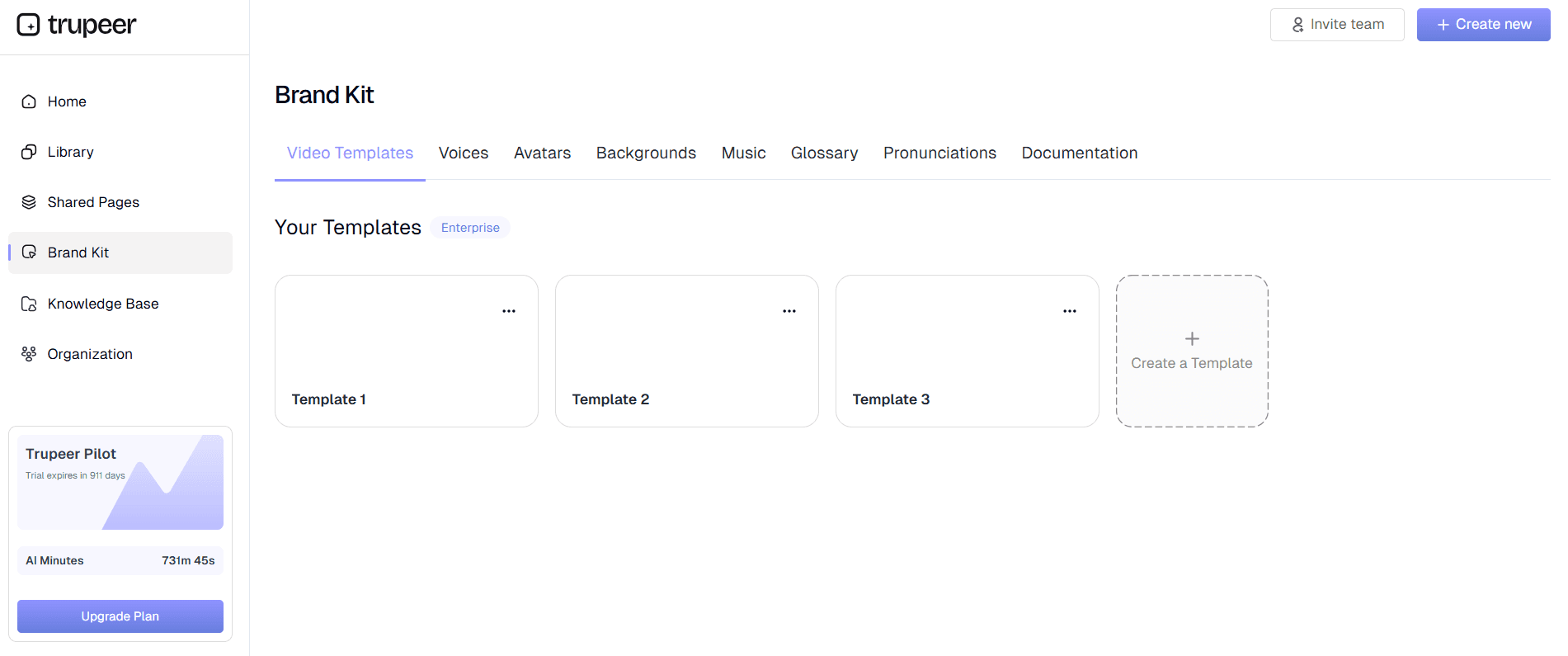
Apply your preferred documentation templates to ensure consistent formatting across all your handbook materials. Trupeer's system allows you to save custom templates with your preferred styling, structure, and formatting preferences. You can also apply your brand kits to maintain visual consistency with your company's identity standards. This ensures every piece of documentation matches your organization's professional appearance and style guidelines.
Step 5: Export and Distribution
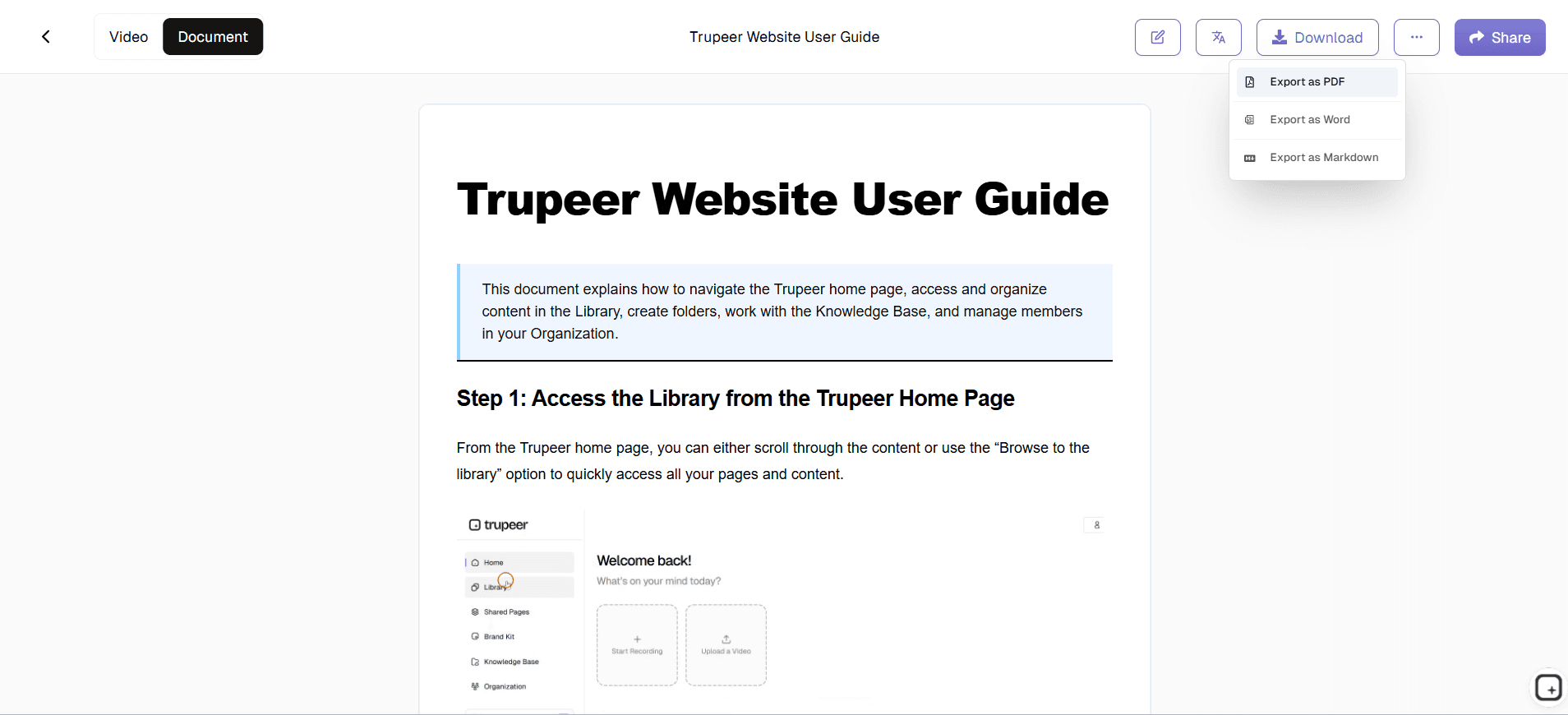
Once your handbook content is generated and formatted, export it in your preferred format. You can choose to keep both the enhanced video version and the written documentation, or focus on the written handbook if that better serves your needs. The platform provides easy sharing options and embed codes, making it simple to distribute the content through your company's knowledge management systems or knowledge base platforms.
Key Features and Capabilities
Trupeer's handbook generator offers comprehensive features designed to streamline documentation creation while maintaining high quality and professional standards across all generated materials.
Dual Content Creation: Generate both video tutorials and written handbook content from a single screen recording session. This unique capability means you create once but deliver content in multiple formats to accommodate different learning preferences within your organization. The written documentation maintains the same logical flow and comprehensive detail as the original recording, ensuring consistency across all formats.
Smart Template System: Utilize customizable documentation templates that automatically format your generated content according to your specifications. Save templates with preferred styling, heading structures, and layout preferences, then apply them consistently across all handbook materials. This feature ensures that whether you're creating Training Manual Generator or written procedures, everything maintains the same professional appearance and organizational structure.
Brand Integration: Seamlessly incorporate your company's visual identity into all generated handbook materials through integrated brand kits. Apply custom colors, logos, fonts, and styling elements automatically to ensure every piece of documentation reflects your organization's professional standards. This feature is particularly valuable for companies creating SOP Generator materials or external-facing handbook content.
Multi-Language Support: Expand your handbook's reach with automatic translation capabilities. Generate handbook content in multiple languages to serve diverse teams or international operations. The translation maintains the original structure and formatting while adapting the content for different linguistic audiences, making it ideal for global organizations.
AI-Powered Enhancement: Benefit from intelligent processing that improves both video and written content quality. The system automatically removes filler words, enhances audio clarity, applies appropriate zoom effects, and structures written content for optimal readability. This ensures your handbook materials are professional-grade regardless of the original recording quality.
Integration Capabilities: Connect with popular documentation platforms and learning management systems to streamline your handbook distribution process. Whether you're building comprehensive technical documentation or creating materials for specific departments, the integration options ensure smooth workflow integration with your existing systems.
Why Should You Use Trupeer's Handbook Generator?
Organizations choosing Trupeer's handbook generator experience significant advantages in documentation creation, maintenance, and employee engagement compared to traditional handbook development methods.
Dramatic Time Savings: Reduce handbook creation time from weeks to hours by eliminating the need to write documentation from scratch. Instead of spending countless hours drafting, revising, and formatting written materials, simply demonstrate processes on screen and let AI generate comprehensive documentation automatically. This efficiency gain allows your team to focus on strategic initiatives rather than time-consuming documentation tasks, while still maintaining high-quality employee resources.
Enhanced Accuracy: Ensure your handbook content accurately reflects actual processes by generating documentation directly from real demonstrations. Unlike written procedures that might miss crucial steps or become outdated quickly, screen-recorded documentation captures exactly how tasks should be performed. This approach significantly reduces errors and confusion among employees following handbook procedures, leading to better compliance and fewer support requests.
Consistency Across Materials: Maintain uniform quality and formatting across all handbook materials regardless of who creates the original recordings. The template system and brand kits ensure that whether you're documenting Documentation Generator procedures or operational workflows, everything maintains the same professional appearance and structural consistency. This uniformity enhances your organization's professional image and makes handbook materials easier for employees to navigate.
Improved Employee Engagement: Increase handbook adoption and compliance by providing both visual and written learning materials. Employees can choose their preferred format or use both together for comprehensive understanding. The combination of clear video demonstrations and structured written steps accommodates different learning styles, leading to better retention and implementation of handbook procedures throughout your organization.
Cost-Effective Scaling: Expand your documentation efforts without proportionally increasing costs or resource requirements. Once you establish templates and workflows, creating additional handbook materials becomes a matter of recording new processes rather than hiring writers or dedicating significant internal resources to documentation projects. This scalability is particularly valuable for growing organizations or those with complex operational procedures.
Easy Updates and Maintenance: Keep handbook content current with minimal effort by simply recording updated processes when procedures change. Rather than manually editing written documentation, record the new process and generate fresh handbook materials automatically. This approach ensures your employee resources remain accurate and relevant, reducing confusion and improving operational efficiency across your organization.
Who Can Use Trupeer's Handbook Generator?
Trupeer's handbook generator serves diverse organizational roles and industries, providing valuable documentation solutions for various professional contexts and operational needs.
HR and People Operations Teams: Create comprehensive employee onboarding handbooks, policy documentation, and procedural guides that help new hires integrate successfully into your organization. Generate materials covering everything from benefits enrollment to workplace procedures, ensuring consistent information delivery across all new employee experiences. The dual-format output means HR teams can provide both reference videos and written handbooks that employees can access according to their preferences and needs.
Training and Development Professionals: Build extensive training videos and accompanying handbook materials for skill development programs, compliance training, and professional development initiatives. Create comprehensive learning resources that employees can reference during training sessions and return to later for reinforcement. The consistent formatting and professional presentation enhance the credibility and effectiveness of training programs across your organization.
Operations and Process Management: Document standard operating procedures, workflow guidelines, and operational handbooks that ensure consistent execution across teams and departments. Create detailed procedure manuals that combine visual demonstrations with written step-by-step instructions, reducing errors and improving efficiency. The ability to quickly update documentation when processes change ensures operational handbooks remain current and useful for daily reference.
Customer Success and Support Teams: Develop client-facing handbooks and internal procedure guides that improve service delivery and team performance. Create AI Video Editor materials that help clients understand your products or services while building internal handbooks that ensure consistent support quality. The professional presentation and clear structure enhance both client satisfaction and team effectiveness.
Marketing and Sales Organizations: Generate AI Screen Recorder handbooks, sales procedure guides, and client presentation materials that support revenue-generating activities. Create comprehensive resources that help sales teams understand products, follow proven processes, and deliver consistent messaging. The brand integration capabilities ensure all materials maintain professional appearance while supporting sales effectiveness.
Small Business Owners and Entrepreneurs: Establish systematic documentation practices that support business growth and operational consistency. Create employee handbooks, procedure manuals, and training materials without requiring significant time investment or specialized writing skills. The cost-effective approach enables small businesses to maintain professional standards while focusing resources on core business development activities.
Best Practices for Using Trupeer's Handbook Generator
Maximize the effectiveness of your handbook generation process by following proven strategies that enhance content quality, employee adoption, and long-term maintenance efficiency.
Plan Your Recording Sessions: Before starting any screen recording, outline the key points you want to cover and organize your demonstration logically. Prepare your screen environment by closing unnecessary applications and ensuring all relevant materials are easily accessible. This preparation results in cleaner recordings and more coherent generated documentation. Consider creating a brief script or outline to ensure you cover all necessary steps without excessive repetition or backtracking.
Leverage Template Consistency: Develop standardized templates for different types of handbook content and apply them consistently across all generated materials. Create specific templates for onboarding procedures, operational workflows, and policy explanations to ensure employees can easily navigate different sections of your handbook. Regularly review and refine your templates based on employee feedback and usage patterns to continuously improve the user experience.
Integrate with Existing Systems: Connect your handbook generation workflow with your organization's existing knowledge base and learning management systems for seamless content distribution. Establish clear naming conventions and organizational structures that make it easy for employees to find and reference handbook materials when needed. Consider how the generated content will fit into your broader documentation ecosystem.
Regular Content Updates: Establish a systematic approach for keeping handbook content current by scheduling regular reviews and updates of your recorded procedures. When processes change, promptly record new demonstrations and update the corresponding handbook materials to prevent confusion and ensure accuracy. Take advantage of the tutorials and guidance resources to continuously improve your documentation creation skills and efficiency.
This screen recorder chrome extension builds on Screenity, originally created by Alyssa X and licensed under the GNU GPLv3, with enhancements developed by the Trupeer team. Source code available here: https://github.com/trupeer-ai/trupeer-chrome-capture.
Explore Related Tools
Why Choose Trupeer's Handbook Generator
Record Once, Get Both
Generate video tutorials and written handbooks from single screen recording
Smart AI Processing
Automatic enhancement, formatting, and professional quality output every time
Brand Consistency
Apply custom templates and brand kits for professional, uniform appearance
Create Your Handbook in 3 Steps
Step 1
Record your process demonstration
Step 2
Let AI generate documentation
Step 3
Apply templates and share
Frequently Asked Questions
What types of handbooks can I create with Trupeer's generator?
You can create employee onboarding handbooks, training manuals, standard operating procedures, policy guides, and any documentation that involves demonstrating processes on screen. The generator works for both internal employee resources and external client-facing materials.
Do I need writing experience to create professional handbooks?
No writing experience is required. Simply record your screen while demonstrating processes, and the AI automatically generates professional written documentation. The system handles formatting, structure, and presentation to ensure handbook quality regardless of your writing background.
Can I customize the appearance and format of generated handbooks?
Yes, Trupeer provides customizable templates and brand kit integration so you can maintain consistent formatting, styling, and visual identity across all handbook materials. You can save preferred templates and apply them automatically to new content.
How does the handbook generator handle updates when processes change?
Simply record the updated process and generate new documentation automatically. The system makes it easy to keep handbook content current by replacing outdated materials with fresh documentation that reflects current procedures and workflows.
What file formats can I export for my generated handbooks?
You can export both video tutorials and written documentation in various formats suitable for different distribution methods. The platform provides easy sharing links and embed codes for internal knowledge bases or learning management systems.
More Tools


