4.8/5
Free Process Generator
Turn Screen Recordings into Professional Process Documentation
Generate Process Docs Now

Trupeer's process generator revolutionizes how businesses create and maintain process documentation. Instead of spending hours writing detailed procedures from scratch, you can simply record your screen while performing a task, and our AI automatically transforms that recording into comprehensive process documentation. This innovative approach eliminates the traditional pain points of process documentation: outdated guides, inconsistent formatting, and the tedious manual work of capturing every step. The core purpose of Trupeer's process generator extends beyond simple documentation creation.
What sets Trupeer's process generator apart from traditional documentation tools is its dual-output capability. While other platforms require you to choose between creating video tutorials or written guides, our system generates both simultaneously from a single screen recording. This approach not only saves time but ensures perfect consistency between your visual and written materials. The AI understands the context of your actions, This intelligent analysis enables the creation of documentation that goes beyond mere step-by-step instructions to provide genuine insights into process optimization. Organizations choose Trupeer's process generator because it transforms documentation from a burden into a strategic asset.
How Does the Process Generator Work?
Trupeer's process generator follows a streamlined workflow that transforms raw screen recordings into polished documentation without requiring technical expertise. The system is designed to handle the complexity of process documentation while maintaining simplicity for the user, ensuring that anyone can create professional-grade materials regardless of their technical background. This is why it pairs well with the process flow template the documentation and the documentation come from the same source.
Step 1: Record Your Process
Begin by using Trupeer's screen recorder to capture yourself performing the process you want to document. You can either use our built-in recording tool or upload an existing recording if you already have footage. The AI works with both approaches, analyzing your screen activity, mouse movements, and any audio narration you provide to understand the complete workflow.

Step 2: AI Analysis and Enhancement
Once your recording is uploaded, our advanced AI system analyzes every frame and interaction. The video processing engine automatically removes background noise, eliminates filler words from any narration, and applies intelligent zoom effects to highlight important interface elements. This ensures your final documentation maintains professional quality standards without manual editing.

Step 3: Automatic Documentation Generation
The AI simultaneously generates written documentation that corresponds to your video content. This includes step-by-step instructions, screenshots at key moments, and explanatory text that describes the purpose behind each action. The system creates comprehensive guides that can serve as standalone documentation or complement your video materials.Step 4: Template Application and Customization
Apply your preferred documentation templates to ensure consistent formatting across all your process documents. Our template system allows you to define standard structures, styling preferences, and organizational elements that reflect your company's documentation standards. This ensures that whether you're creating AI Screen Recorder or written SOPs, everything maintains a cohesive look and feel.
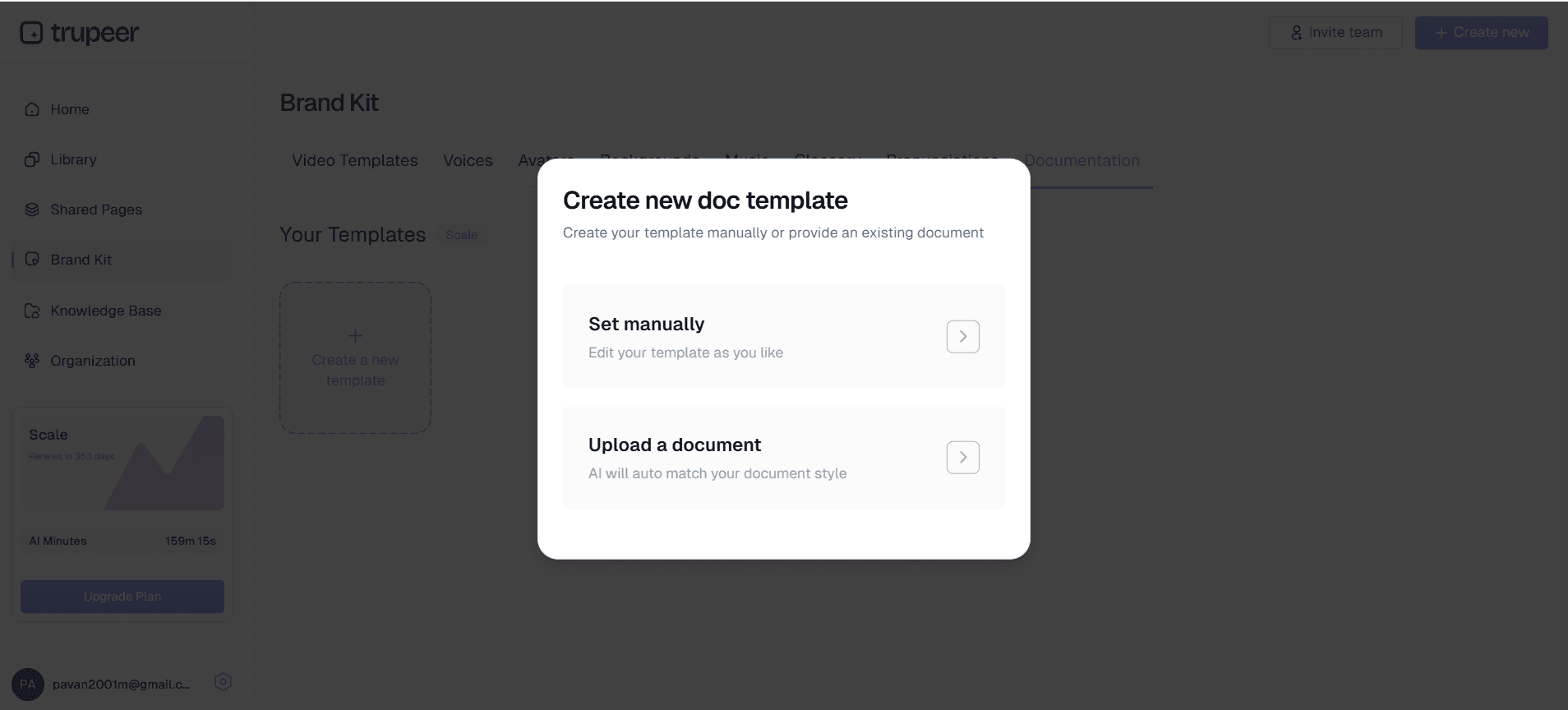
Step 5: Brand Integration and Final Output
Apply your brand kits to incorporate your company's visual identity into the documentation. This includes logos, color schemes, and standardized intros or outros that reinforce your brand presence. The final output can be exported as polished video content, comprehensive written documentation, or both, depending on your specific needs. From there, the process control plan is a natural next step, since the documentation is already captured.
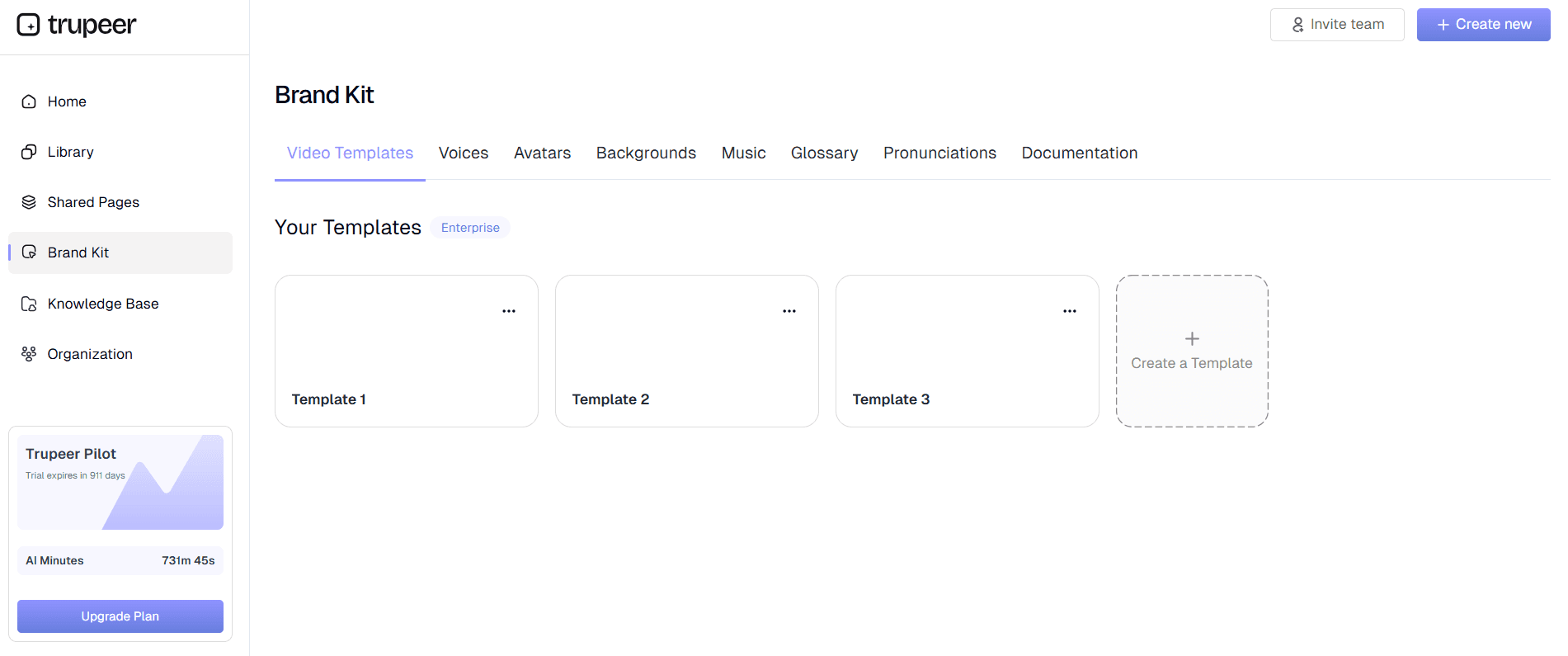
Key Features and Capabilities
Trupeer's process generator incorporates several advanced features that distinguish it from basic documentation tools, creating a comprehensive solution for organizations serious about process excellence and knowledge management.
Dual-Format Output: Generate both video tutorials and written documentation from a single recording session. This unique capability ensures consistency between your visual and textual materials while maximizing the value of your documentation efforts. The AI video editing system ensures that both formats maintain professional quality standards without requiring separate production workflows.
Intelligent Context Recognition: The AI understands not just what actions you're performing, but the business context behind them. This enables the generation of documentation that explains the reasoning behind process steps, potential alternatives, and common troubleshooting scenarios. This depth of understanding transforms simple recordings into comprehensive learning resources.
Template-Based Consistency: Maintain standardized documentation formats across your entire organization with customizable templates. These templates preserve your preferred structure, styling, and organizational elements, ensuring that process documentation created by different team members maintains consistency. This feature is particularly valuable for organizations managing multiple Guide Generator and training materials.
Multi-Language Support: Extend your process documentation globally with automatic translation capabilities. Generate documentation in multiple languages to support international teams or customer bases, maintaining accuracy and context across different linguistic versions.
Integration-Ready Export: Export your documentation in formats optimized for various platforms and use cases. Whether you're building a knowledge base, creating Training Manual Generator materials, or developing internal training programs, the flexible export options ensure compatibility with your existing systems and workflows.
Version Control and Updates: Easily update process documentation by recording new versions of workflows. The AI can identify changes and updates, helping maintain current documentation that reflects your evolving processes and procedures.
Why Should You Use Trupeer's Process Generator?
The benefits of using Trupeer's process generator extend far beyond simple time savings, creating strategic advantages that impact multiple aspects of organizational performance and operational efficiency.
Accelerated Documentation Creation: Traditional process documentation can take days or weeks to create, write, and refine. With Trupeer's system, you can generate comprehensive documentation in minutes. This dramatic time reduction means that processes can be documented immediately after they're developed or refined, preventing the common problem of outdated documentation that plagues many organizations. The efficiency gains are particularly pronounced when creating SOP Generator materials that need regular updates.
Enhanced Accuracy and Completeness: Human-written documentation often suffers from gaps, assumptions, and inconsistencies. When you record actual process execution, every step is captured exactly as performed, eliminating the guesswork and memory gaps that can compromise traditional documentation. The AI ensures that no critical steps are omitted and that the documentation reflects real-world execution rather than idealized procedures.
Improved Knowledge Transfer: Video-based process documentation significantly improves knowledge transfer effectiveness compared to text-only materials. Visual learners can follow the recorded actions, while the accompanying written documentation serves as a reference for detailed steps. This multi-modal approach accommodates different learning styles and ensures that complex processes are understood correctly by new team members.
Scalable Training and Onboarding: Creating effective training materials becomes exponentially easier when you can generate both instructional videos and reference documentation from the same source. New employees can watch the process execution while following along with written guides, accelerating their learning curve and reducing the burden on existing team members who would otherwise need to provide one-on-one training.
Consistent Quality Standards: The template-based approach ensures that all process documentation maintains consistent quality and formatting standards. This consistency improves user experience and makes it easier for team members to find and use the information they need. When combined with brand kits, the documentation also reinforces organizational identity and professionalism.
Reduced Maintenance Overhead: Updating process documentation becomes significantly easier when you can simply record new versions rather than rewriting entire documents. This reduced maintenance burden means that documentation is more likely to stay current, improving its long-term value and reliability.
Who Can Use Trupeer's Process Generator?
Trupeer's process generator serves diverse professional roles and organizational needs, making it valuable across industries and company sizes. The flexibility and ease of use make it accessible to both technical and non-technical users.
Content Creators and Educators: Professional trainers, course creators, and educational content developers can transform their expertise into scalable learning materials. Instead of repeatedly delivering the same training sessions, they can create comprehensive process documentation that serves multiple audiences. The ability to generate both training videos and written materials from a single recording session maximizes content creation efficiency while maintaining educational quality.
Marketing Teams and Product Managers: Marketing professionals can create compelling Documentation Generator materials that demonstrate product capabilities and use cases. Product managers can document feature workflows, creating materials that support both internal teams and customer-facing initiatives. The professional output quality ensures that documentation can be used directly in customer communications and marketing campaigns.
Operations and Process Improvement Teams: Organizations focused on operational excellence can document current state processes, identify improvement opportunities, and create standardized procedures that drive consistency. The detailed capture of actual process execution provides valuable data for process analysis and optimization initiatives. Teams working on AI Video Editor can document both current and future state processes to support transition planning.
Customer Success and Support Organizations: Support teams can create comprehensive help materials that reduce ticket volume and improve customer self-service capabilities. The combination of visual demonstrations and written instructions addresses different customer preferences while ensuring that complex procedures are communicated clearly. Integration with existing knowledge base systems ensures that documentation fits seamlessly into customer support workflows.
Sales and Pre-Sales Teams: Sales professionals can create personalized demonstrations and proposals that showcase product capabilities in the context of specific customer needs. The ability to quickly generate professional-quality AI Screen Recorder materials enables more responsive customer engagement and more effective sales processes.
Small Business Owners and Entrepreneurs: Resource-constrained small businesses can create professional documentation without dedicating significant time or personnel to the effort. The automation capabilities level the playing field, allowing small organizations to maintain documentation standards that compete with larger enterprises while focusing their limited resources on core business activities.
Best Practices for Using Trupeer's Process Generator
Maximizing the value of Trupeer's process generator requires understanding how to prepare recordings, structure processes, and leverage the platform's advanced features for optimal results.
Plan Your Recording Session: Before starting your screen recording, outline the process you want to document and prepare your environment. Close unnecessary applications, clear your desktop of distractions, and have any required materials readily available. This preparation ensures that your recording focuses on the essential process steps without unnecessary diversions that could confuse the final documentation.
Use Clear, Deliberate Actions: When recording, perform each step deliberately and at a pace that allows the AI to clearly identify your actions. Pause briefly between major steps to create natural break points that the system can use to structure the documentation. Speak clearly if you're providing narration, as the AI uses audio cues to enhance the written documentation quality.
Leverage Documentation Templates: Develop and save technical documentation templates that reflect your organization's standards and requirements. Consistent templates not only improve the professional appearance of your documentation but also make it easier for users to find and understand the information they need.
Review and Refine Output: While Trupeer's AI generates high-quality documentation automatically, reviewing and refining the output ensures that it meets your specific requirements. Add context-specific information, clarify any ambiguous steps, and ensure that the documentation addresses common questions or potential issues that users might encounter.
Explore Related Tools
Why Choose Trupeer's Process Generator
Dual Format Output
Generate both video tutorials and written documentation from one recording
AI-Powered Accuracy
Capture every step with intelligent context recognition and enhancement
Template Consistency
Maintain professional standards with customizable documentation templates
Create Process Documentation in 3 Steps
Step 1
Record your screen workflow
Step 2
Let AI generate documentation
Step 3
Apply templates and share
Frequently Asked Questions
What is a process generator and how does it work?
A process generator is a tool that automatically creates process documentation from screen recordings. Trupeer's version uses AI to analyze your recorded workflow and generate both video tutorials and written guides simultaneously.
Can I upload existing recordings to generate process documentation?
Yes, you can upload existing screen recordings to Trupeer's process generator. The AI will analyze the footage and create comprehensive documentation just as it would with a fresh recording made through our platform.
What file formats does the process generator support for documentation export?
Trupeer's process generator exports documentation in multiple formats including video files, PDF guides, and web-ready formats. You can also integrate directly with knowledge base systems and documentation platforms.
How does AI improve the quality of generated process documentation?
The AI enhances documentation by removing background noise, eliminating filler words, applying intelligent zoom effects, and generating contextual written explanations that go beyond simple step descriptions to include reasoning and best practices.
Can I customize the appearance and branding of generated process documentation?
Absolutely. Trupeer's process generator includes brand kit integration and customizable templates, allowing you to maintain consistent branding, formatting, and styling across all your process documentation materials.
More Tools


