4.8/5
Free Accounting Manual Generator
Transform Complex Accounting Processes into Clear, Professional Manuals
Create Your Manual Now

Trupeer's accounting manual generator revolutionizes how accounting professionals create comprehensive documentation for their processes, procedures, and workflows. Instead of spending countless hours writing manuals from scratch, you can now record your screen while performing accounting tasks and let AI automatically generate professional documentation that captures every detail of your process. This innovative approach to creating accounting manuals addresses a critical challenge faced by accounting departments, CPA firms, and financial professionals: the time-consuming nature of documentation creation. Traditional manual writing requires significant effort to capture screenshots, write step-by-step instructions, format content, and ensure consistency across all documentation. With Trupeer's AI screen recorder, you simply perform your accounting tasks as you normally would, and our AI technology handles the rest.
The accounting manual generator works by leveraging advanced AI to analyze your screen recordings and automatically extract key information, procedures, and workflows. Whether you're documenting month-end closing procedures, accounts payable processes, financial reporting workflows, or compliance requirements, our platform creates structured, professional manuals that your team can immediately use for training videos and knowledge transfer. What sets Trupeer apart from traditional documentation tools is our dual approach: you can either record fresh content using our built-in screen recorder or upload existing recordings of your accounting processes. Our AI then enhances these recordings, removing background noise and filler words while generating comprehensive written documentation. This flexibility makes it perfect for accounting teams who want to leverage existing training materials or create new documentation from scratch.
How Does the Accounting Manual Generator Work?
The process of creating accounting manuals with Trupeer is designed to be intuitive and efficient, requiring minimal disruption to your existing workflows. Our screen recorder captures every detail of your accounting processes, from simple data entry tasks to complex financial analysis procedures.
Step 1: Record Your Accounting Process
Start by opening Trupeer's screen recorder and navigate to your accounting software. Whether you're working in QuickBooks, Xero, SAP, or any other accounting platform, simply hit record and perform your typical accounting tasks. The AI captures not just your screen actions but also any verbal explanations you provide, creating a comprehensive record of your process.

Step 2: AI Processing and Enhancement
Once your recording is complete, Trupeer's AI immediately begins processing the content. The system automatically removes background noise, eliminates filler words like "um" and "uh," and applies intelligent zoom effects to highlight important areas of the screen. This ensures your final manual maintains professional quality throughout.

Step 3: Automatic Documentation Generation
The AI analyzes your recording and generates detailed written documentation that corresponds to your screen actions. This includes step-by-step instructions, screenshots at key moments, and explanatory text that makes complex accounting procedures easy to follow for team members at any skill level.

Step 4: Customization and Branding
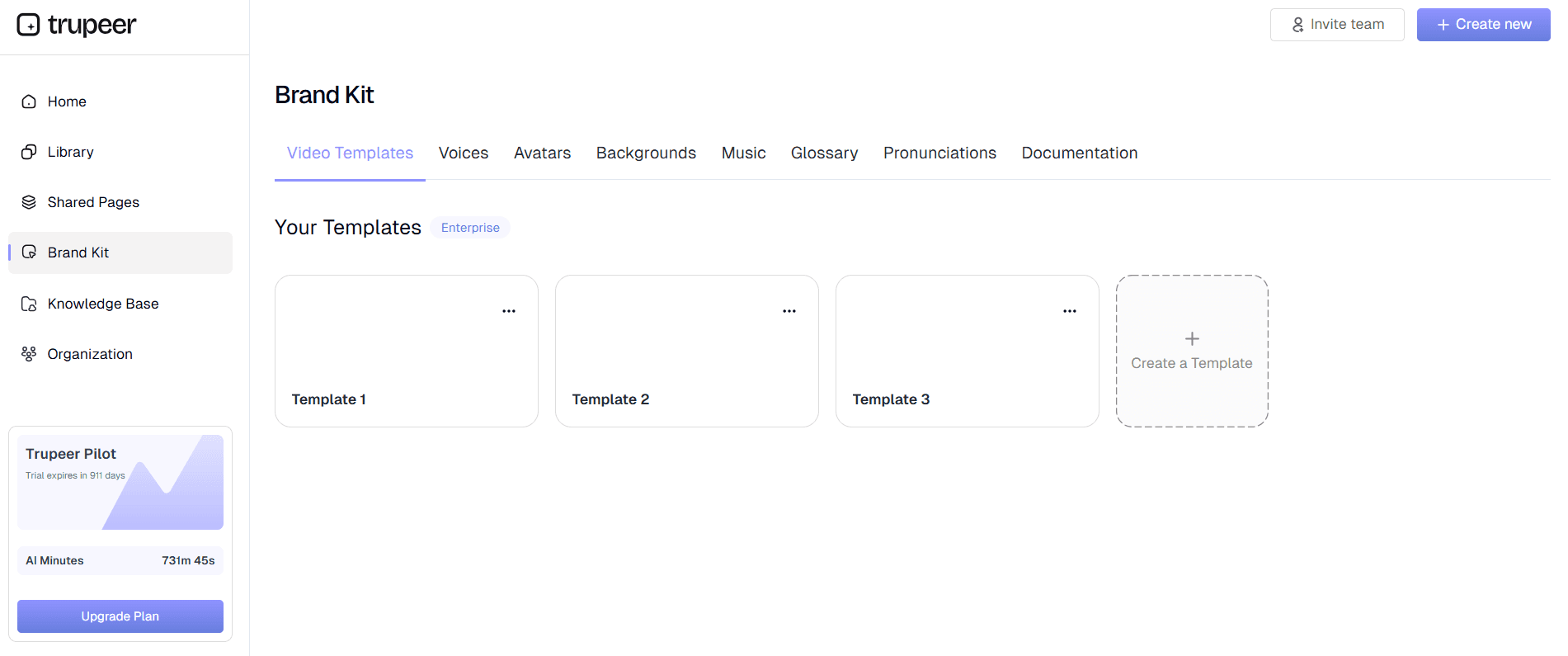
Apply your organization's brand kit to ensure consistent formatting, colors, and logos throughout your accounting manual. You can also customize the documentation using pre-built templates designed specifically for accounting procedures, ensuring consistency across all your manuals.
Step 5: Review and Distribution
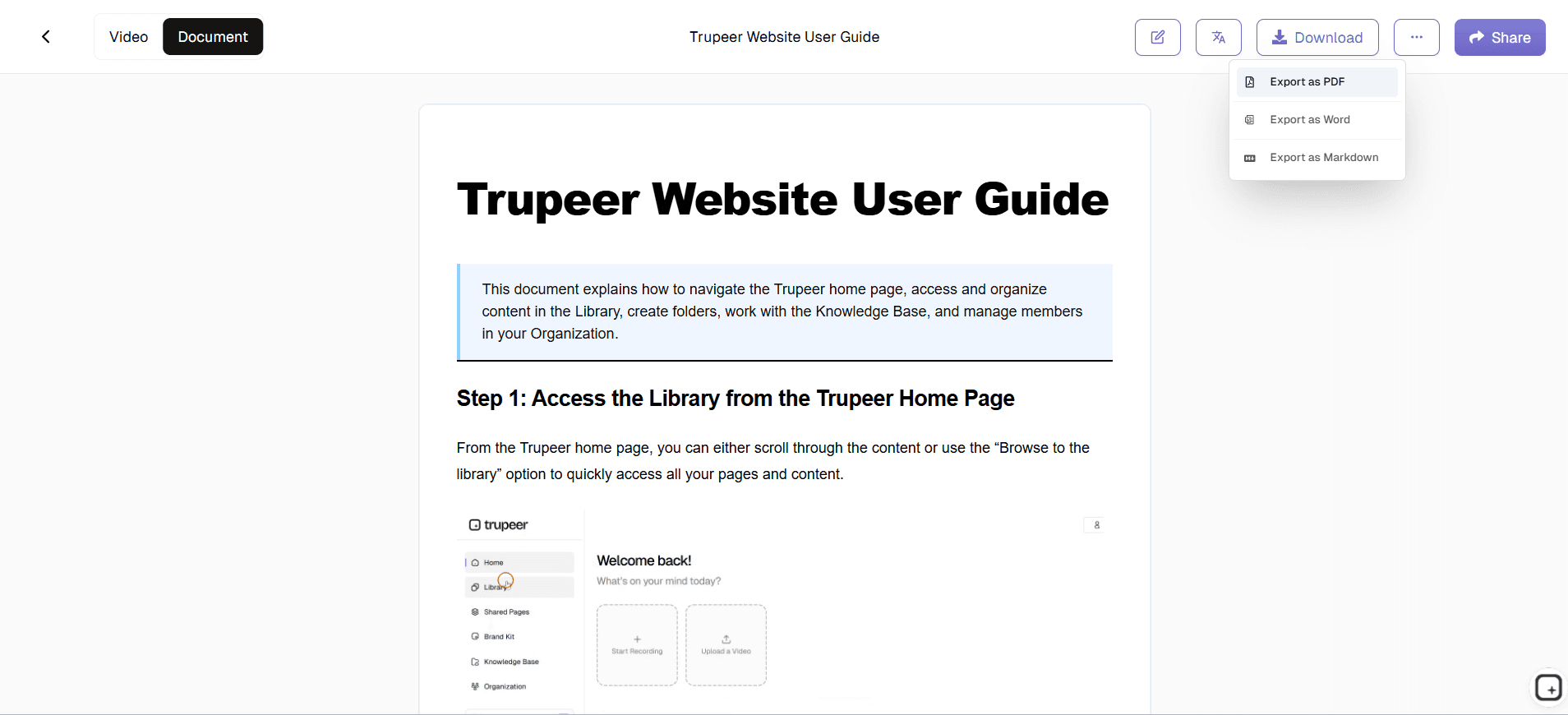
Review your generated manual, make any necessary adjustments, and distribute it to your team. The platform supports multiple export formats, allowing you to share manuals as PDFs, embed them in your company intranet, or use them for AI Screen Recorder initiatives with clients who need to understand your accounting processes.
Key Features and Capabilities
The accounting manual generator includes several specialized features designed specifically for accounting professionals and their unique documentation needs. These capabilities ensure that your manuals capture the precision and detail required for financial processes while remaining accessible to users with varying levels of accounting expertise.
AI-Powered Screen Capture: Our advanced AI screen recorder automatically detects important actions within accounting software interfaces, ensuring that critical steps like journal entries, reconciliations, and report generation are properly documented with appropriate detail and context.
Multi-Software Compatibility: The platform works seamlessly with all major accounting software platforms, from cloud-based solutions like QuickBooks Online and Xero to enterprise systems like SAP and Oracle. This versatility means you can create consistent documentation regardless of which tools your organization uses.
Compliance-Ready Documentation: Generated manuals automatically include timestamps, user actions, and detailed audit trails that support compliance requirements for SOX, GAAP, and other financial regulations. This feature is particularly valuable for technical documentation requirements in regulated industries.
Template Customization: Choose from accounting-specific templates that include standard sections for process objectives, required permissions, system requirements, step-by-step procedures, and quality control checkpoints. These templates ensure your manuals follow industry best practices and maintain consistency across your organization.
Collaborative Review Process: Team members can review and comment on generated manuals before finalization, ensuring accuracy and completeness. This collaborative approach helps identify missing steps or clarifications needed for complex accounting procedures, making the final documentation more effective for training videos and knowledge transfer.
Version Control and Updates: The platform maintains version history for all your accounting manuals, making it easy to update procedures when software changes or new regulations require process modifications. This ensures your documentation stays current and continues to provide value to your team.
Why Should You Use an Accounting Manual Generator?
Creating accounting manuals traditionally requires significant time investment from experienced professionals who could be focusing on higher-value activities. Trupeer's accounting manual generator eliminates this bottleneck while actually improving the quality and consistency of your documentation, making it an essential tool for modern accounting departments.
Time Efficiency: Instead of spending hours writing detailed procedures, you can create comprehensive accounting manuals in the same time it takes to perform the task once. This efficiency gain allows senior accounting staff to focus on analysis, strategy, and client relationships rather than documentation tasks. The time savings become even more significant when creating SOP Generator for accounting software implementations.
Improved Accuracy: Manual documentation often includes errors or omissions because it relies on memory and manual transcription. By capturing actual screen actions and system responses, the accounting manual generator ensures that every step is accurately documented, including error handling and exception procedures that might otherwise be overlooked.
Consistency Across Teams: Large accounting departments often struggle with inconsistent documentation styles and procedures. Using brand kits and standardized templates, the platform ensures all manuals follow the same format and include the same level of detail, regardless of who creates them.
Enhanced Training Capabilities: New employees can learn accounting procedures more effectively with visual, step-by-step manuals that show exactly what they should see on their screens. This reduces training time and improves retention compared to traditional text-only manuals.
Scalable Documentation: As your accounting processes evolve or new software is implemented, you can quickly update existing manuals or create new ones without starting from scratch. This scalability is particularly valuable for Documentation Generator when accounting teams need to document new client processes quickly.
Audit Readiness: Having detailed, current documentation for all accounting processes demonstrates strong internal controls and can significantly streamline audit procedures. Auditors can review documented processes and verify that actual practices match established procedures.
Who Can Use the Accounting Manual Generator?
The versatility of Trupeer's accounting manual generator makes it valuable for a wide range of professionals and organizations who need to document financial processes, create training materials, or ensure consistent accounting procedures across their teams.
CPA Firms and Accounting Practices: Public accounting firms can document client-specific procedures, create standardized audit approaches, and develop training materials for new staff. The platform is particularly useful for creating AI Video Editor materials that help clients understand their financial processes and maintain accurate records between engagements.
Corporate Accounting Departments: Large organizations with complex accounting processes can ensure consistency across multiple locations or divisions. Finance teams can create manuals for month-end closing procedures, budget preparation processes, and compliance requirements that maintain accuracy regardless of staff turnover.
Small Business Owners: Entrepreneurs who handle their own bookkeeping can document their processes to prepare for hiring accounting staff or working with external bookkeepers. This documentation ensures business continuity and makes it easier to train new team members on company-specific procedures.
Accounting Software Consultants: Professionals who implement and customize accounting software for clients can create detailed implementation guides, user manuals, and Training Manual Generator that demonstrate best practices for specific industries or business models.
Educational Institutions: Accounting professors and trainers can create realistic, software-specific learning materials that show students exactly what they'll encounter in professional environments. This practical approach enhances traditional textbook learning with real-world applications.
Compliance Officers: Organizations in regulated industries can document financial controls, create audit trails, and maintain process documentation that supports regulatory requirements. The detailed nature of AI-generated manuals provides the thoroughness needed for compliance documentation while reducing the time burden on compliance teams.
Best Practices for Using the Accounting Manual Generator
To maximize the value of your accounting manuals and ensure they serve their intended purpose effectively, follow these proven strategies that leverage the full capabilities of Trupeer's platform while addressing the specific needs of accounting documentation.
Plan Your Recording Sessions: Before starting your screen recording, outline the complete process you want to document, including any variations or exceptions that commonly occur. This preparation ensures your manual covers all scenarios your team might encounter and reduces the need for multiple recording sessions to capture missing information.
Include Verbal Explanations: While recording your screen, provide clear verbal explanations of why you're performing each step, what results you expect to see, and how to handle common variations or errors. Our AI incorporates these explanations into the written documentation, creating more comprehensive technical documentation that helps users understand not just what to do, but why.
Test Your Documentation: Before finalizing any accounting manual, have a team member who wasn't involved in the creation process follow the documented steps. This testing reveals any gaps or assumptions that might not be obvious to the manual creator but could confuse end users.
Leverage Template Consistency: Use Trupeer's template features to maintain consistent formatting, section headers, and information hierarchy across all your accounting manuals. This consistency makes it easier for team members to quickly find the information they need and reduces the learning curve for new documentation.
Regular Updates and Maintenance: Schedule periodic reviews of your accounting manuals to ensure they remain current with software updates, regulatory changes, and process improvements. The platform's version control features make it easy to track changes and maintain historical documentation for audit purposes.
Explore Related Tools
Why Choose Trupeer's Accounting Manual Generator
AI-Powered Automation
Transform screen recordings into professional manuals automatically with intelligent processing
Compliance Ready
Generate audit-ready documentation with timestamps and detailed procedure tracking
Multi-Format Export
Share as videos, PDFs, or embedded guides for maximum accessibility
How to Create Your Accounting Manual
Step 1
Record your accounting process
Step 2
AI generates professional documentation
Step 3
Customize and share instantly
Frequently Asked Questions
What accounting software does the manual generator support?
Trupeer's accounting manual generator works with all major accounting platforms including QuickBooks, Xero, SAP, Oracle, and any web-based or desktop accounting software. The AI captures screen actions regardless of the specific application.
How long does it take to generate an accounting manual?
Manual generation happens in real-time as you record. A typical 10-minute accounting process recording will produce a complete manual within 2-3 minutes of finishing your recording.
Can I edit the AI-generated accounting documentation?
Yes, you can fully customize all generated content including text, screenshots, formatting, and branding. The AI provides a comprehensive starting point that you can refine to match your specific needs.
Is the accounting manual generator suitable for compliance documentation?
Absolutely. The platform generates detailed audit trails, timestamps, and comprehensive process documentation that meets requirements for SOX, GAAP, and other financial regulations.
Can multiple team members collaborate on accounting manuals?
Yes, Trupeer supports collaborative editing and review processes. Team members can comment, suggest changes, and contribute to manual development to ensure accuracy and completeness.
More Tools



