4.8/5
Free IT Documentation Generator
Streamline Your IT Documentation Process Today
Generate IT Docs Free

Trupeer's IT documentation generator revolutionizes how IT professionals create and maintain technical documentation. Instead of spending hours writing lengthy guides from scratch, you can simply record your screen while performing IT processes and let AI automatically generate comprehensive documentation. This powerful tool addresses the persistent challenge that IT teams face: keeping documentation current, accessible, and detailed enough for both technical and non-technical users. The core problem this tool solves is documentation debt. Most IT teams struggle with outdated documentation, inconsistent formatting, and the time-consuming nature of creating detailed technical guides.
What sets Trupeer's IT documentation generator apart from generic documentation tools is its AI-powered video analysis. The system doesn't just transcribe what you say, it understands what you're doing on screen, identifies key actions, and structures the information logically. Combined with our AI screen recorder, you get a seamless workflow that produces both video tutorials and written documentation from a single recording session. The technology behind this tool leverages advanced computer vision and natural language processing to analyze screen recordings frame by frame. It identifies UI elements, user actions, system responses, and contextual information to create comprehensive documentation. Whether you're documenting software installations, troubleshooting procedures, or system configurations, the AI understands the technical context and generates appropriate documentation structure.
How Does IT Documentation Generator Work?
The IT documentation generation process is designed for maximum efficiency and minimal disruption to your workflow. The system works whether you're creating new documentation or updating existing procedures, giving you flexibility in how you approach documentation maintenance. The same documentation can feed straight into the it documentation solution, so you're not putting it together separately.
Step 1: Record Your IT Process
Start by using Trupeer's screen recorder to capture yourself performing the IT task you want to document. This could be anything from software installation procedures to network configuration steps. The recording captures both your screen activity and any narration you provide, giving the AI complete context about the process.

Step 2: AI Analysis and Enhancement
Once your recording is complete, Trupeer's AI automatically analyzes the footage to identify key actions, system responses, and procedural steps. The AI removes filler words, enhances audio quality, and adds helpful zoom effects to highlight important interface elements. This ensures your final documentation is professional and easy to follow.

Step 3: Automatic Documentation Generation
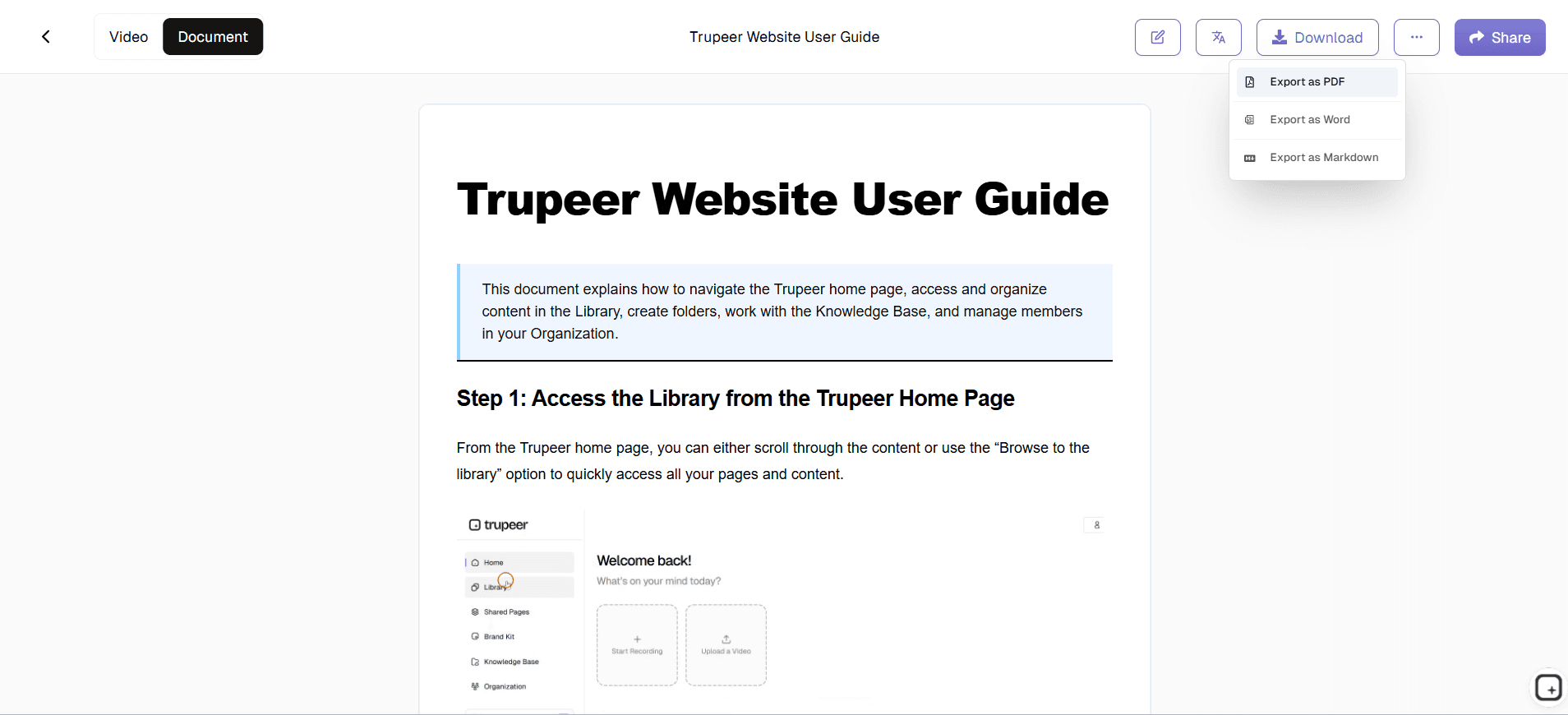
The AI converts your screen recording into structured written documentation, complete with step-by-step instructions, screenshots, and contextual explanations. The system identifies logical break points in your workflow and organizes the content into clear, actionable sections that technical teams can easily follow.

Step 4: Template Application and Customization
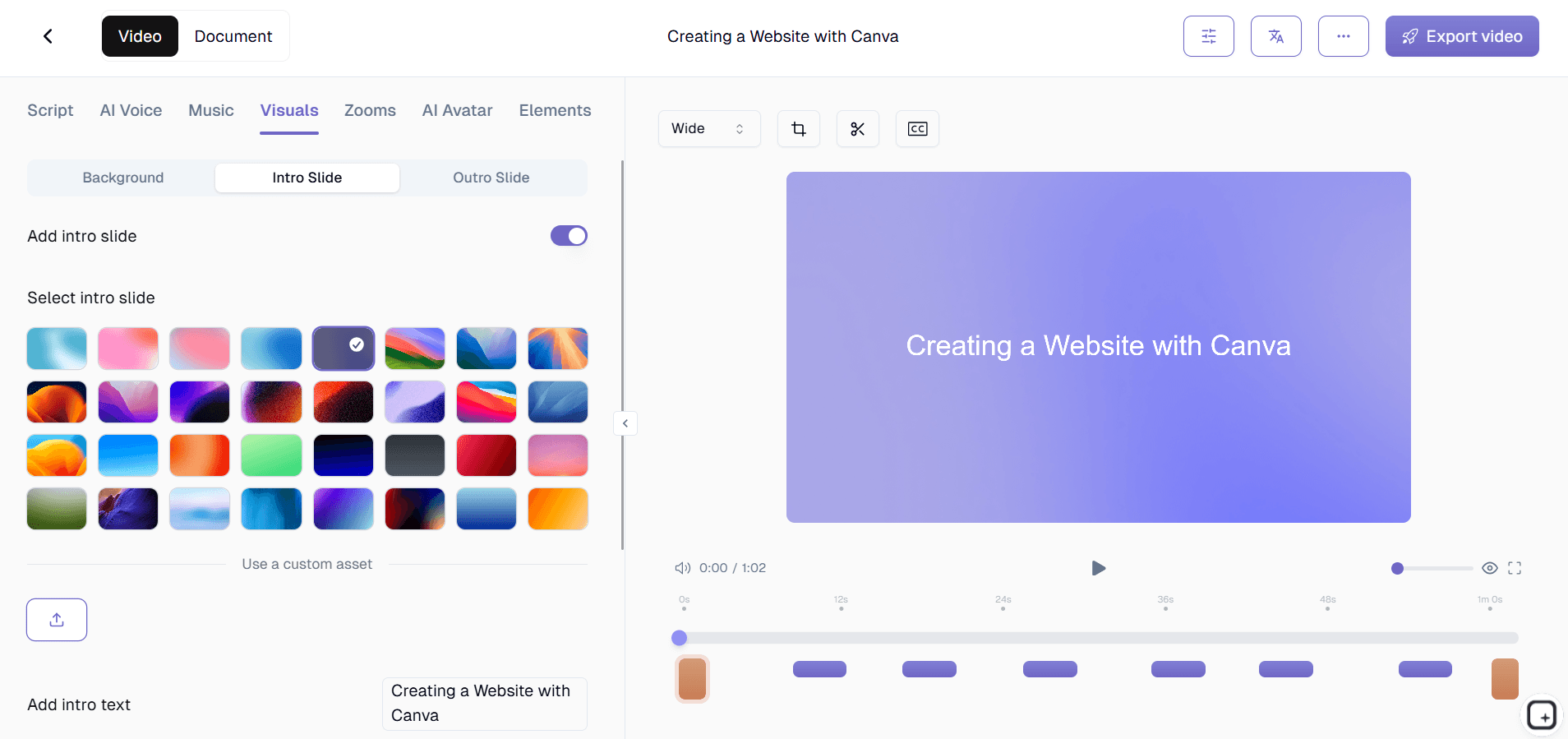
Apply your organization's documentation templates to ensure consistency across all IT documentation. Trupeer's template system allows you to save preferred formatting, styling, and structural elements, so every piece of documentation follows your established standards without manual formatting.
Step 5: Review and Refinement
Review the generated documentation and make any necessary adjustments. The AI provides a solid foundation, but you can refine technical details, add additional context, or modify the structure to match your team's specific needs. The system learns from your edits to improve future documentation generation.
Key Features and Capabilities
Trupeer's IT documentation generator includes powerful features designed specifically for technical documentation needs. The AI video editor automatically enhances your recordings with professional polish, while advanced documentation features ensure your written guides meet enterprise standards.
Smart Process Recognition: The AI identifies common IT procedures and applies appropriate documentation structures automatically. Whether you're documenting database maintenance, security protocols, or user account management, the system recognizes the process type and formats the documentation accordingly, including relevant technical sections and safety warnings.
Multi-Format Output: Generate both video tutorials and comprehensive written documentation from a single recording. This dual output approach means you can provide training videos for visual learners while maintaining detailed written procedures for reference during actual implementation.
Template Customization: Create and save documentation templates that match your organization's standards. Include specific formatting for different types of IT documentation, from quick reference guides to detailed implementation procedures. Templates can include mandatory sections, approval workflows, and compliance requirements.
Brand Integration: Apply your organization's brand kits to maintain consistent visual identity across all documentation. Include company logos, color schemes, and standardized headers that reinforce professional appearance and organizational branding in all technical documentation.
Version Control and Updates: Easily update existing documentation by recording new versions of procedures. The system can identify changes in processes and highlight updates, making it simple to maintain current documentation as systems and procedures evolve.
Collaboration Features: Enable team members to review, comment, and suggest improvements to documentation before publication. This collaborative approach ensures accuracy and completeness while distributing the documentation workload across your IT team.
Why Should You Use IT Documentation Generator?
The benefits of using Trupeer's IT documentation generator extend far beyond simple time savings. This tool fundamentally changes how IT teams approach documentation, making it a natural part of workflow rather than a separate, burdensome task.
Dramatic Time Reduction: Instead of spending hours writing documentation after completing IT tasks, you document while doing. This approach can reduce documentation time by up to 80%, freeing IT professionals to focus on more strategic activities. The time savings compound as you build a comprehensive documentation library without additional writing effort.
Improved Documentation Quality: Screen recordings capture every detail of a process, including visual cues that are often missed in written-only documentation. The AI identifies important interface elements, system responses, and potential trouble spots that human writers might overlook. This comprehensive capture results in more accurate, actionable documentation.
Enhanced Team Onboarding: New IT team members can access both video demonstrations and detailed written procedures, accommodating different learning styles and skill levels. The visual component helps newcomers understand complex interfaces while written documentation provides reference material for later use. This dual approach accelerates onboarding and reduces training time.
Consistency Across Documentation: Templates and AI processing ensure all documentation follows the same structure and quality standards, regardless of who creates it. This consistency makes it easier for team members to find information quickly and reduces confusion that can arise from varying documentation styles and formats.
Reduced Knowledge Loss: When team members leave or change roles, their knowledge stays accessible through comprehensive documentation. The ease of creating documentation with Trupeer means departing employees can quickly document their processes before leaving, preserving institutional knowledge that might otherwise be lost.
Compliance and Audit Readiness: Many IT environments require detailed documentation for compliance purposes. Trupeer's systematic approach ensures procedures are thoroughly documented with timestamps, screenshots, and detailed steps that satisfy audit requirements. Updates are easily tracked, maintaining compliance as systems evolve.
Who Can Use IT Documentation Generator?
Trupeer's IT documentation generator serves diverse technical roles and organizations, from individual consultants to large enterprise IT departments. The tool's flexibility accommodates different technical environments and documentation requirements.
IT System Administrators: Document server configurations, maintenance procedures, and troubleshooting workflows. System administrators can quickly create comprehensive guides for routine maintenance tasks, emergency procedures, and system updates. The visual documentation helps less experienced team members handle complex tasks with confidence, reducing dependency on senior staff for routine operations.
Technical Support Teams: Create detailed troubleshooting guides and customer support procedures. Support teams can document common issues and their resolutions, building a knowledge base that improves response times and consistency. Visual documentation helps support staff understand complex software interfaces and guide customers through solutions more effectively.
DevOps Engineers: Document deployment procedures, infrastructure setup, and automated workflow configurations. DevOps teams can capture complex deployment processes that involve multiple systems and tools, ensuring procedures are repeatable and reliable. This documentation is crucial for maintaining consistency across development, testing, and production environments.
IT Trainers and Educators: Develop comprehensive AI Screen Recorder for technical skills development. Trainers can create both video demonstrations and written exercises from single recording sessions. The ability to generate multiple formats from one source makes it efficient to create comprehensive learning materials that serve different educational needs.
Compliance Officers: Ensure IT procedures meet regulatory requirements and audit standards. Compliance teams can verify that documented procedures include all necessary steps, approvals, and safety measures. The detailed capture capability helps demonstrate compliance with industry standards and regulatory requirements during audits.
IT Consultants: Create client-specific documentation and transfer knowledge effectively. Consultants can document custom implementations and configurations for client teams, ensuring smooth knowledge transfer at project completion. The professional appearance of generated documentation reinforces consultant credibility and provides lasting value for clients.
AI Screen Recorder working on technical products can use the generator to create implementation guides, API documentation, and technical specifications that help customers understand and use complex technical products effectively.
The common thread across IT roles: nobody's documenting because they're already too busy doing. The sysadmin is configuring servers. The DevOps engineer is fixing pipelines. The support team is closing tickets. The trainer is running sessions. Documentation gets postponed until next sprint, which becomes next quarter, which becomes never. Recording during the work itself takes the postponement loop out of the equation. The runbook exists by the time the work finishes. Most IT teams that adopt this pattern produce more documentation in the first month than they shipped in the previous three quarters. Not because anyone tried harder. Because the production cost dropped close to zero.
Best Practices for Using IT Documentation Generator
Maximize the effectiveness of your IT documentation by following proven strategies that ensure comprehensive, useful documentation. These practices help you create documentation that truly serves your team's needs while minimizing effort and maximizing clarity.
Plan Your Recording Sessions: Before recording, outline the key steps and decision points in your process. This preparation ensures you don't miss important details and helps you speak clearly about what you're doing. Consider potential variations or error conditions that should be included in the documentation, and plan to demonstrate these scenarios when possible.
Speak Clearly and Descriptively: While recording, narrate your actions in detail, explaining not just what you're doing but why. The AI uses this narration to enhance the written documentation, so clear verbal explanations result in better final documentation. Include rationale for decisions and warnings about potential pitfalls.
Use Consistent Terminology: Stick to standard technical terminology and avoid abbreviations without explanation. This consistency helps the AI generate more accurate documentation and makes the final guides more accessible to team members with varying experience levels. Consider your organization's standard terminology and use it consistently.
Leverage Documentation Templates: Develop standardized templates for different types of IT documentation, such as installation procedures, troubleshooting guides, and configuration documentation. Templates ensure consistency and completeness while reducing the time needed to format and structure documentation.
Review and Refine Generated Content: While Trupeer's AI produces high-quality documentation, human review ensures technical accuracy and completeness. Add context that might not be obvious from the recording, clarify technical terms, and verify that all safety considerations are adequately addressed.
Document the rare procedures first. The trick most IT teams miss when adopting recorded documentation: starting with the daily procedures (which everybody already knows) instead of the rare ones (which nobody remembers). The quarterly audit prep. The annual access review. The disaster recovery test. The major version upgrade procedure that runs every 18 months. These are the procedures where documentation gaps hurt most because there's no muscle memory backing them up. Record them the next time they happen. Don't wait for "next time" to come around again to start the documentation backlog.
Set up the glossary with internal system names. IT teams use internal names for systems constantly. The prod cluster might be called Aurora. The CRM integration might be called Bridge. The custom monitoring stack might be called Pulse. Add these to the custom glossary before generating the first batch of runbooks. The AI uses the glossary to spell those names correctly in transcripts and in the written guides. Doing this upfront beats finding and replacing typos across 40 runbooks later. And it makes the runbooks read like they were written by somebody who knows the company, because they were.
Where Trupeer fits next to ServiceNow, IT Glue, Hudu, and existing IT documentation platforms
The IT documentation tool space has a few distinct categories worth understanding. IT Glue, Hudu, and Confluence-for-IT are documentation platforms designed for managed service providers and internal IT teams. They handle structured asset documentation: which client has which firewall, what credentials exist for which system, how is the network topology organized. Trupeer doesn't replace those tools. They store the data layer. Trupeer produces the procedural content (how to do something) that gets attached to that data layer. Most IT teams running IT Glue or Hudu use Trupeer alongside it, with the Shared Page link embedded inside the IT Glue documentation as the actual procedural walkthrough.
ServiceNow, Jira Service Management, and other ITSM platforms handle ticket workflows, change management, and incident response. Documentation lives inside the ITSM as knowledge articles, runbooks tied to specific change types, and post-mortem reports. Trupeer feeds into the ITSM the same way it feeds into IT Glue: as the production layer that generates the content, with the ITSM handling the structured workflow around the content. For pure documentation hosting (Confluence, Notion, GitBook, SharePoint), same pattern applies: produce the runbook in Trupeer, paste the written walkthrough into the existing wiki, embed the video as an inline player. Trupeer covers the production speed problem. The wiki or ITSM covers the hosting, search, and workflow problems.
Explore Related Tools
Why Choose Trupeer's IT Documentation Generator
AI-Powered Automation
Automatically converts screen recordings into professional IT documentation with zero manual formatting
Dual Output Format
Creates both video tutorials and written guides from single recording session
Enterprise Templates
Customizable templates ensure consistent formatting across all technical documentation
Get Started with Trupeer's IT Documentation Generator
Step 1
Record your IT process
Step 2
AI generates documentation automatically
Step 3
Customize and share instantly
Frequently Asked Questions
What types of IT processes can I document with this generator?
You can document any IT process that involves screen interaction, including software installations, system configurations, troubleshooting procedures, network setup, database management, security protocols, and user account management.
How accurate is the AI-generated documentation?
Trupeer's AI achieves high accuracy by analyzing both visual screen content and audio narration. The system identifies technical interfaces, captures step sequences, and generates structured documentation that typically requires minimal editing for technical accuracy.
Can I customize the documentation format for my organization?
Yes, Trupeer provides customizable templates that can include your organization's branding, specific formatting requirements, mandatory sections, and compliance elements. Templates ensure consistency across all documentation while meeting your specific organizational standards.
Does the tool work with existing screen recordings?
Absolutely. You can upload existing screen recordings and Trupeer's AI will process them to generate documentation. This feature is particularly useful for converting legacy training videos or existing recordings into structured written documentation.
How does this compare to traditional documentation methods?
Traditional documentation requires performing a task and then separately writing about it, often missing visual context and detailed steps. Trupeer's approach captures everything in real-time, reducing documentation time by up to 80% while improving accuracy and completeness.
More Tools


