4.8/5
Free Quick Reference Guide Generator
Turn Any Screen Recording Into Professional Quick Reference Guides
Create Your Guide Now

Trupeer's quick reference guide generator revolutionizes how teams create documentation by transforming screen recordings into comprehensive written guides automatically. Unlike traditional documentation tools that require manual writing and formatting, Trupeer's AI-powered system captures your actual workflow through screen recording and converts it into step-by-step reference materials that your team can use immediately. The platform addresses a critical challenge faced by businesses worldwide: the time-consuming process of creating and maintaining up-to-date documentation.
What sets Trupeer apart from traditional documentation tools is its dual-output approach. When you record your screen or upload an existing recording, the AI doesn't just create a video tutorial. It simultaneously generates written documentation, complete with screenshots, step-by-step instructions, and professional formatting.
How Does the Quick Reference Guide Generator Work?
Trupeer's quick reference guide generator follows a streamlined five-step process that transforms your screen activity into professional documentation within minutes. The system is designed to work with both fresh recordings and existing video files, giving you maximum flexibility in how you create your reference materials.
Step 1: Record or Upload Your Content
Begin by either using Trupeer's built-in AI Screen Recorder to capture your workflow in real-time, or upload an existing screen recording that demonstrates the process you want to document. The platform supports multiple video formats and can handle recordings from various screen capture tools, making it easy to work with content you may have already created.

Step 2: AI Analysis and Processing
Once your recording is uploaded, Trupeer's AI engine analyzes every frame, identifying user interface elements, tracking cursor movements, and recognizing text within the screen capture. The system creates a detailed map of your workflow, understanding the sequence of actions, the applications involved, and the specific steps required to complete the task.

Step 3: Automatic Documentation Generation
The AI transforms the visual information from your recording into written instructions, automatically generating step-by-step guides with accompanying screenshots. The system creates clear, actionable descriptions for each part of your workflow, ensuring that someone following the guide can replicate your process exactly.

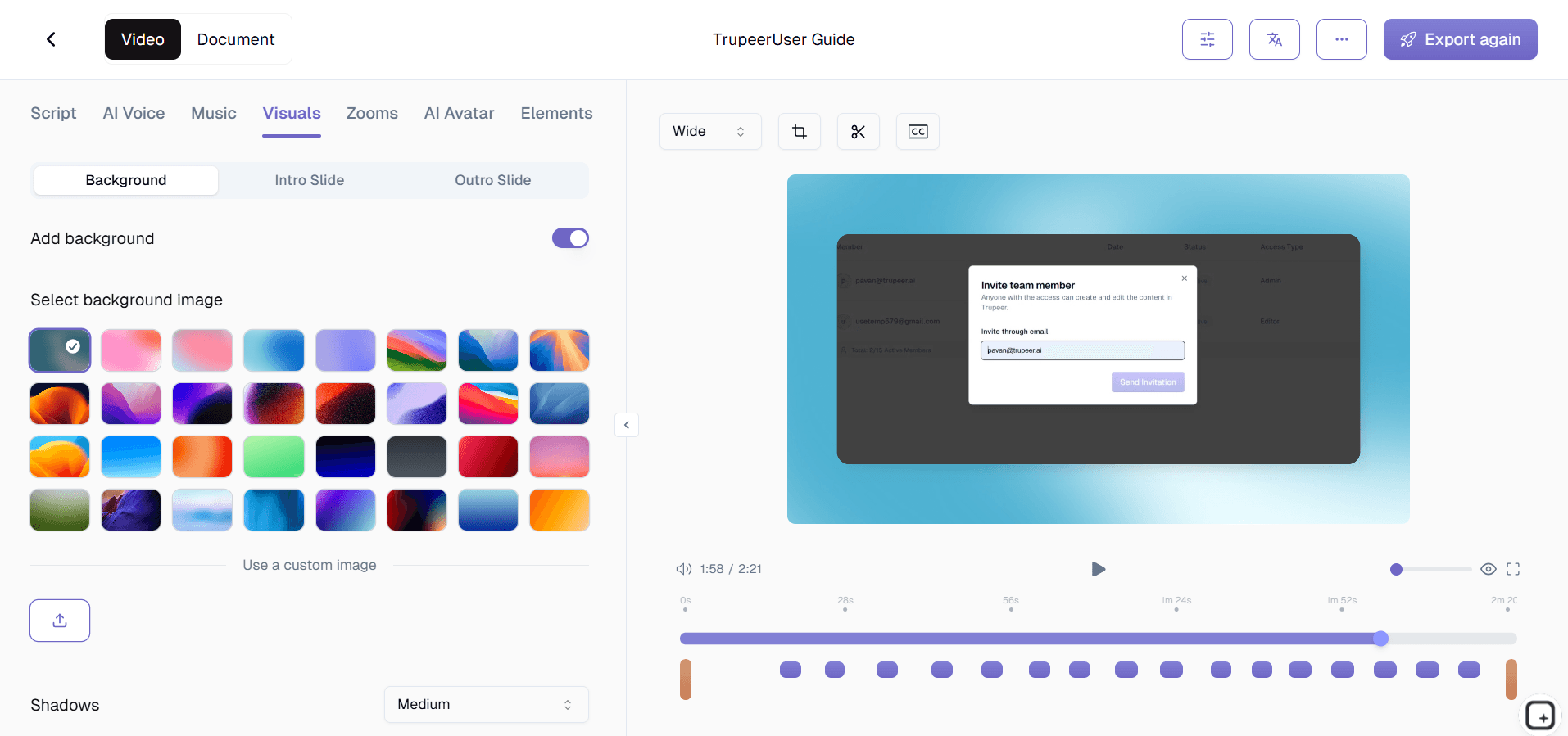
Step 4: Template Application and Customization
Your generated content is formatted using Trupeer's documentation templates, which ensure consistent styling, proper heading hierarchy, and professional presentation. You can customize these templates to match your brand guidelines, creating a cohesive look across all your reference materials that aligns with your organization's visual identity.
Step 5: Review, Brand, and Share
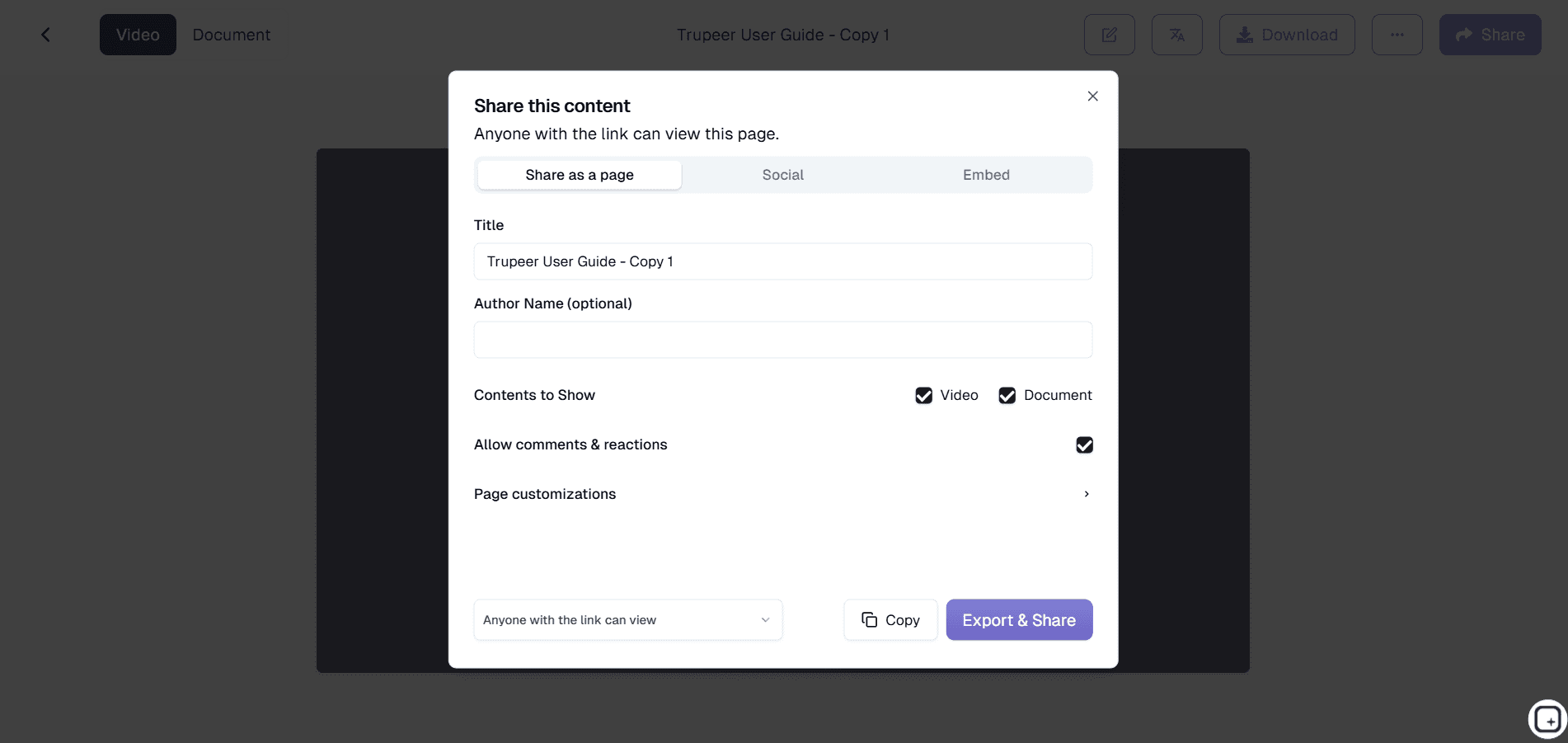
The final step involves applying your brand kits for consistent branding, reviewing the generated content for accuracy, and sharing your completed reference guide via direct links, embedded widgets, or exported files. The system also supports translation into multiple languages, making your guides accessible to global teams.
Key Features and Capabilities
Trupeer's quick reference guide generator offers comprehensive features designed to streamline your documentation workflow while maintaining professional quality standards. These capabilities work together to create a seamless experience from recording to final publication.
AI-Powered Content Recognition: The system uses advanced computer vision to identify and describe user interface elements, automatically generating accurate descriptions of buttons, menus, and screen areas. This eliminates the need for manual screenshot annotation and ensures your guides include precise, actionable instructions that readers can follow easily.
Dual-Output Generation: Every recording produces both video content and written documentation simultaneously. This approach maximizes the value of your time investment, giving you multiple content formats that cater to different learning preferences within your team or customer base.
Template-Based Formatting: Professional documentation templates ensure consistent structure and styling across all your reference guides. These templates follow documentation best practices and can be customized to match your brand requirements, creating a professional appearance that reflects your organization's quality standards.
Brand Integration: Seamlessly apply your company's visual identity through brand kits that include logos, color schemes, and styling preferences. This ensures all your reference guides maintain brand consistency while looking polished and professional.
Multi-Language Support: Built-in translation capabilities allow you to create reference guides in multiple languages from a single recording. This feature is particularly valuable for organizations with global teams or international customer bases who need documentation in their native languages.
Integration-Ready Export: Generated guides can be exported in various formats or shared through direct links and embeddable widgets. This flexibility ensures your reference materials can be integrated into existing knowledge bases, learning management systems, or customer support portals without technical complications.
Why Should You Use Trupeer's Quick Reference Guide Generator?
Trupeer's quick reference guide generator delivers significant time savings and quality improvements compared to traditional documentation methods. Organizations typically see a 75% reduction in documentation creation time while simultaneously improving the accuracy and usability of their reference materials.
Dramatic Time Savings: Creating comprehensive reference guides manually can take hours or even days, especially when you factor in screenshot capture, editing, writing, and formatting. Trupeer reduces this process to minutes by automating the most time-consuming aspects of documentation creation. Teams can focus on strategic work instead of repetitive documentation tasks.
Consistent Quality Standards: Manual documentation often suffers from inconsistent formatting, missing steps, or unclear instructions. Trupeer's AI ensures every guide follows the same high-quality structure and includes all necessary details. The system doesn't skip steps or make assumptions, creating thorough documentation that actually helps users complete tasks successfully.
Reduced Documentation Debt: Many organizations struggle with outdated or incomplete documentation because updating guides manually is too time-intensive. With Trupeer's streamlined process, keeping reference materials current becomes feasible, reducing the documentation debt that often accumulates in fast-moving organizations.
Enhanced User Experience: The guides generated by Trupeer are designed for usability, with clear step-by-step instructions, relevant screenshots, and logical flow. This improves the experience for anyone using your documentation, whether they're internal team members or external customers, leading to better task completion rates and fewer support requests.
Scalability Without Resource Drain: As your organization grows, documentation needs multiply exponentially. Traditional approaches require proportional increases in writing resources, but Trupeer's automated system scales efficiently. You can create extensive documentation libraries without building large documentation teams, making it practical to document every important process thoroughly.
Who Can Use Trupeer's Quick Reference Guide Generator?
Trupeer's quick reference guide generator serves diverse user groups across various industries and organizational functions. The platform's versatility makes it valuable for anyone who needs to create clear, professional documentation quickly and efficiently.
Content Creators and Technical Writers: Professional content creators use Trupeer to streamline their documentation workflows and maintain consistency across large projects. The platform allows them to focus on content strategy and user experience while automating the mechanical aspects of guide creation. Many technical writers report significant productivity gains when using Trupeer for routine documentation tasks.
Marketing Teams and Product Managers: Marketing professionals leverage the platform to create Documentation Generator and accompanying reference guides for sales enablement and customer onboarding. The ability to generate both video and written content from a single recording makes it easier to maintain marketing asset libraries and ensure messaging consistency across channels.
Educators and Corporate Trainers: Educational professionals use Trupeer to create comprehensive Training Manual Generator paired with reference materials that students can revisit. The platform's template system ensures educational content follows pedagogical best practices, while the multi-language support helps reach diverse learner populations effectively.
Product Teams and Software Developers: Development teams rely on Trupeer for creating technical documentation that stays synchronized with product changes. The platform makes it practical to document every feature and update guides whenever the software evolves, reducing support burden and improving user adoption.
Sales Professionals and Customer Success Teams: Sales teams use the platform for AI Screen Recorder materials and personalized customer demonstrations. Customer success professionals create reference guides that help clients maximize product value, reducing support tickets and improving customer satisfaction scores.
Small Business Owners and Entrepreneurs: Resource-constrained small businesses appreciate Trupeer's efficiency in creating professional documentation without requiring dedicated writing staff. The platform enables small teams to punch above their weight in terms of documentation quality and comprehensiveness, supporting better customer experiences and more efficient operations.
Best Practices for Using Trupeer's Quick Reference Guide Generator
Maximizing the value of Trupeer's quick reference guide generator requires understanding how to optimize your recording process and leverage the platform's advanced features effectively. These best practices ensure your generated guides meet professional standards and serve your intended audience well.
Plan Your Recording Session: Before hitting record, outline the process you want to document and practice the workflow to ensure smooth execution. Clear, deliberate actions during recording result in better AI analysis and more accurate written instructions. Take your time with each step and avoid unnecessary cursor movements that might confuse the documentation generation process.
Leverage Template Customization: Invest time in setting up documentation templates that match your organization's style guide and user needs. Well-designed templates improve the consistency and professional appearance of all your reference guides while reducing the manual editing required after generation.
Optimize for Your Audience: Consider who will use your reference guides and adjust your recording style accordingly. For technical audiences, you can move through processes more quickly, while guides for general users benefit from slower, more deliberate demonstrations of each step.
Utilize Advanced Features: Explore Trupeer's tutorials to learn about advanced features like multi-language generation, brand kit integration, and export options. These capabilities can significantly enhance the value and reach of your documentation efforts when used strategically.
Explore Related Tools
Why Choose Trupeer's Quick Reference Guide Generator
Automatic Generation
Transform screen recordings into professional written guides instantly using advanced AI
Dual Content Output
Get both video tutorials and reference documentation from every single recording
Brand Consistency
Apply custom templates and brand kits for professional, consistent documentation styling
How to Use Trupeer's Quick Reference Guide Generator
Step 1
Record or upload your screen
Step 2
Let AI generate documentation
Step 3
Apply templates and branding
Frequently Asked Questions
What types of screen recordings work best for generating quick reference guides?
Any screen recording that demonstrates a clear workflow or process works well. The AI performs best with recordings that show deliberate, step-by-step actions rather than rapid, erratic movements.
Can I edit the generated reference guides after they're created?
Yes, you can review and edit all generated content. Trupeer provides the foundation, and you can refine the documentation to match your specific requirements and style preferences.
How accurate are the automatically generated reference guides?
Trupeer's AI achieves high accuracy by analyzing screen elements and user actions systematically. The generated guides typically require minimal editing, especially when working with clear, well-structured recordings.
Can I create reference guides in multiple languages from one recording?
Absolutely. Trupeer's translation features allow you to generate reference guides in multiple languages from a single recording, making it easy to serve global teams and customers.
What's the difference between Trupeer's approach and traditional documentation tools?
Traditional tools require manual writing and screenshot management. Trupeer automatically extracts both visual and procedural information from recordings, creating comprehensive guides with minimal manual effort.
More Tools


