4.8/5
Free Software Process Generator
Streamline Your Software Process Documentation Creation
Generate Process Docs Now

Trupeer's software process generator revolutionizes how teams create and maintain software process documentation. Unlike traditional documentation tools that require manual writing from scratch, our AI-powered platform transforms screen recordings into comprehensive, professional process guides automatically. Whether you're documenting software workflows, creating standard operating procedures, or building training materials, Trupeer eliminates the tedious manual work of writing process documentation. The core challenge most organizations face is keeping software process documentation current and comprehensive.
Trupeer's software process generator solves this problem by capturing your actual workflow through screen recording and automatically generating both video demonstrations and written documentation. Our AI screen recorder captures every click, keystroke, and navigation step while you perform the process naturally. The AI then processes this recording to create polished video content and detailed written guides that mirror your exact workflow. What sets Trupeer apart from other documentation tools is our dual-output approach and intelligent processing capabilities. While other platforms focus solely on video creation or document generation, we provide both formats from a single recording session.
How Does the Software Process Generator Work?
Trupeer's software process generator operates through a streamlined five-step workflow that transforms raw screen recordings into professional documentation with minimal manual intervention.
Step 1: Record Your Process
Begin by using Trupeer's built-in screen recorder or upload an existing recording of your software process. Our recording tool captures high-quality video while you perform the process naturally, without worrying about perfect execution. The AI will handle imperfections during processing. You can record entire workflows, specific feature demonstrations, or troubleshooting procedures depending on your documentation needs.

Step 2: AI Processing and Enhancement
Once your recording is complete, Trupeer's AI automatically processes the content through multiple enhancement layers. The system removes background noise, eliminates filler words and long pauses, adds intelligent zoom effects to highlight important UI elements, and optimizes video quality. This automated processing ensures your final video looks professional without requiring video editing expertise.

Step 3: Documentation Generation
Simultaneously with video processing, our AI analyzes the screen recording to generate comprehensive written documentation. The system identifies each action, captures relevant UI text, recognizes workflow decision points, and creates step-by-step instructions that mirror your recorded process. This documentation includes screenshots, detailed explanations, and contextual information that makes the process easy to follow.

Step 4: Template Application and Customization
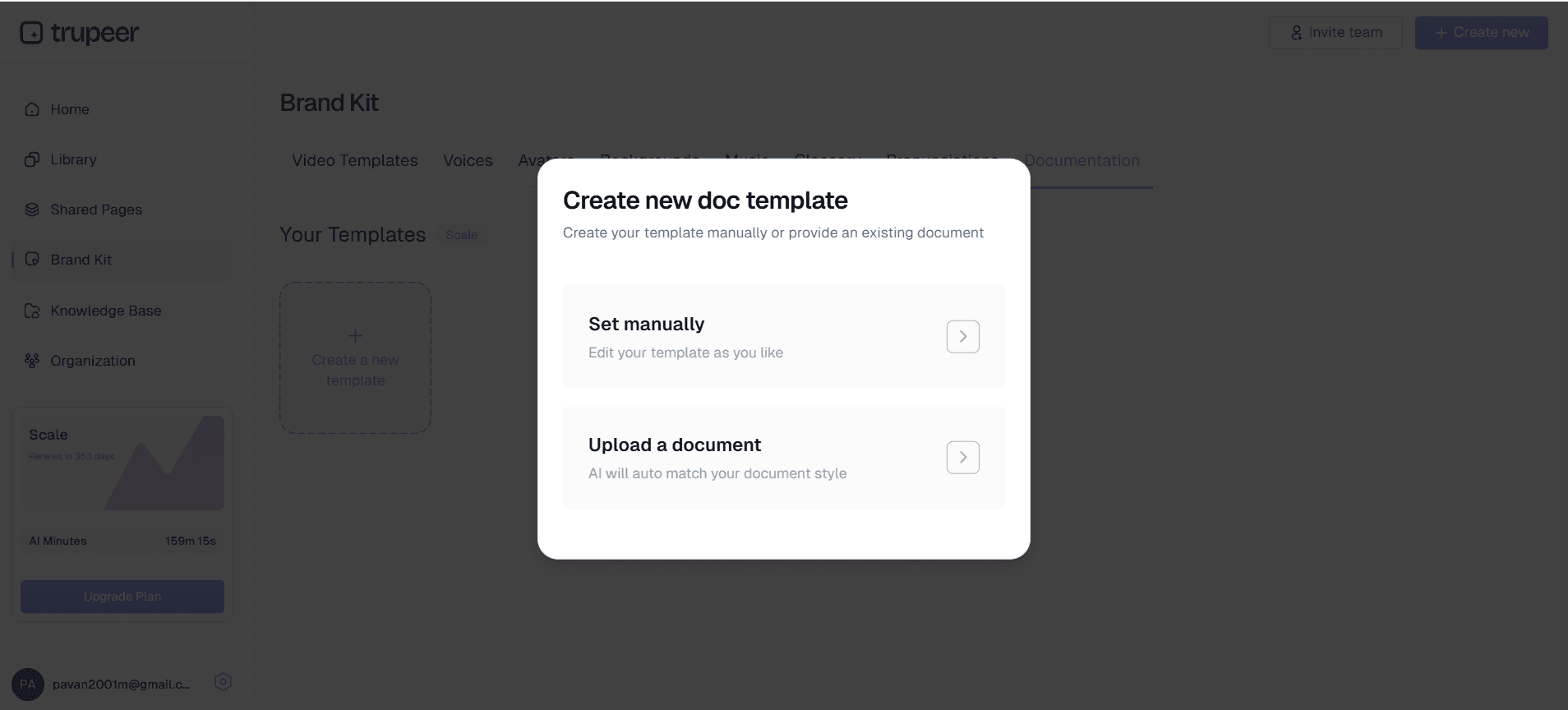
Apply your saved documentation templates to ensure consistent formatting across all your process guides. Trupeer allows you to create and save custom templates with your preferred styling, structure, and formatting preferences. This feature ensures brand consistency and saves time on future documentation projects.
Step 5: Brand Application and Distribution
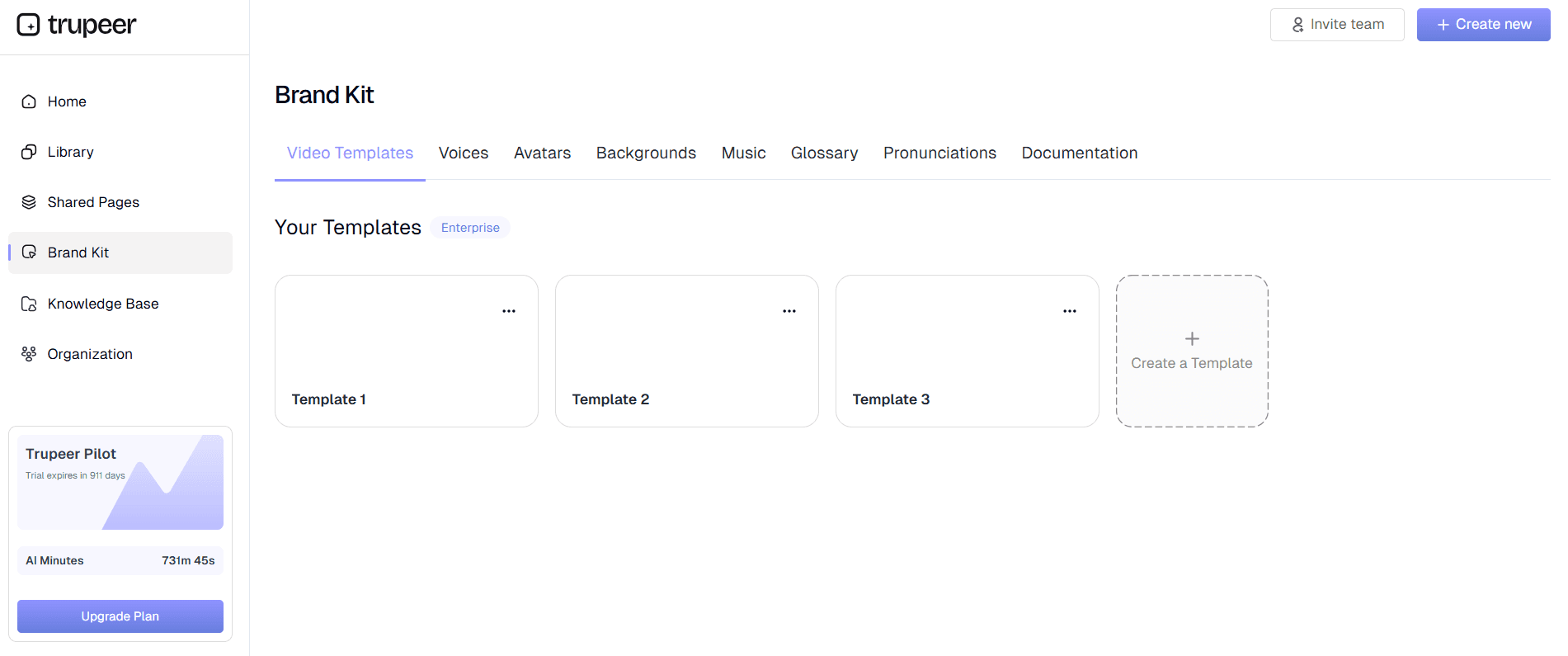
Apply your brand kit to maintain visual consistency across all documentation. Add your company logo, colors, intro sequences, and outros to create professional-looking materials that align with your brand identity. Once complete, share your documentation through direct links, embed codes for websites, or export in multiple formats for different distribution channels.
Key Features and Capabilities
Trupeer's software process generator offers comprehensive features designed to streamline documentation creation while maintaining professional quality and brand consistency.
Dual Recording Options: Choose between Trupeer's built-in screen recording tool or upload existing recordings for AI processing. This flexibility accommodates different workflow preferences and allows teams to enhance previously recorded content. Our AI screen recorder captures crisp video while you demonstrate software processes naturally, without performance pressure.
Intelligent Video Enhancement: Our AI automatically improves video quality through noise removal, filler word elimination, and strategic zoom effects that highlight important interface elements. This automated enhancement transforms raw recordings into polished training videos suitable for professional distribution and team training purposes.
Automated Documentation Generation: Generate comprehensive written guides automatically from screen recordings, eliminating manual writing requirements. The AI captures every step, UI interaction, and process variation to create detailed instructions that complement your video content. This feature is particularly valuable for SOP creation and maintaining consistent process documentation.
Customizable Documentation Templates: Create and save templates with your preferred formatting, styling, and structural elements. This feature ensures consistency across all documentation projects while significantly reducing setup time for new process guides. Templates can include custom headers, footers, styling preferences, and organizational structures that match your company standards.
Multi-Language Support: Extend your documentation reach with automatic video translation capabilities. Transform your software process documentation into multiple languages to support global teams and international users. This feature maintains context and accuracy while making your processes accessible to diverse audiences.
Brand Integration: Maintain visual consistency across all documentation with comprehensive brand kit features. Apply custom colors, logos, intro sequences, and outros to create professional materials that reinforce your company identity and maintain brand standards across all process documentation.
Why Should You Use Trupeer's Software Process Generator?
Trupeer's software process generator delivers significant advantages over traditional documentation methods, providing efficiency gains, consistency improvements, and enhanced accessibility for teams of all sizes.
Dramatic Time Savings: Reduce documentation creation time by up to 90% compared to manual methods. Instead of spending hours writing, formatting, and updating process guides, simply record your workflow and let AI handle the heavy lifting. This efficiency improvement allows teams to focus on core business activities while maintaining comprehensive documentation standards.
Consistent Quality and Format: Eliminate variations in documentation quality and format across different team members and projects. Trupeer's automated processing ensures every piece of documentation meets professional standards, regardless of the creator's writing or design skills. This consistency is particularly valuable for AI Screen Recorder teams managing multiple process guides.
Always Current Documentation: Keep process documentation current with minimal effort by re-recording updated workflows. When software interfaces change or processes evolve, simply create a new recording and generate updated documentation automatically. This approach eliminates the common problem of outdated documentation that confuses rather than helps users.
Multi-Format Output: Receive both video and written documentation from single recording sessions, maximizing content value and accommodating different learning preferences. Some team members prefer video demonstrations while others need written step-by-step guides. Trupeer provides both formats simultaneously, ensuring comprehensive coverage for all users.
Enhanced Accessibility: Make your software processes accessible to global audiences through automatic translation and multiple format options. This accessibility extends your documentation's value and ensures all team members can access and understand critical processes, regardless of language preferences or learning styles.
Professional Presentation: Create documentation that reflects positively on your organization through automated enhancement and brand integration. Professional-looking process guides improve user confidence, support business credibility, and ensure your documentation represents your organization effectively in both internal and external contexts.
Who Can Use Trupeer's Software Process Generator?
Trupeer's software process generator serves diverse professionals and organizations seeking to improve their documentation efficiency and quality across various use cases and industries.
Product Teams and Software Developers: Create comprehensive documentation for software features, development processes, and technical workflows. Product teams use Trupeer to generate Documentation Generator and accompanying written guides that showcase new features and functionality. Development teams document coding processes, deployment procedures, and troubleshooting workflows to support knowledge sharing and onboarding.
Training and Human Resources Teams: Develop engaging training materials for software onboarding and skill development programs. HR teams leverage Trupeer to create consistent training videos that reduce onboarding time and improve new employee confidence. The dual-output format supports different learning styles while ensuring comprehensive coverage of essential software processes.
Customer Success and Support Teams: Build comprehensive help resources and troubleshooting guides that reduce support ticket volume while improving customer satisfaction. Customer success teams use Trupeer to document common workflows and create self-service resources that empower customers to resolve issues independently. The professional quality and clear presentation improve customer confidence and reduce support burden.
Sales and Marketing Professionals: Create compelling AI Video Editor materials and product demonstrations that support revenue generation efforts. Sales teams use Trupeer to document software demonstrations and create reusable presentation materials. Marketing teams leverage the platform to create AI Screen Recorder content that showcases software capabilities effectively.
Consultants and Service Providers: Document client processes and create deliverable materials that add value to consulting engagements. Consultants use Trupeer to capture existing client workflows and create improvement documentation that supports change management initiatives. The professional output quality enhances consultant credibility and client satisfaction.
Small Business Owners and Operations Teams: Standardize business processes and create operational documentation that supports business growth and team consistency. Small businesses use Trupeer to document essential software workflows and create training materials that reduce dependency on individual knowledge and support sustainable growth.
Best Practices for Using Trupeer's Software Process Generator
Maximize the effectiveness of your software process documentation by following proven strategies that enhance content quality and user engagement.
Plan Your Recording Sessions: Before recording, outline the process steps and prepare your software environment to ensure smooth demonstrations. Close unnecessary applications, clear desktop clutter, and have all required data or accounts ready. This preparation results in cleaner recordings that require less post-processing and produce more professional final documentation.
Speak Naturally During Recording: Provide clear verbal explanations while demonstrating processes, as the AI uses this information to enhance written documentation. Don't worry about perfect delivery, as Trupeer's AI removes filler words and pauses automatically. Natural explanations improve the quality of generated written guides and provide better context for process steps.
Leverage Documentation Templates: Create and save templates that match your organization's style and structure preferences. Consistent templates across all documentation projects improve user familiarity and reduce cognitive load when following processes. Visit our technical documentation resources for template best practices and examples.
Update Documentation Regularly: Establish a regular review schedule to ensure process documentation remains current with software updates and process changes. Use Trupeer's efficient re-recording process to update documentation quickly when interfaces or procedures change, maintaining accuracy and user confidence in your documentation.
Optimize for Your Audience: Consider your audience's technical level and familiarity with the software when recording processes. Include appropriate context and explanations that match user knowledge levels, ensuring documentation serves its intended purpose effectively across different user groups and experience levels.
Explore Related Tools
Why Choose Trupeer's Software Process Generator
Record or Upload
Start with built-in recorder or upload existing recordings for instant AI processing
Auto Documentation Generation
AI creates comprehensive written guides automatically from your screen recordings
Professional Brand Integration
Apply custom branding and templates for consistent, professional-looking documentation
Create Software Process Documentation in 3 Steps
Step 1
Record your software workflow
Step 2
AI processes and enhances content
Step 3
Share professional documentation instantly
Frequently Asked Questions
What is a software process generator and how does it work?
A software process generator automatically creates documentation from screen recordings. You record your software workflow, and AI generates both polished videos and written step-by-step guides, eliminating manual documentation writing.
Can I use existing screen recordings with Trupeer's software process generator?
Yes, you can upload existing screen recordings and let Trupeer's AI process them automatically. The system enhances video quality, removes noise, and generates comprehensive written documentation from any uploaded recording.
How does AI-generated process documentation compare to manually written guides?
AI-generated documentation is more accurate and comprehensive because it captures every action from actual screen recordings. It's also faster to create and easier to keep updated compared to manual documentation writing.
What file formats can I export from the software process generator?
Trupeer supports multiple export formats including MP4 videos, PDF documents, and various documentation formats. You can also generate shareable links and embed codes for website integration.
Is the software process generator suitable for technical software documentation?
Absolutely. The generator excels at technical documentation by capturing exact UI interactions, system responses, and process flows. It's perfect for software tutorials, API demonstrations, and complex workflow documentation.
More Tools


