4.8/5
Free ChatGPT Documentation Generator
Transform Your ChatGPT Workflows into Professional Documentation
Create Documentation Now

Trupeer's ChatGPT documentation generator revolutionizes how teams capture and share their AI workflows. Instead of manually writing documentation from scratch, you simply record your screen while working with ChatGPT, and our AI automatically transforms that recording into polished documentation and professional videos. This innovative approach eliminates the tedious process of documenting ChatGPT prompts, responses, and workflows after the fact. The core challenge many professionals face is capturing their ChatGPT expertise in a way that others can follow and replicate.
What sets Trupeer apart from generic documentation tools is our focus on screen recording and AI enhancement. While other platforms require you to type out your processes manually, Trupeer captures your actual ChatGPT sessions through screen recording, then uses AI to create comprehensive documentation automatically. Our AI script generator can even enhance the narrative flow of your documentation, making complex ChatGPT workflows easy to understand and follow. The technology behind Trupeer's ChatGPT documentation generator combines advanced screen capture with intelligent content analysis. Our AI recognizes ChatGPT interfaces, prompts, and responses, automatically organizing them into structured documentation formats. This means your team gets both the visual context of seeing ChatGPT in action and the written guidance to replicate those results independently.
How Does ChatGPT Documentation Generator Work?
The process of creating ChatGPT documentation with Trupeer is remarkably straightforward and eliminates the guesswork from documenting AI workflows. Our system captures your actual work in real-time, then automatically processes it into professional documentation that your team can use immediately. That's also where the project documentation template fits in it takes the documentation you already have and turns it into something you can share.
Step 1: Record Your ChatGPT Session
Start by opening Trupeer's built-in AI Screen Recorder or use our Chrome extension to begin capturing your screen. Navigate to ChatGPT and begin your typical workflow, whether you're crafting prompts for content creation, problem-solving, or analysis. The recorder captures everything, including your prompt strategies, how you refine queries, and the responses you receive.

Step 2: AI Processing and Enhancement
Once you stop recording, Trupeer's AI immediately begins processing your screen capture. The system automatically removes background noise, eliminates any filler words if you're narrating, and applies intelligent zoom effects to highlight important sections of your ChatGPT interaction. This happens without any manual intervention on your part.

Step 3: Automatic Documentation Generation
While the video is being enhanced, our AI simultaneously analyzes your ChatGPT session and generates comprehensive written documentation. This includes your prompts, key responses, decision points, and the overall workflow structure. The technical documentation created is formatted professionally and ready to share.

Step 4: Customization and Branding
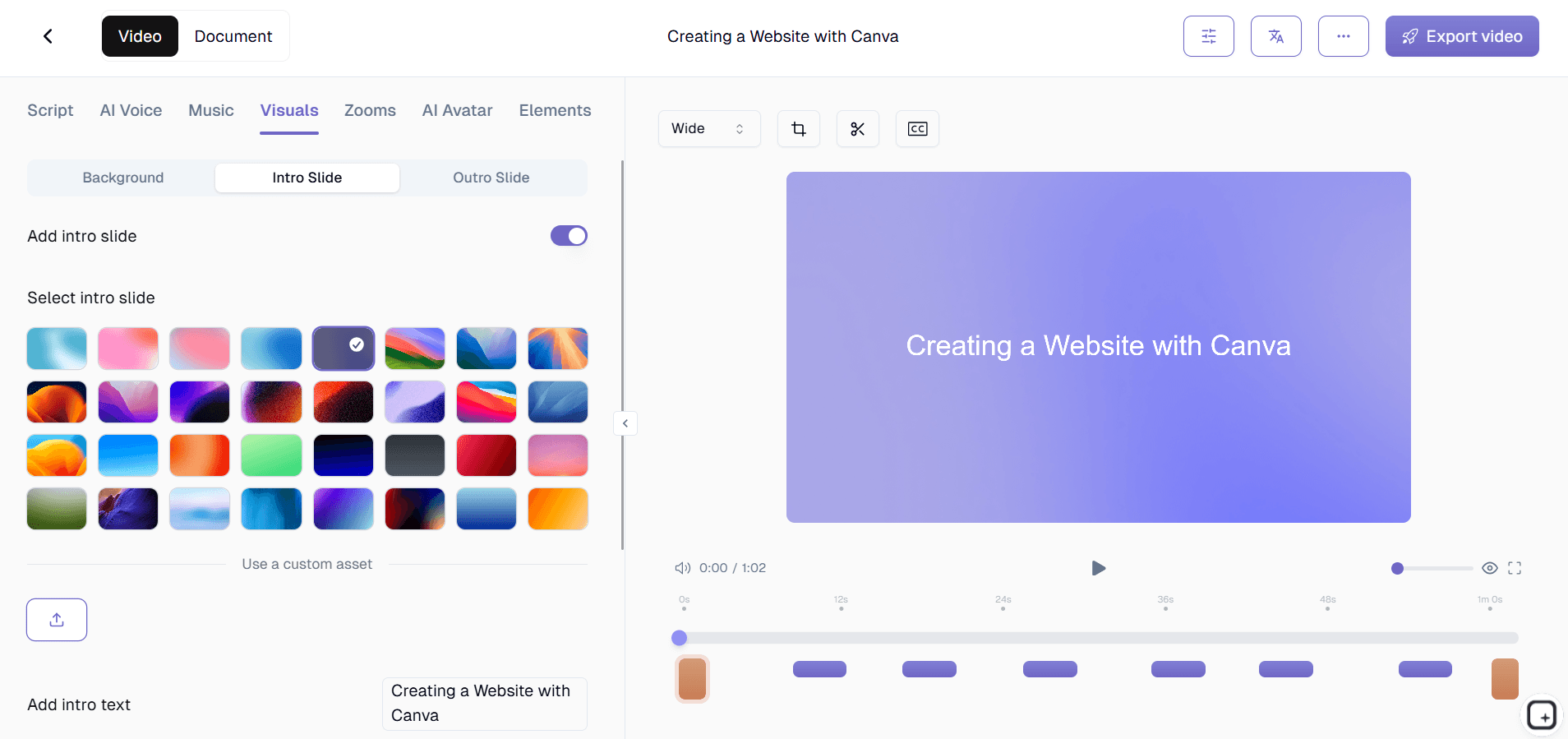
Apply your brand kits to ensure the final documentation matches your company's visual identity. You can customize colors, add logos, and include standard intros or outros. Documentation templates let you maintain consistent formatting across all your ChatGPT guides.
Step 5: Share and Distribute
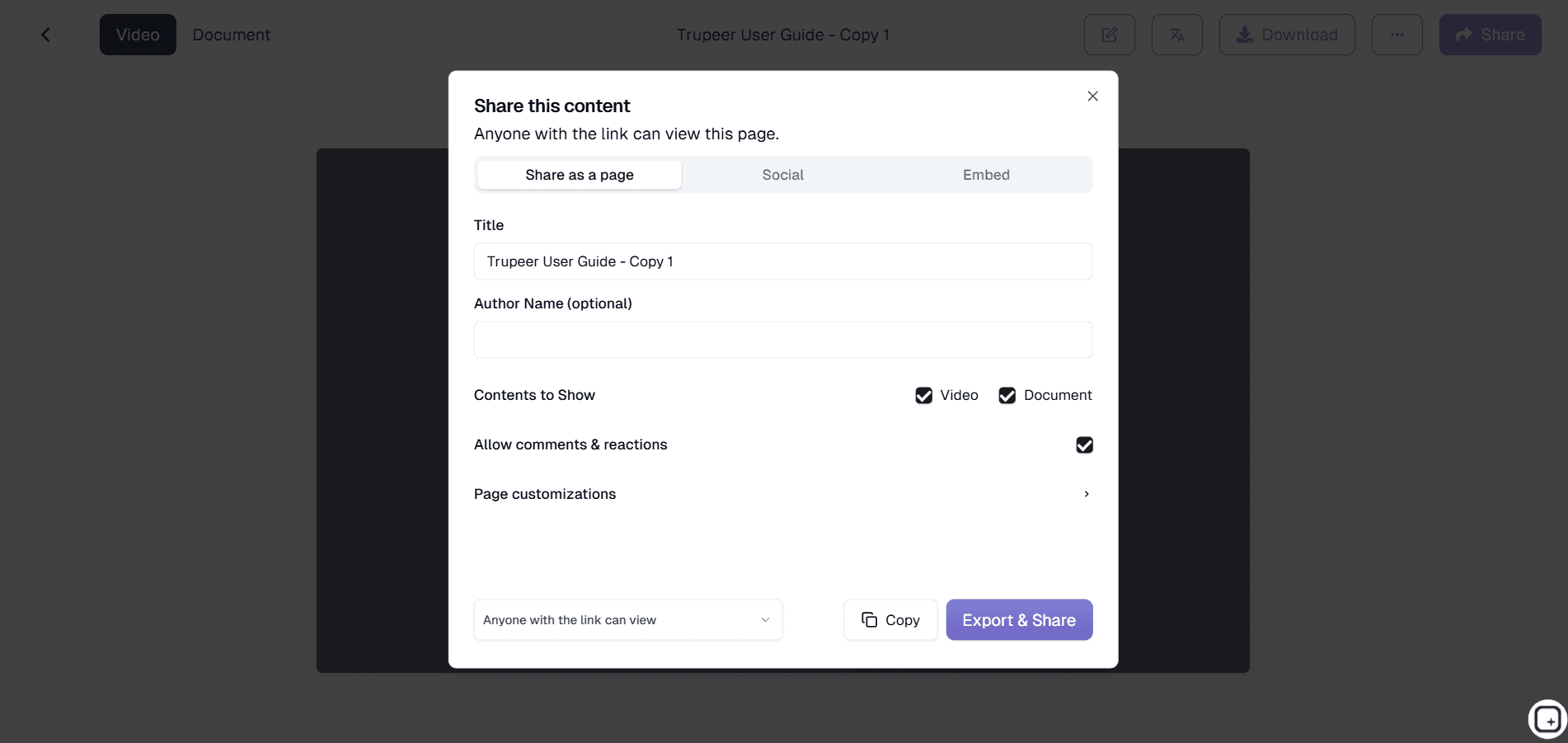
Export your documentation as a polished video, written guide, or both formats simultaneously. Share via direct links, embed on your website, or add to your knowledge base. The versatility ensures your ChatGPT expertise reaches your team in the format they prefer.
Key Features and Capabilities
Trupeer's ChatGPT documentation generator includes powerful features designed specifically for AI workflow documentation. These capabilities ensure your ChatGPT expertise is captured comprehensively and shared effectively across your organization.
Real-Time Screen Capture: Unlike tools that require you to recreate your ChatGPT workflows for documentation purposes, our AI Screen Recorder captures your actual work sessions as they happen. This authentic approach ensures nothing gets lost in translation and your team sees exactly how you achieve results with ChatGPT.
Automatic Content Recognition: Our AI specifically recognizes ChatGPT interfaces and interactions, intelligently organizing prompts, responses, and conversation flows into structured documentation. This targeted recognition means better formatting and more logical organization than generic screen recording tools.
Dual Output Generation: Every recording produces both video documentation and written guides simultaneously. Your visual learners get to see ChatGPT in action, while others can reference the written technical documentation for quick lookups and implementation guidance.
Template Customization: Save time with reusable documentation templates that maintain consistent formatting across all your ChatGPT guides. Whether you're creating AI Video Editor featuring ChatGPT or internal process documentation, templates ensure professional consistency.
Advanced Editing Capabilities: Beyond basic recording, our AI enhances your content with noise removal, automatic zoom effects on important ChatGPT interactions, and filler word elimination. These improvements happen automatically, saving hours of manual video editing while producing professional results.
Multi-Language Support: Share your ChatGPT expertise globally with automatic AI Screen Recorder capabilities. Your ChatGPT documentation can reach international team members or clients without additional effort on your part.
Why Should You Use ChatGPT Documentation Generator?
The benefits of using Trupeer's ChatGPT documentation generator extend far beyond simple time savings. This tool fundamentally changes how organizations capture, share, and scale their AI expertise across teams and departments.
Eliminate Knowledge Silos: Instead of keeping ChatGPT expertise trapped in individual minds, our platform makes it easy to document and share effective prompting strategies. Your Manual Creator team can learn from your marketing team's ChatGPT approaches, and customer success can adopt proven techniques from product development.
Reduce Training Time: New team members can watch actual ChatGPT sessions rather than trying to interpret written instructions. This visual learning approach combined with written documentation significantly reduces onboarding time and improves comprehension of complex AI workflows.
Maintain Consistency: When your team has documented ChatGPT processes, everyone follows proven approaches rather than reinventing the wheel. This consistency leads to better results and reduces the frustration of trial-and-error learning that typically accompanies AI tool adoption.
Scale Expertise Efficiently: Top performers can quickly document their ChatGPT techniques and share them across the organization. Whether you're creating Training Manual Generator for new hires or building a comprehensive AI knowledge base, Trupeer makes expertise scaling effortless.
Improve Compliance and Auditability: In regulated industries, having documented AI processes becomes crucial for compliance. Trupeer's automatic documentation ensures you have clear records of how ChatGPT is used in your workflows, complete with timestamps and detailed process flows.
Enhance Collaboration: Teams can build on each other's ChatGPT discoveries when everything is documented and easily accessible. Your Training Manual Generator team can refine prompts discovered by customer research, creating compounding improvements in AI effectiveness.
Who Can Use ChatGPT Documentation Generator?
Trupeer's ChatGPT documentation generator serves diverse professional contexts where AI expertise needs to be captured, shared, and scaled effectively across teams and organizations.
Content Creators and Marketers: Document your proven ChatGPT prompts for blog writing, social media content, and campaign development. Create SOP Generator showing how you use ChatGPT for content ideation and refinement. Your documented processes help content teams maintain quality and consistency while reducing the time spent crafting effective prompts from scratch.
Training and Development Teams: Build comprehensive Training Manual Generator showing employees how to leverage ChatGPT for their specific roles. Whether you're training customer service representatives on using ChatGPT for response drafting or teaching analysts to use AI for data interpretation, visual documentation accelerates learning and adoption.
Consultants and Freelancers: Demonstrate your ChatGPT expertise to clients through professional documentation that showcases your methodology. Create AI Video Editor materials that help clients implement your recommended AI workflows independently, adding value to your engagements while reducing ongoing support requests.
Product Teams and Developers: Document ChatGPT integrations and prompt engineering decisions for technical documentation purposes. Capture API interactions, prompt optimization processes, and integration workflows that other developers can follow and improve upon.
Sales and Presales Teams: Create compelling demonstrations of how ChatGPT enhances your products or services. Use Trupeer to build AI Screen Recorder materials that show prospects exactly how AI integration works in practice, moving beyond theoretical discussions to concrete demonstrations.
Educational Institutions: Professors and instructors can document effective ChatGPT teaching strategies, showing students appropriate AI usage while maintaining academic integrity. Create reusable educational content that demonstrates proper prompt engineering and critical evaluation of AI-generated responses.
Human Resources Teams: Document ChatGPT applications for job description writing, candidate screening, and employee communication. Create standardized processes that ensure consistent quality while helping HR team members leverage AI effectively without extensive technical training.
Best Practices for Using ChatGPT Documentation Generator
To maximize the effectiveness of your ChatGPT documentation, follow these proven strategies that ensure your captured workflows are clear, actionable, and valuable for your team members.
Plan Your Recording Sessions: Before starting your screen recording, outline the ChatGPT workflow you want to document. This preparation ensures you cover all important steps and decision points without getting sidetracked. Consider narrating your thought process as you work, explaining why you chose specific prompts or how you evaluate ChatGPT's responses.
Demonstrate Multiple Scenarios: Don't just show one perfect interaction with ChatGPT. Include examples of prompt refinement, handling unexpected responses, and recovering from less-than-ideal outputs. This realistic approach better prepares your team for actual usage scenarios they'll encounter.
Leverage Documentation Templates: Use Trupeer's template system to maintain consistency across all your ChatGPT documentation. Standardized formatting makes it easier for team members to find information quickly and ensures professional presentation across your knowledge base.
Combine with Written Guides: While screen recordings show the 'how,' complement them with written summaries that explain the 'why' behind your ChatGPT strategies. Our tutorials section demonstrates how combining visual and written content creates more comprehensive learning resources.
Regular Updates and Revisions: ChatGPT evolves rapidly, and so should your documentation. Schedule regular reviews of your documented processes to ensure they remain current and effective. Use Trupeer's easy re-recording capabilities to update outdated workflows without starting from scratch.
Explore Related Tools
Why Choose Trupeer's ChatGPT Documentation Generator
Real-Time Capture
Record actual ChatGPT sessions as you work, capturing authentic workflows automatically.
Dual Format Output
Get both professional video and written documentation from every single recording session.
AI Enhancement
Automatic noise removal, zoom effects, and content organization for polished results.
How to Use Trupeer's ChatGPT Documentation Generator
Step 1
Record your ChatGPT workflow
Step 2
AI processes and enhances automatically
Step 3
Export and share documentation
Frequently Asked Questions
How does the ChatGPT documentation generator work with screen recording?
Trupeer captures your actual ChatGPT sessions through screen recording, then AI automatically generates both video and written documentation from that footage. You don't need to recreate your workflow for documentation purposes.
Can I document ChatGPT workflows that I've already completed?
Yes, if you have existing screen recordings of ChatGPT sessions, you can upload them to Trupeer and our AI will process them into professional documentation. The system works with both live recording and uploaded footage.
What formats can I export my ChatGPT documentation in?
Trupeer exports your ChatGPT documentation as polished videos, written guides, or both formats simultaneously. You can share via direct links, embed codes, or download files for your knowledge base.
Does the tool recognize ChatGPT-specific elements in my recordings?
Yes, Trupeer's AI specifically recognizes ChatGPT interfaces and intelligently organizes prompts, responses, and conversation flows into structured documentation with proper formatting and logical organization.
Can I customize the appearance of my ChatGPT documentation?
Absolutely. Apply your brand kits for consistent colors and logos, use customizable templates for formatting, and add intros or outros to match your company's professional standards across all documentation.
More Tools


