4.8/5
Free HR Document Generator
Revolutionize Your HR Documentation Process
Start Creating HR Docs

Trupeer's HR document generator represents a groundbreaking shift in how human resources teams create, maintain, and distribute critical documentation. Unlike traditional document creation methods that require writing from scratch or piecing together templates, this innovative tool transforms screen recordings into comprehensive HR documents automatically. Whether you're demonstrating a new employee onboarding process, walking through performance review procedures, or explaining benefits enrollment, Trupeer's AI converts your recorded actions into professional, written documentation. The core innovation lies in the dual-creation approach. You can either use Trupeer's built-in screen recorder to capture your HR processes in real-time, or upload existing recordings of your workflows. The AI then analyzes every action, click, and spoken word to generate structured, readable documents that perfectly mirror your demonstrated processes.
What sets Trupeer apart from conventional HR documentation tools is the seamless integration of video and text generation. While other solutions require you to write content manually or upload text files, Trupeer's approach captures the nuanced details that only come from watching actual process demonstrations. The AI script generator component ensures that every procedural step, decision point, and best practice gets translated into clear, actionable documentation. The technology behind Trupeer's HR document generator combines advanced screen capture capabilities with sophisticated natural language processing. When you record an HR procedure, the system doesn't just capture what's happening on screen. It analyzes the context, identifies key steps, recognizes interface elements, and interprets spoken explanations to create comprehensive documentation.
How Does the HR Document Generator Work?
The HR document generation process follows a streamlined workflow designed for maximum efficiency and minimal technical complexity. The system accommodates both live demonstration capture and existing recording enhancement, giving HR teams flexibility in how they approach documentation creation. That's also where the brd document template fits in it takes the documentation you already have and turns it into something you can share.
Step 1: Capture or Upload Your HR Process
Begin by either recording a new demonstration of your HR procedure using Trupeer's integrated screen capture tool, or upload an existing recording of the process you want to document. The system supports various video formats and automatically optimizes the input for processing. During live recording, you can demonstrate software workflows, navigate through HR systems, or walk through physical procedures while providing verbal explanations.

Step 2: AI Analysis and Content Extraction
Once your recording is processed, Trupeer's AI analyzes every frame, identifying interface elements, tracking user actions, and transcribing spoken content. The system recognizes HR-specific terminology, understands workflow patterns, and maps the demonstrated process into logical documentation segments. This analysis phase typically takes just a few minutes, even for longer recordings.

Step 3: Automated Document Generation
The AI transforms the analyzed content into structured written documentation, organizing the information into clear sections with step-by-step instructions, decision trees, and reference materials. The technical documentation framework ensures that complex HR processes are broken down into digestible, actionable components that team members can easily follow.

Step 4: Template Application and Customization
Apply your organization's documentation templates to ensure consistency across all HR materials. Trupeer's template system allows you to save preferred formatting, styling, and structural elements, so every generated document maintains your brand standards and organizational requirements automatically.
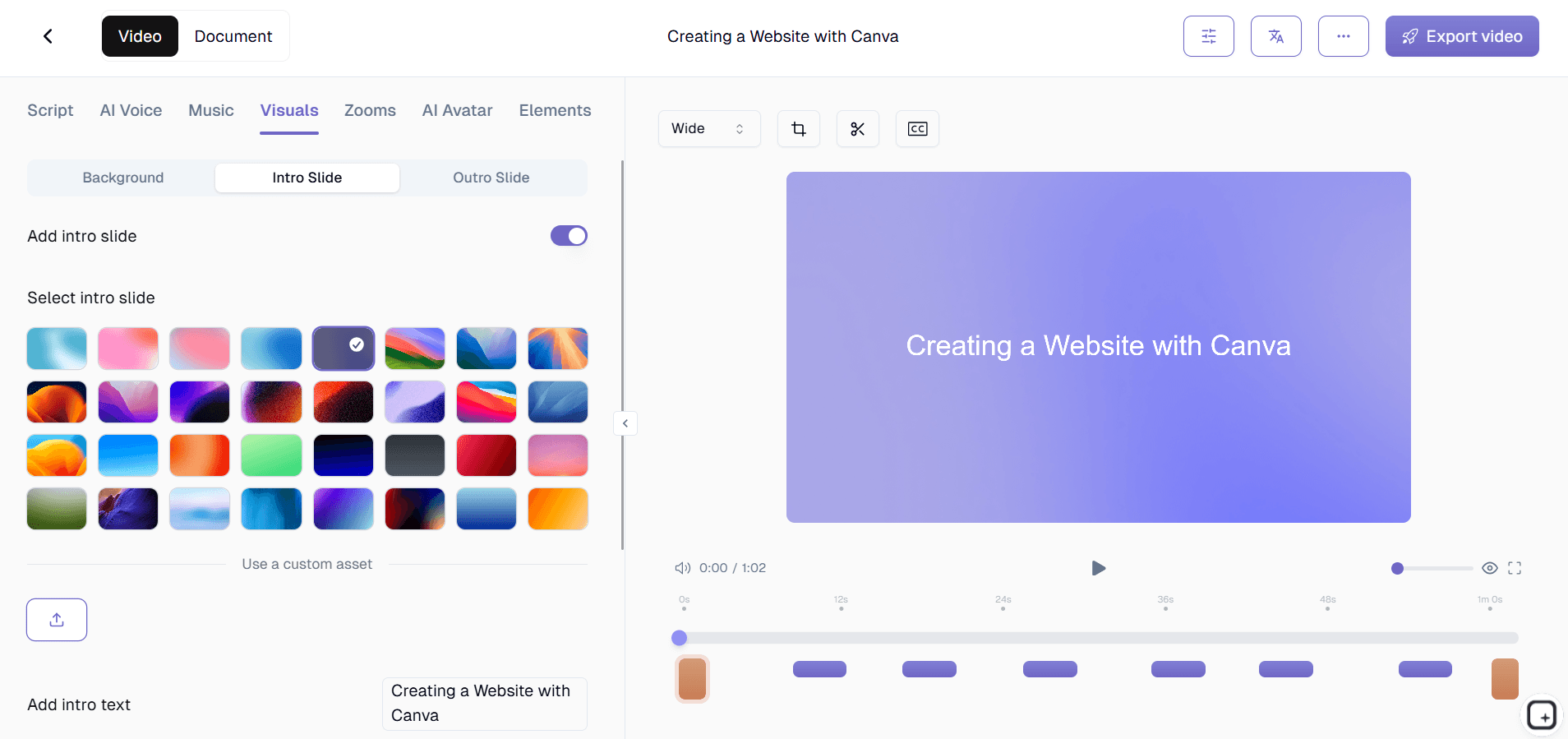
Step 5: Review, Refine, and Distribute
Review the generated documentation, make any necessary adjustments, and distribute through your preferred channels. The system supports multiple export formats and integrates with popular HR platforms and knowledge management systems for seamless workflow integration.
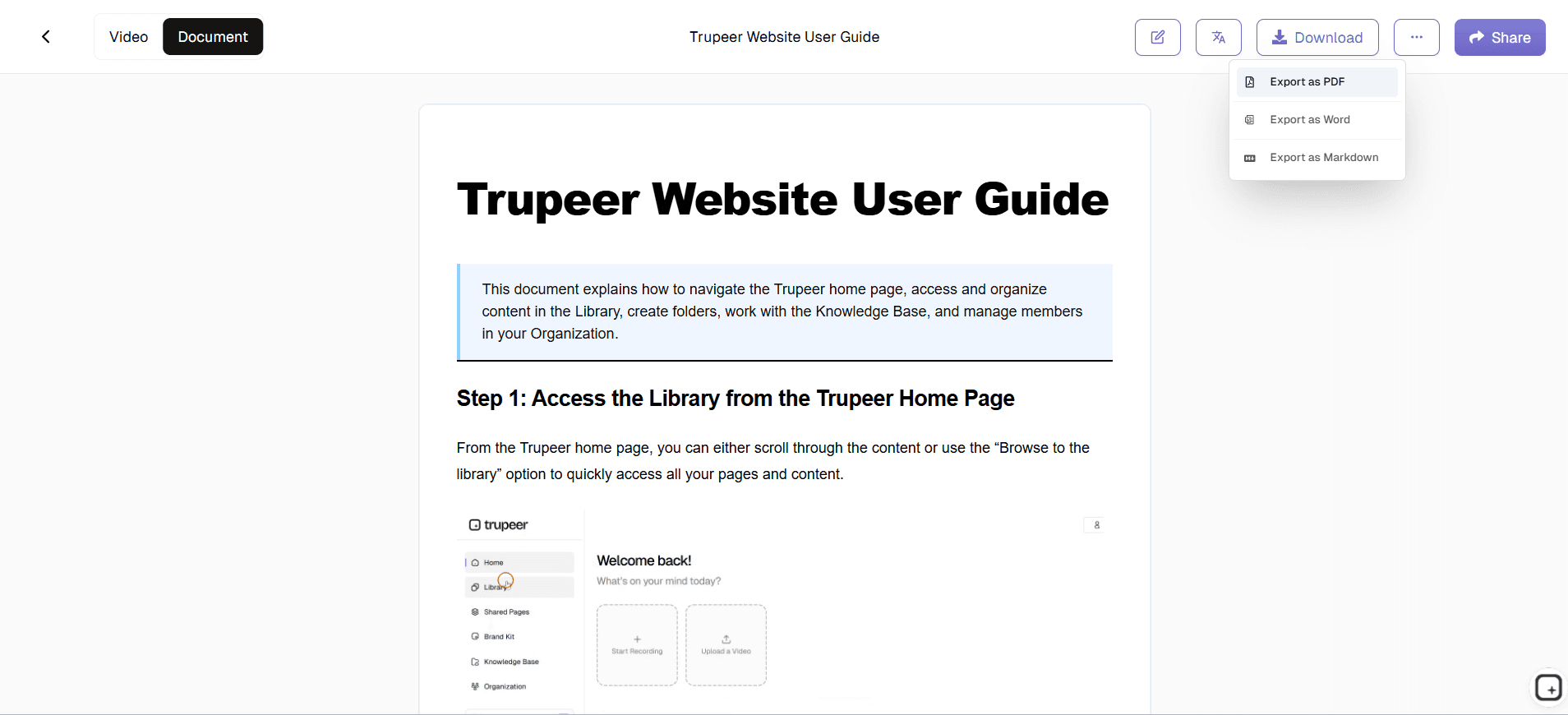
Key Features and Capabilities
Trupeer's HR document generator encompasses a comprehensive suite of features designed specifically for human resources documentation needs. Each capability addresses common pain points in HR documentation workflows while maintaining the flexibility to accommodate diverse organizational requirements.
Dual Input Methods: The platform supports both live screen recording and uploaded video processing, giving you complete flexibility in how you capture HR processes. Use the integrated aiscreen record feature for real-time demonstration capture, or upload existing training recordings, software walkthroughs, or procedure demonstrations for automatic enhancement and documentation generation.
AI-Powered Content Enhancement: Beyond basic transcription, the system intelligently enhances your recordings by removing filler words, reducing background noise, and applying automatic zoom effects to highlight important interface elements. This ensures that both the video content and generated documentation maintain professional quality standards that reflect well on your HR department's attention to detail.
Customizable Documentation Templates: Save and reuse documentation templates that match your organization's formatting requirements, brand guidelines, and structural preferences. Whether you need employee handbooks, standard operating procedures, or AI Screen Recorder documentation, templates ensure consistency across all your HR materials while dramatically reducing formatting time.
Multi-Language Documentation Support: Leverage the translation capabilities to create HR documentation in multiple languages, ensuring that diverse workforces can access critical information in their preferred language. This feature is particularly valuable for global organizations or companies with multilingual employee populations.
Brand Kit Integration: Apply your company's visual identity consistently across all generated documents through the brand kits feature. Maintain professional appearance with custom colors, logos, headers, and footers that reinforce your organizational brand in every piece of HR documentation.
Integrated Video and Document Output: Generate both polished video content and comprehensive written documentation from a single recording session. This dual output approach supports different learning preferences while providing multiple formats for various distribution channels and training scenarios.
Why Should You Use Trupeer's HR Document Generator?
The advantages of implementing Trupeer's HR document generator extend far beyond simple time savings, though efficiency gains are substantial. Organizations that adopt this approach typically see dramatic improvements in documentation quality, consistency, and accessibility across their HR operations.
Eliminate Documentation Bottlenecks: Traditional HR documentation creation often becomes a significant bottleneck, with subject matter experts struggling to find time to write comprehensive procedures. By converting demonstrated processes directly into documentation, you remove the writing burden while capturing more detailed, accurate information than manual documentation typically contains. This approach enables AI Video Editor teams to focus on strategic initiatives rather than administrative documentation tasks.
Ensure Process Consistency: When HR procedures exist only in institutional memory or informal notes, consistency suffers across different team members and locations. Generated documentation from actual process demonstrations ensures that everyone follows identical procedures, reducing errors and improving compliance with organizational standards and regulatory requirements.
Accelerate Employee Onboarding: New HR team members can access comprehensive, visually-supported documentation that shows exactly how procedures should be executed. Rather than relying on shadowing or incomplete written instructions, new employees can reference detailed guides that include both visual and textual information, dramatically reducing training time and improving competency development.
Scale Knowledge Sharing: As your organization grows, the ability to rapidly create and distribute standardized HR documentation becomes crucial. The streamlined generation process enables you to document new procedures as they're developed, maintain current documentation as processes evolve, and ensure that all locations and team members have access to identical procedural information.
Support Compliance and Auditing: Comprehensive documentation generated from actual process demonstrations provides clear audit trails and compliance evidence. When regulatory bodies or internal auditors need to understand your HR procedures, you can provide detailed documentation that accurately reflects your actual practices rather than aspirational written policies that may not match reality.
Who Can Use Trupeer's HR Document Generator?
Trupeer's HR document generator serves a diverse range of professionals and organizations, each finding unique value in the platform's ability to transform demonstrated processes into comprehensive documentation. The tool's flexibility accommodates different organizational sizes, industries, and documentation requirements.
HR Professionals and Directors: Human resources leaders use the platform to document complex procedures like performance management workflows, benefits administration processes, and compliance protocols. The ability to demonstrate these procedures while simultaneously generating written documentation ensures that critical HR knowledge gets captured and shared effectively across teams. Integration with AI Screen Recorder workflows helps HR support revenue teams with proper documentation and training materials.
Training and Development Specialists: Learning and development professionals leverage the dual video-document output to create comprehensive training materials that accommodate different learning styles. Whether developing manager training programs, employee development curricula, or compliance training modules, the platform enables rapid creation of professional training resources that maintain consistency across all organizational levels.
Operations Managers: Operations teams responsible for HR systems implementation and maintenance use the platform to document software procedures, system configurations, and troubleshooting processes. The screen recording capabilities perfectly capture software demonstrations while generating step-by-step written procedures that technical and non-technical team members can follow successfully.
Compliance Officers: Organizations with strict regulatory requirements use the platform to document compliance procedures, audit processes, and regulatory reporting workflows. The comprehensive documentation generated from actual process demonstrations provides the detailed evidence that auditors and regulatory bodies require while ensuring that compliance procedures are followed consistently.
Small Business Owners: Entrepreneurs and small business leaders often wear multiple hats, including HR responsibilities. The platform enables them to quickly document essential HR processes as their businesses grow, creating scalable procedures that support business expansion without requiring extensive time investment in manual documentation creation.
Consultants and HR Service Providers: External HR consultants use the platform to document client-specific procedures, create deliverable materials, and develop training resources that clients can implement independently. The professional output quality and comprehensive nature of generated documentation enhance consultant value delivery while reducing the time required for deliverable creation.
The common thread across HR audiences: nobody on these teams wants to be doing documentation work in the first place. The HR director wants to be running people strategy. The training specialist wants to be designing learning programs. The compliance officer wants to be advising on policy. Documentation is the work that gets postponed because it's never anyone's actual job, even when everyone agrees it has to happen. Recording during the actual procedure work takes the postponement loop out of the equation. The doc exists when the procedure runs. Most HR teams that adopt this pattern produce more documentation in their first month with the tool than they shipped in the previous three quarters. Not because anyone tried harder. Because the production cost dropped close to zero.
Best Practices for Using Trupeer's HR Document Generator
Maximizing the value of your HR documentation efforts requires strategic approach to both the recording process and the generated content utilization. These proven practices help organizations achieve optimal results while building sustainable documentation workflows that support long-term HR effectiveness.
Plan Your Recording Sessions: Before hitting record, outline the specific procedure you want to document and gather any necessary materials, login credentials, or reference information. Clear preparation ensures smooth demonstrations that translate into comprehensive documentation. Consider creating brief scripts for complex procedures, though natural explanation often produces the most useful generated content.
Leverage Documentation Templates: Invest time upfront in creating robust documentation templates that reflect your organization's formatting standards, required sections, and approval workflows. Well-designed templates ensure consistency across all generated materials while reducing post-generation editing requirements.
Combine with Existing Workflows: Integrate the documentation generation process into your existing procedure development and review cycles. When implementing new HR processes, make demonstration recording and documentation generation standard steps in your workflow, ensuring that written procedures stay current with actual practices.
Utilize Multi-Format Distribution: Take advantage of both video and written documentation outputs by distributing them through appropriate channels. Use video content for initial training and complex procedure demonstration, while providing written documentation as ongoing reference materials and quick-lookup guides for experienced team members.
Document the rare procedures first: The trick most HR teams miss: starting with the daily procedures (which everyone already knows) instead of the once-a-quarter or once-a-year ones (where documentation gaps actually hurt). The annual benefits enrollment. The quarterly comp cycle. The semi-annual performance review process. The rare-but-critical termination procedure. These are the procedures where the senior team relies on memory because they happen so infrequently. Recording them the next time they run produces documentation that's actually useful for the moments when memory isn't enough.
Set up the glossary with internal HR terminology on day one: HR teams use specific terms constantly: PTO accrual rates, the company's specific RSU vesting schedule, the internal name of the HRIS instance, the recruiting team's internal acronyms (RPO, RIF, BBC for "behavioral-based competency"). Add these to the custom glossary before generating the first batch of docs. The AI uses the glossary to spell these correctly in transcripts and written guides. Doing it upfront beats finding and replacing typos across 40 procedure docs later. And the docs read like they were written by somebody who knows the company, because they were.
Where Trupeer fits next to Workday, BambooHR, Rippling, and HR documentation platforms
Workday, BambooHR, Rippling, Gusto, Paycom, and other HRIS platforms handle the system of record for HR data: employee profiles, comp data, benefits enrollment, time off tracking, payroll. These platforms have their own help docs but the depth varies, and most of them assume the HR team has separately documented internal procedures for their company's specific configuration. So the new manager learning Workday for the first time needs both: Workday's documentation (which covers the generic platform) AND the company's internal SOPs (which cover how this company configures and uses Workday). Trupeer fills the second gap. The AI doesn't replace the HRIS or duplicate its docs; it generates the company-specific procedural content that explains how the team's particular workflows run on top of the HRIS.
A different cluster: dedicated HR documentation platforms like Trainual, Loop & Tie, and AirMason. These host HR handbooks and provide structure for employee-facing content (table of contents, search, signature tracking, version history). Trupeer feeds into these. Generate the HR SOP or handbook section in Trupeer, paste the written guide into Trainual or AirMason, embed the Shared Page link as an inline video player. For pure documentation hosting (Notion, Confluence, SharePoint, Google Sites), same pattern applies. Trupeer covers the production speed problem. The HR documentation platform covers the hosting, signing, and tracking. Most enterprise HR functions end up running both. The combination works better than either alone.
Explore Related Tools
Why Choose Trupeer's HR Document Generator
AI-Powered Generation
Transform screen recordings into comprehensive HR documentation automatically using advanced AI technology.
Template Customization
Save and reuse formatting templates to ensure consistent, professional documentation across your organization.
Multi-Language Support
Generate HR documents in multiple languages to support diverse, global workforce requirements effectively.
How to Use Trupeer's HR Document Generator
Step 1
Record or upload HR process
Step 2
AI analyzes and enhances content
Step 3
Generate professional HR documents
Frequently Asked Questions
What types of HR documents can I create with Trupeer?
You can create employee handbooks, training manuals, SOPs, onboarding guides, compliance documentation, and any other HR materials by recording your processes and letting AI generate the written content.
Do I need technical skills to use the HR document generator?
No technical skills are required. Simply record your screen while demonstrating HR processes, or upload existing recordings, and Trupeer's AI handles the rest automatically.
Can I customize the formatting of generated HR documents?
Yes, you can create and save custom templates with your preferred formatting, styling, colors, and organizational structure to ensure all documents match your company standards.
How accurate are the AI-generated HR documents?
The AI analyzes your actual demonstrated processes, ensuring high accuracy. Generated documents reflect exactly what you show and explain during recording, capturing real-world procedures precisely.
Can I edit documents after they're generated?
Absolutely. Generated documents serve as comprehensive starting points that you can review, edit, and refine as needed before distributing to your team or organization.
More Tools


