4.8/5
Free Onboarding Guide Maker
Build Engaging Onboarding Guides That Actually Work
Create Your Guide Free

Trupeer's onboarding guide maker revolutionizes how companies create employee training materials by transforming simple screen recordings into comprehensive, professional onboarding guides. This AI-powered platform eliminates the traditional pain points of documentation creation, where teams spend countless hours writing step-by-step processes, taking screenshots, and formatting content manually. The onboarding guide maker addresses a critical business challenge: 58% of organizations struggle to create effective onboarding materials, leading to longer time-to-productivity for new hires and increased training costs.
What sets Trupeer's onboarding guide maker apart from generic documentation tools is its dual-output capability. When you record your screen or upload an existing recording, the AI doesn't just create a video. It simultaneously generates written documentation, complete with screenshots, step-by-step instructions, and formatted text that matches your brand guidelines. This means you get both engaging employee onboarding videos and comprehensive written guides from a single recording session. The platform leverages advanced AI technology to automatically enhance your recordings with professional editing features. It removes background noise, eliminates filler words like "um" and "uh," adds strategic zoom effects to highlight important interface elements, and applies consistent branding throughout. This ensures your onboarding materials maintain a professional standard that reflects well on your organization, even if you're not a video production expert.
How Does the Onboarding Guide Maker Work?
Trupeer's onboarding guide maker follows a streamlined five-step process that transforms raw recordings into polished training materials. This workflow accommodates different creation preferences, whether you prefer recording fresh content or working with existing materials.
Step 1: Record or Upload Your Content
Begin by either using Trupeer's built-in screen recorder to capture your workflow live or upload an existing recording you've already created. The platform supports various video formats and quality levels, making it flexible for teams with different recording setups. During live recording, simply click record and demonstrate the process you want to teach, speaking naturally as you work through each step.

Step 2: AI Processing and Enhancement
Once your recording is complete or uploaded, Trupeer's AI automatically begins processing the content. The system analyzes your audio to remove filler words, background noise, and awkward pauses that can distract from the learning experience. Simultaneously, it examines the visual content to identify key interface elements, important clicks, and areas where learners should focus their attention.

Step 3: Automatic Documentation Generation
While enhancing your video, the AI generates comprehensive written documentation from your recording. This includes extracting key steps, creating relevant screenshots, and organizing the content into a logical flow that matches your verbal explanation. The system identifies important terminology and creates consistent formatting throughout the guide.

Step 4: Brand Application and Customization
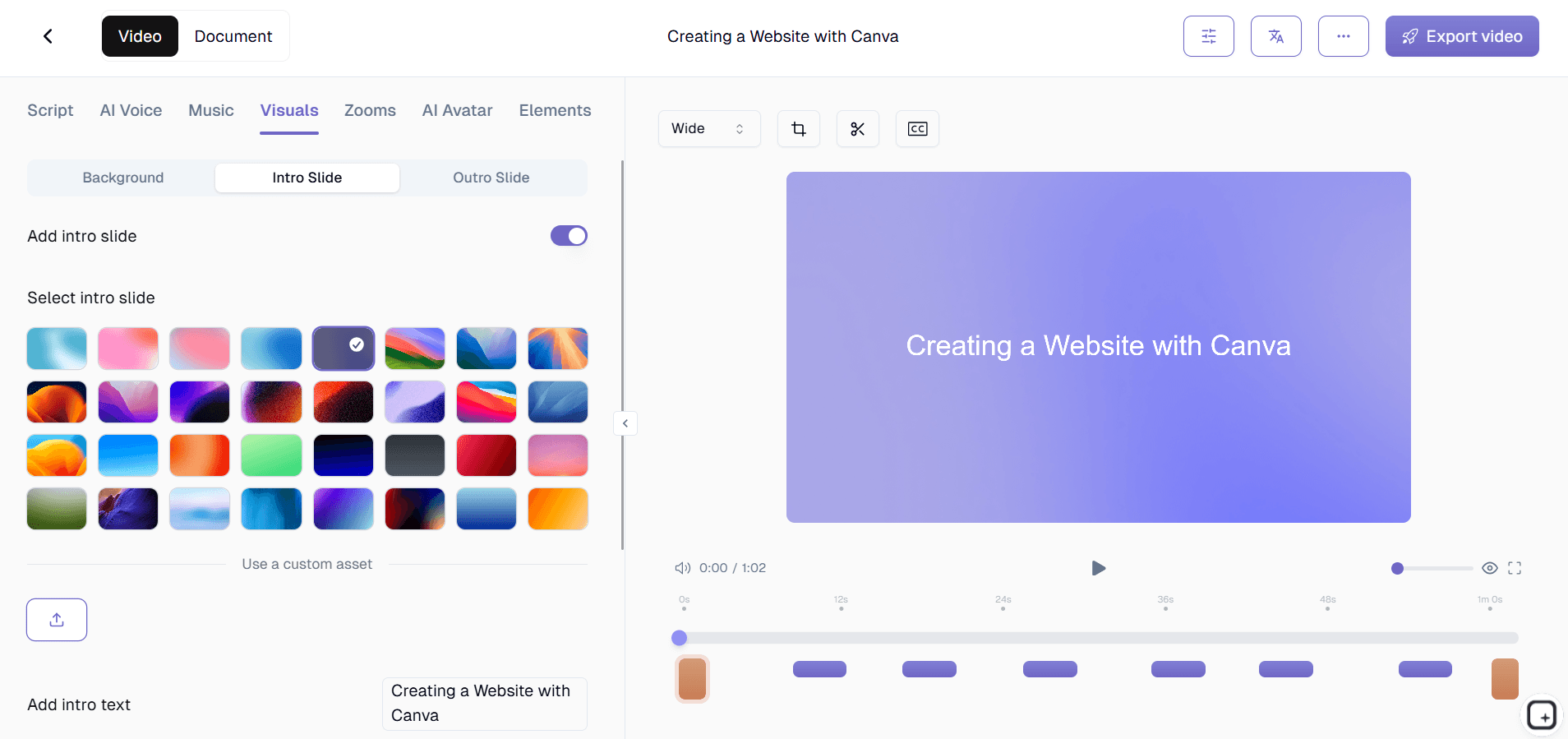
The platform applies your brand kits to ensure consistency across all onboarding materials. This includes adding your company colors, logos, intro and outro sequences, and maintaining font consistency. You can also customize the documentation format using saved templates that match your organization's style preferences.
Step 5: Export and Distribution
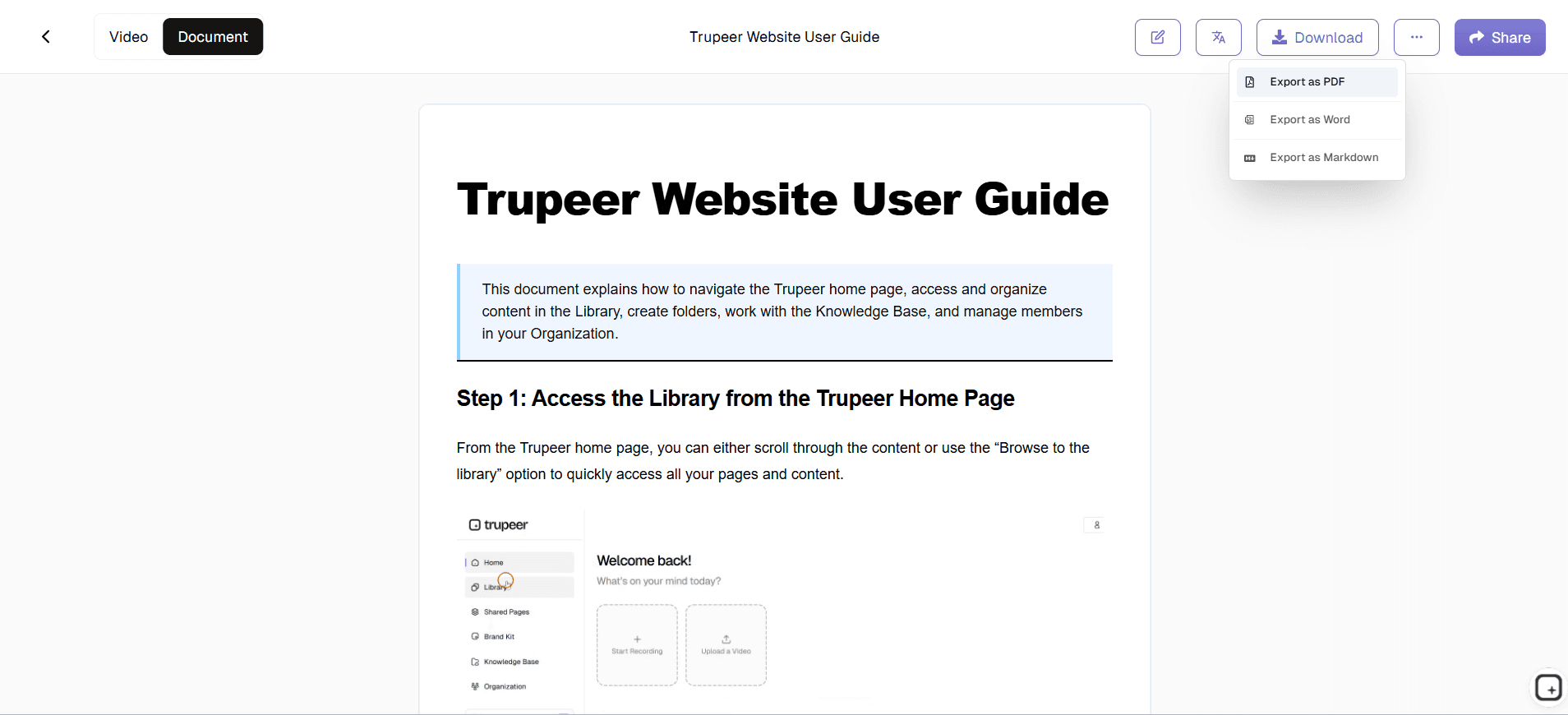
Finally, export your completed onboarding guide in multiple formats. You can download the polished video for embedding in your learning management system, generate a PDF version of the written guide for offline reference, or create shareable links for immediate access. The platform also provides embed codes for seamless integration into your existing onboarding workflows.
Key Features and Capabilities
Trupeer's onboarding guide maker offers comprehensive features designed specifically for creating effective employee training materials. These capabilities ensure your onboarding guides are not only informative but also engaging and professional.
AI-Powered Documentation Templates: Create consistent, branded onboarding materials using customizable templates that save your preferred formatting, styling, and structure. These templates ensure every guide maintains your organization's professional standards while reducing creation time significantly. The system remembers your choices and applies them automatically to future guides, creating a cohesive onboarding experience across different departments and roles.
Automatic Video Enhancement: Transform raw screen recordings into polished training videos with AI-driven editing. The system removes distracting filler words, eliminates background noise, and adds strategic zoom effects to highlight important interface elements. This professional polish helps new employees focus on learning rather than being distracted by production quality issues.
Dual-Format Output: Generate both engaging video content and comprehensive written documentation from a single recording session. This addresses different learning preferences within your organization, ensuring visual learners benefit from video demonstrations while those who prefer written instructions have detailed text guides. Both formats maintain consistency in content and branding.
Multi-Language Support: Reach global teams with automatic video translation capabilities. The platform can translate your onboarding guides into multiple languages while maintaining the original video timing and visual elements. This feature is particularly valuable for international organizations or companies with diverse workforces.
Integration-Ready Sharing: Share completed onboarding guides through multiple channels using shareable links, embed codes for learning management systems, or downloadable files for offline access. The platform provides analytics on guide usage, helping you understand which onboarding materials are most effective and where new employees might need additional support.
Brand Consistency Tools: Maintain professional appearance across all onboarding materials with automated brand application. The system ensures consistent use of colors, fonts, logos, and formatting throughout every guide, creating a cohesive onboarding experience that reinforces your company's professional image.
Why Should You Use This Onboarding Guide Maker?
Implementing Trupeer's onboarding guide maker delivers significant benefits that directly impact your organization's training effectiveness and operational efficiency. These advantages make it an essential tool for any company serious about creating successful onboarding experiences.
Dramatically Reduced Creation Time: Traditional onboarding guide creation takes 8-15 hours per comprehensive guide when done manually. With Trupeer's system, you can create the same quality content in under 2 hours, including both video and written components. This 75% time reduction allows your team to focus on strategic onboarding improvements rather than content production logistics.
Improved Learning Outcomes: New employees retain 65% more information when training materials combine visual demonstrations with written instructions. By automatically generating both formats from your single recording, you address multiple learning styles simultaneously. The AI-enhanced video quality and professional formatting increase engagement, leading to faster skill acquisition and reduced time-to-productivity.
Consistent Quality Standards: Eliminate the variability that occurs when different team members create training materials using various tools and approaches. The platform's automated enhancement and brand kit application ensure every onboarding guide meets the same professional standards, regardless of who creates it. This consistency builds confidence in new hires and reflects positively on your organization's attention to detail.
Scalable Training Infrastructure: As your company grows, creating onboarding materials for new roles and departments becomes increasingly challenging. Trupeer's template system and AI automation make it easy to scale your AI Screen Recorder production without proportionally increasing your team size or budget. You can quickly adapt existing guides for new situations or create entirely new content efficiently.
Cost-Effective Solution: Replace expensive video production services and time-intensive manual documentation processes with a single platform that delivers professional results. The reduction in creation time translates to significant labor cost savings, while the improved onboarding effectiveness reduces turnover and training-related support requests.
Who Can Use This Onboarding Guide Maker?
Trupeer's onboarding guide maker serves diverse professionals across organizations who need to create effective training materials efficiently. Each user type benefits from specific features tailored to their unique requirements and workflows.
HR Professionals and People Operations Teams: Create comprehensive onboarding programs that cover company culture, policies, and general procedures. HR teams can record orientation sessions, policy explanations, and cultural introductions, then automatically generate supporting documentation for new hire packets. The customer onboarding videos methodology applies equally well to employee onboarding, ensuring consistent messaging and professional presentation across all materials.
Department Managers and Team Leads: Document role-specific processes and departmental workflows that new team members need to understand. Managers can quickly record their screen while demonstrating software tools, explaining project workflows, or walking through department-specific procedures. The resulting guides serve as ongoing reference materials that reduce repetitive training questions and ensure consistent knowledge transfer.
Training and Development Specialists: Build comprehensive learning paths that combine multiple onboarding modules into cohesive programs. Training professionals can create specialized guides for different roles, seniority levels, or learning tracks. The platform's template system ensures consistency across multiple modules while allowing customization for specific audiences.
IT and Technical Teams: Create detailed guides for software onboarding, system access procedures, and technical tool training. IT professionals can document complex setup processes, security protocols, and software configurations that new employees must understand. The automatic documentation generation is particularly valuable for technical content, where precise step-by-step instructions are crucial for successful completion.
Small Business Owners and Startup Founders: Establish professional onboarding processes without requiring dedicated training staff or significant budget allocation. Entrepreneurs can document their own expertise and business processes, creating scalable training materials that maintain quality as their team grows. This is particularly valuable for companies that need to onboard employees quickly during rapid growth phases.
Remote Team Coordinators: Address the unique challenges of virtual onboarding by creating engaging digital materials that work across different time zones and locations. The platform's sharing capabilities and offline access options ensure remote employees have consistent access to onboarding materials regardless of their location or schedule constraints.
Best Practices for Using the Onboarding Guide Maker
Maximize the effectiveness of your onboarding guides by following proven strategies that leverage Trupeer's capabilities while addressing common onboarding challenges.
Plan Your Recording Structure: Before hitting record, outline the key concepts and steps you want to cover. Organize content into logical segments of 5-10 minutes each, as shorter modules improve retention and allow for flexible consumption. Consider creating a series of focused guides rather than one comprehensive recording, as this approach better accommodates different learning paces and makes updates easier to manage.
Speak Naturally and Conversationally: While recording, explain each step as if you're training someone sitting next to you. Don't worry about perfect delivery since Trupeer's AI will remove filler words and awkward pauses automatically. Focus on clear explanations and remember to verbalize what you're doing, even when it seems obvious to you. New employees benefit from hearing the reasoning behind each action.
Leverage Documentation Templates: Set up and save documentation templates that match your organization's style and information architecture. This ensures consistency across different creators and departments while significantly reducing formatting time. Include standard sections like prerequisites, step-by-step instructions, troubleshooting tips, and additional resources in your templates.
Create Modular Content for Easy Updates: Structure your onboarding guides as modular components that can be easily updated when processes change. Rather than creating one comprehensive guide, develop focused modules that cover specific topics or procedures. This approach makes maintenance easier and allows new hires to consume content in smaller, more manageable segments that improve comprehension and retention.
Explore Related Tools
Why Choose Trupeer's Onboarding Guide Maker
AI Documentation Generation
Automatically converts screen recordings into professional written guides with screenshots
Dual-Format Output
Creates both engaging videos and comprehensive text guides from single recording
Brand Consistency
Applies your brand colors, logos, and formatting automatically across materials
Create Your Onboarding Guide in 3 Steps
Step 1
Record or upload your content
Step 2
AI enhances and processes automatically
Step 3
Export and share your guide
Frequently Asked Questions
What makes a good onboarding guide for new employees?
Effective onboarding guides combine visual demonstrations with written instructions, are broken into digestible modules, and include real-world context. They should be consistently branded and easily accessible across devices.
How long should employee onboarding guides be?
Individual guide modules should be 5-10 minutes long for optimal retention. Comprehensive onboarding programs can span multiple modules consumed over days or weeks depending on role complexity.
Can I update existing onboarding guides easily?
Yes, Trupeer's modular approach allows you to re-record specific sections without recreating entire guides. The AI processing automatically maintains consistency with your existing brand templates and formatting.
Do onboarding guides work for remote employees?
Absolutely. Digital onboarding guides are particularly effective for remote teams, providing consistent training experiences across time zones. Trupeer's sharing options ensure easy access regardless of location.
How do I measure onboarding guide effectiveness?
Trupeer provides usage analytics showing engagement rates and completion times. Combine this with employee feedback surveys and time-to-productivity metrics to assess onboarding success.
More Tools


