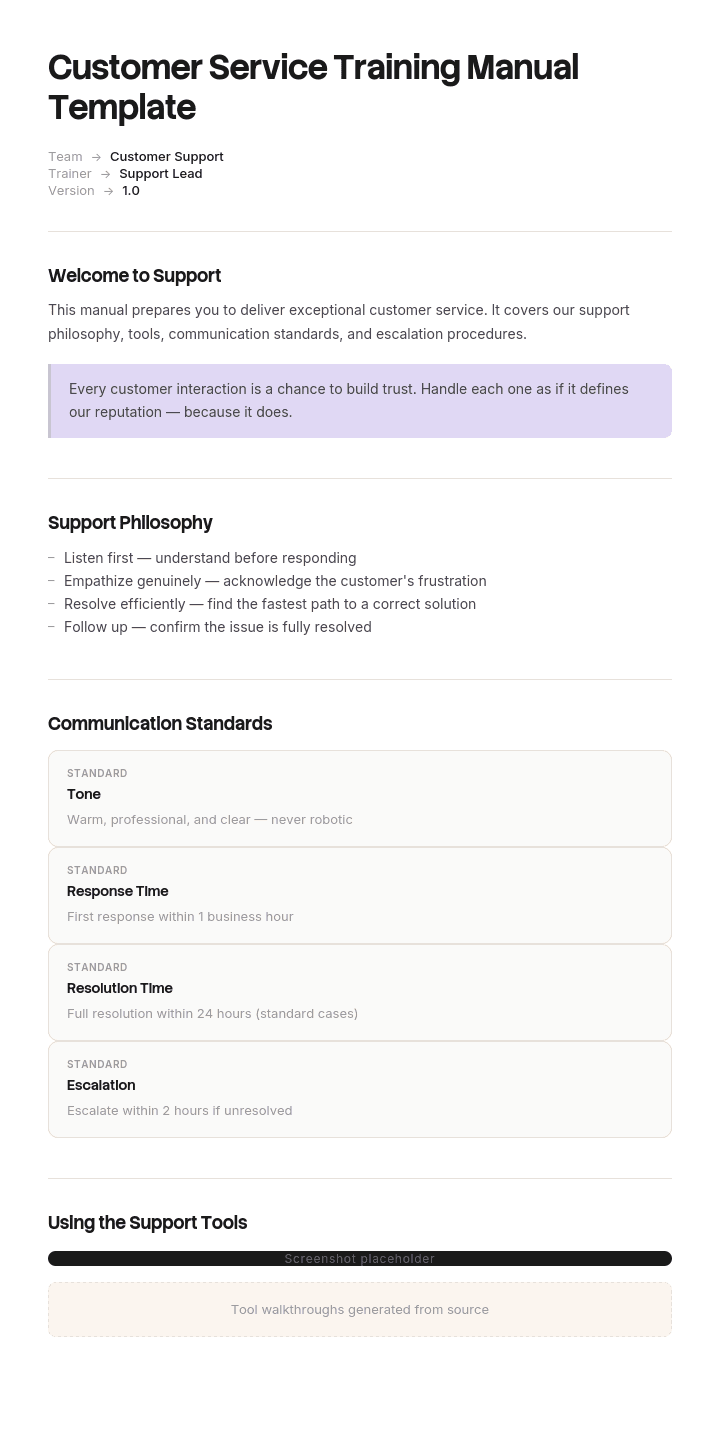
Use this template
Great customer service is built on great training. With Trupeer, you can save hours on training design by starting with a free customer service training manual template, customizing it with your brand guidelines, and turning the training into engaging video modules agents actually finish.
Most customer service training manuals are eighty pages of product information given to someone who cannot yet find the refund button. The new agent reads chapter one, gets put on live tickets in week two, and never opens it again.
This template is structured around what a support agent actually needs, in the order they need it, and it is explicit about the parts a written manual cannot teach.
Download the customer service training manual template
Format | Best for |
|---|---|
Word (.docx) | The manual itself. Free download, no sign-up |
PowerPoint (.pptx) | Delivering modules as sessions, one deck per module |
The issued version, and printing for new starter packs | |
Excel (.xlsx) | The training matrix: who has completed which module, and when |
Google Docs | Drafting with the support team who will deliver it |
Free, editable, no watermark. Most teams use Word for the manual and Excel for the completion matrix, then export to PDF once approved.
What is in the template
Front matter. Welcome, how to use the manual, the training schedule, who to ask for what.
Eight modules, each with the same structure: learning outcomes, content, worked examples, practice exercise, assessment, and a sign-off line.
The company, the customers and the product
Systems and tools
Your first conversations
Handling problems and complaints
Refunds, escalations and authority
Difficult conversations
Quality standards and how you are measured
Where to find things and who to ask
Back matter. Glossary, escalation contacts, quick reference card, assessment record, and a thirty-day check-in.
Supporting files. A training matrix in Excel, a one-page quick reference card, and a trainer's guide with timings.
How to customize this template in Trupeer
Step 1: Open the Templates Section
Go to the Templates section from the main navigation.

Step 2: Select and Open a Template
Click on any template you want to work with to open it.

Step 3: Expand the Template View
If needed, expand the template view to see the full layout and details clearly.

Step 4: Edit the Template
Click on Edit to start modifying the selected template.

Within the editor, you can:
Add new sections
Define or update formatting rules
Add a logo and adjust its position and related settings
Step 5: Save Your Customized Template
After making all necessary changes, click Save to store the updated template as your own.

Step 6: Preview and Fine-Tune the Template
When you want to see how your customized template looks, open the Preview.

From the preview screen, you can continue to make adjustments directly if needed, ensuring the template appears exactly as you want.
With a customer service training manual template you can:
Save hours on design: Skip the blank page with a comprehensive training structure.
Standardize service quality: Built-in standards ensure every agent delivers consistent service.
Stay on-brand: Apply your logo, fonts and tone of voice using Trupeer's brand kit.
Train faster: Convert dense manuals into video modules - drastically reducing ramp time.
Cover every scenario: Built-in sections for common scenarios, escalation and edge cases.
Reach global teams: Translate training into 65+ languages with one click.
The four competencies a support agent needs
Every module maps to one of four things. Naming them stops the manual becoming an undifferentiated information dump.
Product knowledge. What you sell, how it works, what commonly goes wrong. This is what most manuals contain almost exclusively.
Systems fluency. How to actually operate the helpdesk, the CRM, the billing system. Where to click, what to log, how to find a previous ticket.
Process adherence. What to do in each recurring situation, what your authority is, when to escalate.
Conversational skill. How to open, how to acknowledge, how to say no, how to stay steady when someone is angry.
The common failure is weighting the manual entirely toward the first while agents fail on the second and fourth. A new agent who knows the product perfectly and cannot find the refund screen will still have a bad first week.
Product knowledge
What to include: what the product does, who buys it and why, the three or four things that most commonly go wrong, and the vocabulary customers use as distinct from the vocabulary you use internally.
What to leave out: everything else. Comprehensive product documentation belongs in a knowledge base the agent can search, not in a manual they read once. The manual should teach them enough to hold a conversation and enough to know what to look up.
A useful test: could the agent explain to a customer what the product is for, in one sentence, without jargon? That is the bar for module one.
Systems fluency
The competency most under-served by written manuals and the one that causes most week-one distress.
What to include: the systems in the order they will use them, the ten actions that cover most of the job, where to log what, and how to find a customer's history.
The problem is that describing an interface in prose does not work. "Navigate to the account panel and select the adjustments tab" is clear until the interface has three panels and the tab is called something slightly different. This is the section that should be recorded rather than written, and the manual should hold the checklist while a walkthrough shows the actions.
Process adherence
What to include: the six procedures every support team needs, summarised, with links to the full versions. Complaint handling, escalation, refunds and goodwill, first response and triage, difficult customers, and handover.
Do not duplicate the procedures into the manual. Summarise and link, or the two will drift apart at the first revision and agents will not know which is current. The full versions belong in the customer service SOP.
What the manual adds that the SOP does not: why the procedure exists, what happens when it is not followed, and the judgement calls the SOP deliberately leaves open.
Conversational skill
The competency that decides whether a customer escalates, and the one a document teaches worst.
What a manual can do: give the wording for the moments where phrasing matters, explain the difference between acknowledging and apologising, and provide worked examples of the same situation handled two ways.
What it cannot do: teach tone, pace, or when to stop talking. Those need listening to real calls, role play, and feedback on the agent's own recorded conversations.
If your training budget allows one thing beyond the manual, make it structured listening. New agents who spend four hours listening to your best agent handle real contacts learn more about conversational skill than any written module delivers.
What a manual can and cannot teach
Worth being honest about, because it determines what else your training programme needs.
Competency | Manual | What it actually needs |
|---|---|---|
Product knowledge | Good | Manual plus a searchable knowledge base |
Systems fluency | Poor | Recorded walkthroughs and supervised practice |
Process adherence | Good | Manual plus the SOPs at the point of use |
Conversational skill | Weak | Listening, role play, coached feedback |
A manual that pretends to cover all four equally produces agents who pass the assessment and struggle on the floor. Better to be explicit that two of the four are taught elsewhere, and say where.
The manual structure
Each module follows the same shape, which matters more than the content of any individual one because consistency is what makes a manual navigable.
Element | Purpose |
|---|---|
Learning outcomes | Three or four, written as what the agent will be able to do |
Why this matters | One paragraph connecting it to the customer's experience |
Content | The material itself, in short sections |
Worked example | A real situation handled correctly, with the reasoning shown |
Practice | An exercise or scenario they complete |
Assessment | How competence is checked |
Sign-off | Trainer and agent, dated |
Learning outcomes written as capabilities rather than topics is the discipline that keeps modules honest. "Understand our refund policy" is a topic. "Can decide whether a refund request falls within your authority and process it correctly" is an outcome you can assess.
A worked module
Module 4: Handling problems and complaints
Learning outcomes. By the end of this module you will be able to acknowledge a complaint without admitting fault or dismissing the customer, identify what outcome the customer actually wants, decide whether the resolution falls within your authority, and know exactly when to escalate.
Why this matters. A complaint handled well produces a customer more loyal than one who never had a problem. Handled badly it produces a public review and a lost account. The difference is usually the first thirty seconds.
Content.
The order matters and it is counterintuitive. Acknowledge before you diagnose. Most agents want to establish the facts first, because that feels like being helpful. To the customer it feels like being doubted.
Acknowledge: say back what has happened in your own words and confirm you have understood.
Ask: what would a good outcome look like for you? Customers frequently want less than you would have offered.
Check: account and history, while they are talking. A repeat complaint is a different situation.
Decide: within your authority or not. Your limits are in module 5.
Resolve or escalate: state what you are doing, when it will happen, what they will see.
Confirm: in writing, within the hour.
Log: category, resolution, value of any goodwill, whether it was a repeat.
Worked example.
Customer, by chat: "This is the second time this has arrived damaged. I'm done."
Weak response: "I'm sorry you feel that way. Can I take your order number?"
Why it fails: "sorry you feel that way" is not an apology, and asking for the order number first signals process before person.
Better response: "Twice is twice too many, and I'm sorry. That's clearly not good enough. I can see this is the second one, so let me sort it properly rather than just sending another. What would work best for you, a replacement or a refund?"
Why it works: acknowledges specifically, takes ownership without blaming a department, recognises the repeat, and asks for the outcome rather than assuming.
Practice. Three scenarios in appendix B. Draft your response to each and review with your trainer.
Assessment. Handle two live complaints with your trainer listening, then discuss. Competent means acknowledging before diagnosing, asking for the desired outcome, and either resolving within authority or escalating correctly.
Sign-off. Agent: ______ Trainer: ______ Date: ______
Sequencing: what to teach when
Front-loading product knowledge is the standard mistake. New agents need enough to function before they need depth.
When | Focus | Why |
|---|---|---|
Days 1 to 2 | Company, customers, product basics, systems access | They cannot learn anything else until they can log in |
Days 3 to 5 | Systems fluency, shadowing real contacts | Watching before doing, with the systems open |
Week 2 | First conversations on low-complexity contacts, supervised | Doing beats reading, early |
Week 3 | Complaints, escalation, refunds and authority | Once they can handle the routine, teach the exceptions |
Week 4 | Difficult conversations, quality standards | Requires enough experience to have context |
Day 30 | Check-in, assessment, gaps identified | Find what the manual missed |
Ongoing | Product depth, edge cases | Never finishes, and belongs in the knowledge base |
Get them taking real contacts by week two. Agents who spend three weeks reading before their first conversation lose confidence rather than building it, and the manual gets blamed for a sequencing decision.
Assessment and sign-off
Assess capability, not recall. A quiz on the refund policy proves nothing. Watching them process a refund proves it.
Assess per module, so gaps are visible early rather than at the end.
Use live or simulated contacts wherever possible, since the skill is performing under mild pressure.
Record the sign-off with the module version, so you know what they were trained on.
Set a competence bar and hold it. Signing off an agent who is not ready is unfair to them and to customers.
Re-assess after any material change to product, policy or systems.
The Excel training matrix tracks all of this: one row per agent, one column per module, with completion date and trainer.
Keeping the manual current
The reason most manuals are useless by month six.
Assign an owner, a named role rather than a department. Set a review date per module, not for the whole document, since module 2 on systems will go stale far faster than module 1 on company background. Review immediately after any product release, policy change or system migration, and after every intake, because new starters find the gaps.
Version each module separately so an update to one does not require reissuing the whole manual. And keep a change log at the front, so an agent who trained six months ago can see what has changed since.
Training materials beyond the manual
The manual is one artifact in a set. A complete programme usually needs:
A quick reference card. One page, the ten things looked up most often. The single most used item in any support onboarding pack.
Recorded system walkthroughs. For the competency prose cannot carry.
Call or chat recordings, annotated, showing good handling.
Scenario packs for role play and practice.
The SOP set at the point of use, not inside the manual.
A searchable knowledge base for product depth.
A thirty-day check-in template to find what the manual missed.
The training plan template covers scheduling all of this, and the job aid template is the format for the quick reference card.
How to create your training manual
List what a competent agent can do, not what they should know. Capabilities, not topics.
Sort those into the four competencies and check the balance. If everything lands under product knowledge, the manual will not work.
Sequence by what they need first, which is systems, not history.
Write learning outcomes per module before writing any content.
Get worked examples from your best agents, including real wording. This is the most valuable content in the manual and it cannot be invented.
Record the systems modules rather than describing interfaces in prose.
Summarise and link the procedures rather than duplicating them.
Build the assessment before the content, so the content serves it.
Test it on one new starter and fix everything they had to ask about.
Assign an owner and per-module review dates.
Best practices
Learning outcomes as capabilities, not topics.
Systems before product depth.
Live contacts by week two.
Worked examples with real wording from real agents.
Show the same situation handled two ways, weak and better.
Record anything involving a screen.
Link to procedures rather than copying them.
Assess by observation, not by quiz.
One page quick reference alongside the manual.
Per-module versions and review dates.
Common mistakes
Eighty pages of product information as module one.
Interfaces described in prose.
Procedures duplicated from the SOPs, then drifting out of sync.
Learning outcomes written as topics.
No worked examples, or invented ones that do not sound like your customers.
Assessment by multiple choice.
Three weeks of reading before the first real contact.
Conversational skill assumed rather than taught.
No owner, so it decays.
One monolithic version, so any change means reissuing everything.
No quick reference card, so agents build their own on sticky notes.
Record the parts a manual cannot carry
Open the template in Trupeer AI, apply your brand kit so training materials match your internal documentation, and edit any module directly. Setup is in the template guide.
Two of the four competencies resist writing. Systems fluency fails because a described interface is always more ambiguous than a demonstrated one, and conversational skill fails because tone cannot be transcribed.
Record the systems walkthrough once and Trupeer AI produces the written steps and a narrated video walkthrough from the same pass, so module two becomes something an agent watches with the system open rather than reads. Translate it into 65+ languages for distributed support teams, keep the set in your knowledge base so it doubles as reference after training ends, and reuse it for every intake through team training. Given support turnover, recording once and reusing indefinitely is where most of the saving is.
Record it. Brand it. Translate it. Trupeer it.
Frequently Asked Questions
Is there a free customer service training manual template in Word?
Yes. Word is the main format, with all eight modules structured and guidance notes you delete as you write. Free download, no sign-up, no watermark.
Can I download a customer service training manual template for free?
Yes, every format is a free download with no account required, and you can adapt it however you like with no attribution.
Is there a free customer service training manual template in PowerPoint?
Yes. The PowerPoint version splits the manual into one deck per module for delivering training as sessions, with the learning outcomes on the opening slide and the practice scenarios at the end. Use it alongside the Word manual rather than instead of it, since agents need something to refer back to.
Is there a free customer service training manual template in PDF?
Yes, formatted for a new starter pack and for printing. The quick reference card is included as a separate one-page PDF, since that is the item agents actually keep on the desk.
Is there a free customer service training manual template in Excel?
Yes, though it holds the training matrix rather than the manual: one row per agent, one column per module, with completion dates, trainer and assessment result. It is what tells you who has been trained on which version of what.
Is there a free training manual template in Word?
Yes. For training outside customer service, the general training manual template uses the same module structure without the support-specific content.
What is the best free customer service training manual template?
The one with worked examples in it. A structure is easy to copy and a module list is easy to write. What takes time and makes the manual usable is real wording from real interactions, which is why this template includes a full worked module rather than headings alone.
Where can I find free customer service training materials in PDF?
The manual, the quick reference card and the scenario pack are all included as PDFs. Beyond documents, the materials most support teams need are recorded system walkthroughs and annotated call recordings, which a PDF cannot carry and which matter more for the two competencies documents teach badly. You can close that gap by learning how to turn a PDF into a video.
What is a customer service training manual?
A structured document teaching a new support agent what they need to do the job: the product, the systems, the procedures and how to handle conversations. Its job is getting a new starter to competence, after which the knowledge base takes over as the reference.
What should a customer service training manual include?
Front matter and a schedule, modules covering company and product, systems, first conversations, complaints, refunds and authority, difficult conversations, quality standards and where to find things. Each module needs learning outcomes, worked examples, practice, assessment and sign-off. Plus a glossary, quick reference card and a thirty-day check-in.
How long should a customer service training manual be?
Shorter than most. Aim for something a new agent can work through in their first three weeks alongside real contacts, which usually means thirty to fifty pages. Product depth belongs in a searchable knowledge base rather than in the manual.
How do you write a customer service training manual?
Start by listing what a competent agent can do rather than what they should know, sort those into the four competencies to check the balance, sequence systems before product depth, write learning outcomes before content, get worked examples from your best agents, record anything involving a screen, and test it on one new starter before rolling it out.
What is the difference between a training manual and an SOP?
A training manual teaches someone to do the job and is read once, during onboarding. An SOP tells someone how to handle a specific situation and is consulted repeatedly, often mid-conversation. The manual should summarise and link to the SOPs rather than copying them, or the two versions will drift apart.
How long should customer service training take?
Two to four weeks to basic competence for most support roles, with the agent taking real contacts from week two under supervision. Full competence including edge cases takes three to six months and continues through coaching rather than through the manual.
How often should the training manual be updated?
Per module rather than as a whole document. Systems modules go stale fastest and need reviewing after any release or migration. Review the whole set after each intake, since new starters reliably find the gaps existing staff have stopped noticing.
Can I customise this customer service training manual template?
Yes, every version is fully editable. Replace the worked examples with your own, since those are the part that has to sound like your customers. In Trupeer AI you can also apply your brand kit so training materials match your other documentation.


