Use this template
A great job aid is one of the highest-leverage performance support tools there is. With Trupeer, you can save hours on creating job aids by starting with a free job aid template, customizing it with your brand guidelines, and using our AI job aid generator to turn workflows into clear, scannable references.
What is a job aid template, and how is it different from training?
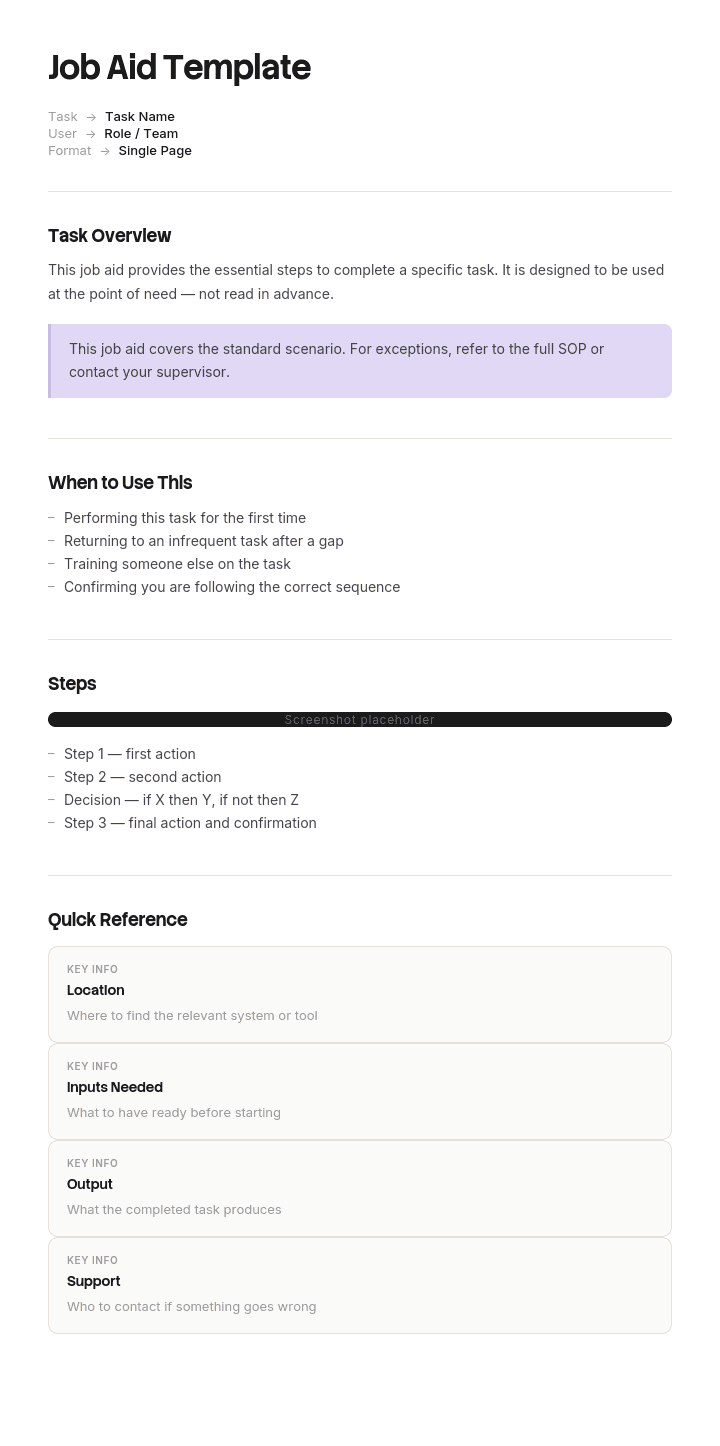
A job aid is a short reference used while the work is happening, by someone who has already been trained, to carry the part of the task that is not worth memorising. A job aid template is the reusable shell for building them: the fields, the structure and the rules about length.
Training changes what a person can do. A job aid changes what they have to hold in their head while doing it. The test for which you need is simple. If the person cannot perform the task at all, that is a training gap. If they can perform it but get one specific part of it wrong, that is a job aid.
The useful consequence is that job aids are cheap. A good one takes an hour rather than three weeks, and it is meant to be replaced when the process changes rather than maintained forever.
What a job aid is not, and when to write something else
It is not a procedure. An SOP is authoritative, versioned, and covers the full task including the parts nobody struggles with. A job aid covers only the hard bit and points at the SOP for the rest.
It is not a training module. If the reader needs context, background, or to understand why, they need training material and the job aid will be ignored.
It is not a how-to article. Articles are read once, before or after the work, and are written to be understood. Job aids are scanned mid-task and are written to be used.
And it is not a wiki page. A reference that requires two searches to find has already lost, because the moment it is needed lasts about fifteen seconds.
How to customize this template in Trupeer
Step 1: Open the Templates Section
Go to the Templates section from the main navigation.

Step 2: Select and Open a Template
Click on any template you want to work with to open it.

Step 3: Expand the Template View
If needed, expand the template view to see the full layout and details clearly.

Step 4: Edit the Template
Click on Edit to start modifying the selected template.

Within the editor, you can:
Add new sections
Define or update formatting rules
Add a logo and adjust its position and related settings
Step 5: Save Your Customized Template
After making all necessary changes, click Save to store the updated template as your own.

Step 6: Preview and Fine-Tune the Template
When you want to see how your customized template looks, open the Preview.

From the preview screen, you can continue to make adjustments directly if needed, ensuring the template appears exactly as you want.
With a job aid template you can:
Save hours on creation: Skip the blank page with a proven scannable structure.
Improve performance: Job aids cut errors by giving workers info exactly when they need it.
Stay on-brand: Apply your logo, fonts and colors using Trupeer's brand kit.
Reduce training time: Workers reach proficiency faster when job aids are accessible.
Standardize execution: Use the same format for every job aid across teams.
Reach global teams: Translate job aids into 65+ languages with one click.
Why most job aid templates fail before a word is written
Search this term and you get lists: five examples you can steal, eighteen examples and templates, six free downloads. Flowcharts, checklists, cheat sheets, decision trees, infographics. Pick one, fill it in.
Format is the last decision, not the first. A flowchart and a lookup table solve different problems, and choosing between them by appearance produces a document that is well made, well branded and changes nothing measurable.
The missing step is diagnosis. Before choosing a format, find out precisely how people fail at this task now. Not that they find it hard, but which part they get wrong and in what way. That is usually available in twenty minutes from a quality audit, a ticket queue, an error log, or two conversations with the people doing the work. There are only a handful of ways a trained person fails at a familiar task, each with a matching aid, and a correct diagnosis chooses the format for you.
How to diagnose the failure before you choose a format
Sit with the last twenty errors, or the last twenty times someone asked a colleague for help, and sort them by what the person did not have at the instant they went wrong.
Was it sequence, meaning they missed a step or did things out of order. Was it choice, meaning they picked the wrong option from several plausible ones. Was it recall, meaning they knew everything but omitted an item under load. Was it recognition, meaning they could not tell whether what they were looking at was correct. Or was it a value, meaning they knew exactly what to do and did not have the code, threshold or setting to hand.
Twenty errors is usually enough for one bucket to hold more than half of them. That bucket is your job aid.
Job aid format types: step card, decision table and reference card
What actually goes wrong | What you will hear | The aid that fixes it | What it must contain |
|---|---|---|---|
Sequence: steps missed or done out of order | "I always forget whether the approval comes before or after" | Step card | Numbered actions, one per line, with the expected result beside each |
Choice: wrong option picked from several | "They all sound the same to me" | Decision table | Conditions in the left column, the exact value or action in the right |
Recall: item omitted under time pressure | "I know it, I just forgot it was Friday" | Checklist, confirmed after the fact | Short items, no explanations, a defined trigger for when to run it |
Recognition: cannot tell good from bad | "How do I know if that one is right?" | Annotated example | A real correct sample and a real wrong one, side by side, with the difference marked |
Value: knows the action, not the number | "What is the code for that again?" | Reference card | Codes, thresholds, contacts, limits, and nothing else |
Two format notes worth having. A flowchart is a decision table drawn badly in most cases, useful only when a genuine loop or a rejoin exists that a table cannot express. And an infographic is a decision about presentation, not a category of job aid, so decide the type first and make it attractive second.
Free job aid template structure to copy and fill in
Copy from here. It fits on one side of a page and it should stay that way.
Title, written as the task. "Choose the right refund ledger code", not "Refund guidance". The user is looking for a task, so name it as one.
Use this when. The trigger, in one line. This is what stops a job aid being read at the wrong moment.
Owner and last checked date. A name and a date. Not a version number, which nobody reads, and not "last updated", because editing the wording is not the same as confirming it still works.
The aid itself. The step card, table, checklist, example or reference card from the section above. Nothing else competes for space with this.
If this does not cover it. Who to ask, by what route. Every job aid needs an exit for the cases it deliberately excludes, because a job aid that pretends to cover everything gets abandoned the first time it does not.
Link to the full procedure. One link to the SOP or work instruction that owns the whole task.
Copy to here. If your filled version runs to a second page, you have written a procedure and it belongs somewhere else.
A job aid example: the flowchart that changed nothing
Kestrel Home Insurance ran a contact centre of ninety agents. A quality audit found that fourteen percent of customer refunds were posted to the wrong ledger code, which generated about a hundred and ten correction tickets a month for finance at roughly twelve minutes each, so around twenty two hours of rework every month.
Learning and development built a job aid: a full page process flowchart of the refund journey, eleven boxes, properly branded, laminated for the floor and pinned in the team channel. It took three weeks including design review.
Six weeks after rollout the error rate was thirteen percent.
The reason is visible in the flowchart itself. Agents were not getting the sequence wrong. They had each processed hundreds of refunds. Every error happened inside one box, the one reading "select the correct ledger code", because there were twenty three codes and several were near identical. Refund for a policy cancelled before renewal, refund for a policy cancelled after renewal and refund for an overpaid premium all read almost the same in a dropdown at eleven in the morning with a customer waiting.
That is a value failure, not a sequence failure. The team had built a step card for a problem that needed a reference card.
The replacement was a decision table on one side of A5, taped to the bottom edge of each monitor. Left column, what the customer said. Right column, the exact code string to select. Twenty three codes collapsed to nine rows covering about ninety four percent of cases, with a final row saying that anything else goes to a team leader. It took ninety minutes to build, most of which was pulling the ninety four percent figure out of the last quarter's refunds.
Error rate fell to three percent in the following quarter and correction tickets dropped from around a hundred and ten a month to about twenty four.
The three week flowchart was not a bad document. It was a good answer to a question nobody was asking, and the ninety minute table worked because somebody had first spent an afternoon finding out why people were getting it wrong.
How to create a job aid template step by step in under an hour
Watch the task being done once, by someone who is fluent, on the real system. Do not interrupt.
Pull the last twenty errors or questions and sort them into the five buckets. Pick the biggest bucket and take the matching format.
Draft the aid with the fluent person in the room, then cut it by half. The first draft always contains explanation that belongs in training and steps that nobody gets wrong.
Test it on someone who is trained but not fluent, mid-task, without helping them. Watch where their eyes stop.
Put a name and a date on it, place it, and move on. Ninety minutes is a reasonable total, and anything approaching a week means you are building a training asset rather than a job aid.
Job aid examples for five common workplace tasks
Choosing a code, category or account. Decision table, condition on the left and the exact string on the right. The most common genuine job aid and the least often built.
Handing over a shift or an incident. Checklist with a fixed trigger, confirmed after the handover rather than read during it.
Escalating a customer issue. Decision table by symptom, pointing to a route and a named queue rather than a person. Pairs with a help desk response template.
A rarely performed system task. Step card with expected results, because the failure is sequence and the user has no recent memory to fall back on.
Judging quality of work. Annotated example showing an accepted piece of work beside a rejected one, with the deciding difference marked.
Where to put a job aid so people actually use it
Placement is half the artefact. A job aid buried in a knowledge base is just a document, and a document is something people look for only once they already know they need it.
It should be reachable without leaving the task. Physically that means the monitor bezel, the wall by the machine or the back of a lanyard card. Digitally it means pinned in the channel where the work is discussed, embedded in the tool, or attached to the ticket type that triggers it.
Keep the canonical copy in your knowledge base so there is one version to update, then push copies to where the work happens. Two locations is fine. Two versions is not.
How do job aids improve employee performance?
They reduce errors on the specific step that produces them, and they shorten the time a new starter takes to reach acceptable quality. Both effects are measurable if you record the error rate before building the aid, which is also the discipline that stops you building the wrong one.
What they do not do is raise general capability. Gains from job aids are narrow by design, which is why five aids aimed at five known failure points usually outperform forty covering everything.
Can I get a job aid template in Word, PowerPoint or Excel?
Each format suits a different aid type, which is a more useful answer than a download link. Word suits step cards and annotated examples. Excel suits decision tables and reference cards, because a table is what it is good at and you can sort while building. PowerPoint suits nothing much as a working job aid, but it is the right tool for the wall poster version of one you have already tested.
Build the aid first, then choose the file format that matches its type. Choosing the file first is how you end up with a flowchart nobody needed.
How to review and retire job aids that have stopped working
Check each one against a date, not a feeling. Anything older than six months without a check has probably drifted from the system it describes, and a job aid that is wrong is worse than one that is missing because people trust it.
Retire aggressively. When the process changes so the failure no longer happens, or the interface changes so the choice is no longer ambiguous, delete the aid rather than updating it. Job aids that outlive their failure mode clutter the shelf and make the useful ones harder to find.
Count what you deleted this quarter alongside what you created. A library that only grows is not being reviewed.
What to leave out when writing a job aid
Explanations of why. Genuine reasoning belongs in training and in the SOP, and every sentence of it in a job aid pushes the useful part further down the page.
Screenshots of interfaces your vendor changes on their own schedule. Name the button rather than showing where it sits.
Steps nobody gets wrong. Including the whole task feels thorough and it dilutes the part that matters. If agents never get steps one to seven wrong, the job aid starts at step eight.
Anything regulated. Where the task is clinical, electrical, food safety, aviation or working at height, the controlled document is the authority and a job aid must reference it rather than restate it. Have the relevant qualified person sign off any aid used in those settings before it goes on a wall.
How to build job aids from a screen recording
The bottleneck is never deciding what the job aid should say. It is the hour of screenshotting, cropping and formatting between knowing and having.
Trupeer AI turns a screen recording into a formatted step-by-step guide, so the fluent person performs the task once and the draft exists. From there you cut it down to the failing step, which is the part that needs judgement. The same recording gives you a video for people who would rather watch, a document for your knowledge base, and consistent branding across every aid your team makes.
Record it. Brand it. Translate it. Trupeer it.
For teams supporting a shift-based or multilingual workforce, guides and training videos cover the wider rollout, and translation means the reference card on the wall reads the same in every site. Setup instructions are in the document template setup guide.
Frequently Asked Questions
Is there a free job aid template in Word?
The structure above is written to be pasted straight into Word and kept as your house shell. Word suits step cards and annotated examples best. There is no gated download, which also means no form standing between you and the structure. Save your filled version as the departmental starting point.
Is there a free job aid template in PowerPoint?
Use PowerPoint for the poster version rather than the working version. Build and test the aid first in whatever is fastest, then lay the tested content into a slide when you need something to print at A3 for a wall or a machine. Designing in slides first tends to produce decoration rather than a working reference.
Is there a free job aid template in Excel?
Excel is the best of the four for decision tables and reference cards, which happen to be the two most useful job aid types. Two columns, conditions on the left and exact values on the right, sorted by how often each case occurs. Print it at the size it will actually be read.
Is there a free job aid template in PDF?
Export your own once the aid has been tested on a real user. PDF is right for the final placed version, because you want the thing on the wall to be fixed, and wrong for the draft, since job aids usually need two rounds of cutting before they work.
What does a step-by-step job aid template look like?
Numbered actions, one action per line, with the expected result beside each. No more than about nine steps. If it runs longer, either the task splits into two aids or the steps include navigation that can be cut. Use it only where the diagnosed failure is sequence, not choice or recall.
Can I download a job aid template for free?
The structure, the format table and the worked example are free and unrestricted. Use them, adapt them, and put them in your own template library under your own name with no attribution needed.
How long should a job aid be?
One side of one page, and shorter is usually better. The constraint is not aesthetic. A job aid is scanned in about fifteen seconds while something else is happening, so anything that cannot be found in that window is not doing the job the format exists to do.
Who should write job aids?
Whoever can see the errors, working with whoever is fluent at the task. That is often a team leader and a strong performer rather than a learning designer, and it is the reason job aids should stay cheap. A ninety minute aid built by the team beats a three week aid built for them, as the example above shows.

