4.8/5
Free Job Aid Generator
Turn Screen Recordings Into Professional Job Aids Instantly
Create Job Aids Free

Trupeer's job aid generator revolutionizes how organizations create visual work instructions and performance support materials. Unlike traditional approaches that require manual documentation creation, our AI-powered platform transforms simple screen recordings into comprehensive job aids complete with step-by-step instructions, visual cues, and professional formatting. A job aid is a performance support tool that provides workers with the information they need to complete tasks efficiently and accurately.
Our job aid generator stands apart from competitors by combining screen recording technology with intelligent AI processing. When you record your screen or upload an existing recording, our AI analyzes every action, automatically generates clear instructions, and formats everything into professional documentation. The system integrates seamlessly with our AI screen recorder to capture your workflows and our technical documentation tools to ensure consistent output formatting.
How Does Job Aid Generator Work?
Creating job aids with Trupeer's platform follows a streamlined five-step process that transforms raw screen recordings into polished performance support materials.
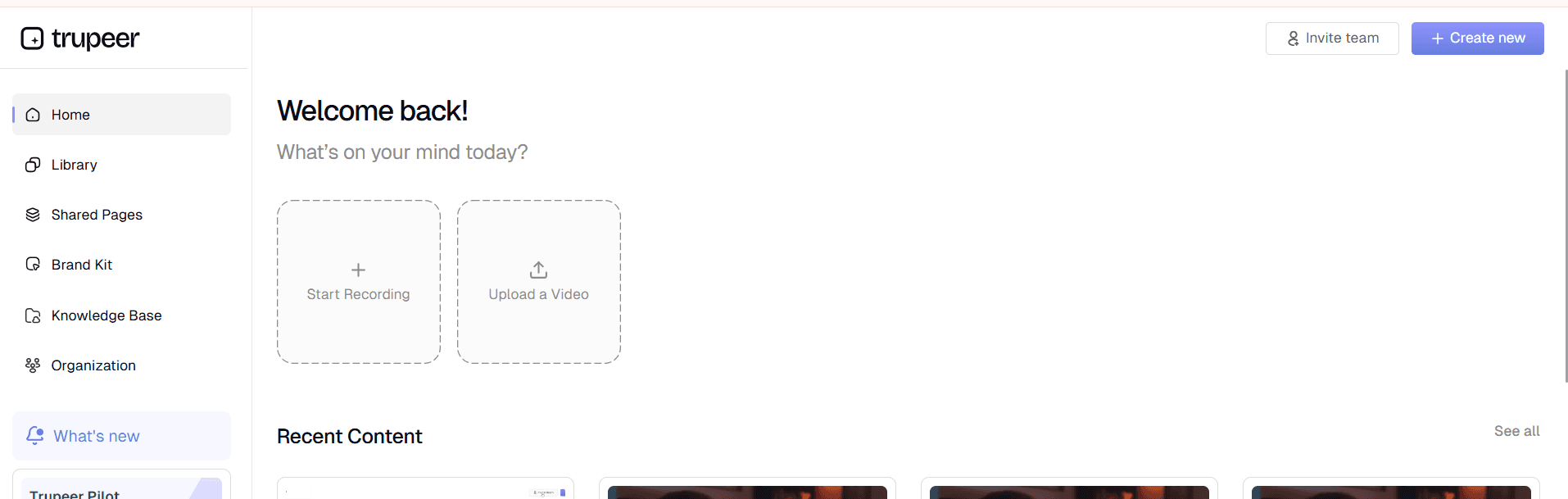
Step 1: Record or Upload Your Workflow
Begin by capturing your process using Trupeer's built-in screen recording functionality or upload an existing recording. Our screen recorder captures high-quality video while automatically optimizing for documentation purposes. The system records all on-screen actions, mouse movements, and interface interactions that will become the foundation of your job aid.
Step 2: AI Processing and Enhancement
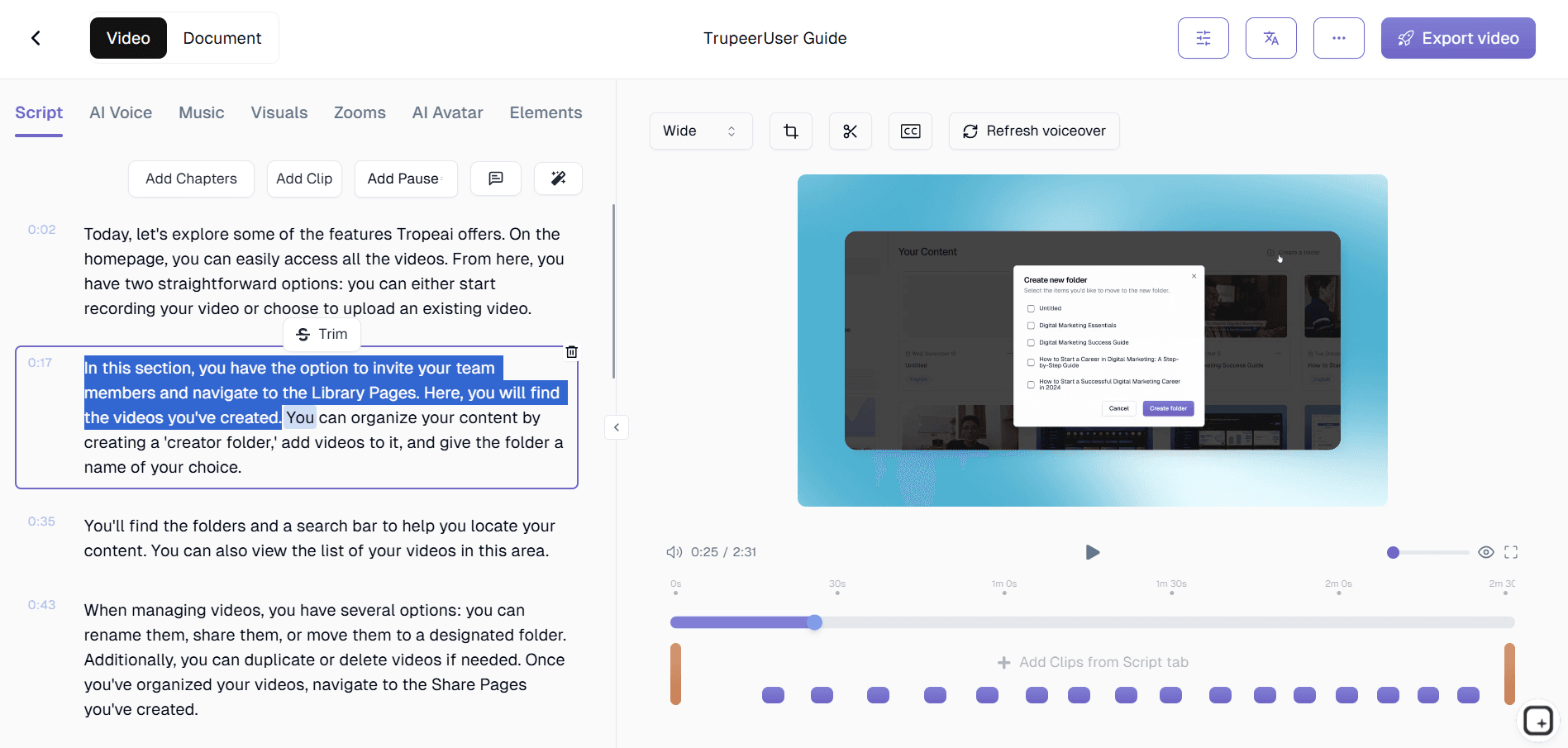
Once your recording is complete, Trupeer's AI automatically processes the content to remove background noise, eliminate filler words, and enhance video quality. The system analyzes each frame to identify key actions and interface elements. This processing stage ensures your final job aid focuses on essential information while maintaining visual clarity throughout the documentation.

Step 3: Automatic Instruction Generation
Our AI examines your recorded workflow and generates clear, step-by-step instructions that correspond to each action performed. The system creates descriptive text that explains not just what happens but provides context for why each step matters. This automated instruction generation saves hours of manual writing while ensuring comprehensive coverage of your process.
Step 4: Template Application and Customization
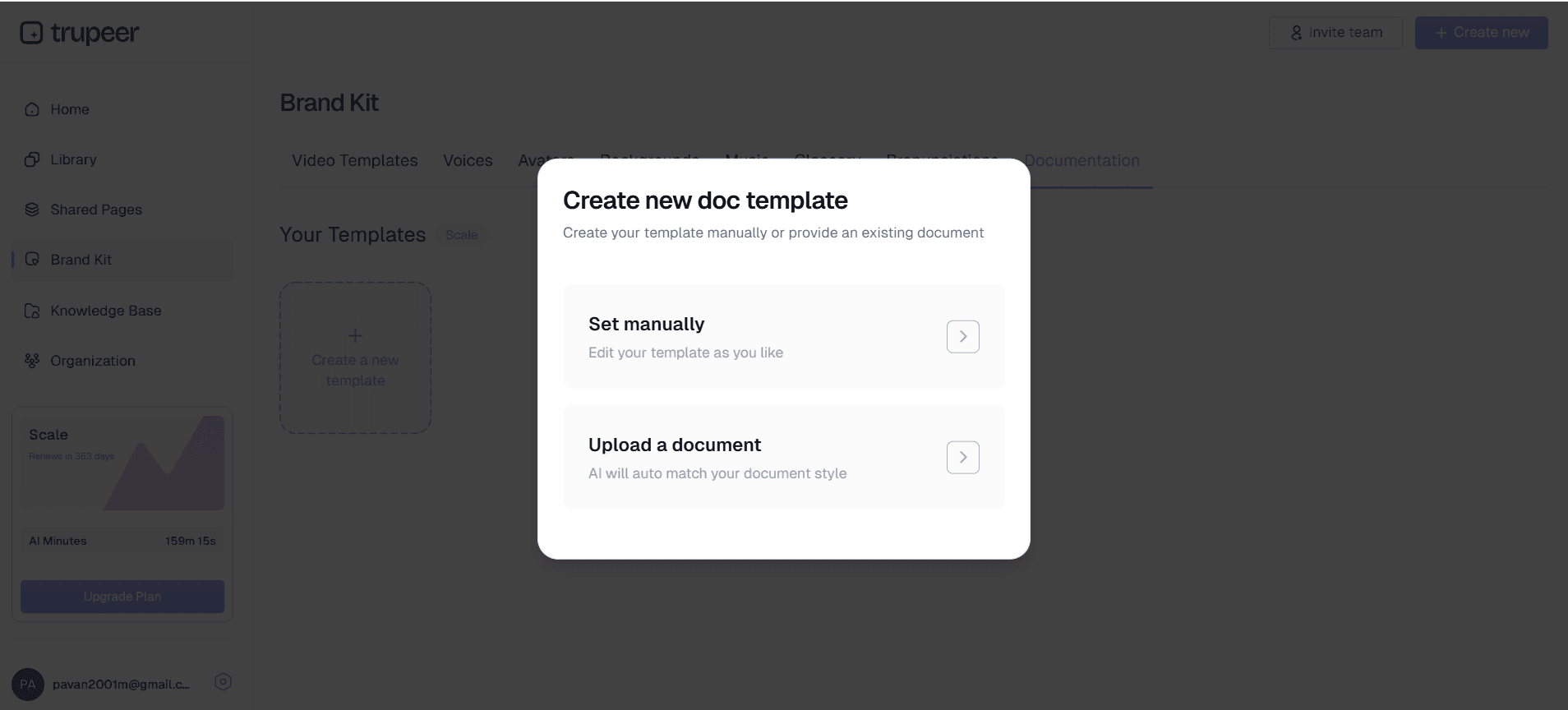
Apply your preferred documentation template to ensure consistent formatting across all job aids. Trupeer's template system allows you to save specific formatting preferences, styling choices, and structural elements. You can customize layouts, add company branding through our brand kits feature, and maintain visual consistency across all performance support materials.
Step 5: Export and Share
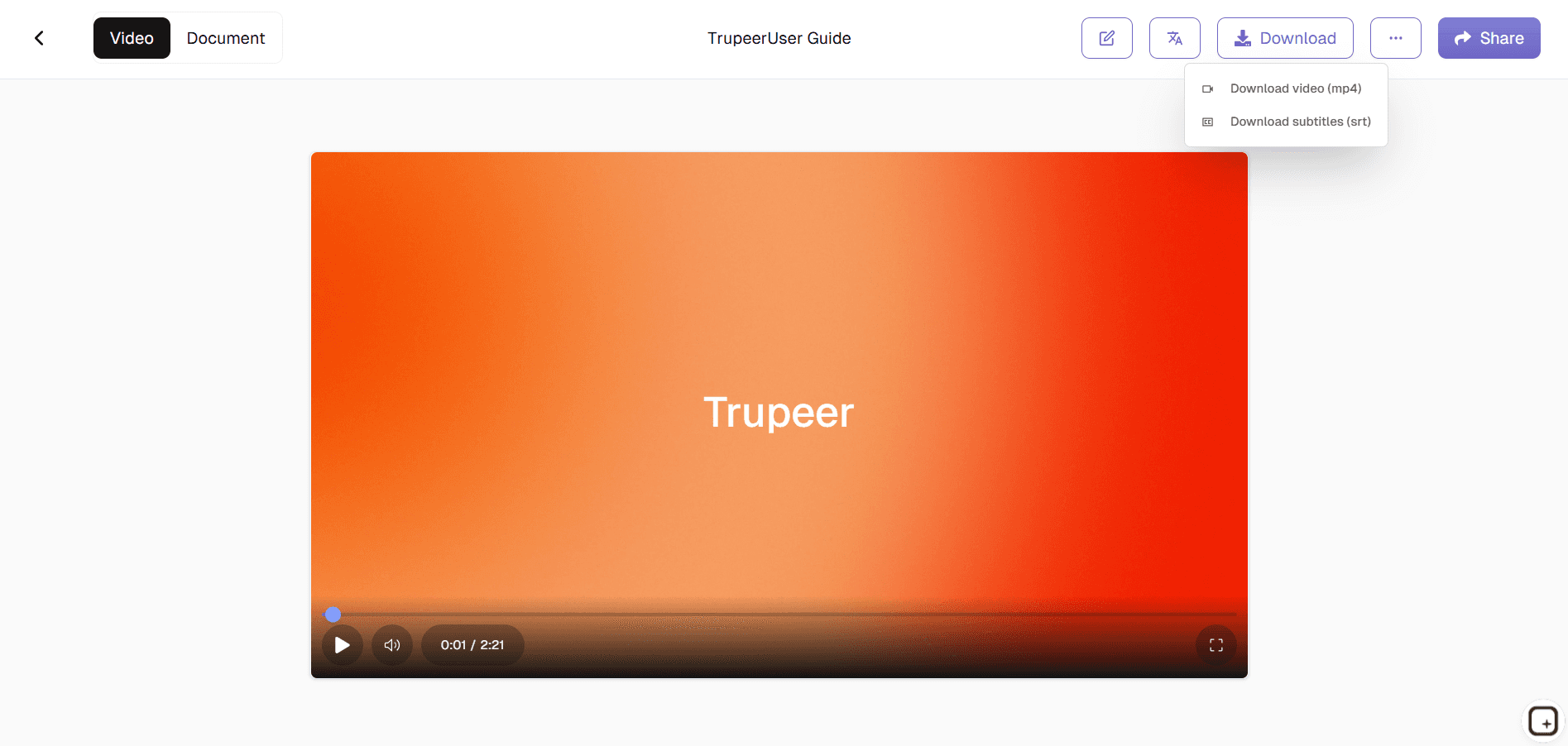
Generate your completed job aid in multiple formats suitable for different distribution methods. Export as PDF documents for printing, HTML for web publishing, or embed directly into learning management systems and knowledge bases. The finished job aids can be shared via direct links or embedded into existing training materials.
Key Features and Capabilities
Trupeer's job aid generator offers comprehensive functionality designed to streamline the creation of professional performance support materials across various use cases and organizational needs.
Intelligent Screen Analysis: Our AI analyzes screen recordings to identify critical workflow elements, user interface components, and decision points. This analysis ensures that generated job aids highlight important visual cues and provide context for complex interface interactions. The system recognizes patterns across different software applications and adapts instruction formatting accordingly.
Automated Step Sequencing: The platform automatically breaks down complex workflows into logical, sequential steps that users can easily follow. Each step includes relevant screenshots, action descriptions, and contextual information. This automated sequencing eliminates the manual effort typically required to organize workflow documentation while ensuring logical flow and completeness.
Template Customization System: Create and save custom templates that match your organization's documentation standards and visual identity. Templates include formatting preferences, color schemes, layout options, and branding elements. This system ensures consistency across all job aids while allowing flexibility for different types of processes and audiences. Integration with our training videos feature allows you to combine visual and video learning materials.
Multi-Format Export Options: Generate job aids in various formats to support different distribution and usage scenarios. Export as interactive PDFs with clickable navigation, web-based HTML documents for online access, or printer-friendly formats for physical distribution. The flexible export system accommodates different learning preferences and organizational requirements.
AI-Enhanced Content Quality: Beyond basic transcription, our AI enhances content quality by adding explanatory context, identifying potential confusion points, and suggesting clarifications. The system recognizes when additional explanation might be helpful and automatically includes relevant details. This enhancement ensures job aids provide comprehensive support rather than just step-by-step instructions.
Version Control and Updates: Maintain multiple versions of job aids and easily update existing documentation when processes change. The platform tracks revisions and allows quick updates by re-recording modified sections. This version control capability ensures that performance support materials remain current and accurate over time.
Why Should You Use Job Aid Generator?
Implementing Trupeer's job aid generator provides significant advantages for organizations seeking to improve performance support, reduce training time, and maintain consistent execution across teams and processes.
Dramatic Time Savings: Traditional job aid creation can take hours or days per document, involving manual screenshot capture, writing, formatting, and review cycles. Our automated approach reduces creation time by up to 90%, allowing you to generate comprehensive job aids in minutes rather than hours. This efficiency gain enables organizations to document more processes and maintain up-to-date materials without significant resource investment.
Enhanced Learning Effectiveness: Visual job aids created from actual workflow recordings provide learners with realistic, contextual guidance that mirrors their actual work environment. Unlike generic documentation, these materials show exactly what users will see on their screens. This authenticity improves comprehension and reduces the gap between training materials and real-world application. Integration with our AI Screen Recorder capabilities allows you to combine job aids with demonstration videos for comprehensive learning experiences.
Consistency Across Documentation: Automated generation ensures consistent formatting, terminology, and structure across all job aids within your organization. This consistency reduces confusion and creates a cohesive learning experience. Template systems maintain visual standards while AI processing ensures similar processes are documented using comparable language and structure. The result is a unified documentation ecosystem that supports rather than confuses learners.
Improved Accuracy and Completeness: Human-created documentation often suffers from missing steps, unclear instructions, or outdated information. AI-generated job aids capture every action performed during recording, ensuring comprehensive coverage of processes. The system identifies potential gaps and prompts for additional information when necessary, resulting in more complete and accurate performance support materials.
Scalable Documentation Process: As organizations grow and processes evolve, maintaining current job aids becomes increasingly challenging. Trupeer's automated approach makes documentation scalable by reducing the expertise and time required to create professional materials. Teams can quickly document new processes, update existing procedures, and maintain comprehensive performance support libraries without dedicating significant resources to manual documentation tasks.
Who Can Use Job Aid Generator?
Trupeer's job aid generator serves diverse professional contexts, enabling various user groups to create effective performance support materials tailored to their specific needs and audiences.
Content Creators and Instructional Designers: Professional content developers use our platform to rapidly prototype and produce performance support materials for various learning programs. The automated generation process allows focus on instructional strategy rather than manual documentation tasks. Integration with our SOP Generator enables comprehensive learning material development that combines visual job aids with scripted content for multimedia training programs.
Marketing Teams and Product Managers: Marketing professionals create job aids for product demonstrations, customer onboarding processes, and sales enablement materials. These visual guides help customers understand product features and support sales teams in delivering consistent demonstrations. Our Documentation Generator tools complement job aid creation by enabling teams to develop comprehensive marketing support materials that combine visual documentation with promotional content.
Educators and Corporate Trainers: Educational professionals use job aids to support classroom instruction, online learning programs, and practical skill development. The visual nature of AI-generated job aids particularly benefits hands-on training scenarios where learners need step-by-step guidance for software applications, equipment operation, or complex procedures. These materials serve as effective reference tools that learners can access during and after training sessions.
Product Teams and Software Developers: Development teams create job aids for user onboarding, feature explanation, and customer support. These materials help users understand new features and reduce support ticket volume by providing clear, visual guidance. Product teams also use job aids internally to document development processes, testing procedures, and deployment workflows, ensuring consistent execution across team members and projects.
Sales Professionals and Customer Success Teams: Sales teams utilize job aids for product demonstrations, proposal presentations, and customer training materials. These visual guides ensure consistent messaging while helping prospects understand product value and implementation processes. Our AI Video Editor and AI Screen Recorder features integrate with job aid generation to create comprehensive customer support ecosystems that guide users from initial interest through successful implementation.
Small Business Owners and Operations Managers: Small business operators create job aids for employee training, standard operating procedures, and customer service processes. The automated approach enables resource-constrained organizations to maintain professional documentation standards without dedicating significant staff time to manual creation. These materials support consistent service delivery and efficient employee onboarding across growing businesses.
Best Practices for Using Job Aid Generator
Maximize the effectiveness of your job aids by following proven strategies that enhance user comprehension, adoption, and long-term value across your organization.
Plan Your Recording Strategy: Before recording, outline the complete process you want to document and prepare your screen environment. Close unnecessary applications, organize desktop items, and ensure consistent window sizing. This preparation results in cleaner recordings that translate into more professional job aids. Consider recording at standard screen resolutions to ensure compatibility across different devices and display sizes.
Focus on User Perspective: Record workflows from the end user's perspective rather than the expert's viewpoint. Include common hesitation points, decision-making moments, and potential confusion areas. This user-centric approach creates more helpful job aids that address real-world usage scenarios. Pay attention to explaining why certain actions are necessary, not just how to perform them.
Leverage Template Consistency: Develop and maintain standardized templates that reflect your organization's visual identity and documentation standards. Consistent templates improve user familiarity and reduce cognitive load when accessing different job aids. Save successful template configurations for reuse across similar processes and team members.
Regular Updates and Maintenance: Schedule periodic reviews of job aids to ensure continued accuracy as software interfaces and processes evolve. Use Trupeer's quick update features to refresh specific sections without recreating entire documents. Establish feedback mechanisms that allow users to report outdated information or suggest improvements, keeping your performance support materials current and valuable.
Integration with Broader Learning Systems: Combine job aids with other learning materials and performance support tools for comprehensive coverage. Link to related tutorials and reference our knowledge base for additional context. This integrated approach creates a learning ecosystem that supports users at different skill levels and learning preferences.
Explore Related Tools
Why Choose Trupeer's Job Aid Generator
AI-Powered Creation
Automatically transforms screen recordings into professional job aids with step-by-step instructions
Template Customization
Save custom templates with your branding and formatting preferences for consistent output
Multi-Format Export
Export as PDF, HTML, or embed directly into learning management systems
Create Job Aids in 3 Simple Steps
Step 1
Record screen or upload video
Step 2
AI generates instructions automatically
Step 3
Export and share job aids
Frequently Asked Questions
What is a job aid and how does it differ from training materials?
A job aid is a performance support tool that provides step-by-step guidance for completing specific tasks. Unlike training materials that teach concepts, job aids offer immediate, practical assistance during task execution to reduce errors and improve efficiency.
Can I create job aids from existing screen recordings?
Yes, Trupeer accepts both live recordings and uploaded video files. You can upload existing screen recordings and our AI will automatically process them into professional job aids with generated instructions and formatting.
How does AI ensure accuracy in generated job aid instructions?
Our AI analyzes every action in your screen recording using computer vision and natural language processing. It identifies interface elements, user actions, and workflow patterns to generate contextually accurate instructions that match your actual process.
What file formats can I export my job aids in?
You can export job aids as interactive PDFs, web-ready HTML documents, printer-friendly formats, or embed codes for integration into websites and learning management systems. Multiple export options ensure compatibility with your distribution needs.
How do I maintain consistency across multiple job aids?
Use Trupeer's template system to save your preferred formatting, styling, and branding elements. Templates ensure visual consistency across all job aids while brand kits maintain professional appearance with your company colors and logos.
More Tools


