4.8/5
Free Instruction Manual Creator
Professional Instruction Manuals from Simple Screen Recordings
Create Your Manual Now

Trupeer's instruction manual creator revolutionizes how businesses and individuals create comprehensive documentation. Instead of spending hours writing step-by-step guides from scratch, you can simply record your screen while performing a task, and our AI automatically generates detailed instruction manuals with professional formatting. This innovative approach eliminates the traditional pain points of manual creation: forgetting steps, inconsistent formatting, and the time-consuming process of capturing screenshots and writing descriptions. The platform addresses a critical challenge faced by product teams, customer success managers, and training coordinators who need to create clear, actionable instruction manuals quickly.
What sets Trupeer apart from generic documentation tools is our dual-output approach. When you create an instruction manual, you're not just getting written documentation but also a polished video tutorial. This combination caters to different learning styles and ensures your audience can follow instructions whether they prefer visual or written guidance. Our AI video editor automatically enhances your recordings with zoom effects, noise removal, and filler word elimination. This makes it perfect for creating customer success materials that actually help users succeed. Whether you're documenting software workflows, creating training materials, or building knowledge bases, Trupeer's instruction manual creator ensures consistency and completeness.
How Does Instruction Manual Creation Work?
The instruction manual creation process with Trupeer is designed for maximum efficiency and minimal effort. You don't need prior documentation experience or technical writing skills to create professional-grade instruction manuals that rival those produced by dedicated technical writers. This is why it pairs well with the work instruction template the documentation and the documentation come from the same source.
Step 1: Record Your Process
Start by opening Trupeer's screen recorder and begin recording your screen while performing the task you want to document. Alternatively, if you already have existing recordings, you can upload them directly to the platform. The AI works with both fresh recordings and previously captured content, giving you flexibility in how you approach documentation creation.

Step 2: AI Analysis and Processing
Once your recording is complete or uploaded, Trupeer's AI immediately begins analyzing every action, click, and navigation step. The system identifies distinct processes, recognizes interface elements, and understands the logical flow of your workflow. This analysis forms the foundation for generating accurate, sequential instructions that mirror your exact process.

Step 3: Automatic Documentation Generation
The AI transforms your screen recording into comprehensive written instructions, complete with step numbers, action descriptions, and contextual explanations. Each instruction is crafted to be clear and actionable, ensuring readers can follow along without confusion. The system automatically generates descriptions for buttons, menu items, and interface elements.

Step 4: Template Application and Customization
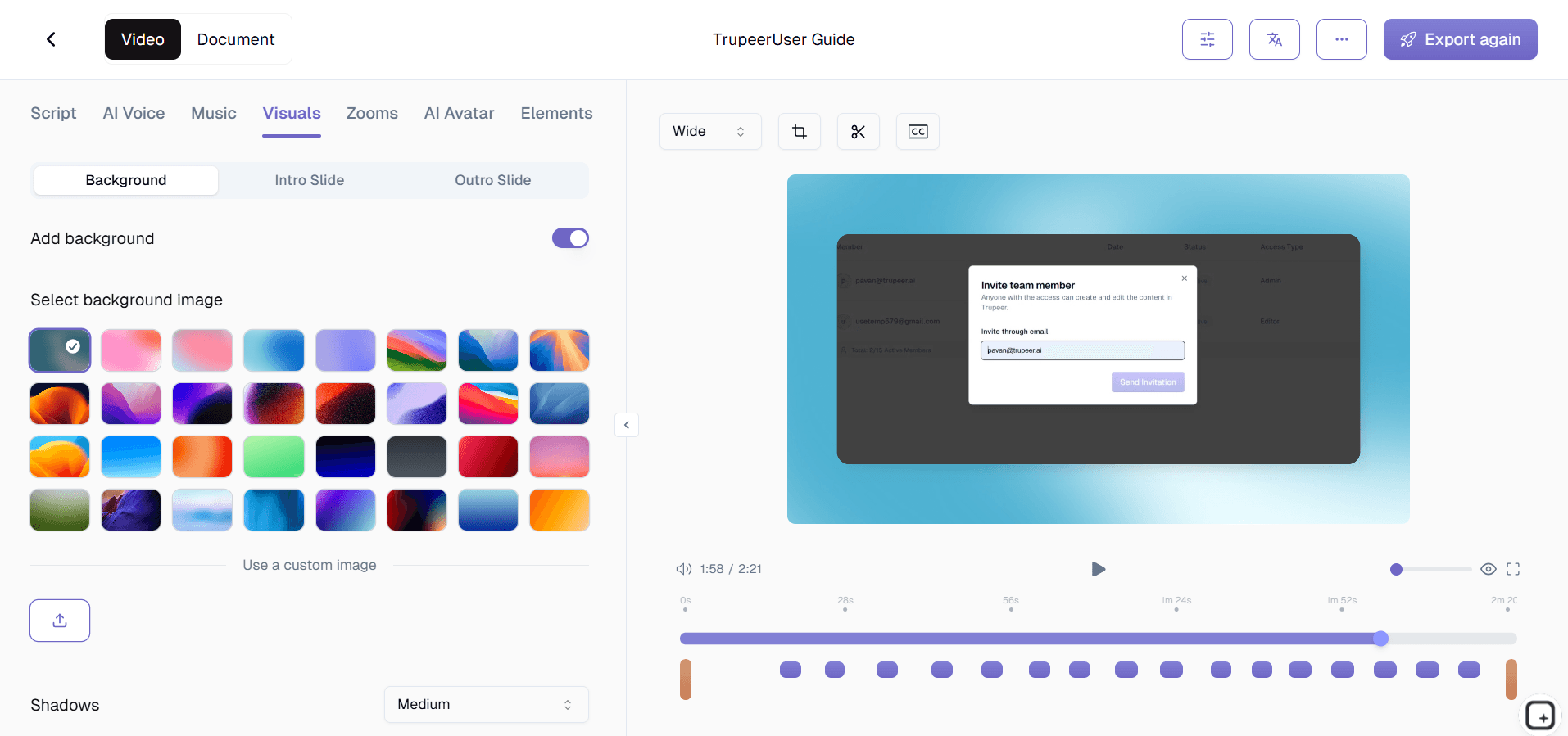
Apply your preferred documentation templates to ensure consistent formatting across all your instruction manuals. Trupeer allows you to save custom templates with your preferred styling, structure, and branding elements, streamlining future manual creation and maintaining brand consistency across your documentation library.
Step 5: Review, Brand, and Share
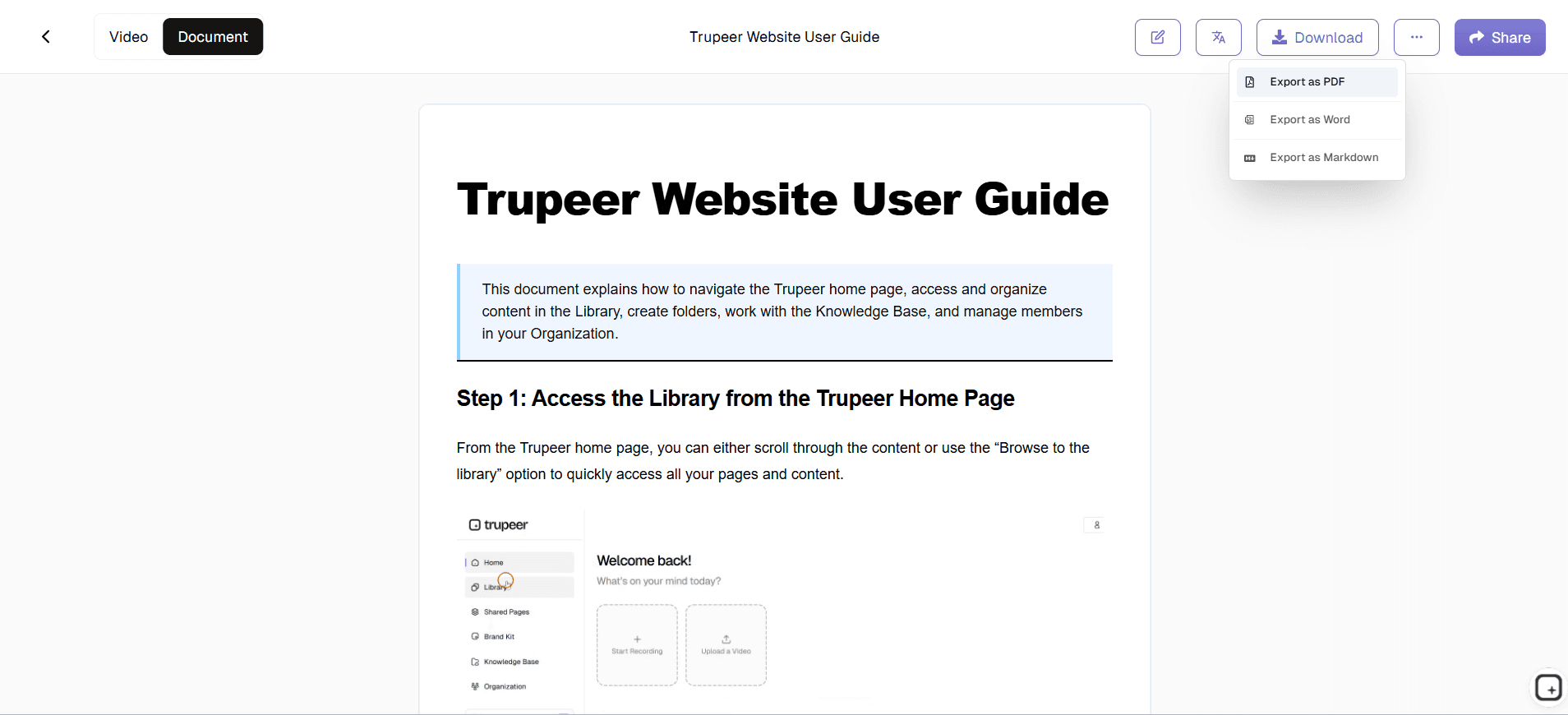
Review the generated instruction manual, apply your brand kit for consistent visual identity, and make any necessary adjustments. You can then export the manual as a standalone document, embed it in your knowledge base, or share it directly with your team or customers through secure links.
Key Features and Capabilities
Trupeer's instruction manual creator includes powerful features designed to streamline documentation workflows and produce professional results consistently. These capabilities address the common challenges faced when creating comprehensive instructional content.
Dual-Format Output: Every instruction manual comes with both written documentation and an enhanced video tutorial. This approach caters to different learning preferences and ensures comprehensive coverage of your process. The AI Screen Recorder are automatically edited with professional touches like zoom effects and audio enhancement.
AI-Powered Content Generation: The platform's artificial intelligence doesn't just transcribe your actions but creates meaningful, contextual instructions. It understands user interface elements, recognizes common patterns, and generates descriptions that make sense to your intended audience, whether they're technical users or complete beginners.
Template Customization System: Save time and ensure consistency with customizable documentation templates. Create templates that match your brand guidelines, include standard formatting, and incorporate required sections like prerequisites, troubleshooting tips, or additional resources. This feature is particularly valuable for teams creating multiple instruction manuals.
Multi-Language Support: Reach global audiences by translating your instruction manuals into multiple languages automatically. The translation feature maintains the structure and formatting of your original manual while adapting the content for different linguistic markets, expanding your documentation's reach significantly.
Brand Integration: Apply consistent branding across all instruction manuals with Trupeer's brand kit functionality. Include your logo, use brand colors, and maintain visual consistency that reinforces your professional image. This is especially important for customer-facing documentation and Documentation Generator materials.
Interactive Elements: Generated manuals can include interactive elements and clickable sections that enhance user engagement. This feature is particularly useful for creating comprehensive knowledge base articles that encourage exploration and deeper understanding of your processes.
Why Should You Use Trupeer's Instruction Manual Creator?
Traditional instruction manual creation is time-intensive, prone to errors, and often results in incomplete documentation that frustrates users. Trupeer's approach eliminates these pain points while delivering superior results that actually help people accomplish their goals.
Time Efficiency: Creating instruction manuals traditionally requires hours of writing, screenshot capture, editing, and formatting. With Trupeer, you simply perform the task once while recording, and the AI handles the rest. This represents a time savings of up to 80% compared to manual documentation creation, allowing your team to focus on higher-value activities.
Completeness and Accuracy: When you perform a task while recording, you naturally include every necessary step, eliminating the common problem of forgotten instructions. The AI captures every action, ensuring your instruction manual includes all the details users need to succeed. This completeness reduces support tickets and user frustration significantly.
Consistency Across Documentation: Using templates and automated generation ensures all your instruction manuals follow the same format, style, and structure. This consistency makes your documentation library more professional and easier for users to navigate. Teams creating SOPs and process documentation particularly benefit from this standardization.
Scalability for Growing Teams: As your product or service evolves, updating instruction manuals becomes effortless. Simply record the updated process, and Trupeer generates new documentation that matches your existing format and style. This scalability is crucial for growing businesses that need to maintain current documentation without dedicating entire teams to the effort.
Enhanced User Experience: The combination of video and written instructions caters to different learning styles and preferences. Users who prefer visual learning can follow the video, while those who want quick reference can use the written instructions. This dual approach significantly improves user success rates and reduces confusion.
Professional Quality Output: Even if you're not a trained technical writer, Trupeer ensures your instruction manuals look and read professionally. The AI generates clear, grammatically correct instructions with appropriate terminology and logical flow. This quality is essential for customer-facing documentation and internal training materials.
Who Can Use Trupeer's Instruction Manual Creator?
Trupeer's instruction manual creator serves diverse users across industries and roles, each with specific documentation needs and challenges. The platform's flexibility and ease of use make it valuable for both technical and non-technical professionals.
Content Creators and Course Developers: Online educators and content creators use Trupeer to build comprehensive course materials and tutorials. The platform's ability to generate both video content and written guides makes it perfect for creating multi-format educational resources. Whether you're teaching software skills or explaining complex processes, the instructional design capabilities help create engaging, effective learning materials.
Marketing and Product Teams: Marketing professionals creating AI Video Editor and accompanying documentation benefit from Trupeer's integrated approach. Product teams documenting new features, creating release notes, or building user guides can streamline their workflow significantly. The brand consistency features ensure all documentation aligns with company standards and visual identity.
Educators and Corporate Trainers: Educational institutions and corporate training departments use Trupeer to create comprehensive training materials that combine visual and written elements. The platform excels at documenting software training, process procedures, and step-by-step workflows that employees need to master. Integration with existing learning management systems makes deployment straightforward.
Customer Success and Support Teams: Customer success managers creating help documentation, troubleshooting guides, and onboarding materials find Trupeer invaluable for reducing support ticket volume. The detailed instruction manuals help customers self-serve effectively, while the video components provide visual confirmation of correct procedures. This combination significantly improves customer satisfaction and reduces support burden.
Sales Teams and Account Managers: Sales professionals creating personalized AI Screen Recorder and follow-up documentation can use Trupeer to provide prospects with detailed implementation guides. The professional appearance and comprehensive coverage help close deals by demonstrating clear value and reducing implementation concerns.
Small Business Owners and Entrepreneurs: Small business owners who need to document processes for scaling, create standard operating procedures, or build knowledge bases without dedicated technical writing resources benefit from Trupeer's automation. The platform allows resource-constrained businesses to create professional documentation that supports growth and operational efficiency.
Consultants and Service Providers: Management consultants, software implementers, and service providers use Trupeer to create client deliverables, process documentation, and training materials. The professional output quality and branding capabilities help maintain credibility while reducing the time spent on documentation creation.
Best Practices for Using Trupeer's Instruction Manual Creator
Maximize the effectiveness of your instruction manuals by following proven strategies that enhance clarity, usability, and user success rates. These practices ensure your documentation serves its intended purpose effectively.
Plan Your Recording Session: Before starting your screen recording, outline the process you'll demonstrate and gather any necessary materials or information. Close unnecessary applications, clear your desktop, and ensure your screen resolution provides clear visibility of interface elements. This preparation results in cleaner recordings and more professional final documentation.
Speak Clearly During Recording: While Trupeer's AI can generate instructions from visual cues alone, providing clear verbal narration during recording enhances the quality of generated text. Explain what you're doing and why, as this context helps the AI create more comprehensive and helpful written instructions.
Use Consistent Terminology: Maintain consistent language when referring to interface elements, processes, and actions throughout your recording. This consistency carries through to the generated instruction manual and helps users follow along without confusion about terminology or naming conventions.
Break Complex Processes into Segments: For lengthy or complex procedures, consider creating multiple shorter recordings rather than one extensive session. This approach allows you to focus on specific aspects of the process and results in more digestible instruction manuals that don't overwhelm users with information.
Leverage Template Customization: Invest time in creating comprehensive templates that include your branding, standard sections, and preferred formatting. Well-designed templates save significant time on future instruction manuals and ensure consistency across your documentation library. Include sections for prerequisites, troubleshooting, and additional resources to maximize user success.
Test Your Instructions: Before finalizing instruction manuals, have someone unfamiliar with the process attempt to follow the generated instructions. This testing reveals gaps or unclear sections that need refinement and ensures your documentation actually helps users achieve their goals successfully.
Utilize the tutorials section to explore advanced features and optimization techniques that can enhance your instruction manual creation workflow.
Explore Related Tools
Why Choose Trupeer's Instruction Manual Creator
Dual-Format Output
Get both professional video tutorials and comprehensive written documentation automatically
AI-Powered Generation
Advanced AI converts screen recordings into clear, actionable step-by-step instructions
Brand Consistency
Apply custom templates and branding for professional, consistent documentation across teams
Create Instruction Manuals in 3 Simple Steps
Step 1
Record your screen process
Step 2
AI generates written instructions
Step 3
Apply branding and share
Frequently Asked Questions
What types of instruction manuals can I create with Trupeer?
You can create any type of instruction manual by recording your screen while performing the task. This includes software tutorials, process documentation, product guides, training materials, and standard operating procedures.
Do I need technical writing experience to use the instruction manual creator?
No, technical writing experience is not required. Trupeer's AI automatically generates professional-quality written instructions from your screen recordings, handling formatting, structure, and clear explanations automatically.
Can I customize the format and branding of my instruction manuals?
Yes, Trupeer offers extensive customization options including custom templates, brand kits with your colors and logos, and flexible formatting options. You can save templates for consistent styling across all your documentation.
How accurate are the AI-generated instruction manuals?
Trupeer's AI is highly accurate at capturing and describing screen actions. The system recognizes interface elements, understands context, and generates step-by-step instructions that mirror your exact process with professional clarity.
Can I translate my instruction manuals into other languages?
Yes, Trupeer includes automatic translation capabilities that can convert your instruction manuals into multiple languages while maintaining formatting and structure, making your documentation accessible to global audiences.
More Tools


