Use this template
How-to articles are one of the highest-traffic content formats on the web. With Trupeer, you can save hours on writing how-to content by starting with a free how-to article template, customizing it with your brand guidelines, and turning each article into an engaging video tutorial that gives readers a second way to learn.
A how-to article has a reader in a very particular state. They are part way through something, it is not working, and they have already spent longer than they wanted to. They are not reading, they are scanning for the bit that unblocks them.
Almost every rule about writing these follows from that.
Download the how-to article template
Format | Best for |
|---|---|
Word (.docx) | Drafting and reviewing before it goes into your help centre |
Printable guides, onboarding packs, offline reference | |
PowerPoint (.pptx) | Turning a how-to into a training deck or walkthrough slides |
Google Docs | Drafting with the person who actually does the task |
Excel (.xlsx) | The article inventory: title, owner, last reviewed, source |
Free, editable, no watermark.
The three ways a how-to article fails
Every failure is one of these, and they need different fixes.
Gate | The reader's question | What fixes it |
|---|---|---|
Find it | Does an article about this exist? | The title, and where it is indexed |
Confirm it | Is this the right article for my situation? | The opening block and prerequisites |
Complete it | Can I actually get to the end? | Step quality, screenshots, troubleshooting |
Most writing advice addresses the third gate. Most articles fail at the first two.
Gate one: the title
If the title does not match the words the reader would use, the article does not exist as far as they are concerned.
Write the task, not the feature. "How to export your report as CSV" beats "Using the export module". People search for what they are trying to do.
Use their vocabulary. Your internal name for a feature is not what customers call it. Pull the phrasing from support tickets and site search.
Start with the verb. "How to reset your password" scans faster than "Password resets: a guide".
Be specific enough to be exclusive. "How to add a user" is ambiguous if you have three kinds of user. "How to add an admin user to a workspace" is not.
One task per title. If the title contains "and", you have two articles.
Gate two: the opening
The reader has landed. They have about five seconds to decide whether this is the right page.
The opening block answers three questions before the steps start.
What this article does. One sentence. "This article shows you how to connect your accounting system so invoices sync automatically."
Who it is for. Any role, permission or plan requirement. "You need admin access to do this."
What you need first. Prerequisites, stated before step one rather than discovered at step four.
That last one prevents the most common frustration in technical documentation, which is getting three steps in and finding you needed something you do not have. Prerequisites belong at the top, always.
Add expected time where it is more than a couple of minutes. "This takes about 15 minutes" lets someone decide whether to start now or come back.
Gate three: the steps
Where the reader either finishes or gives up.
One action per step. If a step contains "and then", split it.
Start each step with the verb. "Click Settings" not "You should then click on Settings".
Say where before what. "In the top right, click Export" tells them where to look first.
Name what they will see. Exact button labels, in the exact capitalisation. If the button says "Save & close", write that.
Number them. Bullets imply order does not matter.
Keep it under ten steps where possible. Longer tasks split into phases with subheadings.
Show the result. After the last step, say what should now be true. "The sync runs every hour. You will see the last sync time on the integrations page."
Do not explain why mid-task. The reader is executing, not learning. Put reasoning in a note, or in a separate concept article.
How to customize this template in Trupeer
Step 1: Open the Templates Section
Go to the Templates section from the main navigation.

Step 2: Select and Open a Template
Click on any template you want to work with to open it.

Step 3: Expand the Template View
If needed, expand the template view to see the full layout and details clearly.

Step 4: Edit the Template
Click on Edit to start modifying the selected template.

Within the editor, you can:
Add new sections
Define or update formatting rules
Add a logo and adjust its position and related settings
Step 5: Save Your Customized Template
After making all necessary changes, click Save to store the updated template as your own.

Step 6: Preview and Fine-Tune the Template
When you want to see how your customized template looks, open the Preview.

From the preview screen, you can continue to make adjustments directly if needed, ensuring the template appears exactly as you want.
With a how-to article template you can:
Save hours on writing: Skip the blank page with a structure built for how-to content.
Rank in search: Well-structured how-tos with HowTo schema rank well on Google.
Stay on-brand: Apply your logo, fonts and colors using Trupeer's brand kit.
Reduce support load: Clear how-to articles help users self-serve.
Add video walkthroughs: Embed video tutorials for steps that are hard to explain in text.
Reach global readers: Translate how-to articles into 65+ languages with one click.
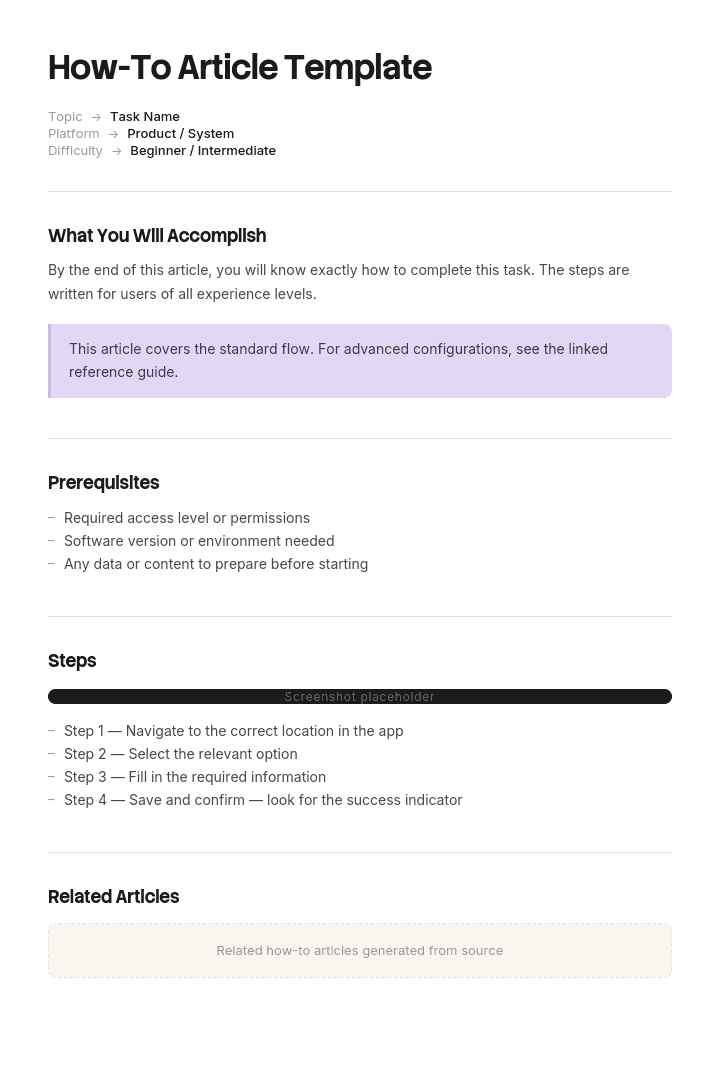
The how-to article template
Section | Contents |
|---|---|
Title | Task-based, verb first, one task |
Summary | One sentence on what this achieves |
Who this is for | Role, permission, plan |
Before you start | Prerequisites, access, information needed |
Time required | Where it is more than a couple of minutes |
Steps | Numbered, one action each, with screenshots |
Result | What should now be true |
Troubleshooting | The three or four things that commonly go wrong |
Related articles | Next likely task, and the concept article if there is one |
Metadata | Owner, last reviewed, product version |
Ten sections, of which four are short. The bulk is steps and troubleshooting.
Screenshots
The difference between a usable how-to article and a wall of instructions.
One screenshot per step where the interface is not obvious. Not every step, or the article becomes unscannable.
Crop to the relevant area. A full-screen capture makes the reader hunt for the thing you meant.
Annotate lightly. One box or arrow. Multiple annotations compete with each other.
Show state, not just location. Where a step changes something, a before and after is worth more than a single image.
Avoid personal or customer data. Use a demo account, and check the browser tabs and notifications in the corner of your capture.
Note the maintenance cost. Screenshots go stale at every interface change, and stale screenshots undermine trust in the whole article. This is the strongest argument for recording rather than capturing.
Troubleshooting
The section that separates a competent article from a genuinely useful one, and the one most often omitted.
List the three or four things that actually go wrong, in the reader's words, with the fix.
Nothing appears after step 4. Usually means the connection has not finished authorising. Wait a minute and refresh. If it is still empty, the account may not have the required permission.
The button is greyed out. You need admin access for this. Ask whoever set up your workspace.
It worked but the data looks wrong. Check the date range filter, which defaults to the current month.
Source these from support tickets rather than imagination. If four people have contacted you with the same problem after following the article, that problem belongs in the article.
Weak and better
Weak: Users can configure export settings via the reporting module in order to obtain data in various formats as required.
Better: To export a report as CSV: 1. Open the report. 2. In the top right, click Export. 3. Choose CSV and click Download. The file appears in your downloads folder, and includes every column currently visible in the report.
Weak: Step 3: Configure the integration settings appropriately and save your changes.
Better: 3. Enter the API key from your accounting system. 4. Set Sync frequency to Hourly. 5. Click Save & test. You should see a green Connected label.
The first version is one step doing three things with no way to tell whether it worked. The second is three steps with a verifiable outcome.
Weak title: Integration Configuration Guide
Better title: How to connect your accounting system
Weak opening: This article provides an overview of the export functionality available within the platform.
Better opening: This shows you how to export a report as CSV, Excel or PDF. You need view access to the report. Takes about a minute.
Types of documentation article
A how-to is one of four types, and mixing them is the most common structural mistake in documentation.
Type | Answers | Reader state | Format |
|---|---|---|---|
How-to | How do I do this specific task? | Stuck, mid-task, impatient | Numbered steps |
Concept | What is this and why does it work this way? | Learning, has time | Prose with examples |
Reference | What are the exact values and options? | Looking one thing up | Tables and lists |
Tutorial | Teach me this from scratch | New, willing to follow along | Guided sequence with a worked example |
The mistake is explaining concepts inside a how-to. The reader is executing and does not want the background. Link to the concept article instead, and keep the steps clean.
The reverse mistake is a concept article with three steps buried in the middle, which nobody will find when they need them.
Article length
Shorter than instinct suggests. A how-to article should cover one task and stop.
If it runs past ten steps, look for a natural split. "How to set up X" is often really "How to create X", "How to configure X" and "How to invite people to X", which are three articles that can each be found independently and linked in sequence.
Long articles also fail at gate one, because a single article covering six tasks can only have one title, which means five of those tasks are unfindable.
Formats
Word for drafting and review, because tracked changes and comments make the review cycle manageable. This is where most articles should be written before they go anywhere near a publishing system.
PDF for anything printed, handed out at training, or needed offline. Also the right format for a customer-facing guide you attach to an email.
PowerPoint when a how-to becomes training. One step per slide, screenshot on each, works well for a walkthrough session.
Your help centre or knowledge base for anything customer-facing that needs to be findable and searchable, which is most of them. Word and PDF are drafting and distribution formats, not publishing ones.
Maintaining articles
Documentation decays quietly, and stale documentation is worse than none because people follow it and it fails.
Assign an owner per article. Record the product version it was written against. Review after any release affecting the feature, and on a fixed cycle otherwise.
The most reliable maintenance signal is a support ticket about something the article covers. That means either the article is wrong, or it is right and unfindable. Both are worth fixing and both are invisible unless someone is watching for it.
Screenshots are the highest-maintenance element by a distance, which is worth factoring into how many you use and how you produce them.
Measuring whether it works
Views, which tell you if it is findable.
Support tickets on the same topic after publication. Should fall. If they do not, the article is not working or not findable.
Search terms with no results, which show what articles are missing.
Time on page, interpreted carefully. Long can mean thorough or confusing.
Article feedback, if your help centre offers it, though response rates are usually low.
Deflection, meaning people who viewed the article and did not then contact support.
The most useful single number is support volume on the topic before and after publication. Everything else is a proxy.
How to write a how-to article
Find out what people actually ask, from support tickets and site search. Do not guess the topic.
Write the title first, as a task in the reader's words. If you cannot, the scope is unclear.
Do the task yourself while writing, or watch someone do it. Articles written from memory skip steps.
List prerequisites as you hit them.
Write one action per step, verb first, with the exact interface labels.
Capture or record as you go, not afterwards from memory.
State the expected result.
Add troubleshooting from real tickets.
Have someone unfamiliar follow it without help. Every question they ask is a defect.
Publish, then watch support volume on that topic.
Step nine is the only real test. An article reviewed by someone who already knows the task will always read fine.
Best practices
Task-based titles in the reader's vocabulary.
Prerequisites before step one, always.
One action per step, verb first.
Exact interface labels, exact capitalisation.
Screenshots cropped and lightly annotated.
Expected result stated after the last step.
Troubleshooting sourced from real tickets.
One task per article, under ten steps.
Concepts linked, not embedded.
Tested by someone who has not done the task.
Common mistakes
Titles named after features rather than tasks.
Prerequisites discovered at step four.
Steps containing three actions each.
Vague instructions like "configure the settings appropriately".
Interface labels paraphrased rather than quoted.
Full-screen screenshots with no cropping.
Customer data visible in a screenshot.
No expected result, so the reader cannot tell if it worked.
No troubleshooting section.
Concepts explained inside the steps.
Six tasks in one article, five of them unfindable.
Written from memory rather than by doing the task.
Reviewed only by people who already know how.
Screenshots never updated after an interface change.
Record the task instead of writing it from memory
Open the template in Trupeer AI, apply your brand kit so articles match your documentation, and edit any section directly. Setup is in the template guide.
Two things make how-to articles expensive. Writing from memory skips the steps you perform automatically, which is exactly where readers get stuck. And screenshots are slow to produce and go stale at every interface change, which is why so many articles show a version of the product that no longer exists.
Recording solves both. Perform the task once and Trupeer AI produces the written article with the steps in the order they actually happened and screenshots captured automatically, plus a narrated video walkthrough from the same pass. When the interface changes, re-record rather than re-screenshot.
Translate it into 65+ languages, and keep the set in your knowledge base where readers will find it.
Record it. Brand it. Translate it. Trupeer it.
Frequently Asked Questions
Is there a free how-to article template in Word?
Yes. Word is the main format and the right place to draft, since review with tracked changes is easier there than in a publishing system. It includes the full structure with prompts in each section. Free download, no sign-up, no watermark.
Is there an article template in Word, free to download?
Yes, and it works for any instructional article, not only step-by-step ones. The structure holds for concept, reference and troubleshooting articles with minor adjustment.
Is there a free how-to article template in PDF?
Yes, as a printable guide format suitable for training handouts, onboarding packs and anything a customer needs offline.
Is there an article template in PDF?
Yes, both a blank version and a completed example so you can see a finished how-to article before writing your own.
Is there a free how-to article template in PPT or PowerPoint?
Yes. The PowerPoint version turns a how-to into a training walkthrough, one step per slide with room for a screenshot on each. It works well for a live session, and less well as reference material afterwards, so most teams need the Word version too.
Can I download a free how-to article template?
Yes, every format is a free download with no account required and no attribution.
What is the best free how-to article template?
The one that includes prerequisites and troubleshooting. Most templates give you a title and numbered steps, which is the easy part. Readers give up because they discover a missing prerequisite at step four or hit a problem the article does not mention, and those two sections are what prevent it.
What is a how-to article?
A short instructional article covering one specific task, written for someone who is trying to do it right now. It differs from a tutorial, which teaches from scratch, and from a concept article, which explains how something works.
What should a how-to article include?
A task-based title, a one-sentence summary, who it is for including any permissions needed, prerequisites before step one, time required, numbered steps with one action each, the expected result, troubleshooting for the three or four common problems, related articles, and metadata showing the owner and last review date.
How do you write a good how-to article?
Write the title as a task in the reader's words, do the task yourself while writing rather than working from memory, list prerequisites as you hit them, use one action per step with exact interface labels, state what should be true at the end, and add troubleshooting from real support tickets. Then have someone unfamiliar follow it without help.
How long should a how-to article be?
One task, ideally under ten steps. If it runs longer, it is usually several tasks that would each be more findable as separate articles linked in sequence. Long articles also fail because they can only have one title, which makes the other tasks inside them invisible to search.
What is the difference between a how-to and a tutorial?
A how-to serves someone who already knows what they want and needs the specific steps. A tutorial teaches a beginner, usually with a worked example and more explanation. Reader state is the difference: the how-to reader is impatient and mid-task, the tutorial reader has set aside time to learn.
Should how-to articles include screenshots?
For anything where the interface is not obvious, yes, cropped to the relevant area with light annotation. Not on every step, or the article stops being scannable. Be aware that screenshots are the highest-maintenance element in documentation and go stale at every interface change, which is worth weighing before adding twelve of them.
How often should how-to articles be reviewed?
After any release affecting the feature, and on a fixed cycle otherwise, usually every six to twelve months. The most useful trigger is a support ticket about something the article already covers, which means it is either wrong or unfindable.
Can I customise this how-to article template?
Yes, every version is fully editable. Adjust the sections to your documentation standards, though prerequisites and troubleshooting are the two worth keeping regardless, since they address the two points where readers most often abandon an article.

