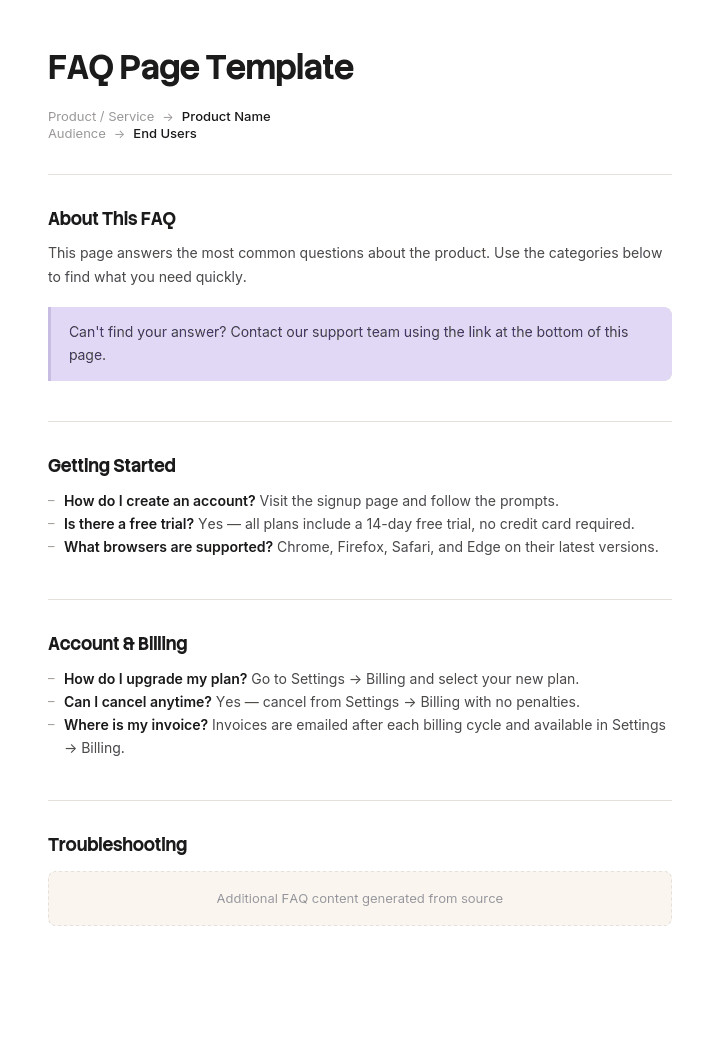
Use this template
A well-built FAQ page is one of the highest-ROI pages on your site - it deflects support tickets, improves SEO and helps customers self-serve. With Trupeer, you can save hours on writing FAQ pages by starting with a free FAQ page template, customizing it with your brand guidelines, and turning FAQ entries into short video answers that customers can watch instead of read.
Almost every FAQ page is written the same way. Someone books an hour, a few people brainstorm questions customers might have, and the answers get written by whoever knows the product best.
The result is a page full of questions nobody asked, written in the vocabulary of the company rather than the customer, which does not reduce support volume because it does not answer what people actually contact you about.
The questions already exist. They are in your ticket queue.
Download the FAQ template
Format | Best for |
|---|---|
Word (.docx) | Drafting and reviewing the content before it goes on the site |
Printable FAQ sheets, sales leave-behinds, event handouts | |
PowerPoint (.pptx) | Internal FAQ decks for launches and enablement |
Excel (.xlsx) | The question inventory: source, volume, owner, status, last reviewed |
Google Docs | Collaborative drafting with support and product |
Free, editable, no watermark. If you want a designed FAQ section for your website, a design tool or your CMS theme is the right place for that. What these templates hold is the content that goes into it.
Where FAQ questions should come from
Ranked by how well they predict what people will actually ask.
Source | What it gives you | Quality |
|---|---|---|
Support tickets | The exact questions people ask, in their words, with volume | Best |
Site search queries | What people looked for and did not find | Excellent, and usually ignored |
Live chat transcripts | Pre-purchase hesitations | Very good |
Sales objections | What stops people buying | Very good |
Search Console queries | What brings people to you from Google | Good |
Reviews and social | Complaints and confusions, unfiltered | Good |
Onboarding questions | What new customers struggle with | Good |
A brainstorm in a meeting | What the company thinks customers wonder | Poor |
The last row is how most FAQ pages get written. The first two are sitting in systems you already have.
How to customize this template in Trupeer
Step 1: Open the Templates Section
Go to the Templates section from the main navigation.

Step 2: Select and Open a Template
Click on any template you want to work with to open it.

Step 3: Expand the Template View
If needed, expand the template view to see the full layout and details clearly.

Step 4: Edit the Template
Click on Edit to start modifying the selected template.

Within the editor, you can:
Add new sections
Define or update formatting rules
Add a logo and adjust its position and related settings
Step 5: Save Your Customized Template
After making all necessary changes, click Save to store the updated template as your own.

Step 6: Preview and Fine-Tune the Template
When you want to see how your customized template looks, open the Preview.

From the preview screen, you can continue to make adjustments directly if needed, ensuring the template appears exactly as you want.
With an FAQ page template you can:
Save hours on writing: Skip the blank page with a proven FAQ structure.
Reduce support load: Clear FAQ answers cut tickets and free up agents for harder issues.
Improve SEO: FAQ schema and well-structured answers help your pages rank for question-based searches.
Stay on-brand: Apply your logo, fonts and colors using Trupeer's brand kit.
Add video answers: Embed short video tutorials for questions that are hard to explain in text.
Reach global users: Translate FAQ content into 65+ languages with one click.
Sourcing from support tickets
The single best source, and it takes an afternoon.
Export the last three to six months of tickets. Group them by category if your categorisation is good, or by keyword if it is not. Count them. The top fifteen by volume are your FAQ, in that order.
Then do the more valuable second pass. Look at the resolution codes. Tickets resolved with "documentation provided" mean the answer already exists and could not be found, which is a findability problem rather than a content one, and putting it in the FAQ may not fix it. Tickets resolved by support explaining the same thing repeatedly are pure FAQ material.
Use the customer's wording, not your category name. If forty people asked "why has my order not arrived" and your category is "Fulfilment enquiries", the FAQ question is the first one.
The customer ticket and resolution template covers the categorisation that makes this analysis possible in the first place.
Sourcing from site search
The most underused data in most organisations.
Every search someone runs on your site is a question they could not answer by looking. Two lists matter: the most frequent searches, and the searches that returned nothing or led to no click. The second list is more useful, because it is a record of people failing to find something.
If you do not have site search analytics enabled, that is a twenty-minute fix and it will pay for itself before the FAQ page is written.
Sourcing from sales and chat
Sales objections are pre-purchase FAQs, and they belong on the page even when the answer is awkward.
The questions people ask before buying are usually about price, comparison to alternatives, contract terms, what happens if it does not work, and how hard it is to switch. Most FAQ pages avoid these, which is a mistake: the person asking has already thought of the objection, and refusing to address it does not remove it.
Chat transcripts capture the same thing with less filtering. Search them for question marks and for phrases like "does it", "can I", "what happens if" and "is there".
The questions nobody asks but everybody needs
A small category worth including deliberately.
Things people should ask before buying and do not, where the answer would prevent a bad fit. Things that would generate a complaint later if unstated. And the honest limitations, because the question "does it do X" gets asked eventually, and the answer being findable is better than it arriving as disappointment.
Including a question whose answer is no builds more trust than any number of easy ones.
How to write an FAQ answer
The rules are different from ordinary writing, because the reader is scanning while mildly annoyed.
Answer in the first sentence. Yes, no, or the number. Context afterwards.
Use their words in the question, yours in the answer. The question should match how people phrase it, including informal wording.
One question per question. If it contains "and", it is two entries.
Be specific. "Usually within a few days" causes a support ticket. "Within 3 working days, or 5 to Northern Ireland" does not.
Say no clearly when the answer is no. Hedged refusals generate follow-up contacts.
Link to the detail rather than including it. The FAQ answers; the guide explains.
Give the next step. If the answer is that they need to do something, say what and where.
Keep it under 100 words where possible. Longer answers belong in documentation.
Weak and better
Q: How long does delivery take?
Weak: We aim to dispatch all orders as quickly as possible. Delivery times may vary depending on your location and the shipping method selected at checkout.
Better: Three working days to UK mainland, five to Northern Ireland and the Highlands. You will get a tracking link when it ships. If it has been longer than that, [contact us with your order number] and we will chase it.
Q: Can I cancel my subscription?
Weak: Subscriptions may be cancelled in accordance with our terms and conditions. Please refer to your account settings or contact our support team for further assistance.
Better: Yes, any time, in Settings then Billing. You keep access until the end of the period you have paid for, and we do not charge a cancellation fee. We do not refund part-months.
Q: Does it integrate with [tool]?
Weak: We offer a range of integrations to suit different workflows. Please contact us to discuss your requirements.
Better: Not currently. It is on the roadmap but not scheduled. In the meantime you can export as CSV and import manually, or use our API. If this is a blocker for you, tell us, because we track requests and it affects prioritisation.
The pattern in each: answer first, specific detail, honest about limits, and a next step.
Structuring the FAQ page
Group by topic, not chronologically or by internal team. Five to seven groups maximum.
Order within groups by volume, most-asked first. Not by how logical the sequence feels to you.
Show questions collapsed, answers expanded on click, so people can scan the list.
Include search if you have more than about twenty-five questions.
Put the top three or four at the top, ungrouped, because a large proportion of visitors want one of them.
End with a route to a human. Every FAQ page should assume it failed for some proportion of readers and tell them where to go.
Twenty to forty questions is a workable page. Beyond that you have a knowledge base rather than an FAQ, and it should be structured as one.
Types of FAQ
Type | Audience | Where it lives |
|---|---|---|
General website FAQ | Prospects and customers | A page on your site |
Product FAQ | Users of one product or feature | Product page or help centre |
Pre-sales FAQ | People deciding whether to buy | Pricing or sales pages |
Support FAQ | Existing customers with a problem | Help centre |
Internal FAQ | Staff, usually at launch or change | Intranet, or a document |
Onboarding FAQ | New customers or new employees | Onboarding materials |
Event or launch FAQ | Attendees or affected users | Email, landing page, deck |
The internal one is the most neglected and often the highest value. A well-written internal FAQ before a product launch stops the support team improvising twelve different answers in week one.
The FAQ document template
For internal FAQs, sales sheets and launch documents, where the FAQ is a file rather than a web page.
Field | Enter |
|---|---|
Title and audience | Who this is for |
Version and date | |
Owner | Who maintains it |
Question | In the audience's words |
Short answer | One or two sentences, usable verbatim |
Detail | Additional context if asked |
Do not say | Wording to avoid, and why |
Escalate to | Who handles it if the answer is not enough |
Source | Where the question came from |
Last reviewed | Date |
The "do not say" column is what makes an internal FAQ genuinely useful. Telling support what not to promise is often more valuable than telling them what to say.
FAQ schema and search
Worth understanding, and worth checking current guidance rather than trusting any article including this one.
FAQPage structured data marks up questions and answers so search engines can identify them. Google previously showed these as expandable rich results in the SERP, and then substantially reduced that, limiting FAQ rich results to a narrow set of authoritative sites. Because this policy has changed more than once, check Google's current structured data documentation before building an FAQ strategy around rich results.
What has not changed: a well-written FAQ can still rank for the question itself as an ordinary result, and question-shaped content is well suited to how people search. Write the questions in natural language, keep the answer concise and near the top, and mark it up if you like, but do not let the markup be the reason the page exists.
Maintaining it
The reason most FAQ pages are wrong within a year.
Assign an owner. Review quarterly against fresh ticket data, since the top questions change as the product and the customer base change. Remove questions that no longer come up, because a stale FAQ dilutes the current ones. Add anything that has appeared in the ticket queue more than a handful of times since the last review.
The most useful maintenance signal is a support ticket asking a question that is already on the FAQ page. That means the answer exists and did not work, either because it was unfindable or because it was unclear. Track those specifically.
When an FAQ is the wrong answer
Worth saying, because FAQ pages are often used to paper over problems.
If the same question arises constantly because the product is confusing, the FAQ is a workaround. Fixing the interface removes the question.
If the answer requires several steps, it is documentation rather than an FAQ. Link to it.
If the honest answer is a policy people dislike, an FAQ entry will not change that, and burying it makes it worse.
And if you have more than fifty questions, you have a knowledge base. Structure it accordingly rather than growing an accordion indefinitely.
Design and format
For the visual FAQ section on your website, the practical options are your CMS theme's accordion component, a design tool such as Canva for anything downloadable or printed, or an HTML snippet if you are building it yourself.
Design does matter here. A wall of text with no visual separation between questions defeats the scanning that FAQ pages exist to support. Collapsed questions, generous spacing, clear typographic hierarchy between question and answer.
What we provide is the content: the questions, the answers, and the structure. That is the part that determines whether the page works, and it is also the part most templates skip.
How to build your FAQ page
Export three to six months of support tickets and count by topic.
Pull site search queries, especially the zero-result ones.
Ask sales for their five most common objections.
Write the question list in customer wording, ordered by volume.
Cut to twenty to forty, grouped into five to seven topics.
Write answers, first sentence first, under 100 words each.
Include at least one honest no.
Have support review it, since they will spot the answers that will not survive contact with a real customer.
Publish with a clear route to a human.
Set a quarterly review against fresh ticket data.
Best practices
Questions sourced from tickets and search, not from a meeting.
Customer wording in the question, yours in the answer.
Answer in the first sentence.
Specific numbers rather than approximations.
One question per entry.
Under 100 words, linking out for detail.
Grouped by topic, ordered by volume within group.
At least one honest negative answer.
A route to a human at the bottom.
Reviewed quarterly against new ticket data.
Common mistakes
Questions invented rather than observed.
Company vocabulary in the question, so nobody searching finds it.
Answers that avoid answering, particularly on price and limitations.
Hedged refusals that generate follow-up contacts.
Sixty questions in one accordion.
Ordered by internal logic rather than by what people ask most.
No search on a long page.
No contact route, implying the FAQ is the only support you offer.
Never reviewed, so it describes a product from two versions ago.
Used to work around a confusing product instead of fixing it.
Built for schema markup rather than for readers.
Answer it once, properly, in both formats
Open the template in Trupeer AI, apply your brand kit so FAQ documents match your other materials, and edit any section directly. Setup is in the template guide.
Some FAQ answers cannot be written well. Anything whose honest answer is a sequence of steps in your product becomes either a 300-word answer nobody reads or a link to documentation that may not exist yet.
Those are the entries worth recording. Capture the process once and Trupeer AI produces the written guide and a narrated video walkthrough together, so the FAQ answer stays two sentences and links to something the person can watch. Translate it into 65+ languages if you support international customers, and keep the set in your knowledge base, which is where an FAQ should graduate to once it passes fifty questions.
Record it. Brand it. Translate it. Trupeer it.
Frequently Asked Questions
Is there a free FAQ template in Word?
Yes. The Word version is for drafting and reviewing the content before it goes anywhere, with the question inventory, answer fields and a review column. Free download, no sign-up, no watermark.
Is there a free FAQ page template in Word doc format?
Yes, a .doc version is included alongside .docx.
Can I download a free FAQ page template?
Yes, every format is free with no account required and no attribution.
Is there a free FAQ page template in PDF?
Yes, formatted as a printable FAQ sheet, which is the format most used for sales leave-behinds, event handouts and internal launch documents.
Is there a free FAQ page template in PPT or PowerPoint?
Yes. The PowerPoint version is built for internal FAQ decks, the kind used at launches and in enablement sessions, with one question per slide and a "do not say" note in the speaker notes.
Is there an FAQ template for Canva?
Not from us, and Canva is a reasonable choice for a designed FAQ graphic or a downloadable sheet. What these templates hold is the content, meaning the questions, the answers and the structure, which is the part that determines whether an FAQ works. Design the container in whichever tool you prefer.
Is there an FAQ template for a website?
For the visual component, use your CMS theme's accordion or an HTML snippet, since an FAQ section is a front-end pattern rather than a document. The content templates here are what you fill it with. If you are choosing between building a page and building a help centre, the deciding factor is question count: past about fifty, you need a knowledge base rather than an FAQ page.
What is an FAQ page?
A page answering the questions people most commonly ask, grouped by topic, with short answers and links to fuller documentation. Its purpose is to resolve common questions without contact, which only works if the questions are the ones people actually ask.
Where do you get questions for an FAQ page?
From support tickets first, counted by volume over three to six months. Then site search queries, especially ones returning no results. Then sales objections and chat transcripts. Questions generated in a brainstorm are the weakest source and the most common one.
How many questions should an FAQ page have?
Twenty to forty, grouped into five to seven topics. Fewer than fifteen and it probably does not cover enough to reduce contact. More than fifty and you need a searchable knowledge base rather than a longer accordion.
How do you write a good FAQ answer?
Answer in the first sentence, then give context. Use specific numbers rather than approximations. Keep it under 100 words and link out for detail. Say no clearly when the answer is no, and give the next step if the person needs to do something.
Should an FAQ page include difficult questions?
Yes. Price, comparison to alternatives, limitations and what happens if it does not work are the questions people are already thinking about. Not answering them does not remove the doubt, and an honest negative answer builds more trust than a page of easy ones.
Does FAQ schema still work for SEO?
FAQPage structured data marks up questions and answers for search engines, but Google has significantly narrowed which sites are eligible for FAQ rich results, and the policy has changed more than once. Check the current structured data documentation before building a strategy around it. A well-written FAQ can still rank as an ordinary result for the question itself, which is the more reliable benefit.
How often should an FAQ page be updated?
Quarterly, against fresh support ticket data, since the most common questions shift as the product and customer base change. Remove questions that no longer arise, because stale entries dilute the current ones.
What is the difference between an FAQ and a knowledge base?
An FAQ answers common questions briefly on one page. A knowledge base holds structured, searchable articles covering topics in depth. The threshold is roughly fifty questions or any answer needing more than a short paragraph, at which point an FAQ page stops being navigable.
Can I customise this FAQ template?
Yes, all versions are fully editable. The question list is the part that must be yours, and the honest way to build it is from your own ticket data rather than from anyone's example list. In Trupeer AI you can also apply your brand kit so FAQ documents match your other materials.


