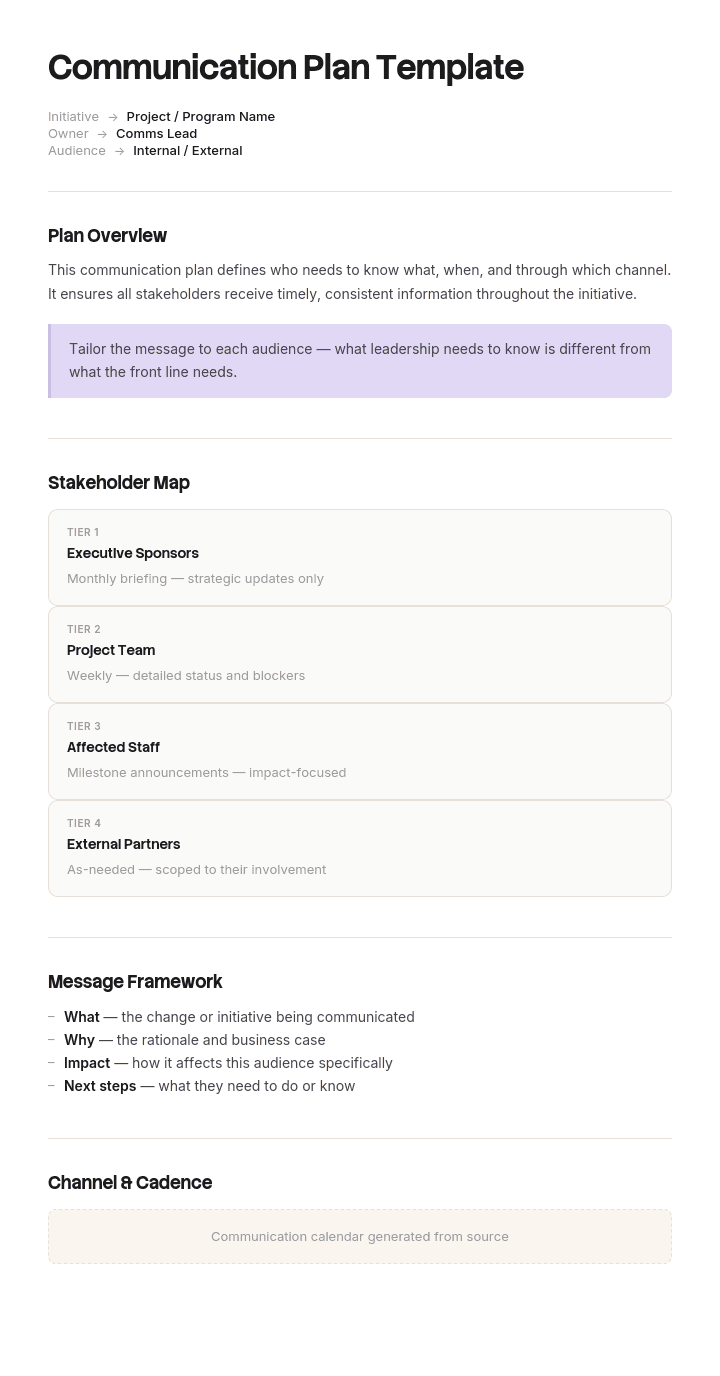
Use this template
A great communication plan is what keeps a project, change or campaign from spinning out of control. With Trupeer, you can save hours on communication planning by starting with a free communication plan template, customizing it with your brand guidelines, and turning the plan into video updates that scale across audiences.
Almost every project post-mortem contains a line about communication. Not that there was too little of it, usually, but that the wrong people got the wrong thing at the wrong time, while the people who needed to act found out last.
A communication plan fixes that by making the decision once, in advance, instead of forty times under pressure. This free template gives you the matrix, plus the parts most templates leave out: cadence, feedback routes, and what happens when something goes wrong.
Download the communication plan template
Format | Best for |
|---|---|
Word (.docx) | The written plan, for approval and sharing. Free download, no sign-up |
Excel (.xlsx) | The matrix itself, filtering by audience, owner or channel |
PowerPoint (.pptx) | Presenting the plan to sponsors or a steering group |
The approved version, and printing | |
Google Docs | Collaborative review before sign-off |
Google Sheets | Live tracking during delivery |
Free, editable, no watermark. Most people use Word for the plan and Excel for the matrix, since one is read and the other is worked.
The communication plan template
Audience | What they need to know | Why | Channel | Frequency | Owner | Feedback route | Status |
|---|---|---|---|---|---|---|---|
Eight columns. The two most often missing are Why, which stops the plan filling up with updates nobody needs, and Feedback route, which is what turns communication from broadcast into something two-way.
What is a communication plan?
A communication plan sets out who needs to know what, why they need to know it, how they will be told, how often, and who is responsible for telling them.
It exists to prevent information asymmetry: the state where the people who need to act do not know, while the people who do not need detail are drowning in it. Both are communication failures and the second one causes the first, because people who receive too much stop reading.
What is a communication plan template?
A pre-built matrix with the columns already in place, so you are making decisions about audiences and cadence rather than designing a table. The template also carries the sections most people forget: escalation, feedback routes, and the review point where you check whether the plan is working.
Why you need a communication plan
The decision gets made once. Without a plan, every update is a fresh judgement call about who to copy in, made by whoever is busiest.
Nobody is missed. The absent audience is invisible until they surface as a problem, usually late.
Over-communication becomes visible. A matrix showing one audience receiving five weekly updates is easier to fix than a vague sense of too many emails.
Cadence stops being ad hoc. Regular, predictable updates reduce the anxious check-ins that consume more time than the updates would have.
Ownership is explicit. Shared communication responsibility means it happens inconsistently or not at all.
Silence gets noticed. A plan makes a missed update an observable gap rather than something nobody thinks about until it matters.
How to customize this template in Trupeer
Step 1: Open the Templates Section
Go to the Templates section from the main navigation.

Step 2: Select and Open a Template
Click on any template you want to work with to open it.

Step 3: Expand the Template View
If needed, expand the template view to see the full layout and details clearly.

Step 4: Edit the Template
Click on Edit to start modifying the selected template.

Within the editor, you can:
Add new sections
Define or update formatting rules
Add a logo and adjust its position and related settings
Step 5: Save Your Customized Template
After making all necessary changes, click Save to store the updated template as your own.

Step 6: Preview and Fine-Tune the Template
When you want to see how your customized template looks, open the Preview.

From the preview screen, you can continue to make adjustments directly if needed, ensuring the template appears exactly as you want.
With a communication plan template you can:
Save hours on planning: Skip the blank page with a structure used by experienced PMs and comms leads.
Reach the right audiences: Built-in stakeholder analysis ensures every audience gets the right message.
Stay on-brand: Apply your logo, fonts and colors using Trupeer's brand kit.
Scale messaging: Convert long emails into short video updates everyone can watch.
Track adoption: Built-in metrics help you measure whether messages are landing.
Reach global teams: Translate communication updates into 65+ languages with one click.
A great communication plan turns chaos into clarity. Use this template to plan, deliver and measure every communication with confidence.
The four directions of communication
Most plans treat all stakeholders as one list. In practice communication runs in four directions, and each has a different cadence, channel and failure mode. Sorting your audiences this way makes the gaps obvious.
Communicating upward
To sponsors, executives and the board.
They need: progress against the thing they care about, decisions they must make, and risks that could require their intervention. Short, and led with the conclusion.
Cadence: regular and predictable, usually fortnightly or monthly, plus immediate escalation for anything material.
Failure mode: surprises. An executive who learns about a problem from someone else has lost confidence in the reporting, not just in the project. The rule is that bad news travels upward faster than good news, not slower.
What works: a consistent format every time, so they learn where to look. Status, decisions needed, risks. Nothing else.
Communicating downward
To the teams doing the work, and their managers.
They need: what is happening, what it means for their work specifically, what has changed since last time, and what is expected of them.
Cadence: frequent, often weekly, plus immediate notice of anything that changes their work.
Failure mode: managers finding out at the same time as their teams. A manager who cannot answer their team's questions loses standing, and the change loses its most important advocate. Brief managers first, always.
What works: translating the general into the specific. "The migration is on track" means nothing to a team. "You will not be able to raise invoices on Thursday afternoon" does.
Communicating across
To peer teams and functions who are affected but not involved.
They need: what will change for them, when, and what they need to do about it.
Cadence: at the points where their work is touched, not on your project's rhythm.
Failure mode: the most under-planned direction. Sideways audiences are affected without being consulted, find out too late to prepare, and become a blocker at exactly the wrong moment. Support teams and finance are the usual casualties.
What works: identifying them properly at the start. Ask which teams touch this process before or after us, and which will get the questions when something changes.
Communicating outward
To customers, partners, suppliers, and sometimes the public.
They need: what changes for them, when, what they need to do, and where to get help.
Cadence: deliberately timed, usually less often than internal, and never before the internal audiences are ready.
Failure mode: going external before support and sales are briefed. Customers then contact people who know nothing about it, which does more damage than a delayed announcement would have.
What works: treating internal readiness as a gate on external communication. If support cannot answer the questions, do not send the email.
For campaign-specific external communication, use the brand campaign communication plan or the marketing communication plan.
What a communication plan should include
Purpose. What this plan is for and what it covers.
Audiences, segmented and sorted by direction.
Message per audience, translated into what it means for them.
The reason each audience needs it. The column that keeps the plan honest.
Channel, chosen for where they already are.
Frequency, stated as a cadence rather than "regularly".
Owner, one person per row.
Timing and sequence, including which communications gate others.
Feedback route, so people can respond rather than only receive.
Escalation path for anything urgent.
Review point, where you check whether the plan is working.
Choosing the right cadence
Cadence errors cause more problems than channel errors.
Audience | Typical cadence | Signal it is wrong |
|---|---|---|
Executive sponsor | Fortnightly or monthly | They are asking for ad hoc updates, which means yours are too infrequent or not answering their question |
Delivery team | Weekly, plus daily during critical phases | People are asking each other rather than reading |
Affected peer teams | At the points that touch them | They are surprised by something that was in your plan |
Managers of affected teams | Before their teams, every time | Their team knew first |
Customers | Deliberately, at defined milestones | Support is fielding questions about something not yet announced |
The general rule: predictable beats frequent. An audience that knows an update arrives every second Tuesday will wait for it. One receiving irregular updates will chase.
Choosing the right channel
Email for anything that needs to be referred back to. Poor for anything requiring a response.
Chat for speed and low-stakes updates. Anything important posted only in chat has effectively not been communicated.
Meeting when you need discussion or a decision. Wasteful for one-way information.
Written document for detail people will consult repeatedly.
Video for anything demonstrating a change in how work is done, where text is always more ambiguous.
In-person or all-hands for significant change, where the fact of showing up carries part of the message.
The test is whether you need it understood, acknowledged, or acted on. Those need different channels, and most plans use email for all three.
Filled-in communication plan example
Project: Replacing the manual expense process with a new claims system. Go-live: 1 October. Affected: 340 people across 4 sites.
Audience | What they need | Why | Channel | Frequency | Owner |
|---|---|---|---|---|---|
Executive sponsor | Progress, decisions needed, risks | Owns the budget and the mandate | 1-page written status | Fortnightly | Project lead |
Steering group | Milestones, budget, escalations | Governance | Deck plus 30 min meeting | Monthly | Project lead |
Finance team | Detailed process changes, their new role | Their work changes most | Working sessions | Weekly | Business analyst |
Line managers, 42 | What changes for them, what to tell their teams | They will be asked first | Dedicated session, then email | Before each team comms | Change lead |
All staff | What is changing and when | They all submit claims | All-hands, then intranet | At 3 milestones | Sponsor |
Field staff, 210 | How to submit on mobile | Primary users | Short video plus one-pager | At go-live, plus on demand | Change lead |
Site admins, 12 | The workaround is ending, and why | Losing informal control | 1:1 conversations | Before all-staff comms | Finance Manager |
Support desk | What is launching, likely questions | Will field the questions | FAQ plus walkthrough | 1 week before go-live | Change lead |
IT team | Integration and cutover plan | Delivering it | Standing meeting | Weekly | Technical lead |
Payroll | Timing of the first payment run | Affected downstream | Direct briefing | Twice, at plan and pre-go-live | Finance Manager |
Gating rules. Managers are briefed before their teams, every time. Support is briefed before go-live communications go out. Site admins are spoken to before the all-staff announcement, because hearing it in a group would make an honest conversation impossible afterwards.
Feedback route. Questions to a named mailbox monitored daily by the change lead, with a weekly summary of themes to the project team. Anything raised twice becomes an FAQ entry.
Note payroll and the support desk in that table. Neither is involved in the project and both would be missed by a stakeholder list built from the project team. They surfaced by asking which teams get the questions when this changes.
Simple communication plan template
If the full matrix is more than the situation needs, four columns are enough: audience, what they need to know, how often, and who owns it.
That covers most small projects and internal changes. Add the Why column when the plan starts growing rows nobody can justify, and add the Feedback route column when you notice communication is entirely one-way.
Starting simple and adding a column when its absence causes a problem is better than filling in eight columns because the template has them.
Types of communication plan
Type | Purpose | Trupeer template |
|---|---|---|
Project communication plan | Keeping stakeholders informed during delivery | This template |
Change management communication plan | Supporting people through a change in how they work | |
Marketing communication plan | Coordinating campaigns across channels | |
Brand campaign communication plan | A single campaign, phased from pre-launch to wrap-up | |
Crisis communication plan | Prepared responses for incidents | |
Risk and situational communication plan | Communication under uncertainty or escalating risk | |
Strategy deployment communication plan | Cascading strategy through an organisation | |
Internal communication plan | Ongoing employee communication | This template, internal audiences only |
Stakeholder communication plan | Where stakeholder management is the focus | This template plus a stakeholder analysis |
What makes a good communication plan
Every row has a reason. If you cannot say why an audience needs something, remove the row.
Messages are translated per audience rather than copied.
Cadence is stated as a rhythm, not as "as needed".
One owner per row.
Sequence and gating are explicit, particularly managers before teams and internal before external.
Feedback has a route, and someone reads it.
It fits on a page or two, so people actually consult it.
It gets reviewed. A plan written once and never revisited stops matching reality within weeks.
Who should use a communication plan?
Project managers during delivery.
Change leads running an organisational change.
Product marketing coordinating a launch.
Internal communications managing ongoing employee comms.
Operations leads rolling out a new process.
Founders and small business owners, where the simple four-column version is usually enough.
PMOs, standardising how projects report.
When to use a communication plan
At the start of any project involving more than one team.
Before any change to how people work.
When an audience has been surprised by something they should have known.
When people are asking for updates you thought you had already given.
Before a launch or external announcement.
When a project has more than about five stakeholder groups, at which point holding it in your head stops working.
How to create a communication plan in 6 steps
List every audience, sorted by direction. Upward, downward, across, outward. The sideways list is the one you will underestimate.
For each, write why they need to know. Anything you cannot justify comes off the plan.
Write what they need, in their terms. Translate the general into what changes for them specifically.
Choose the channel and the cadence. Where they already are, at a rhythm they can rely on.
Assign one owner per row, and set the gating rules. Managers before teams. Internal before external.
Add the feedback route and the review point. Then check the matrix for an audience receiving five things a week, and for anyone missing entirely.
How to use this communication plan template
Fill in audiences before anything else, and sort them by direction as you go.
Complete the Why column second. It will cause you to delete rows, which is the point.
Use the Excel version if you have more than about fifteen rows, so you can filter by owner and spot overload.
Sort by frequency once and look for audiences receiving too much.
Mark the gating rows explicitly, so a sequence error is visible.
Share it with the owners. A plan the owners have not seen is a plan of things that will not happen.
Review it at the first milestone. Cadence usually needs adjusting after two or three cycles.
Customizing it for your organisation
Add columns your organisation genuinely needs and no more. Common additions: an approval column where messaging needs sign-off, a language column for multilingual workforces, a location or site column for multi-site operations, and a confidentiality marker where some information is restricted.
Common removals: for small teams, the Why column can be implicit and the status column is usually unnecessary. Simplify rather than leaving columns blank, because empty columns train people to skim.
Best practices
Brief managers before their teams, without exception.
Do not go external until internal audiences and support are ready.
Say who owns each row, one name.
Prefer predictable over frequent.
Translate messages per audience.
Make feedback possible and read it.
Keep it to two pages.
Review the cadence after two cycles.
Common mistakes
Treating all stakeholders as one list, so sideways audiences get missed.
No Why column, so the plan fills with updates nobody needs.
Identical messaging to every audience.
Cadence described as "regular", which means it will not happen.
Owners shared between people, so nothing gets sent.
Managers and their teams told at the same time.
External communication before support is briefed.
One-way only, with no route for questions.
Written once and never revisited.
Every channel is email, regardless of whether the message needs understanding, acknowledgement or action.
For anything that changes how people work, show them
Open the template in Trupeer AI, apply your brand kit so communications look consistent wherever they land, and edit any section directly. Setup is in the template guide.
The hardest rows in any communication plan are the ones telling people their work is changing. Written instructions describing a new process are always more ambiguous than watching it, which is why those rows generate the most questions and the most rework.
Record the new process once and Trupeer AI produces the written guide and a narrated video walkthrough from the same pass, so a single row in your plan delivers something people can actually follow. Translate it into 65+ languages, which for multi-site and international audiences turns one communication into something everyone receives properly. Keep it in your knowledge base so the answer exists when someone asks in month three, and see how teams handle this in change management.
Record it. Brand it. Translate it. Trupeer it.
Frequently Asked Questions
Is there a free communication plan template in Word?
Yes. Word is the format most teams use for the written plan, with the matrix as a table plus sections for purpose, gating rules and feedback routes. Free download, no sign-up, no watermark.
Can I download a free communication plan template in Word?
Yes. Every format is a free download with no account required, reusable across as many projects as you need.
Is there a communication plan template in Word doc format?
Yes, a .doc version is included alongside .docx for older document systems and libraries.
Is there a free communication plan template in Excel?
Yes, and Excel is the better choice once you pass about fifteen rows. You can filter by owner to spot who is carrying too much, sort by frequency to find over-communicated audiences, and mark gating rows so sequence errors are visible.
Is there a free communication plan template in PPT or PowerPoint?
Yes. The PowerPoint version is for presenting the plan to sponsors or a steering group, with a stakeholder map slide, a cadence overview and the matrix split across slides by audience direction. Keep the Word or Excel version as the working document.
Is there a free communication plan template in PDF?
Yes. The PDF is the approved version for circulation, and it prints cleanly if you are working through audiences with a team on paper.
Is there a simple communication plan template?
Yes. The simple version has four columns: audience, what they need to know, how often, and who owns it. That is enough for small projects and internal changes, and adding columns before you need them tends to produce a plan people skim rather than use.
What is a communication plan?
A document setting out who needs to know what, why, through which channel, how often, and who is responsible for telling them. Its purpose is preventing information asymmetry, where the people who need to act do not know while others receive more than they can read.
What should a communication plan include?
Purpose, segmented audiences, the message per audience, why each audience needs it, channel, frequency, one owner per row, timing and gating rules, a feedback route, an escalation path, and a review point.
What is the difference between a communication plan and a communication strategy?
A strategy sets objectives, positioning and key messages. A plan turns those into dated rows with audiences, channels and owners. If you are writing cadences and owners, you are in the plan. If you are debating what the message should be, you are still in the strategy.
How often should you update a communication plan?
Review it after the first two or three cycles, since cadence almost always needs adjusting, then at each major milestone. Update immediately whenever a new audience appears or someone is surprised by something they should have known, because both indicate the plan is now wrong.
Who should own the communication plan?
One named person, usually the project or change lead. Individual rows have their own owners, but overall ownership shared between people means nobody notices a missed update.
How detailed should a communication plan be?
Detailed enough that someone else could execute a row without asking you what it means. Beyond that, extra detail reduces the chance anyone reads it. One to two pages for most projects.
How do I identify communication stakeholders?
Start with the four directions: who is above this work, who is doing it, who is beside it, and who is outside it. Then ask two questions that catch the ones normally missed: which teams touch this process before or after us, and who will receive the questions when something changes. Support desks, finance and payroll are the usual answers, and the usual omissions.
Can I customize this communication plan template?
Yes, all versions are fully editable. Add an approval, language or site column if your organisation needs one, and remove anything you would leave blank. In Trupeer AI you can also apply your brand kit so everything you send looks consistent.

