Use this template
An action plan is what bridges the gap between intent and execution. With Trupeer, you can save hours on action planning by starting with a free action plan template, customizing it with your brand guidelines, and turning the plan into video updates that drive accountability across teams.
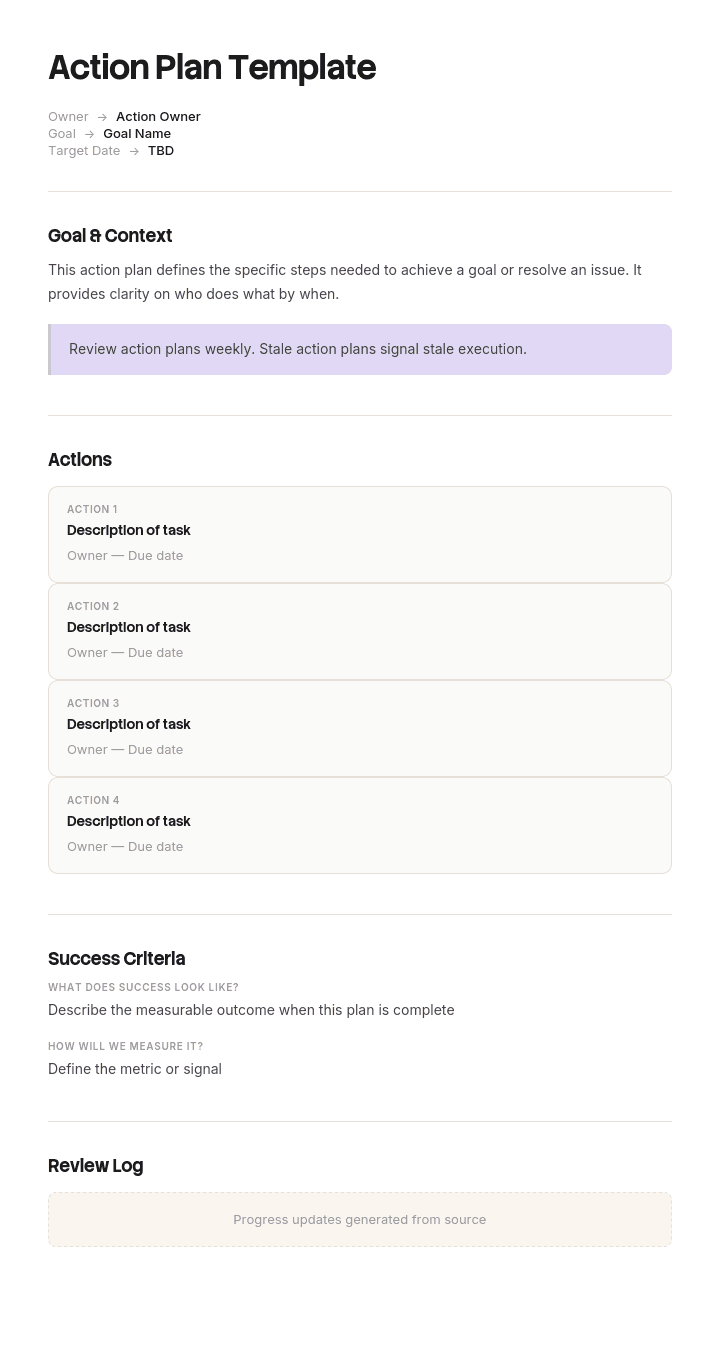
This action plan template provides a structured framework to capture goal, action items, owners, deadlines, dependencies, resources and success metrics - useful for individual goals, team projects, performance improvement, post-retrospective actions and strategic execution. Generate an AI video summary, pair with our change management use case, and translate into 65+ languages for global teams.
What you get in this free action plan template
This is the template. Copy it into a doc or spreadsheet, or download it in your preferred format below.
Goal | Action step | Owner | Start date | Due date | Dependency | Resources | Success measure | Status | Notes |
|---|---|---|---|---|---|---|---|---|---|
The goal sits in one cell at the top and every row beneath it serves that goal. If a row doesn't visibly serve it, the row belongs in a different plan.
Every field, and what to put in it
Goal or objective. One outcome, written as a result rather than an activity. "Reduce onboarding to 30 days," not "improve onboarding."
Action step. One specific, verifiable action per row. If it contains the word "and," it's two rows.
Owner. A named person or a role. Never blank, and never "the team."
Start date. When work begins. Often more useful than the due date, because slippage starts here.
Due date. When it must be complete.
Dependency. Which row must finish before this one can start.
Resources. Budget, tools, access or people required.
Success measure. How you'll know it's done, not just stopped. The field most plans omit and most need.
Status. Not started, in progress, blocked, done. Blocked is the one that earns its keep.
Notes. Blockers, decisions, changes and dates moved.
Ten fields is the full version. A simple action plan needs five: goal, action, owner, due date, status. Delete the rest rather than leaving them empty.
A filled-in action plan example
The same template completed for a customer onboarding goal.
Goal: Reduce average customer onboarding time from 45 days to 30 by the end of Q3.
Action step | Owner | Start | Due | Dependency | Success measure | Status |
|---|---|---|---|---|---|---|
Map the current onboarding process end to end | Ops lead | 5 Aug | 12 Aug | None | Documented process with timings per stage | Done |
Identify the three slowest stages | Ops lead | 12 Aug | 15 Aug | Row 1 | Three stages named, with data | In progress |
Rewrite the kickoff call agenda | AM lead | 18 Aug | 22 Aug | Row 2 | New agenda approved and in use | Not started |
Automate account provisioning | IT | 25 Aug | 5 Sep | Row 2 | Provisioning under 1 hour, down from 3 days | Not started |
Record onboarding walkthrough videos | AM lead | 1 Sep | 12 Sep | Row 3 | 4 videos live in the knowledge base | Not started |
Re-measure average onboarding time | Ops lead | 25 Sep | 30 Sep | All rows | Average at or below 30 days | Not started |
Every row has an owner, a date and a measure you could verify without holding a meeting. That's the standard. Compare it to "improve onboarding," which fails all three tests and is what most plans actually contain.
How to customize this template in Trupeer
Step 1: Open the Templates Section
Go to the Templates section from the main navigation.

Step 2: Select and Open a Template
Click on any template you want to work with to open it.

Step 3: Expand the Template View
If needed, expand the template view to see the full layout and details clearly.

Step 4: Edit the Template
Click on Edit to start modifying the selected template.

Within the editor, you can:
Add new sections
Define or update formatting rules
Add a logo and adjust its position and related settings
Step 5: Save Your Customized Template
After making all necessary changes, click Save to store the updated template as your own.

Step 6: Preview and Fine-Tune the Template
When you want to see how your customized template looks, open the Preview.

From the preview screen, you can continue to make adjustments directly if needed, ensuring the template appears exactly as you want.
How to fill in the Excel action plan template
Excel and Google Sheets are right when you want to sort, filter and track status. Word and Google Docs are better when the plan is narrative and gets read rather than worked.
Download the file or make a copy. In Google Sheets, copy it rather than editing the original.
Fill in the goal cell first. Everything below is constrained by what you write here.
List actions in sequence, one per row. Sequence matters more than completeness at this stage.
Assign every owner before you set any dates. Dates without owners are wishes.
Add dates, then sort by due date. If five things land in the same week, reschedule now rather than discovering it later.
Fill the dependency column. This is where sequencing errors become visible.
Use the status dropdown. Not started, in progress, blocked, done.
Set a fixed weekly review day. A plan reviewed on no particular day is reviewed never.
The Excel version arrives with conditional formatting applied, so overdue rows turn red and blocked rows turn amber with no setup. The status dropdown and sortable owner and date columns are already built in.
What an action plan is, and what it isn't
An action plan is a document listing the steps needed to reach one goal, each with an owner, a date and a way to verify completion. An action plan template is that structure pre-built, so you supply the specifics instead of designing the columns.
What it isn't: a to-do list. A to-do list says "update the onboarding docs." An action plan says who is updating them, by when, what "updated" means, and what depends on it being done. The difference is ownership and verification.
It also isn't a project plan. That distinction is worth understanding before you pick a tool, and it's covered below.
A plan of action template and an action plan template are the same document, incidentally. Both phrasings are in common use and the format doesn't change between them.
Why an action plan template beats a to-do list
Actions get owners. A blank owner column is visible in a way an unassigned intention never is.
Deadlines become comparable. Everything due in the same week shows up as a problem before it becomes one.
You stop rebuilding the structure. Blank-page planning wastes the first hour on formatting instead of thinking.
Progress becomes reviewable. A status column turns "how's it going" into a specific conversation.
Dependencies surface early. Writing them down exposes sequencing errors you'd otherwise hit in week three.
Handover is possible. Someone else can pick up a documented plan. Nobody can pick up your intentions.
When you need an action plan, and who it's for
Reach for one when a meeting produced decisions but no owners, when a goal has been agreed and nobody has broken it down, when an audit or complaint requires documented corrective action, or when work is being handed to someone else. Also before an emergency, since a plan written during one is worse than useless.
The clearest signal is scale: the work is too small for project software but too big to hold in your head. And if you've said "we should really" about the same thing three times, that's the moment.
It's used most by:
Project managers breaking deliverables into owned steps.
Team leads and managers turning quarterly goals into this week's work.
Safety and compliance officers documenting corrective and preventive actions.
HR teams running coaching and performance conversations.
Sales teams building mutual action plans with buyers.
Marketing teams planning campaigns against budget and targets.
Founders and business owners translating a strategy into next week.
Which action plan template fits your job
The same structure adapts to most situations. What changes is which fields become mandatory.
Type | Use it for | Fields that become essential |
|---|---|---|
Simple action plan | Small goals, personal plans | Goal, action, owner, due date, status |
SMART goal action plan | Performance and development goals | Measure, deadline, achievability check |
Goal action plan | Any objective with multiple steps | Success measure per step |
Project action plan | Workstreams and small projects | Dependencies, milestones, resources |
Business action plan | Annual and quarterly planning | Budget, business objective, risk |
Corrective action plan | Quality issues, audit findings, CMS responses | Root cause, verification method, closure date |
Emergency action plan | OSHA workplace compliance | Evacuation routes, roles, assembly points, drill log |
Safety action plan | Hazard registers, safety programmes | Hazard, risk rating, control measure |
Incident action plan | Live incident response | Objectives, resources assigned, next briefing |
Mutual action plan | Complex B2B sales and implementation | Owner column split between you and the client |
5W1H action plan | Process improvement, root cause follow-up | Who, what, where, when, why, how |
Marketing action plan | Campaigns and launches | Channel, budget, KPI, result |
SEO action plan | Site audit follow-up, SEO roadmaps | Category, priority, effort, expected impact |
Coaching action plan | Mentoring and skills development | Current state, target state, support needed |
Performance action plan | Performance conversations | Expected standard, support provided, review dates |
Strategic action plan | Leadership execution of a strategy | Strategic objective, quarterly milestone, KPI |
Weekly action plan | Personal and team weekly planning | Weekly priorities, daily actions, carry-over |
Affirmative action plan | Federal contractor HR reporting | Job group, availability analysis, placement goal |
Plan of action and milestones | Security and FedRAMP remediation | Weakness, scheduled completion date, milestones |
The most common mistake is using a goal-driven template for a problem-driven situation. A corrective action plan without a root cause field produces a list of fixes for a problem nobody diagnosed.
For the two most requested variants we have dedicated versions: the [corrective action plan template] with a full verification log, and the [emergency action plan template] covering fire, tornado and severe weather.
How to write an action plan from scratch
Write the goal as an outcome. "Reduce onboarding to 30 days" can be verified. "Improve onboarding" cannot.
Work backwards from the deadline. Start at the end date and place the milestones that must be true before it.
Break milestones into single actions. One verb, one owner, one date each.
Name owners before dates. An unowned date is a hope with a calendar entry.
Add a success measure to every step. If you can't say how you'd verify it, the step isn't defined yet.
Then pick your weekly review day before you start. The review is where the plan survives contact with reality.
Why action plans fail
No owners. The single most common reason plans stall.
Actions too vague to verify. "Look into pricing" can never be marked done honestly.
Everything due at once. A sign the plan was written without a calendar open.
Activity mistaken for outcome. Ten completed actions and no result means the actions were wrong.
Dependencies ignored. Then discovering in week three that step four needed step two.
Never reopened. A plan is a working document, not a record of a meeting.
The wrong template. Root cause fields matter for corrective plans and are dead weight on a weekly one.
Download the action plan template in Word, Excel or PDF
Every version is free, editable and printable, with no watermark.
Format | Best for |
|---|---|
Word (.docx) | Narrative plans that get read and shared |
Excel (.xlsx) | Tracking status, sorting by owner and date, conditional formatting |
Google Docs | Collaborative editing and comments |
Google Sheets | Live status tracking across a team |
PowerPoint (.pptx) | Presenting the plan by milestone to leadership |
Printable PDF | Wall charts, workshops and print |
Turn the plan into something your team can actually follow
Open the template in Trupeer AI, apply your brand kit so the plan carries your fonts, colors and logo, and edit any field directly. Setup is covered in the template guide.
Then deal with the part a spreadsheet can't. Plans stall because the people executing them don't know how to do the steps. Record the process once and you get written documentation plus a narrated video walkthrough from the same pass, so a row that says "automate account provisioning" comes with a video showing exactly how.
Record it. Document it. Translate it into 65+ languages. Store it in your knowledge base. Trupeer it.
With an action plan template you can:
Save hours on planning: Skip the blank page with a proven action-plan structure.
Drive accountability: Built-in fields for owners, deadlines and metrics.
Stay on-brand: Apply your logo, fonts and colors using Trupeer's brand kit.
Communicate clearly: Convert plans into video updates teams can absorb fast.
Standardize execution: Use the same template for every action plan.
Reach global teams: Translate action plans into 65+ languages with one click.
A great action plan turns ambition into measurable progress. Use this template to make every goal actionable, owned and tracked.
Frequently Asked Questions
What is an action plan?
An action plan is a structured document that breaks a goal into specific, owned actions with deadlines and success metrics. It captures who's doing what, by when, with what resources - so progress can be tracked and accountability is clear.
What should an action plan include?
A complete action plan includes the overall goal, specific action items, owners for each action, deadlines, dependencies, required resources, success metrics, status indicators and a review cadence. Some plans also include risks and contingencies.
How do you write an action plan?
Start with a clear goal. Brainstorm everything that needs to happen to achieve it. Break each item into specific actions. Assign owners and deadlines. Identify dependencies. Define success metrics. Set a review cadence. Track status and adjust as needed - action plans are living documents.
What is the difference between an action plan and a project plan?
A project plan is comprehensive - it covers scope, schedule, budget, risk, communications and stakeholder management. An action plan is simpler - it lists specific actions, owners and deadlines. Action plans are great for smaller initiatives; complex efforts need full project plans.
How often should you review an action plan?
Most action plans benefit from weekly or bi-weekly reviews. Use the action plan as the agenda for your team meeting. Update statuses, address blockers and adjust priorities. Static plans rarely deliver results - regular review is what makes action plans work.


