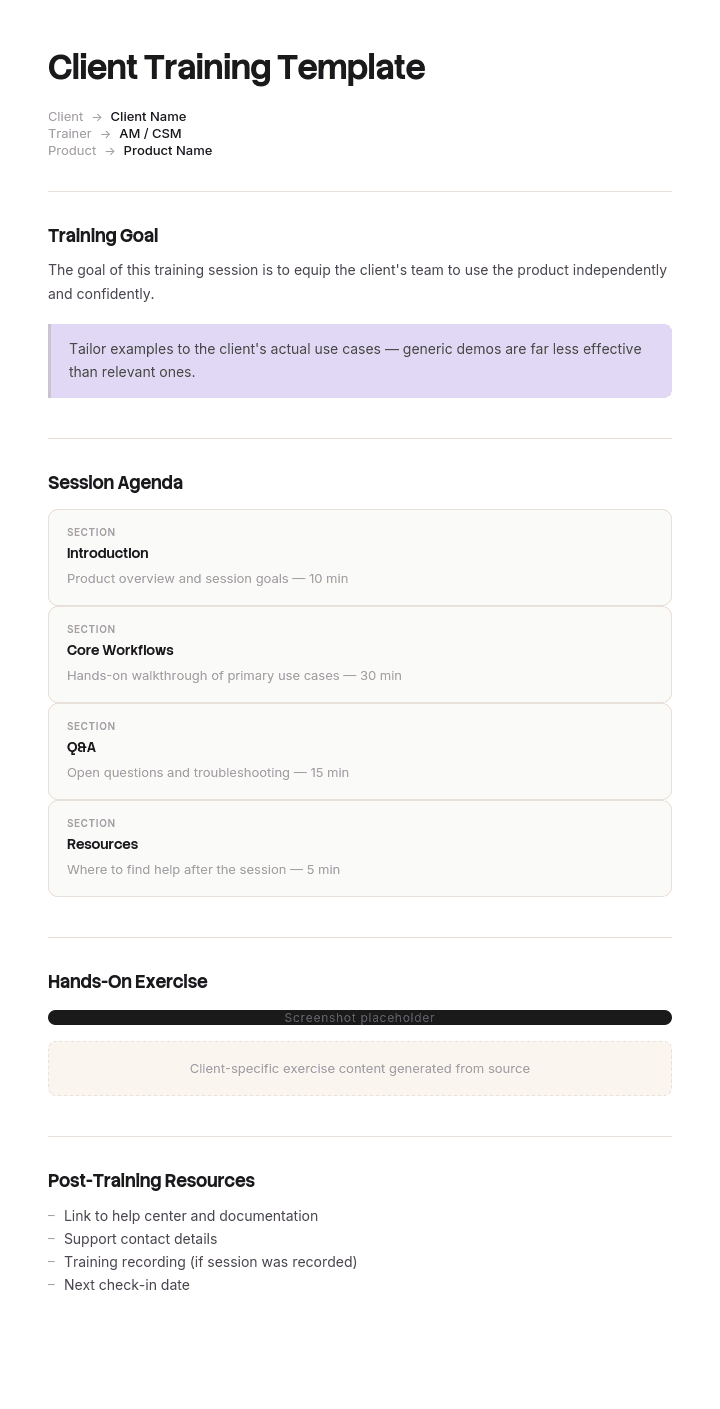
Use this template
Trained clients adopt more, churn less and advocate more. With Trupeer, you can save hours on client training design by starting with a free client training template, customizing it with your brand guidelines, and turning the training into engaging video modules clients actually finish.
Internal training has a captive audience. Client training does not. Your clients have day jobs, they did not choose to learn your product, and nobody can make them attend anything.
That single difference invalidates most training plans, which are built on the assumption that scheduling a session means learning happens. This free client training template starts from the opposite assumption: attention is the scarce resource, so the plan has to earn it.
Download the client training plan template
Format | Best for |
|---|---|
Word (.docx) | The training plan you share with the client. Free download, no sign-up |
Excel (.xlsx) | Tracking modules, roles and completion across many client accounts |
The version sent at kickoff, and printing for workshops | |
Google Docs | A shared plan the client can comment on |
Google Sheets | Live completion tracking the client can see |
Free, editable, no watermark.
Why training clients is different from training employees
No authority. You cannot make attendance mandatory, so anything requiring a scheduled hour will have partial turnout.
No shared calendar. Every live session is a scheduling negotiation, which adds days to onboarding and stalls adoption.
Different motivation. Employees learn because the job requires it. Clients learn only if the thing they want is on the other side of learning it.
Wildly mixed audiences. The admin, the daily user and the executive need different things, and one session covering all three serves none.
Turnover you cannot see. The person you trained leaves in month four and nobody tells you. Your adoption number quietly falls.
Success is invisible to them. Clients rarely notice their own progress, so it has to be pointed out.
The practical consequences: default to asynchronous, split by role, keep every piece short, and measure completion rather than delivery.
Segment by role before designing anything
The most common client training failure is one programme for everyone. Split first.
Role | What they need | What they do not need | Time they will give |
|---|---|---|---|
Admin or owner | Configuration, permissions, integrations, reporting | The daily workflow in detail | 60 to 90 minutes |
Daily user | The two or three tasks they actually perform | Configuration, admin settings | 10 to 20 minutes |
Occasional user | One task, findable when needed | Everything else | 5 minutes, at the moment of need |
Manager or approver | Their own task, plus how to read the data | The full workflow | 15 minutes |
Executive sponsor | What good looks like, and the outcome | How anything works | 10 minutes, once |
Note the daily user gets ten to twenty minutes. That is the real budget, and any plan assuming more will produce partial completion at best.
How to customize this template in Trupeer
Step 1: Open the Templates Section
Go to the Templates section from the main navigation.

Step 2: Select and Open a Template
Click on any template you want to work with to open it.

Step 3: Expand the Template View
If needed, expand the template view to see the full layout and details clearly.

Step 4: Edit the Template
Click on Edit to start modifying the selected template.

Within the editor, you can:
Add new sections
Define or update formatting rules
Add a logo and adjust its position and related settings
Step 5: Save Your Customized Template
After making all necessary changes, click Save to store the updated template as your own.

Step 6: Preview and Fine-Tune the Template
When you want to see how your customized template looks, open the Preview.

From the preview screen, you can continue to make adjustments directly if needed, ensuring the template appears exactly as you want.
With a client training template you can:
Save hours on design: Skip the blank page with a structure built for client training.
Drive adoption: Trained clients use more features and stick around longer.
Stay on-brand: Apply your logo, fonts and colors using Trupeer's brand kit.
Engage clients: Convert training into video modules clients can take on their schedule.
Standardize across clients: Use the same template for every client training engagement.
Reach global clients: Translate client training into 65+ languages with one click.
What a client will actually make time for
Three things, and almost nothing else.
Something that removes work they currently do. "This replaces the spreadsheet you build every Monday" earns attention. "Here is an overview of the platform" does not.
Something short enough to fit between meetings. Under fifteen minutes, watchable at their desk without booking anything.
Something available at the moment they are stuck. The most valuable training a client ever receives arrives when they have the task in front of them and cannot proceed, which is never the moment you scheduled a session for.
Design against those three and the programme works. Design a curriculum and it will be politely ignored.
The client training plan template
Field | Enter |
|---|---|
Client and account | Name, account manager |
Training goal | What the client must be able to do, and by when |
Success measure | How you will know, per role |
Role | Which user group this row applies to |
Module | One capability or task |
Format | Live, recorded, written, in-product |
Duration | Realistic minutes |
Timing | Day number relative to go-live |
Owner | Who delivers or prepares it |
Completion | Tracked per named person, not per company |
Notes | Reschedules, attendance, follow-up needed |
Completion tracked per named person is the field that matters. "The client has been trained" is not a fact you can act on. "Four of six daily users completed module two" is.
The client training programme structure
Before go-live. Admin and configuration training only. Do not train daily users on something they cannot yet use, because the gap between learning and applying is where retention dies.
At go-live. Daily users, one short module per task, delivered asynchronously so it does not gate your timeline. Plus a live optional session for questions, which is a different thing from a training session.
First two weeks. Support at the moment of need. Documentation and short clips findable from inside the workflow. This is where most of the actual learning happens, and it is the phase most plans do not include at all.
Day 30 to 90. Advanced capability for the people who are now fluent, refreshers for the ones who are not, and onboarding for new joiners on the client side. That last one starts immediately and never stops.
Ongoing. A self-serve library so a new starter at the client in month eight is not dependent on you scheduling something.
Filled-in client training plan example
Client: Logistics company, 140 users. Product: Operations reporting platform. Go-live: day 25. Training goal: 70% of intended users weekly active by day 60, ops managers running the weekly report unaided by day 14.
Day | Role | Module | Format | Duration | Owner | Completion |
|---|---|---|---|---|---|---|
10 | Admin (2 people) | Configuration and permissions | Live, 1:1 | 60 min | Onboarding lead | 2 of 2 |
12 | Admin | Integrations and data refresh | Recorded plus written guide | 20 min | Onboarding lead | 2 of 2 |
14 | Ops manager (6) | Running the weekly report | Recorded, 3 clips | 12 min total | Onboarding lead | 5 of 6 |
14 | Ops manager | Live Q&A, optional | Live, group | 30 min | Onboarding lead | 4 attended |
25 | Daily user (120) | Finding and filtering your data | Recorded | 8 min | Onboarding lead | 71 of 120 |
25 | Daily user | Exporting and sharing | Recorded | 6 min | Onboarding lead | 58 of 120 |
25 | Approver (12) | Reviewing and approving | Recorded | 5 min | Onboarding lead | 11 of 12 |
25 | Executive sponsor (1) | Reading the adoption dashboard | Live, 1:1 | 10 min | Account manager | 1 of 1 |
26 to 40 | All | Point-of-need library, searchable | Written plus clips | As needed | Onboarding lead | 340 views |
45 | Daily user, non-completers | Nudge plus 3 min summary clip | Recorded | 3 min | Account manager | 34 of 49 |
60 | Ops manager | Custom reports, advanced | Live, group | 45 min | Onboarding lead | 6 of 6 |
Ongoing | New client-side joiners | Full daily user path | Recorded | 14 min | Self-serve | 9 to date |
What the numbers say. Daily user completion at 59% is the problem, not the ops managers. The day 45 nudge recovered 34 people, which suggests the issue was awareness rather than unwillingness. The self-serve path has already trained nine people nobody scheduled anything for, which is the part that scales.
Notice that the largest group gets the shortest modules and no live session. That inversion is deliberate and it is what makes the plan work.
What to include in a client training plan
The training goal, stated as a capability with a date, not as sessions delivered.
Role segmentation with a realistic time budget per role.
One module per task, kept short.
Format per module, chosen for the audience rather than convenience.
Timing relative to go-live, with daily users trained when they can apply it.
Named completion tracking.
A point-of-need library for the first fortnight.
A path for client-side new joiners, running indefinitely.
Success measures per role.
The owner of each module, and who chases non-completion.
Choose the format for each module
Format | Best for | Weakness |
|---|---|---|
Live 1:1 | Admins, sponsors, anything needing configuration decisions | Does not scale, needs scheduling |
Live group | Optional Q&A, advanced sessions for the already fluent | Partial attendance, gone once delivered |
Recorded walkthrough | Everything the daily user needs | Requires making it once |
Written guide | Reference, scanning, searching later | Poor at showing interface actions |
In-product or point of need | The moment someone is stuck | Only works for well-defined tasks |
Certificate or assessment | Compliance-adjacent training where proof is needed | Adds friction, rarely earns it otherwise |
The default should be recorded plus written for the same module, from the same source, so they cannot drift apart. Live is for the small groups where a conversation genuinely adds something.
Building a client training library
The difference between training a client and having a training programme.
One module per task, named for the task rather than the feature. "Run the weekly report" not "Reporting module."
Searchable, because people arrive with a question rather than a curriculum.
Available without a login if possible. A support portal requiring credentials nobody remembers is a library nobody uses.
Versioned, so a clip showing an interface from two releases ago gets replaced rather than confusing people.
Owned by a named person, with a review date.
Handed to the client as theirs, not kept as yours. Clients who can self-serve raise fewer tickets and churn less.
How to measure client training
Completion by named person, per role. The primary measure. Company-level completion hides everything useful.
Time to first successful use. Did the training produce the behaviour, per role.
Support tickets by topic. A cluster on one task means that module is unclear or unfindable.
Library usage over time. Should rise, because it means self-serve is working.
Adoption at day 30, 60 and 90, split between trained and untrained users. This is the number that tells you whether training is doing anything.
New joiner throughput. How many client-side starters trained without you scheduling anything.
If trained and untrained users show the same adoption, the training is not the intervention you think it is. That is worth knowing.
Training needs assessment for clients
Before designing, establish four things per account.
Who will actually use this, in what roles, and how many of each. Clients routinely name fewer users than exist.
What each role needs to be able to do, expressed as tasks rather than features.
What they can already do. Some clients arrive fluent in a comparable tool and being trained from zero is insulting.
What constraints exist. Shift patterns, no desk access, low bandwidth, a language other than the one your material is in. These determine format more than anything else.
The training needs assessment template covers this in full.
Certificates and proof of completion
Worth being clear about when this matters and when it is decoration.
It matters when the client's own compliance regime requires evidence, when the training is safety-related, or when a contract specifies trained users. In those cases you need named completion records and a certificate is a reasonable artifact.
It does not matter for ordinary product training, where a certificate adds friction and completion tracking already tells you what you need. If your clients ask for certificates and the training is not compliance-related, the underlying request is usually visibility of who has been trained, which a completion report answers better.
If you specifically need a designed certificate, that is a graphic design job rather than a document one, and a tool like Canva will serve you better than any template here.
Client training by business type
Type | What the training covers | The usual constraint |
|---|---|---|
SaaS and software | Product tasks by role, admin configuration | Daily users will give ten minutes, not an hour |
Professional services | How to work with you: process, handoffs, approvals | Client assumes they already know how |
Agency | Approval workflow, brief templates, reporting | Multiple stakeholders, none of them accountable |
Managed IT and MSP | Ticket raising, escalation, self-service fixes | Training the whole client workforce, not a team |
Equipment and hardware | Operation, maintenance, safety | Physical, shift-based, often no screen |
Financial and regulated | Compliance-relevant process, record keeping | Proof of completion genuinely required |
How to build your client training programme
Start from the capability, not the curriculum. What must each role be able to do?
Count and segment the actual users, then set a realistic time budget per role.
Break capability into one module per task, and keep each under fifteen minutes.
Choose the format per role rather than per your convenience. Big groups get recorded, small groups get live.
Time daily user training to when they can apply it, not before.
Build the point-of-need library before go-live, since the first fortnight is when it is needed most.
Track completion by name and chase non-completers once, with something short.
Create the new-joiner path immediately, because client-side turnover starts in month one.
Measure adoption split by trained and untrained.
Review the modules that generate support tickets. Those are your defects.
Best practices
Default to asynchronous. Live sessions should be the exception.
Segment by role before writing anything.
Keep daily user modules under ten minutes.
Name modules after tasks, not features.
Lead with what work it removes.
Train people when they can apply it, not weeks earlier.
Track completion by named person.
Give the library to the client, not just access to it.
Build the new-joiner path on day one.
Point out client progress. They will not notice it themselves.
Common mistakes
One programme for all roles, serving none of them.
Scheduled live sessions as the primary format, gating your timeline on the client's calendar.
Training daily users before go-live, so it has decayed by the time it is needed.
Feature tours instead of task training.
Modules too long for the audience's actual attention budget.
Company-level completion tracking, which hides the group that did not engage.
No point-of-need material, so week one support volume is entirely avoidable questions.
No path for client-side new joiners, so adoption decays as their team turns over.
Measuring sessions delivered rather than capability gained.
Certificates used as a substitute for knowing whether anyone learned anything.
Record it once and train every client with it
Open the template in Trupeer AI, apply your brand kit so training materials look like they came from you, and edit any section directly. Setup is in the template guide.
Client training does not scale when it depends on someone delivering it. Every new account means the same session again, at whatever time the client can manage, and the material vanishes the moment the call ends.
Record the walkthrough once and Trupeer AI produces the written guide and a narrated video walkthrough from the same recording, which is what makes the recorded-plus-written default practical rather than twice the work. Translate it into 65+ languages, which matters more in client training than internal training because you do not choose your clients' workforce. Hand the set over in your knowledge base so it belongs to the client and serves their new starters in month eight. See how other teams do this in training videos and customer success.
Record it. Brand it. Translate it. Trupeer it.
Frequently Asked Questions
Is there a free client training template in Word?
Yes. Word is the format most teams use for the plan they share with the client, with the role segmentation table, module list and success measures built in. Free download, no sign-up, no watermark.
Can I download a free client training template?
Yes, every format is a free download with no account required and no watermark, reusable across as many client accounts as you need.
Is there a free client training template in PDF?
Yes. The PDF is the version to send at kickoff, and it prints cleanly if you plan the training with the client during a call.
Is there a free client training template in Excel?
Yes, and Excel is the right choice once you are training more than a couple of clients. It tracks modules against named people per role, shows completion rates by group, and totals the time each role is actually being asked for.
What is the best free client training template?
The one matching your delivery model. If your training is mostly asynchronous, use the Excel version, since completion tracking by named person is the measure that matters. If you deliver live and want a document to share, use Word. Both include role segmentation, which is the part most templates omit and the part that determines whether the programme works.
Is there a free training manual template in Word?
Yes, though that is a different document. A training manual is the reference material; a training plan is who learns what, when. For the manual, use the training manual template, and for customer-facing service training the customer service training manual template.
Is there a free training certificate template in Word format?
Not here, and it is worth explaining why. These are planning and delivery documents rather than designed artifacts, and a certificate is a design job. A tool like Canva will produce a better-looking one in less time. What this template does give you is the completion record behind a certificate, tracked by named person and role, which is usually what someone actually needs when they ask for certificates.
What is a client training plan?
A plan setting out which of your client's people need to be able to do what, by when, in what format, and how you will know they can. It differs from an internal training plan because attendance cannot be mandated, so it is built around short, role-specific, mostly asynchronous material.
What should a client training plan include?
The training goal as a capability with a date, role segmentation with realistic time budgets, one module per task, format per module, timing relative to go-live, completion tracking by named person, a point-of-need library, a path for client-side new joiners, and success measures per role.
How is client training different from employee training?
You have no authority to mandate attendance, no shared calendar, and a client audience whose motivation depends entirely on whether learning removes work they currently do. Client-side turnover is also invisible to you, which means a programme with no self-serve path degrades quietly as their team changes.
How long should client training be?
Per module, ten to fifteen minutes for daily users and up to ninety for admins. Total programme length matters less than whether individual pieces fit into the gaps in someone's day. Anything requiring a booked hour from a large user group will have partial completion.
Should client training be live or recorded?
Recorded by default, live by exception. Live works for admins, executive sponsors and advanced sessions with people who are already fluent. For the largest user group, recorded is better because it does not gate your timeline, it survives being missed, and it still exists when their team turns over.
How do you measure client training?
Completion by named person and role, time to first successful use, support tickets by topic, library usage over time, and adoption at day 30, 60 and 90 split between trained and untrained users. That last split is the one that tells you whether the training is doing anything.
How do you get clients to actually complete training?
Make it shorter than they expect, lead with the work it removes rather than the features it covers, deliver it when they can apply it, make it findable at the moment they are stuck, and chase non-completers once with something three minutes long. Attendance mandates are not available to you, so the material has to be worth the time on its own.
Can I customize this client training template?
Yes, all versions are fully editable. Adjust the roles, module lists and time budgets to your product. In Trupeer AI you can also apply your brand kit so everything the client receives looks like it came from you.


