Use this template
Great product training is what turns curious users into confident customers. With Trupeer, you can save hours on product training design by starting with a free product training plan template, customizing it with your brand guidelines, and turning the plan into engaging video modules learners actually finish.
What is a product training plan template?
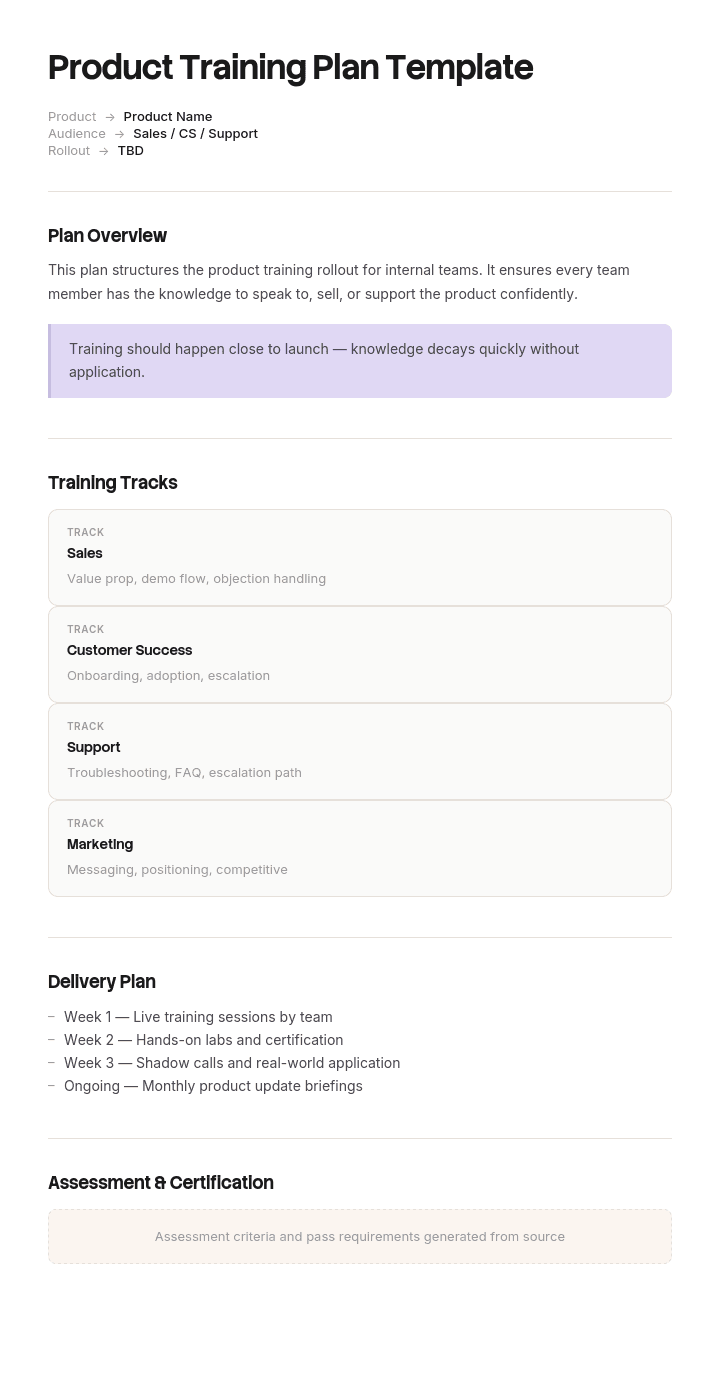
A product training plan sets out how people learn to use, sell, support or implement a specific product: what they need to be able to do, in what order, delivered how, and by when.
A template gives you the structure. Audiences, capabilities, modules, delivery method, schedule and assessment.
Search for one and you will be offered general employee training plan templates, because almost nothing on the first page of results is about product training specifically. Those templates are fine as far as they go, and they miss the one thing that makes product training different from every other kind.
The subject changes underneath you, on somebody else's schedule.
Product training is the only training with a version number
Train somebody on giving feedback, handling a difficult customer or operating a forklift, and the subject is stable. The training you built three years ago is still broadly correct.
Product training is not like that. If your product ships every three weeks, some proportion of your training becomes wrong every three weeks. Not gradually, and not because anybody neglected it: because a screen moved, a setting was renamed, a workflow was removed or a feature was added.
Two things follow, and neither is in any standard training plan template.
Every training asset has a version it was built against, and almost none of them record it. Ask an organisation which product version its onboarding course covers and you will usually get a shrug and a date.
And there is no connection between the release process and the training. Release checklists cover engineering, QA, documentation, release notes, support readiness and sometimes marketing. Very few of them ask which training this affects, so nobody finds out until a new starter tells their manager that module seven does not match the product.
By then the informal fix is already in place: people are told verbally which modules to skip, which is knowledge that exists nowhere and disappears when that manager leaves.
How to customize this template in Trupeer
Step 1: Open the Templates Section
Go to the Templates section from the main navigation.

Step 2: Select and Open a Template
Click on any template you want to work with to open it.

Step 3: Expand the Template View
If needed, expand the template view to see the full layout and details clearly.

Step 4: Edit the Template
Click on Edit to start modifying the selected template.

Within the editor, you can:
Add new sections
Define or update formatting rules
Add a logo and adjust its position and related settings
Step 5: Save Your Customized Template
After making all necessary changes, click Save to store the updated template as your own.

Step 6: Preview and Fine-Tune the Template
When you want to see how your customized template looks, open the Preview.

From the preview screen, you can continue to make adjustments directly if needed, ensuring the template appears exactly as you want.
With a product training plan template you can:
Save hours on design: Skip the blank page with a proven training structure.
Train multiple audiences: Adapt the same plan for new hires, customers and partners.
Stay on-brand: Apply your logo, fonts and colors using Trupeer's brand kit.
Drive adoption: Trained users adopt more features and stick around longer.
Standardize learning: Use the same plan template for every product training initiative.
Reach global learners: Translate product training into 65+ languages with one click.
Split training into a durable layer and a volatile layer
The structural fix is to stop building product training as one thing.
Layer | Content | Decay rate | Build for |
|---|---|---|---|
Durable | The market, the buyer, the problem being solved, the value model, how to think about the product, competitive positioning | Changes once or twice a year | Longevity, higher production value, worth investing in |
Volatile | How to actually do things in the current version: screens, settings, workflows, configuration | Changes every release | Speed of replacement, low production cost, version stamped |
Most product training mixes them. A single ninety minute module explains why the product exists and then walks through the interface, so the moment the interface changes the whole module is compromised. Because rebuilding a produced module is expensive, it does not get rebuilt, and the durable content goes stale along with the volatile content it was bundled with.
Separate them and two useful things happen. The durable layer stops being disturbed by releases, which means it can justify real production effort. And the volatile layer can be cheap and disposable, because you know in advance you will replace it.
The practical rule when writing a module: if a screenshot or a click path belongs in it, it is volatile. If it would still be true if the product were rebuilt from scratch on different technology, it is durable.
How to connect the release process to training
One line on the release checklist, answered by the product manager, taking about three minutes.
Which training modules does this release affect?
That is the whole intervention. It works because product managers know the answer, it costs almost nothing, and it moves the discovery of a problem from a new starter's third week to the day before release.
Three supporting habits make it stick.
Version stamp every volatile module with the product version it was built against, visible to the learner. A module that says it covers version 4.2 while the product is on 4.9 is at least honest, and learners handle honest better than they handle wrong.
Name an owner per module, not for the training programme as a whole. Programme owners do not notice individual modules going stale.
Report a currency figure, meaning the proportion of volatile modules built against the current version. One number, reviewed monthly, which is the only measure that tells you whether the connection is working.
Where the change is significant enough to need customers informed as well, the release note and the training update come from the same source material, and our knowledge base article templates cover the customer-facing half.
Free product training plan template: the structure to copy
Copy from here.
Header. Product and current version. Audience. Owner. Last reviewed date. Delivery window.
Audience and outcome. Who this is for and what they must be able to do unsupervised at the end, phrased as tasks rather than topics. Sales, support, implementation and customers need separate plans, covered below.
Capabilities. Six to ten things the learner will be able to do. "Run a discovery call covering the three qualification criteria" rather than "understand the product".
Durable modules. The market, the buyer, the problem, the value model, positioning. With a review date rather than a version.
Volatile modules. One row each, with the capability it supports, the delivery format, the length, the owner, the product version it was built against, and the date last rebuilt.
Delivery schedule. When each module is delivered, and whether it is a fixed sequence or triggered by something in the learner's own work.
Assessment. How competence is confirmed. Observation of real work wherever possible rather than a quiz, since product knowledge tested immediately after a module measures recall rather than capability.
Release linkage. Which release checklist item triggers a review of this plan, and who answers it.
Currency measure. Proportion of volatile modules on the current version, updated monthly.
Copy to here. Two pages. If your plan runs longer, module descriptions have usually expanded into module content, which belongs in the modules.
The software company with three accurate modules out of fourteen
Calderstone Software sells field service management software and ships every three weeks. Its go-to-market organisation covers about sixty in sales, eighty five in support and forty implementation consultants, who also deliver training to new customers.
Product training had been built properly in 2023: fourteen modules, around nine hours, video with workbooks, produced with an agency at a total cost of roughly a hundred and twenty thousand pounds.
Two years later somebody checked which modules matched the shipping product.
Three were still fully accurate. Six contained at least one section showing a screen that no longer existed. Five were substantially wrong.
Nobody had noticed, because nobody owned individual modules and the release checklist had eleven items, none of which mentioned training.
The symptoms were all informal. New sales hires were being told by their managers to skip module seven because it was out of date, which was knowledge that existed only in conversation. Support agents trained on module nine were giving customers instructions for a workflow removed fourteen months earlier. And the four implementation consultants delivering customer training had each built their own deck, because the official one was wrong, so four different versions of the product were being taught to customers.
The measurable cost showed up in ramp. Median time for a new salesperson to run an unassisted customer demo had gone from about five weeks in 2023 to nine weeks by 2025. Exit interviews and manager feedback attributed most of that to the gap between what training said and what the product did, since new hires had to unlearn before they could sell.
The rebuild split the fourteen modules into four durable and ten volatile. The durable four covered the market, the buyer, the problem and the value model, and have not been touched since. The ten volatile ones were rebuilt from screen recordings rather than produced as video projects, which took module refresh from an agency job costing around four thousand pounds to internal time measured in hours.
One line was added to the release checklist asking which training modules the release affects, answered by the product manager in about three minutes.
Twelve months on, all ten volatile modules were current at every monthly check. The four durable modules had not needed touching, which was the point. Time to first unassisted demo was back to five weeks.
Internal or customer product training: which are you planning?
The two get conflated and they need separate plans, because the outcome, the attention available and the consequences of failure are all different.
Internal product training is for people who sell, support, implement or build alongside the product. Attendance is expected, the outcome is job competence, and you can assess it by watching them work. Depth matters more than engagement, and different internal audiences need genuinely different plans. Sales needs the buyer, the value model and the demo. Support needs failure modes, diagnostics and workarounds, which our product support SOP template covers on the procedure side. Implementation needs configuration and edge cases.
Customer product training is for people who bought the product. Attendance is voluntary in practice even when it is contractual, the outcome is adoption, and you usually cannot observe whether it worked. It needs to be shorter, more visual, and organised around what the customer is trying to achieve rather than around your feature set.
The common mistake is building one course and delivering it to both. Customers get internal depth they do not need, and internal teams get a customer pitch that does not prepare them for a hard question.
If you are planning training for people joining the company rather than for a product specifically, our new hire training template covers the sequencing problem there, which is a different one.
What should a product training plan include?
The audience, the capabilities, the modules split by layer, the schedule, the assessment, and the release linkage.
Three fields are worth defending against anybody trimming the document.
The version stamp on volatile modules. Without it there is no way to tell what is stale except by watching it.
Per module ownership. Programme ownership is not enough, and it is the difference between someone noticing and nobody noticing.
The currency measure. One number, monthly, showing what proportion of the volatile layer matches the shipping product. It is the only measure that tells you whether the system is holding.
What to leave out of the plan itself: the module content, which belongs in the modules; the product roadmap, which changes faster than the plan; and detailed scheduling for cohorts, which belongs in a calendar.
How to create a product training plan, step by step
Start with the audience and pick one. Building for sales, support and customers at once produces a plan that fits none of them.
Write the capabilities as tasks the person will do unsupervised, agreed with the manager who will judge whether they can.
Sort candidate content into durable and volatile using the screenshot test. Anything with a click path in it is volatile.
Build the durable layer properly. It is worth the effort because it will last, and it is what makes the volatile layer make sense.
Build the volatile layer cheaply and stamp it with the version. Expect to replace it rather than maintain it.
Add the release checklist line and name a module owner for each volatile module.
Then set the assessment against real work, and set the monthly currency check.
Types of product training plan template, and when each fits
New joiner product induction. Front-loaded, durable layer first, volatile layer second. The one place where sequence really matters, since the durable content is what makes the volatile content comprehensible.
Release training. Short, triggered by a release, volatile only. Fifteen minutes rather than an hour, delivered close to the release date. This is the plan most organisations lack entirely.
Role conversion. Somebody moving from support to implementation, or sales to customer success. Mostly volatile layer with a small durable top-up, and it is usually over-specified because people assume more is needed than is.
Customer onboarding training. Short, outcome-organised, delivered close to the point of first use rather than at contract signature.
Certification or partner training. Where a third party needs to demonstrate competence. Needs assessment that stands up, version control that is auditable, and a re-certification trigger on major releases.
Refresher. Rarely worth running as a course. The recurring questions your support and enablement teams answer are a better guide to what needs re-teaching, and a job aid usually beats a session.
How to measure product training that keeps changing
Completion and satisfaction are both easy to collect and neither tells you much, particularly here, where a learner can complete and enjoy a module that is describing a version of the product that no longer exists.
Three measures earn their place.
Currency. The proportion of volatile modules built against the shipping version. This is the leading indicator and it is the one that predicts the others.
Time to unassisted capability, per audience. Time to first unassisted demo for sales, time to first solo ticket resolution for support, time to first independent configuration for implementation. Compare across cohorts rather than against a target.
Support and enablement question volume, meaning how often trained people ask questions they should have been trained on. Rising volume on a topic points at either a stale module or a missing one, and it is the earliest signal you will get.
For customer training specifically, product usage of the trained feature is the only honest measure, and it should be looked at four to six weeks after the session rather than immediately.
Can I get a training plan template in Word or Excel?
Excel for the module register, which is the operational core. One row per module with the capability it supports, layer, format, length, owner, product version built against, date last rebuilt and current status. Add a formula flagging any volatile module more than one version behind, and a cell showing the currency percentage.
Word or Google Docs for the plan narrative: audience, capabilities, assessment approach and the release linkage. This is what gets agreed with the people whose teams are being trained.
PowerPoint for the modules themselves if that is your delivery format, though the argument of this page is that volatile modules are better as recordings than as slide decks, because slides are expensive to rebuild and recordings are not.
PDF for the version issued to a partner or attached to a certification scheme, exported from the live register with the version stamped on it.
How to rebuild a training module in an afternoon
Everything above depends on one thing being cheap. If replacing a volatile module means an agency, a script, a studio and three weeks, nobody will replace it, and the split between durable and volatile is just a filing convention.
Trupeer AI is what makes it work. Somebody performs the task in the current version with a recording running, and the output is a written guide and a video from the same pass, with the steps and screens already captured. A module refresh becomes an afternoon of someone's time rather than a production budget.
Record it. Brand it. Translate it. Trupeer it.
That changes the economics enough to alter the plan itself. Once a module costs hours rather than thousands, release training becomes viable, per-audience versions become viable, and translating for other regions stops being a separate project. Training videos and guides cover delivery, the material lives in your knowledge base in consistent branding, and brand kits keep customer-facing training looking like your product rather than like a screen capture. Setup instructions are in the document template setup guide.
Frequently Asked Questions
Is there a free product training plan template in Word?
The structure above pastes straight into Word or Google Docs, including the durable and volatile split and the release linkage that general training templates omit. There is no gated download and no form. Keep the module register in a spreadsheet and reference it, since that part needs sorting and a currency calculation.
Is there a free product training plan template in Excel?
Excel is the right home for the module register. Columns for module, capability, layer, format, owner, product version built against, date last rebuilt and status. The single most useful addition is a flag on any volatile module more than one release behind, which turns staleness from something you discover into something you can see.
Is there a free product training plan template in PDF?
Export for partners, certification schemes or anything attached to a contract, with the product version stamped on it. Keep the working version editable, because the volatile layer is meant to change and a frozen plan disguises that as a problem rather than as the design.
Is there a training schedule template in Excel?
A schedule and a plan are different documents. The schedule is dates, cohorts, rooms and attendance, which Excel handles well. The plan is capabilities, modules and assessment. Build the plan first, then generate the schedule from it, because a schedule built first tends to fill the calendar rather than the need.
How long should product training take?
The durable layer is usually two to four hours and worth doing properly. The volatile layer should be as short as the capabilities require, delivered close to first use rather than in one block. Total front-loaded time of a day is plenty for most internal audiences, with the rest triggered by the work.
Who should own product training?
Product marketing or enablement owns the plan, and a named person owns each volatile module. The module owner is the one that matters, because programme owners do not notice individual modules going stale and module owners do.
How often should product training be updated?
The volatile layer on every release that touches it, prompted by the release checklist. The durable layer once or twice a year, or when positioning genuinely changes. Reviewing everything on a calendar produces a lot of modules reissued unchanged and misses the release that broke module seven.
What are the challenges of not training your team on the product?
The visible cost is ramp time. The larger costs are quieter: inconsistent answers to customers, people improvising demonstrations, support giving instructions for workflows that no longer exist, and the informal knowledge network that grows to compensate, which works well until the person holding it leaves. Stale training produces all of the same symptoms as no training, with the additional problem that people trust it.


