4.8/5
AI Santa Video Generator
Create magical, personalized AI Santa video messages in minutes. No filming, no editing, no hassle.
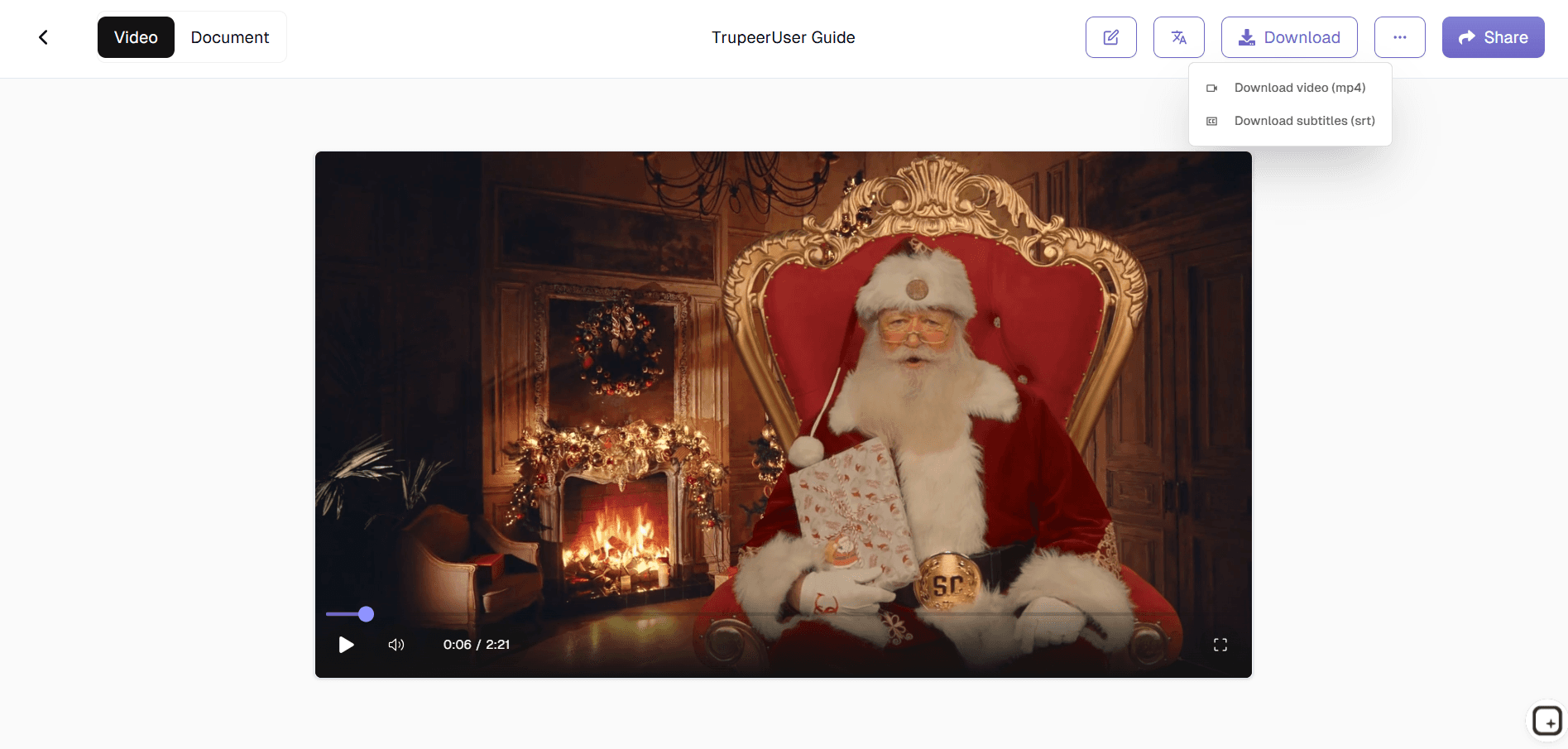
Trupeer's Santa Video Generator uses Santa AI to create magical, personalized Santa video messages. Turn a script or a letter to Santa into a video message from Santa with a realistic Santa AI voice and a talking Santa avatar. It is a free Santa video maker for families, schools and businesses, and each video is ready in minutes.
Why Use an AI Santa Video Generator?
Parents spend hours searching for FaceTime Santa services that charge premium prices for short, generic messages. Filming your own Santa video needs a costume, acting and editing skills most families don’t have, and a poor Santa voice generator can break the holiday magic for children.
Many free personalized video from Santa sites add watermarks, limit the length or give every child the same script. Making a personalized Santa video for several kids or a whole classroom takes too long, and last-minute requests on Christmas Eve often get left out.
What Trupeer’s AI Santa Video Generator Does
Trupeer’s AI Santa video generator turns your message into a realistic Santa video. AI Santa calls people by name, mentions their good deeds or achievements and shares custom wishes in a warm Santa Claus AI voice, with festive backgrounds and scenes, all in a few minutes.
Core capabilities
Generate a Santa video message from text with the child’s name and details
Turn a letter to Santa, wish list, newsletter or slide deck into a narrated Santa video
Create a talking AI Santa avatar that feels like a FaceTime Santa call, free to start
Record your screen or upload a video and add a Santa voiceover and avatar
Add Santa AI voice narration in multiple languages
Export a free Santa video message for instant sharing
How to Create an AI Santa Video with Trupeer
Trupeer is a full AI video platform, so you can start a Santa video from almost anything you already have: a script, a letter, a document, a screen recording or an existing video. Whichever way you start, Trupeer writes the script, adds a natural Santa AI voice and lets you put a talking AI Santa Claus on screen.
Write a script:
Type what Santa should say and turn the text into a Santa video, just like our script to video makerUpload a document (new):
Turn a letter to Santa, wish list, holiday newsletter, PDF, Word file, PowerPoint or Google Doc into a narrated Santa video with document to videoRecord your screen:
Record a browser tab, window or your whole screen with the Trupeer Chrome extension, such as a holiday photo album, a gift guide or a product tour, and let Santa narrate itUpload an existing video:
Add a family clip, a store walkthrough or a promo video and replace the audio with a Santa voiceoverMerge several clips:
Upload multiple videos, arrange them in order and turn them into one Santa videoAdd an AI Santa avatar to any video:
Put a talking Santa on screen with natural lip sync, using a Santa avatar or one you create from a photo
How Trupeer’s Santa Video Generator Works
Every Santa video follows the same simple flow, whichever way you start.
Step 1: Sign up and choose how to start
Create a free Trupeer account. From the home screen, choose to record your screen, upload a video, or upload a document such as a letter to Santa, PDF, Word file or slide deck.

Step 2: Add your Santa content
Record your screen with the Chrome extension, upload your video or clips, or upload your document. Select the language you want Santa to speak, then submit.

Step 3: Let AI generate the Santa script
Trupeer turns your content into an editable script, split into scenes, with a narrated voiceover. Read it like a document and add names, good deeds, wishes or your holiday offer.

Step 4: Add the Santa voice and AI Santa avatar
Open the AI Voice tab and choose the Christmassy Santa voice, or a cloned custom voice. Then open the AI Avatar tab, switch the avatar on and pick a Santa avatar or upload a photo to create your own. Lip sync is applied automatically.

Step 5: Make it festive
Add background music, visuals, zooms and on-screen elements, apply your brand kit, and turn on captions. Any change to the script updates the voice and lip sync, so there is no timeline editing.

Step 6: Translate, download and share
Translate the Santa video into 120+ languages if you need more than one version. Then download it as an MP4, download subtitles as an SRT file, or share it with a link.
Create Your Own Talking AI Santa Claus Avatar
Want Santa looking straight into the camera? Use the AI Santa avatar. Write a personalized message from Santa, then pick a Santa avatar. You can also upload an AI Santa photo, or a photo of someone dressed as Santa, and Trupeer turns it into a custom talking avatar in about two to three minutes. It works the same way as our AI talking head video generator, with a Santa twist.
Santa avatar styles
Natural:
A real-life Santa that feels like a video call with SantaCinematic:
Movie-style lighting for a magical Santa Claus videoCartoon:
A storybook Santa for toddlers and younger kidsRetro:
A vintage Christmas card lookFormal:
A polished Santa for business holiday greetings
Who Trupeer’s Santa Video Generator Is For
Perfect for creating holiday magic without production costs.
Parents and families:
Send a personalized Santa video message to each childGrandparents and relatives:
Send a personalized video from Santa to family anywhere, in their languageTeachers and schools:
Create Santa videos for toddlers, classes and school eventsBusinesses and marketers:
Send branded Santa greetings and holiday offers to customersHR and team leads:
Share a fun Santa message with employees and remote teamsRetailers and small businesses:
Promote holiday sales, store events and gift guides with SantaEvent organizers and nonprofits:
Play a custom Santa video at parties, community events and fundraisersContent creators:
Make Santa videos for YouTube, Instagram and TikTok
AI Santa Video Ideas for Families, Schools and Businesses
A message from Santa Claus works for much more than a child’s wish list. Here are popular ways people use Trupeer’s AI Santa video generator.
For families
Letter reply:
Santa reads back a child’s wish list and says the elves are on it, a classic Santa video for kidsNice list message:
Santa names real good deeds and confirms a place on the nice listFamily greeting:
A personalized Santa Claus video for relatives abroad, in their own language
For schools and communities
Classroom message:
One Santa video for the whole class, made from the class list or newsletterEvent opener:
A Santa welcome video for a school play, holiday fair or fundraiser
For businesses and teams
Customer holiday greeting:
A branded Santa thank-you video for customers and partnersHoliday sale promo:
Santa announces your Christmas offer, gift guide or store hoursProduct walkthrough:
Record your app or website and let Santa guide viewers through a holiday featureEmployee message:
A year-end Santa message from leadership to the whole teamSocial media video:
Short Santa clips for Instagram, TikTok, YouTube and LinkedIn
Key Features of Trupeer’s AI Santa Video Generator
Professional AI-generated Santa videos from a script, document, screen recording or video, now with new document to video and custom avatar features.
Personalized Messages:
Santa mentions names, good deeds and personal detailsRecord or Upload:
Start from a screen recording, an existing video or several merged clipsDocument to Video (New):
Convert a letter to Santa or any document into a narrated Santa videoCustom AI Santa Avatar (New):
Create a talking Santa from one JPEG or PNG photoRealistic Santa Voice:
A built-in Christmassy Santa AI voice, plus 100+ other AI voicesVoice Cloning (New):
Record about five minutes of audio so Santa can sound like GrandpaEdit Like a Doc:
Change a word in the script and the voice, lip sync and scenes updateFestive Scenes:
Christmas backgrounds and scenes for every Santa video120+ Languages:
Translate your Santa message with the AI video translator for every familyCaptions and Pronunciation:
Add captions and set how unusual names should be saidBrand Kit:
Add logo, colours, backgrounds and music to company Santa greetingsInstant Export:
Download your free video message from Santa as MP4 or share a link
AI Santa Video vs a Live Santa Video Call
A live video call with Santa needs a booked time slot, a paid performer and a reliable connection, and slots run out in December. An AI Santa video is a pre-recorded personalized video from Santa that you can make any time, edit as often as you like and replay on Christmas morning. Choose the Natural avatar style for a message that feels like a Santa video call, without the scheduling.
Explore Related Tools
Benefits of Using Trupeer’s AI Santa Video Generator
Personalized Messages
Custom scripts so AI Santa speaks directly to each child by name.
Multiple Santa Styles
Different Santa looks and avatar styles for every AI Santa video.
Realistic Voice & Motion
A natural Santa AI voice with lip sync for believable greetings.
How to Make an AI Santa Video with Trupeer
Step 1
Write a script, upload a document or video, or record your screen
Step 2
Add the Santa voice and a talking AI Santa avatar
Step 3
Download your Santa video as MP4 or share a link
Frequently Asked Questions
Is the Santa video generator free?
Yes. You can start free with no credit card and create a free personalized Santa video from a script or a letter to Santa, then export it as an MP4 or share it with a link. Longer videos, more exports, custom AI avatars and voice cloning are available on paid plans.
What details can I include in a Santa video message?
Add the child’s name, age, good deeds, wish list, a pet’s name or a recent milestone, and Santa says them in the video. You can type these into the script or upload a letter to Santa and let the AI write Santa’s reply from it. The more specific the details, the more believable the message from Santa feels.
Do I need video editing or technical skills to use this tool?
No. There is no filming, costume or timeline editing. You write or upload the message, pick a Santa avatar and voice, and Trupeer creates the video. To make changes, edit the script like a document and the Santa voice, lip sync and scenes update automatically. Most Santa videos are ready in a few minutes.
Can I create a free Santa video at the last minute?
Yes. Because there is nothing to film or book, you can create a free Santa video on Christmas Eve or even Christmas morning. Write a short script or upload a wish list, choose the Santa voice and export. A 60 to 90 second message usually takes only a few minutes from start to download.
Can Santa mention specific details about my child?
Yes. Santa only says what is in the script, so every personalised santa video is unique. Mention the child’s name, specific good deeds and gifts from the wish list, and set how unusual names should be pronounced so Santa says them correctly. You can also translate the message into 120+ languages.
More Tools