4.8/5
Best Enterprise Training Video Software
The enterprise training video software that handles the full AI post-production pipeline (filler removal, zoom effects, brand kit, captions, document generation) from one screen recording.
Try the Software Free

Trupeer AI is the enterprise training video software that handles the full post-production pipeline for training video content using AI: filler-word removal, zoom and cursor effects, intro and outro slides, brand kit application, captioning, voiceover, and a matching written guide, all from one screen recording. A trainer, L&D specialist, or subject expert records the walkthrough; the software produces a published-quality training video and a written training guide in the same job, no video editor required. Buyers evaluating enterprise training video software typically have a pile of tools to choose from (Camtasia, Adobe Captivate, Articulate Storyline, Synthesia, Loom for Enterprise), each solving a different piece of the production stack. Trupeer AI replaces the piece that consumes the most human time, the post-production and document-generation work, and assumes the company already has an LMS for delivery.
AI-powered post-production: filler removal, zoom and cursor effects, brand kit application, captions, voiceover, intro and outro slides.
Outputs MP4 video plus PDF or DOCX written guide from the same source recording, in the same job.
AI avatars deliver training videos from a typed script without anyone needing to film themselves.
Translation across 65+ languages for both video voiceover and written guide.
Built for L&D and training teams that don't have video editors on staff or an agency on retainer.
What the AI production pipeline actually does
The AI pipeline runs automatically after recording stops. Filler words, "um" moments, and pauses while you fumble with the screen get removed. Detection logic finds what the trainee needs to see and zooms the viewport accordingly. Cursor highlighting applies on click actions, erratic mouse movement gets smoothed, and zoom effects appear on UI interactions. Captions get generated in the recording language. The company's intro and outro slides come from the brand kit, and brand colors apply to any on-screen graphics. The custom glossary catches internal product names, integrations, and acronyms that the AI wouldn't otherwise spell correctly. If the recording changes often, the enterprise sales software is easy to keep current because it's built from the recording rather than written by hand.
Document generation runs in parallel with video processing. The AI captures screenshots at each step boundary, writes the corresponding numbered step description, and assembles a written training guide ready for the company handbook or wiki. The document includes the same brand kit elements as the video, so handbook and video stay visually consistent. A draft training video and a draft written training guide arrive in the editor together, both pulled from the same source recording, ready for review.
How the enterprise training video software works in three steps
The workflow takes three steps from start to published training asset. No video editing software to learn, no separate documentation tool, no agency briefing call.
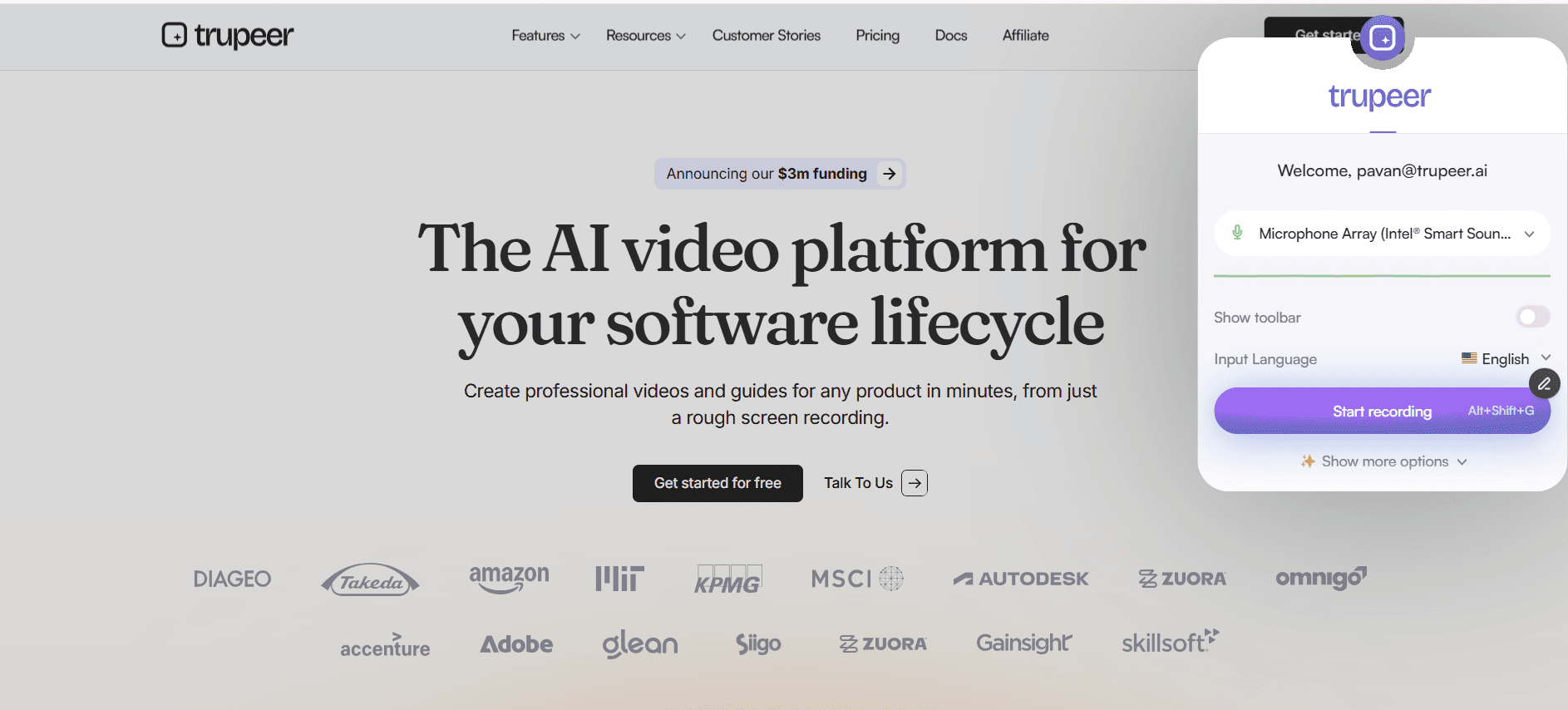
Step 1: Record the walkthrough or use an AI avatar
Hit record in the browser, on whatever corporate-issued laptop the subject expert is already using. The recorder captures screen, system audio, microphone, and webcam (any combination, all optional). For trainings without a willing presenter, pick an AI avatar from the catalog and type a script; the avatar delivers the training as a talking-head video without anyone going on camera. Custom avatars trained on a real trainer's likeness are available via the HeyGen integration for enterprises that want a consistent corporate face across the training library.
Step 2: AI runs the full post-production pipeline
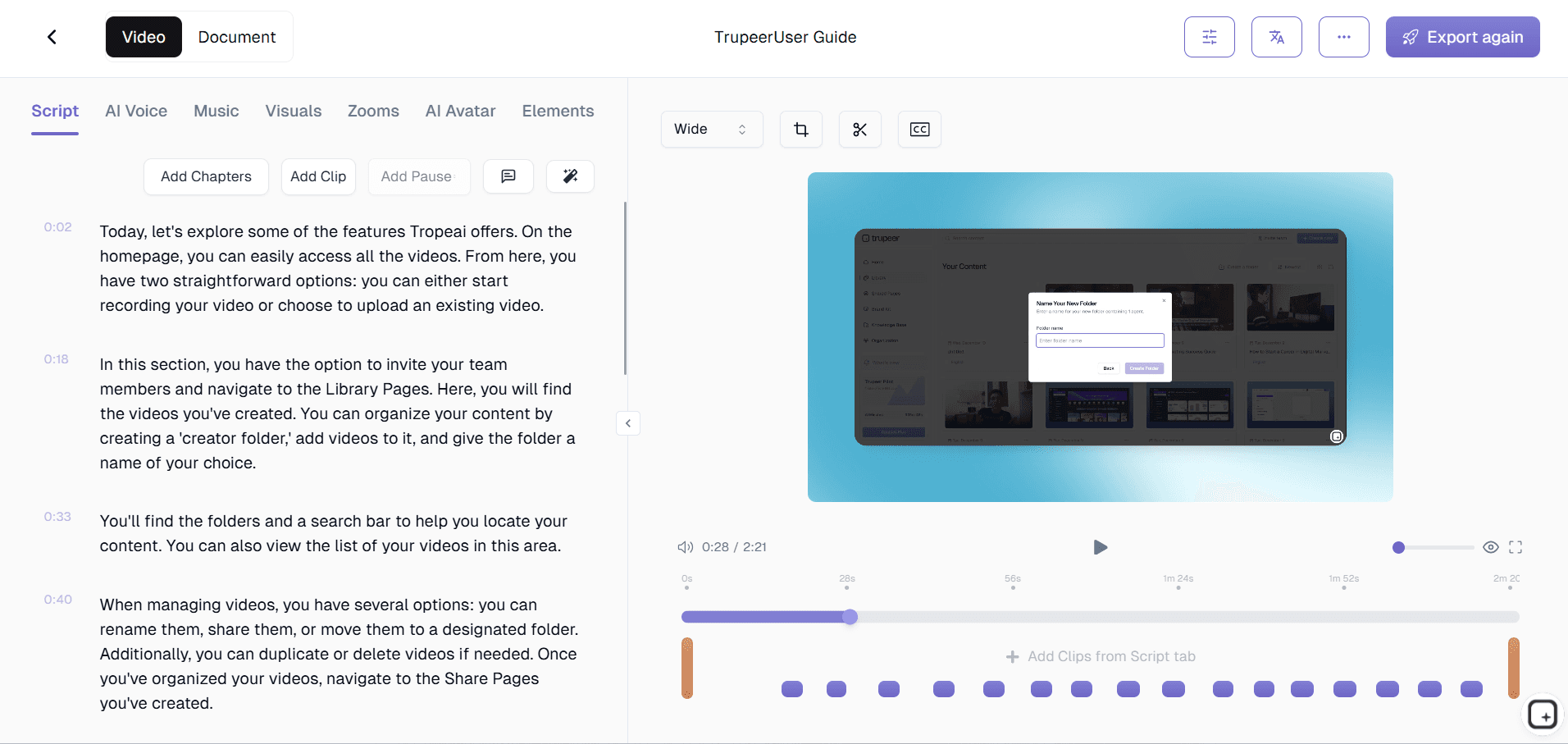
Filler words, awkward pauses, and "let me find that file" moments get removed. Zoom and cursor effects highlight the part of the screen the trainee needs to follow. The brand kit applies the intro slide, outro slide, lower-third graphics, color palette, and font selection without manual styling. Captions get generated in the recording language. Voiceover (optional) layers on top with a chosen voice from the catalog or a custom-cloned voice for consistency with the rest of the training library. A draft training video and a draft written training guide show up together in the editor.
Step 3: Translate, brand, and ship
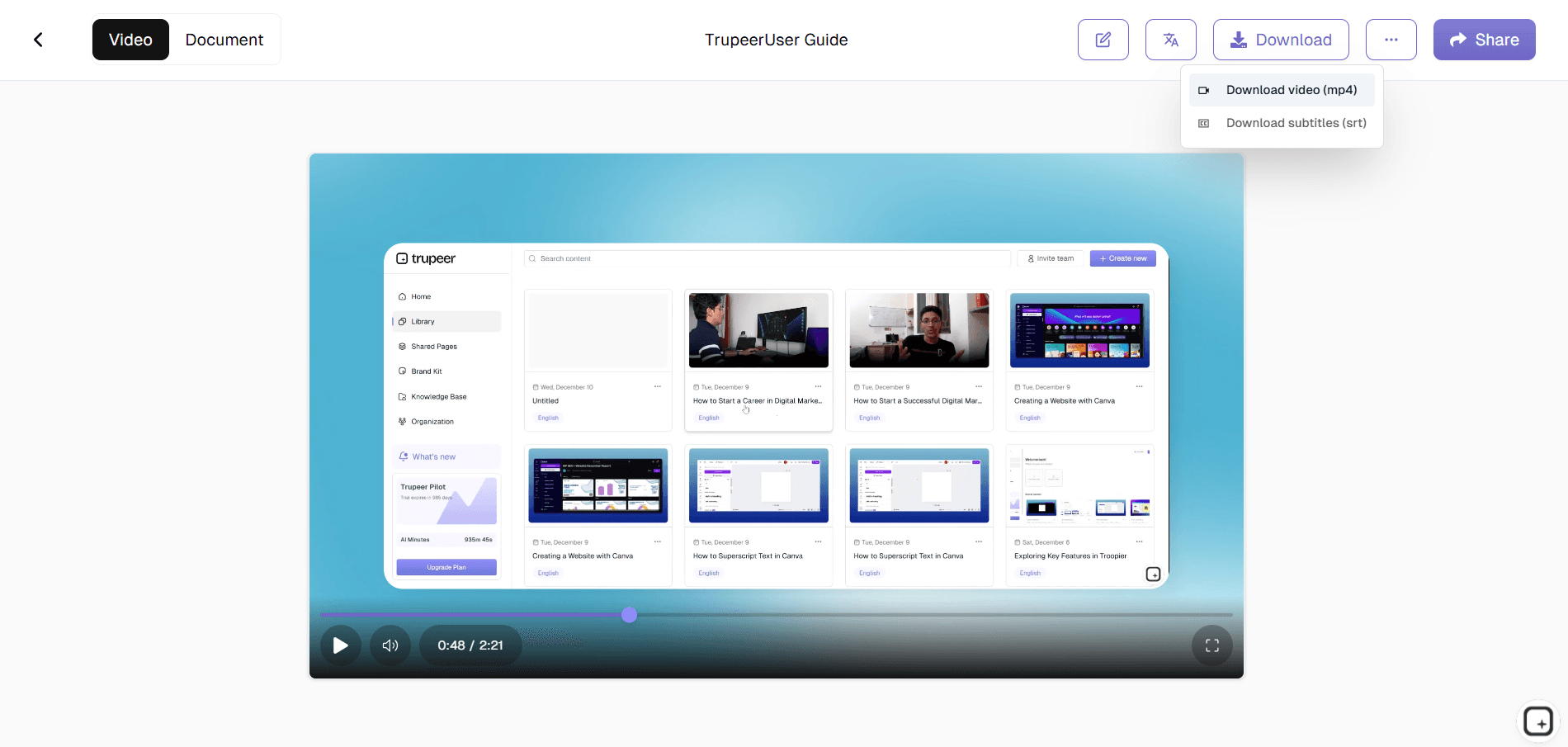
Apply any region-specific brand kit variations if the enterprise has them. Translate into Spanish, Portuguese, Hindi, Mandarin, Japanese, French, German, Arabic, or any of 65+ languages the workforce speaks (the AI translates both video voiceover and written guide in the same job, with voice cloning preserving the original presenter's voice across translated versions). Then ship via MP4 upload to the LMS, PDF posting to the employee handbook, or a Shared Page link for everywhere else.
Who picks this software inside an enterprise
The person picking this software inside an enterprise is usually a head of L&D, a director of organizational development, or a training operations manager who has been asked to scale corporate training video production without proportionally scaling headcount or budget. They've evaluated the alternatives in the broader training software market: Camtasia and Adobe Captivate (legacy desktop video editing software with steep learning curves), Articulate Storyline and Rise (course authoring suites with strong interactive features but no AI training video production), Synthesia (AI avatar-led video with no screen-recording flow), Loom and Vidyard (screen recording with manual editing), Brightcove and Vimeo (hosting and analytics, not production), plus the long tail of training video maker, training video creator, and training video generator products targeting smaller teams. Each tool covers a piece of the workflow. Trupeer AI covers the production-and-document-generation piece, faster, and pairs with whatever delivery system the enterprise already has. If you currently host training on Vimeo, see our list of Vimeo alternatives.
Around the buyer, the actual day-to-day users are individual training producers across the organization. HR onboarding leads, IT system trainers, sales enablement managers, customer success educators, operations training specialists, and compliance training owners all use the same software to produce training videos for their respective audiences. Production analytics in the admin view show how many videos and guides each function has shipped, plus total AI minutes consumed, which lets the buyer see actual ROI per team six months after rollout.
What this enterprise training video software produces
Video output is MP4, encoded at standard resolutions (720p, 1080p, with 4K available for high-fidelity training content). The MP4 format is what every enterprise corporate training video stack already accepts, so the output works with every LMS that handles MP4 uploads (Cornerstone, Docebo, TalentLMS, Workday Learning, Absorb, 360Learning, Saba, SAP SuccessFactors, Oracle Learning, and the rest of the video training software ecosystem). Video file sizes match LMS upload limits across all of these systems.
Document output is PDF or Word (DOCX), with screenshots and numbered step descriptions inline. The document includes brand kit elements (logo, header, footer styling) so it looks like it came from the same company as the video. Both outputs can also ship as a Shared Page, which is a branded URL that wraps the video player, the written guide, and optional engagement features (timed comments, embed code, visibility controls) into one link the L&D team can paste into Slack, embed in SharePoint or Confluence, or send via email.
Honest scope: what this software does not do
Enterprise procurement teams evaluating training video software want explicit scope, since the alternative (discovering missing features mid-rollout) is expensive. Trupeer AI does not generate SCORM packages. It exports MP4 video and PDF or DOCX documents, which the L&D team uploads to whichever LMS the enterprise runs. SCORM packaging happens in dedicated course authoring software like Articulate Storyline, iSpring, or Adapt Learning, which most enterprises pair with Trupeer for the small fraction of training that requires branching and assessments.
Trupeer AI does not track learner-side completion, viewing time, or assessment scores. Those metrics come from the LMS where the video gets assigned. Trupeer's production analytics cover the content-creation side: how many videos, guides, and Shared Pages each team has shipped, plus total AI minutes consumed. Learner-side analytics is what the LMS exists for. Trupeer AI is also not on-premises deployable, since the platform runs as SaaS hosted by Trupeer, accessed via web browser. Enterprises with strict on-premises mandates or specific identity-provider integration requirements should check the Trust Center for current data handling, processing, and security documentation before evaluating.
Keeping training video content current across releases and languages
Training video content rots quickly in enterprises because the underlying systems, processes, and policies it documents change every quarter. A UI update breaks last quarter's system training, a process change makes the existing module misleading, a policy update makes the compliance training out of date. Re-recording entire modules from scratch is the standard approach, which is why most enterprise training libraries drift two to three releases behind reality. Trupeer AI handles updates by re-recording just the changed segment. The AI re-processes only that part, both the video and the written guide update in place, and the training module gets re-uploaded to the LMS as a new version. Trainees see the current process automatically.
Translation is the second axis of currency for global enterprises. The same training video and matching guide reach employees in Madrid in Spanish, São Paulo in Portuguese, Tokyo in Japanese, Mumbai in Hindi, Berlin in German, Paris in French, Dubai in Arabic, from one source recording, in the same release cycle. Voice cloning carries the original presenter's voice across translated versions for tonal consistency. For enterprises evaluating the broader training video stack alongside this software, the Trupeer AI enterprise training video platform page covers the multi-team governance angle, and the Trupeer AI SOP builder covers the standard operating procedures that sit underneath training videos.
People also ask for
Enterprise Documentation & Knowledge Base Platform
Enterprise Documentation Software
Enterprise Training Video Platform
Free Employee Training Generator
Free Training Video Creation Software
Free AI Training Video Generator
Free GitBook Alternative for SaaS Documentation
What this enterprise training video software does
Full AI post-production pipeline
Filler removal, zoom and cursor effects, brand kit application, captions, voiceover, intro and outro slides, all from one recording with no video editor required.
Video and written guide from the same source
One screen recording produces both the MP4 training video and the PDF or Word training guide together, with the same brand kit elements applied to both.
AI avatars for trainings nobody wants to film
Pick an avatar from the catalog or use a custom avatar trained on a real trainer. The avatar delivers the training as a talking-head video. No camera, microphone, or on-camera recording session required.
Produce enterprise training videos in three steps
Step 1
Record the walkthrough or use an AI avatar with a typed script
Step 2
AI runs the full post-production pipeline and generates the written guide
Step 3
Translate, brand, ship via LMS upload or Shared Page link
Frequently Asked Questions
Is the enterprise training video software free to use?
The core flow is free: record a training walkthrough, generate the video and written guide, share via a Shared Page link. Enterprise tiers add team workspaces with multiple seats, brand kit management, custom voice cloning, AI avatars from the full catalog, translation across 65+ languages, knowledge base visibility controls, production analytics, and seat-based licensing at enterprise scale. Pricing details on the pricing page, or via book a demo for enterprise terms.
What security and compliance certifications does the software have?
Current security, data handling, and compliance documentation lives on the Trupeer Trust Center, which is the source of truth for SOC 2 status, data residency, GDPR handling, and processing details. Enterprise procurement teams with security questionnaires should pull current documentation directly from the Trust Center rather than relying on tool pages, since certifications and details update over time.
Does the software integrate with our LMS and identity provider?
For LMS integration, Trupeer AI exports MP4 video and PDF or Word documents which the L&D team uploads to whichever LMS the enterprise runs (Cornerstone, Docebo, TalentLMS, Workday Learning, Absorb, 360Learning, and others all accept MP4 and PDF uploads). The Shared Page link option works for content outside the LMS (SharePoint, Confluence, Slack channels). For identity provider and SSO integration specifics, check the Trupeer Trust Center for current configuration options and supported standards.
Can the software produce training videos at the volume an enterprise needs?
Yes. The same workflow scales from 5 training videos per month to several hundred per quarter, since the AI handles the post-production work regardless of input volume. Production capacity is constrained by how many subject experts in the organization are willing to record walkthroughs (or how many scripts the team can write for AI avatars to deliver), not by the software's processing capacity. A typical 5,000-employee enterprise running 15 to 20 active training campaigns per quarter produces all the associated training videos and matching guides in the same workspace.
Can we use the software with our existing video and learning tools?
Trupeer AI is designed to coexist with the rest of the enterprise's video and learning toolchain rather than replace it. The MP4 and PDF outputs work as inputs to LMS systems (Cornerstone, Docebo, Workday Learning), video hosting platforms (Vimeo Enterprise, Brightcove, Kaltura, Panopto), course authoring suites (Articulate Storyline, Adobe Captivate for SCORM-packaged content), and any tool that accepts standard file formats. Trupeer AI handles the post-production and document generation; the existing tools handle delivery, hosting, viewer analytics, and interactive course assembly.
More Tools



