Use this template
PDCA is one of the most powerful continuous improvement frameworks ever developed. With Trupeer, you can save hours on PDCA documentation by starting with a free PDCA method template, customizing it with your brand guidelines, and turning PDCA cycles into video updates that align teams behind every improvement.
What is PDCA, and what does a PDCA template do?
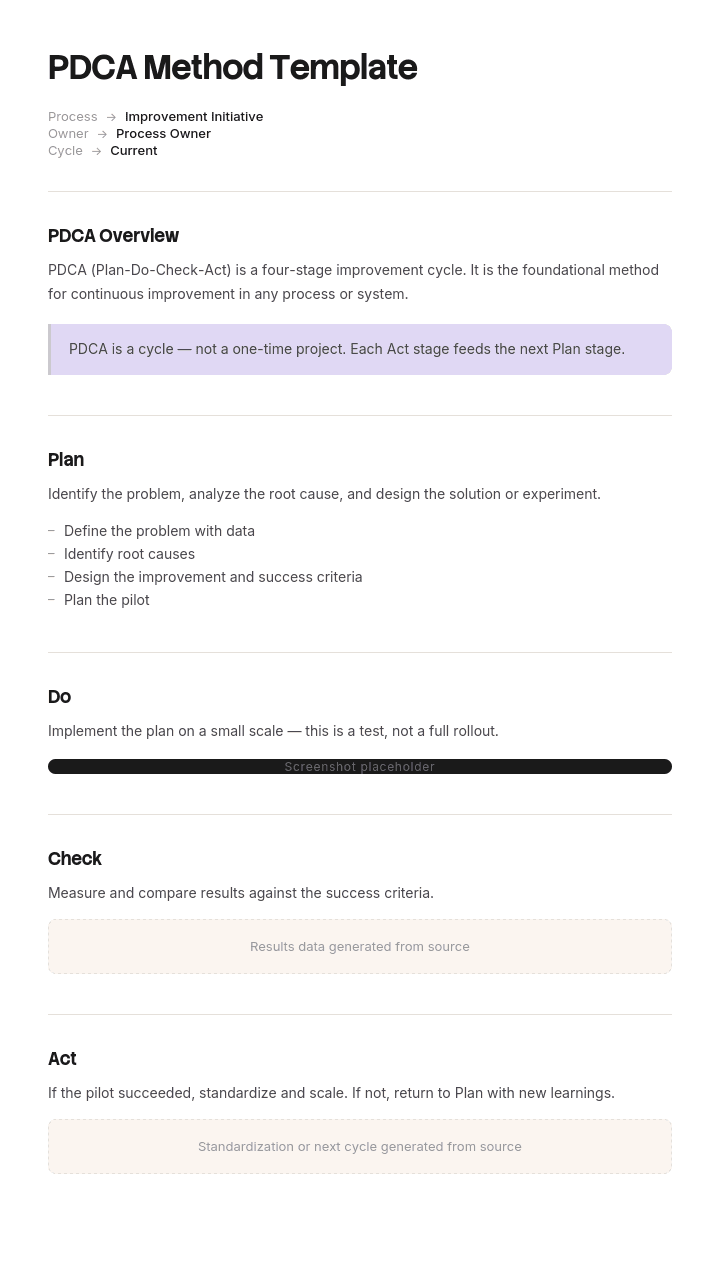
PDCA is a four stage improvement cycle: Plan a change, Do it on a small scale, Check whether it worked, and Act on what you found. It comes from Shewhart and Deming and it underpins most modern quality and continuous improvement practice, including the improvement requirements in ISO management standards.
A PDCA template is the form that carries one cycle. It gives each stage a box, keeps the work visible, and makes it possible to look back at what was tried.
The templates are easy to find and they are almost all the same: a circle divided into four, or a table with four columns. That shape is faithful to the model and it is also why so many PDCA cycles produce nothing. A four box template with nowhere to record what the situation was before you started cannot support the stage the whole method depends on.
Why PDCA usually runs as Plan, Do, Plan, Do
Audit a set of completed PDCA forms in almost any organisation and the pattern is consistent. Plan is full. Do is full. Check is thin or empty. Act is empty or says "standardise".
The usual explanation is discipline: people move on to the next thing before closing the last one. That is true and it is not the root cause, because the same people close incident reports and finish audits.
The root cause is that Check is usually impossible. To check whether something improved you need a number from before, measured the same way, and the template never asked for one. So the person filling in Check has a choice between writing something unverifiable, such as "operators report it is easier", or leaving it blank. Most leave it blank, and the ones who do not have written something that cannot be wrong, which is the same as nothing.
Act then inherits the problem. With no finding to act on, the only available entry is a vague intention, and the cycle ends without anybody deciding anything.
Two fields fix both stages, and neither of them sits inside the four boxes.
How to customize this template in Trupeer
Step 1: Open the Templates Section
Go to the Templates section from the main navigation.

Step 2: Select and Open a Template
Click on any template you want to work with to open it.

Step 3: Expand the Template View
If needed, expand the template view to see the full layout and details clearly.

Step 4: Edit the Template
Click on Edit to start modifying the selected template.

Within the editor, you can:
Add new sections
Define or update formatting rules
Add a logo and adjust its position and related settings
Step 5: Save Your Customized Template
After making all necessary changes, click Save to store the updated template as your own.

Step 6: Preview and Fine-Tune the Template
When you want to see how your customized template looks, open the Preview.

From the preview screen, you can continue to make adjustments directly if needed, ensuring the template appears exactly as you want.
With a PDCA method template you can:
Save hours on planning: Skip the blank page with a structure built for PDCA cycles.
Drive continuous improvement: Built-in fields ensure each phase is captured and learned from.
Stay on-brand: Apply your logo, fonts and colors using Trupeer's brand kit.
Roll out changes faster: Convert PDCA learnings into updated SOPs and video walkthroughs.
Standardize improvement: Use the same template for every PDCA cycle.
Reach global teams: Translate PDCA documentation into 65+ languages with one click.
The baseline that has to exist before Plan
The first act of a PDCA cycle is not planning. It is measuring.
Before anything is planned, record what the situation is now: the measure, its current value, how it is measured, over what period, on what date, and who captured it. Five lines. Nothing proceeds until they exist.
This sounds pedantic and it is the difference between a cycle that can conclude and one that cannot. It also does something useful earlier than expected: a surprising number of proposed improvements do not survive the attempt to baseline them, because nobody can say what the current level is, which usually means nobody knows whether there is a problem.
Three rules keep baselines honest. Measure over a period long enough to include normal variation, since a single day's figure will move on its own. Write down how it was measured, because the Check must use the identical method or the comparison means nothing. And capture it before the team knows what change is coming, where that is practical, since a baseline taken after everyone has been told what is about to improve tends to be unrepresentative.
Where no number exists at all, a count is better than an adjective. How many times last month, out of how many attempts, is almost always obtainable in an afternoon.
Act is a decision: adopt, adapt or abandon
The Act stage is where most templates put a single empty box, and the word itself is ambiguous. In the original model it can mean standardise the change, or adjust it and go round again. Those are opposite instructions and one box cannot hold both.
Replace the box with three outcomes, exactly one of which must be selected.
Adopt. The change worked. Name the document that has been updated as a result: the SOP, the work instruction, the job aid, the setting. An adopt with no named document has not been adopted, it has been approved of, and it will revert within about six weeks.
Adapt. Partial or unclear result. State what specifically changes for the next cycle and set the date. This is a legitimate outcome and it should be common, since most first attempts are partly right.
Abandon. It did not work, or it made things worse. State what was reverted and when, and record what was learned so it is not tried again by somebody else in eighteen months.
Abandon is the outcome almost no organisation ever records, which is why failed changes quietly persist and why the same problem gets tackled twice with contradictory solutions. Making it a tick box rather than an admission changes how often it gets used.
Free PDCA method template: the four stages plus two fields
Copy from here. One cycle per form, one page.
Header. Cycle reference, title, owner, team, start date, target close date.
Baseline, before Plan. The measure. Current value. Method of measurement. Period covered. Date captured. Who captured it.
Plan. The problem in one sentence, stated as an observation rather than a solution. The suspected cause. The change being tried. The prediction, meaning what you expect the measure to do and by how much. Where it will be tried and for how long. Who is doing it.
Do. What was actually done, what differed from the plan, when it started and finished, and anything that went wrong during the trial.
Check. The measure again, using the method named in the baseline. The post value. The difference. Whether it matched the prediction. Any side effects noticed, including on work not being measured.
Act. One of adopt, adapt or abandon, with the required detail for each as above. Named person, dated.
Next cycle. Reference, if this leads to another.
Copy to here. The prediction field in Plan is worth defending against everyone who wants to delete it. Writing down what you expect to happen before you do it is what turns Check from a formality into information, because a change that improved things by an amount nobody expected is telling you something different from one that landed as predicted.
The four PDCA stages, and what each one must produce
Stage | The question | What it must produce | Common failure |
|---|---|---|---|
Baseline | Where are we now? | A number, a method and a date | Skipped entirely, so Check has nothing to compare |
Plan | What will we try and what do we expect? | A stated change and a numeric prediction | A solution with no cause and no prediction |
Do | What actually happened? | A record of what was done and what deviated | Written as the plan repeated, not as events |
Check | Did it work? | The same measure, same method, and the difference | An adjective instead of a number |
Act | What now? | Adopt, adapt or abandon, with named consequence | Empty, or the word "standardise" alone |
Two stages carry the weight and neither is Plan. Teams put most of their effort into planning because it is the stage that feels like thinking, and the stages that generate learning are Check and Act.
The plant with 47 cycles and 3 that could be checked
Ledstone Packaging runs a corrugated packaging plant of about three hundred people. PDCA was its standard improvement method. Everyone had been trained, boards were on the wall, and over eighteen months forty seven cycles were logged.
Somebody audited them.
All forty seven had a completed Plan. Forty four had a completed Do. Twelve had anything written in Check. Six had anything in Act, and all six said standardise without naming a document.
Of the twelve with something in Check, three contained a before number. The other nine said things like improved, faster, or operators report it is easier.
So of forty seven cycles, three could be evaluated at all.
The cost showed up in two places. Cycle nineteen had changed a changeover sequence and had been adopted. It increased average changeover time by about seven minutes, and at roughly forty changeovers a week that is nearly five hours a week of lost run time. It was found eleven months later during an unrelated analysis of line performance, not by the cycle that created it.
And cycles eight and thirty one had both addressed label applicator misfeeds, with contradictory solutions, because nobody had established whether cycle eight worked before cycle thirty one was started.
The changes made were narrow. A baseline block was added above Plan, with the measure, value, method, period, date and who captured it, and no cycle could be opened without it. Act became three tick boxes with a required field under each.
Over the following twelve months they logged thirty one cycles, which is fewer on purpose. All thirty one had baselines. Twenty nine had a Check containing a post value. The Act outcomes were seventeen adopt, nine adapt and five abandon.
The five abandons were the number the quality manager was proudest of, because in the previous eighteen months that outcome had never once been recorded. Two of them were changes that had made things worse and were reverted within three weeks rather than eleven months.
How to run a PDCA cycle properly, step by step
Pick a problem small enough that a cycle can complete in weeks rather than quarters. PDCA is not a project methodology and long cycles are how the method dies.
Baseline it before anything else, using the five fields above.
Plan the change with a stated cause and a numeric prediction. If you cannot predict, you do not yet understand the cause well enough to test a change, and the honest next step is to observe rather than to plan.
Do it small. One line, one shift, one team, one week. The point of a trial is that reversing it is cheap.
Check with the same measure and the same method, over a comparable period. Look for side effects deliberately, because changes frequently improve the measured thing and degrade something adjacent that nobody was watching.
Act by selecting one of the three outcomes and completing the field it requires. Then close the cycle, visibly, so people can see cycles finishing.
The advantages and disadvantages of the PDCA cycle
The advantages are real. It is simple enough to teach in twenty minutes. It applies to almost any kind of work. It encourages small reversible changes rather than large risky ones. And it produces a written record, which is what allows an organisation to stop repeating itself.
The disadvantages are equally real and less often stated.
It is slow. A cycle that includes a proper baseline, a trial period and a check takes weeks, which makes it a poor fit for anything urgent.
It assumes a measurable outcome. Work where the result is qualitative or takes months to appear does not fit the model well, and forcing it produces exactly the unfalsifiable Check described above.
It is easily performed rather than done. Boards, forms and training are visible; the discipline of measuring twice is not, and organisations frequently have the first without the second.
And it says nothing about how to find the cause. Plan assumes you have a hypothesis, and generating a good one is where most improvement work actually succeeds or fails.
When should you use PDCA, and when something else?
Use PDCA when you have a measurable problem, a plausible cause, and the ability to try a change on a small scale and reverse it. That is a narrower set of circumstances than the method's popularity suggests, and it is where it works well.
Use something else in three cases.
When the improvement is small, obvious and reversible, a full cycle is overhead. Make the change and record it. Our kaizen method template covers that lighter path, including the threshold below which nobody should need permission.
When the cause is genuinely unknown and contested, PDCA's Plan stage will produce a guess. Structured problem solving such as an A3 or a formal root cause analysis comes first, and PDCA tests the resulting hypothesis.
When the problem is variation in a stable process and you have data, DMAIC and the statistical tooling around it will get further than PDCA will.
And where the improvement is about workplace organisation rather than process performance, our 5S process improvement template is the better starting point.
PDCA template variants: A3, FOCUS PDCA and RACI
A3. The whole cycle on one A3 sheet, with the left half devoted to understanding the current condition and the right half to the change. It is PDCA with a much larger baseline section, which is exactly the emphasis this page argues for.
FOCUS PDCA. A healthcare variant adding a front end: Find a process to improve, Organise a team, Clarify current knowledge, Understand variation, Select the improvement. Those five steps are all about establishing the current condition before planning, which again is the same correction.
PDCA with RACI. Adds responsibility assignment across the stages. Useful where a cycle crosses teams and nobody owns the Check, which is the stage that most often falls between people.
Presentation and chart formats. Circular diagrams for slides. Fine for explaining the method and useless as a working form, because a circle has nowhere to write a measurement method.
The pattern across the useful variants is that all of them expand the front of the cycle. The pattern across the decorative ones is that they make the circle prettier.
Can I get a PDCA template in Excel, PowerPoint or PDF?
Excel is the right working format and it is not close. A PDCA log wants one row per cycle with columns for reference, title, owner, baseline value, method, prediction, post value, difference, Act outcome and close date. That sheet is what makes the audit in the worked example possible, and building it usually reveals the problem before anyone changes the form.
Word or a printed A4 form suits the individual cycle, particularly on a shop floor where the form lives on a board rather than a screen. Keep it to one side.
PowerPoint suits explaining PDCA to people and nothing else. A circular diagram is a teaching aid, not a template, and using it as the working form guarantees the baseline never gets recorded.
PDF suits the closed cycle filed as a record once Act is complete.
How to capture a before and after without a study
The reason Check gets skipped is often practical rather than cultural. Measuring means somebody has to go and observe the work twice, several weeks apart, using the same method, and that is real time nobody has allocated.
For anything involving a person performing a task, recording is a cheap and comparable measurement. A screen or process recording before the change and another after gives you two artefacts you can time, count steps in, and compare directly, without anybody standing there with a stopwatch on two separate occasions.
Trupeer AI turns those recordings into written procedures as well, which matters at the Act stage: an adopt outcome requires a named document to be updated, and if updating it is expensive the adopt quietly becomes an approval that reverts.
Record it. Brand it. Translate it. Trupeer it.
The SOP creator covers the procedures that adopt outcomes have to change, and where the change is at a workstation our manufacturing work instructions template covers the document that has to reflect it. The recordings and the resulting procedures live in your knowledge base in consistent branding. Setup instructions are in the document template setup guide.
Frequently Asked Questions
Is there a free PDCA template in Excel?
Excel is the right home for the cycle log, which is more valuable than the individual form. One row per cycle with baseline value, method, prediction, post value and Act outcome. Add a count of cycles by Act outcome, and if abandon is zero across a year, the process is not being run honestly rather than being run perfectly.
Is there a free PDCA template in PowerPoint?
Only for teaching. The circular PDCA diagrams that dominate slide template libraries are explanatory graphics with no room for a measurement method or a prediction. Use slides to explain the cycle and a form or a spreadsheet to run one.
Is there a free PDCA template in Word?
The structure above pastes straight into Word as a one page form, including the baseline block and the three Act outcomes that standard templates omit. There is no gated download and no form. Print it at A4 if it is going on a board.
Is there a free PDCA template in PDF?
Export the completed cycle to PDF once Act is closed, as the record. Keep the blank form editable, because the measure and method fields usually need tailoring to each area, and a fixed PDF encourages people to skip the fields that do not obviously fit.
What is the difference between PDCA and kaizen?
Kaizen is the broader habit of continuous small improvement. PDCA is one method for testing a specific change within that habit. In practice most kaizen improvements are too small and too reversible to justify a full cycle, and should simply be made and recorded. Reserve PDCA for changes where you genuinely do not know whether the idea will work.
What is the difference between PDCA and DMAIC?
DMAIC, meaning define, measure, analyse, improve and control, is the Six Sigma equivalent and it is heavier. It assumes data, statistical analysis and a trained practitioner, and it is stronger where the problem is variation in a stable process. PDCA is lighter, faster and better suited to testing a hypothesis you already have.
How long should a PDCA cycle take?
Weeks rather than months. A baseline period, a trial period long enough to include normal variation, and a check. Two to eight weeks covers most operational cycles. Anything running past a quarter has usually become a project and should be managed as one.
Who should own a PDCA cycle?
Whoever does the work, with a named person accountable for the Check specifically. That second name matters, because Check is the stage that falls between people when a cycle crosses teams, and assigning it separately is the single cheapest fix available.

