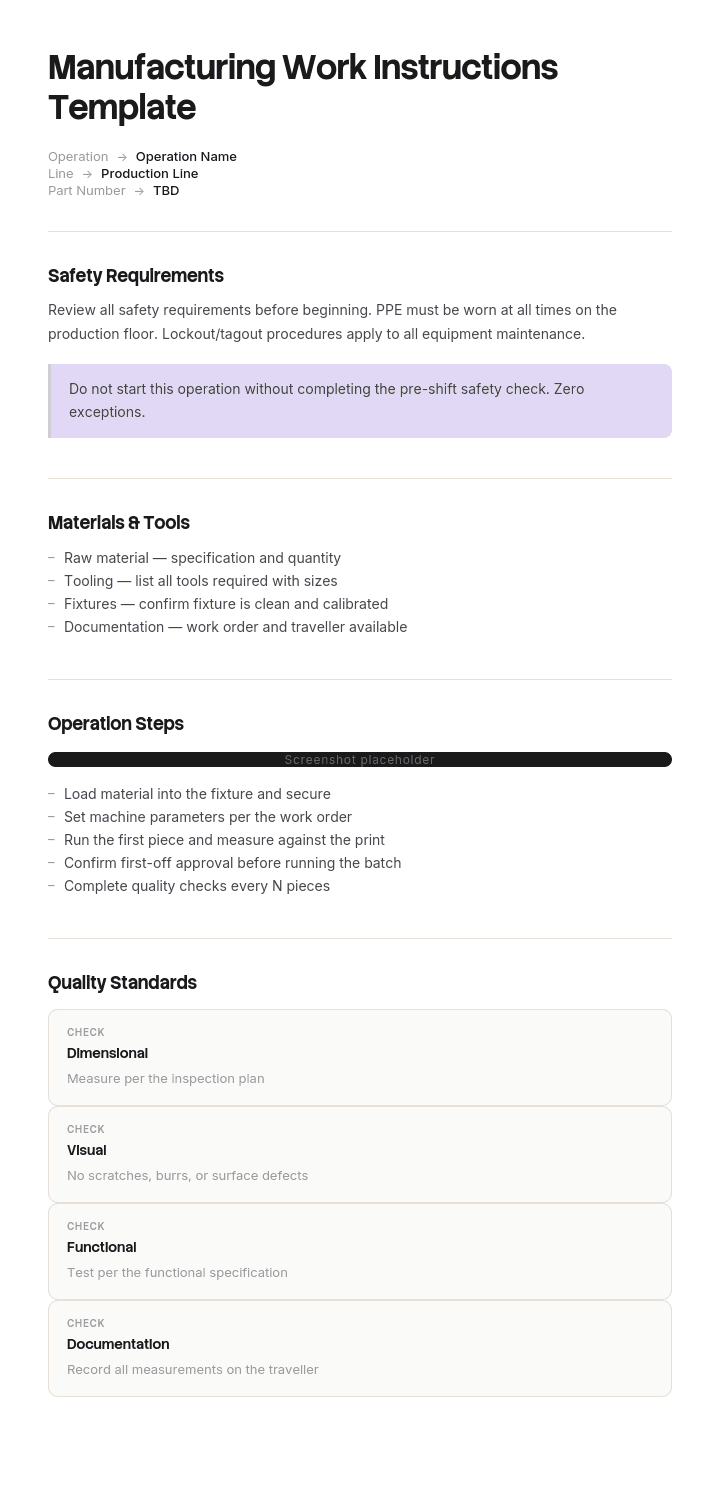
Use this template
Clear manufacturing work instructions are the difference between consistent quality and recurring rework. With Trupeer, you can save hours on shop-floor documentation by starting with a free manufacturing work instructions template, customizing it with your brand guidelines, and turning written instructions into video walkthroughs operators can watch right at the line.
What is a manufacturing work instruction template for?
A work instruction is the document telling one person how to perform one operation at one station, in enough detail that two operators produce the same result. It sits below the procedure, which describes the process, and above nothing, because it is the last document before the work itself.
In manufacturing it carries weight that its equivalents elsewhere do not. It is usually a controlled document under a quality system, it is what a new starter is trained against, and it is what an auditor will ask to see at the point of use.
A manufacturing work instructions template is the reusable shell: the header fields, the step format, the image conventions and the revision block. The template is the easy part. Whether the document still matches reality is the hard part, and that is what most of this page is about.
Why your work instructions no longer match the job
Every work instruction is accurate on the day it is signed. Then three things happen slowly.
The process changes. A tool is refurbished, a setpoint retuned, a material behaves differently, a fixture is replaced. Each change is made properly and only some reach the document.
The operators improve it. People who run a cell four hundred times a week find better sequences, and those improvements spread by demonstration rather than by revision. Within a year the best operator is not doing what the document says.
And the document gets reviewed rather than checked. Review means an engineer reads it at a desk and signs it. Checking means somebody stands at the station and compares it to what is happening. Only one of those finds anything.
The result is a library that is formally controlled and quietly wrong. Experienced operators know the document is out of date and work from memory. The people who suffer are new starters, agency staff and anyone covering a shift, because they are the only ones actually following it. That is why defect rates so often spike with unfamiliar labour and get blamed on training.
How to customize this template in Trupeer
Step 1: Open the Templates Section
Go to the Templates section from the main navigation.

Step 2: Select and Open a Template
Click on any template you want to work with to open it.

Step 3: Expand the Template View
If needed, expand the template view to see the full layout and details clearly.

Step 4: Edit the Template
Click on Edit to start modifying the selected template.

Within the editor, you can:
Add new sections
Define or update formatting rules
Add a logo and adjust its position and related settings
Step 5: Save Your Customized Template
After making all necessary changes, click Save to store the updated template as your own.

Step 6: Preview and Fine-Tune the Template
When you want to see how your customized template looks, open the Preview.

From the preview screen, you can continue to make adjustments directly if needed, ensuring the template appears exactly as you want.
With a manufacturing work instructions template you can:
Save hours on documentation: Skip the blank page with a structure built for manufacturing.
Reduce defects: Clear visual instructions cut errors and rework on the line.
Stay on-brand: Apply your logo, fonts and colors using Trupeer's brand kit.
Train operators faster: Pair instructions with video walkthroughs at the workstation.
Standardize across plants: Use the same template for every line and shift.
Reach global teams: Translate work instructions into 65+ languages with one click.
How to run a deviation walk on a single cell
Thirty to forty minutes, one station, one quality or process engineer, no announcement beyond telling the operator what you are doing and why.
Print the current controlled work instruction. Not the copy on the shared drive, the one that is supposed to be at the station, and note whether it is there at all and whether it is the current revision.
Stand where you can see the work without being in the way, and watch three consecutive cycles without saying anything.
Write down every difference between the document and what you see. Steps in a different order, steps skipped, steps performed that the document does not mention, different settings, tools or checks. Judge none of them yet, and correct nothing unless it is a safety matter, in which case stop the work.
Then talk to the operator, one deviation at a time, and ask why. That conversation is the value of the exercise and it only works if it is obviously not disciplinary.
Count the deviations. That number, on a document nobody suspected, is what convinces a management team to do this across the plant.
The three verdicts for every deviation you find
Verdict | What it means | What you do | Typical share |
|---|---|---|---|
Revise | The document is wrong. The process changed and the paperwork did not | Raise a document change immediately, it is a live nonconformity | Around a third |
Adopt | The operator's way is better and safe | Capture it, verify it, standardise it, then revise the document | Often the largest group |
Retrain | The operator is not following a step that matters | Retrain and record it, and ask why the step was skippable | The rest |
The proportions matter more than the total. A cell that is mostly revise has an engineering change process that does not reach the shop floor. A cell that is mostly adopt has good operators and no route for their improvements, and our kaizen method template covers the mechanism for capturing those properly. A cell that is mostly retrain has a training or supervision problem rather than a documentation one.
Two things must never be treated as adopt. Anything touching machine guarding, isolation and lockout, personal protective equipment or an emergency stop. And anything affecting a characteristic that is specified by a customer, a regulator or a validated process, where the deviation is a nonconformity to be reported through your existing route rather than a suggestion. Those are stop-and-escalate, not observations.
Free manufacturing work instructions template: the one page to copy
One operation, one page. If it will not fit, it is two operations.
Header. Part number and revision. Operation number and name. Cell or station. Document number and revision. Effective date. Author and approver. Cycle time. Revision history in one line.
Materials, tools and equipment. What must be at the station before starting, including gauges and their calibration status.
Safety. Only the hazards present at this operation, with the required protection, placed here and repeated inline at the step where the hazard occurs.
Setup and settings. Every value an operator would otherwise have to remember, with tolerance. Temperatures, pressures, speeds, torque, dwell. This is the section that most often diverges from reality.
Steps. Numbered, one action each, with the expected result and an image where the image does more work than the words. Aim for under twelve. Mark critical steps distinctly, meaning the ones where an error reaches the customer.
Checks. What is inspected, how often, against what, and what to do when it fails.
If something is wrong. Who to call, and the point at which the operator stops rather than continues.
Copy to here. Two rules keep it usable. The document has to be readable at the distance the operator actually stands from it, which is usually further than the person designing it imagines. And it has to be checkable against one cycle, which is what makes the deviation walk possible at all.
What should be included in a work instructions template?
The header fields above, and specifically the revision block and the approver, because a work instruction without a traceable revision is not a controlled document however good the content is.
Beyond that, the test is whether an operator on their second day could complete the operation correctly using only this sheet. Anything that does not serve that is either training material or engineering rationale, and both belong elsewhere.
The most commonly missing field is the expected result beside each step. Without it, an operator cannot tell whether the step worked, which means errors are found at inspection rather than at the station.
How to write manufacturing work instructions, step by step
Watch the operation first, performed by someone fluent, at normal speed, without interrupting. Record it if you can, because you will miss things.
Write the steps from what you saw rather than from the engineering intent. Those differ, and the version people actually perform is the one worth documenting and then improving.
Cut every step that is navigation or handling rather than decision or action. Picking up the part is not a step. Orienting it a specific way because it only fits one way is.
Add the expected result to each remaining step, then add images where a photograph removes a paragraph. Photographs of the real station beat drawings, and both beat description.
Set the setup values with tolerances taken from the current engineering record, not from the previous version of the document. This is where errors propagate between revisions.
Then have someone who has not done the job perform it from the sheet while you watch and say nothing. Every hesitation is a defect in the document.
Visual work instructions and when images beat words
Manufacturing is the one domain where visual instructions genuinely outperform text, for specific reasons. The reader is looking at the part rather than the page, has gloves on, may not read the site's main language fluently, and needs to confirm a state rather than absorb a sentence.
Images do best for orientation, for correct and incorrect side by side, for where a component sits, and for gauge readings. They do worst for conditions, branching sequences, and any number with a tolerance.
Four rules hold up. Photograph the real station rather than using a CAD render, because operators recognise their own bench. Mark the point of interest rather than showing the whole assembly. Keep a short text line with every image, since an image alone is ambiguous about what you are meant to notice. And avoid photographing anything that changes often.
Where a site runs several languages, images plus short standardised phrases beat full translation of long text and survive turnover better.
The plant that found nine deviations in one cycle
Wexbridge Polymers runs injection moulding across three sites for automotive customers, around five hundred staff, certified to IATF 16949. Its work instruction library held about twelve hundred and forty controlled documents.
One part family had run at around two point one percent scrap against a target of nought point six for eighteen months. Several 8D investigations had been raised. Corrective actions held for a few weeks each time and then the rate returned.
The quality manager took the current controlled work instruction to the cell and watched three cycles. On a fourteen step document she recorded nine deviations.
Four were operators doing it better, mostly a purge sequence the day shift had worked out that reduced the first-off reject.
Three were the document being wrong. The most important was mould temperature. The sheet specified sixty eight degrees. The tool had been refurbished in 2022 and everyone who had been there at the time ran it at seventy four.
Two were operators skipping a check that mattered.
The temperature was the defect. Experienced operators set seventy four and produced good parts. New starters, agency cover and anyone conscientious enough to follow the sheet set sixty eight and produced scrap. The shift data showed it plainly once anyone thought to look at scrap by operator tenure, which nobody had, because the documented cause was assumed to be process variation.
That work instruction had been reviewed three times in eighteen months. Every review was an engineer reading it at a desk and signing it.
They rolled deviation walks across fourteen cells. About eight hours of engineering time in total. A hundred and twenty six deviations: thirty eight document errors, fifty one operator improvements worth adopting, thirty seven retraining items.
Scrap on the original part family fell to nought point seven percent in the quarter after the setpoint was corrected.
The library had been fully compliant throughout. Every document was controlled, current-revision and signed. It was also, in thirty eight places, wrong.
Work instruction or SOP: which one are you writing?
A procedure describes a process that spans roles and decisions: how nonconforming material is handled, how a changeover is authorised. A work instruction describes one operation performed by one person at one place.
The practical test is whether the document contains the word "or" in a way that requires judgement. If the reader has to decide between paths based on circumstances, you are writing a procedure. If they perform the same sequence every time, it is a work instruction.
Getting this wrong in either direction is costly. Procedures written as work instructions become enormous and unusable. Work instructions written as procedures become vague and leave the operator to invent the detail.
Our SOP template covers the procedure level, and where the need is a short reference rather than a full instruction, a job aid is often the better artefact. For work instructions outside manufacturing, our work instructions template covers the general case and the construction site version covers site work.
Revision control, ISO 9001 and IATF 16949 requirements
Quality standards require documented information to be controlled, available at the point of use, and protected from unintended use of obsolete versions. That has four practical consequences.
Every instruction carries a document number, a revision and an effective date, and the revision at the station matches the revision in the system.
Obsolete copies are removed. Uncontrolled printouts taped to a machine are among the most common audit findings in this area, and they usually exist because the controlled version was wrong or unreachable.
Changes are approved by the named authority before they take effect, and the change record shows what changed and why.
And where a change affects a customer-specified characteristic, a validated process or a safety control, your customer notification and change approval requirements apply on top. Automotive, aerospace, medical device and pharmaceutical customers each impose their own.
This page is not compliance advice, and the requirements differ by standard, sector and customer. Confirm what applies with your quality function before changing how documents are controlled.
Paper, digital or screen at the station?
Paper is still right in plenty of places. It survives dust, coolant and dropped tools, costs nothing and needs no login. Its weakness is revision control, because a printed copy cannot tell you it is out of date.
A screen at the station solves that and adds video, zoom and multiple languages from one source. It costs more, needs infrastructure the floor may not have, and introduces its own failure mode, which is becoming wallpaper nobody looks at.
Format is a much smaller variable than whether the content is true. A digital work instruction that has drifted from the job is exactly as useless as a paper one and more expensive to have been wrong on. Run the deviation walk before you buy anything, because the result usually reframes the business case.
If you do go digital, the argument that holds is not paperlessness. It is that a document you can revise the same week it changes is a document that stays true.
Can I get a work instructions template in Word or Excel?
Word suits the instruction itself, because it handles images, tables and a header block, and it prints predictably. Keep a locked header and let authors edit only the body, which prevents the revision block drifting between documents.
Excel suits two things. The document register, listing every instruction with its part, operation, revision, effective date, approver and last verified date. And the deviation walk record: cell, date, step number, what was observed, verdict, action, closed date. That second sheet is the one that produces the numbers in the example above.
PDF is the right output format for the controlled version issued to the floor, since it fixes the content and stamps the revision. PowerPoint is a reasonable authoring tool for image-heavy visual instructions where the layout matters more than the text, and a poor one for anything with a lot of setup values.
How to update a work instruction the same week it changes
Everything above depends on one thing being cheap. If revising a work instruction takes a fortnight of an engineer's attention, the deviation walk will produce a list nobody works through, and the divergence starts again immediately.
Trupeer AI makes the revision itself fast. The operator or engineer performs the corrected method once on camera, and the output is a formatted instruction with the steps and images already in place, ready to check and approve rather than build from scratch. A thirty eight item backlog becomes a fortnight of work rather than a project.
Record it. Brand it. Translate it. Trupeer it.
Translation is doing real work here rather than being a feature: for a shop floor running several first languages, one recording produces the instruction in each of them, which is otherwise where multilingual sites quietly give up. The manual creator covers longer operating documents and documentation keeps the register and the instructions together. Setup instructions are in the document template setup guide.
Frequently Asked Questions
Is there a free manufacturing work instructions template in Word?
The header fields and section structure above paste straight into Word and work as a controlled document shell. Lock the header and revision block so authors cannot alter them, which is the single change that most improves consistency across a library. There is no gated download and no form.
Is there a free manufacturing work instructions template in Excel?
Excel is better used for the register and the deviation walk record than for the instruction. If you do author in Excel, which some plants prefer for setup-value-heavy operations, keep one operation per sheet and lock the header row. Print settings are the usual pain point, so fix them in the template rather than per document.
Is there a free manufacturing work instructions template in PDF?
PDF is the right format for issuing, not for authoring. Export from your source document, stamp the revision and effective date on every page, and make sure the version on the floor can be checked against the register. A PDF is only controlled if something tells the reader whether it is current.
Is there a work instructions template in PowerPoint?
PowerPoint suits visual work instructions where images carry most of the meaning and each slide is one step. It is a good authoring tool for that specific case and a poor one for operations with many setup values or tolerances, where a table serves better.
How long should a work instruction be?
One page and under about twelve steps for a single operation. Longer usually means two operations have been combined, or that handling and navigation steps have been included. The practical test is whether you could check the whole document against one cycle at the station.
Who should write manufacturing work instructions?
A process or manufacturing engineer, drafted from watching the operation and reviewed by an experienced operator before approval. Instructions written entirely from engineering intent describe the process as designed rather than as run, and that gap is exactly what the deviation walk exists to find.
How often should work instructions be reviewed?
On triggers rather than a calendar. When the process, tool, material or setpoint changes. When a defect or 8D points at the operation. When the cell takes on unfamiliar labour and performance moves. And a rolling deviation walk across the plant, a few cells a month, so every instruction is checked against reality roughly annually.
What is the difference between a work instruction and a job aid?
A work instruction is the complete controlled method for an operation. A job aid is a short reference covering the part people get wrong, placed where the work happens, and it is not usually a controlled document. Many stations need both: the instruction for training and audit, the job aid for the one setting everyone forgets.


