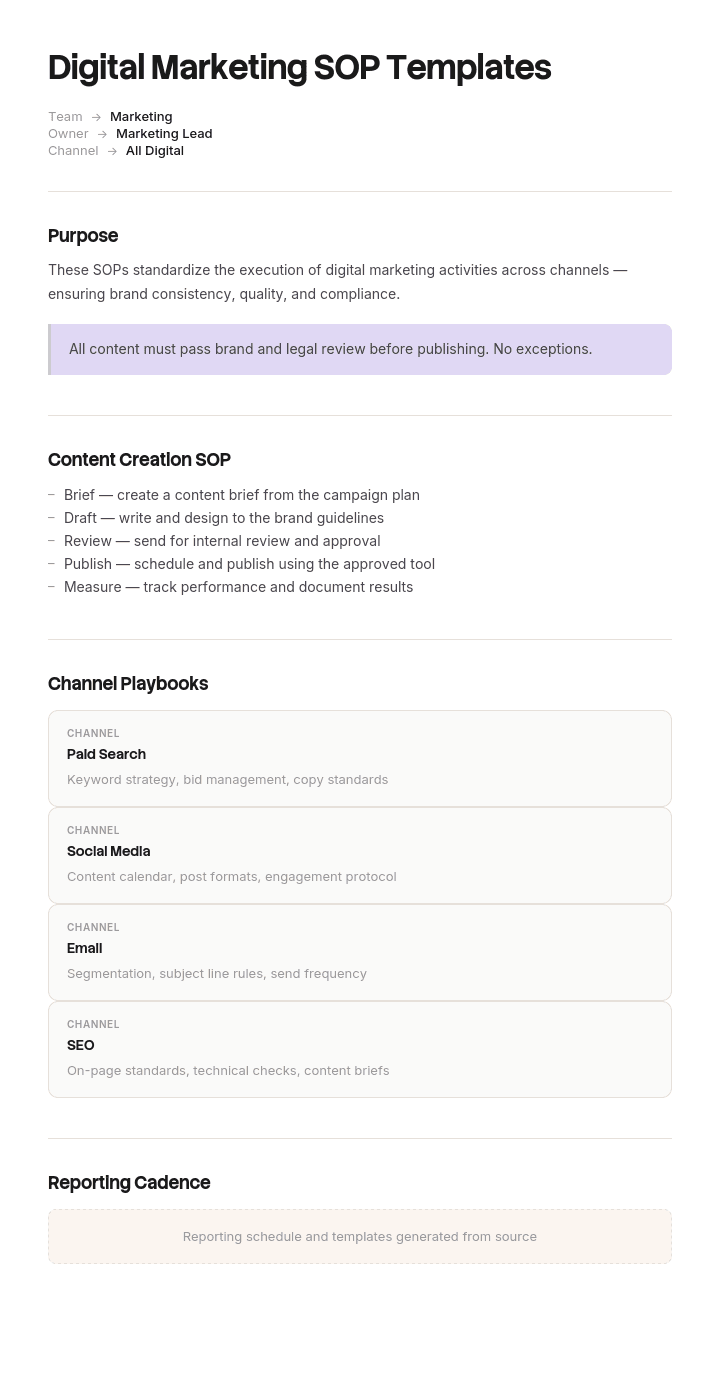
Use this template
Digital marketing teams thrive on speed - but only if their processes are tight. With Trupeer, you can save hours on documentation by starting with free digital marketing SOP templates, customizing them with your brand guidelines, and using our AI SOP creator to turn marketing processes into video walkthroughs.
Marketing does not need procedures for everything. It needs them for the handful of moments where an action cannot be taken back: the email that went to fifty thousand people, the campaign that spent four thousand overnight, the page that published with the staging tracking still on it.
Everything before those moments is a draft. Everything after is public, spent or lost. These templates cover the eight procedures that sit at those points.
Download the digital marketing SOP templates
Format | Best for |
|---|---|
Word (.docx) | Writing and editing the procedures. Free download, no sign-up |
Excel (.xlsx) | The SOP register, approval matrix and UTM taxonomy |
Approved versions and pre-launch checklists | |
Google Docs | Drafting with the team who run the processes |
Google Sheets | Live launch checklists during a campaign |
Free, editable, no watermark.
The moments that need a procedure
Marketing operations has a small number of irreversible actions, and almost every expensive mistake happens at one of them.
Moment | What cannot be undone | Typical cost of getting it wrong |
|---|---|---|
Hitting send | The email is delivered | Wrong personalisation, broken link, wrong segment, unsubscribes |
Publishing a page | It is live and crawlable | Staging noindex left on, tracking missing, wrong pricing |
Launching a paid campaign | Money starts spending | Wrong audience, no budget cap, broken landing page |
Posting to social | Screenshots exist | Tone, timing during a live incident, wrong account |
Changing tracking | Historic data breaks | Comparability lost permanently |
Sending to a list | Consent implications | Regulatory exposure |
Write procedures for these first. The reversible parts of marketing, briefing, drafting, designing, reviewing, need good habits rather than documented procedures.
How to customize this template in Trupeer
Step 1: Open the Templates Section
Go to the Templates section from the main navigation.

Step 2: Select and Open a Template
Click on any template you want to work with to open it.

Step 3: Expand the Template View
If needed, expand the template view to see the full layout and details clearly.

Step 4: Edit the Template
Click on Edit to start modifying the selected template.

Within the editor, you can:
Add new sections
Define or update formatting rules
Add a logo and adjust its position and related settings
Step 5: Save Your Customized Template
After making all necessary changes, click Save to store the updated template as your own.

Step 6: Preview and Fine-Tune the Template
When you want to see how your customized template looks, open the Preview.

From the preview screen, you can continue to make adjustments directly if needed, ensuring the template appears exactly as you want.
With digital marketing SOP templates you can:
Save hours on writing: Skip the blank page with proven structures for marketing workflows.
Standardize execution: Use the same SOPs for every campaign, channel and team member.
Stay on-brand: Apply your logo, fonts and colors using Trupeer's brand kit.
Onboard marketers faster: New hires ramp quickly with clear, video-based SOPs.
Cover every channel: Templates for SEO, paid ads, content, email, social and analytics.
Reach global teams: Translate marketing SOPs into 65+ languages with one click.
The digital marketing SOPs you need
# | SOP | Trigger | Irreversible moment it protects |
|---|---|---|---|
1 | Content and SEO publishing | Article approved for publication | Page goes live |
2 | Paid campaign launch | Campaign built and ready | Spend begins |
3 | Email send | Email approved | Delivery |
4 | Social posting and scheduling | Post approved | Publication |
5 | Landing page launch | Page built | Live and indexed |
6 | Tracking and UTM governance | New campaign or link created | Data comparability |
7 | Reporting | Period end | Decisions made on wrong numbers |
8 | Brand and legal approval | Any external asset | Public claim |
Six of the eight exist to prevent a specific irreversible mistake. Reporting and approval are the two that protect decisions rather than actions.
Content and SEO publishing SOP
Trigger. Article approved by the content owner.
What it covers. Final proofread, target keyword confirmed in title and H1, meta title and description within length, internal links added both to and from the article, images compressed with alt text, canonical correct, noindex removed, schema applied where relevant, author and date set, and the URL checked for typos, because a published URL is expensive to change.
The gate. Nobody publishes their own work without a second pair of eyes on the checklist. Not on the writing, on the checklist.
Post-publish. Submit for indexing, add to the content register, and schedule a performance review at 30 and 90 days.
Paid campaign launch SOP
Trigger. Campaign built, before it is enabled.
What it covers. Budget cap set at campaign and account level, audience and exclusions confirmed, negative keywords loaded, geo and language targeting checked, schedule and end date set, conversion tracking verified as firing, landing page loading and tracked, UTM parameters correct, creative approved, and spend authority confirmed against the approval matrix.
The gate. A second person confirms budget cap and end date specifically. Those two fields cause more overspend than anything else, and both are trivial to check.
First 24 hours. Someone checks spend and delivery the morning after launch. Not the week after.
Email send SOP
The highest-consequence procedure in most marketing teams, and worked out in full below.
Trigger. Email approved and audience defined.
What it covers. Segment verified with the count checked against expectation, suppression lists applied, personalisation tokens tested with a real record and a null record, every link clicked in a test send, subject line and preheader proofed, sender name and reply-to correct, unsubscribe present and working, rendering checked on mobile and in at least two clients, send time and time zone confirmed, and a seed list included.
The gate. Two people confirm the segment and the count. The classic failure is not a broken email, it is a good email sent to the wrong people.
Social posting SOP
Trigger. Post approved and scheduled.
What it covers. Correct account confirmed, particularly where personal and brand accounts share a device. Copy proofed including hashtags. Links tracked. Image dimensions correct per platform. Alt text added. Tagged accounts verified as the real ones. Scheduled time checked against the content calendar for conflicts.
The gate that matters most is not on the post. It is a rule for pausing scheduled content during a live incident, an outage, or a significant external event. Scheduled promotional posts running during a crisis is the most common avoidable social mistake, and it needs a named person with authority to pause everything.
Landing page launch SOP
Trigger. Page built and content approved.
What it covers. Noindex and staging robots directives removed, form tested end to end including the notification email and CRM record, thank-you page or confirmation working, tracking and conversion events firing, page speed acceptable, mobile checked on a real device, links tested, legal and pricing accurate, and redirects in place if replacing an existing URL.
The gate. Form submission tested by someone other than the person who built the page, all the way through to the record appearing where it should.
Tracking and UTM governance SOP
The least glamorous and most valuable.
What it covers. The naming taxonomy for source, medium, campaign, content and term. Who can create new values. Lower case enforced, since UTM values are case sensitive and Facebook and facebook will split your data forever. A single build tool or sheet rather than people typing parameters by hand. A register of active campaigns. And a rule that changes to tracking are reviewed for their effect on historic comparability before they happen.
Why it matters. Every other marketing report depends on this, and it is the one thing you cannot retrofit. Data collected inconsistently for six months is simply gone.
Reporting SOP
What it covers. Which metrics, from which source of truth, over which period, with which comparison. The definition of each metric written down, so a qualified lead means one thing across every report. Who produces it, who reviews it, and when it is circulated. And a rule that any change to a definition is annotated on the chart from that date.
The failure it prevents. Two people presenting different numbers for the same thing in the same meeting, which happens whenever the source of truth is unstated.
Brand and legal approval SOP
What it covers. What requires approval and what does not, because a rule requiring sign-off on everything gets bypassed. Who approves what, with named roles. Turnaround expectations, so approval is not an indefinite queue. And what claims require legal review, typically anything comparative, any statistic, any regulated term, and anything about a customer.
The gate. Approval is recorded, not verbal. A screenshot of a Slack thumbs-up is a record. A remembered conversation is not.
A complete worked SOP
MKT-003 · Email send · v2.0
Purpose. Ensure every email is sent to the right people, renders correctly, and works, before it becomes irreversible.
Applies to. All marketing emails to more than 50 recipients. Transactional emails follow MKT-009.
Owner. Lifecycle Marketing Manager. Approver. Head of Marketing.
Trigger. Email content approved and audience defined.
Authority. Sends up to 10,000 recipients approved by the Lifecycle Manager. Above that, Head of Marketing. Any send to the full base requires Head of Marketing regardless of size.
Steps.
Confirm the segment definition against the brief in writing. Not "our active users" but the specific criteria.
Run the segment and record the count. Compare against the expected count.
Gate. If the count differs from expectation by more than 20%, stop and investigate before proceeding. This single check catches most wrong-audience sends.
Apply suppression lists: unsuppressed unsubscribes, recent recipients within the frequency cap, current support escalations, and anyone in an active sales conversation where relevant.
Proof subject line, preheader, sender name and reply-to address.
Send a test to the seed list, including at least one Gmail, one Outlook and one mobile device.
Click every link in the test, including the logo, the footer and the unsubscribe. Confirm each lands where intended with correct UTM parameters.
Test personalisation with a real record and with a record missing the personalised field. The null case is where "Hi ," comes from.
Confirm rendering on mobile and in two desktop clients. Check dark mode if your template uses images with transparent backgrounds.
Confirm send time and time zone. State explicitly which time zone the schedule uses.
Gate. A second person confirms the segment, the count and the send time. Recorded in the campaign record, not verbally.
Schedule or send.
Monitor for 30 minutes after send. Watch bounce rate and any immediate replies.
Log the send in the campaign register with segment, count, and any deviations.
Definition of done. Sent, logged, monitored for 30 minutes, no immediate issues.
If something is wrong after sending. Do not send a correction to everyone by default. Assess how many were affected and how badly. A follow-up correction to fifty thousand people about a broken link that eight people clicked does more damage than the original error. Decide with the Head of Marketing.
Never. Send without a test. Send to a segment you have not counted. Schedule for a Monday morning without checking the content calendar. Reuse a previous send without re-testing links, because URLs expire.
Review. Quarterly, and after any send incident.
What goes in a marketing SOP
Title, reference and version.
Owner and approver.
Trigger, as an observable event.
Spend or send authority in numbers.
Numbered steps, one action each.
Gates, marked clearly, with who signs.
What to do when something goes wrong after the irreversible moment.
A short never-do list.
What gets logged, and where.
Review date.
The "what to do when it has gone wrong" section is the one marketing SOPs most often lack, and it is the section people actually need, because that is when they reach for the document.
Approval gates and who signs
Action | Approver | Cannot self-approve |
|---|---|---|
Publish an article | Content owner | Correct |
Launch a campaign under [£1,000] | Marketing Manager | Correct |
Launch a campaign over [£1,000] | Head of Marketing | Correct |
Email under 10,000 recipients | Lifecycle Manager | Correct |
Email to the full base | Head of Marketing | Correct |
Any comparative or statistical claim | Legal | Correct |
Anything naming a customer | Customer's contact plus Legal | Correct |
Pausing all scheduled content | Any of Head of Marketing, Comms, or on-call | No approval needed. Pausing is always allowed |
That last row matters. Make pausing frictionless and un-approved. The cost of an unnecessary pause is near zero, and the cost of scheduled content running during a crisis is not.
How to write your marketing SOPs
Start with the irreversible moments, not with an org chart of processes.
Write the email send SOP first. Highest consequence, most commonly informal.
Watch the process being done by whoever does it best, and record it.
Put the gates in explicitly, with a named role and a recorded confirmation.
State authority limits in numbers.
Write the post-mistake section. What to do after a bad send is the part people need under pressure.
Keep each to one page. A pre-launch checklist that runs to three pages will not be used.
Test with someone who has not done the task, then fix what they asked about.
Store them where the work happens, in the campaign brief template or the project tool, not a separate wiki.
Assign an owner and a review date.
Keeping them current
Marketing SOPs go stale faster than most, because they depend on tools that change constantly.
Review quarterly, and immediately after any platform change, any new tool, any tracking change, and after every incident. Tie the review to your tooling: when you migrate email platforms, the email SOP is part of the migration, not something to update afterwards.
Retire procedures that no longer describe anything you do. An SOP register with fourteen procedures where four are current teaches the team that none of them are reliable.
Best practices
Write procedures for irreversible actions only.
Two people on the segment and the count for any large send.
Budget cap and end date checked by a second person before any campaign goes live.
Lower case UTM values, enforced by a build tool rather than by hope.
One source of truth per metric, written down.
Pausing scheduled content requires no approval.
Approval recorded, never verbal.
Include a post-mistake section in every procedure.
One page each.
Review after every incident.
Common mistakes
Procedures written for the reversible parts and not the irreversible ones.
No count check before a send, which is the single cheapest control available.
Budget caps left unset because the campaign was only meant to run for a day.
Staging noindex left on a published page.
UTM values typed by hand, splitting data across capitalisation variants.
Metric definitions unstated, so two reports disagree.
Approval required for everything, so people route around it.
No rule for pausing content during an incident.
Correction emails sent reflexively, amplifying a small error.
SOPs stored somewhere nobody opens during a launch.
Register full of procedures nobody has updated since a platform migration.
Record the process once, keep the SOP current
Open the templates in Trupeer AI, apply your brand kit so procedures match your internal documentation, and edit any section directly. Setup is in the template guide.
Marketing SOPs are unusually tool-dependent. Half the steps in the email send procedure are actions inside a specific platform, and a written description of a screen goes out of date the moment the interface changes or you migrate.
Record the process once and Trupeer AI produces the written procedure and a narrated video walkthrough from the same pass, so a new team member can watch the segment being built rather than reading eleven steps about a screen they have never seen. Re-record after a migration rather than rewriting. Translate it into 65+ languages for distributed or agency teams, keep the set in your knowledge base, and use the same recordings for onboarding.
Record it. Brand it. Translate it. Trupeer it.
Frequently Asked Questions
Are there free digital marketing SOP templates?
Yes, eight of them on this page: content and SEO publishing, paid campaign launch, email send, social posting, landing page launch, tracking and UTM governance, reporting, and brand and legal approval. Free in Word, Excel, PDF and Google formats, no sign-up, no watermark.
What is a digital marketing SOP?
A documented procedure for a recurring marketing task, covering the trigger, the ordered steps, the approval gates, who has authority to act, and what to do if something goes wrong. In marketing the most valuable ones sit at points where an action cannot be undone.
Which marketing SOPs should I write first?
The email send procedure, because it has the highest consequence and is most often informal. Then paid campaign launch, since that is where money is spent irreversibly, and tracking governance, because every report you produce depends on it and it cannot be fixed retrospectively.
What should a marketing SOP include?
Title, reference and version, owner and approver, the trigger, spend or send authority in numbers, numbered steps, clearly marked approval gates, what to do after a mistake, a short never-do list, what gets logged, and a review date.
How long should a marketing SOP be?
One page. These are read immediately before a launch, when someone is under time pressure and wants a checklist rather than a document. Anything longer gets skimmed, which defeats the purpose of having gates in it.
How do you write an SOP for a marketing team?
Identify the irreversible actions first, watch your best person perform each one, write the steps in the order they happen, mark the gates explicitly with a named signer, state authority limits numerically, add a section on what to do when it has gone wrong, and test it with someone who has not done the task.
What is UTM governance and why does it need an SOP?
A defined taxonomy for campaign tracking parameters, plus rules on who can create new values and how they are built. It needs a procedure because UTM values are case sensitive, they are usually typed by hand, and inconsistency cannot be corrected retrospectively. Six months of split data is permanently lost.
How often should marketing SOPs be reviewed?
Quarterly, and immediately after any platform change, tool migration, tracking change or incident. Marketing procedures go stale faster than most because they describe specific interfaces, so tie the review to your tooling changes rather than to the calendar alone.
Should every marketing process have an SOP?
No. Write them for actions that cannot be undone: sends, publishes, launches, spend and tracking changes. The reversible parts of marketing, briefing, drafting, designing and reviewing, need good practice rather than documented procedure, and a register full of procedures nobody follows devalues the ones that matter.
Can I customise these digital marketing SOP templates?
Yes, all versions are fully editable. The authority limits, approval roles and tool-specific steps are the parts that must be yours. In Trupeer AI you can also apply your brand kit so all procedures match your internal documentation.

