4.8/5
Turn Documents & SOPs into Training Videos with AI
Upload an SOP, handbook, policy or manual and get a training video with an AI-written lesson script, voiceover, captions and an optional AI trainer. No filming or editing needed.

TL;DR: Trupeer is a training video maker that starts from the documents your team already has. Upload an SOP, onboarding handbook, policy or product manual, and the AI turns it into a structured lesson: steps in order, narrated and captioned, ready for your team to review and publish to your LMS. No filming, no trainer's calendar to book and no video editing.
Create training videos from PDFs, Word documents, slide decks and text files.
Lesson-style narration that breaks procedures into clear steps.
Translate one training video for every region you operate in.
Update the video when the process changes, without re-recording.
Free to start, no credit card required.
Unlike an AI training video generator that starts from a prompt, Trupeer builds the lesson from your own approved material, so the training says exactly what your documents say. Most organizations already have their training written down. The problem is that nobody reads a 30-page SOP from start to finish. Turning that document into a short video lesson can make the process easier for people to understand, remember and follow.
Turn SOPs, Manuals, and Policies into Training Videos
Any document that explains how something should be done can become a training video:
SOPs and work instructions. SOP to video is one of the most common uses: each step of the procedure becomes a scene, in the right order, with the key checks called out.
Onboarding handbooks. The first-week guide becomes a welcome series new hires can watch before day one.
Policies and compliance guidelines. Codes of conduct, security policies and safety rules become short videos that explain what each rule means in practice.
Product and system manuals. Internal tool guides and product manuals become lessons for employees, partners or customers.
Existing training decks. Slides from past instructor-led sessions become self-paced lessons. See PowerPoint to Video for deck-specific workflows.
If your SOPs aren't written yet, the SOP creator can build them from a screen recording first.
How to Create a Training Video from a Document in Trupeer
You can create training videos from your existing documents in four steps, all in your browser.
Step 1: Upload your SOP, handbook or policy
Drag a PDF, Word document, slide deck or text file into the upload box at the top of this page. Long documents are fine: procedures, handbooks and policy manuals all work.
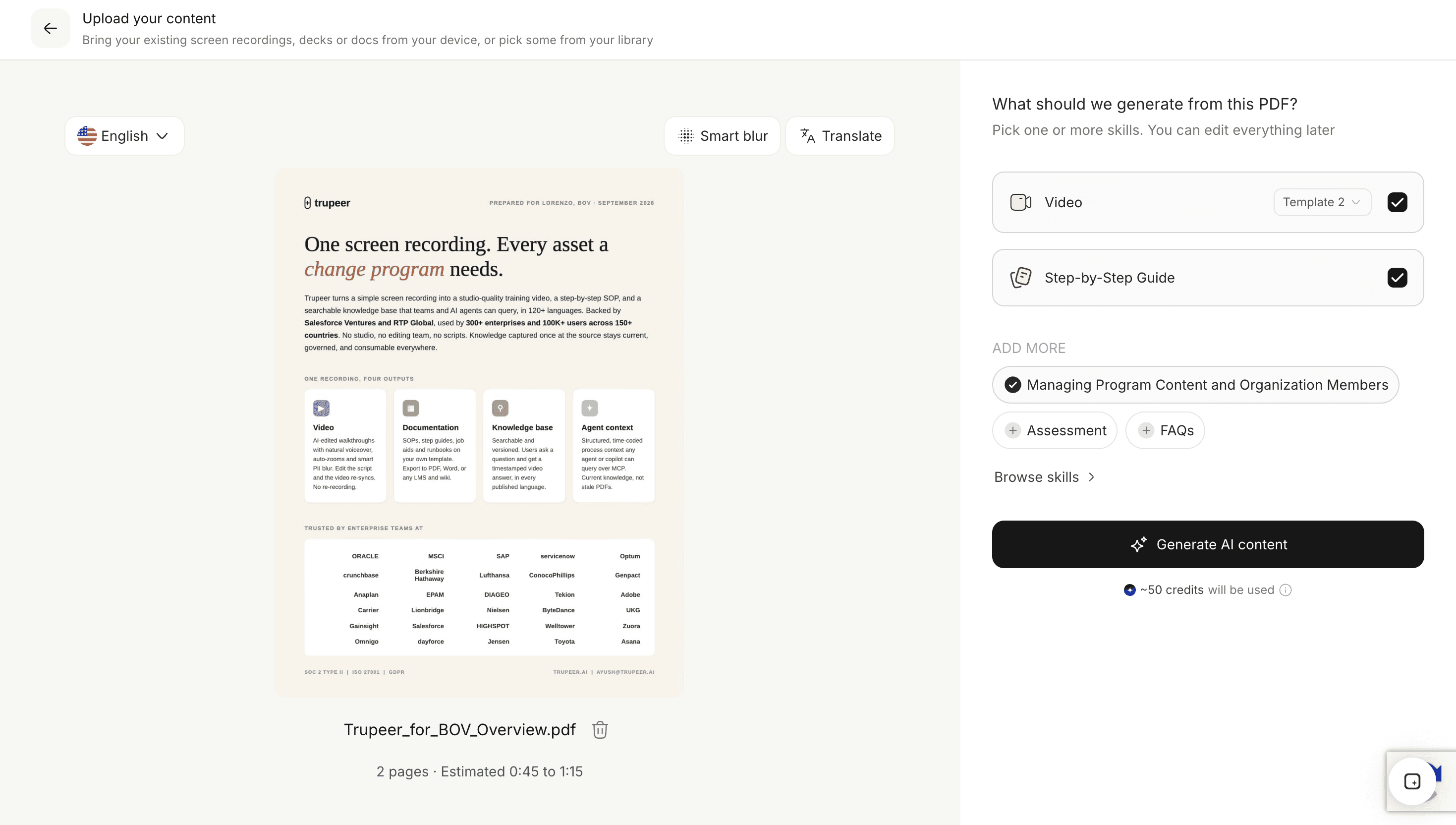
Step 2: Choose a training style
Pick onboarding, SOP and process, compliance and policy, or product training. The style shapes how AI scripting writes the lesson, for example narrating a procedure step by step, or explaining the reason behind each policy rule.
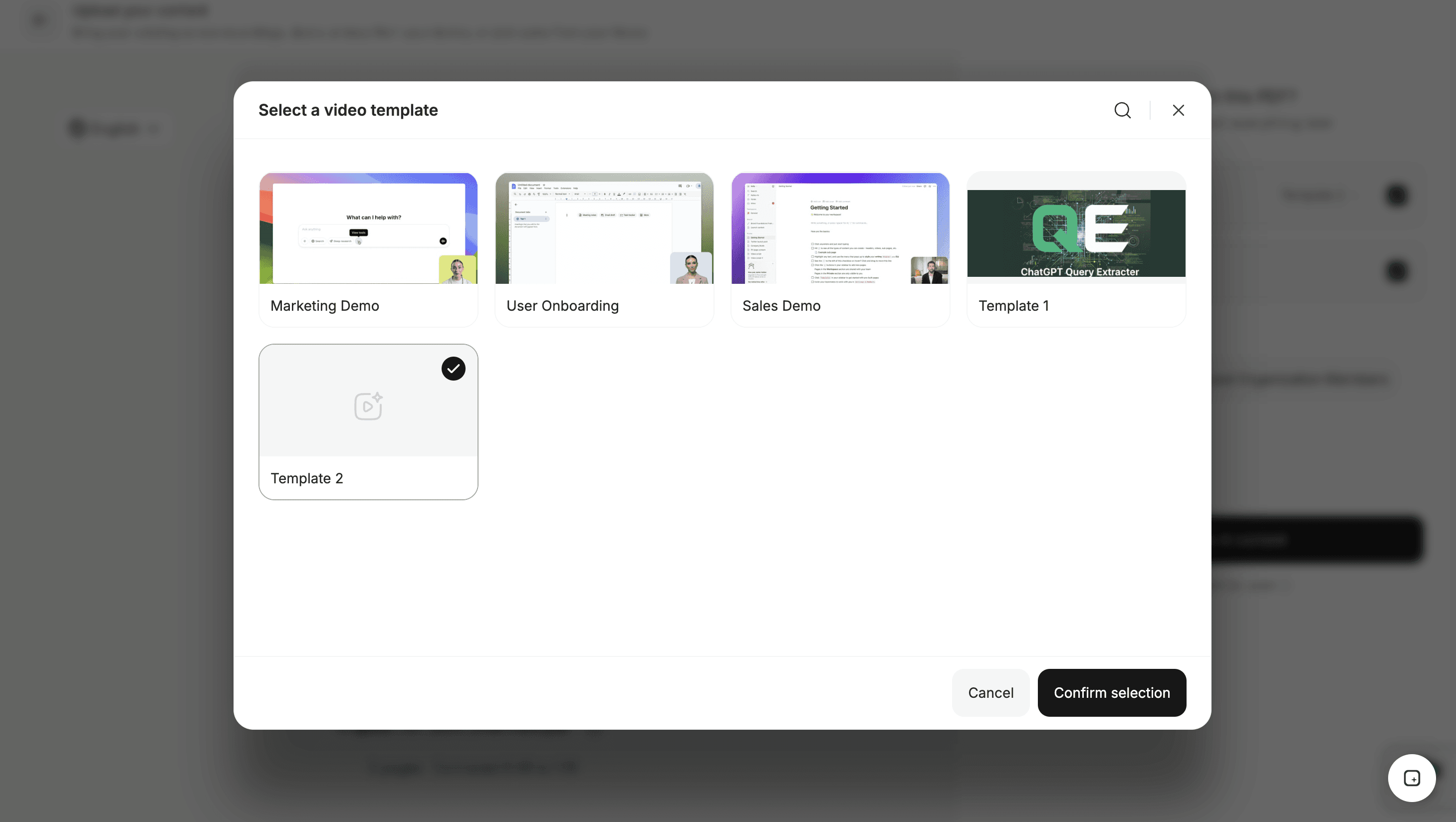
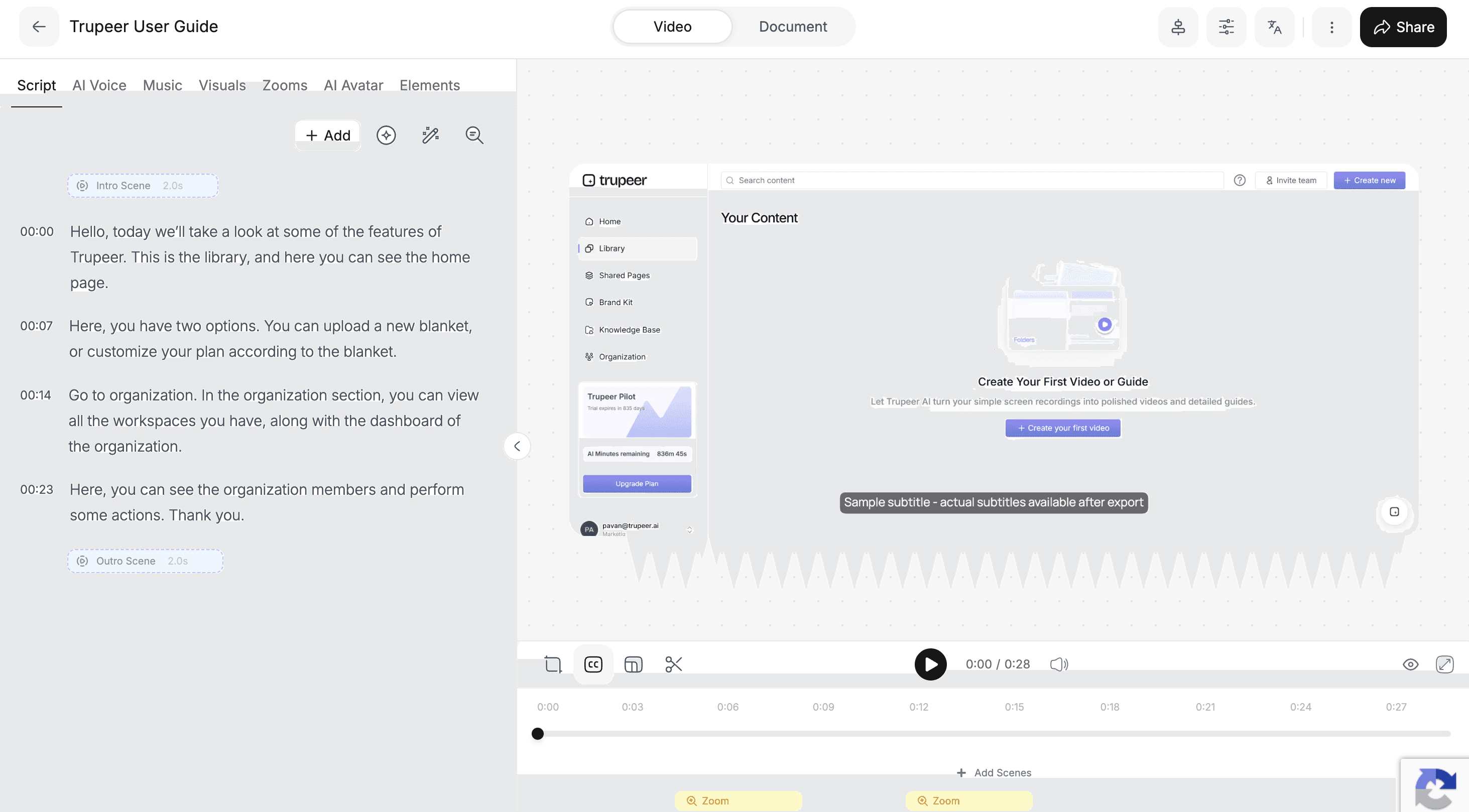
Step 3: Review the lesson script
Trupeer turns the document into a lesson script split into scenes, with narration, captions and the key points on screen. Your subject-matter expert checks terminology, adds context and removes anything that doesn't apply, editing text rather than video.
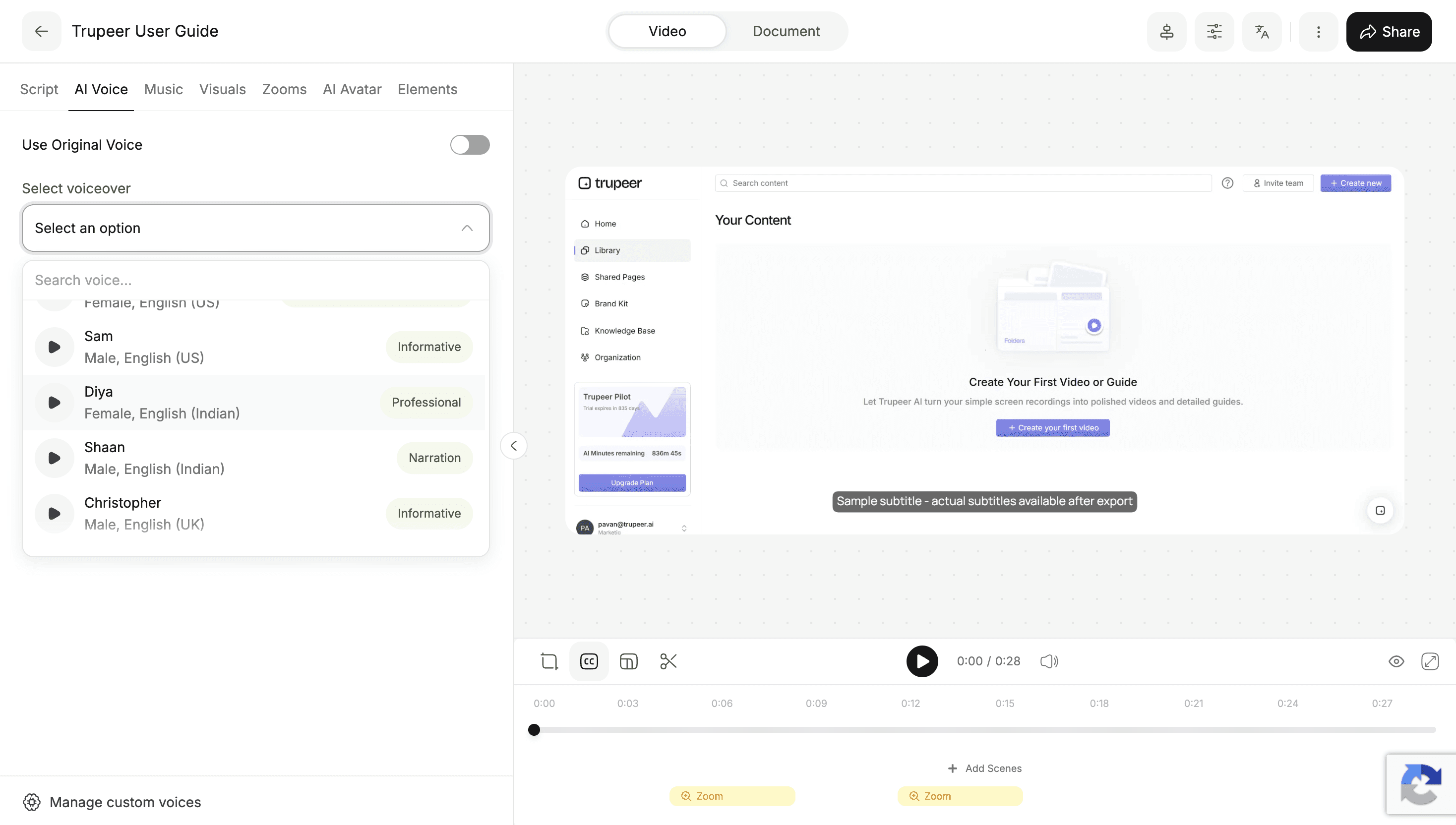
Step 4: Add a voice or AI trainer and publish
Choose an AI voice or AI trainer, apply your brand kit, then export an MP4 for your LMS, share a link, or embed the lesson where your team learns.
AI Training Videos Built for Learning, Not Just Watching
A training video has a different job from an explainer. An explainer condenses a document to one key idea; a training video keeps the full procedure intact, because the learner has to be able to do it afterwards. The training styles preserve the instructional structure of your document:
One step at a time. Procedures are narrated in sequence, so a viewer can pause at any step and pick up again.
The rule and the reason. Policies are explained, not just stated, which makes them easier to apply in real situations.
Key points called out. Critical checks, deadlines and numbers appear on screen as well as in the narration.
Short by design. Long documents can be split into a series of short lessons, which are easier to finish and to revisit later.
Because you review the script before publishing, subject-matter experts stay in control of accuracy. They check the words; they don't need to learn video editing.
A Training Video Maker for L&D Teams and Subject-Matter Experts
Training videos usually stall between two groups: the experts who know the process and the people who know how to make video. Trupeer removes the hand-off, so each person does the part they are good at.
L&D and HR teams set the standard: choose the training style, apply the brand kit, and publish lessons to the LMS. One training video creator can produce a full curriculum without a production team.
Subject-matter experts check accuracy. They review the script in plain text and correct a step or a term in seconds, without touching video tools.
Managers and team leads can turn their own team's documents into lessons for new joiners, instead of repeating the same walkthrough every time someone starts.
The result is training that is faster to create, easier to approve and consistent across teams.
Add an AI Trainer, Voiceover, and Captions to Every Lesson
Consistent instruction. An AI voiceover delivers the lesson the same way every time, so every new hire hears the same explanation instead of a different version from each trainer.
Trainer-led lessons without recording. A custom AI avatar presents onboarding and policy training on screen, without booking a trainer or a studio.
Accessible training. Captions are generated from the narration, so lessons work for every learner, on the shop floor, in open offices and on mute.
Recognizably official. Your brand kit makes every lesson look like it came from your L&D team, so learners know it is the approved version.
Create Multilingual Training Videos for Every Region
Global teams usually end up with training in one language and a backlog of translation requests. With Trupeer, you create the lesson once and use video translation to produce versions in 120+ languages, with dubbed voiceover and subtitles. Every region gets the same content, at the same time, in the language they work in.
Keep Training Videos Current When Processes Change
Training goes out of date quietly. A step is added to a procedure, a tool is replaced, a policy is revised, and the video everyone watches still shows the old way. Re-shooting is expensive, so it often doesn't happen.
With Trupeer, the video is built from a script, so updating it means editing the lines that changed. Trupeer's AI-powered video editor regenerates the voiceover and captions, and everything else stays as it was. That makes it realistic to keep training accurate during change management, when the same update has to reach every team quickly.
Employee Training Videos for Every Team
Employee onboarding
Give every new hire the same first-week experience: company overview, tools, policies and who to ask for what, without scheduling the same session every month. It works as an employee training video maker for HR teams that onboard people every week. See how teams build onboarding and other training videos with Trupeer.
Compliance and policy training
Turn policies into short, consistent videos, so every employee hears the same explanation instead of a different version from each manager.
Operations and SOPs
Frontline and operations teams get step-by-step videos for the procedures they perform, which are easier to follow than a document on a shared drive.
Software and tool rollouts
When you roll out a new internal tool, pair a document-based overview with a hands-on walkthrough created with screen recording to training video.
Customer training
Turn product manuals and help articles into training that helps customers get value faster, a common approach for customer success teams.
Sales training
Convert playbooks, product sheets and objection-handling guides into lessons reps can watch before calls, as part of sales enablement.
Share Training Videos in Your LMS and Knowledge Base
A training video is only useful if people can find it. Export lessons as MP4 files for your LMS, share them with a link, or embed them in your knowledge base or intranet next to the written procedure. Trupeer also connects with learning platforms such as 360Learning.
What Makes Trupeer Different from a Typical Training Video Maker?
Most training video makers start from a blank canvas: pick a template, write the script, record or animate every scene. Trupeer starts from the knowledge you have already written down.
Document-first. Your SOPs, handbooks and policies become the lesson, so you don't write the training twice.
No recording sessions. AI narration and avatars replace the trainer on camera.
Experts stay in control. Subject-matter experts edit words in a script, not clips on a timeline.
Built to be maintained. Updates take minutes, so training keeps pace with the business.
Ready for global teams. One lesson, translated for every region.
You can create training videos for free to test it on your own documents. Free plans have limits on things like video length and exports; see the pricing page for team features. For explainers aimed at customers rather than employees, use Document to Explainer Video, and for any other document type, start from Document to Video.
Explore Related Tools
Why L&D Teams Use Trupeer for Training Videos
Start from Your Documents
SOPs, handbooks and policies become lessons, so you never write the same training twice.
No Trainer on Camera
AI narration and avatar trainers deliver the lesson, with captions for every viewer.
Always Up to Date
Edit the script when a process changes, and translate lessons for every region.
Start Your First Training Video in Minutes
Step 1
Upload an SOP, handbook, policy or manual
Step 2
Review the AI lesson script and scenes
Step 3
Add a voice or AI trainer and publish to your LMS
Frequently Asked Questions
How do I create training videos from documents?
Upload your SOP, handbook, policy or manual to Trupeer and choose a training style. The AI writes a lesson script split into scenes, adds a voiceover and captions, and you review it before exporting an MP4, sharing a link or adding it to your LMS.
Can I turn an SOP into a video?
Yes. Upload the SOP as a PDF, Word or text file, and Trupeer turns each step of the procedure into a scene with narration, captions and the key checks shown on screen.
Do subject-matter experts need video skills to create training videos?
No. Trupeer writes the lesson script and builds the video from the document. Subject-matter experts only review the script in plain text and correct any step or term, while L&D teams handle styles, branding and publishing.
Is there a free AI training video maker?
Yes. You can create training videos with Trupeer for free, with no credit card required. Free plans have limits on things like video length and exports, and paid plans add longer videos, avatars, translation and team features.
Can I add Trupeer training videos to my LMS?
Yes. Export lessons as MP4 files to upload to any LMS, share them with a link, or embed them in your knowledge base or intranet. Trupeer also integrates with learning platforms such as 360Learning.
More Tools


