4.8/5
Free Screen Recording to SOP
Convert Screen Recording to SOP Automatically with AI
Convert Your Recording Now

Trupeer's screen recording to SOP tool lets you convert screen recording to SOP documents automatically, without writing a single step by hand. Instead of pausing a recording, taking screenshots, and typing out instructions, you simply record your process once and let AI convert the screen recording into a polished, step-by-step standard operating procedure. This solves a problem every operations, IT, and training team knows well: turning the knowledge inside someone's head into documentation that the rest of the organization can actually follow. With Trupeer's AI screen recorder, the recording is the work, and the SOP is the by-product.
When you convert screen recording to SOP with Trupeer, the platform analyzes your recording, breaks it into logical steps, captures the right screenshots at the right moments, and writes clear instructions to match. You can record a fresh walkthrough in the browser or upload an existing screen recording you already have. From there the AI builds a structured document you can edit, brand, translate, and publish as a finished SOP. What makes this different from static step-capture tools is that the same recording also becomes a narrated video, so your team gets both a written SOP and a visual walkthrough from a single capture. For teams that maintain large libraries of process documentation, this turns SOP creation from a multi-hour chore into a few minutes of review.
How to Convert Screen Recording to SOP with Trupeer
The process to convert screen recording to SOP is designed to fit into how your team already works, with minimal disruption. Trupeer's screen recorder captures every action on screen, and the AI does the structuring, writing, and formatting for you.
Step 1: Record or Upload Your Screen Recording
Open Trupeer's screen recorder and walk through your process exactly as you normally would, narrating as you go if you like. Already have a recording? Upload your existing screen recording instead. Either way, this is the only manual step required to convert screen recording to SOP content.

Step 2: Let AI Convert the Screen Recording to an SOP
Once the recording is complete, Trupeer's AI processes it automatically. It removes filler words and background noise, applies intelligent zoom to highlight key actions, and converts the screen recording into a structured SOP with sequential steps, descriptive instructions, and screenshots placed at the right moments.

Step 3: Review and Edit Your SOP
The generated SOP is fully editable. Adjust the wording, add or replace images, reorder steps, and refine formatting until the document matches your standards. Because the AI gives you a complete first draft, reviewing is far faster than writing from scratch.
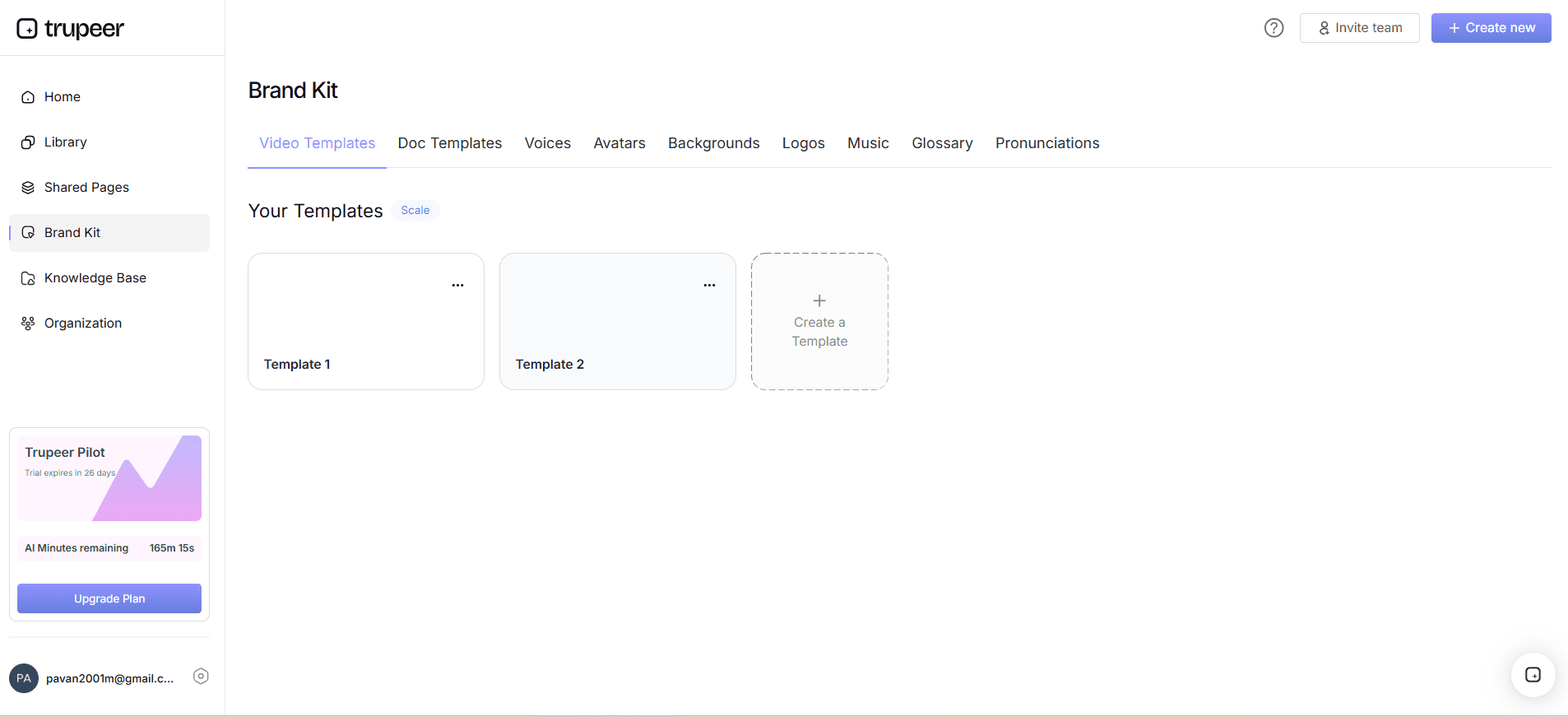
Step 4: Apply Your Brand Kit
Apply your organization's brand kit so every SOP carries consistent logos, colors, and call-to-action links. Standardized templates keep documentation uniform no matter who on your team chose to convert screen recording to SOP that day.
Step 5: Publish and Share the SOP
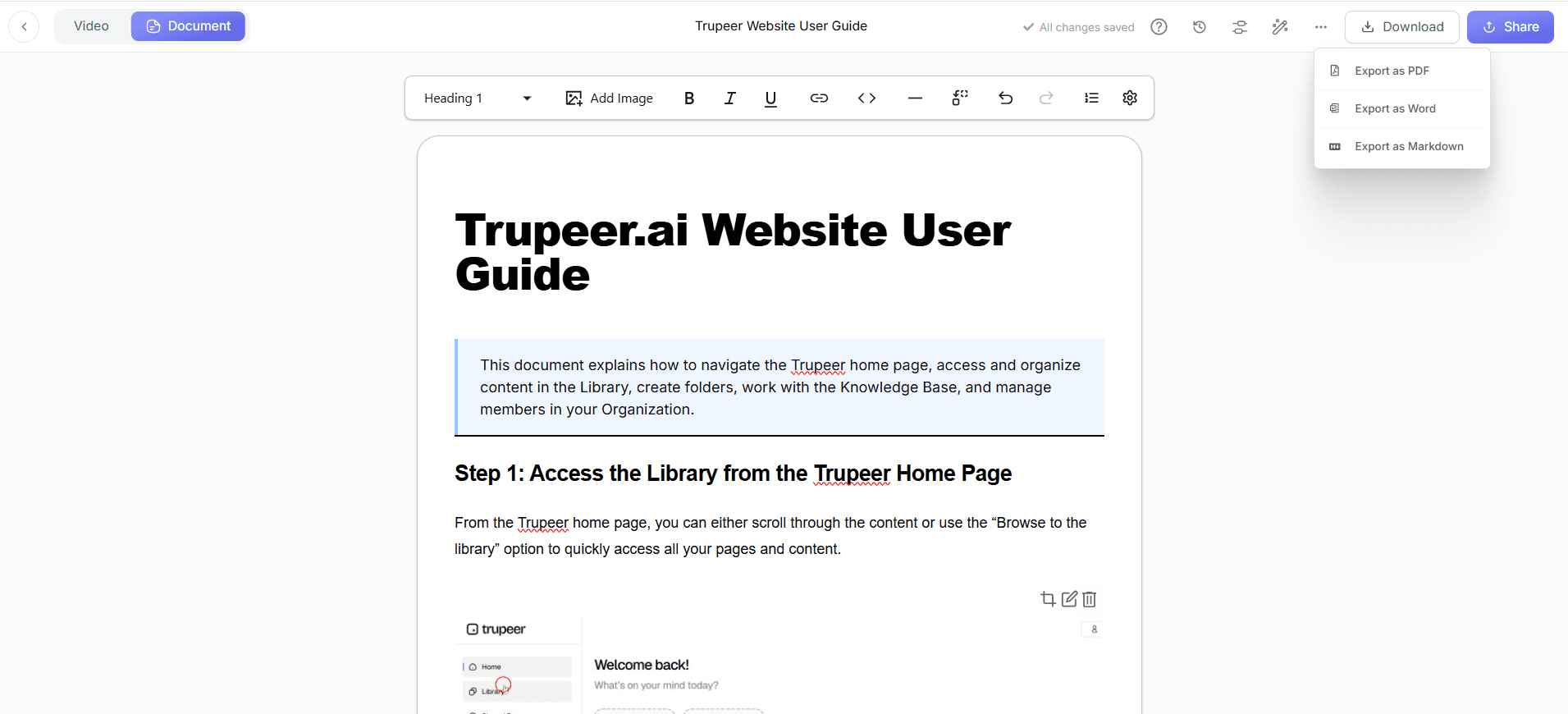
Export your finished SOP as a document, share it as a link, or host it in a searchable knowledge base. You can publish both the written SOP and the narrated video together, giving your team the format that works best for them.
Key Features to Convert Screen Recording to SOP
The tool to convert screen recording to SOP includes a set of capabilities built specifically for teams that document processes at scale, balancing speed with the precision and control that enterprise documentation demands.
Automatic Step Detection: The AI watches your recording and breaks the workflow into clear, ordered steps, so you don't have to decide where one instruction ends and the next begins when you convert screen recording to SOP.
Auto-Captured Screenshots: Relevant screenshots are pulled from the recording and placed beside the matching step, giving every SOP the visual detail readers need without any manual cropping or pasting.
Document and Video From One Recording: A single capture produces both a written SOP and a narrated video, so you can convert screen recording to SOP and a training video at the same time.
Multi-Language Support: Publish each SOP in multiple languages so distributed and global teams can follow the same standardized process in their own language.
Enterprise Workspaces and Roles: Organization-level workspaces, user roles, and shared-page visibility controls let large teams convert screen recording to SOP content securely and keep sensitive procedures restricted to the right people.
Centralized Knowledge Base: Every SOP can live in a searchable, hosted knowledge base, making it easy for employees to find the right procedure instead of digging through scattered files.
Why Convert Screen Recording to SOP with AI?
Traditional SOP writing pulls experienced staff away from higher-value work for hours at a time. Choosing to convert screen recording to SOP with AI removes that bottleneck while improving the quality and consistency of the final documentation.
Massive Time Savings: You create a complete SOP in roughly the time it takes to perform the task once. Subject-matter experts document by doing, not by writing, which frees senior staff for analysis and strategy.
Higher Accuracy: Because the SOP is built from an actual recording of the process, every click and screen state is captured faithfully, reducing the errors and skipped steps common in manually written procedures.
Consistency Across Teams: When everyone uses the same tool to convert screen recording to SOP, all documentation follows the same structure, tone, and branding, regardless of who created it.
Faster Onboarding: New hires learn from visual, step-by-step SOPs that show exactly what their screen should look like, shortening ramp time and improving retention compared with text-only manuals.
Always Up to Date: When a process changes, you re-record and regenerate rather than rewriting from scratch, so it is realistic to convert screen recording to SOP updates as often as your software changes.
Audit and Compliance Readiness: Detailed, current SOPs with clear steps and timestamps demonstrate strong internal controls and make audits far smoother for regulated teams.
Who Should Convert Screen Recording to SOP?
The ability to convert screen recording to SOP is valuable for any team responsible for documenting how work gets done, from small operations teams to large enterprises with strict compliance needs.
Operations Teams: Document recurring workflows, hand-offs, and exception handling so processes keep running smoothly even as people change roles or leave.
IT and System Administrators: Capture configuration, provisioning, and troubleshooting steps once and convert screen recording to SOP libraries that reduce repeat tickets and tribal knowledge.
Customer Support and Success: Turn common resolution flows into SOPs and technical documentation that agents and customers can follow without escalation.
HR and Training Teams: Build onboarding and enablement material by recording real systems, so learners see the exact tools they'll use day to day.
Enterprise and Compliance Leaders: Standardize procedures across divisions with workspace controls and secure sharing, making it safe to convert screen recording to SOP content at organization scale. Learn more on the enterprise page.
Founders and Small Business Owners: Document how the business runs before you hire, so new team members can be trained from a clear, repeatable SOP from day one.
Best Practices to Convert Screen Recording to SOP
To get the most consistent results when you convert screen recording to SOP, a little preparation goes a long way. These practices help the AI produce cleaner first drafts and reduce your review time.
Plan the Walkthrough First: Outline the full process, including common variations, before you hit record. A complete recording means a complete SOP and fewer re-recordings.
Narrate as You Record: Explain why each step matters, not just what to click. The AI folds your narration into the written SOP, producing richer guidance for the reader.
Record at a Steady Pace: Move deliberately between actions so the AI can capture clean screenshots and segment steps accurately when it converts the screen recording to an SOP.
Test With a Fresh Reader: Have someone who didn't create the SOP follow it end to end. Their questions reveal gaps that are obvious to the author but not to a new user.
Standardize With Templates and Brand Kits: Use consistent templates and your brand kit so every SOP looks and reads the same, making your whole library easier to navigate.
Explore Related Tools
Why Choose Trupeer to Convert Screen Recording to SOP
AI-Powered SOP Generation
Convert any screen recording into a structured, step-by-step SOP with auto-captured screenshots, no manual writing required
Enterprise-Ready Controls
Organization workspaces, user roles, and shared-page security let large teams convert screen recording to SOP content safely at scale
Edit, Brand & Translate
Refine the generated SOP, apply your brand kit, and publish in multiple languages for global teams
How to Convert Screen Recording to SOP
ステップ 1
Record or upload your screen recording
ステップ 2
AI converts the recording into an SOP
ステップ 3
Edit, brand, and share instantly
よくある質問
How do I convert a screen recording to an SOP?
Record your process with Trupeer's screen recorder or upload an existing recording, and the AI automatically converts the screen recording into a step-by-step SOP with screenshots and written instructions. You then review, edit, and publish it, the whole process takes minutes rather than hours.
Can I convert an existing screen recording into an SOP, or do I need to record fresh?
Both work. You can record a new walkthrough directly in Trupeer or upload a screen recording you already have. In either case the AI will convert the screen recording to an SOP, so you can reuse training material you have already captured.
What formats can I export the generated SOP in?
You can export the SOP as a document, share it as a link, or host it in a searchable knowledge base. Because the same recording also produces a narrated video, you can publish the written SOP and the video walkthrough together.
Is the screen recording to SOP tool suitable for enterprise teams?
Yes. Trupeer offers organization workspaces, user roles, and shared-page visibility controls, so enterprise teams can convert screen recording to SOP content while keeping sensitive procedures restricted to the right people and standardized across divisions.
Does the AI add screenshots to the SOP automatically?
Yes. As it converts the screen recording to an SOP, the AI captures relevant screenshots from the recording and places them next to the matching step, so every procedure includes the visual detail readers need without any manual cropping or pasting.


