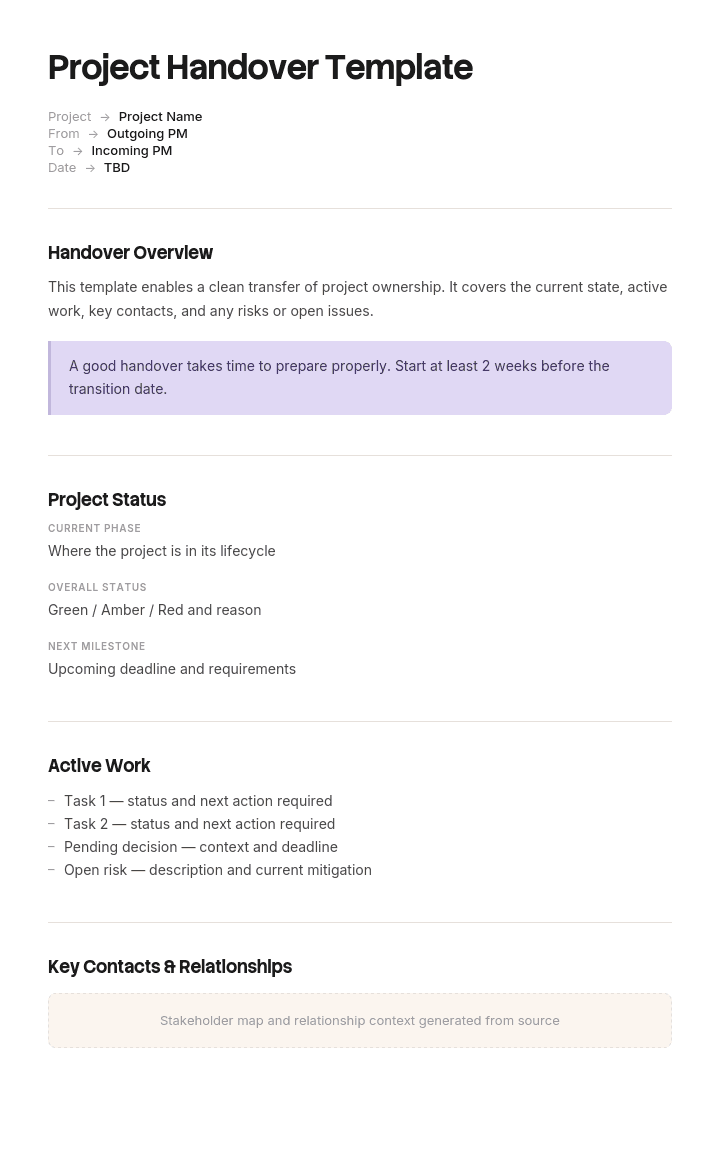
Use this template
A great project handover protects everything you've built. With Trupeer, you can save hours on handover documentation by starting with a free project handover template, customizing it with your brand guidelines, and turning handovers into video walkthroughs that ramp the receiving team fast.
What is a project handover template, and what goes in it?
A project handover document is what the team that built something gives to the team that will run it. It says what the thing is, who owns it now, what state it is in, what remains outstanding, and who to contact.
A template gives you the sections. Most versions offer roughly the same set: overview, status, deliverables, contacts, outstanding tasks, documentation, notes and sign-off.
That set is reasonable. What almost every handover gets wrong is not the sections but the volume, and specifically the failure to separate two kinds of content that behave completely differently.
If you are looking for the conditions that must be satisfied before a handover can happen, and who has the right to refuse, that is a different document and our project handover checklist template covers it. This page covers what you actually hand over.
A handover document is written to become obsolete
Here is the property that distinguishes a handover document from every other document a project produces.
Its job is to get the receiving team from knowing nothing to operating competently. Once that has happened, usually within a few weeks, the document has done its work and will not be opened again. The team's own understanding, their own runbooks and their own notes replace it.
That is not a failure. It is what success looks like.
The mistake is writing it as a permanent reference, because a permanent reference has to be comprehensive, and comprehensiveness is exactly what stops it being read in the first week when it matters. A hundred and eighty seven page pack is not read by four people in their first fortnight while also keeping a system running. It is filed.
So the handover document should be optimised for the first forty eight hours and the first three weeks, and everything permanent should live somewhere else and be linked.
How to customize this template in Trupeer
Step 1: Open the Templates Section
Go to the Templates section from the main navigation.

Step 2: Select and Open a Template
Click on any template you want to work with to open it.

Step 3: Expand the Template View
If needed, expand the template view to see the full layout and details clearly.

Step 4: Edit the Template
Click on Edit to start modifying the selected template.

Within the editor, you can:
Add new sections
Define or update formatting rules
Add a logo and adjust its position and related settings
Step 5: Save Your Customized Template
After making all necessary changes, click Save to store the updated template as your own.

Step 6: Preview and Fine-Tune the Template
When you want to see how your customized template looks, open the Preview.

From the preview screen, you can continue to make adjustments directly if needed, ensuring the template appears exactly as you want.
With a project handover template you can:
Save hours on handovers: Skip the blank page with a structure built for transitions.
Cover every artifact: Built-in sections ensure no deliverable, doc or sign-off gets missed.
Stay on-brand: Apply your logo, fonts and colors using Trupeer's brand kit.
Onboard receiving teams faster: Pair the handover with a video walkthrough.
Standardize across projects: Use the same template for every project transition.
Reach global teams: Translate handover documentation into 65+ languages with one click.
Bootstrap content and reference content are different things
Sort every candidate item into one of two categories and the pack restructures itself.
Bootstrap content. Needed immediately, useless later. What this thing is in two sentences. Who owns it now. What is fragile. Who to call for what. What is outstanding. What must not be changed without asking. Where everything else lives.
Reference content. Needed occasionally, needed for years. Architecture. As-built configuration. Runbooks. Test results. Requirements traceability. User guides. Contracts.
Bootstrap content belongs in the handover document, which should be two pages.
Reference content belongs in the operational documentation, where the receiving team already keeps things and will look for it, with links from the handover document. It does not belong inside the pack, because bundling it is what makes the pack unreadable and what causes it to be archived as a unit rather than absorbed into the team's own system.
Our project documentation template covers which reference documents are worth keeping at all, and our IT documentation template covers where the as-built material should live afterwards.
What breaks first: the field no template has
The single most valuable thing a handing team can write is a list of what is fragile, and no handover template asks for it.
The project team knows. They know which integration is held together with a scheduled retry, which configuration depends on an upstream system behaving consistently, which job fails if the file arrives late, and which part of the build they were never entirely happy with. That knowledge is complete on the day of handover and gone within a month.
It disappears because nothing asks for it. Test results record what passed. Risk logs record what people worried about beforehand. Neither captures the engineer's private assessment of where the soft spots are.
Ask for five items. What will break first, why, what it looks like when it does, and what to do. Written by the people who built it rather than by the project manager, because the project manager does not know.
Two things make this work in practice. Make it explicitly blameless: this is not an admission of poor work, it is the most useful thing they can hand over, and framing it as a defect list guarantees an empty section. And ask for it a fortnight before handover rather than on the day, when the answer will be "nothing that I know of".
The two page document for the first week
Copy from here. Two sides, and resist expansion.
What this is. Two sentences describing the thing and what it does for the business.
Who owns it now. The receiving owner by name, the escalation above them, and the date ownership transferred.
What breaks first. Five items, as above, with symptom and first action.
Who to call for what. A short routing list. The internal team, the systems integrator, each vendor's support line with contract reference and hours, and the named individuals from the project who remain available during hypercare. Contact lists that name only the integrator are a recurring and expensive omission.
What is outstanding. Open defects by severity with owners and dates, deferred items recorded as decisions, and anything the project agreed to do after handover.
What not to change without asking. Configuration, jobs or settings where a change has non-obvious consequences. Short, specific, and one of the few genuinely preventive sections available.
Where everything else is. Links to the reference material, by name, in the location the receiving team already uses.
Copy to here. If it runs past two sides, something in it is reference content.
Free project handover template: the structure to copy
The full handover consists of the two page document above plus a defined set of referenced material. The pack is the union of the two, not a single bundle.
The two page first week document, as above.
Referenced reference material, each existing in its permanent home rather than in the pack:
As-built description, verified by somebody performing real tasks from it. Runbooks for every scheduled, automated or recurring task. Architecture or asset records. Known limitations and current workarounds. Access and account records, transferred to role-based accounts. Contracts, licences and support arrangements with renewal dates. Final requirements and acceptance evidence, retained where a standard requires it. Monitoring and alerting configuration.
Handover record. Date, parties, what was transferred, conditions attached to acceptance, hypercare terms, and signatures. One page, archived.
Two rules keep this from collapsing back into a bundle. Every referenced document must exist in the receiving team's system before handover, not be promised. And the two page document must be readable without opening any of them, which is the test of whether the bootstrap content is genuinely separated.
The broadcaster who read 22 of 187 pages
Sedgewick Media, a publisher and broadcaster of about eight hundred people, took handover of a new digital asset management system.
The pack ran to a hundred and eighty seven pages across fourteen documents, plus a forty one slide deck. Project overview, eight pages. Architecture, twenty two. Requirements traceability, thirty four. Test results, forty six. As-built configuration, thirty one. User guides, twenty eight. Contact list, two. Outstanding items, three. Sign-off, one.
The receiving team was four people in digital operations.
In week one an ingest job failed. There was no runbook. They worked it out by reading the as-built configuration for about three hours.
In week two a scheduled purge deleted assets that should have been retained. The project team had known this was fragile: the retention rule depended on a metadata field populated by an upstream system that populated it inconsistently. That fact appeared on page one hundred and eighteen, inside a test result, described as known behaviour. Sixty one assets had to be recovered from archive, costing about fourteen thousand pounds in staff time and vendor charges.
In week three they called the wrong vendor twice, because the contact list named the systems integrator and not the asset management vendor's support line.
Asked afterwards what would have helped, the receiving team's answer was two pages: what breaks, who to call, what is outstanding, and what not to touch.
Of the hundred and eighty seven pages, they had read twenty two in the first month.
The next handover, a rights management system, used a two page first week document and ninety four pages of reference material held in the operations team's own documentation and linked rather than bundled. The what-breaks-first list ran to five items, written by the two engineers who had built it.
In the first month there was one incident. It was the second item on that list. It was resolved in forty minutes.
What should a project handover document include?
The bootstrap content above, and specifically five things that most packs either omit or bury.
What breaks first, written by the builders.
Vendor support lines, not just the integrator, with contract references and hours.
What not to change, which is short and preventive.
Outstanding items with owners and dates, since an undated open defect becomes permanent.
Where the reference material lives, in the receiving team's system rather than in the pack.
What to leave out of the document, while still handing it over: architecture diagrams, test results, requirements traceability, user guides and configuration exports. All are useful and none belongs in the thing somebody reads in week one.
How to write a project handover document
Start a fortnight before handover, not on the day. The what-breaks-first list needs thinking time and it needs the engineers, who will be dispersing.
Write the two page document first, before assembling anything else. Doing it in this order forces the separation between bootstrap and reference.
Ask the builders individually rather than in a meeting for the fragile items. In a group, with the project manager present, the answer is that everything is fine.
Confirm every reference link resolves and that the document it points at is in the receiving team's system, not the project's. A link into a project SharePoint that will be archived is a broken link with a delay.
Have somebody from the receiving team read the two pages and attempt one real task using only what the document points them to. Every question they ask is a gap.
Then agree the hypercare terms and sign, which our project handover checklist template covers.
Handover report variants, and who reads each
The word covers a wide family and the documents are genuinely different, which is worth knowing if you are searching template libraries.
Variant | Handed from | Handed to | The critical content |
|---|---|---|---|
Project handover | Project team | Operations or BAU team | What breaks, contacts, outstanding items |
Construction handover | Contractor | Building owner or FM | O&M manual, statutory documentation, defects |
Shift handover | Outgoing shift | Incoming shift | Current state, in-flight issues, anything unusual |
Job or role handover | Departing employee | Successor | Tacit knowledge, relationships, undocumented routines |
Asset or equipment handover | Supplier or previous holder | New holder | Condition, serial numbers, warranty, maintenance history |
Client acceptance | Supplier | Client | Deliverables against contract, sign-off, warranty terms |
Two of these have their own treatment. Construction handover centres on the operating documentation, and our operation and maintenance manual template covers why that document is usually accepted rather than checked. Role handover is about knowledge rather than artefacts, and our knowledge transfer SOP template covers a method that surfaces what a written list will not.
Best practices and the mistakes that recur
Write the document, not the pack. Two pages plus links beats a bundle every time.
Ask what is fragile, blamelessly, in advance. The single highest value section and the one nobody requests.
Name vendors, not just the integrator. A recurring and easily avoided cost in the first month.
Date every outstanding item. Undated means permanent.
Put reference material in the receiver's system before handover. Not in the project's, which gets archived.
Do not hand over and close on the same day. Closure removes the budget and people that hypercare depends on.
Have the receiver test the document rather than read it. Reading a handover pack tells you nothing about whether it works.
Project handover document or handover checklist?
They are two halves of the same event and they are separate documents.
The checklist governs whether handover can happen: the acceptance criteria, who verifies them, and who has the authority to refuse. It is completed before and at the handover, and its value ends once the handover is accepted. Our project handover checklist template covers it, including why the criteria should be written by the receiving team at planning rather than by the project at closure.
The handover document is what gets transferred: the bootstrap content the receiving team needs in order to operate. Its value begins when the handover is accepted.
Most organisations have some version of the first and a bundle instead of the second. The checklist without the document produces a compliant handover to a team that cannot run the thing. The document without the checklist produces a good briefing that nobody was allowed to refuse.
Can I get a project handover template in Excel or Word?
Word or Google Docs for the two page document, because it is prose and it is read rather than sorted. Keep it to two sides and export it as a PDF for the record.
Excel for the two lists that need columns. Outstanding items with severity, owner and target date. And the contact routing list with system, vendor, contract reference, hours and phone number. Both change during the first months and both are consulted rather than read.
PDF for the signed handover record archived with the project. Because this is the document people return to when something goes wrong a year later, freezing and dating it matters.
What does not work is a single bundled document containing everything, in any format. That is the failure the whole page describes, and the format does not change it.
How to write the what-breaks-first list quickly
The two sections with the highest value here, the fragile items and the runbooks they point at, are the two most likely to be missing, and for the same reason. Both require somebody to describe something they built months ago, in detail, in the week when the project has least time.
Trupeer AI removes most of that cost. The engineer who built the job records themselves running it, including what it looks like when it fails and what they do about it, and the output is a written runbook with the steps and screens already captured. The fragile item and its first action come out of the same recording.
Record it. Brand it. Translate it. Trupeer it.
That also makes the handover verifiable rather than asserted, since the receiving team can perform the task from the recording-derived guide rather than reading a description and hoping. The SOP creator covers the procedures, our IT SOP template covers which are worth maintaining afterwards, and the material lives in your knowledge base in consistent branding, which is where the reference links should point. Setup instructions are in the document template setup guide.
Frequently Asked Questions
Is there a free project handover template in Excel?
Excel suits the two lists rather than the document: outstanding items with severity, owner and date, and the contact routing list. There is no gated download and no form. Keep the two page narrative in a document, since it is read once in a hurry and cells are the wrong container for that.
Is there a free project handover template in Word?
The two page structure above pastes straight into Word or Google Docs. The discipline is length rather than format: if it runs past two sides, something in it is reference content and belongs in the receiving team's documentation with a link.
Is there a free project handover template in PDF?
Export the two page document and the signed handover record to PDF for the archive. Do not bundle the reference material into the same PDF, which is exactly the pattern that produces a document nobody reads.
Where can I find a project handover document in PDF?
Several universities and public bodies publish theirs and they are useful for the item list. Read them noting what is absent: almost none has a fragile-items section, and almost all bundle reference material into the pack, which are the two things this page argues against.
How long should a project handover document be?
Two sides for the document people read, plus however much reference material the thing genuinely needs, held separately. The worked example above is the argument: a hundred and eighty seven page pack of which twenty two pages were read in the first month.
Who should write the project handover document?
The project manager writes the two page document, and the engineers who built the thing write the fragile items. That split matters, because the project manager does not know what is fragile and the engineers will not write the contact routing list.
What is a handover report?
A broader family than project handover, covering shift handovers, role handovers, asset transfers and client acceptance. Template libraries list dozens of variants, including sector-specific ones for nursing, warehousing and facilities. The table above sets out who hands to whom in each case, since the critical content differs considerably.
When should the handover document be written?
Start a fortnight before handover. The fragile items need thinking time and they need people who are about to disperse. Written on the day, the section comes back empty, which is the most common way the most valuable part of a handover is lost.

