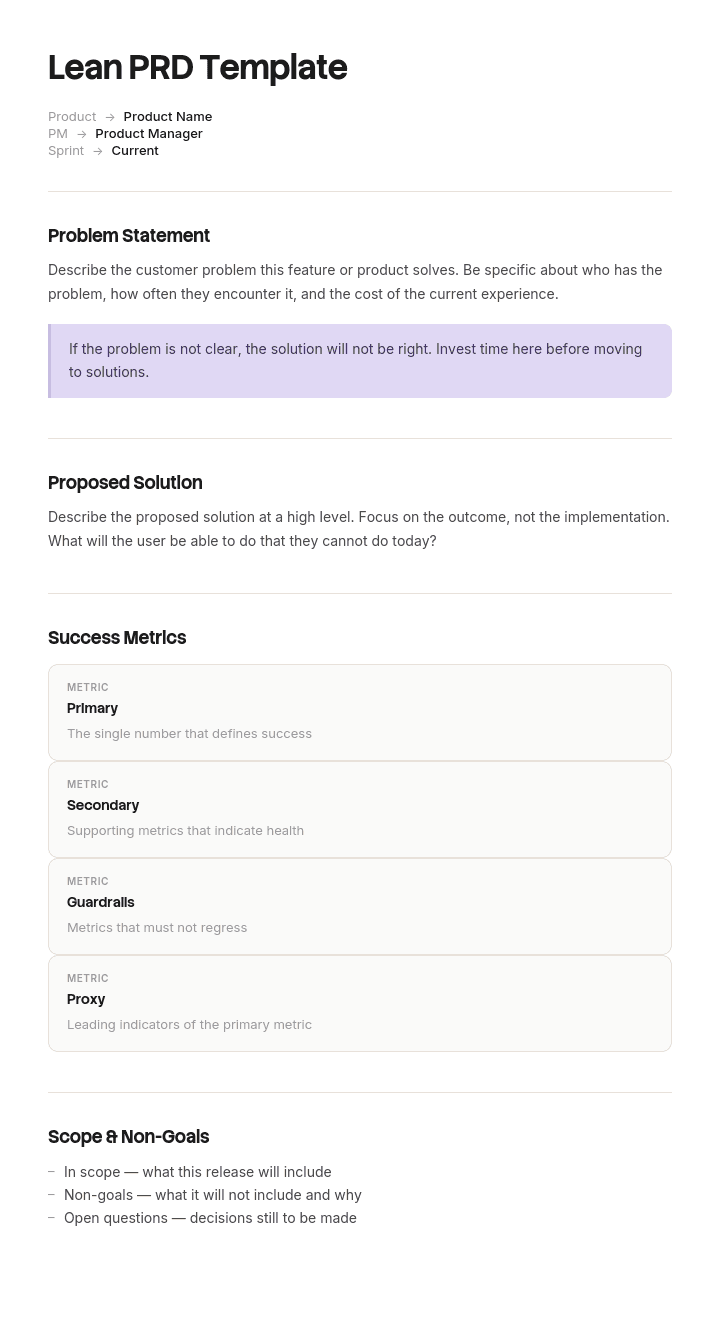
Use this template
Modern product teams move fast - and need PRDs that match. With Trupeer, you can save hours on product spec writing by starting with a free lean PRD template, customizing it with your brand guidelines, and turning lean PRDs into video walkthroughs that align cross-functional teams quickly.
What is a lean PRD, and how is it different from a PRD?
A product requirements document sets out what is being built, for whom, and what has to be true for it to count as done. A lean PRD does the same job in one or two pages instead of ten, for a team that is close enough to the problem to be trusted with the details.
The usual explanation is that a lean PRD is shorter. That is the symptom rather than the definition, and chasing it produces a bad document, since you can shorten a PRD by cutting the parts that mattered just as easily as the parts that did not.
The useful definition is about authority. A PRD is a set of constraints placed on a team. A lean PRD places the smallest number that still gets the right outcome, and says explicitly where the team decides instead. It is short because most of what fills a conventional PRD turns out to be specification nobody had an opinion about.
A PRD is a list of decisions you take from the team
Read any requirement in a PRD and ask what it is doing. Every one of them removes a choice from the person who would otherwise have made it while building.
Some removals are necessary. If the import has to survive a closed laptop because files take twenty minutes to process, the team needs to know, and it is not their call.
Most are not. Column order on a mapping screen, the wording of an error message, whether validation runs before or after upload: these end up in PRDs because the template has a section for them and a blank section feels like carelessness. Each is a constraint the team will either follow without question, in which case you may have made the product worse, or negotiate their way out of, which costs days.
So a lean PRD asks one question of every line before it goes in. If the team chose either option, would I be equally happy? If yes, do not write it. Write that it is theirs. That question is what makes the document short, and shortness is the by-product rather than the goal.
How to customize this template in Trupeer
Step 1: Open the Templates Section
Go to the Templates section from the main navigation.

Step 2: Select and Open a Template
Click on any template you want to work with to open it.

Step 3: Expand the Template View
If needed, expand the template view to see the full layout and details clearly.

Step 4: Edit the Template
Click on Edit to start modifying the selected template.

Within the editor, you can:
Add new sections
Define or update formatting rules
Add a logo and adjust its position and related settings
Step 5: Save Your Customized Template
After making all necessary changes, click Save to store the updated template as your own.

Step 6: Preview and Fine-Tune the Template
When you want to see how your customized template looks, open the Preview.

From the preview screen, you can continue to make adjustments directly if needed, ensuring the template appears exactly as you want.
With a lean PRD template you can:
Save hours on writing: Skip the 20-page format with a focused one-page lean structure.
Align teams faster: Built-in problem and hypothesis sections force product clarity.
Stay on-brand: Apply your logo, fonts and colors using Trupeer's brand kit.
Iterate quickly: Update the PRD and regenerate the video as the spec evolves.
Standardize across teams: Use the same template for every product initiative.
Reach global product teams: Translate lean PRDs into 65+ languages with one click.
How to tag every requirement as constrained or team's call
Two tags, on every line, no exceptions.
Constrained. This has to be this way, and here is why. The reason is not optional, and it is the part that makes the constraint survivable. A constraint with a reason can be intelligently challenged when circumstances change. A constraint without one becomes folklore that nobody dares touch three years later.
Team's call. I have described the outcome. How you get there is yours. If you want my opinion, ask, and treat it as an opinion.
The ratio tells you something. First drafts come out heavily constrained, and adding a reason to each line is where most of them collapse, because the honest reason is often that it was in the template.
Two rules keep the tags honest. A constraint justified by "consistency with the rest of the product" should name the specific thing it is consistent with. And a team's call line is a promise: overrule one during the build and you have broken the document, so the next one will not be believed.
The acceptance line that makes delegation safe
You can only hand over the how if you have been exact about the what. That is the trade, and the acceptance line is where you pay for it.
One sentence, describing what will be true after this ships that is not true now, written so that you and an engineer would independently agree whether it had happened. Not a metric target, which is a business outcome and belongs elsewhere. Not a list of features, which is the thing you are trying not to write.
Good: a customer can upload a file of up to fifty thousand rows, close their laptop, and find the import completed when they return.
Bad: improve the bulk import experience.
The acceptance line goes at the top, before the context and before the requirements. If you cannot write one, you are not ready to write the document, and the honest next step is a conversation rather than a draft.
Free lean PRD template: the one and a half pages to copy
Copy from here.
Acceptance line. One sentence, as above.
Why now. Two or three sentences. What is happening that makes this worth doing this quarter rather than next year. This is the section that gets cut and should not be, because it is what the team uses to make the hundred small trade-offs you will never see.
Who this is for. The narrowest true description of the user, and roughly how many of them there are. A number here prevents a great deal of over-engineering.
Constrained requirements. Numbered. Each one a single sentence plus a reason. Aim for under fifteen. If you have thirty, most of them are team's call in disguise.
Team's call. A short list naming the areas you are explicitly not specifying. Naming them matters, because an unmentioned area reads as an oversight rather than a delegation.
Not building. The things people have asked for that are out of scope, named specifically enough to be contentious. A not-building list that nobody objects to is not doing any work.
Open questions. With a name and a date against each. Questions without an owner sit unanswered until they become blockers.
How we will know. The measure you will look at after release, and when. One or two, not a dashboard.
Copy to here. If the filled version runs past two pages, look at the constrained list first. That is where the padding always is.
A filled lean PRD example for a bulk import feature
Acceptance line. A customer administrator can import up to fifty thousand customer records from a CSV, close their browser during the import, and find it completed correctly when they return.
Why now. Three of our five largest accounts migrate from a competitor this quarter and each has between twelve and forty thousand records. Today they either paste in batches of five hundred or send us a file and we do it manually, which took our support team eleven days last month.
Who this is for. Account administrators during onboarding, roughly forty of them a quarter, most of whom will do this exactly once.
Constrained requirements.
The import must survive the browser closing, because files of this size take twenty minutes or more and laptops sleep.
Rows that fail validation must not block rows that pass, because a single bad row currently costs a customer the whole run.
The customer must be able to download a file of the failed rows with the reason attached, because that is how they fix them without our help.
Duplicate detection must run on email address, matching how the rest of the product identifies a customer.
No import may begin without an on-screen preview of the first ten mapped rows, because the most common support ticket is a mis-mapped column found after the fact.
Team's call. Mapping screen layout, error message wording, progress indication, where validation runs, file size ceiling above fifty thousand rows, whether mappings are remembered between imports.
Not building. Scheduled or recurring imports. Import from Salesforce or HubSpot directly. Editing records during import. All three have been asked for and all three are separate pieces of work.
Open questions. What happens to an import in progress when the customer's session expires, owner Priya, by 14 March.
How we will know. Manual imports handled by support drop below one a month by the end of the quarter.
Five constrained requirements, six areas explicitly delegated. That is a page.
The PRD that took five sprints instead of three
Halbrook, a B2B software company of about ninety people, built the feature above. The first attempt used their standard template and ran to nine pages with forty one numbered requirements.
It specified the column order on the mapping screen, the wording of six error messages, a ten megabyte file ceiling, that validation must run client-side, the modal layout, and that the progress bar must display a percentage.
Estimated at three sprints. It took five.
The retrospective traced the difference. Six of the forty one requirements were renegotiated during the build, each costing between half a day and three days of back and forth, because each specified an implementation the team had good reason to do differently.
Client-side validation was the worst of them. The team knew server-side processing was necessary above a few thousand rows and raised it in the first sprint. It took nine days to get the document changed, because the PM was on leave and nobody felt able to overrule a numbered requirement in a signed PRD.
Asked afterwards, the PM said she had held no opinion on five of those six. They were there because the template had a user interface section and leaving it empty had felt sloppy.
The requirement she did care about, that the import survive the browser closing, sat at number thirty four in the list and had been read as a nice-to-have. It shipped without it and was added two months later at roughly a sprint of extra cost.
The next feature used the format on this page. One and a half pages, eleven constrained requirements each with a reason, six areas marked team's call, one acceptance line. Estimated at three sprints and delivered in three, with no requirement renegotiated.
One design decision did come back to her, flagged by the team as something marked team's call that turned out to affect the acceptance line. That is the conversation the format is trying to produce.
How to write a lean PRD in under an hour
Write the acceptance line first and spend a disproportionate amount of the hour on it. Everything downstream is easier once it exists, and if it will not come, that is information.
Write the not-building list second, while you still remember what people have been asking for. It is much harder to write later, once you are attached to the shape of the thing.
Then list every requirement you can think of, without tagging, for ten minutes. Do not filter as you go.
Now tag them. For each one, write the reason it must be that way. Anything where the reason turns out to be "that is how we usually do it" or does not come at all moves to team's call. This step typically halves the list.
Write why now and who this is for from what you already know. Two minutes each.
Finally, read the constrained list as if you were the engineer. Anywhere you would ask "why?" and the document does not answer, either add the reason or drop the line.
Common mistakes when using a lean PRD template
Mistake | What it looks like | What to do instead |
|---|---|---|
Specifying by default | Every template section filled in | Ask whether you would be equally happy either way |
Constraints without reasons | Numbered requirements, no rationale | Add the reason or move it to team's call |
Burying the one that matters | The critical requirement at number thirty four | It belongs in the acceptance line |
Empty not-building list | "Future considerations: none" | Name the things people asked for and you refused |
Overruling a team's call | PM rejects an implementation during build | Accept it, or admit the tag was wrong and say so |
Using lean for the wrong work | Regulated, safety-critical or contractual builds | Use a full specification with sign-off |
Treating it as a contract | The document is signed and frozen | Version it, and record what changed and why |
The last two are worth expanding. Where the work is governed by a regulator, a safety case, a customer contract with specified deliverables, or an accessibility or data protection obligation, a lean PRD is the wrong instrument. Those need a full specification, traceability to the obligation, and review by whoever is accountable for it. Delegating the how is exactly what you cannot do when the how is the thing being audited.
How a PRD differs from a BRD, a spec and a user story
A business requirements document sits above the PRD. It describes a business problem and what a solution must achieve commercially, usually before anyone has decided what to build. If you are searching for a business requirement document sample, that is a different artefact and it belongs to a different stage.
A technical specification sits below. It describes how the thing will be built, and it is written by engineering rather than for them. A lean PRD deliberately leaves most of this space empty, which is what the team's call tag is doing.
A user story is smaller than all of them. One story is a slice of work. A PRD covers a body of work that will contain many stories, and the acceptance line is what those stories are collectively meant to add up to.
A product specification document, where organisations keep one, is closer to a description of what was built than what should be. It is maintained after release, and the PRD is not.
Lean PRD templates in Confluence, Notion and Google Docs
Confluence is the most common home and its stock PRD template is conventional, with sections for goals, background, assumptions, user stories, requirements and open questions. Replacing that with the structure above works fine, and the page properties for status and owner are worth keeping.
Notion suits it better if you want the constrained requirements as a database, since the tag becomes a property you can filter on and the ratio across a quarter is visible without counting.
Google Docs is fastest for a document that will be argued with, because comment threads are where the argument happens. The weakness is that the argument then lives in resolved comments nobody reads, so copy any decision that changed the document into the requirement's reason before resolving the thread.
Whichever you use, the format matters far less than whether the tags survive a review meeting.
Can I get a lean PRD template in Word, Excel or PDF?
Word or Google Docs suits the document itself, and the structure above pastes straight in with no adjustment. That is where it should live, because a PRD is prose with a list in it.
Excel suits the constrained requirements list if you are running several features at once and want to see the tag ratio across a team. Columns for feature, requirement, tag, reason and whether it was renegotiated during build. That last column is the only PRD metric I have ever seen change anyone's behaviour.
PDF suits the version attached to a decision or shared outside the company. Keep the working version editable, because the open questions section is meant to be answered in place.
Are AI PRD generators worth using for a lean PRD?
They are genuinely useful for the parts that are recall rather than judgement. Give a good one a description of the feature and it will produce a structured draft with sections you might have forgotten, which is a reasonable starting point.
What they cannot do is the tagging, because the question is whether you would be equally happy either way, and only you know that. Left alone, a generator will produce a confidently specified document, since that is what its training data looks like, which is precisely the failure this page is about.
The practical use is to generate the long version and then cut it using the tag question. That is faster than writing from blank and it keeps the judgement where it belongs.
How to keep the PRD connected to what shipped
A PRD stops being read the day the work starts and is never updated afterwards, which is fine. What is not fine is that the acceptance line then never reaches anyone outside the team.
The people who need it are support, who will get the tickets, and customers, who need to know what changed. Both usually get a one line changelog entry, and neither gets the resumable-import detail that cost a sprint.
Trupeer AI closes that gap cheaply. Whoever built it records the finished feature once and you get a written walkthrough, a video for the release note, and a document for your knowledge base in your own branding. Structures for the customer-facing version sit in our knowledge base article templates.
Record it. Brand it. Translate it. Trupeer it.
For the internal record of what was actually built, technical documentation covers it, and setup instructions are in the document template setup guide.
Frequently Asked Questions
Is there a free lean PRD template in Word?
The structure above pastes straight into Word or Google Docs and needs no reformatting. There is no gated download, which also means no form between you and the template. Keep your filled version as the team's house format, because the value comes from every PRD looking the same rather than from the sections themselves.
Is there a free lean PRD template in PDF?
Export your own when the document is being shared outside the team or attached to a decision record. Keep it editable while the open questions are still open, since a PRD frozen before its questions are answered tends to get ignored rather than followed.
Is there a free lean PRD template in Excel?
Excel is for the requirements register across features rather than for a single PRD. Feature, requirement, constrained or team's call, the reason, and whether it was renegotiated during build. Reviewing that last column quarterly is the fastest way to find out which PMs are over-specifying.
Is there a PRD template for Google Docs?
Copy the structure above into a Google Doc and save it as a template in your team drive. Google Docs is a good choice for this document specifically because the argument happens in comments, with the caveat that decisions reached in a comment thread need writing into the requirement's reason before the thread is resolved.
What is the best PRD template?
The one your engineers read before they start rather than during the retrospective. Structure matters much less than whether requirements carry reasons and whether the document says where the team decides. A ten section template with no rationale field will produce documents nobody trusts, however complete it looks.
Where can I find a business requirement document sample in PDF?
A BRD is a different document at an earlier stage, describing a business problem and what a solution must achieve, usually before the product decision is made. Searching for a PRD when you need a BRD is common and produces frustration, because the PRD assumes the build decision has already been taken.
How long should a lean PRD be?
One to two pages, with under fifteen constrained requirements. Longer usually means specification has crept back in, and the test is to add a reason to every constrained line. Whatever survives that is the real document.
Who should write the lean PRD?
The product manager, with the acceptance line agreed with whoever is accountable for the outcome, and the constrained list reviewed by a senior engineer before it is circulated. That review is where most unnecessary constraints get caught, and it takes about twenty minutes.


