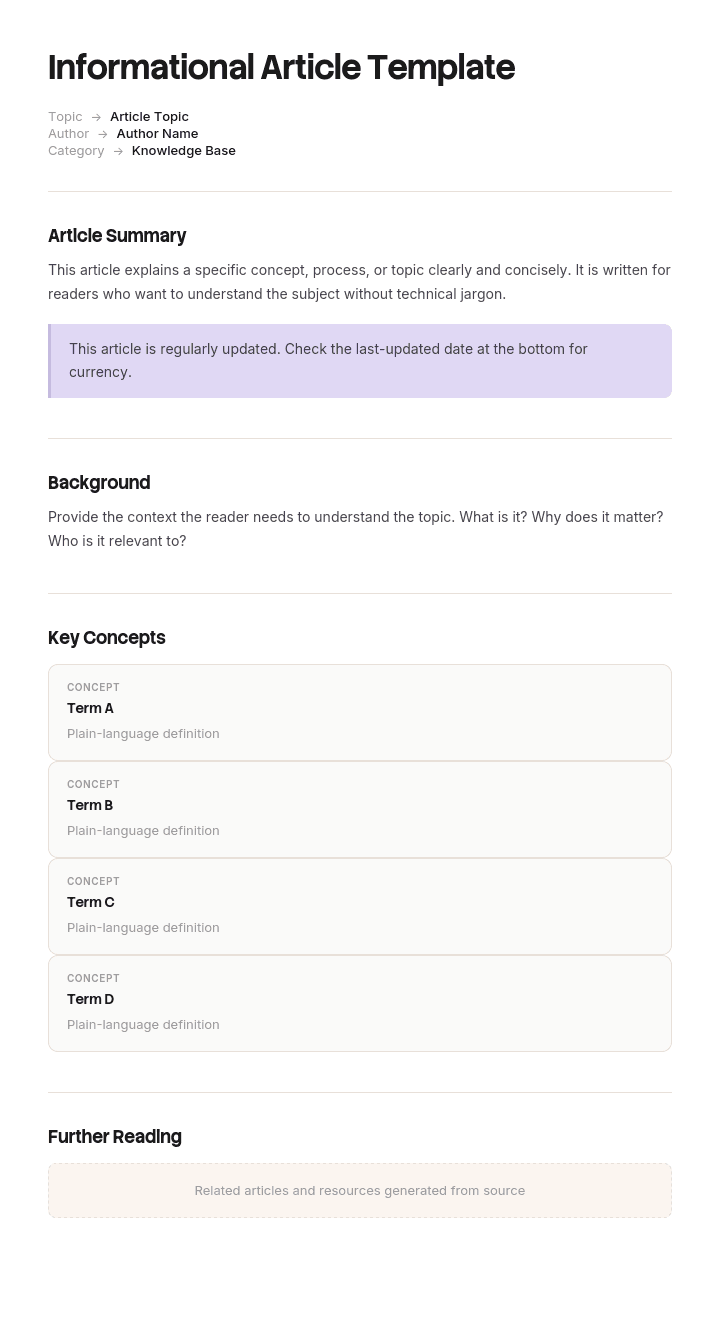
Use this template
Informational articles are the workhorse of content marketing - they educate, build trust and rank in search. With Trupeer, you can save hours on writing informational articles by starting with a free template, customizing it with your brand guidelines, and turning each article into a video summary readers can also watch.
An informational article explains something. What a thing is, why it works the way it does, what the difference is between two options, what happens behind a process.
They are harder to write than instructions, and they fail differently. A how-to fails when someone gets stuck. An explanation fails when someone finishes reading, believes they understood, and turns out not to have.
Download the informational article template
Format | Best for |
|---|---|
Word (.docx) | Drafting and reviewing before publishing |
Printable explainers, briefing documents, handouts | |
PowerPoint (.pptx) | Explaining a concept in a session rather than a document |
Google Docs | Drafting with a subject expert |
Free, editable, no watermark.
Which article type do you need?
The reader wants to | Type | Template |
|---|---|---|
Understand what something is or why it works that way | Informational or concept | This page |
Complete one specific task | How-to | |
Become competent at a whole area | Guide | |
Look up an exact value or option | Reference | |
Learn from scratch, following along | Tutorial |
The most common structural mistake in documentation is mixing these. An explanation with three steps buried in it, or a set of instructions interrupted by background, serves neither reader.
Why explanations fail
Not because the writer knows too little. Almost always the opposite.
The reader already believes something. They arrive with a mental model, usually incomplete and often wrong. Facts added to a wrong model get absorbed into it rather than replacing it, which is why someone can read an accurate explanation and come away still wrong.
The writer has forgotten what it was like not to know. Once you understand something, the difficulty of learning it becomes invisible. You skip the step that confused you originally because it no longer seems like a step.
Abstraction comes first. Definitions before examples is the natural order for someone who already understands, and the wrong order for everyone else.
Completeness is mistaken for clarity. Covering every case makes the explanation accurate and makes the core idea harder to find.
Start from what they already believe
The most useful thing you can do before writing is find out what the reader currently thinks.
For a product concept, that comes from support tickets: the questions people ask reveal the model they are operating with. "Why did my report not update" tells you they think it updates live. That misconception is the thing your article has to address, and it is more useful than any amount of accurate description.
Then write the explanation to dislodge it rather than to describe the truth. Those are different pieces of writing. One acknowledges what people assume and shows why it does not hold. The other states what is true and hopes the reader notices the conflict.
Naming the misconception explicitly works well. "You might expect the report to update as soon as data changes. It does not, and the reason is worth understanding."
How to customize this template in Trupeer
Step 1: Open the Templates Section
Go to the Templates section from the main navigation.

Step 2: Select and Open a Template
Click on any template you want to work with to open it.

Step 3: Expand the Template View
If needed, expand the template view to see the full layout and details clearly.

Step 4: Edit the Template
Click on Edit to start modifying the selected template.

Within the editor, you can:
Add new sections
Define or update formatting rules
Add a logo and adjust its position and related settings
Step 5: Save Your Customized Template
After making all necessary changes, click Save to store the updated template as your own.

Step 6: Preview and Fine-Tune the Template
When you want to see how your customized template looks, open the Preview.

From the preview screen, you can continue to make adjustments directly if needed, ensuring the template appears exactly as you want.
With an informational article template you can:
Save hours on writing: Skip the blank page with a structure built for educational content.
Improve SEO: Well-structured articles rank better in search results.
Stay on-brand: Apply your logo, fonts and colors using Trupeer's brand kit.
Engage more readers: Pair articles with video summaries to reach different learning preferences.
Standardize content: Use the same template across blog posts and KB articles.
Reach global readers: Translate articles into 65+ languages with one click.
The explanation structure
Section | Purpose |
|---|---|
Title | What this explains, in the reader's words |
The short answer | Two or three sentences. Some readers need only this |
Why this matters to you | What decision or problem this affects |
The common assumption | What people usually think, named explicitly |
The actual explanation | Concrete first, then the general principle |
An example | One, worked through |
Edge cases and exceptions | After the main idea has landed, not before |
What to do with this | The practical consequence |
Related | Adjacent concepts, and the how-to if there is one |
The short answer at the top is not a summary of the article. It is the answer, for the substantial proportion of readers who want it and will leave. Giving it away immediately is correct. The article exists for the readers who want more.
Concrete before abstract
The single most reliable improvement to any explanation.
People understand a general principle much more readily after seeing a specific instance of it. Writing the definition first and the example second reverses how understanding actually forms, and it is the default order in almost all technical writing because it is the order that feels logical to someone who already knows.
Abstract first: Rate limiting restricts the number of requests a client may make within a defined time window, preventing resource exhaustion and ensuring equitable service availability.
Concrete first: If you send more than 100 requests in a minute, we start rejecting them until the minute is up. This stops one integration accidentally consuming capacity everyone else needs. That restriction is called rate limiting.
The second is not simpler in content. It arrives in the order the reader can absorb.
Analogies, and where they break
Analogies are the most powerful tool in explanatory writing and the most likely to cause a subtle misunderstanding later.
Use one when the concept is genuinely unfamiliar and there is a close everyday parallel. Keep it short, and use it once rather than extending it through the article.
Then say where it stops. "This is a bit like a queue at a counter, except that unlike a queue, the order is not guaranteed." Naming the limit prevents the reader carrying the analogy into territory where it produces wrong conclusions, which is how analogies create the misconceptions that later articles have to undo.
If you cannot state where the analogy breaks, you do not understand the concept well enough to explain it yet.
The article template
Field | Enter |
|---|---|
Title | What this explains |
Audience | Who this is for, and what they are assumed to know |
Short answer | Two or three sentences |
Why it matters | The decision or problem this affects |
Common assumption | What people typically believe |
Explanation | Concrete example first, then the principle |
Diagram | Where the concept is structural or sequential |
Edge cases | After the main explanation |
Practical implications | What to do differently knowing this |
Related articles | Adjacent concepts, and any how-to |
Owner and last reviewed |
Weak and better
Weak opening: This article provides an overview of our data synchronisation architecture and the various factors that influence update frequency across integrated systems.
Better opening: Your data updates every 15 minutes, not instantly. If you have just changed something and cannot see it, that is why. This explains how the sync works and when the gap matters.
Weak explanation: The system employs an eventual consistency model whereby writes are propagated asynchronously across nodes, with convergence typically achieved within a bounded time window.
Better explanation: When you save a change, it is written in one place first and copied to the others a moment later. For a few seconds, different parts of the system can show different values. This is deliberate, because waiting for every copy to confirm before accepting your change would make saving much slower. It matters in one situation: if you save and immediately run a report, the report may not include the change.
Weak structure: definition, history, architecture, use cases, examples.
Better structure: the one-line answer, why you would care, the common misunderstanding, a worked example, then the general rule, then the exceptions.
Length and scope
One concept per article. If the title needs "and", you have two.
Most concept articles should be shorter than their authors want them to be. The temptation to cover every case is strongest here, because the subject expert can see all the exceptions and each one feels important.
The test: could someone read this and be able to make the decision it affects? If yes, additional accuracy is costing more clarity than it is buying. Move the exceptions to a reference article and link.
Eight hundred to fifteen hundred words is a reasonable range for most explanatory pieces. Longer usually means several concepts, or a concept article that has absorbed reference material.
Diagrams
Concept articles benefit from diagrams more than any other type, because much of what they explain is structural or sequential.
Use one where the concept involves things relating to other things, a sequence of events, or a comparison of two states. A single diagram of a flow often replaces four paragraphs.
Keep it simple enough to be read in a few seconds. A diagram with twenty boxes explains nothing that twenty paragraphs would not, and it is harder to update.
Label everything in the same words the article uses. Diagrams that introduce their own terminology create a second thing to learn.
When to explain and when to link
A live question in most documentation.
Explain inline when the reader cannot proceed without it, when it is two sentences, or when the article's whole purpose is that concept.
Link out when it is a genuine concept in its own right, when only some readers will need it, or when the explanation would double the length.
Never explain inline in a how-to article. The reader is executing and the background interrupts. Link, and keep the steps clean. That is the strongest argument for having concept articles at all: they give how-to articles somewhere to send people.
Types of informational article
Type | Answers | Example |
|---|---|---|
What is | Definition and purpose | What is single sign-on |
How it works | Mechanism | How our sync works |
Why | Rationale for a design or policy | Why reports refresh every 15 minutes |
Comparison | Difference between two things | Standard versus premium plans |
When to use | Decision guidance | When to use a workspace rather than a folder |
Background | Context for a change | Why we moved to the new permissions model |
The "why" articles are the most valuable and the least written. Most documentation explains what and how, leaving readers to guess at rationale, and the guesses are usually less charitable than the truth.
Formats
Word for drafting and review, especially where a subject expert needs to check accuracy.
PDF for briefing documents, printed explainers and anything distributed rather than published.
PowerPoint when the explanation is delivered as a session. Concept explanation works well live, because you can watch faces and adjust, which a document cannot do.
Your help centre or knowledge base for anything customer-facing, cross-linked from the how-to articles that reference the concept.
Testing an explanation
Harder to test than instructions, because a reader who has misunderstood does not know it.
The method that works: ask someone to explain it back in their own words. Not whether they understood, which everyone says yes to, but the explanation itself. Where their version diverges from yours is where the article failed.
Better still, ask them to predict something. "Given what you just read, what would happen if you saved a change and immediately ran a report?" A wrong prediction is precise feedback about which part did not land.
Test with someone who matches the actual audience. A colleague who already knows the concept will read your article and recognise the truth in it, which tells you nothing.
Maintaining
Concept articles age more slowly than how-to articles, since underlying principles change less often than interfaces.
They do go wrong in two specific ways. The system changes and the explanation quietly stops being true, which is worse than an out-of-date screenshot because nothing looks obviously wrong. And a related how-to article changes, leaving the concept article describing something the instructions no longer match.
Review annually, and whenever the thing being explained changes. Note the last reviewed date, since readers reasonably discount undated explanations of technical behaviour.
Best practices
One concept per article.
Short answer at the top, given away immediately.
Name the common assumption explicitly.
Concrete example before the general principle.
One analogy at most, with its limits stated.
Exceptions after the main idea, never before.
A diagram where the concept is structural.
Link out rather than explaining inside a how-to.
Test by asking someone to explain it back.
Say what to do differently knowing this.
Common mistakes
Definition first, example last.
Every exception covered, burying the core idea.
The reader's existing belief never addressed, so the correction does not land.
Written for someone who already understands.
An analogy extended past the point where it holds.
Concept and instructions mixed in one article.
No practical implication, so the reader learns something and does nothing with it.
Jargon defined using other jargon.
Diagrams with their own terminology.
Tested with colleagues who already knew.
Undated, so readers cannot judge whether it is still true.
Some things are easier shown than written
Open the template in Trupeer AI, apply your brand kit so articles match your documentation, and edit any section directly. Setup is in the template guide.
Explanatory writing is genuinely hard, and some concepts resist it. Anything sequential, anything where the reader needs to see state change, and anything involving an interface tends to take four paragraphs in writing and thirty seconds to demonstrate.
Record the thing happening and Trupeer AI produces the written explanation and a narrated video from the same pass, so the article can carry both. Readers who prefer text get the text, and the ones who need to see it can. Translate it into 65+ languages, and keep the set in your knowledge base alongside the how-to articles that link to it.
Record it. Brand it. Translate it. Trupeer it.
Frequently Asked Questions
Is there a free informational article template in Word?
Yes. Word is the main format, with the full structure including the short answer, common assumption and explanation sections. Free download, no sign-up, no watermark.
Is there an article template in Word, free to download?
Yes, and it works for explanatory articles of any kind: what-is, how-it-works, why, comparison and decision-guidance pieces.
Is there a free article template?
Yes, in Word, PDF and PowerPoint, all free with no account required. If you need instructions rather than explanation, the how-to article template is the better fit.
Is there a free informational article template in PDF?
Yes, both blank and with a completed example, which is useful because the difference between a good and a poor explanation is easier to see than to describe.
Is there a free informational article template in PPT or PowerPoint?
Yes. The PowerPoint version is for explaining a concept in a session rather than a document, which often works better since you can watch whether people are following and adjust. Keep the written version as the record.
Can I download a free informational article template?
Yes, every format is a free download with no attribution required.
What is the best free informational article template?
The one with a short answer section at the top and a place to name the common misconception. Most templates give you headings for introduction, body and conclusion, which is the structure that makes explanations hard to follow. Answering immediately and addressing what the reader already believes are the two things that most improve an explanation.
What is an informational article?
An article that explains something rather than instructing someone. It answers what a thing is, how it works, why it works that way, or how two things differ. It differs from a how-to article, which walks through a task, and from reference material, which lists values and options.
What should an informational article include?
A title in the reader's words, a two or three sentence short answer, why it matters to them, the common assumption stated explicitly, the explanation with a concrete example before the general principle, edge cases afterwards, the practical implication, and links to related concepts and any relevant how-to.
How do you write a good explanation?
Find out what the reader currently believes, usually from support questions, and write to dislodge that rather than simply stating the truth. Put the concrete example before the abstract principle. Give the short answer immediately. Use at most one analogy and say where it breaks. Put the exceptions after the main idea, not before.
How long should an informational article be?
Eight hundred to fifteen hundred words for most concepts. Longer usually means you are covering several concepts or have absorbed reference material that belongs elsewhere. The test is whether the reader can make the decision the article affects, not whether every case is covered.
What is the difference between an informational article and a how-to article?
An informational article explains why or what. A how-to article explains how, in numbered steps, for someone mid-task. Mixing them serves neither reader, since someone executing does not want background and someone learning does not want to be dropped into step four. Keep them separate and link between them.
How do you know if an explanation worked?
Ask someone to explain it back in their own words, or better, to predict what would happen in a specific situation. Asking whether they understood produces a yes regardless. Test with someone from the actual audience, since a colleague who already knows the concept will recognise the truth in your article without learning anything from it.
How often should informational articles be reviewed?
Annually, and whenever the thing being explained changes. They age more slowly than how-to articles, but they fail more quietly: an outdated screenshot is obvious, an explanation that is no longer true looks exactly like one that is.
Can I customise this informational article template?
Yes, every version is fully editable. The two sections worth keeping are the short answer at the top and the common assumption, since those are what separate an explanation people follow from one they merely read.

