4.8/5
Free Workflow Generator
Transform Your Processes Into Professional Documentation Instantly
Generate Your Workflow Free

Trupeer's free workflow generator revolutionizes how teams create process documentation by transforming simple screen recordings into polished, professional workflow guides. Unlike traditional documentation tools that require manual writing and formatting, our AI-powered platform captures your actual workflow in action and automatically generates both video tutorials and written documentation from a single recording session. The core challenge most teams face is the time-consuming nature of creating comprehensive workflow documentation. Writing step-by-step guides manually can take hours, and keeping them updated becomes a constant struggle.
What sets our free workflow generator apart is the intelligent automation that happens behind the scenes. When you record your workflow or upload an existing recording, our AI automatically identifies key steps, removes unnecessary pauses and filler words, adds professional zoom effects to highlight important actions, and generates clean written documentation that matches your recording perfectly. This isn't just screen capture – it's intelligent workflow documentation that understands context and creates professional output without manual intervention. This makes it incredibly valuable for training videos, standard operating procedures, and knowledge base articles. We built this tool because teams were struggling with the documentation burden that comes with modern software workflows. Every software update, process change, or new team member onboarding created hours of documentation work.
How Does the Free Workflow Generator Work?
Trupeer's workflow generation process is designed for simplicity while delivering professional results. The entire system works seamlessly whether you're creating new recordings or enhancing existing footage you already have.
Step 1: Capture Your Workflow
Start by either recording your screen using Trupeer's built-in screen recorder or uploading an existing recording you've already made. The recording process is intuitive – simply select the area of your screen you want to capture and begin demonstrating your workflow naturally. You don't need to worry about perfect presentation or avoiding mistakes, as our AI will clean up the recording automatically. The system captures everything you do on screen along with any audio narration you provide.

Step 2: AI Processing and Enhancement
Once your recording is complete or uploaded, Trupeer's AI immediately begins processing the footage. The system automatically removes background noise, eliminates filler words and awkward pauses, and adds professional zoom effects to highlight important cursor movements and screen actions. This enhancement happens without any input from you, transforming raw screen capture into polished, professional-quality video that looks like it was edited by an expert.

Step 3: Automatic Documentation Generation
While enhancing your video, the AI simultaneously analyzes your workflow and generates comprehensive documentation. This includes step-by-step instructions, screenshots of key moments, and descriptive text that explains what's happening at each stage. The written guide perfectly complements your video, giving users multiple ways to consume and reference your workflow information.

Step 4: Customization and Branding
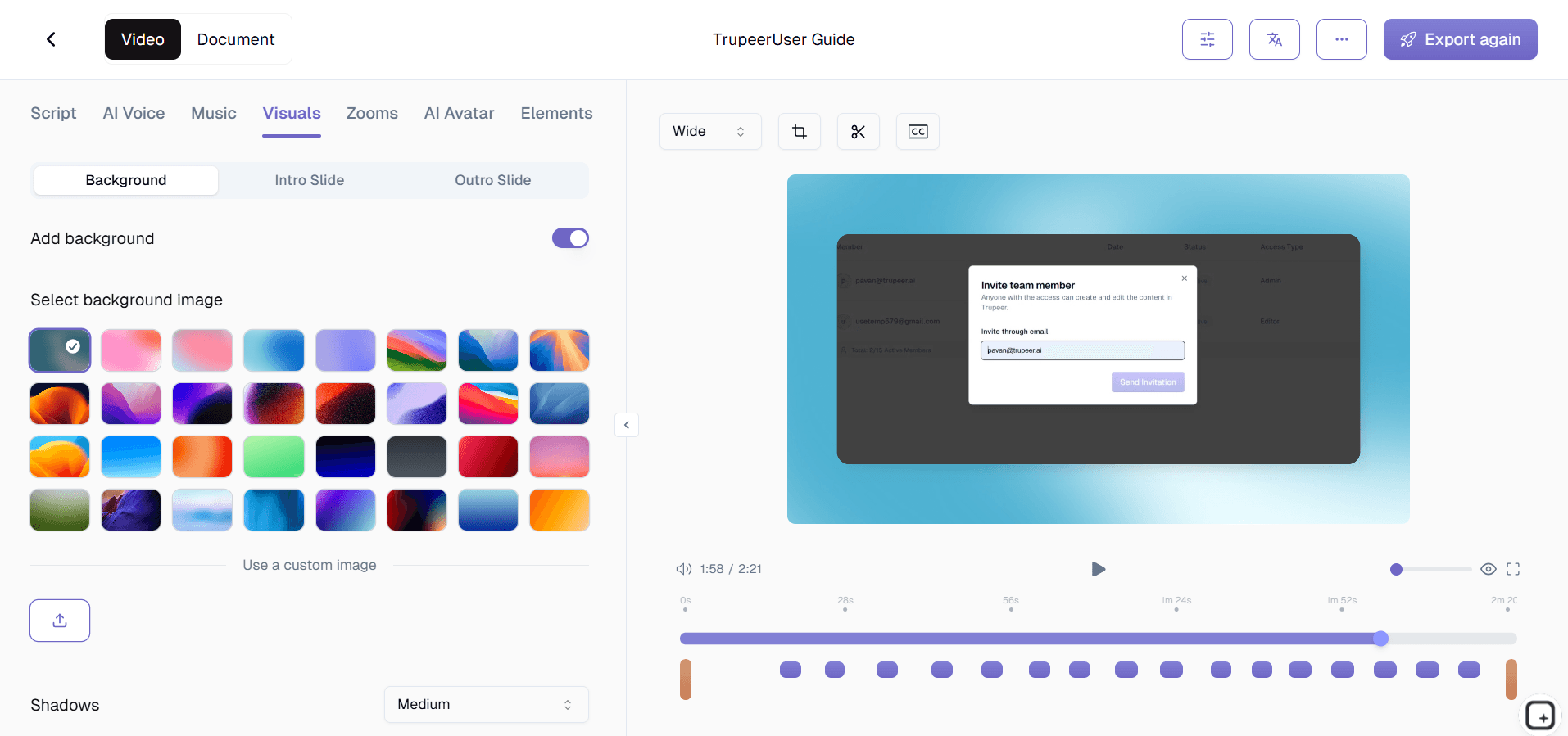
Apply your brand kits to ensure consistent visual identity across all your workflow documentation. Add your company colors, logos, intro and outro sequences, and maintain professional appearance standards. You can also customize the documentation format using reusable templates that maintain consistent styling and structure across all your workflow guides.
Step 5: Multi-Format Export and Sharing
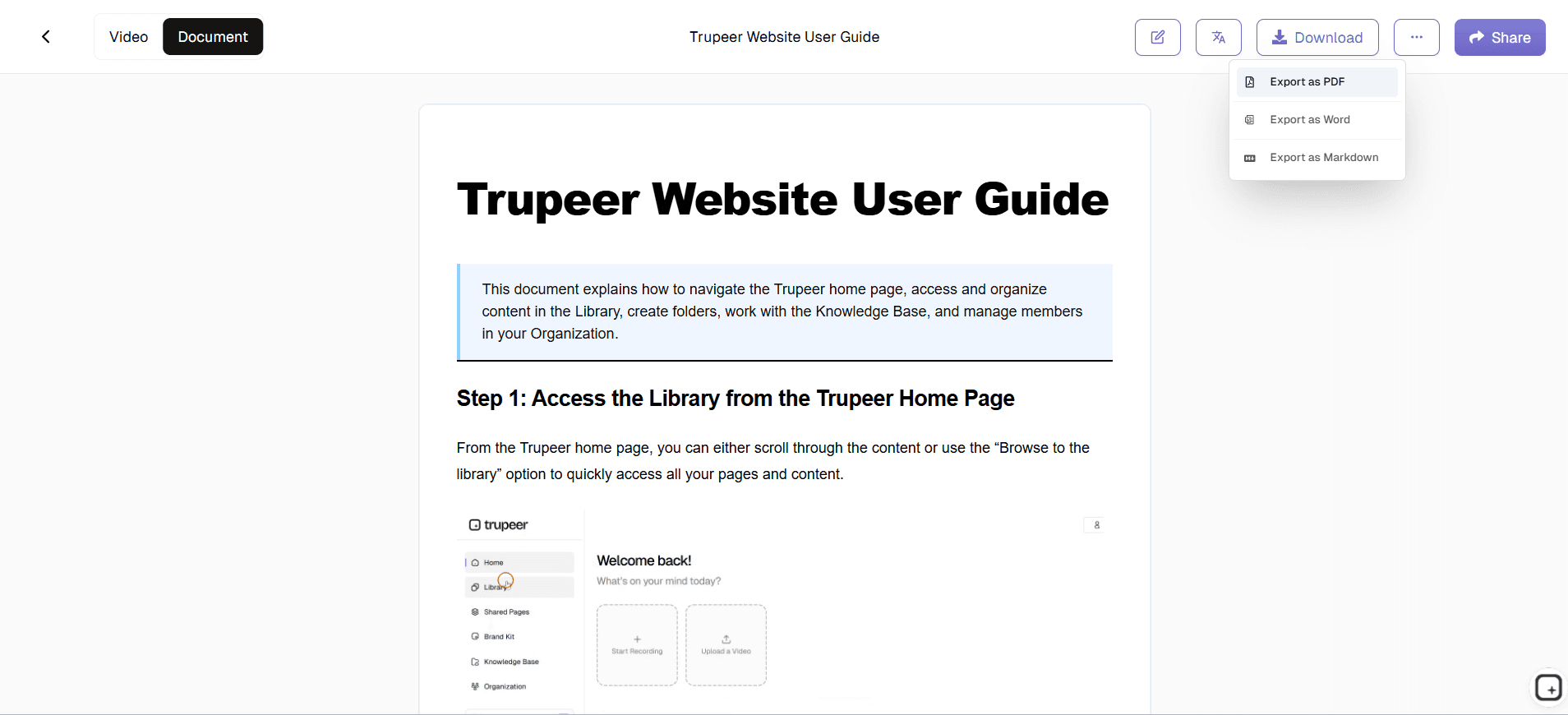
Export your completed workflow documentation in multiple formats to serve different use cases. Share polished video versions for visual learners, distribute written guides for quick reference, or embed both formats directly into your website, learning management system, or internal wiki. The sharing options are flexible, allowing you to reach your audience through their preferred channels.
Key Features and Capabilities
Trupeer's free workflow generator includes powerful features that streamline the entire documentation creation process while ensuring professional results every time.
AI-Powered Screen Recording: Our intelligent recording system captures not just what you see, but understands the context of your actions. The AI video editor automatically enhances your recording with noise removal, filler word elimination, and strategic zoom effects that highlight important interface elements and cursor movements. This means even spontaneous recordings come out looking professionally edited.
Automatic Documentation Templates: Save time with pre-built documentation formats that structure your workflow guides consistently. These templates can be customized with your preferred formatting, styling, and organizational structure, then reused across multiple workflow documentation projects. This ensures all your team's process guides maintain a consistent, professional appearance while reducing setup time for new documentation.
Multi-Language Translation: Reach global teams and audiences by automatically translating your workflow videos and documentation into multiple languages. This feature is particularly valuable for international companies or teams that need to share processes across different regions. The translation capabilities maintain the context and technical accuracy of your workflow instructions while making them accessible to non-English speakers.
Upload and Enhance Existing Recordings: Don't start from scratch if you already have workflow recordings. Upload your existing screen captures and let Trupeer's AI transform them into polished, professional documentation. This feature is perfect for teams that have accumulated raw training footage or screen recordings but lack the time or expertise to edit them properly.
Integrated Brand Management: Maintain consistent visual identity across all workflow documentation with comprehensive branding tools. Add your company logo, apply brand colors, include standard intro and outro sequences, and ensure every piece of documentation reflects your organization's professional standards. This creates cohesive learning materials that reinforce your brand while delivering valuable information.
Smart Export Options: Generate multiple output formats from a single recording session. Create video tutorials for visual learners, written step-by-step guides for quick reference, and embedded content for your website or internal systems. This versatility ensures your workflow documentation serves multiple purposes and reaches different learning preferences within your audience.
Why Should You Use Trupeer's Free Workflow Generator?
The advantages of using Trupeer's workflow generator extend far beyond simple time savings, though the efficiency gains are substantial. Traditional workflow documentation can take 3-5 hours per process when done manually, while our system reduces this to under 30 minutes including recording time.
Eliminate Documentation Bottlenecks: Stop letting documentation lag behind your actual processes. When software updates, procedures change, or new workflows are implemented, you can update your documentation immediately by recording the new process once. This keeps your team working with current information and reduces confusion that comes from outdated guides. The speed of documentation creation means updates happen in real-time rather than weeks later.
Ensure Consistency Across Teams: Standardize how workflows are documented throughout your organization. When everyone uses the same system and templates, knowledge sharing becomes more effective and new team members can onboard faster. The consistent format helps teams find information quickly and reduces the learning curve for accessing institutional knowledge.
Create Multiple Learning Formats: Different people learn differently, and your workflow documentation should accommodate various learning styles. Visual learners benefit from the enhanced video tutorials, while others prefer written step-by-step guides they can reference quickly. By providing both formats automatically, you ensure comprehensive knowledge transfer that works for your entire team.
Professional Quality Without Expertise: Produce documentation that looks like it was created by professional instructional designers, even if you have no video editing or technical writing experience. The AI handles all the complex editing, formatting, and presentation work, leaving you free to focus on demonstrating the actual workflow. This democratizes documentation creation across your organization.
Scale Documentation Efforts: Create comprehensive workflow libraries without dedicating full-time resources to documentation. Teams can contribute their expertise by recording processes they know well, and the system handles the production work. This distributed approach to documentation creation builds knowledge bases faster while ensuring subject matter experts are creating the content.
Who Can Use Trupeer's Free Workflow Generator?
Trupeer's workflow generator serves a diverse range of users and use cases, making it valuable for virtually any organization that needs to share process knowledge effectively.
Content Creators and Educators: Build comprehensive course materials and tutorials by recording your creative or educational processes once and generating multiple content formats. Whether you're teaching software skills, creative techniques, or academic subjects, the workflow generator creates professional learning materials that engage students and provide clear guidance. The ability to create both video and written materials from one recording session dramatically increases your content output while maintaining quality standards.
Marketing and Product Teams: Create compelling AI Screen Recorder and user guides that showcase your software or services effectively. Marketing teams can generate customer-facing documentation that explains complex features simply, while product teams can create internal workflow guides for feature development and testing processes. The professional output quality makes these materials suitable for external use with customers and prospects.
Corporate Training Departments: Develop comprehensive training programs by documenting standard operating procedures, compliance processes, and job-specific workflows. The consistency and professional quality of generated materials ensure training standards remain high while reducing the time investment required from subject matter experts. Integration with existing training video systems makes rollout seamless.
Sales and Customer Success Teams: Create personalized workflow demonstrations for prospects and customers by recording customized process walkthroughs. AI Video Editor becomes more effective when teams can quickly create relevant demonstrations that address specific customer needs. Customer success teams can generate help materials that reduce support ticket volume while improving customer satisfaction.
Technical Documentation Teams: Transform complex technical processes into accessible documentation that serves both internal teams and external users. Whether documenting API usage, software installation procedures, or troubleshooting workflows, the generator creates materials that technical and non-technical audiences can understand. The ability to maintain technical documentation that stays current with rapid development cycles is particularly valuable.
Small Business Owners and Consultants: Document your expertise and internal processes without investing in expensive production resources. Create client deliverables, internal training materials, and knowledge bases that position your business professionally while capturing institutional knowledge that doesn't depend on your personal availability. The scalability of documentation creation helps small businesses compete with larger organizations in terms of professional presentation.
Best Practices for Using the Free Workflow Generator
Maximize the value of your workflow documentation by following proven strategies that enhance both the creation process and the final output quality.
Plan Your Recording Session: Before you start recording, outline the key steps you want to demonstrate and prepare any necessary files or browser tabs. This preparation ensures your recording flows smoothly and covers all essential information without unnecessary backtracking. Clean up your desktop and close irrelevant applications to maintain focus on the workflow you're documenting.
Speak Clearly During Recording: Provide clear narration as you demonstrate each step, explaining not just what you're doing but why you're doing it. This context helps viewers understand the reasoning behind each action and makes the generated documentation more comprehensive. The AI can enhance audio quality, but starting with clear speech produces better results.
Use Consistent Terminology: Stick to standard terms for interface elements, processes, and outcomes throughout your recording. This consistency carries through to the generated documentation and makes it easier for users to follow along. Avoid jargon unless you're creating documentation specifically for technical audiences who understand the terminology.
Take Advantage of Templates: Set up documentation templates that match your organization's style guide and information architecture. Once configured, these templates ensure all workflow documentation maintains consistent formatting and structure, making your knowledge base more professional and easier to navigate. Regularly review and update templates to keep them aligned with your evolving needs.
Leverage Advanced Features: Explore the AI Screen Recorder for creating structured narration before recording, and use the translation features to create multilingual documentation sets. These advanced capabilities can significantly expand the reach and effectiveness of your workflow documentation without proportionally increasing the time investment.
Explore Related Tools
Why Choose Trupeer's Workflow Generator
AI-Powered Enhancement
Automatically removes noise, filler words, and adds professional zoom effects
Dual Format Output
Creates both polished videos and written documentation from single recording
Brand Consistency
Apply custom branding with templates for professional, consistent documentation
Get Started with Trupeer's Free Workflow Generator
Step 1
Record or upload workflow
Step 2
AI enhances automatically
Step 3
Export and share documentation
Frequently Asked Questions
What makes Trupeer's free workflow generator different from other screen recording tools?
Unlike basic screen recorders, Trupeer automatically generates both enhanced videos and written documentation from your recordings. Our AI removes filler words, adds zoom effects, and creates professional guides without manual editing.
Can I use the workflow generator with existing recordings I already have?
Yes, you can upload existing screen recordings and Trupeer's AI will enhance them with noise removal, professional editing, and automatic documentation generation. This works with most common video formats.
Is the workflow generator really free to use?
Trupeer offers free access to core workflow generation features including screen recording, AI enhancement, and basic documentation creation. Premium features like advanced branding and translation require a paid plan.
How long does it take to generate workflow documentation?
The AI processing typically takes 2-5 minutes for most recordings. You'll have enhanced video and written documentation ready almost immediately after your recording session ends.
What types of workflows work best with this tool?
Any screen-based process works excellently, including software tutorials, business procedures, training materials, and product demonstrations. The AI is particularly effective with step-by-step processes and interface interactions.
More Tools


