4.8/5
Best Free AI Word Document Generator Free
Boost employee efficiency with Trupeer's free AI document generator that automates task documentation. Create accurate process guides quickly and effortlessly.

Trupeer’s AI-powered Word Document Generator is your go-to solution for creating professional, structured, and editable Word files in minutes. Whether you need internal documentation, client reports, or training manuals, Trupeer simplifies it all with AI precision and smart formatting.
With Trupeer’s AI document creator, you can automatically generate business documents, guides, reports, and SOPs with zero manual effort. It’s not just fast it’s intelligent, consistent, and scalable for teams of all sizes.
Generate polished Word documents instantly using AI.
Automate internal documentation with the AI generator for internal docs.
Create, edit, and export fully formatted Word files effortlessly.
Use templates or let the AI documentation maker structure your content automatically.
Export or share files across platforms with one click.
What is Free AI Word Document Generator?
Trupeer's best ai word document generator free revolutionizes how you create professional documentation. Unlike traditional document generators that require you to write everything from scratch, Trupeer automatically transforms your screen recordings into comprehensive Word documents. Whether you're creating training materials, SOPs, or user guides, our AI watches your screen recording and generates detailed written documentation that matches your exact workflow.
What sets Trupeer apart from other document generators is our dual-output approach. You don't just get a document or just a video - you get both. Record once with our screen recorder, and our AI creates a polished video alongside comprehensive written documentation. This makes it perfect for teams who need multiple content formats for different audiences and use cases.
How to use Trupeer's AI Word Document Generator Free Works?
Trupeer's document generation process is designed for maximum efficiency and professional results. The system combines screen recording technology with advanced AI analysis to produce documents that would typically take hours to create manually.
Step 1: Record Your Screen or Upload Existing Content
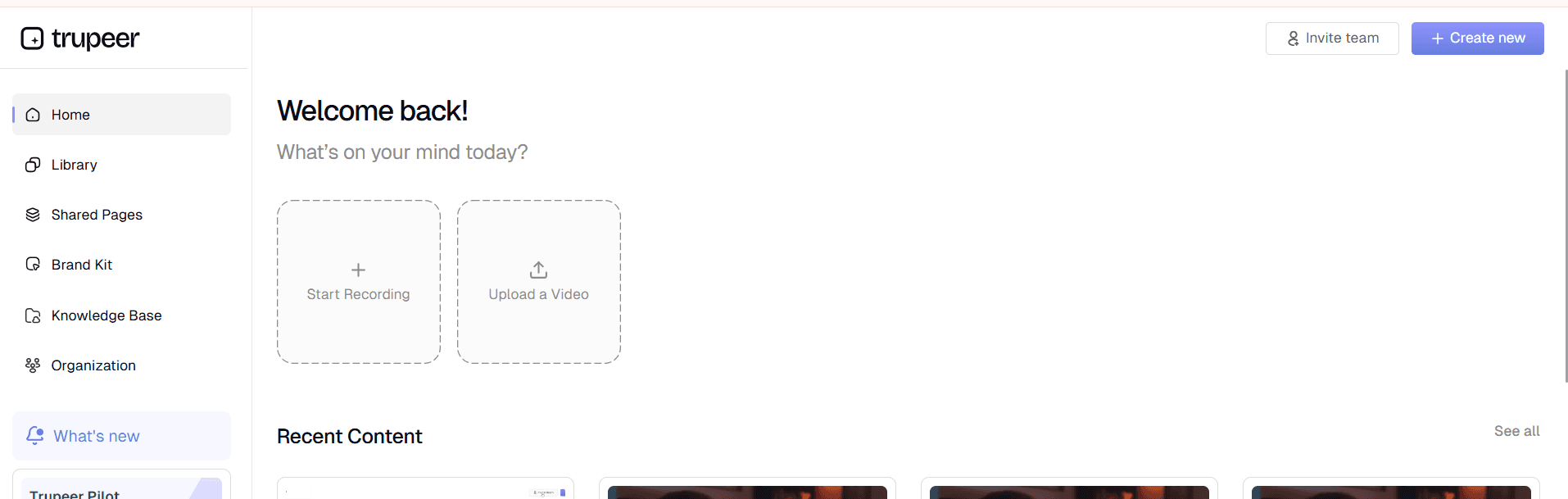
Start by either recording your screen directly through Trupeer's built-in recorder or uploading an existing recording. The platform supports various file formats and can process both newly captured content and archived recordings. This flexibility means you can enhance old training materials or create fresh documentation from live demonstrations.
Step 2: AI Analysis and Content Extraction
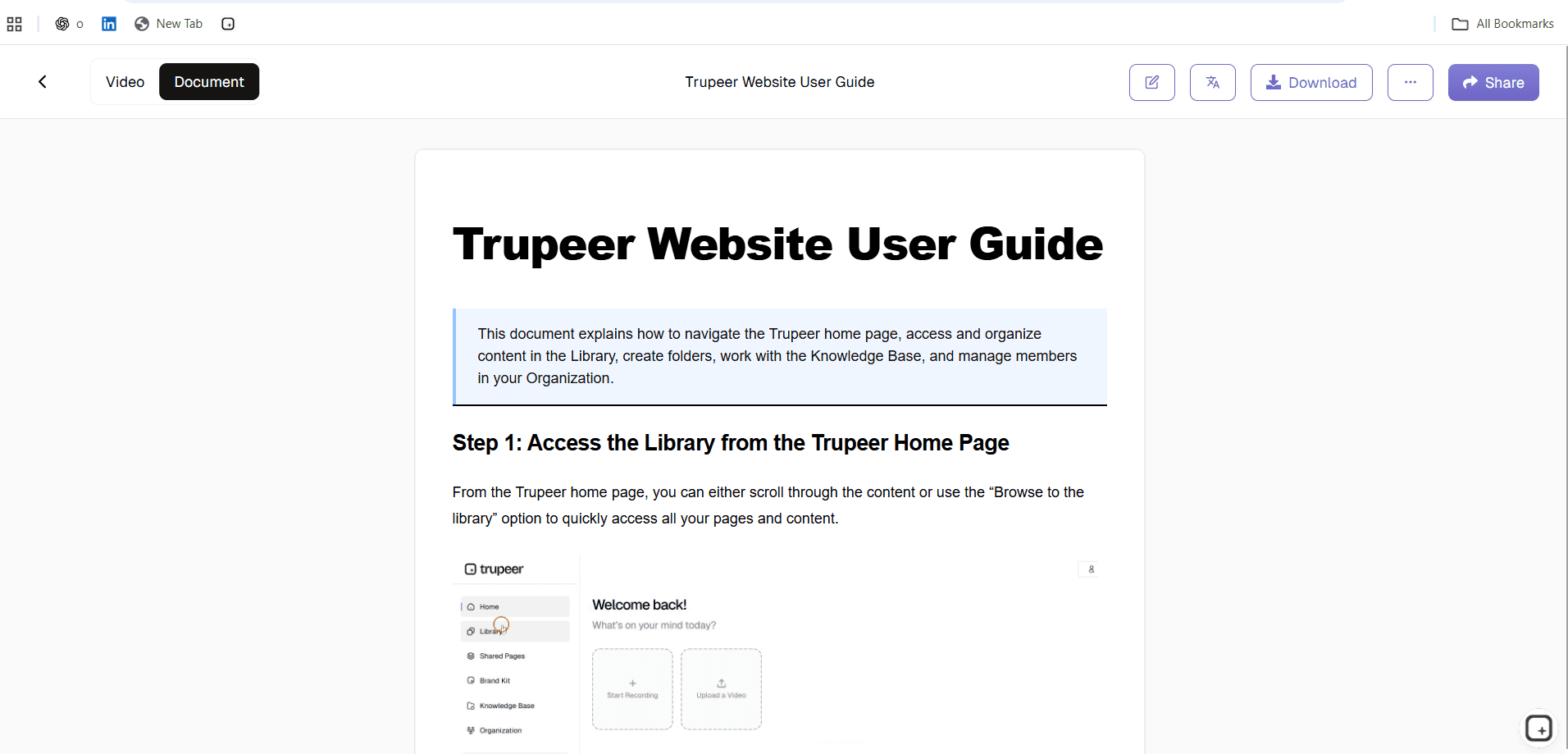
Once your recording is processed, Trupeer's AI analyzes every frame to understand the workflow being demonstrated. It identifies key actions, interface elements, decision points, and procedural steps. The AI recognizes different software interfaces, understands navigation patterns, and captures the logical sequence of tasks being performed.

Step 3: Automated Document Structure Creation
The AI creates a logical document structure based on the recorded process. It organizes content into clear sections, creates headings and subheadings, and establishes a flow that makes sense for readers following the procedure. This includes identifying prerequisite steps, main procedures, and expected outcomes.
Step 4: Professional Formatting and Enhancement
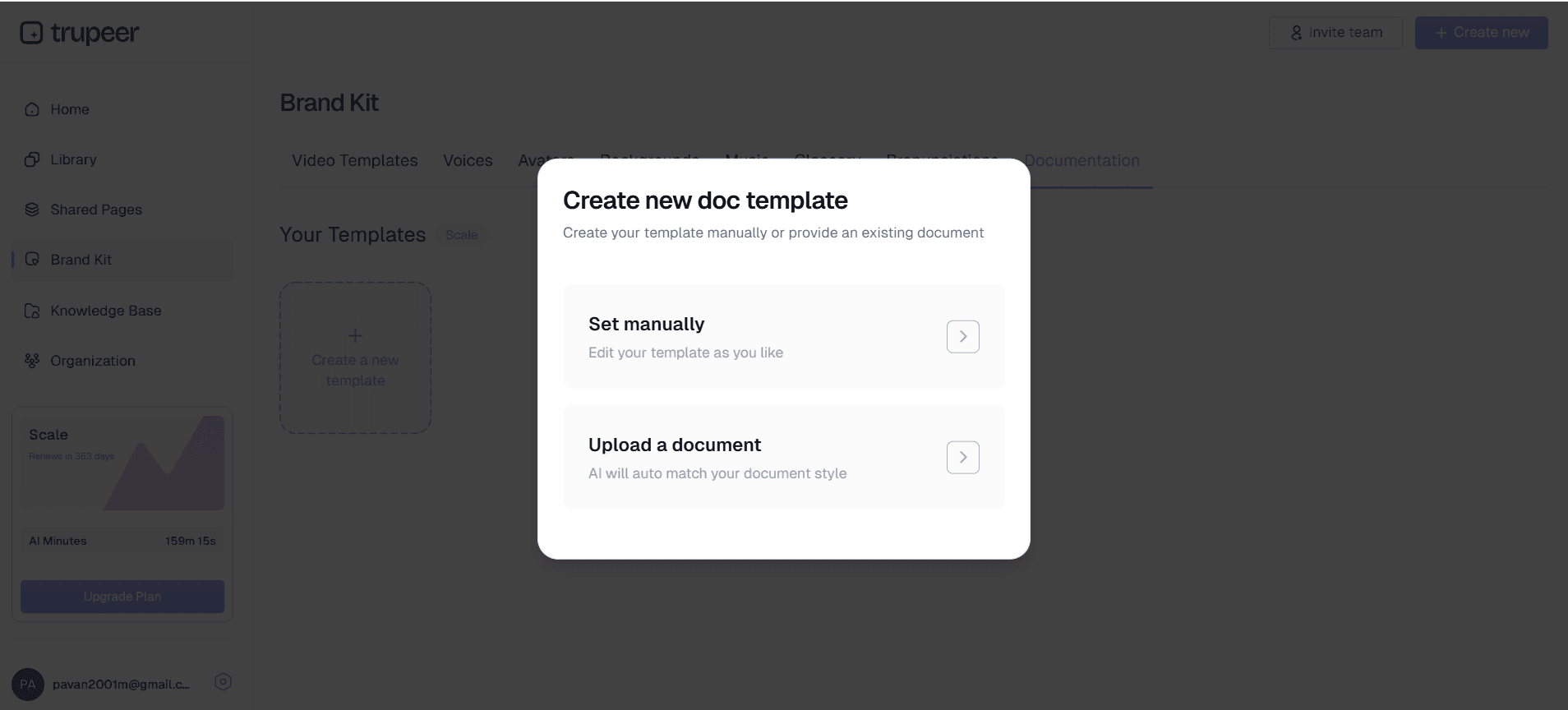
Using customizable documentation templates, the system applies professional formatting to your content. You can save templates with preferred styling, fonts, colors, and structural elements, ensuring consistency across all documentation. The AI also suggests improvements for clarity and completeness.
Step 5: Brand Integration and Export
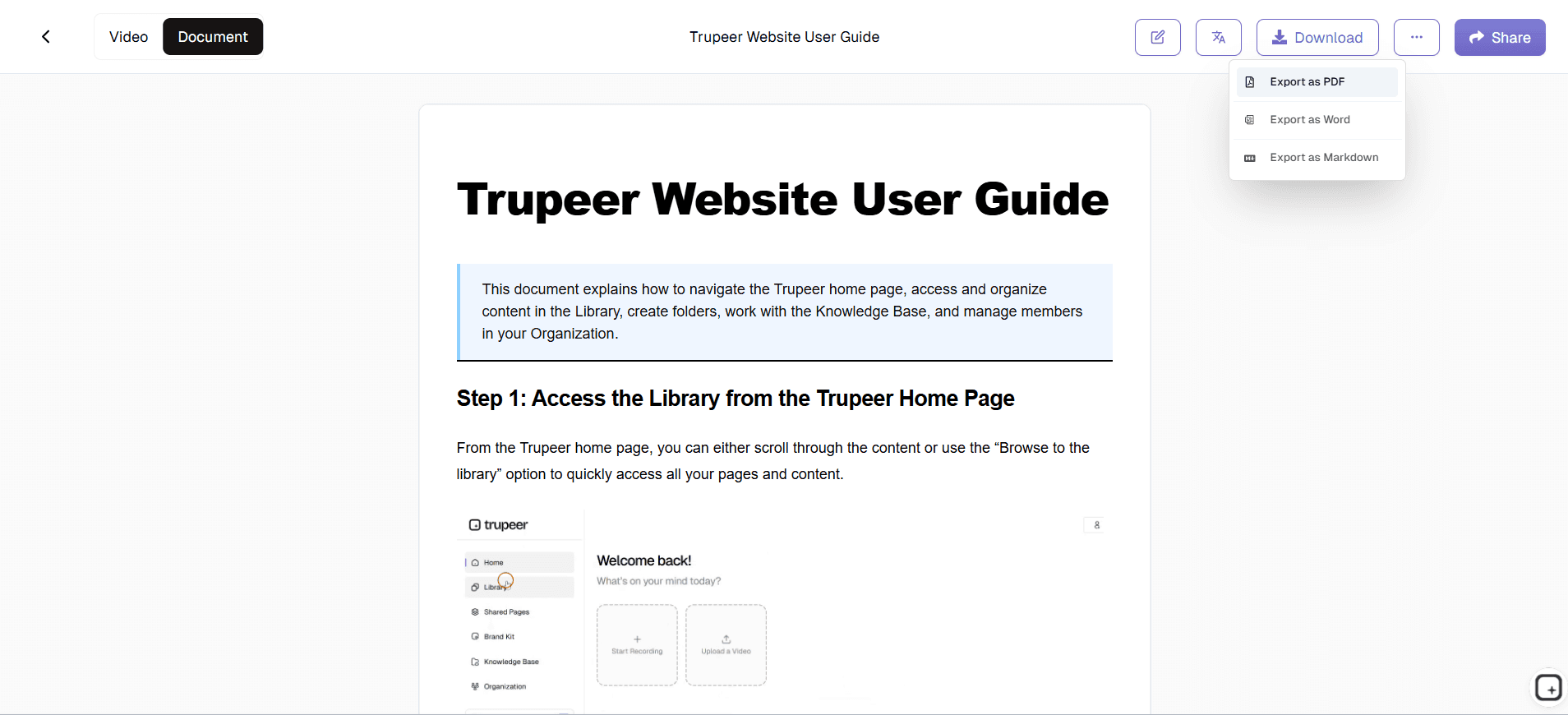
Apply your brand kits to ensure consistent visual identity across documents. Add your company logo, colors, and style elements automatically. Export options include Word documents, PDFs, and web-ready formats, giving you flexibility in how you distribute and use the final documentation.
Key Features of AI Word Document Generator
Trupeer's best ai word document generator free includes comprehensive features designed to streamline your documentation workflow while maintaining professional quality standards.
Intelligent Content Recognition: The AI doesn't just transcribe - it understands what's happening on screen. It recognizes software interfaces, identifies important UI elements, and creates contextual descriptions. This means your documentation explains not just what buttons to click, but why and what the expected results should be.
Customizable Documentation Templates: Save time and ensure consistency with reusable templates. Configure your preferred formatting, section structures, and styling elements once, then apply them across all projects. This feature is particularly valuable for teams creating SOPs and process documentation that need to follow company standards.
Dual Output Generation: Every recording produces both professional video content and written documentation. This is perfect for training videos where different team members prefer different learning formats. Sales teams can use videos for presentations while support teams use written guides for reference.
Advanced Video Enhancement: The integrated AI video editor automatically improves your recordings. It removes background noise, eliminates awkward pauses and filler words, and adds professional zoom effects to highlight important interface elements. This ensures both your video and document outputs meet professional standards.
Multi-Language Support: Expand your documentation's reach with automatic translation capabilities. Generate documents in multiple languages to support global teams and international customers. This feature is essential for companies creating AI Screen Recorder and documentation for diverse markets.
Upload and Enhance Existing Recordings: You're not limited to new recordings. Upload existing raw footage, training videos, or screen captures, and let the AI transform them into professional documentation. This is particularly valuable for teams with extensive libraries of informal training materials that need professional enhancement.
Why Should You Use the AI Word Document Generator?
Choosing Trupeer's documentation generator delivers significant advantages over traditional document creation methods and competing AI tools.
Massive Time Savings: Traditional documentation creation involves multiple steps - recording, reviewing, writing, formatting, and editing. Trupeer consolidates this into a single streamlined process. Teams report reducing documentation creation time by up to 80% while improving quality and consistency. This time savings is especially valuable for Guide Generator teams who need to create multiple content formats quickly.
Consistent Professional Quality: Human-created documentation varies in quality, style, and completeness depending on the creator's skills and available time. Trupeer's AI ensures every document meets professional standards with consistent formatting, clear structure, and comprehensive coverage. This consistency is crucial for Training Manual Generator teams who need reliable reference materials.
Dual Content Creation Efficiency: Instead of creating videos and documents separately, you get both from a single recording session. This efficiency is particularly valuable for SOP Generator teams who need multiple content formats for different stages of the sales process. Sales reps can use videos for presentations while prospects can reference written documentation later.
Scalable Documentation Process: As your team or product grows, documentation needs multiply exponentially. Trupeer's automated approach scales effortlessly, allowing you to maintain comprehensive documentation without proportionally increasing your content creation resources. This scalability supports Documentation Generator initiatives where new processes need rapid documentation.
Enhanced Learning and Retention: The combination of visual and written content supports different learning styles within your organization. Some team members learn better from video demonstrations, while others prefer step-by-step written instructions. Providing both formats from a single source ensures comprehensive knowledge transfer across your team.
Who Can Use the Free AI Word Document Generator?
Trupeer's documentation generator serves diverse professional needs across industries and organizational roles.
Content Creators and Instructional Designers: Create comprehensive learning materials that include both video demonstrations and detailed written guides. The platform is particularly valuable for creating training videos and accompanying documentation for online courses, workshops, and certification programs. Educational content creators can produce professional materials without extensive video editing or writing expertise.
Marketing and Product Teams: Develop compelling AI Video Editor alongside detailed feature documentation for prospects and customers. Marketing teams can create consistent messaging across video and written materials, ensuring potential customers have comprehensive information in their preferred format. Product managers can document new features efficiently while creating materials for sales teams simultaneously.
Educators and Corporate Trainers: Transform live training sessions or software tutorials into permanent learning resources. Record training sessions once and generate both video content for interactive learning and written guides for future reference. This approach is particularly effective for software training where learners need both demonstration and reference materials.
Customer Success and Support Teams: Create comprehensive help documentation that includes visual demonstrations and step-by-step written instructions. When customers encounter issues, they can choose between watching a video solution or following written troubleshooting steps. This dual approach reduces support ticket volume while improving customer satisfaction and self-service capabilities.
Sales and Pre-Sales Professionals: Develop personalized AI Screen Recorder materials that demonstrate product capabilities while providing detailed information prospects can review independently. Sales teams can record custom demonstrations for specific prospects and automatically generate accompanying documentation that addresses detailed questions and implementation considerations.
Small Business Owners and Entrepreneurs: Efficiently create professional documentation without hiring specialized content creators or technical writers. Small businesses can document their processes, create customer onboarding materials, and develop training resources using existing team knowledge and minimal additional resources.
Best Practices for Using the AI Word Document Generator
Maximize the effectiveness of your documentation creation by following proven strategies and avoiding common pitfalls.
Plan Your Recording Structure: Before recording, outline the key points you want to cover and the logical sequence of steps. This preparation ensures your final documentation has clear flow and comprehensive coverage. Consider creating a simple checklist of topics to address, which will result in more organized and useful documentation.
Use Clear, Deliberate Actions: When recording, move deliberately through your process and pause briefly between major steps. This helps the AI better understand the workflow structure and creates natural break points in the documentation. Avoid rushed movements or rapid clicking that might confuse the content analysis.
Leverage Template Customization: Invest time in creating and refining your documentation templates. Well-designed templates ensure consistency across all your documentation and save significant time on formatting. Consider different templates for different types of content - SOPs, training materials, and customer-facing guides may benefit from different structural approaches.
Combine with Other Trupeer Features: Take advantage of the platform's integrated features like brand kits for consistent visual identity and video translation for global reach. These features work seamlessly together to create comprehensive, professional content packages that serve multiple organizational needs simultaneously.
Explore Related Tools
Technical Documentation Generator
User Manual Guide
Knowledge base software
Free Screenshot Generator
Free SOP Generator
AI-Generated Documents
AI Video Translator
Free Online Course Creator
Why Choose Trupeer's AI Document Generator
Dual Output Creation
Generate both professional videos and comprehensive Word documents from single recording
Smart Content Recognition
AI understands workflows and creates structured, logical documentation automatically
Brand Consistency
Apply custom templates and brand kits for professional, consistent documentation
How to Use Trupeer's AI Word Document Generator
Step 1
Record screen or upload video
Step 2
AI processes and analyzes content
Step 3
Download professional Word document
Frequently Asked Questions
What makes Trupeer's AI word document generator different from other free tools?
Trupeer creates documents from screen recordings, not from scratch writing. You record your process once and get both a professional video and comprehensive Word document automatically generated.
Can I use existing recordings with the AI document generator?
Yes, you can upload existing screen recordings and raw footage. Trupeer's AI will enhance the video and generate professional documentation from any compatible recording format.
How accurate is the AI-generated documentation?
Trupeer's AI analyzes visual workflows to create highly accurate, contextual documentation. The system understands software interfaces and processes to generate logical, step-by-step instructions that match your recorded workflow.
Is the free AI word document generator really free to use?
Yes, Trupeer offers free access to core documentation generation features. You can create professional Word documents from your screen recordings without any upfront costs or hidden fees.
What file formats can I export my generated documents to?
Trupeer supports multiple export formats including Word documents, PDFs, and web-ready formats. You can choose the format that best suits your distribution and usage needs.
More Tools


