4.8/5
Free AI Powered Training Program Generator
Turn expert walkthroughs, screen recordings, and internal process videos into polished training content. Record once, get video and docs in any of 65+ languages.
Make Training Content Free

Trupeer AI's training program generator takes a recording (a subject matter expert walking through a workflow, a manager explaining a process, a screen capture of a tool in use) and turns it into a polished training video plus a written training guide, ready to brand and translate into any of 65+ languages. L&D teams use it to ship onboarding, compliance, sales, and product training without a video editor or instructional designer in the loop. The whole production cycle is short enough that training updates ship the same week the underlying workflow changes, not three months later when the new hire has already given up on the old version.
Record once and get a polished training video plus a written training guide in the same flow.
Filler words, awkward pauses, and cursor jitter get removed automatically. Zoom and cursor effects added where they help.
Translate training content into 65+ languages so global teams get materials in their own language the same week.
AI avatars and voiceovers available when the expert doesn't have time to record themselves.
Share via a branded Shared Page link that embeds into Slack, intranet, or any LMS that accepts embedded video.
What Trupeer AI produces from a single training recording
The person who knows the work records a screen walkthrough of how it actually gets done, a manager records themselves explaining a process, or someone uploads an existing recording. Trupeer AI handles the post-production. Filler words get removed. Cursor jitter and zoom transitions get smoothed. A draft training video and a draft written training guide arrive in the same job, so the L&D team doesn't have to produce them separately for learners who'd rather read than watch.
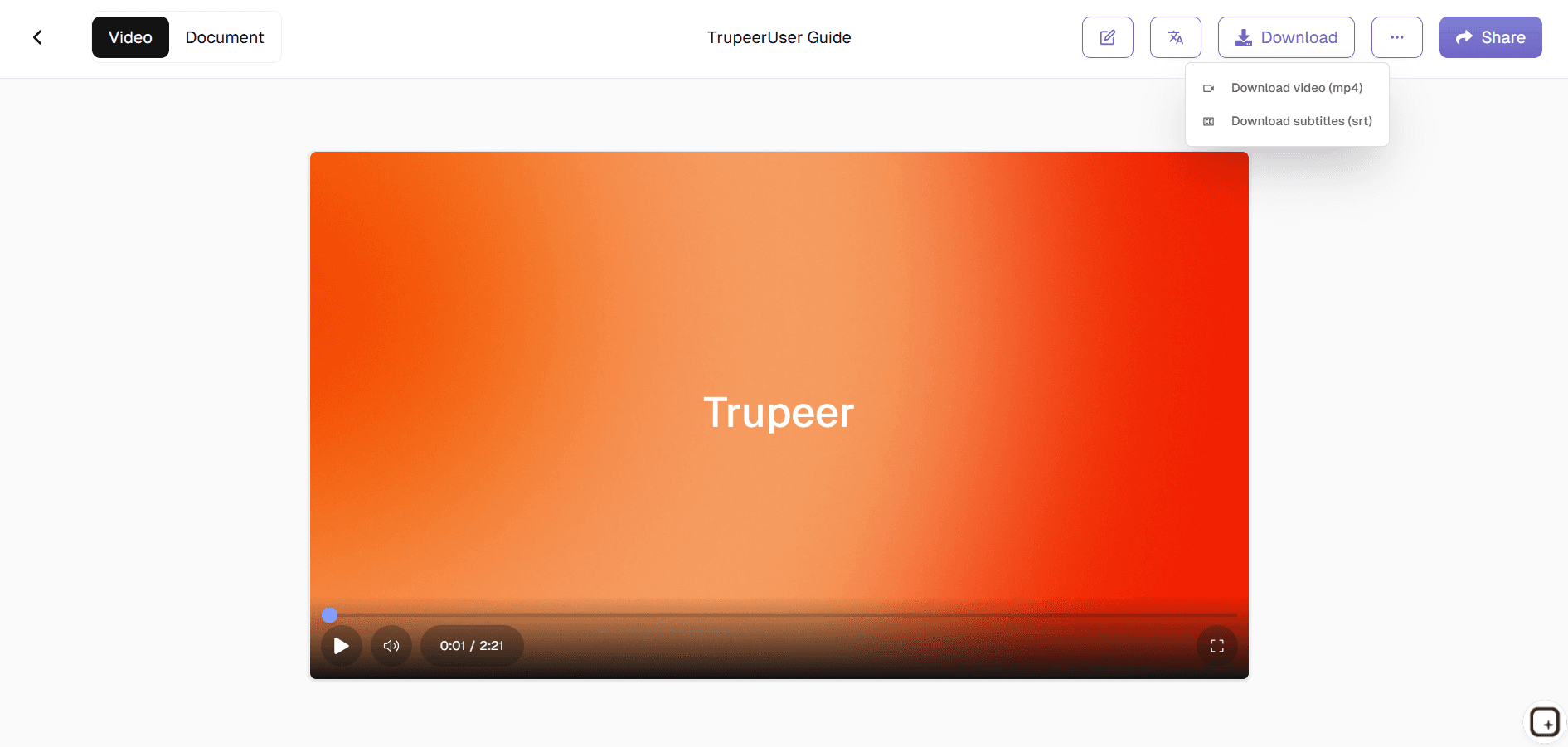
The video output is MP4, ready for embedding into any LMS, intranet, Slack channel, or YouTube account. The document output is PDF or Word, ready for the knowledge base or for handing to compliance for review. If the expert doesn't want to be on camera, the L&D team can swap them for an AI avatar from the Trupeer catalog. Useful when the original trainer left the company, when re-recording would take longer than the team can afford, or when the team wants a consistent on-screen presenter across the whole training series. Voiceover gets the same treatment: dozens of AI voices and accents, or a custom voice cloned from a short audio sample. Product names and brand terminology stay consistent through a custom glossary, which matters when training content references internal tool names the AI wouldn't otherwise know.
How L&D teams use Trupeer AI in three steps
The full flow takes one recording and produces ship-ready training content. No video editor, no instructional designer, no separate documentation pass.
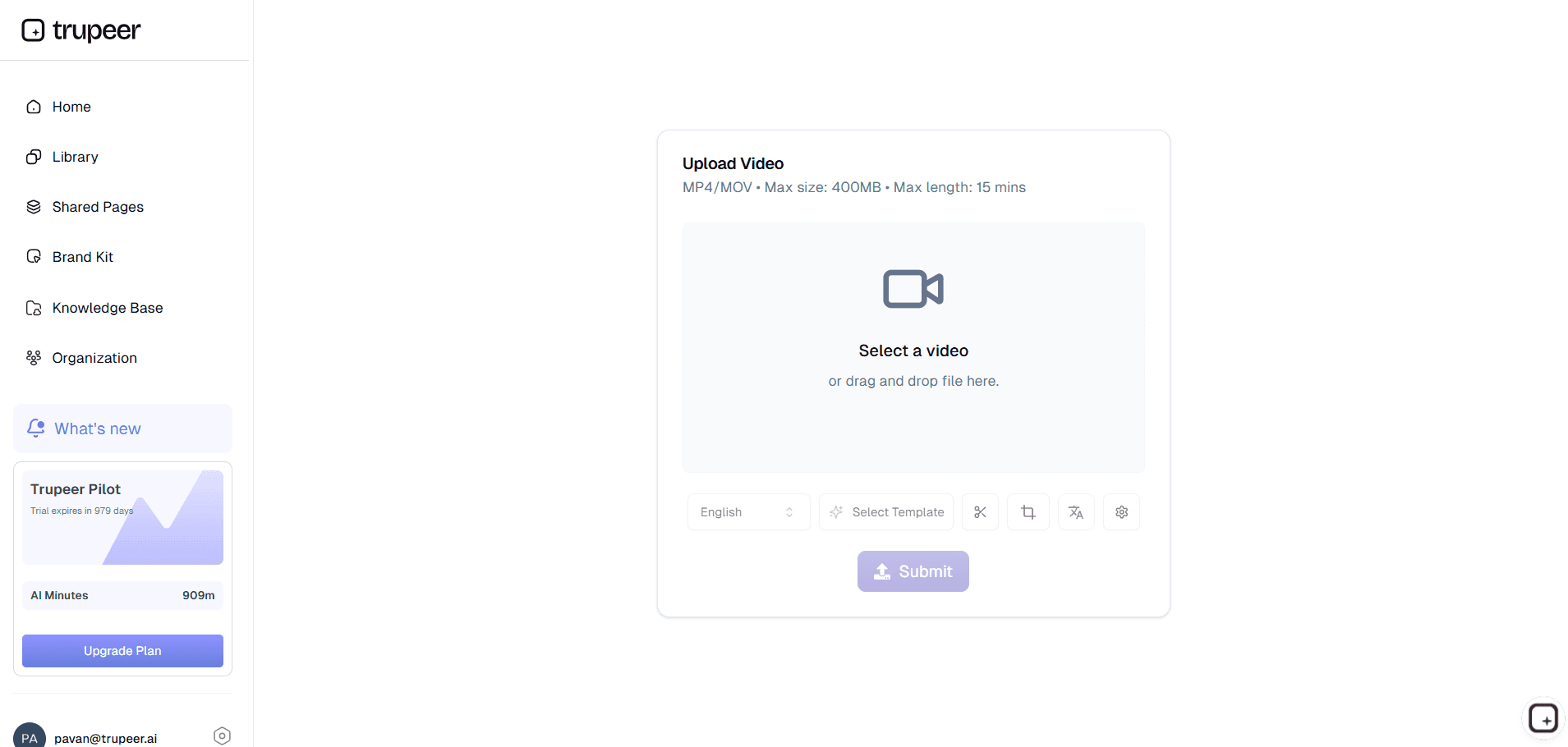
Step 1: Record or upload the training content
The team's expert records a screen walkthrough showing how the work gets done. A new manager records themselves explaining a process. Or the L&D team uploads an existing recording of an in-person training session. A 30-minute deep-dive, a 5-minute tool walkthrough, a 2-minute compliance reminder all run through the same flow. If recording isn't an option, a written script also works as input. Trupeer AI generates the video and document from the script directly.
Step 2: Trupeer AI processes the recording
Filler words get removed. Zoom and cursor effects get added where they help the learner follow what's happening on screen. A draft training video and a draft written training guide show up in the editor together. The custom glossary applies, so internal product names get pronounced and spelled correctly in both the video and the document.
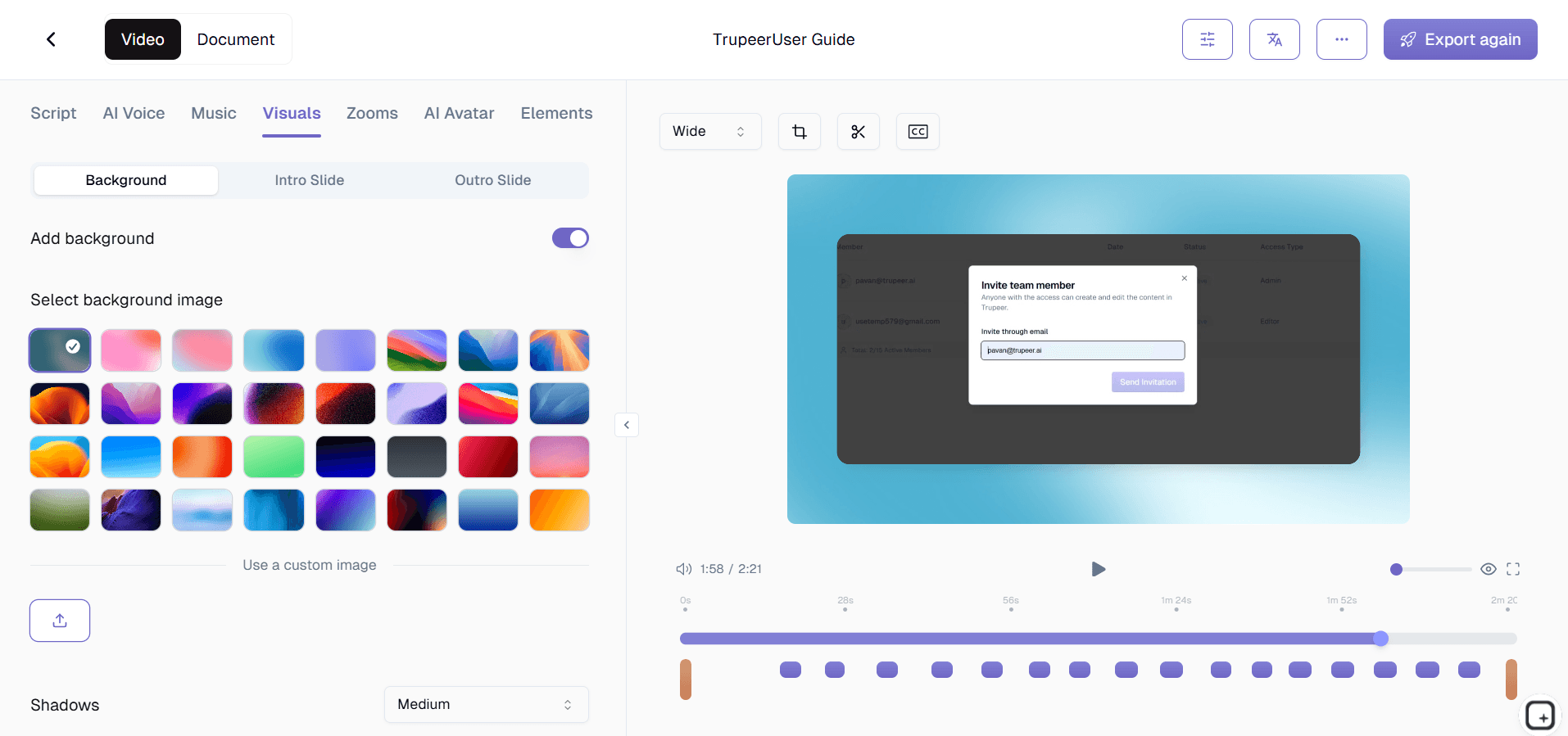
Step 3: Edit, brand, translate, and share
Trim any sections that didn't land. Apply the brand kit so the corporate logo, colors, and intro/outro slides match the rest of the company's training library. Translate into Spanish, Mandarin, Hindi, Portuguese, or any of 65+ languages the global team speaks. Then ship via a Shared Page link the L&D team can embed in the LMS, post in Slack, drop into the new-hire onboarding email, or hand directly to the team that needs the training.
Who actually opens Trupeer AI for training content
The person who opens this tool is usually an L&D specialist or training manager at a company that's outgrown the "send the new hire to shadow someone" approach to onboarding. Trupeer AI fills the gap between having someone on the team who knows the work and having a polished training video the rest of the team can use. The same role shows up in adjacent titles: corporate learning and development manager, learning and development specialist, employee learning and development lead, instructional designer with a four-person team trying to do twelve people's work.
The workflow shows up across adjacent functions. HR managers reach for it when compliance training has to ship before a regulatory deadline. Sales enablement leaders use it when a product launch needs accompanying sales training material. Customer success leaders use it when a product change requires customer-facing training content. Department heads use it to capture role-specific training the central L&D team doesn't have bandwidth to design. Experienced team members themselves use it when they're tired of explaining the same thing in person every quarter and want a recording they can point new joiners to instead. Whether the team currently runs separate training video software for editing or hands the editing work to an outside agency, Trupeer collapses both layers into one flow.
Training content types Trupeer AI handles
The most common output is the new-hire onboarding video, capturing how an experienced team member actually onboards new joiners onto the team or tool. Companies that build a library of these videos see ramp time drop because the new joiner can re-watch the explanation any time, instead of asking the original person to repeat themselves. The second most common is the compliance training video, where the legal language has to land for an audit but nobody on the team wants to record the same data security walkthrough every year.
Sales training programs cover product knowledge, methodology, and call playbooks. Trupeer AI handles them the same way it handles every other training video: record once, generate a polished version, brand it, translate it for the regional sales teams. Management training programs cover the people-leadership content companies usually buy externally because the internal L&D team doesn't have the bandwidth to make it. Security awareness training programs handle the annual phishing, password, and social engineering refresh that nobody wants to record from scratch every year.
The translation feature earns its keep on customer training and global compliance content. Record the training once in English, translate into the languages each office or customer base speaks, and ship the same week. Employee training programs that used to require regional production budgets now run through the same recording-to-doc flow as any other internal video. Same workflow for software walkthroughs (CRM training, ERP training, internal tool onboarding), process documentation videos, manager-onboarding training, and the role-specific content that sits in the gap between the LMS and the team's day-to-day work. The output of each is a training plan the L&D team can drop into the LMS without a separate template pass.
Translation in 65+ languages closes the global training gap
Most corporate training content fails the global test. The L&D team at headquarters builds the new compliance training in English. Three months later, the Mumbai office is still using a 2-year-old translated version because nobody on the central team has the bandwidth to re-translate every update. The Berlin office quietly built their own version because the English content didn't land. Translating into 65+ languages closes that gap. The same recording reaches the same audience in the same week, in the language each office actually speaks.
This matters most for compliance training and customer training. Compliance language gets technical fast, and bad translation creates real legal exposure if learners misunderstand a regulation. Customer training breaks completely when the customer's first language isn't the language of the original recording. Trupeer's translation preserves the structure of the training while adapting the language, so technical accuracy holds and the customer experience doesn't degrade. AI in learning and development is most useful when it scales the parts of the work that humans can't scale, and translating one training into 30 markets in a single week is exactly that kind of work.
Sharing training content through a single branded link
Trupeer AI ships every training video and document as a Shared Page: a branded landing page with the company logo, the training topic, an embedded video or document, and a call-to-action link the L&D team can customize. The link goes anywhere. Embedded into the LMS, posted in Slack, dropped into the new-hire onboarding email, sent directly to the team that needs the training. Learners visit one link instead of hunting through five different tools to find the training they were assigned.
Updates work the same way. When the underlying workflow changes, the original trainer re-records the affected section. Trupeer AI re-processes the recording. The Shared Page updates, and anyone who bookmarked the original link gets the new version automatically. Bookmarks stay current, which solves the staleness problem most training libraries run into within a year of being set up. The L&D team doesn't have to chase down every learner who has the old link or re-upload anything into the LMS. Pairing the generator with the Trupeer AI SOP builder covers the procedural documentation that sits underneath the training video.
Why L&D teams use Trupeer AI for training content
No video editor in the loop
Filler words, awkward pauses, and cursor jitter get removed automatically. Zoom and cursor effects added where they help.
Video and document together
Same recording produces a polished training video and a written training guide. Learners who'd rather read than watch get both.
65+ languages, one recording
Translate the training once. Global teams get it in their own language the same week.
Make a training program in three steps
Step 1
Record an expert walkthrough, upload existing footage, or write a script
Step 2
Trupeer AI generates a polished training video and written guide
Step 3
Brand, translate to 65+ languages, and embed in your LMS or intranet
Frequently Asked Questions
Is the AI training program generator free to use?
Yes for the core flow. Record a training video, generate the polished version and written guide, translate, and share via a Shared Page link. Paid tiers add brand kits, AI avatars, custom voice cloning, team workspaces, and longer recording limits. Pricing details on the pricing page.
What inputs does the training program generator support?
Screen recordings, webcam recordings, uploaded video files, audio files, and text scripts. L&D teams that need a polished training video but don't have an experienced person on hand to record can input a script and Trupeer AI generates the video with an AI avatar and voiceover. Inputs combine: a screen recording plus a written script plus an audience description gives the AI the richest material to work from.
What formats does the training output export to?
Video exports as MP4 for upload to any LMS, intranet, Slack channel, or YouTube account. Document exports as PDF or Word (DOCX) for the knowledge base or for compliance review. Both also ship as a Shared Page, which is a branded link that embeds anywhere the company already shares content.
Does Trupeer AI integrate with our existing LMS?
Trupeer AI generates training content. The LMS hosts and tracks it. The two layers work together through the Shared Page link, which embeds into any LMS that accepts embedded video. The L&D team doesn't have to choose between Trupeer AI and the existing LMS. They run alongside each other: the LMS handles enrollment, completion tracking, and reporting, and Trupeer AI handles where the training content comes from.
Can L&D teams use AI avatars instead of recording someone on camera?
Yes. Trupeer AI's avatar catalog covers conversational, professional, and presentational styles. L&D teams use avatars when the original trainer has left the company, when re-recording isn't practical, or when the team wants a consistent on-screen presenter across the whole training series. Custom avatars are also supported via HeyGen integration for teams that want a specific trainer as the recurring on-screen presenter.
More Tools


