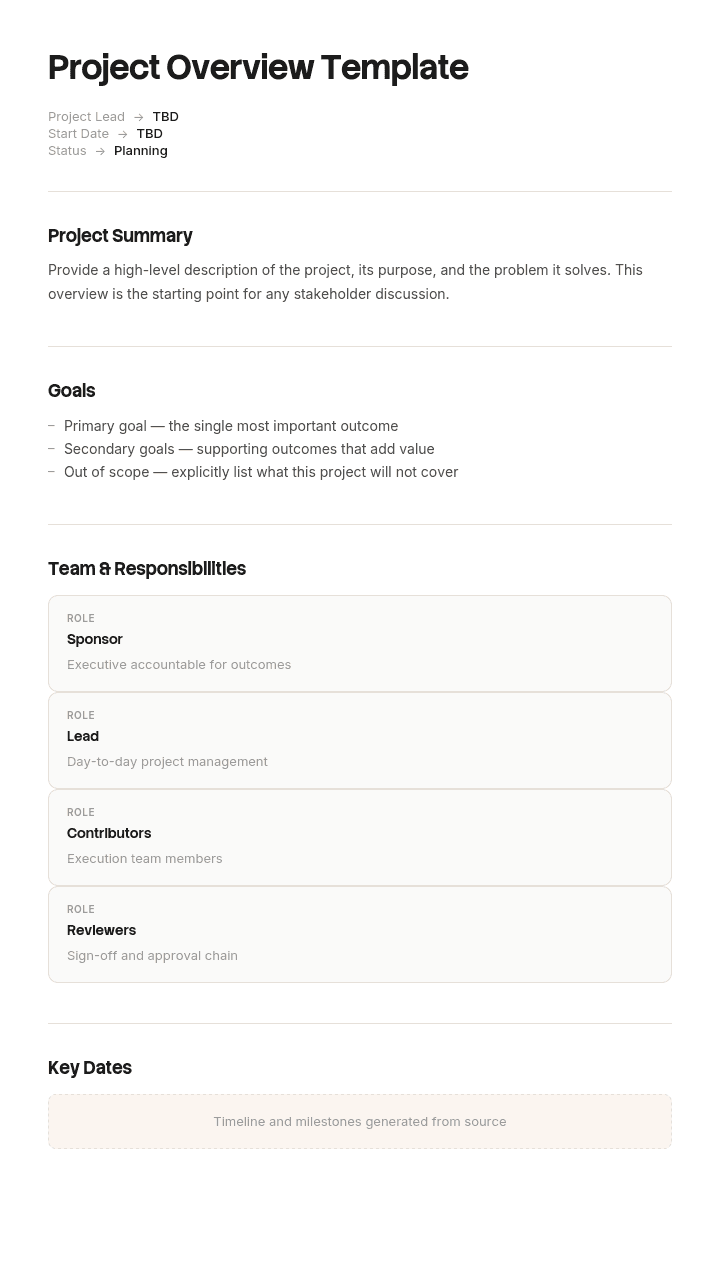
Use this template
A project overview gives every stakeholder the context they need to engage meaningfully - the why, the what and the who behind every initiative. With Trupeer, you can save hours on briefing by starting with a free project overview template (available in Word and editable formats), customizing it with your brand identity, and turning it into a short, high-impact AI video walkthrough that brings everyone up to speed in minutes.
What is a project overview template, and who is it for?
A project overview is the short summary of a project shown to people who are not working on it: an executive, a portfolio board, a stakeholder in another department, a new joiner.
It is not the plan and it is not the brief. The plan is the working document. The brief authorised the work and is frozen, and our project brief template covers it. The overview is what you hand somebody who has ninety seconds and one question.
That gives it a property no other project document has: it must stay current. A brief is signed and archived. A plan is baselined and versioned. An overview describing a project as it stood four months ago is worse than nothing, because people act on it.
Most overview templates handle the sections competently and then get the hardest part wrong, which is how they represent whether the project is actually going to land.
An overview compresses out the uncertainty
An overview is a compression of a plan, and compression is lossy. The question is what gets lost.
A plan contains ranges, dependencies, assumptions and named risks. It records that the delivery date assumes a contractor is available from March, that the integration depends on another team's release, and that two of the estimates are wide.
An overview contains a date and a status. Which means the compression systematically discards the uncertainty and replaces it with a confidence the project does not have.
That is not a presentational quibble. The reader of an overview is usually somebody who could help: reassign a resource, escalate to a supplier, remove a dependency, extend a deadline. To do any of that they need to know what is under strain. A date and a colour tell them nothing is, until suddenly something is.
So the design question for an overview is not what to include. It is how to carry uncertainty in one page without turning it back into a plan.
How to customize this template in Trupeer
Step 1: Open the Templates Section
Go to the Templates section from the main navigation.

Step 2: Select and Open a Template
Click on any template you want to work with to open it.

Step 3: Expand the Template View
If needed, expand the template view to see the full layout and details clearly.

Step 4: Edit the Template
Click on Edit to start modifying the selected template.

Within the editor, you can:
Add new sections
Define or update formatting rules
Add a logo and adjust its position and related settings
Step 5: Save Your Customized Template
After making all necessary changes, click Save to store the updated template as your own.

Step 6: Preview and Fine-Tune the Template
When you want to see how your customized template looks, open the Preview.

From the preview screen, you can continue to make adjustments directly if needed, ensuring the template appears exactly as you want.
With a project overview template you can:
Brief stakeholders fast: Replace 20-page briefs with a 3-minute video walkthrough.
Save hours on writing: Use a proven structure that captures everything stakeholders need - without starting from scratch.
Standardize formats: Use the same overview structure for every project, so teams know where to find information.
Stay on-brand: Apply your logo, colors and fonts using Trupeer's brand kit - perfect for both internal and client-facing overviews.
Share at scale: Send a single video link to your entire org, partners or customers. Ideal for change management initiatives and project kickoffs.
Reach global teams: Translate overview videos into 65+ languages with a single click.
Why RAG status tells a reader nothing useful
Red, amber and green are the default answer and they fail in a specific, documented way.
Green is undefined. In most organisations it means the project manager does not currently have a reason to say otherwise, which is not the same as on track.
Amber is a social signal rather than a measurement. It usually means the project manager has decided to start managing expectations, and the timing of that decision is about confidence and politics rather than about the project.
Red is retrospective. By the time a project is red, the slip has happened and the conversation is about recovery rather than prevention.
The consequence is visible in any portfolio's history. Go back through the monthly overviews of projects that slipped badly and you will usually find they were green the month before, and frequently green for months before that. The information was in the risks section all along, as one item in a list of five, with nothing to indicate which one was moving.
A status colour cannot show a risk materialising, and that is the only thing the reader needed.
What to put in place of the status colour
Three fields, all of which fit on one page.
Forecast completion, as a range. Earliest, expected and latest. A range widens before a date moves, which means it is a leading indicator rather than a lagging one. A project whose range goes from four weeks wide to eleven weeks wide has told you something a green status never will.
The load-bearing assumption. The single assumption which, if it fails, moves the date most. Named, with its current state. Not a list of five risks. One, because the point is to say which one you are watching.
What changed since last time. One line. Not progress, which the milestones cover, but change: an assumption weakening, a dependency slipping, a range widening, a decision still outstanding.
Add an as-at date and one named owner, and the overview stops being a snapshot of somebody's confidence and becomes a document that can be compared month to month.
The three fields take about the same space as a RAG box and a risk list, so this is a substitution rather than an addition.
Free project overview template: the one page to copy
Copy from here. One side, and it should stay one side.
Header. Project name. Owner. Sponsor. As-at date. Version.
In one sentence. What this project will have delivered when it is finished, written for somebody outside it.
Why it matters. Two lines on the problem or opportunity, with a number where one exists.
Forecast. Earliest, expected and latest completion. Plus the original expected date, so drift is visible without anybody having to remember it.
The load-bearing assumption. The one assumption the date depends on most, and its current state in a few words.
What changed since last update. One line.
Milestones. Four to six, with dates and whether each is complete, in progress or not started. No more.
Spend. Committed against approved, and forecast to completion.
What we need. Anything a reader could unblock: a decision, a resource, an escalation, an answer. With a name against it.
Where the detail is. Links to the plan, the brief and the risk register for anybody who wants them.
Copy to here. If the overview exceeds one side, the milestones list has usually expanded, which is a sign it is turning back into a plan.
The college group whose projects were green until red
Halstead College Group runs six campuses with around two thousand eight hundred staff and a portfolio of roughly twenty four active projects.
Every project produced a one page overview each month for the portfolio board: objectives, milestones, RAG status, budget and a list of key risks. The board reviewed all twenty four in a ninety minute meeting.
Over eighteen months, five projects slipped by more than three months.
Somebody went back through the overviews for those five.
All five had been green in the month before they went amber. Three went straight from green to red. The median gap between a green status and the slip being announced was six weeks.
Every one of the five had, in its risks section, the actual cause of the eventual slip. It was there as one item in a list of four to six, with nothing to indicate that it was moving.
The clearest case was a campus network upgrade. It was green for seven consecutive months. Risk three on every overview read "dependency on external contractor availability". In month eight it went red, because the contractor had been effectively unavailable since month five. The project manager had known. The overview had no field in which to say that a risk was materialising, so it stayed as risk three.
The five slipped projects cost an estimated three hundred and ten thousand pounds in extended resource, and two of them missed academic year deadlines, which pushed delivery a full year.
The format changed. RAG status was removed. In its place went the forecast range, the load-bearing assumption with its current state, and one line on what changed since last month. Each overview gained an as-at date and a single named owner.
Over the following twelve months, across twenty one projects, four slipped by more than a month. All four were flagged a median eleven weeks in advance, because in each case the forecast range widened before the expected date moved.
The board meeting shortened from ninety minutes to fifty five, because reading three fields is faster than interpreting twenty four colours.
The components of a project overview that matter
Component | What it should say | The usual version | Why the usual version fails |
|---|---|---|---|
Status | Forecast range, earliest to latest | A colour | Undefined, and lagging |
Risk | The one assumption carrying the date | A list of four to six | Nothing indicates which is moving |
Progress | Milestones complete, in progress, not started | A percentage complete | Derived from effort, not from outcome |
Change | One line on what moved since last time | Absent | Month to month comparison becomes impossible |
Currency | An as-at date and a named owner | Neither | Nobody knows whether it is current |
Ask | What a reader could unblock, with a name | Absent | Every reader is a potential unblocker and is given nothing to do |
Spend | Committed, approved, forecast to completion | Spend to date | Tells you the past rather than the outcome |
The two rows most worth arguing for are change and ask. Change is what makes a series of overviews readable as a trend rather than as twelve unrelated snapshots. Ask is what turns a reporting document into one that occasionally produces help.
Percentage complete deserves particular scepticism. It is almost always derived from effort spent or tasks closed, both of which are poor proxies for whether the outcome will arrive, and it is the number most likely to sit at ninety percent for two months.
How to write a project overview, step by step
Write the one sentence description first and test it on somebody outside the project. If they cannot repeat it back, the rest of the page will not land either.
Get the forecast range from the team rather than from the plan. Plans carry the date that was committed; teams carry the date they believe. Ask for earliest, expected and latest separately, because asking for one number produces the committed date.
Identify the load-bearing assumption by asking what would have to go wrong for the date to move by a month. The answer comes quickly and it is rarely the top item on the risk register.
Write the change line by comparing with last month's version rather than from memory.
Write the ask last, and make it specific enough to be actioned. "Support from the business" is not an ask. "A decision on the data retention rule from Priya by 12 March" is.
Then keep the previous versions. The value of an overview compounds across months and disappears if each one overwrites the last.
Keeping the overview current, and who owns it
The overview is the only project document that is wrong if it is out of date rather than merely historical, and it goes stale for a mundane reason: updating it competes with delivering.
Three habits keep it honest.
One named owner, not the project team. Shared ownership of a document with a monthly cadence means nobody's diary contains it.
An as-at date on the face of it, so a reader can tell whether they are looking at something current. This costs nothing and prevents the common failure where a six month old overview circulates as though it were live.
Rewrite rather than append. An overview that accumulates history becomes a report. Keep the previous versions in the file and issue a fresh one page each time.
Tie the update to something that already happens monthly rather than creating a new ritual. A portfolio board, a steering meeting or a finance cycle all work. An update scheduled independently of any meeting is the one that slips.
Project overview variants: executive, one page and presentation
The structure adapts and the emphasis moves depending on who reads it.
Executive overview. Forecast, assumption, spend and ask. Milestones reduced to two or three. Executives want to know whether it will land, what it depends on and whether they need to act.
One page overview. The default described above, and for most projects it is the only version needed.
Presentation overview. The same content laid out as slides for a board or steering meeting. Keep it to three slides and resist adding a Gantt chart, which consumes the discussion regardless of what else is on the agenda.
Project overview statement. A more formal artefact in some methodologies, closer to a brief in that it states the problem, objectives and success criteria and is written once at the start. If that is what you need, the brief structure is the better starting point.
New joiner overview. Same page plus a short paragraph on why the project exists and who the key people are. Genuinely useful and almost never produced.
Portfolio view. One row per project rather than one page each, carrying forecast range, the load-bearing assumption in a few words, and the change line. This is where the format earns most of its value, because ranges widening across a portfolio are visible at a glance and colours are not.
Project overview, brief or plan: which do you need?
Three documents, in sequence, with different lifespans.
The brief states the problem and authorises the work. Written before the plan, frozen once approved, and superseded by the plan. Our project brief template covers it, including why a brief that states a solution is not a brief.
The plan covers how the work will be delivered: scope, schedule, resources, dependencies. Live during delivery, and our IT project plan template covers building one against constraints you do not control.
The overview summarises the current position for people outside the project. Rewritten monthly, and the only one of the three that is wrong if it is not current.
Where projects also need a set of gate conditions, our project checklist template covers that, and for the documents that outlive the project our project documentation template covers what is worth keeping.
The common confusion is between overview and brief, because both are short and both are shown to sponsors. The test is whether the document changes. If it should be identical in month six to month one, it is a brief.
Can I get a project overview template in Excel or PowerPoint?
PowerPoint or Google Slides for the presented version, and it should be no more than three slides. This is the format most overviews end up in, and the discipline is resisting the fourth slide.
Word or Google Docs for the one page written version, which is what circulates by email and what a new joiner reads.
Excel for the portfolio view, which is where this format is most useful. One row per project with forecast earliest, expected and latest, the original expected date, the load-bearing assumption, the change line and the owner. Conditional formatting on range width rather than on a status colour, so widening ranges surface themselves.
PDF for the issued version each month, dated, so that a series of them can be compared later. That comparison is what the worked example above depended on, and it is only possible if each month's version was frozen rather than overwritten.
If you searched for a project overview template and actually want a plan, a schedule or a project management template set, those are different documents and several results for this term are exactly that. Our operational plan template covers ongoing functions rather than projects, which is a distinction worth checking before you start.
How to show progress without writing a status report
An overview describes progress in words, and words are a poor medium for showing that something now works which did not work last month.
For any project delivering something people will use, a short recording of the thing working is worth more to a sponsor than a paragraph and a percentage. It is also considerably harder to be vague about.
Trupeer AI makes that cheap. Whoever built the increment records it once and the output is a written walkthrough and a video, so the monthly overview can link to two minutes of the actual thing rather than asserting that phase two is complete.
Record it. Brand it. Translate it. Trupeer it.
The same recordings serve the handover and the training material later, which means the effort is not spent purely on reporting. The material lives in your knowledge base in consistent branding, and brand kits keep anything going to a board or an external stakeholder looking like it came from your organisation. Setup instructions are in the document template setup guide.
Frequently Asked Questions
Is there a free project overview template in Excel?
Excel is the right choice for the portfolio view rather than for a single project. One row per project with the forecast range, the original expected date, the load-bearing assumption, the change line and the owner. There is no gated download and no form. Format on range width rather than on a status colour.
Is there a free project overview template in Word?
The one page structure above pastes straight into Word or Google Docs. Keep it to one side and keep each month's version rather than overwriting, since the value of an overview is largely in the comparison between months.
Is there a free project overview template in PowerPoint?
Three slides: the one sentence description with the forecast range, the load-bearing assumption with what changed, and the ask. Resist adding a Gantt chart, which reliably consumes the meeting regardless of what else is on the agenda.
Is there a free project overview template in PDF?
Export each monthly version to PDF, dated, and keep the series. That archive is what lets you check whether projects were green the month before they slipped, which is the analysis that justifies changing the format.
Where can I find project management templates in Excel?
Several of the results for this term are general project management template sets rather than overviews, and they are worth using for schedules and trackers. For the project's own plan, our IT project plan template covers the constraints most templates omit, and for the gate conditions our project checklist template covers when each item is actually actionable.
What is a project overview statement?
A more formal document used in some methodologies, stating the problem, objectives, success criteria and high level approach. It is written once at initiation and it does not change, which makes it closer to a brief than to the overview described on this page. If yours is being rewritten monthly, it is an overview regardless of what it is called.
How often should the project overview be updated?
Monthly for most projects, tied to a meeting that already exists rather than to a standalone reminder. Weekly is usually too often to show meaningful change and quarterly is too slow to be useful. Whatever the cadence, put the as-at date on the face of the document.
Who should write the project overview?
The project manager, singly. Shared ownership of a monthly document means it slips, and an overview written by a project office from the plan tends to reproduce the committed date rather than the believed one, which is precisely the compression this page is about

