Use this template
For managed service providers, SOPs are the operating system of the business. With Trupeer, you can save hours on MSP documentation by starting with a free MSP SOP template, customizing it with your brand guidelines, and using our AI SOP creator to turn each procedure into a clear video walkthrough.
What is an MSP SOP template, and how does it differ?
An MSP standard operating procedure is the written method for a task your team performs repeatedly across client environments: restoring a mailbox, disabling a leaver, rebuilding an endpoint, handling a phishing report.
The technical content overlaps almost entirely with an internal IT SOP. Two things are added, and both come from the fact that you are working under a commercial agreement in somebody else's estate.
Every procedure has a commercial edge. Somewhere in the work, you cross from what the contract covers into what should be billed or quoted, and the person standing at that line is a technician in the middle of a ticket.
And every procedure has handoffs outside your organisation. Steps that need the client to approve, provide access, be present, or make a decision, and those people do not answer to your service levels.
An internal SOP has neither problem. Ignore both and you get procedures that are technically excellent and quietly expensive, which is the subject of most of this page.
Where MSP margin leaks: inside the ticket
Ask an MSP owner where margin goes and you hear about salaries, tooling, or clients who take too much support. Those are real and visible, which is why they get managed.
The leak that is not visible happens inside legitimate tickets.
An engineer picks up an in-scope request, resolves it correctly, and while logged in notices something else that is wrong. The client's Teams structure is a mess, or their firewall rules are a decade of accumulated exceptions. They spend ninety minutes fixing it because it obviously needed fixing, and log it against the same ticket.
Nothing about that is misconduct. It is a good engineer doing a good thing. It is also unbilled work on a fixed-fee contract, and because it sits inside an in-scope ticket no report will ever show it to you.
Ask the engineers why and the answer is consistent. Nobody told them where the line is. The service description is a commercial document in the contract folder, and the runbooks describe how to do the work while saying nothing about whether to.
So the commercial boundary gets decided dozens of times a week by whoever happens to be in the ticket. That is a procedure design problem, not a discipline problem.
How to customize this template in Trupeer
Step 1: Open the Templates Section
Go to the Templates section from the main navigation.

Step 2: Select and Open a Template
Click on any template you want to work with to open it.

Step 3: Expand the Template View
If needed, expand the template view to see the full layout and details clearly.

Step 4: Edit the Template
Click on Edit to start modifying the selected template.

Within the editor, you can:
Add new sections
Define or update formatting rules
Add a logo and adjust its position and related settings
Step 5: Save Your Customized Template
After making all necessary changes, click Save to store the updated template as your own.

Step 6: Preview and Fine-Tune the Template
When you want to see how your customized template looks, open the Preview.

From the preview screen, you can continue to make adjustments directly if needed, ensuring the template appears exactly as you want.
With an MSP SOP template you can:
Save hours on writing: Skip the blank page with a structure built for MSP procedures.
Cut MTTR: Clear SOPs help any tech support any client, fast.
Stay on-brand: Apply your logo, fonts and colors using Trupeer's brand kit.
Onboard techs faster: Pair SOPs with video walkthroughs to ramp new technicians.
Stay audit-ready: Built-in sections support SOC 2, ISO 27001 and client audits.
Reach global teams: Translate MSP SOPs into 65+ languages with one click.
Why every MSP procedure needs a scope edge
The fix is small and it goes in the procedure rather than in a policy nobody reads.
Every MSP SOP states, at the top, what it covers under contract and where it stops. Not in general terms. Specifically enough that a tier one engineer at four thirty on a Friday can tell which side of the line they are on without ringing anyone.
The wording that works states a boundary rather than a permission. "This procedure covers restoring a single mailbox from backup. Restoring more than five mailboxes, or any restore requiring a new backup job, is out of scope and requires a scope note."
That does three things a service description cannot. It reaches the person doing the work at the moment they need it. It uses the vocabulary of the task rather than of the contract. And it gives them an action, which is raising a note rather than making a judgement.
Where the boundary genuinely is ambiguous, say so and name who decides. Ambiguity acknowledged is manageable. Ambiguity unmentioned becomes whatever the fastest engineer assumed.
How to tag a procedure included, billable or quote
Three tags, one per procedure, sometimes one per step where a procedure spans the boundary.
Tag | Meaning | What the engineer does | Where it goes wrong |
|---|---|---|---|
Included | Covered by the standard managed contract | Do it, log to the contract code | Procedures tagged included that have grown in scope since the contract was written |
Billable | Do it, but it is chargeable work | Tell the client it is chargeable before starting, log to the billable code | Engineers doing it without telling the client, which makes the invoice a surprise |
Quote required | Stop. This is project work | Raise a scope note, do not proceed | Engineers who proceed because it is "only twenty minutes", and it is never twenty minutes |
The middle row needs the most care, because a billable tag without a "tell the client first" instruction produces disputed invoices, which cost more relationship than the work earned.
Review the tags annually against the current service description rather than the one in force when the runbooks were written. Scope drifts in one direction, and procedures tagged included three years ago frequently now describe considerably more work than the contract covers.
Client-side dependencies and the tickets that age
The second field most MSP procedures lack is a marker on every step that requires somebody outside your organisation.
Mark it and give it an expected response window. Client approval for a leaver disable, physical access for a hardware swap, a decision on whether to restore or investigate.
Then give the engineer an instruction, which is to park the ticket rather than wait on it. That sounds administrative and it moves two numbers. Ticket age stops being inflated by time that was never yours, and engineers stop holding half-finished work in their heads.
Be specific in the wording: "Requires client authorisation. Expected within one working day. Park the ticket and set a reminder rather than holding it open."
Where a client is repeatedly slow on the same dependency, that shows up as a pattern in parked tickets and belongs in their quarterly review as a service constraint rather than in your engineers' handling times.
Free MSP SOP template: the structure to copy
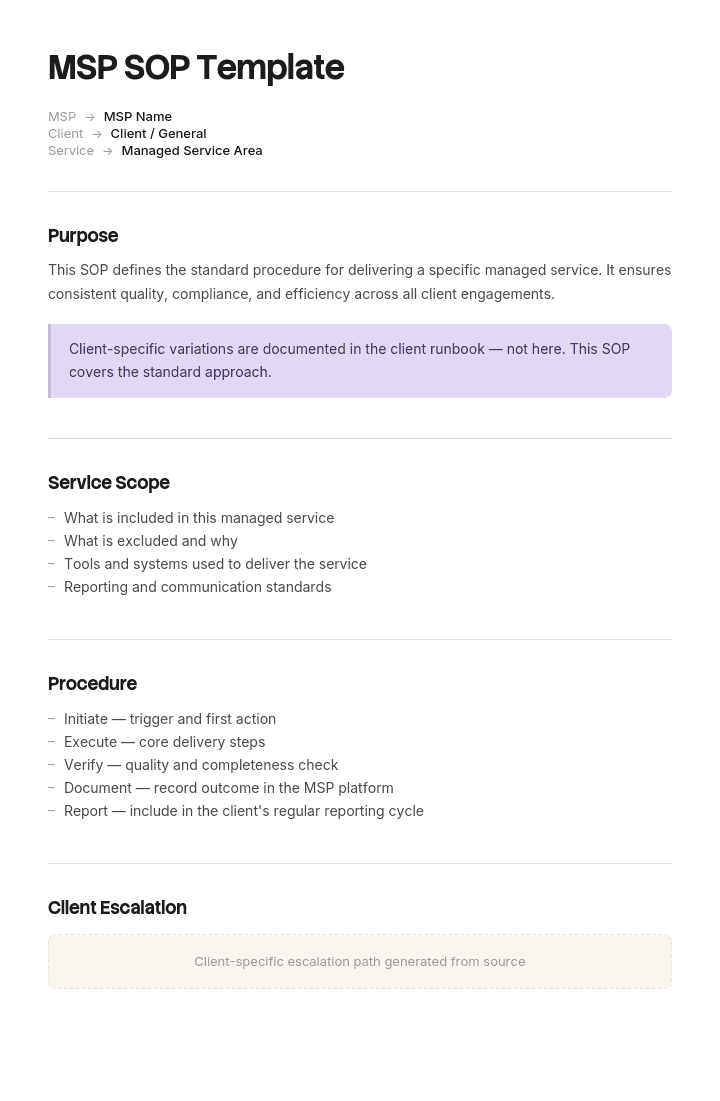
Copy from here. Fields marked with an asterisk are the MSP-specific additions.
Header. Procedure number and title, written verb first. Owner. Last verified date, meaning when somebody last ran it. Scope tag: included, billable or quote required. Billing code, where billable. Estimated engineer time. Client applicability, meaning all clients or named exceptions.
Scope edge. One or two sentences: what this covers, and the specific conditions under which it becomes billable or requires a quote.
Trigger. The request or event that starts this procedure.
Do not run this if. Conditions under which the procedure is wrong, including where a client deviation applies.
Prerequisites. Access, tooling, client authorisation, information needed. Mark every client-side item.
Steps. Numbered, one action each, with the expected result. Mark any step requiring client action with the expected response window.
Verification. How you know the outcome happened, covering any delayed effect such as replication or overnight sync.
Client communication. What you tell the client, when, and in what words. This is a section internal SOPs do not need at all.
Escalation. Who, by what route, and at what point.
Deviations. A pointer to the client deviation register rather than a list, since the register is where per-client differences live.
Copy to here. The last point matters structurally: this procedure exists once, as standard, and per-client variation belongs in the register described in our MSP documentation templates. Copying the procedure per client is how a library becomes unmaintainable.
The MSP that was giving away 285 hours a month
Barrowden Technology ran managed services for twenty six clients with fourteen engineers, on fixed-fee contracts with project work billed separately.
Gross margin on the managed contracts had slid from fifty eight percent to forty four over two years. Salary increases and tooling explained roughly a third of the drop. The rest was unaccounted for.
The managing director took one month of time entries, eighteen hundred and forty engineer hours, and reviewed a sample of two hundred against the service description line by line.
Thirty one of the two hundred described work that fell outside contract scope and had never been quoted or billed. Extrapolated across the month that is around two hundred and eighty five hours, at an internal cost of about thirty eight pounds an hour, so roughly ten thousand eight hundred pounds a month and something near a hundred and thirty thousand a year.
Almost every instance had begun inside a legitimate in-scope ticket. The largest single entry was ninety minutes rebuilding a client's Teams channel structure, logged under a ticket that started as one mailbox permission issue.
Every engineer interviewed said the same thing. They did not know where the line was, had never read the six page service description, and the runbooks said nothing about it.
The change was three fields on every runbook: the scope tag, the billing code, and the scope edge sentence. Client-side steps were marked with expected response windows and an instruction to park.
Over the following two quarters, out-of-scope work in sampled time entries fell from about fifteen percent to around four. Billable revenue outside the managed contracts rose by roughly six thousand two hundred pounds a month, which is the same work being paid for rather than refused. Managed contract margin recovered to fifty three percent.
The side effect was the one nobody predicted. Average ticket age fell, because tickets waiting on clients were now parked rather than sitting in engineers' queues looking active.
Which SOPs an MSP should write first, and why
Not the interesting ones. Write the procedures where ticket volume is high, or where the scope edge is genuinely unclear, because those are the two places a procedure pays for itself.
By volume, that is usually password and access requests, new starter and leaver processing, mailbox and file restores, endpoint rebuild and handover, printer and peripheral deployment, and VPN or remote access issues.
By scope ambiguity, it is anything involving another vendor, anything touching a system the client added without telling you, data migrations of any size, anything described by a client as a "quick change", and security incident response, where the boundary between contracted response and project remediation is both unclear and expensive.
Security incident response is worth writing early for a second reason. It is the procedure most likely to be executed under pressure by whoever is available, and the one clients most often ask to see. Pair it with a method of procedure for any planned remediation on client infrastructure.
Ten to fifteen procedures covering the volume list is a working library. Attempting forty first is why these projects stall.
How to write an MSP SOP procedure, step by step
Record someone doing the task on a real client environment, at normal pace, without interruption.
Write the steps from the recording, then delete every step that is navigation rather than action or decision. Add the expected result to each one that remains.
Now write the scope edge, and write it with someone who understands the contract rather than alone. This is the step engineers cannot do unaided and commercial people cannot do unaided, and it takes about ten minutes per procedure with both in the room.
Mark the client-side steps and give each an expected response window.
Set the scope tag and, where relevant, the billing code.
Then have someone who has not done the task follow it on a different client's environment. That last detail matters, because a procedure that only works on the estate it was written against is not a standard procedure.
What do ISO 9001 and client audits expect from an SOP?
ISO 9001 does not prescribe a template. It asks that documented information needed for the operation of processes is available, suitable, adequate and controlled, which in practice means each procedure has an identifier, a version, an owner, an approval, and a mechanism preventing use of superseded copies.
For an MSP the more frequent test is not your own certification but your clients' audits. Enterprise clients and anyone with a security framework will ask to see specific procedures, most commonly access provisioning and revocation, incident response, change management, backup and restore verification, and how you handle their credentials.
What those reviewers look for is unglamorous. Evidence the procedure is followed rather than merely written, meaning tickets referencing it and a last verified date that is recent. A named owner. And a version history showing it changes.
Two practical points. Keep the client-facing versions of security procedures separate from the internal ones, so you can share without exposing your whole library. And be careful sharing procedures containing another client's specifics, which is a real risk when the deviation detail sits in the procedure rather than in a separate register.
Nothing here is compliance advice, and requirements vary by standard, framework and client contract. Confirm the specifics with whoever holds your certification.
How MSP SOPs relate to your standard library
The SOP is one document type inside the wider structure. The distinction worth keeping clear is between the method and the estate.
The method is standard, exists once, and is yours. Procedures, report formats, build standards. A client leaving does not take these.
The estate is per client and largely theirs. Asset registers, credentials, diagrams, and the deviation register recording where their environment differs from your standard.
Procedures reference the estate rather than containing it. When a procedure needs a client-specific value, it points at the register. That single rule is what allows one procedure to serve thirty clients, and our MSP documentation templates cover the register and the wider library. Where a procedure needs a quick reference at the point of work, a job aid is often better than lengthening the SOP.
Can I get an MSP SOP template in Word or Excel?
Word or Google Docs suits the procedure itself, and the structure above pastes in directly. Lock the header block so authors cannot omit the scope tag, since that is the field most likely to be skipped by whoever is writing at speed.
Excel suits the procedure register, which is the list of every SOP with owner, scope tag, billing code, last verified date and ticket volume. Two columns on that sheet earn their keep: the proportion of procedures verified in the last six months, and the count by scope tag, which tells you at a glance how much of your library is contractually ambiguous.
PDF suits the versions you share with clients during an audit, exported from the live copy rather than maintained separately. For general SOP structure outside the MSP context, our SOP template covers it.
Generating the SOP from a recording instead of a template
The reason MSP procedure libraries stay thin is not disagreement about what to write. It is that writing a runbook means an engineer screenshotting and describing a task they could have completed four times in the same period.
Trupeer AI removes that cost. The engineer performs the task once on camera and the output is a formatted procedure with steps and screens already captured, which they check rather than write. Fifteen procedures becomes a fortnight rather than a quarter, which is the difference between a library that exists and one that is always about to.
Record it. Brand it. Translate it. Trupeer it.
The SOP creator covers the procedures themselves, and where the output is going to a client, brand kits mean it arrives looking like your firm rather than a generic export. Technical documentation keeps the procedures and the estate records together. Setup instructions are in the document template setup guide.
Frequently Asked Questions
Is there a free MSP SOP template in Word?
The structure above pastes straight into Word or Google Docs, including the scope tag and client dependency fields that general SOP templates do not have. There is no gated download and no form. Lock the header when you save it as your house template, because the scope tag is the field that gets left blank.
Is there a free MSP SOP template in Excel?
Excel is better for the register than the procedure. One row per SOP with owner, scope tag, billing code, last verified date and monthly ticket volume. Sort by ticket volume to see which procedures deserve attention, and count by scope tag to see how much of your library has never had its commercial boundary set.
Is there a free MSP SOP template in PDF?
Export from your live copy when a client asks to see a procedure during an audit, and keep the working version editable. A PDF procedure library has the same problem as any frozen document set, which is that it cannot tell the reader it is out of date.
Where can I find a general SOP template in Word?
If you want the standard structure without the MSP-specific fields, our SOP template covers it, and the IT SOP template covers technical operations including how to decide which procedures are worth writing at all.
What is a step-by-step standard operating procedure template?
It is the most common SOP format: numbered actions, one per line, each with the result you should see. It suits linear tasks with a known start and finish, which is most MSP work. It is the wrong format for diagnosis, where the next action depends on what you just found, and those are better as a decision tree.
How many SOPs does an MSP need?
Ten to fifteen covering your highest ticket volumes, plus incident response and anything where the scope edge is unclear. Beyond about thirty, maintenance becomes the constraint and you will be better off with fewer procedures kept genuinely current than a large library nobody trusts.
Who should write MSP SOPs?
An engineer who performs the task, with the scope edge agreed alongside whoever owns the contract. That pairing is unusual and it is the whole point, because a technically correct procedure with no commercial boundary is what produces the leakage in the worked example.
How do we stop engineers doing out-of-scope work?
Tell them where the line is at the moment they are standing on it, which means in the procedure rather than in a service description. Then give them an action other than a judgement call, which is raising a scope note. Most out-of-scope work is done by conscientious people who could not tell, and the fix is information rather than enforcement.


