Use this template
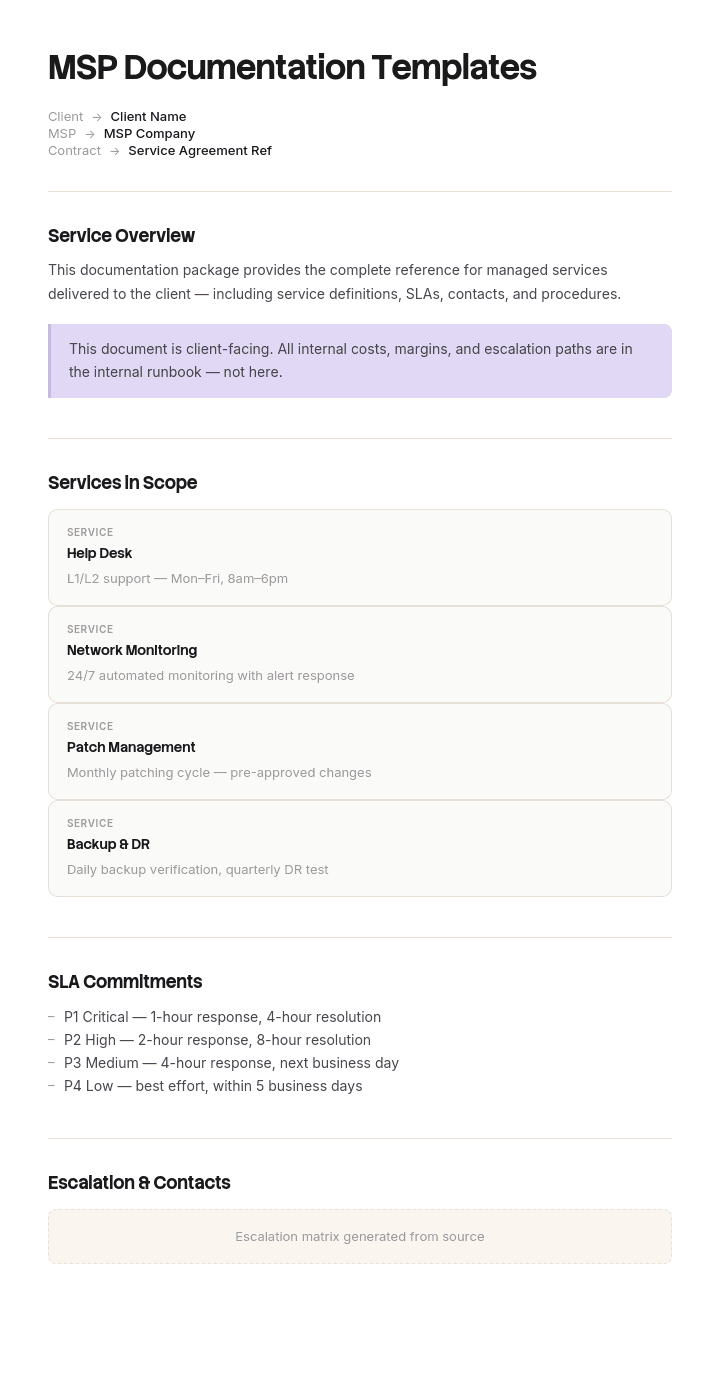
For managed service providers, documentation isn't just nice-to-have - it's the product. With Trupeer, you can save hours on writing MSP documentation by starting with free MSP documentation templates, customizing them with your brand guidelines, and turning client documentation into video walkthroughs any technician can use.
What is MSP documentation, and what makes it different?
MSP documentation is everything a managed service provider writes down in order to run other organisations' technology: asset registers, network diagrams, credentials, runbooks, escalation paths, client-specific quirks, and the reports and reviews the client sees.
Two things make it structurally different from internal IT documentation, and almost every template ignores both.
You are documenting estates you do not own. The client has a claim on some of what you write and no claim on the rest, and that line matters commercially, contractually and on the day the relationship ends.
And you are documenting the same procedure across many estates at once. An internal team writes one backup restore runbook. An MSP writes one and then has to keep it true across thirty or forty environments that differ in ways nobody fully remembers.
The second problem is the one that quietly eats an MSP's margin, so it is where this page starts. For the single-estate version, our IT documentation template covers the general case.
Why forty copies of one runbook is the real problem
Almost every MSP starts the same way. Build a good set of runbooks. Onboard a client. Copy the runbooks into that client's folder or space so the engineer working the ticket has everything in one place. Repeat.
It is a reasonable instinct and it produces a slow disaster. After four years with thirty odd clients you have well over a thousand documents, most of which are near-duplicates of each other, and no way of telling which copy is current.
The failure is not that the documents are bad. Each copy was correct when it was made. The failure is that improvements to the method now have to be applied thirty times, and they are applied five or ten times before somebody gets pulled onto something urgent.
What engineers do next is the expensive part. Once a technician has been burned twice by a runbook that did not match the environment, they stop reading runbooks. They work from first principles instead, which is slower, less consistent and completely invisible in your reporting, because the ticket still closes.
So an MSP documentation structure has to make the standard updateable in one place. Everything below follows from that.
How to customize this template in Trupeer
Step 1: Open the Templates Section
Go to the Templates section from the main navigation.

Step 2: Select and Open a Template
Click on any template you want to work with to open it.

Step 3: Expand the Template View
If needed, expand the template view to see the full layout and details clearly.

Step 4: Edit the Template
Click on Edit to start modifying the selected template.

Within the editor, you can:
Add new sections
Define or update formatting rules
Add a logo and adjust its position and related settings
Step 5: Save Your Customized Template
After making all necessary changes, click Save to store the updated template as your own.

Step 6: Preview and Fine-Tune the Template
When you want to see how your customized template looks, open the Preview.

From the preview screen, you can continue to make adjustments directly if needed, ensuring the template appears exactly as you want.
With MSP documentation templates you can:
Save hours on writing: Skip the blank page with structures built for MSP operations.
Cut MTTR: Clear documentation helps any tech support any client, fast.
Stay on-brand: Apply your logo, fonts and colors using Trupeer's brand kit.
Onboard techs faster: New technicians ramp quickly with clear, video-based docs.
Stay audit-ready: Built-in sections support SOC 2, ISO 27001 and client audits.
Reach global teams: Translate MSP docs into 65+ languages with one click.
Great MSP documentation is what makes a managed services business scalable. Use these templates to capture every client, every system, every procedure clearly and consistently.
Document the standard once, record only the deviation
One standard library. One copy of each document. Versioned, owned, and the only place the method exists.
Then, per client, a single short document recording where that client differs from standard, and nothing else. Not a copy of the runbook with edits. A list of exceptions.
The client deviation register is the whole trick. If the client uses a different backup product, that is one row. If their firewall is a different vendor, one row. If their finance director must approve any out-of-hours work, one row. Everything not on the register is standard by definition, which means an engineer reads two documents rather than searching one folder hoping the copy in it is current.
The registers stay small. In practice a mature client sits at somewhere between eight and twenty rows, and the exercise of writing one usually surfaces three or four deviations nobody had recorded anywhere.
There is a second benefit that shows up later. A short list of everything non-standard about a client is a very good sales and margin document. Deviations are where your time goes.
The client deviation register, and what goes in it
One row per deviation, five fields.
What differs. Stated against the standard, so "backup is Datto rather than our standard Veeam" rather than "uses Datto".
Which standard document it affects. The reference, so an engineer reading the runbook can be pointed here.
Why. Client preference, inherited from a previous provider, a compliance requirement, a technical constraint. This field determines whether the deviation is worth removing.
Since when, and reviewed when. A date. Deviations inherited at onboarding often persist for years because nobody revisits them.
Effort or risk. A short note on what it costs you. This is what turns the register into a commercial document as well as a technical one.
Add a header naming the client, the standard library version this register is written against, and the account owner. Review the registers quarterly. Deviations with no reason and no cost are candidates for standardising, and doing that is usually the highest-return documentation work an MSP can do.
What documents an MSP actually needs, by category
Category | Documents | Standard or per client | Who sees it |
|---|---|---|---|
Client estate | Asset register, network diagram, licence inventory, credentials | Per client, and it is the client's data | Internal, shared on request |
Procedures | Runbooks, restore procedures, onboarding and offboarding steps | Standard, with deviations noted | Internal only |
Client specifics | Deviation register, contacts, escalation, approval rules, out-of-hours terms | Per client | Internal, shared in part |
Change and incident | Method of procedure per change, incident records, post-incident reviews | Per event | Internal, shared selectively |
Client-facing | Monthly report, quarterly business review, site audit, onboarding checklist | Standard format, client data | Client |
Commercial | Service description, SLA, pricing model, contract schedules | Standard | Client |
Internal business | Employee handbook, security policy, tooling standards | Standard | Internal |
Most MSPs are strong on the first and fifth rows and weak on the third, which is exactly backwards, because the third row is what makes the second row usable.
Two of these have their own templates worth using directly. The credentials and licence inventory has a natural home in our application and credentials register, and the runbooks themselves follow the structure in our IT SOP template.
Free MSP documentation templates: the standard library to build
Copy from here. This is the minimum standard library, and it is smaller than most MSPs expect.
Onboarding pack. Discovery checklist, site audit, asset capture, credential capture, deviation register initial fill, first month review. One document, run once per client.
Runbooks, one per recurring task. Backup restore, user create and disable, mailbox restore, endpoint rebuild, password reset, VPN access, printer deployment, certificate renewal, patch exception. Start with the ten tasks that generate the most tickets rather than trying to cover everything.
Escalation and on-call. How a ticket escalates, who is called at each tier, what constitutes an emergency, and the out-of-hours authorisation rule.
Incident and change. A post-incident review format, and a method of procedure format for planned changes on client infrastructure.
Client-facing reports. Monthly report, quarterly business review, and a site audit output. Fixed format, client data filled in.
Offboarding pack. What the client receives, what you retain, in what format, by when. Written before you need it.
Deviation register template. The five fields above.
Copy to here. Ten to fifteen runbooks plus six standing documents is a working library. The instinct to write forty runbooks first is the reason most MSP documentation projects stall in month two.
Internal and external MSP documentation, and who owns which
The distinction most guides draw is internal versus client-facing, which is useful for deciding tone. The more consequential distinction is ownership, and it becomes real at offboarding.
Broadly, and this varies by contract and jurisdiction, the client's data is the client's: asset registers describing their equipment, their network topology, their credentials, their licence entitlements, their configuration. You hold it as a service provider rather than owning it.
Your method is yours: the standard runbooks, the report formats, your build standards, your pricing model, your internal procedures. A client leaving is not entitled to your runbook library.
The deviation register sits awkwardly in between, which is why it is worth naming explicitly in your contract. It describes the client's environment, which argues for theirs, but it is written against your standards, which argues for a redacted version.
Settle this in writing in the service agreement rather than at the point of exit. This page is not legal advice and the position differs by contract and jurisdiction, so have your solicitor review the documentation ownership and return clauses. Doing it once costs an hour. Doing it during an offboarding costs considerably more, as below.
The MSP with 1,360 documents and nine stale runbooks
Thornbury IT ran managed services for thirty four clients with twenty two staff, nine of them engineers. On every onboarding they copied their runbook set into the new client's space, which by year four meant roughly forty documents per client and about thirteen hundred and sixty in total.
The problem surfaced during an incident. An engineer worked a failed backup for one client following that client's restore runbook, which referenced a Veeam job naming convention. The client had moved to a different backup product fourteen months earlier. The standard runbook had been updated. The copy in that client's folder had not.
They sampled twelve clients' restore runbooks afterwards. Nine differed from the current standard, and five of those nine differences were simply stale rather than deliberate.
The measurable cost was in handling time. Average tier two handling time across the business was forty seven minutes. For the clients whose runbooks were stale it was seventy one, because the engineers on those accounts had stopped trusting the documentation and were working it out each time.
Separately, a client had left in year three and asked for their documentation. Thornbury sent the client's folder, which contained their own standard runbooks mixed with the client's asset register and credentials. Nobody had ever drawn the line. The argument over what the client was entitled to took six weeks and involved both firms' solicitors.
The rebuild took a month of one person's time. One standard library, single copy, versioned. Per client, a deviation register only. Median register length was eleven rows.
Thirteen hundred and sixty documents became forty standard documents and thirty four registers, so seventy four in total. Tier two handling time converged at forty four minutes across all accounts. And the offboarding pack was defined in the contract from then on: the client receives the asset register, credentials, diagrams and their deviation register, and Thornbury retains the standard library.
Are there free MSP documentation templates on GitHub?
Yes, and they are worth a look with realistic expectations.
What you will find are community repositories of runbook collections, PowerShell script libraries with embedded documentation, markdown-based documentation frameworks, and occasionally a full documentation structure published by an MSP as a recruitment or marketing exercise. Searching for MSP runbooks or IT documentation alongside markdown or docs-as-code will surface most of it.
What is genuinely useful in those repositories is structure and coverage: a list of the runbooks a competent MSP maintains is a good checklist against your own. What is rarely useful is the content, because runbooks are specific to a tool stack, and a restore procedure for someone else's backup product and RMM is closer to a worked example than a template.
Two cautions. Check the licence before you incorporate anything into a commercial documentation library, since permissive is common but not universal. And never adapt a repository that contains real client identifiers, network detail or anything resembling credentials, which does turn up in public repos more often than it should.
The docs-as-code approach itself, meaning markdown in version control, is a legitimate option for an MSP and it solves the single-copy problem elegantly. Its weakness is that engineers under time pressure will not commit to a repository, so adoption tends to be the limiting factor rather than tooling.
MSP documentation software and the vendor lock-in problem
The documentation platforms aimed at MSPs are good at the things that are hard to build yourself: structured asset relationships, integration with your RMM and PSA, credential handling with an audit trail, and per-client separation with permissions.
The trade is that your documentation becomes shaped by their data model, and getting it out again in a usable form is frequently worse than the sales process implies. Export usually means a set of records rather than the readable documents your engineers actually use.
Two questions are worth asking before committing. Can you export everything, including relationships and attachments, in a format that would still be usable if you never bought another product. And can you maintain a single standard document that applies across clients, or does the model force a copy per client, which reintroduces the exact problem this page is about.
That second question rules out more products than you would expect. Where a platform forces per-client copies, keep the standard library outside it, in something plainer, and use the platform for client estate data, which is what it is genuinely good at. Our knowledge base template covers structuring that standard library wherever it ends up living.
What happens to documentation when a client leaves?
Offboarding is where documentation quality becomes visible, usually to people who are already unhappy.
Define the pack in the contract. A reasonable position is that the client receives their asset register, network diagrams, licence inventory, credentials transferred securely, their deviation register, and any documentation they paid for as a deliverable. You retain your standard runbooks, report formats and internal procedures.
Set a timescale and a format in the same clause, because "documentation will be provided" is where disputes start. Thirty days and a specified format is normal.
Do the credential handover through a proper process rather than a spreadsheet, and record what was transferred and when, since that record protects both parties if something is later accessed.
Where the departure is a transfer to another provider rather than in-house, a structured handover is considerably cheaper than a document dump, and our knowledge transfer SOP covers how to run one.
Can I get MSP documentation templates as a PDF?
PDF is right for two of these and wrong for the rest.
Right for the client-facing documents: the monthly report, the quarterly review, the site audit output. Those are snapshots of a moment and freezing them is correct, and they should carry your branding.
Wrong for runbooks, the deviation register and the asset register, all of which change and all of which need to be searchable. A PDF runbook library is a slower version of the problem in the worked example above, because a PDF cannot tell a reader it is out of date.
For the standard library, use whatever your engineers will actually search under pressure, and keep one copy. For client deliverables, generate the PDF from that source rather than maintaining a separate one.
How to keep the standard library current across every client
The whole structure depends on the standard library being genuinely maintained, and the reason it usually is not is that updating a runbook means somebody screenshotting, cropping and rewriting steps for a tool they already know how to use.
Trupeer AI removes most of that. An engineer performs the task once on camera and the output is a formatted runbook with the steps and screens already in place, ready to review rather than write. A ten runbook refresh becomes a day rather than a quarter.
Record it. Brand it. Translate it. Trupeer it.
For client-facing material the branding matters commercially, and brand kits mean the report and the guide a client receives look like they came from you rather than from a template. Documentation and technical documentation keep the standard library and the client estate records together, and the SOP creator covers the runbooks themselves. Setup instructions are in the document template setup guide.
Frequently Asked Questions
Are there free MSP documentation templates in PDF?
The structures on this page are free to copy, and the sensible split is to keep runbooks and registers in something searchable while exporting client-facing reports to PDF. There is no gated download and no form. If you want a PDF of the standard library for reference, generate it from your live copy rather than maintaining it separately.
What are the best free MSP documentation templates?
The best set is the smallest one you will keep current: ten to fifteen runbooks covering your highest ticket volumes, an onboarding pack, an escalation document, a deviation register format, and three client-facing report formats. Judge any template library by whether it separates the standard from the per-client exception, because that is the part that determines whether it survives thirty clients.
Where should an MSP keep its documentation?
Client estate data belongs in a platform that integrates with your RMM and PSA and handles credentials properly. The standard library belongs wherever engineers will search it fastest, which may be the same platform or may be something plainer. The decisive question is whether the platform lets you maintain one document that applies across all clients.
How much documentation should a new client get at onboarding?
None of your standard library, and all of their own estate data. In practice the onboarding deliverable a client values is the asset register, the network diagram and a plain summary of what you found and what you recommend. Sending runbooks at onboarding is a common instinct and it gives away your method for no commercial return.
Does the client own the documentation we write about their systems?
Their data usually yes, your method usually no, and the boundary should be written into the service agreement rather than argued at exit. Asset registers, diagrams, credentials and configuration describe their property. Your standard runbooks and report formats are your intellectual property. Get the clause reviewed by your own solicitor, because the position varies by contract and jurisdiction.
How do we stop engineers skipping documentation?
Make the standard library trustworthy first. Engineers skip documentation because it has been wrong before, not because they dislike reading. Fix the single-copy problem, get handling times to converge, and the behaviour changes on its own. Requiring documentation updates at ticket closure only works once the library is worth updating.


