4.8/5
أنشئ توثيقًا مجانيًا باستخدام الذكاء الاصطناعي
حوّل تسجيلات الشاشة إلى توثيق احترافي
أنشئ الوثائق مجانًا

تطبيق Trupeer للوثائق يُحدث ثورة في طريقة إعداد فرق العمل لوثائق العمليات، عبر تحويل تسجيلات الشاشة إلى أدلة مكتوبة شاملة تلقائيًا. بخلاف أدوات التوثيق التقليدية التي تتطلب كتابة وتنسيقًا يدويًا، تعتمد هذه المنصة المدعومة بالذكاء الاصطناعي على التقاط سير عملك عبر تسجيل الشاشة ثم توليد وثائق احترافية خلال دقائق. تتمثل المشكلة الأساسية التي تواجه معظم الفرق في أن إنشاء الوثائق يستغرق وقتًا طويلًا. ما يميز تطبيق التوثيق هذا هو نهجه المزدوج في المخرجات. عند تسجيل سير عملك أو رفع تسجيلات موجودة، لا يقوم الذكاء الاصطناعي بإنشاء فيديو فقط. بل يقوم في الوقت نفسه بتوليد وثائق مكتوبة تفصيلية تلتقط كل خطوة ونقطة قرار وتفصيل للعملية. وهذا يعني أنك تحصل على توثيق تقني شامل دون استثمار الوقت التقليدي في كتابة كل شيء من الصفر.
حالة استخدام واقعية تستحق التوضيح. لدى مدير العمليات في شركة SaaS تضم 60 موظفًا تراكم مهام: تحتاج عملية تعويض المصروفات الجديدة إلى وثيقة مكتوبة، وتحتاج جولة تدقيق الأمان المحدثة إلى وثيقة، وتسلسل استقبال العملاء يحتاج إلى وثيقة، وإعداد تقنية المعلومات للموظف الجديد يحتاج إلى وثيقة. أربع مشاريع توثيق، كل واحد مُقدّر بـ 4-6 ساعات من وقت الكتابة. لذا تُجدول 16-24 ساعة من العمل تحت عبارة "عندما تتوفر فترة بعد الظهر"، وهو أمر لا يحدث أبدًا. يؤدي مسار العمل المعتمد على التسجيل إلى إخراج هذه المهام من التقويم. سجّل سير العمل مرة واحدة أثناء تنفيذ العمل الفعلي. يقوم الذكاء الاصطناعي بتوليد الوثيقة المكتوبة مع لقطات شاشة مضمّنة. راجع وأرسل خلال 30 دقيقة. تُنجز أربع مشاريع توثيق في فترة بعد ظهر واحدة بدلًا من أربع جلسات "متى ما تيسر" التي لا تحدث.
استخدم Trupeer كبرنامج لتوثيق العمليات
يوثق توثيق العمليات كيف يتم إنجاز العمل فعليًا، والخطوات القابلة للتكرار خلف أي مهمة، بحيث يستطيع أي شخص اتباعها دون الاعتماد على المعرفة المتوارثة. الجزء الصعب غالبًا ليس معرفة العملية. بل هو كتابتها كاملة. يزيل Trupeer هذه الخطوة. سجّل العملية مرة واحدة أثناء تنفيذها، وسيقوم برنامج التوثيق بتوليد مستند كامل ومُنسّق، مع كتابة كل خطوة والتقاط لقطة شاشة تلقائيًا. وهذا يجعل من العملي توثيق سير عمل البرامج، والعمليات الداخلية، والإجراءات التقنية التي غالبًا لا يتم تدوينها لأن القيام بذلك يدويًا يستغرق وقتًا طويلًا جدًا.
عندما تتغير العملية، سجّل فقط الجزء الذي تغيّر وأعد توليد الوثيقة، حتى يبقى توثيق العمليات لديك محدثًا بدلًا من أن يصبح قديمًا. يمكن تصدير كل مستند بصيغ متعددة، مع تطبيق مجموعة العلامة التجارية الخاصة بك، وترجمته إلى 65+ لغة. بالنسبة لوثائق المهام على مستوى الخطوة، قم بإقرانه مع Step-by-Step Guide Generator أو Process Generator.
كيف يعمل تطبيق التوثيق؟
يُبسّط تطبيق Trupeer عملية إنشاء الوثائق بالكامل عبر سير عمل بديهي يتطلب خبرة تقنية محدودة جدًا. تم تصميم النظام لالتقاط المحتوى ومعالجته وإخراج وثائق احترافية عبر بضع نقرات فقط.
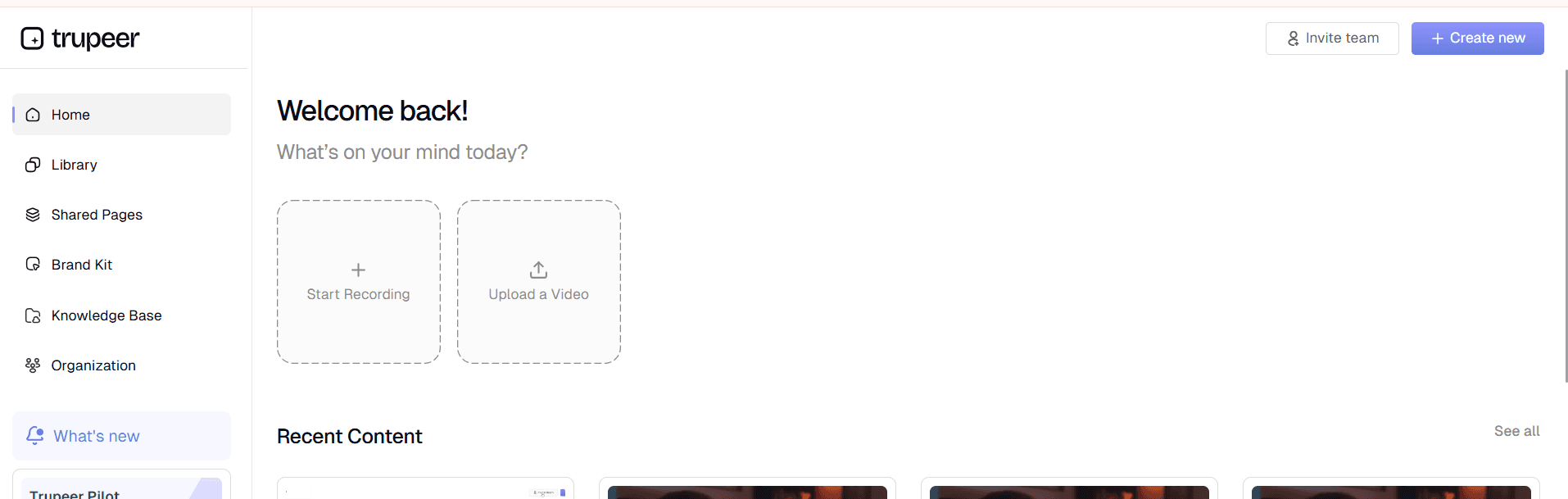
الخطوة 1: سجّل أو ارفع محتواك
ابدأ باستخدام مسجل الشاشة المدمج في Trupeer لالتقاط سير عملك في الوقت الفعلي، أو ارفع تسجيلات شاشة موجودة سبق أن أنشأتها. تدعم المنصة تنسيقات فيديو متعددة وتتعامل بسلاسة مع التسجيل المباشر والمحتوى المُسجل مسبقًا.
الخطوة 2: معالجة الذكاء الاصطناعي والتحسين
بمجرد وصول تسجيلك إلى النظام، يبدأ الذكاء الاصطناعي فورًا في معالجة المحتوى. يقوم تلقائيًا بإزالة ضوضاء الخلفية، وإلغاء الكلمات الحشوية، وإضافة تأثيرات تكبير ذكية لإبراز المناطق المهمة. يحدث تحرير فيديو الذكاء الاصطناعي في الخلفية بينما تتم عملية توليد الوثائق.

الخطوة 3: توليد الوثائق تلقائيًا
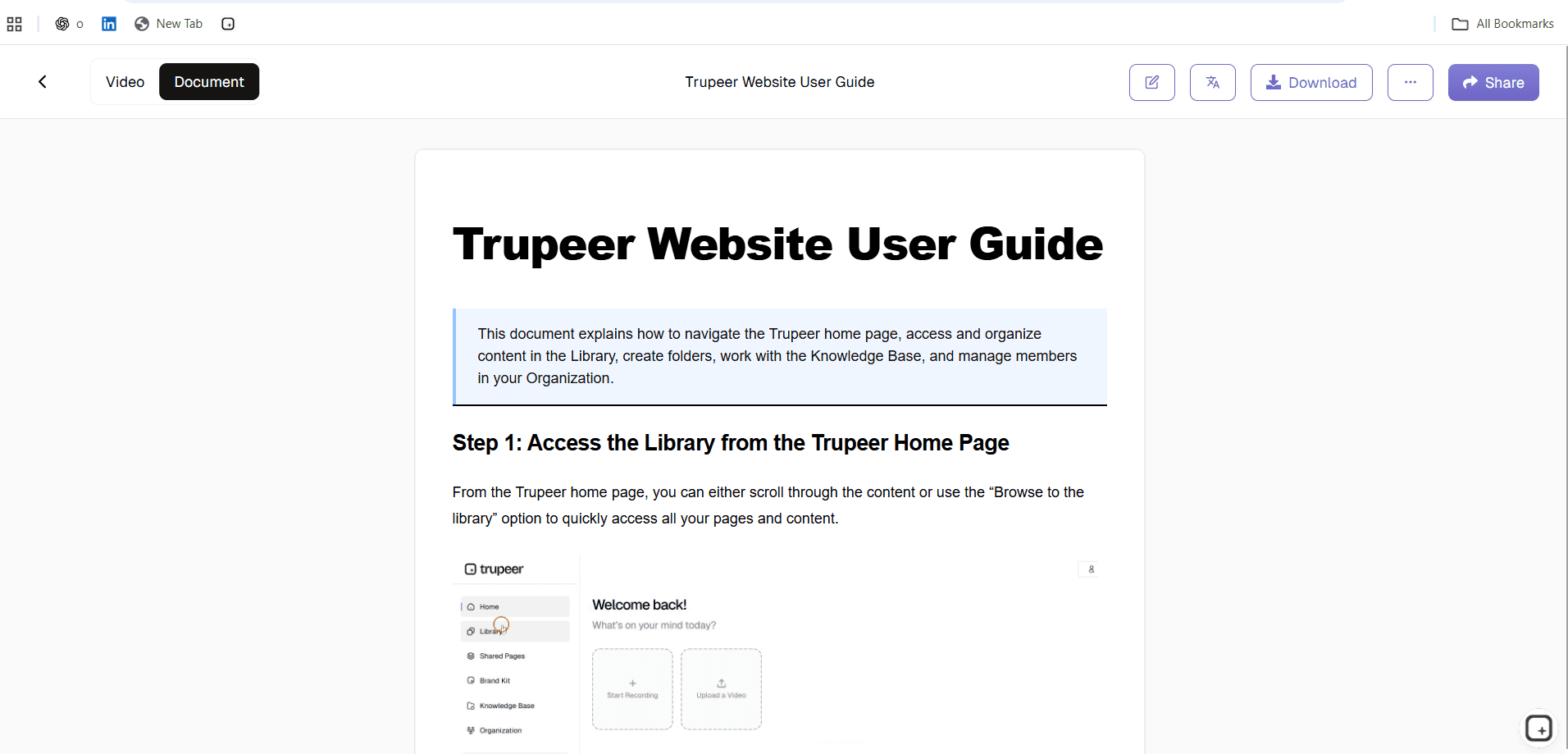
يحلل الذكاء الاصطناعي تسجيلك إطارًا بإطار، ويحدد الإجراءات الرئيسية وعناصر الواجهة وخطوات العملية. ثم يقوم بتوليد وثائق مكتوبة شاملة تعكس سير عملك المسجل، كاملة مع تعليمات خطوة بخطوة وتفسيرات سياقية.
الخطوة 4: تطبيق القوالب والتنسيق
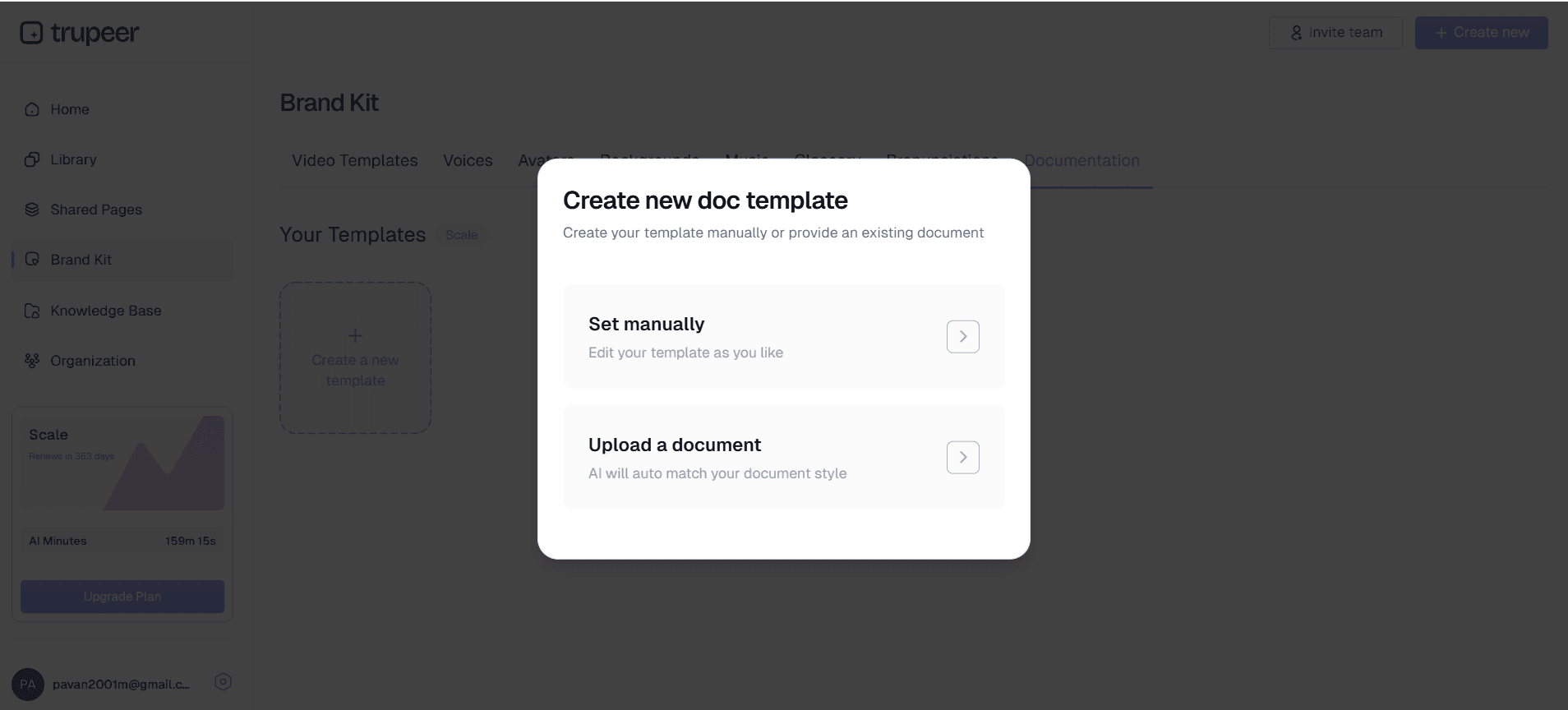
طبّق قوالب التوثيق التي حفظتها لضمان تنسيق متسق عبر جميع أدلتك. تحافظ هذه القوالب القابلة للتخصيص على أسلوبك المفضل وبنيتك وعناصر العلامة التجارية، لتنتج وثائق تبدو احترافية وتتماشى مع معايير مؤسستك. إذا كانت الوثائق تتغير كثيرًا، فإن قالب وثائق المشروع سهل الحفاظ عليه محدثًا لأنه مبني على التسجيل وليس مكتوبًا يدويًا.
الخطوة 5: المراجعة والتخصيص
راجع الوثائق التي تم توليدها وأجرِ أي تعديلات ضرورية. تتيح المنصة لك تعديل المحتوى وإعادة تنظيم الأقسام وإضافة سياق إضافي مع الحفاظ على الأساس الذي تم توليده بواسطة الذكاء الاصطناعي. يمكنك أيضًا تطبيق مجموعات العلامة التجارية الخاصة بك لضمان الاتساق البصري عبر جميع الوثائق.
الميزات والقدرات الأساسية
يتضمن تطبيق التوثيق ميزات قوية مصممة لتبسيط كل جوانب عملية إنشاء الوثائق، بدءًا من التسجيل الأولي وحتى التوزيع النهائي.
توليد محتوى مدعوم بالذكاء الاصطناعي: تقوم أدوات الذكاء الاصطناعي لتوثيق الفيديو في المنصة بتحويل تسجيلات الشاشة تلقائيًا إلى أدلة مكتوبة تفصيلية. وهذا يلغي الحاجة إلى النسخ اليدوي ويضمن عدم تفويت أي خطوة مهمة في عملية التوثيق لديك. ماذا يعني "تحويل تلقائي" بشكل ملموس. يقوم الذكاء الاصطناعي بمراقبة تسلسل النقرات في تسجيلك. انقر إلى الإعدادات، واختر الفوترة، ثم اضغط على تصدير سجل الفواتير لتصبح الوثيقة المكتوبة: "1. افتح الإعدادات. 2. اختر الفوترة. 3. انقر على تصدير سجل الفواتير." مرقمة. لقطات الشاشة مضمّنة في كل خطوة. إزالة الكلمات الحشوية من السرد. إجمالي وقت الكتابة لكل وثيقة: صفر. تستخدم معظم الفرق المسودة المُولدة تلقائيًا كما هي للوثائق الداخلية وتقوم بمراجعة مدتها 5-10 دقائق للمحتوى الموجه للعملاء.
قوالب توثيق قابلة للتخصيص: احفظ القوالب وأعد استخدامها مع التنسيق والأسلوب والبنية التي تفضلها. تضمن هذه الميزة الاتساق عبر جميع الوثائق مع تقليل وقت الإعداد للمشاريع الجديدة بشكل كبير. يمكن أن تتضمن القوالب العلامة التجارية للشركة، وتخطيطات أقسام محددة، وقواعد تنسيق موحدة. تتضاعف الفائدة عبر مكتبة الوثائق. قم بإعداد القالب مرة واحدة مع بنية العناوين، ونمط الخطوات، ونمط تعليق لقطة الشاشة، وأسلوب التنبيه للتحذيرات. بعد ذلك، تتبع كل وثيقة يتم توليدها نفس القالب تلقائيًا. لذا تبدو الوثائق الـ 20 التي تُرسلها الفرق خلال العام وكأنها صدرت من نفس الناشر. لا من 20 مساهمًا فرديًا مختلفًا مع خيارات تنسيق غير متطابقة. الحيلة التي تفوتها معظم الفرق: إعداد القوالب قبل توليد الدفعة الأولى من الوثائق. إعادة تهيئة الوثائق الموجودة لقالب جديد تكلف وقتًا حقيقيًا.
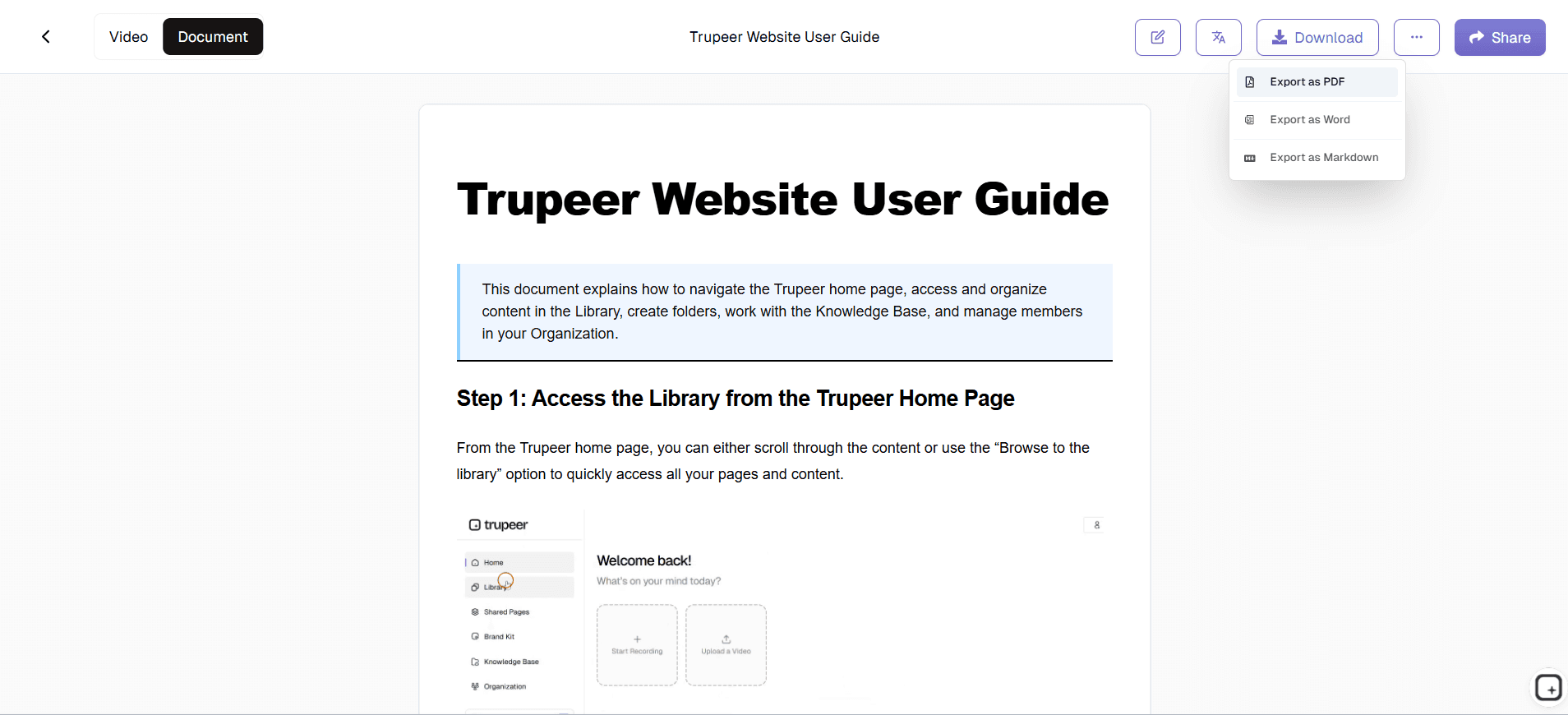
خيارات تصدير متعددة الصيغ: قم بتصدير وثائقك بصيغ مختلفة لتلبية احتياجات التوزيع المتنوعة. سواء كنت تحتاج إلى أدلة PDF للوصول دون اتصال، أو صيغ HTML مناسبة للويب، أو محتوى جاهز للتكامل في قاعدة المعرفة، فإن المنصة تدعم متطلبات إخراج متعددة. صيغ التصدير التي يجب توضيحها. يتم تنزيل الفيديو كملف MP4 حقيقي. يتم تنزيل الوثيقة المكتوبة كـ PDF أو Word (DOCX). رابط الصفحة المشتركة يجمع الصيغتين في عنوان URL واحد بعلامة تجارية مع إعدادات الرؤية (عام، للمؤسسة فقط، نطاقات محددة، دعوة فقط). يعمل كلا التنزيلين خارج Trupeer. لذا إذا قامت الشركة لاحقًا بترحيل مكتبة الوثائق إلى منصة مختلفة، ستنتقل الملفات معها. لا يوجد قفل مقنع على أنه ميزة.
تكامل مجموعة العلامة التجارية: طبّق هوية العلامة التجارية بشكل متسق عبر جميع الوثائق باستخدام ألوان مخصصة وشعارات وعناصر تنسيق. تضمن مجموعات العلامة التجارية الخاصة بك أن تعكس كل وثيقة الهوية البصرية لمؤسستك ومعاييرها الاحترافية. بالنسبة للوثائق الموجهة للعملاء، يهم الاتساق في العلامة التجارية أكثر مما تدركه الفرق الداخلية. وثيقة بدون خط ثابت وألوان وشرائح مقدمة متسقة تشير إلى أنها "تم تجميعها بسرعة". وثيقة مع علامة تجارية مناسبة تشير إلى أن "هذا الفريق يأخذ التوثيق على محمل الجد". تطبق مجموعة العلامة التجارية كل هذه العناصر تلقائيًا عبر كل صفحة. حتى عندما يساهم ستة أعضاء مختلفون في الفريق في التسجيلات الأساسية، يبدو الناتج متسقًا تحريرياً.
ترجمة الفيديو والتوطين: وسّع نطاق وصول وثائقك عبر قدرات ترجمة الفيديو التلقائية. تكون هذه الميزة مفيدة بشكل خاص للفرق العالمية أو المؤسسات التي تخدم أسواقًا دولية، لضمان إمكانية الوصول إلى وثائقك عبر حواجز اللغة. النسخة العملية. أنشئ الوثائق أولًا باللغة الإنجليزية. ثم ترجم إلى الإسبانية أو الألمانية أو البرتغالية أو اليابانية، أو أي مجموعة من 65+ لغة مدعومة بنقرة واحدة. تنطبق الترجمة على التعليق الصوتي للفيديو، والمحتوى المكتوب، والنص الظاهر على الشاشة في لقطات الشاشة، والترجمات النصية، وكل ذلك في مهمة واحدة. لذا يحصل عميل مؤسسي عالمي يدير العمليات عبر أربعة أسواق على نفس الوثيقة بلغات أربع من مصدر واحد. ومن المهم أن نكون صريحين بشأن الحدود: أحيانًا تحتاج المفردات القانونية المتخصصة جدًا إلى مُراجع يتقن اللغة المحلية. بالنسبة لمعظم محتوى المنتجات والإجراءات، يتم إرسال ترجمة الذكاء الاصطناعي كما هي.
التكامل مع سير العمل الحالي: تتصل المنصة بسلاسة مع أنظمة قواعد المعرفة الشائعة وأدوات التعاون ومنصات إدارة المحتوى. تعني قدرة التكامل هذه أن الوثائق التي تم توليدها يمكن أن تتدفق مباشرة إلى الأنظمة الحالية دون استيراد يدوي أو إعادة تنسيق. كيف يبدو التكامل فعليًا في الممارسة. يقوم رابط الصفحة المشتركة بتضمين المحتوى داخل Notion وConfluence وSharePoint وGitBook وDocument360، أو أي منصة تقبل تضمين iframe. يتم لصق تنزيلات MP4 وPDF في مقالات Zendesk Help Center وIntercom Articles أو أي أداة ويكي. لذا يتم إنتاج الوثيقة في Trupeer واستضافتها في أي مكان يعمل فيه سير العمل الحالي للفريق. لا حاجة لإجراء نقاش "أخرج أدواتك الحالية وهاجر كل شيء".
لماذا يجب أن تستخدم تطبيق التوثيق؟
يؤدي اختيار تطبيق Trupeer للوثائق إلى فوائد قابلة للقياس تحوّل طريقة تعامل مؤسستك مع توثيق العمليات وإدارة المعرفة.
توفير الوقت: قد يستغرق إنشاء الوثائق التقليدي ساعات أو أيامًا لكل دليل. مع هذه المنصة، يمكنك توليد توثيق شامل خلال دقائق. ما عليك سوى تسجيل سير عملك مرة واحدة، ويتولى الذكاء الاصطناعي الأعمال الثقيلة لإنشاء كل من محتوى الفيديو والأدلة المكتوبة، مما يقلل وقت التوثيق حتى بنسبة 90%.
تحسين جودة التوثيق: يلتقط التوثيق المُولّد بالذكاء الاصطناعي تفاصيل غالبًا ما ينسى البشر تضمينها أو يفوتونها. يحدد النظام كل نقرة وخطوة تنقل ونقطة قرار، مما ينتج أدلة عمليات أكثر شمولًا ودقة. تقلل هذه المقاربة الشاملة من تذاكر الدعم ووقت التدريب لأن المستخدمين يحصلون على معلومات كاملة.
زيادة إنتاجية الفريق: عندما يحصل الفرق على توثيق محدث ومفصل، يقضون وقتًا أقل في طرح الأسئلة ووقتًا أكبر في تنفيذ المهام. يتيح تطبيق التوثيق لخبراء المجال مشاركة المعرفة بكفاءة دون الحاجة إلى شرح نفس العمليات مرارًا، مما يحررهم للتركيز على الأنشطة الأعلى قيمة.
الاتساق عبر التوثيق: غالبًا ما يختلف التوثيق اليدوي في الجودة والتنسيق والشمول اعتمادًا على من يقوم بإنشائه. يضمن الذكاء الاصطناعي بنية متسقة وشمولًا عبر جميع الوثائق، بينما تحافظ القوالب على الاتساق البصري والتنسيقي. يجعل هذا التوحيد التوثيق أسهل في التصفح وأكثر احترافية في المظهر.
إدارة معرفة قابلة للتوسع: مع نمو مؤسستك، يصبح الحفاظ على توثيق محدث أكثر صعوبة. تتوسع هذه المنصة مع احتياجاتك، مما يتيح لك تحديث العمليات بسرعة عبر إعادة تسجيل سير العمل الذي تغيّر. يتكيف مُولّد التوثيق التقني مع العمليات والأنظمة الجديدة دون الحاجة إلى تدريب أو إعداد إضافي.
حل فعّال من حيث التكلفة: مقارنة بتوظيف كتّاب تقنيين متخصصين أو تخصيص موارد داخلية لإنشاء توثيق يدوي، توفر المنصة وفورات كبيرة في التكاليف. تمنحك مكاسب الكفاءة وجودة التوثيق المحسنة عائد استثمار يتضاعف مع الوقت كلما نمت مكتبة الوثائق لديك.
الخيط المشترك بين هذه الفئات: يجب أن يتم عمل التوثيق، لكنه ليس الوظيفة الأساسية لأي شخص. يريد مدير المنتج بناء المنتجات. يريد مدير العمليات تشغيل العمليات. يريد مسؤول تقنية المعلومات التعامل مع البنية التحتية. يريد قائد نجاح العملاء دعم العملاء. يتم تأجيل إنشاء الوثائق لأنه يتنافس مع كل أولوية أخرى، لكنه لا يختفي كحاجة. يؤدي التسجيل أثناء تنفيذ الإجراء الفعلي إلى دمج مرحلة الكتابة والتنسيق في خطوة معالجة الذكاء الاصطناعي. لذا تصبح فوضى الموعد النهائي التي تحدد إنتاج معظم الوثائق أمرًا روتينيًا. معظم الفرق التي تتبنى هذا النمط تُصدر توثيقًا أكثر في الشهر الأول باستخدام Trupeer مقارنة بما أرسلته في الربع السابق.
من يمكنه استخدام تطبيق التوثيق؟
يخدم تطبيق Trupeer مجموعات مستخدمين متنوعة عبر مختلف الصناعات، يستفيد كل منها من تبسيط إنشاء الوثائق بطرق فريدة. إذا كانت الوثائق تتغير كثيرًا، فإن برنامج عرض التطبيق سهل الحفاظ عليه محدثًا لأنه مبني على التسجيل وليس مكتوبًا يدويًا.
صنّاع المحتوى والمسوقون الرقميون: أنشئ أدلة شاملة للعملاء، ووثّق العمليات الإبداعية، وابنِ قواعد معرفة لعمليات إنشاء المحتوى. تتفوق المنصة في التقاط عمليات التصميم وإجراءات إدارة المحتوى وخطوات تنفيذ الحملات. يمكن لصنّاع المحتوى توليد فيديوهات عروض المنتجات إلى جانب التوثيق المكتوب لتسليمات العملاء.
فرق التسويق ومسوقو المنتجات: وثّق عمليات الحملات، وأنشئ إجراءات إطلاق المنتجات، واحتفظ بدفاتر تشغيل التسويق. يمكن للفرق تسجيل سير عمل البرامج لأدوات مثل منصات التحليلات وأنظمة التسويق عبر البريد الإلكتروني وأدوات إدارة وسائل التواصل الاجتماعي. تتضمن تطبيقات مسجل الشاشة بالذكاء الاصطناعي إنشاء عمليات التحليل التنافسي وأدلة تنفيذ الحملات.
المعلمون والمدربون في الشركات: حوّل العروض التوضيحية المباشرة إلى مواد تدريب قابلة لإعادة الاستخدام تتضمن محتوى فيديو وأدلة مكتوبة. يمكن للمؤسسات التعليمية إنشاء توثيق منهج دراسي شامل، بينما يمكن للمدربين في الشركات تطوير Training Manual Generator مع مواد مكتوبة مرافقة لنقل المعرفة بشكل متسق.
فرق المنتجات ومطورو البرمجيات: وثّق العمليات التقنية، وأنشئ أدلة المستخدم، واحتفظ بسير عمل التطوير. يمكن لفرق المنتجات تسجيل عروض الميزات وتوليد توثيق المستخدم في الوقت نفسه، بينما يمكن للمطورين إنشاء أدلة النشر والإجراءات التقنية. تتفوق المنصة في التقاط سير عمل تقني معقد يتطلب توثيقًا تفصيليًا.
فرق المبيعات ومديرو نجاح العملاء: أنشئ نصوص عروض المنتجات، ووثّق عمليات استقبال العملاء، واحتفظ بمواد محرر فيديو الذكاء الاصطناعي. يمكن لمحترفي المبيعات تسجيل عروض المنتجات الناجحة وتحويلها إلى مواد عرض قابلة لإعادة الاستخدام، بينما يمكن لفرق نجاح العملاء توثيق عمليات الدعم وإنشاء موارد ذاتية الخدمة.
مالكو المشاريع الصغيرة ومديرو العمليات: وثّق عمليات الأعمال، وأنشئ مواد تدريب الموظفين، واحتفظ بإجراءات التشغيل. تستفيد الشركات الصغيرة بشكل خاص من كفاءة المنصة، إذ يمكنها إنشاء توثيق احترافي دون موارد مخصصة. يساعد النظام في الحفاظ على استمرارية الأعمال عبر ضمان توثيق العمليات الحرجة بشكل صحيح وسهل الوصول.
أقسام تقنية المعلومات ومسؤولو الأنظمة: أنشئ توثيقًا تقنيًا لإعدادات الأنظمة وتثبيتات البرامج وإجراءات حل المشكلات. تشمل قدرات برنامج توثيق تقنية المعلومات التقاط سير عمل تقني معقد يتطلب توثيقًا خطوة بخطوة بدقة لأغراض الامتثال ونقل المعرفة.
أفضل الممارسات لاستخدام تطبيق التوثيق
عظّم فعالية إنشاء وثائقك عبر اتباع استراتيجيات مجربة تعزز كلًا من عملية التسجيل وجودة المخرجات النهائية.
خطط لجلسات التسجيل: قبل البدء في التسجيل، حدّد العملية التي ستقوم بتوثيقها واجمع أي مواد ضرورية أو بيانات اعتماد تسجيل الدخول. يؤدي التخطيط الواضح إلى تسجيلات أكثر سلاسة وتوثيق أكثر شمولًا. ضع في اعتبارك إعداد نص قصير أو قائمة تحقق لضمان تغطية جميع الخطوات ونقاط القرار المهمة أثناء عملية التسجيل.
حسّن بيئة التسجيل: تأكد من أن شاشتك نظيفة ومنظمة قبل التسجيل، وأغلق التطبيقات غير الضرورية، وحدد مستويات تكبير مناسبة لسهولة الرؤية. تؤثر ممارسات التسجيل الجيدة مباشرة على جودة الوثائق المُولدة. استخدم إشارات مرجعية متسقة للمتصفح وتنظيم سطح المكتب لإنشاء تسجيلات تبدو احترافية وتتحول إلى توثيق مُحكم.
استفد من قوالب التوثيق: طوّر واحفظ قوالب تتوافق مع معايير التوثيق لدى مؤسستك ومتطلباتك البصرية. تضمن القوالب الاتساق عبر جميع الوثائق المُولدة وتقلل وقت المعالجة بعد التوليد بشكل كبير. جرّب هياكل قوالب مختلفة للعثور على التنسيقات الأنسب لأنواع التوثيق التي تحتاجها واحتياجات المستخدمين.
استخدم الميزات المتقدمة: استكشف قدرات مسجل الشاشة بالذكاء الاصطناعي في المنصة لاحتياجات التوثيق الدولي، واستفد من ميزات مجموعة العلامة التجارية للحفاظ على الاتساق البصري. يمكن لهذه الميزات المتقدمة أن توسع نطاق وصول وثائقك ومظهرها الاحترافي بشكل كبير دون استثمار وقت إضافي.
تحديثات المحتوى بشكل منتظم: أنشئ جدولًا لمراجعة الوثائق وتحديثها كلما تغيرت العمليات. تجعل المنصة التحديثات فعّالة لأنك تستطيع ببساطة إعادة تسجيل الأجزاء التي تغيّرت بدلًا من إعادة كتابة المستندات كاملة. يضمن هذا النهج أن يبقى توثيقك محدثًا وقيمًا للمستخدمين على مدار الوقت.
هيّئ بنية الوثيقة قبل التسجيل. الحيلة التي تحوّل وثائق الذكاء الاصطناعي من مسودة غير مكتملة إلى محتوى جاهز للإرسال: حدّد أقسام الوثيقة أولًا، ثم سجّل سير عمل واحد لكل قسم. ينظم الذكاء الاصطناعي المحتوى بشكل نظيف عندما يغطي كل تسجيل مصدر موضوعًا واحدًا منطقيًا. يؤدي تسجيل جولة ممتدة لمدة 60 دقيقة وطلب قصها إلى إخراج فوضوي. أما تسجيل 8 جولات منفصلة لمدة 5 دقائق، كل واحدة تغطي قسمًا واحدًا، فينتج بنية نظيفة. جهد التسجيل متقارب تقريبًا. لكن جودة المخرجات تختلف بشكل كبير.
قم بإعداد القاموس المخصص في اليوم الأول. يستخدم التوثيق مصطلحات محددة بشكل متسق. أسماء المنتجات. أسماء الميزات. الاختصارات الداخلية. مصطلحات الصناعة. إذا كانت ميزة منتجك تُسمى "Pulse" داخليًا، يحتاج الذكاء الاصطناعي إلى معرفة أن "pulse" في النسخ تشير إلى الميزة وليس المفهوم الطبي. يتولى القاموس المخصص ذلك. أضف جميع أسماء المنتجات ومصطلحات الصناعة الأكثر استخدامًا قبل توليد الدفعة الأولى. القيام بذلك مسبقًا يتفوق على البحث والاستبدال لأخطاء المصطلحات عبر 30 وثيقة منشورة لاحقًا.
أين يناسب تطبيق Trupeer بجانب Scribe وTango وNotion وأدوات التوثيق التقليدية
مجال أدوات التوثيق يتضمن عدة مجموعات متقاربة تستحق الفهم. يقوم Scribe وTango بالتقاط النقرات وتوليد أدلة مكتوبة خطوة بخطوة تلقائيًا. إنها سريعة وخفيفة، وتؤدي مسار النقر إلى وثيقة مكتوبة بشكل جيد. لكن المفاجأة: لا تقومان بتوليد فيديو مطابق، لذلك تنتهي الفرق التي تحتاج إلى كلا الصيغتين باستخدام أداة ثانية للفيديو. تقع Guidde أقرب إلى Trupeer: كلاهما ينتج فيديو ووثائق مكتوبة من تسجيل واحد. وتعود الفروقات إلى طريقة التعامل مع مجموعة العلامة التجارية، وإدارة الترجمة، وخيارات تجربة المحرر المحددة.
مجموعة مختلفة: منصات استضافة التوثيق مثل Notion وConfluence وDocument360 وGitBook وReadMe. تستضيف هذه المنصات الوثائق وتوفر بنية (جدول محتويات، بحث، أذونات) لكنها لا تساعد في إنتاج المحتوى. يتكامل Trupeer معها: أنشئ الوثيقة في Trupeer، ثم الصق الدليل المكتوب في Notion أو Document360، وضمّن رابط الصفحة المشتركة كمشغل فيديو مضمّن. المجموعة الثالثة: منصات كتابة تقنية قوية مثل MadCap Flare وAdobe FrameMaker وAuthor-it. تم تصميمها للتوثيق التقني طويل الشكل مع نشر من مصدر واحد والتحكم العميق بالتنسيق ومحتوى شرطي لنسخ المنتج المختلفة. غالبًا ما تمتلك معظم الفرق التي تستخدم هذه منصات أقسام كتابة تقنية مخصصة. لا يقوم Trupeer باستبدالها في حالة الاستخدام هذه.
التوصيف الصريح لـ Trupeer: إنه طبقة الإنتاج للفرق التي لا تمتلك وظيفة كتابة تقنية مخصصة لكنها تحتاج إلى إصدار توثيق يبدو احترافيًا بشكل منتظم. فيديو يتم تحريره تلقائيًا، ووثيقة مكتوبة مع لقطات شاشة مضمّنة، ومجموعة العلامة التجارية، وترجمة إلى 65+ لغة، وتحديثات مبنية على إعادة التسجيل—كل ذلك في سير عمل واحد. بالنسبة للفرق التي تستخدم بالفعل Notion أو Confluence وتريد أدوات أفضل لإنتاج الوثائق التي تعيش هناك، يتكامل Trupeer بشكل طبيعي. أما للفرق التي تحتاج نشرًا من مصدر واحد بمستوى FrameMaker عبر عدة نسخ منتج مع محتوى شرطي، فإن Trupeer ليس الأداة المناسبة.
استكشف أدوات ذات صلة
لماذا تختار تطبيق التوثيق من Trupeer
إنشاء التوثيق الفوري
حوّل تسجيلات الشاشة إلى أدلة مكتوبة شاملة تلقائيًا باستخدام الذكاء الاصطناعي
قوالب قابلة للتخصيص
احفظ القوالب بالتنسيق والتصميم المفضلين للحصول على توثيق متسق
تصدير متعدد التنسيقات
صدّر كفيديو، أو مستندات مكتوبة، أو كلا التنسيقين للتوزيع المرن
أنشئ التوثيق في 3 خطوات
الخطوة 1
سجّل الشاشة أو ارفع فيديو
الخطوة 2
الذكاء الاصطناعي يولّد الوثائق المكتوبة
الخطوة 3
تطبيق القوالب والمشاركة
الأسئلة الشائعة
ما الذي يميز تطبيق توثيق Trupeer عن الأدوات الأخرى؟
على عكس أدوات التوثيق التقليدية التي تتطلب كتابة يدوية، ينشئ Trupeer كلًا من المحتوى المرئي والتوثيق المكتوب تلقائيًا من تسجيلات الشاشة. تسجّل مرة واحدة وتحصل على توثيق شامل بعدة صيغ فورًا.
هل يمكنني استخدام تسجيلات الشاشة الحالية مع تطبيق التوثيق؟
نعم، يمكنك رفع تسجيلات الشاشة الموجودة، وسيعالجها الذكاء الاصطناعي لإنشاء توثيق احترافي. يعمل النظام بسلاسة مع كل من التسجيلات المباشرة والمحتوى المسجّل مسبقًا.
ما مدى دقة الوثائق التي ينشئها الذكاء الاصطناعي؟
يلتقط الذكاء الاصطناعي كل إجراء ونقرة وخطوة من خطوات العملية من التسجيل الخاص بك، وغالبًا ما يُنشئ توثيقًا أكثر شمولًا من الطرق اليدوية. يمكنك مراجعة المحتوى المُولَّد وتحريره للتأكد من أنه يلبّي متطلباتك المحددة.
هل يمكنني تخصيص تنسيق وأسلوب التوثيق المُولَّد؟
بالتأكيد. تتضمن المنصة قوالب قابلة للتخصيص حيث يمكنك تعيين التنسيق والتصميم والألوان والعناصر الهيكلية المفضلة لديك. كما يمكنك تطبيق حِزم العلامة التجارية لضمان هوية بصرية متسقة عبر جميع المستندات.
هل تطبيق التوثيق مناسب للعمليات التقنية والمعقدة؟
نعم، يتفوق النظام الأساسي في توثيق سير العمل التقني المعقد، وتكوينات البرمجيات، والإجراءات التفصيلية. يفهم الذكاء الاصطناعي السياق ويولّد تعليمات شاملة خطوة بخطوة مناسبة لاحتياجات التوثيق التقني.


Understand how work happens.
Carry it into your next transition.
Start Free Trial
Book a Demo
حالات الاستخدام
المنافسون

