4.8/5
Free Online Document Collaboration
Streamline Your Team's Documentation Process with AI-Powered Collaboration
Start Collaborating Now

Trupeer's online document collaboration platform transforms how teams create, share, and maintain documentation by converting screen recordings into professional documents and videos. Unlike traditional collaboration tools that require manual writing and formatting, Trupeer enables you to record your screen once and automatically generate both polished videos and comprehensive written documentation that your entire team can access, edit, and collaborate on seamlessly.
What sets Trupeer apart from conventional online document collaboration tools is our unique dual-output approach. While other platforms focus solely on text-based collaboration, we recognize that modern teams need both visual and written content to effectively communicate complex ideas. Our AI screen recorder captures your workflow in real-time, then our intelligent system automatically generates professional documentation complete with screenshots, step-by-step instructions, and customizable formatting that teams can immediately begin collaborating on.
How Does Online Document Collaboration Work?
Trupeer's online document collaboration process is designed for maximum efficiency and seamless team integration. The entire workflow takes just minutes to complete, transforming your screen recordings into collaborative documentation that your team can immediately begin working with and improving together.
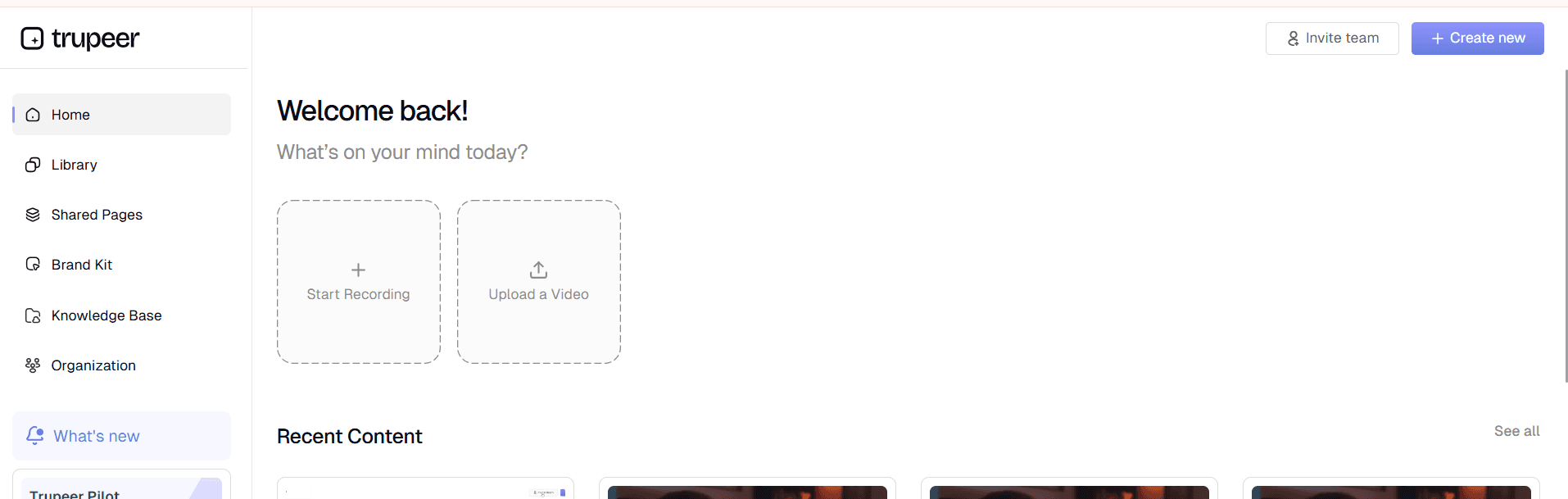
Step 1: Record or Upload Your Content
Begin by using Trupeer's built-in screen recorder to capture your process, or upload an existing recording that you want to transform into collaborative documentation. Our screen recorder automatically optimizes the capture quality and prepares your content for AI processing. Whether you're demonstrating a software workflow, explaining a complex procedure, or walking through a new feature, this initial capture becomes the foundation for your collaborative document.
Step 2: AI Processing and Enhancement
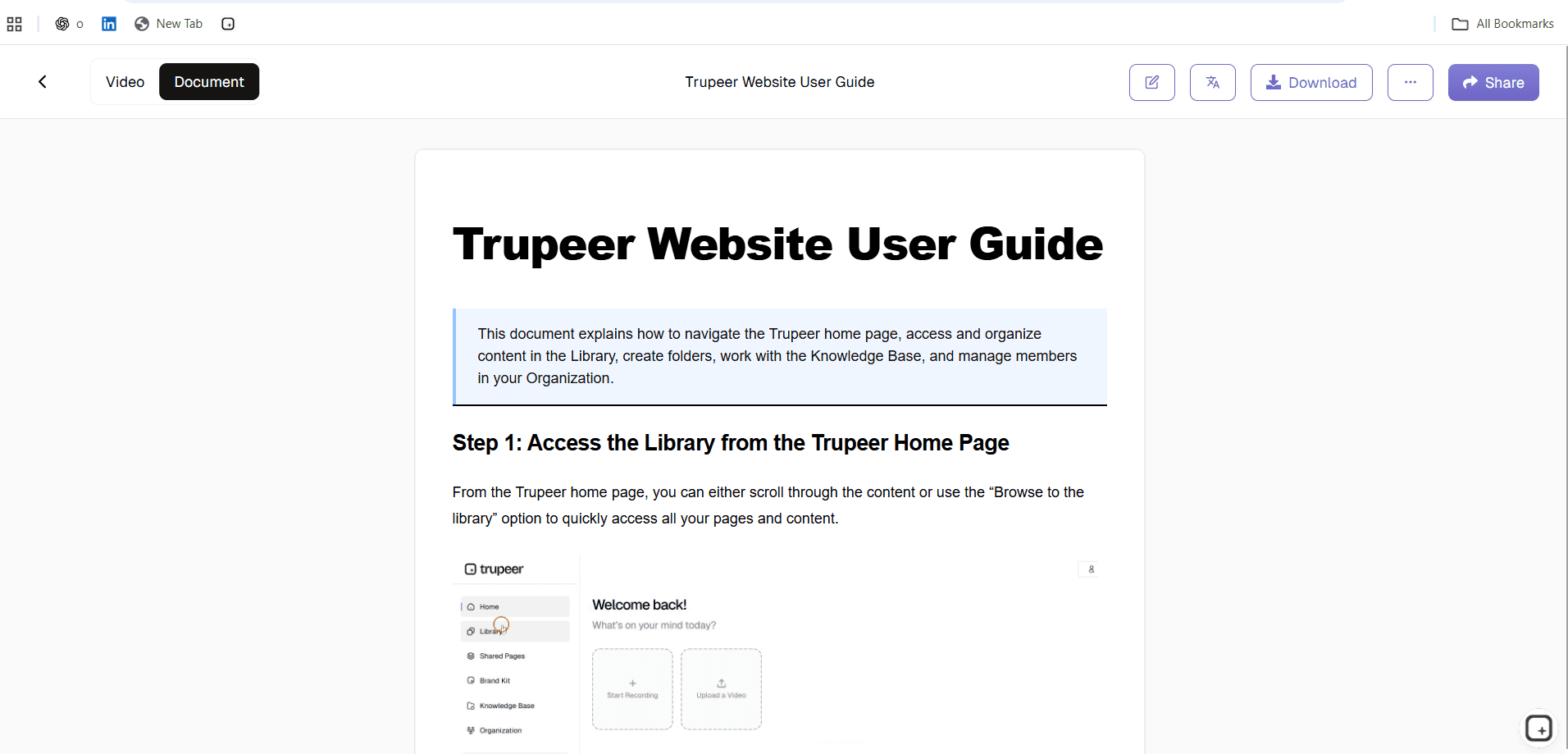
Once your recording is complete, Trupeer's AI automatically processes the content, removing background noise, eliminating filler words, and adding intelligent zoom effects to highlight important actions. The AI simultaneously analyzes the visual content to understand the workflow and begins generating structured documentation. This processing happens in the background while you can continue with other tasks, making the experience incredibly efficient.

Step 3: Automatic Documentation Generation
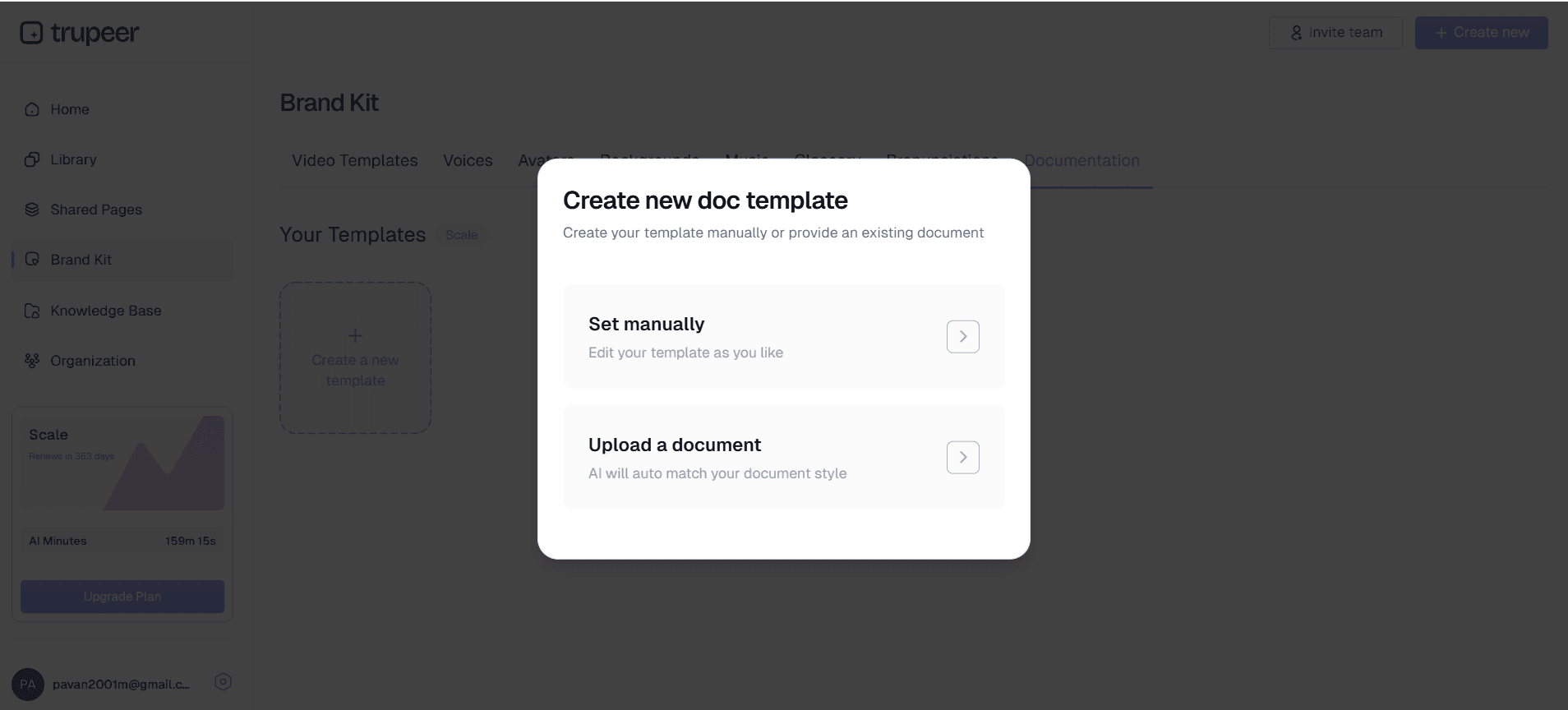
The AI converts your screen recording into comprehensive written documentation, complete with screenshots, step-by-step instructions, and properly formatted sections. You can apply your saved documentation templates to ensure consistent formatting and structure across all your collaborative documents. The system intelligently breaks down complex processes into digestible sections that team members can easily understand and contribute to.
Step 4: Brand Customization and Professional Finishing
Apply your brand kits to both the video and documentation components, ensuring consistent visual identity across all collaborative materials. This includes your company colors, logos, fonts, and standard formatting preferences. The professional appearance enhances credibility and makes your collaborative documents more engaging for team members and external stakeholders.
Step 5: Share and Enable Collaboration
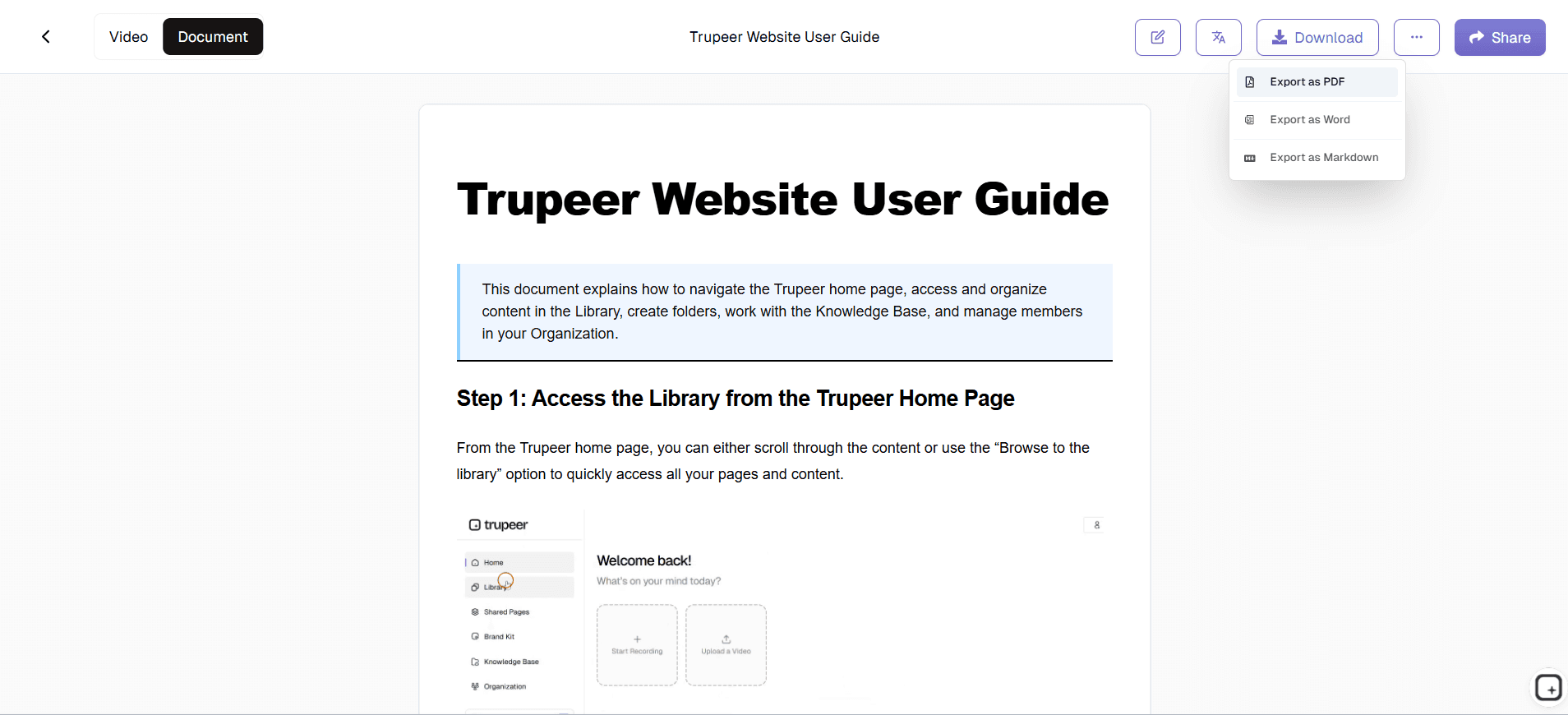
Generate shareable links or embed codes that allow your team to access the documentation immediately. Team members can view the content, add comments, suggest edits, and contribute additional insights without requiring special software or complex permissions management. The collaborative features are built directly into the platform, making it easy for distributed teams to work together effectively.
Key Features and Capabilities
Trupeer's online document collaboration platform offers a comprehensive suite of features designed to streamline how teams create, share, and maintain documentation together. These capabilities address the full spectrum of collaborative documentation needs, from initial creation through ongoing maintenance and updates.
AI-Powered Content Generation: The platform automatically converts screen recordings into structured documentation, eliminating the time-consuming process of manual writing and formatting. This feature integrates seamlessly with our AI video editor, which enhances the visual components while the documentation is being generated. Teams can start with a simple screen recording and end up with professional documentation that's immediately ready for collaboration.
Template-Based Consistency: Save and reuse documentation templates that maintain consistent formatting, styling, and structure across all your collaborative documents. This feature ensures that team members always know where to find information and how to contribute effectively, regardless of who created the original content.
Real-Time Collaboration Tools: Multiple team members can simultaneously access, edit, and comment on documentation without version control issues. The platform tracks all changes and contributions, making it easy to see who added what information and when. This transparency enhances accountability and makes collaborative editing smooth and conflict-free.
Multi-Format Output: Generate both video and written documentation from a single recording, giving teams the flexibility to choose the format that works best for different scenarios. Some team members prefer visual learning through videos, while others need written references for quick lookup. Our platform accommodates both preferences without requiring additional work from content creators.
Global Accessibility Through Translation: Use our translation feature to automatically convert your collaborative documents into multiple languages, making them accessible to international teams. This capability is particularly valuable for organizations with distributed workforces or global customer bases who need consistent documentation across different regions.
Integration Capabilities: Connect with popular productivity tools and platforms that your team already uses, including knowledge bases, project management systems, and communication platforms. This integration eliminates the need to switch between multiple tools and ensures that collaborative documentation fits seamlessly into existing workflows.
Why Should You Use Online Document Collaboration?
Online document collaboration through Trupeer offers transformative benefits that address the most common challenges teams face when creating and maintaining shared documentation. These advantages compound over time, leading to more efficient workflows, better knowledge retention, and stronger team alignment across all projects and initiatives.
Dramatic Time Savings: Traditional documentation creation can take hours or even days, especially when multiple team members need to contribute their expertise. Trupeer's approach reduces this time by up to 90% by automatically generating comprehensive documentation from screen recordings. Teams can create AI Screen Recorder and accompanying documentation simultaneously, maximizing the value of every minute invested in content creation.
Enhanced Knowledge Retention: When team members leave or change roles, their expertise often leaves with them. Online document collaboration ensures that critical knowledge is captured in accessible, searchable formats that remain available to the entire team. The combination of visual and written content makes complex processes easier to understand and remember, reducing the learning curve for new team members.
Improved Consistency and Quality: Standardized templates and automated formatting eliminate the variations in style and structure that plague manually created documentation. Every collaborative document maintains professional quality and follows your organization's standards, regardless of who creates or contributes to the content. This consistency makes information easier to find and use across different projects and departments.
Reduced Training and Onboarding Costs: New team members can access comprehensive, up-to-date documentation that includes both visual demonstrations and written instructions. This self-service approach reduces the time experienced team members need to spend on training activities, while ensuring that new hires receive consistent, thorough information about processes and procedures.
Better Remote Team Coordination: Distributed teams often struggle with knowledge sharing and process alignment. Online document collaboration provides a centralized location where remote team members can access the same high-quality information, contribute their expertise, and stay synchronized with evolving processes. The platform's collaboration features work seamlessly across time zones and geographic boundaries.
Measurable ROI Through Efficiency Gains: Organizations typically see immediate returns on their investment through reduced documentation time, improved process compliance, and faster knowledge transfer. The platform's analytics help track usage patterns and identify the most valuable collaborative documents, enabling teams to focus their efforts on content that delivers the greatest impact.
Who Can Use Online Document Collaboration?
Trupeer's online document collaboration platform serves diverse user groups, each with specific needs for creating, sharing, and maintaining collaborative documentation. The platform's flexibility accommodates different work styles, technical skill levels, and organizational requirements while maintaining ease of use across all scenarios.
Content Creators and Marketing Teams: Marketing professionals use the platform to create Documentation Generator materials that require input from multiple stakeholders. They can record product demonstrations, automatically generate supporting documentation, then collaborate with sales teams, product managers, and designers to refine messaging and ensure accuracy. The ability to maintain brand consistency through integrated brand kits makes this collaboration particularly valuable for marketing workflows.
Training and Development Specialists: L&D teams leverage online document collaboration to create comprehensive training materials that combine visual demonstrations with detailed written instructions. They can record training sessions once, then work with subject matter experts to enhance the automatically generated documentation with additional insights, tips, and context. This collaborative approach ensures that training materials remain current and comprehensive while reducing the burden on individual trainers.
Product and Engineering Teams: Technical teams use the platform to document complex processes, API workflows, and system configurations that require input from multiple engineers. They can record technical demonstrations and automatically generate technical documentation that team members can then enhance with code snippets, troubleshooting tips, and implementation notes. The collaborative features help maintain documentation accuracy as systems evolve and team members discover new insights.
Sales and Customer Success Organizations: Sales teams create AI Video Editor materials by recording product demonstrations and working collaboratively to develop supporting documentation that addresses common customer questions and objections. Customer success teams use similar approaches to create help resources that internal team members can continuously improve based on customer feedback and support interactions.
Small Business Owners and Entrepreneurs: Resource-constrained organizations benefit from the platform's efficiency in creating professional documentation without requiring dedicated technical writing staff. Business owners can record their processes and collaborate with team members to develop comprehensive operational documentation, standard operating procedures, and training materials that help the business scale effectively.
Educational Institutions and Corporate Trainers: Educators use online document collaboration to create course materials that benefit from multiple perspectives and expertise areas. They can record lectures or demonstrations, then collaborate with colleagues and even students to enhance the automatically generated documentation with additional resources, examples, and explanatory content.
Best Practices for Using Online Document Collaboration
Maximizing the value of online document collaboration requires strategic approaches that leverage the platform's strengths while establishing workflows that encourage consistent team participation. These best practices have been developed through extensive user feedback and represent the most effective ways to achieve sustainable collaborative documentation success.
Establish Clear Documentation Standards: Before beginning collaborative projects, define your organization's standards for documentation structure, tone, and level of detail. Create and save templates that reflect these standards, ensuring that all team members start with consistent foundations. This upfront investment in standardization pays dividends as your collaborative documentation library grows and becomes more valuable to the entire organization.
Plan Your Recordings for Maximum Collaboration Value: When creating screen recordings that will become collaborative documents, think beyond the immediate demonstration to consider what additional information team members might need to contribute. Record at a pace that allows for detailed documentation generation, and include verbal explanations of your thought processes that will help colleagues understand the reasoning behind specific steps or decisions.
Implement Regular Review and Update Cycles: Establish scheduled reviews of your collaborative documentation to ensure accuracy and relevance as processes evolve. Assign specific team members responsibility for different document areas, and use the platform's collaboration features to track when updates are needed. Regular maintenance prevents documentation from becoming outdated and maintains its value as a team resource.
Leverage Cross-Functional Collaboration: Encourage team members from different departments to contribute their perspectives to collaborative documents. A AI Screen Recorder representative might add valuable context to technical documentation based on common customer questions, while a sales team member could enhance product documentation with competitive positioning insights. This cross-pollination of knowledge creates more comprehensive and valuable resources.
Use Analytics to Guide Improvement Efforts: Monitor which collaborative documents receive the most views, comments, and contributions to identify your most valuable content. Focus improvement efforts on these high-impact resources, and use usage patterns to guide decisions about what new documentation to create. The platform's analytics help optimize your team's collaborative documentation investments for maximum organizational benefit.
Explore Related Tools
Why Choose Trupeer for Online Document Collaboration
Instant Documentation Generation
Transform screen recordings into professional collaborative documents automatically using AI technology
Real-Time Team Collaboration
Multiple team members can edit, comment, and contribute simultaneously without conflicts
Brand Consistency Tools
Apply custom templates and brand kits for professional, consistent documentation across teams
How to Use Trupeer's Online Document Collaboration Tool
Step 1
Record or upload your content
Step 2
AI generates professional documentation
Step 3
Share and collaborate with team
Frequently Asked Questions
How does online document collaboration work with Trupeer?
Record your screen or upload a video, and Trupeer's AI automatically generates professional documentation that your team can immediately collaborate on. Team members can add comments, make edits, and contribute insights in real-time.
Can multiple team members work on the same document simultaneously?
Yes, Trupeer supports real-time collaboration where multiple users can access, edit, and comment on documents without version control conflicts. All changes are tracked and attributed to specific contributors.
What formats can I export for online document collaboration?
You can export both video and written documentation formats, share via links, or embed directly into websites and knowledge bases. The platform supports multiple output formats to match your team's collaboration preferences.
How do I maintain consistency across collaborative documents?
Use Trupeer's documentation templates and brand kits to ensure all collaborative documents follow your organization's standards for formatting, styling, and visual identity regardless of who creates or contributes to them.
Is online document collaboration secure for sensitive information?
Yes, Trupeer provides enterprise-grade security features including access controls, permission management, and secure sharing options to protect sensitive collaborative documents and ensure only authorized team members can contribute.
More Tools



