4.8/5
Free Document Management Software
Revolutionary Document Management Through Screen Recording
Start Creating Docs Free

Trupeer's document management software revolutionizes how businesses create, organize, and maintain their documentation. Unlike traditional document management systems that require manual writing and formatting, Trupeer's AI-powered platform automatically generates comprehensive documentation from screen recordings. This innovative approach transforms any workflow demonstration or process walkthrough into polished written guides, standard operating procedures, and training materials. The core purpose of our document management software centers on eliminating the time-consuming process of manual documentation creation.
What sets Trupeer apart from competitors is our dual-output capability. While traditional document management systems focus solely on text-based content, our platform generates both professional videos and written documentation from a single recording. This means you can create comprehensive technical documentation while simultaneously producing engaging video content for your team. Our AI screen recorder captures every detail of your workflow, then automatically enhances the footage with noise removal, filler word elimination, and smart zoom effects. The technology behind Trupeer's document management software combines advanced AI video processing with natural language generation. Our system analyzes your screen recordings frame by frame, identifying key actions, interface elements, and workflow patterns. This analysis feeds into our AI engine, which then generates contextually accurate written instructions that mirror your demonstrated process. The result is documentation that maintains the authentic voice and specific details of your actual workflow, rather than generic template-based content. We built this document management software because we recognized that traditional documentation methods couldn't keep pace with modern business needs.
How Does Document Management Software Work?
Trupeer's document management software operates through a streamlined five-step process that transforms your screen activity into professional documentation. This workflow eliminates the traditional barriers that make documentation creation time-intensive and often avoided by busy teams. This is why it pairs well with the change management plan template the documentation and the documentation come from the same source.
Step 1: Capture Your Process
Begin by using our built-in screen recorder or upload an existing recording of your workflow. The system captures high-quality footage of your screen activity, including mouse movements, clicks, and any on-screen text or interface interactions. You can record full-screen demonstrations, specific application windows, or selected areas depending on your documentation needs.

Step 2: AI Analysis and Enhancement
Once your recording is complete, our AI technology automatically analyzes the footage to identify key workflow components. The system removes background noise, eliminates filler words if you've included narration, and applies intelligent zoom effects to highlight important interface elements. This enhancement process ensures your final documentation maintains professional quality regardless of the original recording conditions.

Step 3: Automated Documentation Generation
Our natural language processing engine converts your screen recording into comprehensive written documentation. The AI identifies each step in your demonstrated process, recognizes interface elements and user actions, then generates clear, actionable instructions. This automated process creates structured documentation that follows logical progression and includes relevant details about timing, prerequisites, and expected outcomes.

Step 4: Customization and Branding
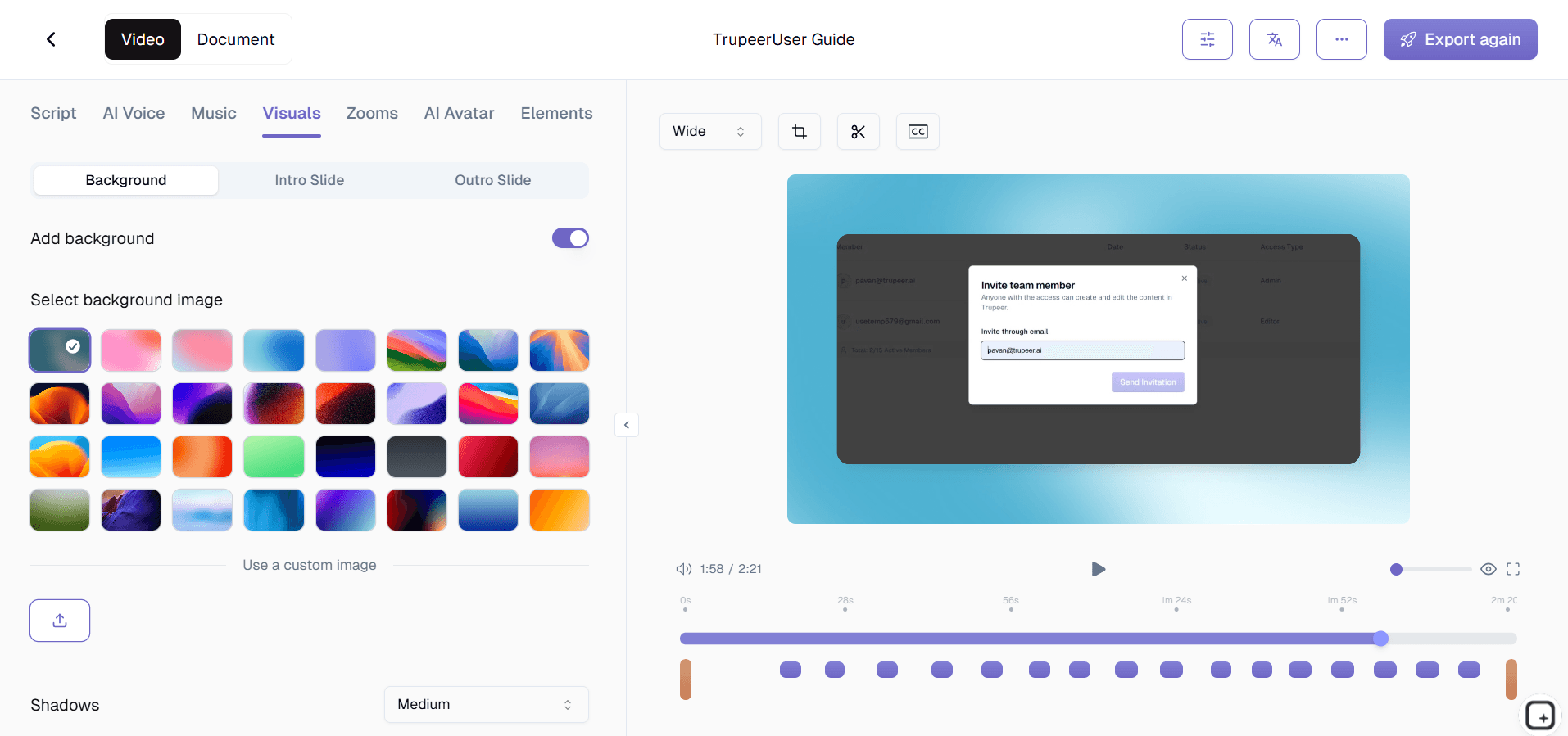
Apply your organization's visual identity using our brand kits feature, which ensures consistent formatting, colors, and styling across all generated documentation. You can also customize the documentation structure using our template system, which allows you to define preferred formatting styles, section headings, and organizational patterns that match your company's documentation standards.
Step 5: Distribution and Integration
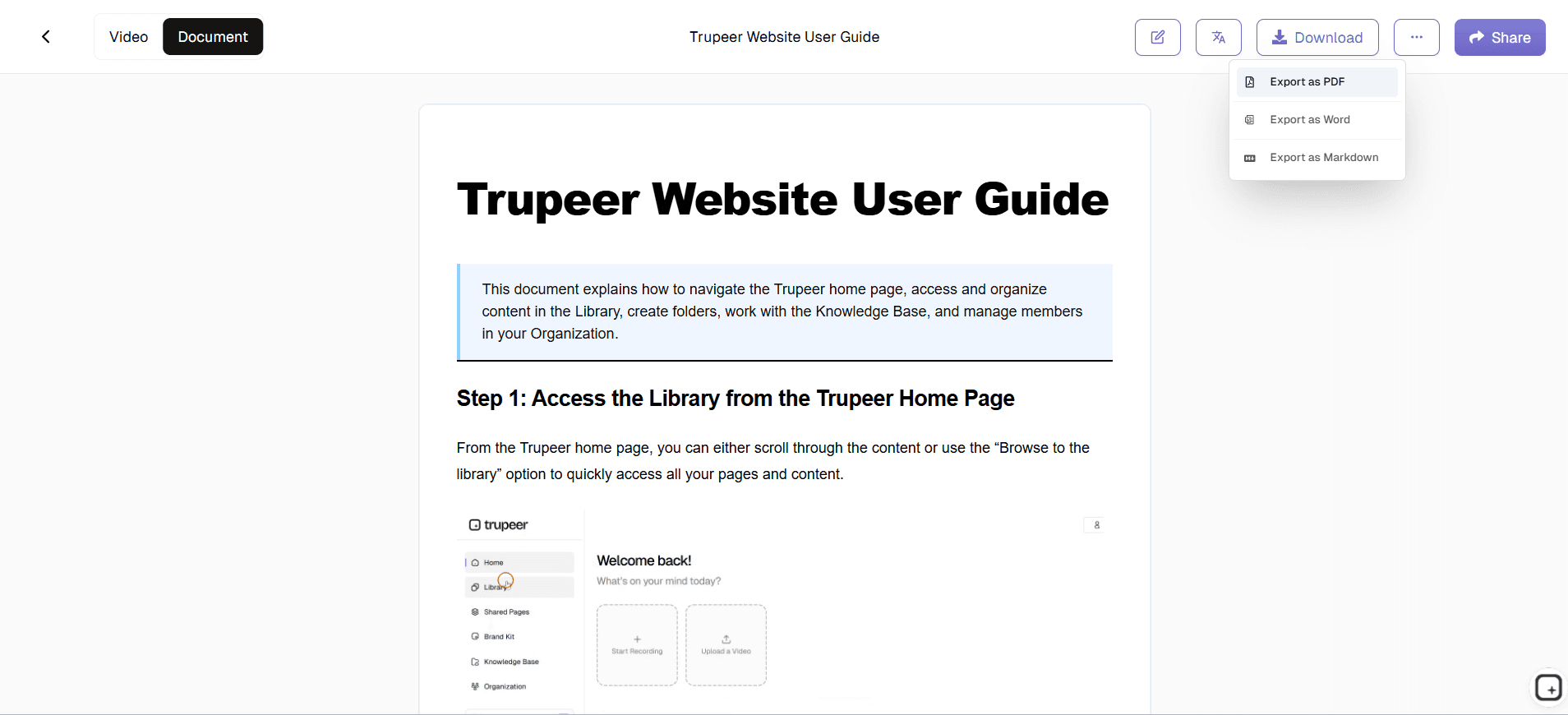
Export your completed documentation in multiple formats, share via direct links, or embed the content into your existing knowledge management systems. The platform generates both video and written versions of your documentation, giving you flexibility in how you distribute the information to different audiences and use cases.
Key Features and Capabilities
Trupeer's document management software includes powerful features designed to streamline your documentation workflow while maintaining professional quality and organizational consistency.
AI-Powered Screen Recording: Our intelligent recording system captures your workflow with automatic optimization for documentation purposes. Unlike basic screen recorders, our technology understands the context of your actions and optimizes the capture quality for subsequent AI analysis. The system works seamlessly with our video translation capabilities, allowing you to create multilingual documentation from a single recording session.
Automatic Documentation Generation: The core strength of our platform lies in its ability to transform visual demonstrations into comprehensive written guides. Our AI analyzes your screen recordings and generates detailed step-by-step instructions, complete with contextual explanations and relevant screenshots. This feature integrates with our technical documentation templates to ensure consistent formatting and professional presentation.
Template Customization System: Create and save custom documentation templates that reflect your organization's preferred structure and styling. These templates can include specific section headings, formatting requirements, and organizational patterns that ensure all team members produce consistent documentation regardless of their individual writing styles or technical expertise.
Multi-Format Export Options: Generate your documentation in various formats to meet different distribution needs. Whether you need PDF guides for offline reference, HTML content for web integration, or video files for visual learners, our platform provides flexible export options that maintain quality and formatting across different output types.
Brand Kit Integration: Maintain visual consistency across all documentation by applying your organization's branding elements automatically. This feature ensures that every piece of generated content reflects your company's visual identity, from color schemes and fonts to logos and standard formatting conventions.
Collaborative Review and Editing: Enable team members to review, comment on, and suggest modifications to generated documentation before final publication. This collaborative approach ensures accuracy while maintaining the efficiency gains of automated content generation.
Why Should You Use Document Management Software?
Adopting Trupeer's document management software provides significant advantages for organizations looking to improve their documentation processes while reducing the time and resources typically required for content creation.
Dramatic Time Savings: Traditional documentation creation can consume hours or days of valuable time, requiring subject matter experts to step away from their primary responsibilities. Our platform reduces documentation creation time by up to 90%, allowing you to generate comprehensive guides in minutes rather than hours. This efficiency gain enables teams to maintain current documentation without sacrificing productivity on core business activities.
Consistency Across All Content: Manual documentation often suffers from inconsistent formatting, varying levels of detail, and different writing styles depending on who creates the content. Our AI-powered system ensures every piece of documentation follows the same structure, uses consistent terminology, and maintains uniform quality standards. This consistency improves user experience and reduces confusion when team members reference different guides.
Improved Knowledge Retention: By making documentation creation effortless, our platform encourages teams to document processes they might otherwise leave undocumented due to time constraints. This comprehensive documentation coverage helps organizations retain institutional knowledge, reduces dependency on individual team members, and facilitates smoother transitions during staff changes or role modifications.
Enhanced Training Effectiveness: Generated documentation includes both visual and written components, catering to different learning styles and preferences. New team members can watch the demonstration video for context, then reference the written guide for specific details during hands-on practice. This dual-format approach accelerates AI Screen Recorder effectiveness and reduces the time required for new employee onboarding.
Scalable Content Creation: As your organization grows and processes evolve, maintaining current documentation becomes increasingly challenging with traditional methods. Our platform scales effortlessly, allowing teams to update documentation by simply recording new versions of modified processes. The AI automatically generates updated content while maintaining consistency with existing documentation standards and organizational requirements.
Cost-Effective Solution: Eliminating the need for dedicated technical writers or extensive time commitments from subject matter experts significantly reduces documentation costs. Organizations can redirect these resources toward core business activities while maintaining comprehensive documentation coverage across all critical processes and procedures.
Who Can Use Document Management Software?
Trupeer's document management software serves diverse user groups across various industries, each benefiting from our platform's unique combination of screen recording and automated content generation capabilities.
Content Creators and Digital Marketers: Content teams use our platform to create comprehensive tutorial libraries, Documentation Generator, and educational content that serves both internal and customer-facing purposes. The ability to generate multiple content formats from single recordings maximizes content ROI while maintaining consistent messaging across different channels and audiences.
Marketing Teams and Product Managers: Marketing professionals leverage our document management software to create detailed product documentation, feature explanation guides, and AI Video Editor materials. The platform's ability to generate both video demonstrations and written guides supports diverse marketing campaigns while ensuring consistent product messaging across different team members and communication channels.
Educators and Corporate Trainers: Educational professionals use our platform to transform lecture demonstrations and software tutorials into comprehensive learning materials. The dual-output format supports different learning preferences, while the automated generation process allows educators to focus on curriculum development rather than time-intensive documentation creation tasks.
Product Teams and Software Developers: Development teams utilize our platform for creating user guides, API documentation, and internal process documentation. The screen recording capability captures complex software interactions accurately, while the AI generates technical documentation that maintains appropriate detail levels for different audience types, from end users to technical implementers.
Sales Professionals and Customer Success Teams: Sales teams create personalized product demonstrations and customer onboarding materials using our platform. The ability to quickly generate professional documentation from sales presentations supports AI Screen Recorder initiatives while reducing the time required to create customized materials for different client needs and industry requirements.
Small Business Owners and Operations Managers: Small business owners benefit from our platform's efficiency in creating standard operating procedures, employee training materials, and process documentation without requiring dedicated documentation resources. This capability helps small businesses maintain professional documentation standards while focusing limited resources on core business growth activities.
Quality Assurance and Compliance Teams: QA professionals use our platform to document testing procedures, compliance processes, and audit preparation materials. The detailed capture capabilities ensure that documentation accurately reflects actual procedures, while the automated generation reduces the administrative burden of maintaining compliance documentation across multiple regulatory requirements.
Best Practices for Using Document Management Software
Maximizing the effectiveness of Trupeer's document management software requires strategic planning and consistent application of proven techniques that optimize both content quality and workflow efficiency.
Plan Your Recording Sessions: Before starting your screen recording, outline the key steps and decision points in your process. This preparation ensures comprehensive coverage while avoiding the need for multiple recording sessions to capture missed elements. Consider your audience's knowledge level and adjust your demonstration pace accordingly to support clear AI analysis and content generation.
Optimize Your Recording Environment: Ensure your screen display uses readable fonts and appropriate zoom levels that will translate well into written documentation. Close unnecessary applications and notifications that might distract from the main process flow. A clean, focused recording environment leads to cleaner, more professional generated documentation.
Leverage Template Consistency: Develop and save custom documentation templates that reflect your organization's standards and requirements. Consistent template usage across team members ensures uniform documentation quality while reducing the time needed for post-generation formatting and editing activities.
Utilize Collaborative Review Features: Implement a review process where subject matter experts validate AI-generated content before final publication. This quality control step maintains accuracy while preserving the efficiency benefits of automated content generation, ensuring your documentation meets both speed and quality requirements.
Regular Content Updates: Establish a systematic approach for updating documentation as processes evolve. Our platform's quick recording and generation capabilities make it practical to maintain current documentation, but only if you implement consistent update schedules that prevent documentation from becoming outdated or irrelevant.
Integration with Existing Systems: Plan how generated documentation will integrate with your existing knowledge base and training systems. Consider export formats, sharing permissions, and access requirements early in your implementation process to ensure seamless integration with established workflows and user access patterns.
Explore Related Tools
Why Choose Trupeer's Document Management Software
AI-Powered Automation
Transform screen recordings into professional documentation automatically with advanced AI processing.
Dual-Format Output
Generate both video demonstrations and written guides from single recording sessions.
Brand Consistency
Apply custom templates and branding to ensure uniform professional appearance across all content.
Get Started with Trupeer's Document Management Software
Step 1
Record your screen workflow
Step 2
Let AI generate documentation
Step 3
Customize and share content
Frequently Asked Questions
What makes AI-powered document management different from traditional systems?
AI-powered document management automatically generates content from screen recordings, eliminating manual writing and formatting. This approach reduces creation time by up to 90% while maintaining consistency and professional quality across all documentation.
Can I customize the generated documentation to match our company standards?
Yes, Trupeer's platform includes customizable templates and brand kits that ensure all generated documentation matches your organization's formatting, styling, and branding requirements. You can save these preferences for consistent application across all future content creation.
How accurate is the AI-generated documentation compared to manually written guides?
Our AI technology analyzes screen recordings frame by frame to capture exact workflows and interface interactions. The generated documentation reflects your demonstrated process accurately, often with more consistent detail than manually written guides that might omit steps or vary in thoroughness.
What file formats can I export my documentation in?
Trupeer supports multiple export formats including PDF for offline reference, HTML for web integration, video files for visual demonstrations, and various text formats for integration with existing knowledge management systems.
How does screen recording-based documentation help with team training?
Screen recording captures the actual workflow context that static written instructions often miss. This visual foundation helps new team members understand not just what to do, but how interfaces should look and behave during each step of the process.
More Tools


