4.8/5
Free AI Business Video Maker
Make professional business videos with AI avatars, voiceovers & templates.
Get started for free

Trupeer's Business Video Maker transforms corporate presentations, reports, training materials, and marketing scripts into professional videos complete with AI narration, branded visuals, and polished animations. This platform enables non-technical teams to create executive-ready content without hiring video production agencies or learning complex editing software.
Why Business Video Maker is required?
Business teams waste weeks coordinating video production across agencies, freelancers, and internal stakeholders while missing critical deadlines. Non-designers struggle with consumer-grade tools lacking corporate templates, brand controls, and professional output quality. Manual video creation doesn't scale for global teams needing localized content in multiple languages and formats.
Inconsistent video styling across departments damages brand cohesion and executive credibility. HR, marketing, and sales groups recreate similar content repeatedly without standardized workflows. Budget constraints force businesses to choose between expensive production houses or amateur smartphone videos that fail to engage stakeholders.
What this Business Video Maker does
Trupeer's Business Video Maker analyzes slide decks, reports, or scripts to automatically generate complete corporate videos featuring professional voiceovers, data visualizations, branded motion graphics, and optimized timing. The AI handles script refinement, visual selection, audio mixing, and export formatting to produce boardroom-ready presentations instantly.
Core Capabilities
Convert PowerPoint/Google Slides into animated executive presentations
Transform reports and data into engaging visual storytelling videos
Generate multilingual business videos with localized voiceovers
Apply enterprise branding across all video outputs automatically
How Trupeer’s Business Video Maker works
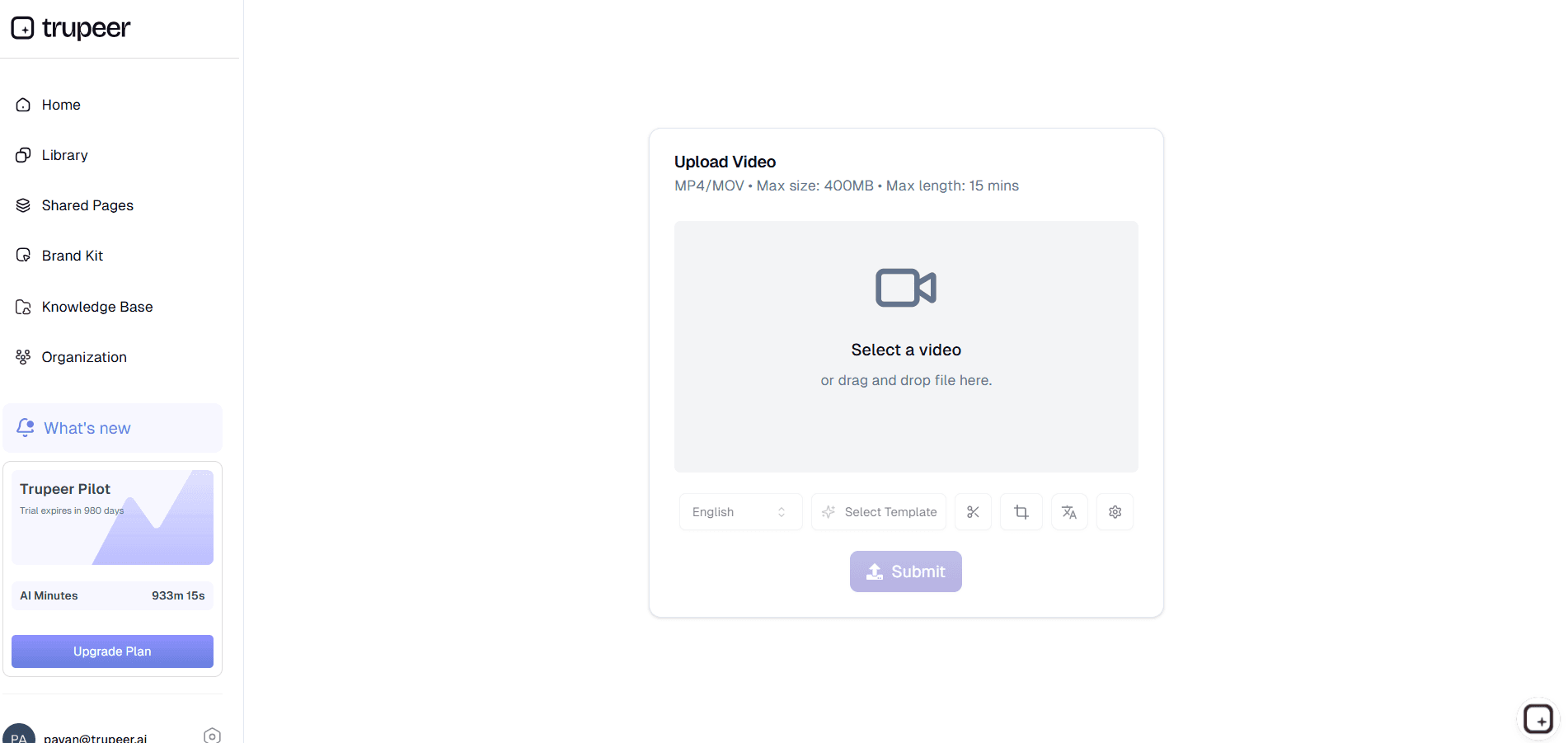
Step 1: Upload Business Content
Import slide decks, reports, scripts, or record presentations directly into the platform for AI analysis.
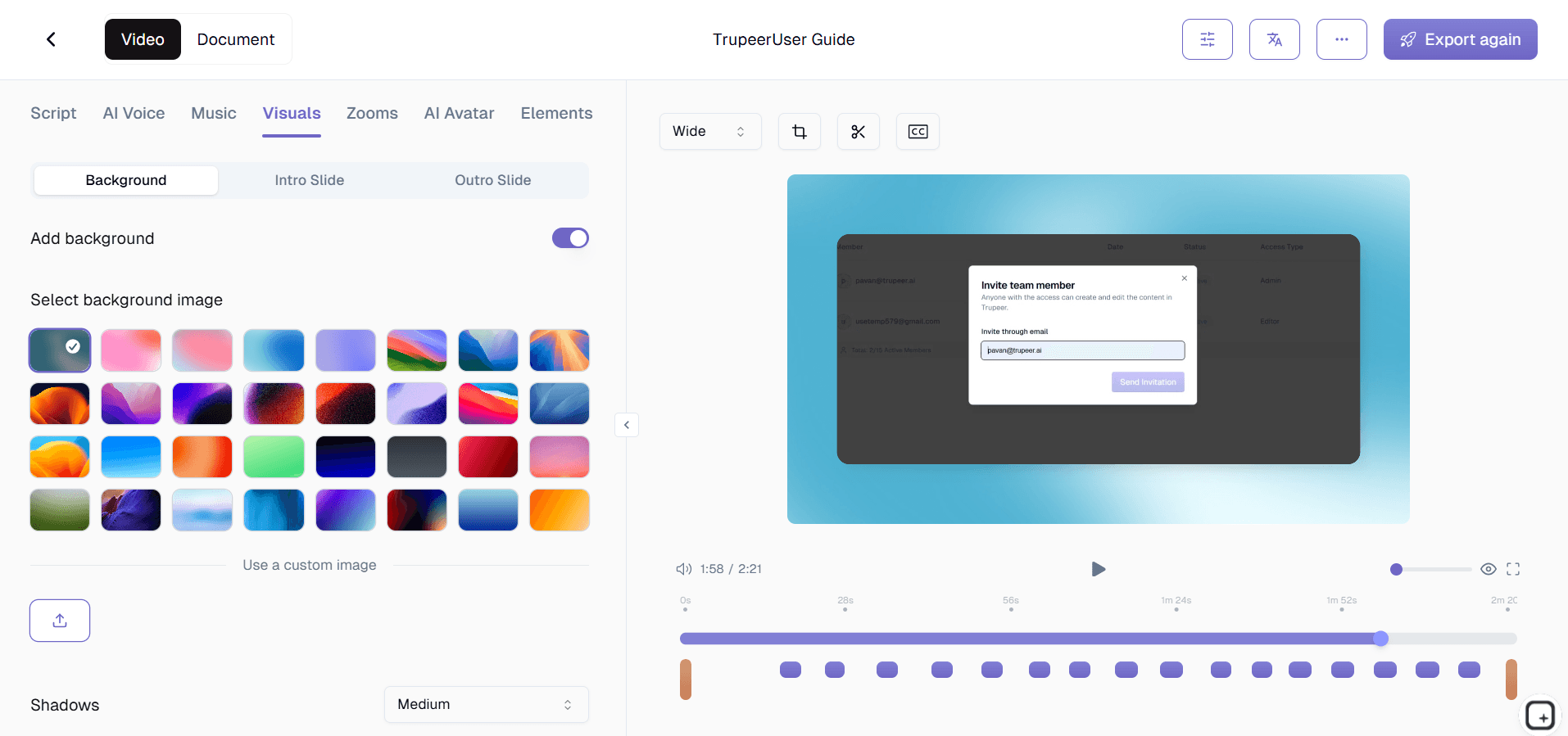
Step 2: AI Generates Corporate Video
The tool creates animated slides, voice narration, transitions, and branded elements synchronized perfectly.
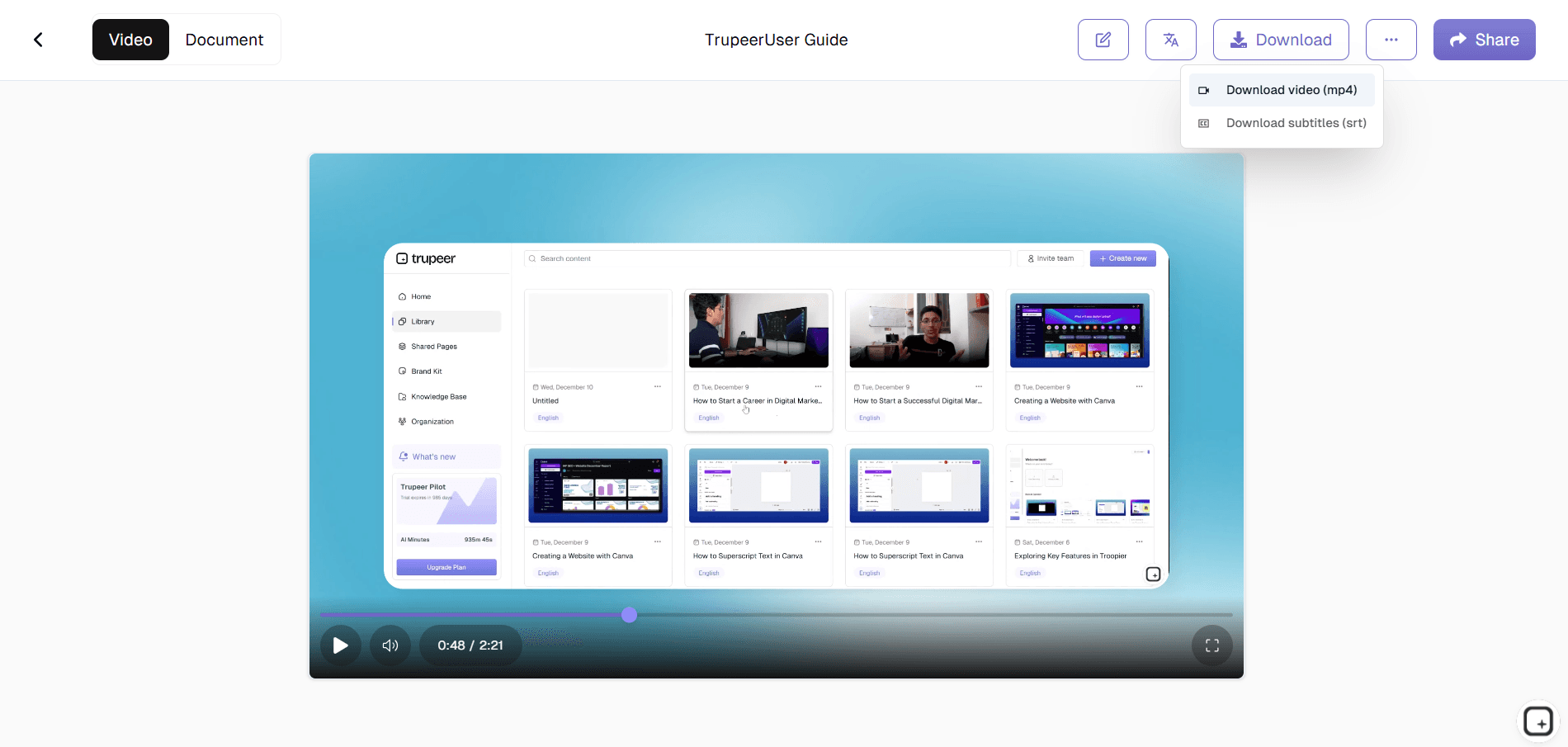
Step 3: Review & Distribute
Preview the executive-ready video, make final brand adjustments, then export or share via secure links.
Who this Trupeer’s Business Video Maker is for
The Business Video Maker empowers corporate teams to produce professional video content without relying on external agencies or specialized skills.
Marketing & Communications:
Create campaign for product launch videos, corporate announcements, and trade show content that maintains perfect brand consistency while meeting tight deadlines for global rollouts.HR & Learning Teams:
Transform training modules, onboarding presentations, and policy updates into engaging videos that improve employee comprehension and reduce live session requirements.Sales & Business Development:
Generate client demo videos, product roadmaps, and proposal walkthroughs that differentiate from static PDFs and impress stakeholders during virtual meetings.Executive Leadership:
Produce polished quarterly updates, investor briefings, and strategy presentations featuring data visualizations and professional narration without presentation team dependency.Internal Operations:
Document processes, compliance training, and software implementations as shareable videos that standardize knowledge transfer across distributed global teams
Key Features of Trupeer’s Business Video Maker
The Business Video Maker delivers enterprise-grade video production capabilities designed specifically for corporate communication challenges.
Enterprise Brand Integration:
Automatically applies logos, color schemes, fonts, and motion guidelines across every video while maintaining pixel-perfect compliance with corporate identity standards for maximum professionalism.AI-Powered Script Optimization:
Analyzes business content to create concise, impactful narration that eliminates jargon, improves clarity, and ensures executive-level communication standards automatically.Multi-Language Corporate Delivery:
Generates multilingual videos in 65+ languages with localized voiceovers, regional date/number formatting, and culturally appropriate visuals for seamless global distribution.Data Visualization Engine:
Converts charts, graphs, and metrics from spreadsheets or slides into animated business graphics that enhance comprehension and maintain data accuracy across formats.Secure Enterprise Export:
Produce training videos optimized for corporate platforms (intranet, LMS, Zoom, Teams) with password protection, expiration dates, and detailed view analytics for compliance tracking.
Explore Related Tools
Benefits of Using Trupeer’s Business Video Maker
Professional Videos in Minutes
Skip expensive video shoots, Trupeer makes it simple to produce high-quality videos.
AI Avatars & Voiceovers
Make your videos dynamic with realistic avatars and natural speech.
Scalable Business Content
Create unlimited videos for training, sales, marketing, and support.
Create Business Videos with Trupeer
Step 1
Upload or Record Your Script
Step 2
Customize with AI
Step 3
Export & Share
Frequently Asked Questions
1. What is Trupeer’s Business Video Maker?
Trupeer’s Business Video Maker is an AI-powered tool that lets you create corporate and marketing videos quickly. It’s built for professionals who want to produce high-quality content for business presentations, training sessions, and product launches.
2. Can I create business videos for free?
Yes! Trupeer offers a free business video maker plan that allows you to create short videos with basic editing and branding features. Premium plans include longer video durations, advanced AI narration, and custom brand templates.
3. How does the AI Business Video Maker work?
Trupeer’s AI video generator analyzes your script or idea, selects visuals and animations, and automatically generates a complete business video with professional voiceovers, transitions, and subtitles ready to share or download.
4. Is Trupeer suitable for internal communication and marketing?
Absolutely. Trupeer’s business video maker is ideal for creating internal training videos, onboarding materials, leadership announcements, and marketing promotions. It helps teams communicate efficiently and visually.
5. How can I share or export my business videos?
Once your video is complete, you can download it in multiple formats, generate a shareable link, or embed it on your company website, intranet, or LinkedIn page. Trupeer ensures every video is optimized for web and mobile playback.
More Tools


