4.8/5
技術マニュアル作成ツール
プロフェッショナルな技術ドキュメントを、手間なく作成
今すぐ技術マニュアルを作成

Trupeerのテクニカルマニュアル作成ツールは、組織がプロフェッショナルな技術文書を作成する方法を革新します。複雑な手順をゼロから何時間もかけて書く代わりに、画面を録画するか既存の録画をアップロードするだけで、当社のAIが洗練された解説動画とともに包括的なテクニカルマニュアルを自動生成します。従来のテクニカルマニュアル作成では、面倒な文書化作業、複数回の編集、そして製品の進化に伴う継続的な更新が必要でした。
Trupeerが従来の文書作成ツールと異なるのは、二重出力のアプローチです。他のプラットフォームが文章コンテンツまたは動画作成のどちらかのみに注力するのに対し、当社の技術文書ソリューションは両方の形式を同時に提供します。プロセスを一度録画すれば、AIが詳細な文書作成の重労働を担い、さらにプロ仕様の編集機能で動画を強化します。当社のAI技術は単純な文字起こしにとどまりません。文脈を理解し、重要な手順を特定し、情報を論理的に構成します。
テクニカルマニュアル作成ツールはどのように機能するのか?
Trupeerでのテクニカルマニュアル作成プロセスは、最大限の効率と最小限の複雑さを念頭に設計されています。当社の効率化されたワークフローにより、文章作成のバックグラウンドや技術コミュニケーションの経験がなくても、誰でもプロ品質の技術文書を作成できます。
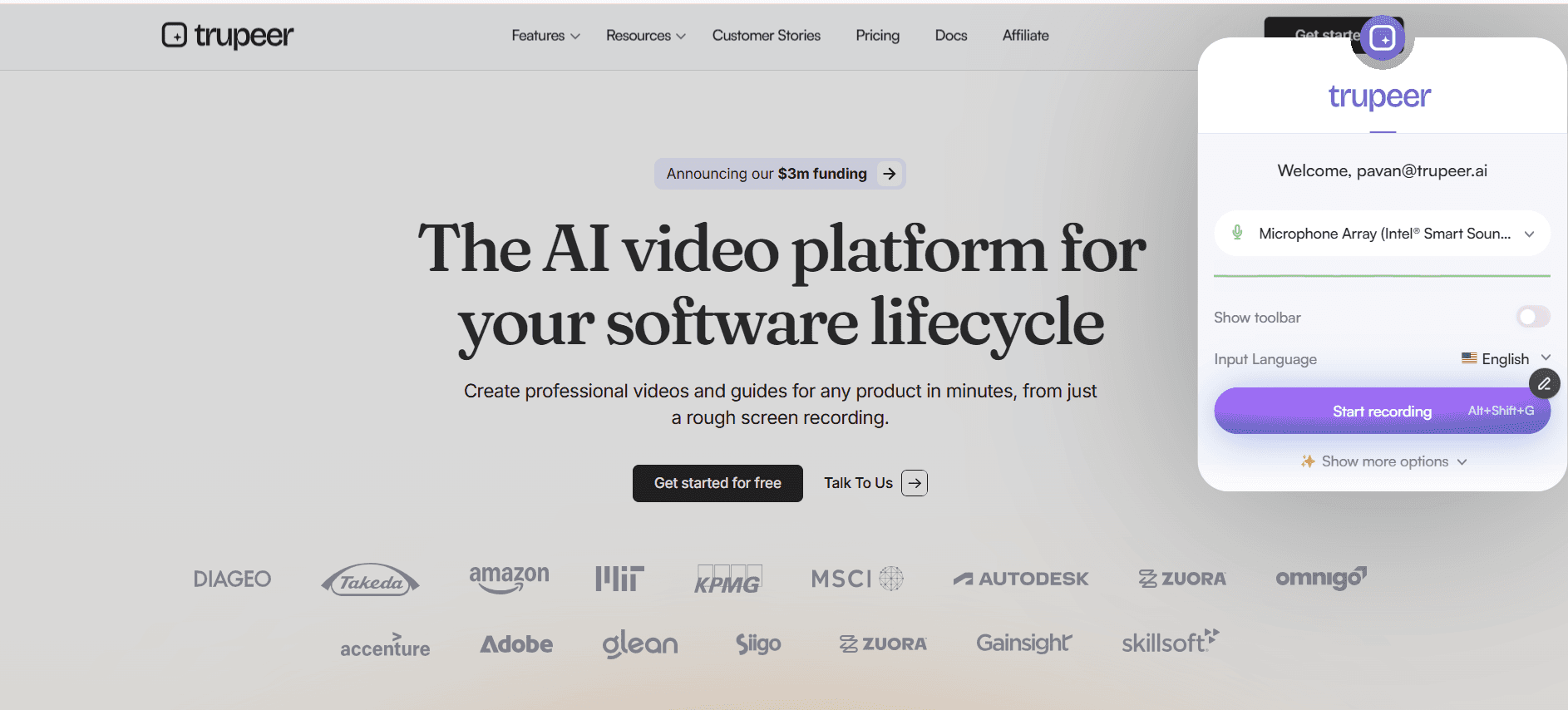
ステップ1: プロセスを記録する
Trupeerに内蔵されたAIスクリーンレコーダーを使って画面を録画するか、既存の録画をアップロードして始めます。プラットフォームはさまざまなファイル形式に対応しているため、あらゆるデバイスやソフトウェアで撮影した映像を使用できます。画面上で操作を見せながら、通常どおり技術的な手順を進め、各ステップを口頭で説明してください。
ステップ2: AIによる分析と処理
録画をアップロードすると、TrupeerのAIエンジンがデモンストレーションのあらゆる側面を分析します。システムは個々の手順を特定し、インターフェース要素を認識し、ナレーションを処理して技術的な文脈を理解します。この分析が、動画強化とドキュメント生成の両方の基盤となります。

ステップ3: 動画の自動強化
AIは、背景ノイズの除去、不要な言葉の削減、重要なインターフェース要素を強調するためのプロフェッショナルなズーム効果の追加によって、元の映像を自動的に改善します。これらの強化により、動画編集の専門知識がなくても、技術デモンストレーションを明確でプロフェッショナルなものにできます。
ステップ4: ドキュメント生成
同時に、AIは録画内容に基づいて包括的な文書を作成します。システムは情報を論理的なセクションに整理し、技術的な詳細を取り込み、プロフェッショナルな技術文書の標準に従ってコンテンツを整形します。この自動化されたプロセスにより、多くの場合、最小限の編集で済む下書きが生成されます。
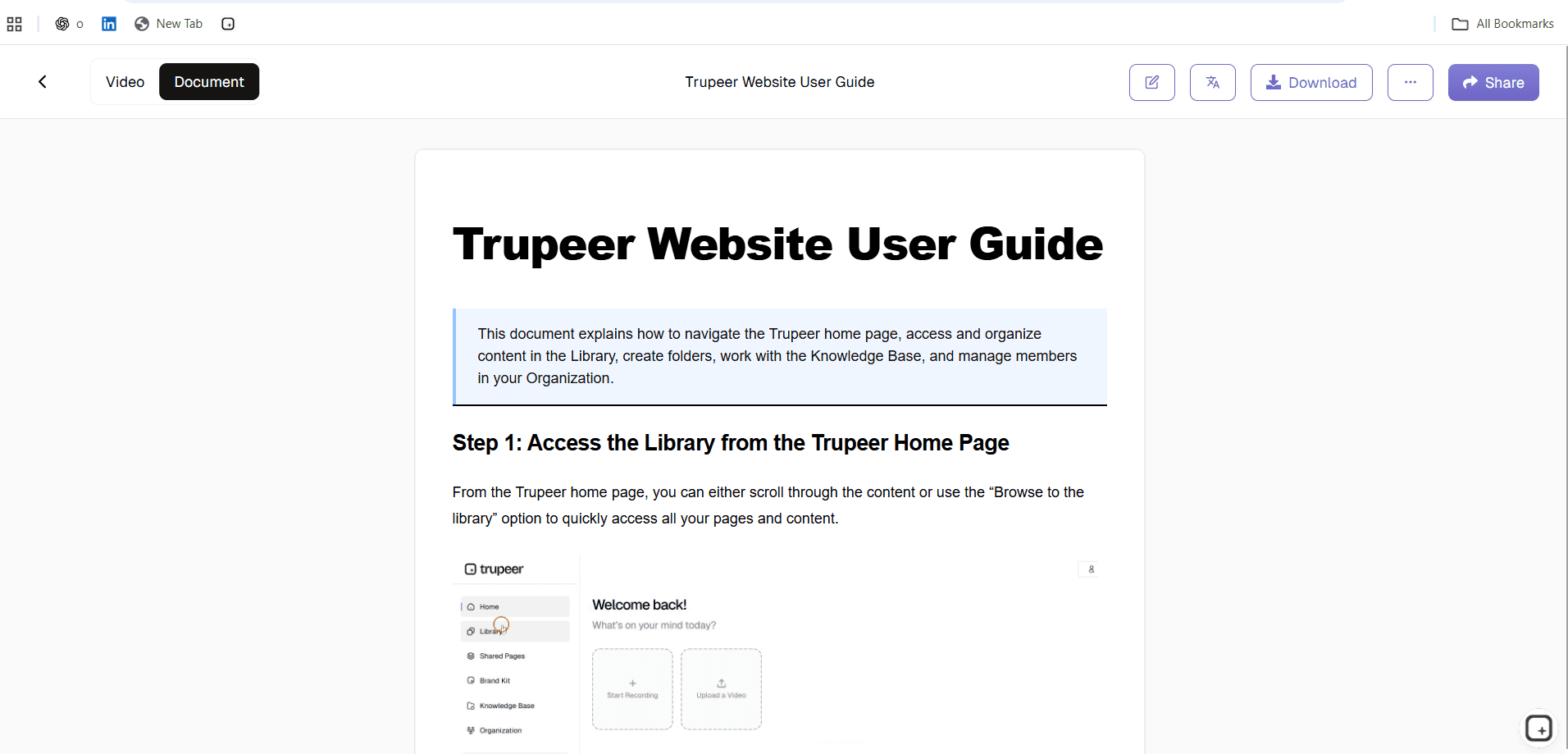
ステップ5: カスタマイズとブランディング
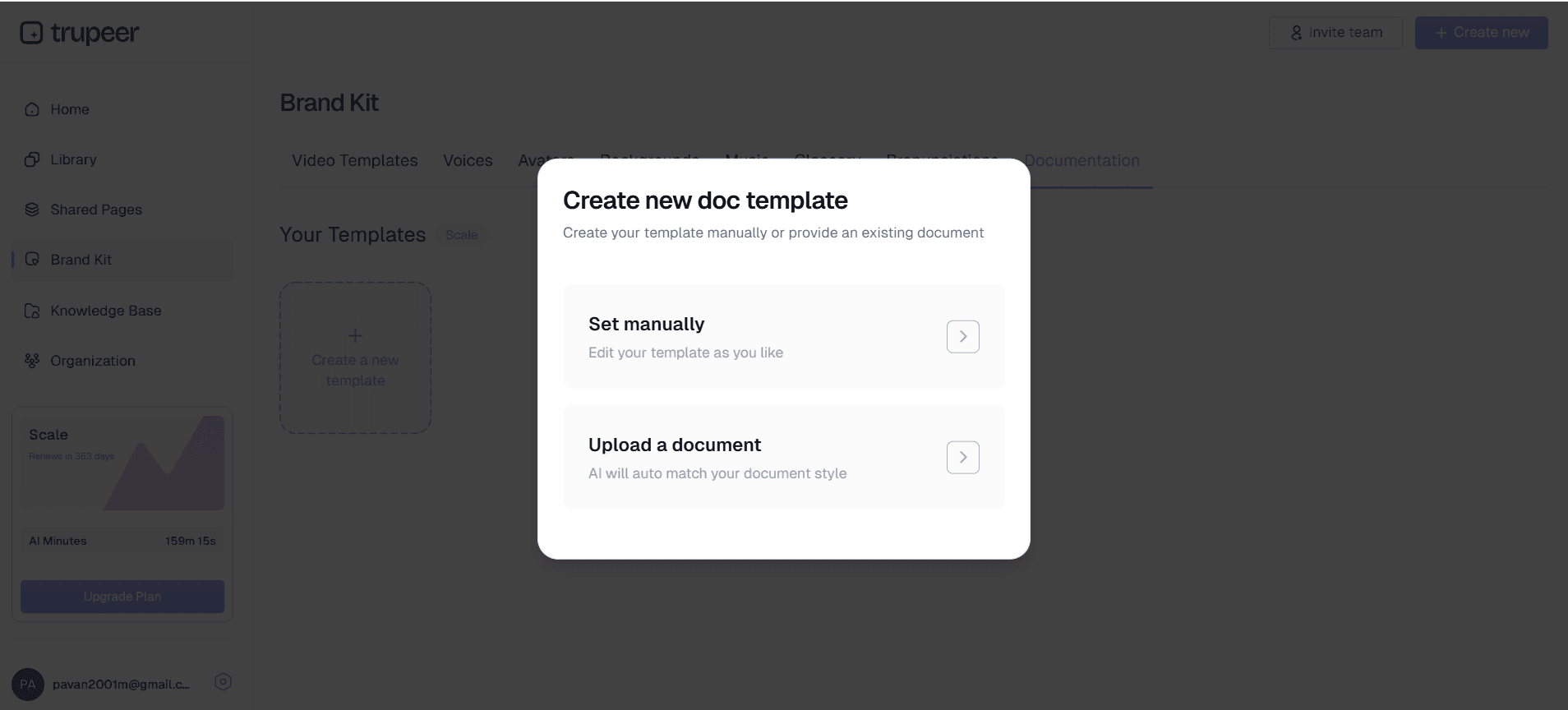
組織のブランドキットを適用して、すべての資料で一貫した見た目を確保します。お好みの書式設定、スタイル、構成要素でドキュメントテンプレートをカスタマイズできます。これらのテンプレートは将来のマニュアル用に保存して再利用でき、技術文書ライブラリ全体の一貫性を維持します。
主な機能と قابلیت
Trupeerのテクニカルマニュアル作成ツールには、技術文書のニーズに特化して設計された強力な機能が含まれています。これらの機能により、作成時間を大幅に削減しながら、マニュアルをプロフェッショナル基準に保てます。
AI駆動のコンテンツ構造化: プラットフォームは、明確な見出し、番号付き手順、適切に整形された技術詳細を用いて、コンテンツを自動的に論理的なセクションへ整理します。この高度な構造化により、手作業での整理に伴う推測作業が不要になり、すべての文書で一貫した書式が保証されます。
複数形式でのエクスポート: テクニカルマニュアルを複数の形式で同時に生成できます。包括的な文書、プロフェッショナルな解説動画、またはその両方を一緒にエクスポート可能です。この柔軟性により、追加作業なしで異なる学習スタイルや配布要件に対応できます。
テンプレートのカスタマイズ: 組織が好む書式、配色、構成要素を備えたドキュメントテンプレートを作成して保存できます。再利用可能なテンプレートにより、ブランドの一貫性が保たれ、標準化された開始点を提供することで今後のマニュアル作成を加速します。
高度な動画強化: 基本的な編集を超えて、AIはカーソル移動に合わせた自動ズーム効果、明瞭な音声のためのノイズ低減、セクション間のプロフェッショナルなトランジションなどの高度な強化を適用します。これらの機能により、手動編集なしで解説動画を放送品質に保てます。
グローバルなアクセシビリティ: 内蔵の動画翻訳機能により、複数言語のテクニカルマニュアルを自動で作成できます。この機能は、グローバルチームや国際的なユーザーベースを持つ組織にとって非常に有用で、個別の翻訳サービスが不要になります。
連携しやすい出力: ナレッジベース、学習管理システム、文書作成プラットフォームと互換性のある形式でマニュアルをエクスポートできます。社内Wikiの更新でも、顧客向けヘルプセンターの運用でも、既存システムとシームレスに統合できます。
なぜテクニカルマニュアル作成ツールを使うべきなのか?
Trupeerのテクニカルマニュアル作成ツールを使うメリットは、単なる時間短縮をはるかに超えます。このアプローチを採用した組織では、文書品質、一貫性、チームの生産性が時間の経過とともに相乗的に向上します。
劇的な時間削減: 従来のテクニカルマニュアル作成には、複雑さに応じて数日から数週間かかることがあります。Trupeerを使えば、包括的な文書を数時間で作成できます。この時間短縮により、技術専門家は、しばしば後回しにされたり優先順位が下がったりする文書作成作業に長時間費やす代わりに、本来の業務に集中できます。
精度と完全性の向上: 専門家が文書作成中にプロセスを実演することで、手順を飛ばしたり重要な詳細を省略したりする可能性が低くなります。画面録画方式は、すべてのクリック、メニュー選択、インターフェース操作を記録し、理想化された説明ではなく実際の手順を反映したマニュアルを保証します。
一貫したプロフェッショナル品質: AI生成ドキュメントは、すべてのマニュアルで一貫した書式、トーン、構成を維持します。この一貫性はユーザー体験を向上させ、組織の細部への配慮を好印象で示します。手動での執筆では著者ごとに文体の違いが生じがちですが、AI処理によりその不一致がなくなります。
スケーラブルな文書作成プロセス: 技術製品が進化しても、文書の更新は簡単です。更新された手順を録画し、既存のテンプレートとブランディングを使って新しいマニュアルを生成できます。この拡張性は、ソフトウェア企業、IT部門、頻繁に手順が変わる組織にとって特に価値があります。
マルチモーダルな学習支援: 動画によるデモンストレーションと詳細な書面手順の両方を提供することで、対象ユーザーのさまざまな学習スタイルに対応できます。視覚的なデモを好むユーザーもいれば、手順を一つずつ追える書面資料を必要とするユーザーもいます。両形式を同時に提供することで、理解度と満足度を最大化します。
誰がテクニカルマニュアル作成ツールを使えるのか?
Trupeerのテクニカルマニュアル作成ツールは、明確で正確な文書が不可欠なさまざまな業務シーンに対応します。プラットフォームの柔軟性により、業界や組織規模を問わず有用です。
ソフトウェア開発チーム: 複雑なソフトウェア製品向けに、包括的なユーザーガイド、APIドキュメント、システム管理マニュアルを作成できます。開発チームは、技術的概念を説明しながら機能を実演でき、エンドユーザーと技術実装者の両方に役立つ文書を作成できます。既存のプロダクトマーケティングワークフローとの統合により、すべての製品コミュニケーションの一貫性が確保されます。
IT部門とシステム管理者: ネットワーク構成、セキュリティ手順、トラブルシューティングのワークフロー、システム保守プロトコルを文書化できます。IT担当者は、日常的な作業を行いながら画面を録画し、知識移転を可能にして個人の専門知識への依存を減らす恒久的な文書を作成できます。
AIスクリーンレコーダーのプロフェッショナル: 複雑な技術概念をわかりやすい学習教材へと変換します。研修の専門家は、視覚的なデモンストレーションと詳細な書面資料を組み合わせた包括的なカリキュラムを作成でき、学習成果の向上と研修実施時間の短縮を実現します。
カスタマーサクセスチーム: 顧客が技術製品で成果を出せるよう、詳細なオンボーディング資料、トラブルシューティングガイド、機能説明を作成できます。ドキュメント生成ツールチームは、サポートチケットの件数を減らしながら顧客満足度を高めるセルフサービス資源を作成できます。
製造・エンジニアリング: 組立手順、品質管理プロセス、装置操作手順、安全プロトコルを文書化できます。エンジニアリングチームは、技術仕様とステップごとの手順を組み合わせた視覚的なガイドを作成し、シフトや拠点をまたいだ一貫した実行を確保できます。
医療・研究所の現場: 規制要件を満たすプロトコル文書、装置操作ガイド、コンプライアンス手順を作成できます。医療従事者は、患者の安全と規制遵守に必要な詳細な正確性を維持しながら、複雑な手順を記録できます。
教育機関: 理論的知識と実践的な応用を組み合わせた技術カリキュラム、実験ガイド、学生向けリソースを作成できます。教育者は、複数の授業セクションや学習形態に対応する包括的な教材を作成できます。
AI動画編集チーム: 複雑な営業プロセスを支える技術デモ資料や顧客向け文書を作成できます。営業チームは、AIスクリーンレコーダーと詳細な技術仕様を組み合わせて、顧客からの質問や懸念に対応できます。
テクニカルマニュアル作成ツールを使うためのベストプラクティス
テクニカルマニュアル作成の効果を最大化するには、戦略的なアプローチと細部への注意が必要です。以下の実証済みの方法により、文書がプロフェッショナル基準を満たし、対象ユーザーに効果的に届くようになります。
録画セッションを計画する: 開始前に、重要な手順を整理し、デモ環境を整えてください。画面上の不要な要素を片付け、ソフトウェアが最新であることを確認し、必要なファイルやデータを用意します。この準備により、後処理が少なく、より洗練された最終文書につながる、よりきれいな録画が得られます。
明確かつ意図的に話す: ナレーションは書面文書の基盤になるため、重要な点をはっきり伝え、一貫した用語を使ってください。可能であれば業界用語を避け、技術用語は最初に登場したときに定義します。この習慣により、AI生成ドキュメントが対象ユーザーにとって理解しやすいものになります。
一貫した操作フローを使う: ソフトウェアやWebベースのプロセスを示すときは、ユーザーが自然にたどる論理的なナビゲーションパスに従ってください。不要にセクション間を飛び移ると、AI処理と最終的な読者の両方を混乱させる可能性があります。
プロフェッショナルな一貫性のためにブランドキットを活用する: 組織全体で使えるテンプレートやブランディング要素を整備し、すべての技術文書で視覚的一貫性を保ちます。この標準化への投資は、文書ライブラリが拡大するほど大きな価値を生みます。
生成コンテンツをレビューして改善する: AI処理は高品質な下書きを生成しますが、最終的な正確性と完全性は人の確認で担保します。編集は、基本的な書式や構成よりも、技術的な正確性や対象ユーザー固有の配慮に重点を置きましょう。書式と構造はAIが効果的に処理します。
テンプレートライブラリを作成する: さまざまな技術文書のニーズに対応する標準テンプレートを作成します。ソフトウェア機能、ハードウェア手順、トラブルシューティングのワークフローなど、文書の種類ごとに既存テンプレートがあると、作成が速くなり、組織全体での一貫性が高まります。
対象ユーザーの技術レベルを考慮する: 技術専門家向け、エンドユーザー向け、または混在した読者向けかに応じて、説明の深さや用語を調整してください。プラットフォームの柔軟性により、必要に応じて同じ元録画から複数のバージョンを作成できます。
関連ツールを見る
Technical Manual Creatorを選ぶ理由
即時ドキュメント生成
高度なAIを使用して、画面録画を自動的に包括的な技術マニュアルに変換します
プロ向け動画高画質化
AIはノイズを除去し、フィラーワードを削除し、洗練されたデモンストレーションのためにズーム効果を追加します
カスタマイズ可能なブランドテンプレート
一貫したブランディングを適用し、再利用可能なテンプレートを保存して、今後のドキュメント作成を効率化します
Trupeerの技術マニュアル作成ツールの使い方
ステップ 1
画面を録画するか、映像をアップロードする
ステップ 2
AIがコンテンツを処理し、強化します
ステップ 3
ドキュメントをカスタマイズしてエクスポートする
よくある質問
このツールでどのような種類の技術プロセスを文書化できますか?
ソフトウェアのワークフロー、システム構成、トラブルシューティング手順、機器の操作など、画面ベースのあらゆる技術的プロセスを文書化できます。AIはさまざまな技術的文脈に自動的に適応します。
AI生成のドキュメントは、手動で書いたものと比べてどのくらい正確ですか?
AIが生成するドキュメントは、録画で示されたすべての手順を高い精度で記録します。多くのユーザーは、生成されたコンテンツには最小限の編集しか必要なく、主に組織固有の用語や書式の好みに合わせるための修正で済むと感じています。
複数の言語で技術マニュアルを作成できますか?
はい、Trupeerには自動翻訳機能があり、技術的な正確さと書式を維持しながら、技術マニュアルを複数の言語に変換できます。
技術マニュアルをどのファイル形式でエクスポートできますか?
ドキュメントは、PDF、Word文書、Web向け形式など、さまざまな形式でエクスポートできます。動画は、ほとんどのプラットフォームやシステムと互換性のある標準形式でエクスポートできます。
録音から技術マニュアルを生成するのにどれくらい時間がかかりますか?
処理時間は録音の長さによって異なりますが、ほとんどの技術マニュアルはアップロード後数分以内に生成されます。AIは自動的に動作するため、処理中に手動で介入する必要はありません。


