4.8/5
مولّد دليل مرجعي سريع
حوّل أي تسجيل شاشة إلى أدلة مرجعية سريعة احترافية
أنشئ دليلك الآن

يُحدث مولّد دليل المراجع السريعة من Trupeer ثورة في طريقة إنشاء الفرق للتوثيق من خلال تحويل تسجيلات الشاشة إلى أدلة مكتوبة شاملة تلقائيًا. وعلى عكس أدوات التوثيق التقليدية التي تتطلب كتابة وتنسيقًا يدويين، يلتقط نظام Trupeer المدعوم بالذكاء الاصطناعي سير عملك الفعلي عبر تسجيل الشاشة ويحوّله إلى مواد مرجعية خطوة بخطوة يمكن لفريقك استخدامها فورًا. تعالج المنصة تحديًا بالغ الأهمية تواجهه الشركات حول العالم: العملية التي تستغرق وقتًا طويلًا في إنشاء التوثيق المحدّث والحفاظ عليه.
ما يميز Trupeer عن أدوات التوثيق التقليدية هو نهج الإخراج المزدوج. عندما تسجل شاشتك أو ترفع تسجيلًا موجودًا، لا ينشئ الذكاء الاصطناعي مجرد شرح فيديو. بل يولّد في الوقت نفسه توثيقًا مكتوبًا، مكتملًا بلقطات شاشة وتعليمات خطوة بخطوة وتنسيق احترافي.
كيف يعمل مولّد دليل المراجع السريعة؟
يتبع مولّد دليل المراجع السريعة من Trupeer عملية مبسطة من خمس خطوات تحوّل نشاط الشاشة إلى توثيق احترافي خلال دقائق. صُمم النظام للعمل مع كلٍّ من التسجيلات الجديدة وملفات الفيديو الموجودة، مما يمنحك مرونة قصوى في كيفية إنشاء موادك المرجعية.
الخطوة 1: سجّل أو ارفع المحتوى الخاص بك
ابدأ إما باستخدام مسجّل الشاشة بالذكاء الاصطناعي المدمج في Trupeer لالتقاط سير عملك في الوقت الفعلي، أو ارفع تسجيل شاشة موجودًا يوضّح العملية التي تريد توثيقها. تدعم المنصة تنسيقات فيديو متعددة ويمكنها التعامل مع التسجيلات من أدوات مختلفة لالتقاط الشاشة، مما يجعل من السهل العمل بالمحتوى الذي ربما أنشأته بالفعل.

الخطوة 2: التحليل والمعالجة بالذكاء الاصطناعي
بمجرد رفع تسجيلك، يحلل محرك الذكاء الاصطناعي في Trupeer كل إطار، ويحدد عناصر واجهة المستخدم، ويتتبع حركة المؤشر، ويتعرف على النص داخل تسجيل الشاشة. ينشئ النظام خريطة مفصلة لسير عملك، مع فهم تسلسل الإجراءات والتطبيقات المعنية والخطوات المحددة المطلوبة لإكمال المهمة.

الخطوة 3: توليد التوثيق تلقائيًا
يحوّل الذكاء الاصطناعي المعلومات المرئية من تسجيلك إلى تعليمات مكتوبة، مولدًا تلقائيًا أدلة خطوة بخطوة مع لقطات الشاشة المرافقة. ينشئ النظام أوصافًا واضحة وقابلة للتنفيذ لكل جزء من سير عملك، مما يضمن أن الشخص الذي يتبع الدليل يمكنه تكرار عمليتك بدقة.

الخطوة 4: تطبيق القوالب والتخصيص
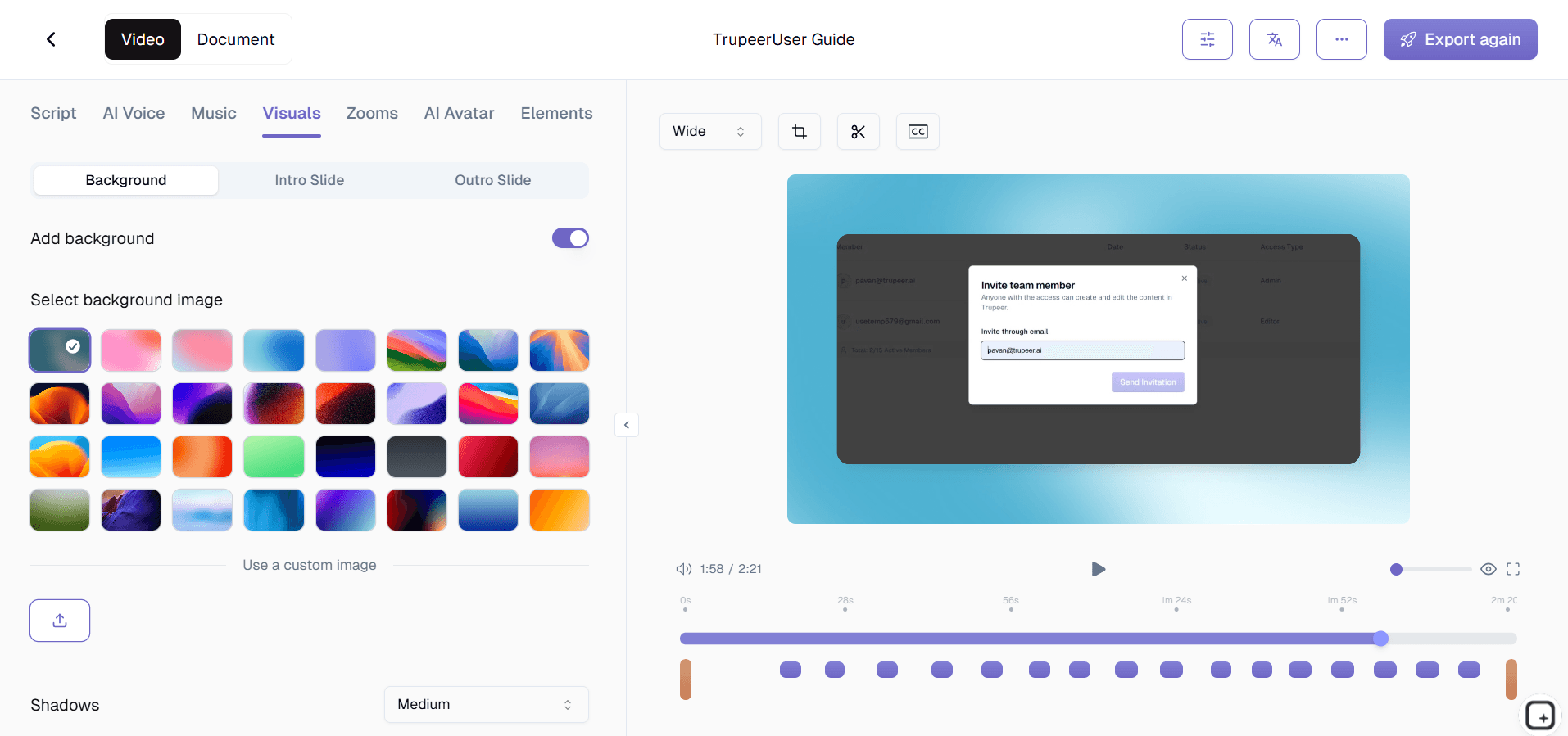
يُنسَّق المحتوى الذي تم إنشاؤه باستخدام قوالب التوثيق من Trupeer، والتي تضمن اتساق الأسلوب، والتسلسل الصحيح للعناوين، والعرض الاحترافي. يمكنك تخصيص هذه القوالب لتتوافق مع إرشادات علامتك التجارية، مما يخلق مظهرًا متماسكًا عبر جميع موادك المرجعية يتماشى مع الهوية البصرية لمؤسستك.
الخطوة 5: المراجعة، والهوية، والمشاركة
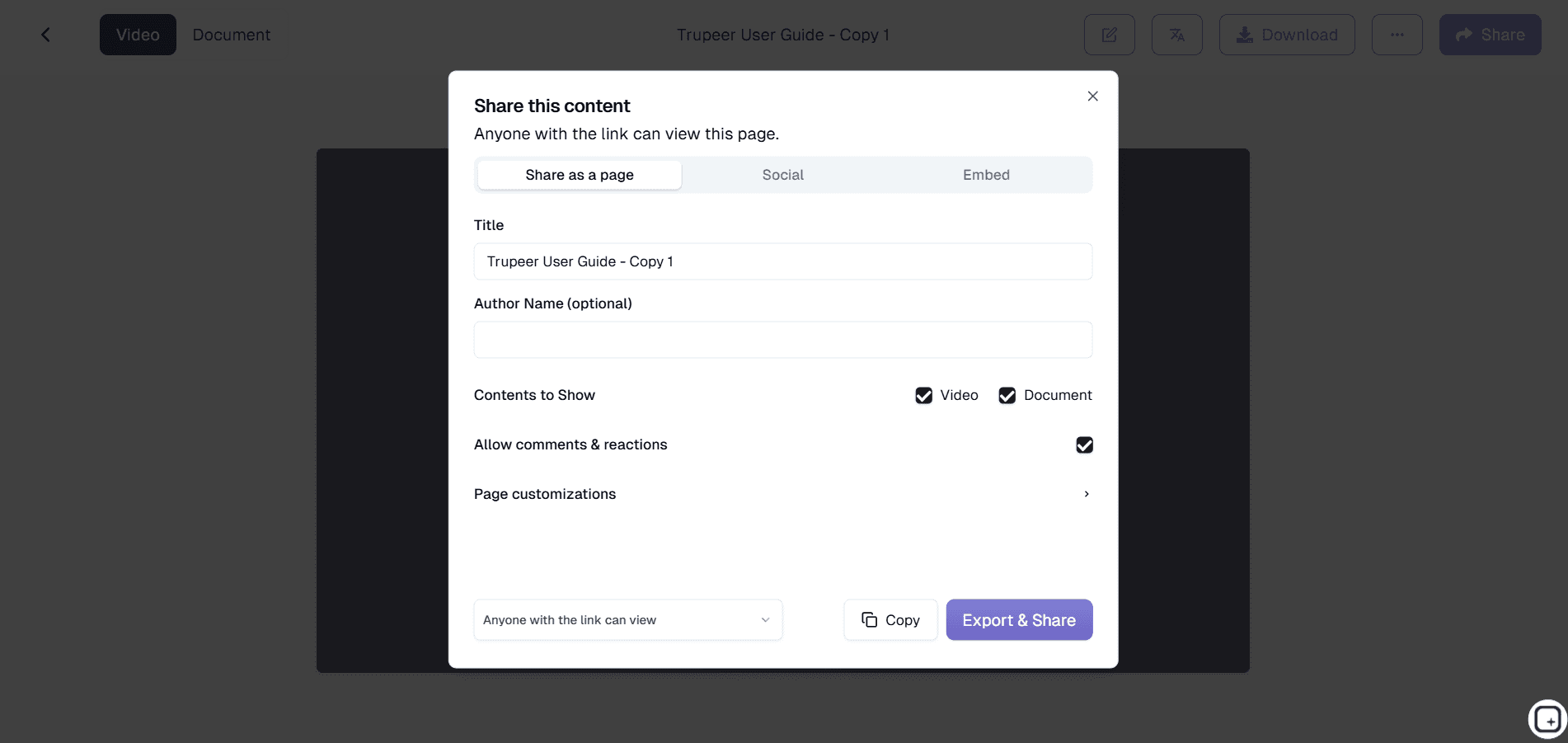
تتضمن الخطوة الأخيرة تطبيق حِزم العلامة التجارية الخاصة بك من أجل اتساق الهوية، ومراجعة المحتوى المُنشأ للتأكد من دقته، ومشاركة دليل المراجع المكتمل عبر الروابط المباشرة أو الأدوات المضمّنة أو الملفات المصدرة. يدعم النظام أيضًا الترجمة إلى لغات متعددة، مما يجعل أدلتك متاحة للفرق العالمية.
الميزات والقدرات الرئيسية
يقدم مولّد دليل المراجع السريعة من Trupeer ميزات شاملة مصممة لتبسيط سير عمل التوثيق لديك مع الحفاظ على معايير الجودة الاحترافية. تعمل هذه القدرات معًا لخلق تجربة سلسة من التسجيل حتى النشر النهائي.
التعرف على المحتوى المدعوم بالذكاء الاصطناعي: يستخدم النظام رؤية حاسوبية متقدمة لتحديد عناصر واجهة المستخدم ووصفها، مولدًا تلقائيًا أوصافًا دقيقة للأزرار والقوائم ومناطق الشاشة. يزيل ذلك الحاجة إلى التعليق اليدوي على لقطات الشاشة ويضمن أن الأدلة الخاصة بك تتضمن تعليمات دقيقة وقابلة للتنفيذ يمكن للقراء اتباعها بسهولة.
التوليد ثنائي الإخراج: ينتج كل تسجيل محتوى فيديو وتوثيقًا مكتوبًا في الوقت نفسه. يزيد هذا النهج من قيمة الوقت الذي تستثمره، ويمنحك صيغ محتوى متعددة تلبي تفضيلات التعلم المختلفة داخل فريقك أو قاعدة عملائك.
تنسيق قائم على القوالب: تضمن قوالب التوثيق الاحترافية بنيةً وأسلوبًا متسقين عبر جميع أدلتك المرجعية. تتبع هذه القوالب أفضل ممارسات التوثيق ويمكن تخصيصها لتتوافق مع متطلبات علامتك التجارية، مما يخلق مظهرًا احترافيًا يعكس معايير الجودة لدى مؤسستك.
تكامل الهوية التجارية: طبّق الهوية البصرية لشركتك بسلاسة عبر حِزم العلامة التجارية التي تتضمن الشعارات وأنظمة الألوان وتفضيلات التنسيق. يضمن ذلك أن تحافظ جميع أدلتك المرجعية على اتساق العلامة التجارية مع مظهر مصقول واحترافي.
دعم متعدد اللغات: تتيح لك إمكانات الترجمة المدمجة إنشاء أدلة مرجعية بعدة لغات من تسجيل واحد. وتُعد هذه الميزة ذات قيمة خاصة للمؤسسات التي تضم فرقًا عالمية أو قواعد عملاء دولية تحتاج إلى توثيق بلغاتها الأصلية.
تصدير جاهز للتكامل: يمكن تصدير الأدلة المُنشأة بتنسيقات مختلفة أو مشاركتها عبر روابط مباشرة وأدوات قابلة للتضمين. تضمن هذه المرونة إمكانية دمج موادك المرجعية في قواعد المعرفة الحالية أو أنظمة إدارة التعلم أو بوابات دعم العملاء دون تعقيدات تقنية.
لماذا ينبغي استخدام مولّد دليل المراجع السريعة من Trupeer؟
يوفر مولّد دليل المراجع السريعة من Trupeer وفورات كبيرة في الوقت وتحسينات في الجودة مقارنة بأساليب التوثيق التقليدية. عادةً ما تشهد المؤسسات انخفاضًا بنسبة 75% في وقت إنشاء التوثيق مع تحسين دقة موادها المرجعية وسهولة استخدامها في الوقت نفسه.
توفير هائل في الوقت: قد يستغرق إنشاء أدلة مرجعية شاملة يدويًا ساعات أو حتى أيامًا، خاصة عندما تأخذ في الاعتبار التقاط لقطات الشاشة وتحريرها والكتابة والتنسيق. يختصر Trupeer هذه العملية إلى دقائق من خلال أتمتة الجوانب الأكثر استهلاكًا للوقت في إنشاء التوثيق. يمكن للفرق التركيز على العمل الاستراتيجي بدلًا من مهام التوثيق المتكررة.
معايير جودة متسقة: غالبًا ما يعاني التوثيق اليدوي من تنسيق غير متسق أو خطوات مفقودة أو تعليمات غير واضحة. يضمن الذكاء الاصطناعي في Trupeer أن يتبع كل دليل البنية عالية الجودة نفسها ويتضمن جميع التفاصيل اللازمة. لا يتخطى النظام خطوات ولا يفترض أشياء من تلقاء نفسه، ما ينتج توثيقًا شاملًا يساعد المستخدمين فعليًا على إكمال المهام بنجاح.
تقليل ديون التوثيق: تكافح كثير من المؤسسات مع التوثيق القديم أو غير المكتمل لأن تحديث الأدلة يدويًا يستغرق وقتًا طويلًا جدًا. مع عملية Trupeer المبسطة، يصبح الحفاظ على حداثة المواد المرجعية أمرًا ممكنًا، مما يقلل ديون التوثيق التي تتراكم غالبًا في المؤسسات سريعة الحركة.
تجربة مستخدم محسّنة: صُممت الأدلة التي ينشئها Trupeer لتكون سهلة الاستخدام، مع تعليمات واضحة خطوة بخطوة ولقطات شاشة ذات صلة وتدفق منطقي. وهذا يحسن التجربة لأي شخص يستخدم توثيقك، سواء كان من أعضاء الفريق الداخليين أو العملاء الخارجيين، مما يؤدي إلى معدلات إكمال مهام أفضل وتقليل طلبات الدعم.
قابلية التوسع دون استنزاف الموارد: مع نمو مؤسستك، تتضاعف احتياجات التوثيق بشكل كبير. تتطلب الأساليب التقليدية زيادات متناسبة في موارد الكتابة، لكن النظام المؤتمت من Trupeer يتوسع بكفاءة. يمكنك إنشاء مكتبات توثيق واسعة دون بناء فرق توثيق كبيرة، مما يجعل من العملي توثيق كل عملية مهمة بشكل شامل.
من يمكنه استخدام مولّد دليل المراجع السريعة من Trupeer؟
يخدم مولّد دليل المراجع السريعة من Trupeer مجموعات مستخدمين متنوعة عبر صناعات ووظائف تنظيمية مختلفة. تجعل مرونة المنصة منها أداة قيّمة لأي شخص يحتاج إلى إنشاء توثيق واضح واحترافي بسرعة وكفاءة.
منشئو المحتوى والكتّاب التقنيون: يستخدم منشئو المحتوى المحترفون Trupeer لتبسيط سير عمل التوثيق والحفاظ على الاتساق عبر المشاريع الكبيرة. تتيح لهم المنصة التركيز على استراتيجية المحتوى وتجربة المستخدم مع أتمتة الجوانب الميكانيكية لإنشاء الأدلة. ويذكر كثير من الكتّاب التقنيين تحسنًا كبيرًا في الإنتاجية عند استخدام Trupeer لمهام التوثيق الروتينية.
فرق التسويق ومديرو المنتجات: يوظف المتخصصون في التسويق المنصة لإنشاء مولّد التوثيق والأدلة المرجعية المصاحبة لتمكين المبيعات وتأهيل العملاء. إن القدرة على توليد محتوى الفيديو والمحتوى المكتوب من تسجيل واحد تجعل من الأسهل الحفاظ على مكتبات الأصول التسويقية وضمان اتساق الرسائل عبر القنوات.
المعلمون ومدربو الشركات: يستخدم المتخصصون في التعليم Trupeer لإنشاء مولّد دليل التدريب الشامل إلى جانب المواد المرجعية التي يمكن للطلاب الرجوع إليها. يضمن نظام القوالب في المنصة أن يتبع المحتوى التعليمي أفضل الممارسات التربوية، بينما تساعد ميزة دعم اللغات المتعددة على الوصول بفعالية إلى فئات متنوعة من المتعلمين.
فرق المنتجات ومطورو البرمجيات: تعتمد فرق التطوير على Trupeer لإنشاء التوثيق التقني الذي يبقى متزامنًا مع تغييرات المنتج. تجعل المنصة من العملي توثيق كل ميزة وتحديث الأدلة كلما تطور البرنامج، مما يقلل عبء الدعم ويحسن اعتماد المستخدمين.
متخصصو المبيعات وفرق نجاح العملاء: تستخدم فرق المبيعات المنصة في مواد مسجّل الشاشة بالذكاء الاصطناعي والعروض التوضيحية المخصصة للعملاء. ينشئ متخصصو نجاح العملاء أدلة مرجعية تساعد العملاء على تعظيم قيمة المنتج، مما يقلل تذاكر الدعم ويحسن درجات رضا العملاء.
أصحاب الأعمال الصغيرة ورواد الأعمال: تقدر الشركات الصغيرة محدودة الموارد كفاءة Trupeer في إنشاء توثيق احترافي دون الحاجة إلى موظفين مخصصين للكتابة. تُمكّن المنصة الفرق الصغيرة من تحقيق نتائج تفوق حجمها من حيث جودة التوثيق وشموليته، بما يدعم تجارب عملاء أفضل وعمليات أكثر كفاءة.
أفضل الممارسات لاستخدام مولّد دليل المراجع السريعة من Trupeer
يتطلب تعظيم قيمة مولّد دليل المراجع السريعة من Trupeer فهم كيفية تحسين عملية التسجيل والاستفادة من الميزات المتقدمة للمنصة بفاعلية. تضمن هذه الممارسات أن تلبي الأدلة المُنشأة لديك المعايير المهنية وتخدم جمهورك المستهدف جيدًا.
خطط لجلسة التسجيل: قبل الضغط على زر التسجيل، حدِّد العملية التي تريد توثيقها وتدرّب على سير العمل لضمان تنفيذ سلس. تؤدي الإجراءات الواضحة والمتعمدة أثناء التسجيل إلى تحليل أفضل بالذكاء الاصطناعي وتعليمات مكتوبة أكثر دقة. خذ وقتك مع كل خطوة وتجنب حركات المؤشر غير الضرورية التي قد تربك عملية توليد التوثيق.
استفد من تخصيص القوالب: استثمر وقتًا في إعداد قوالب توثيق تتوافق مع دليل أسلوب مؤسستك واحتياجات المستخدمين. تحسن القوالب المصممة جيدًا اتساق ومظهر الاحتراف في جميع أدلتك المرجعية مع تقليل التحرير اليدوي المطلوب بعد التوليد.
حسّن المحتوى وفقًا لجمهورك: فكّر فيمن سيستخدم أدلتك المرجعية وعدّل أسلوب التسجيل وفقًا لذلك. بالنسبة للجمهور التقني، يمكنك التنقل عبر العمليات بسرعة أكبر، بينما تستفيد الأدلة للمستخدمين العامين من عروض توضيحية أبطأ وأكثر تعمدًا لكل خطوة.
استفد من الميزات المتقدمة: استكشف الدروس التعليمية الخاصة بـ Trupeer للتعرّف على الميزات المتقدمة مثل التوليد متعدد اللغات وتكامل حِزم العلامة التجارية وخيارات التصدير. يمكن لهذه القدرات أن تعزز بشكل كبير قيمة جهود التوثيق ووصولها عندما تُستخدم بشكل استراتيجي.
استكشف الأدوات ذات الصلة
لماذا تختار مُولِّد دليل Trupeer المرجعي السريع
الإنشاء التلقائي
حوّل تسجيلات الشاشة إلى أدلة مكتوبة احترافية فورًا باستخدام الذكاء الاصطناعي المتقدم
إخراج المحتوى المزدوج
احصل على كلٍ من دروس الفيديو التعليمية ووثائق المرجع من كل تسجيل على حدة
اتساق العلامة التجارية
طبّق قوالب مخصصة وحزم علامات تجارية للحصول على تنسيق احترافي ومتسق للمستندات
كيفية استخدام مُنشئ دليل المرجع السريع من Trupeer
الخطوة 1
سجّل أو حمّل شاشتك
الخطوة 2
دع الذكاء الاصطناعي يُنشئ التوثيق
الخطوة 3
تطبيق القوالب والعلامة التجارية
الأسئلة الشائعة
ما أنواع تسجيلات الشاشة التي تُعدّ الأفضل لإنشاء أدلة مرجعية سريعة؟
أي تسجيل شاشة يوضح سير عمل أو عملية واضحة ينجح بشكل جيد. يعمل الذكاء الاصطناعي بأفضل أداء مع التسجيلات التي تُظهر خطوات مقصودة ومتدرجة بدلًا من الحركات السريعة والعشوائية.
هل يمكنني تعديل أدلة المراجع المُنشأة بعد إنشائها؟
نعم، يمكنك مراجعة وتحرير جميع المحتوى الذي تم إنشاؤه. توفر Trupeer الأساس، ويمكنك تنقيح التوثيق ليتوافق مع متطلباتك المحددة وتفضيلاتك الأسلوبية.
ما مدى دقة أدلة المراجع التي يتم إنشاؤها تلقائيًا؟
يحقق الذكاء الاصطناعي الخاص بـ Trupeer دقة عالية من خلال تحليل عناصر الشاشة وإجراءات المستخدم بشكل منهجي. عادةً ما تتطلب الأدلة المُنشأة تعديلات طفيفة فقط، خاصةً عند العمل مع تسجيلات واضحة ومنظمة جيدًا.
هل يمكنني إنشاء أدلة مرجعية بلغات متعددة من تسجيل واحد؟
بالتأكيد. تتيح لك ميزات الترجمة في Trupeer إنشاء أدلة مرجعية بعدة لغات من تسجيل واحد، مما يسهل خدمة الفرق والعملاء حول العالم.
ما الفرق بين نهج Trupeer وأدوات التوثيق التقليدية؟
تتطلب الأدوات التقليدية كتابةً يدوية وإدارةً لصور الشاشة. يستخرج Trupeer تلقائيًا كلًا من المعلومات المرئية والإجرائية من التسجيلات، مما ينشئ أدلة شاملة بأقل جهد يدوي ممكن.


