4.8/5
AI Video Generator for Training
Transform screen recordings into AI-generated training videos with automated editing and professional polish.
Try for Free

Trupeer's AI Video Generator for Training turns raw screen recordings into professional training videos automatically. Record any process, and the AI generates a polished training video with smart edits, zoom effects, voiceover cleanup, and a matching step-by-step written guide - all without manual video editing.
Record your screen and let AI generate professional training videos instantly.
Automated editing removes filler words and adds zoom effects automatically.
Generate both AI training videos and written documentation from one recording.
Apply consistent branding across all AI-generated training content.
Share training videos via link, embed, or download for any LMS platform.
What Is Trupeer's AI Video Generator for Training?
Trupeer's AI video generator for training is a purpose-built platform that uses artificial intelligence to transform simple screen recordings into fully produced training videos. Instead of spending hours in traditional video editing software cutting clips, adding transitions, and syncing audio, the AI handles every production step automatically. You demonstrate a process on screen, and the AI generates a training video that looks like it was produced by a professional video team.
How Does AI Video Generator for Training Work?
Getting started with AI Video Generator for Training takes just a few minutes.
Step 1: Record or Upload
Start a screen recording directly in your browser, or upload an existing video file you want to transform.

Step 2: AI Processing
The AI analyzes your recording, removes filler words, adds zoom effects, and generates video automatically.
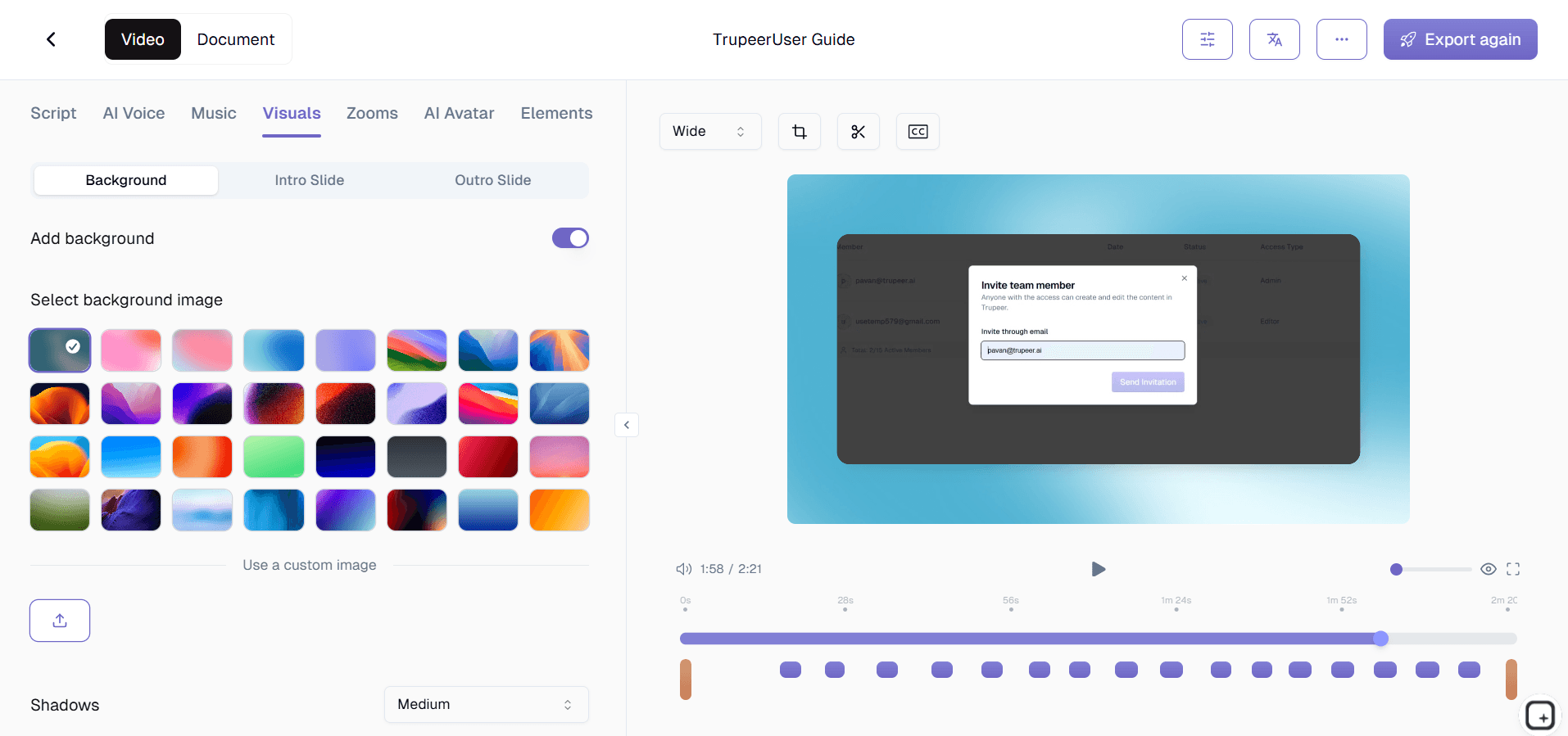
Step 3: Customize and Share
Edit the output, apply your brand kit, and share via link or embed on your website. Updates are just as easy.

Key Features of Trupeer's AI Video Generator for Training
Intelligent Scene Detection: The AI analyzes your screen recording to identify distinct workflow steps, automatically segmenting your video into logical chapters. Each scene transition is detected and enhanced with smooth cuts, so your training video flows naturally without manual splicing or timeline editing.
Automated Filler Word Removal: Every pause, verbal stumble, and filler word is automatically identified and cleanly removed from your audio track. The AI preserves your natural speaking cadence while eliminating distractions, producing voiceover quality that sounds rehearsed and professional without requiring multiple takes.
Context-Aware Zoom Effects: The AI tracks your cursor movements and UI interactions in real-time, automatically applying zoom-in effects when you click buttons, fill form fields, or navigate menus. Viewers see exactly what matters at each step without you manually creating zoom keyframes in post-production.
Rapid Iteration and Updates: When training content needs updating after a software release or process change, re-record only the affected section. The AI regenerates just that portion of the training video, keeping your content library current without rebuilding videos from scratch.
Why Choose Trupeer's AI Video Generator for Training?
Production Quality Without Production Teams: Generate training videos that look professionally produced without hiring videographers, editors, or voice talent. The AI replaces an entire post-production workflow.
Speed at Scale: Create dozens of training videos in the time it previously took to produce one. The AI processes recordings in minutes, enabling rapid content creation across your entire training curriculum.
Consistent Quality: Every AI-generated training video meets the same production standard. No variation in editing quality, branding, or format regardless of who creates the source recording.
Lower Total Cost: Eliminate software licensing fees for video editing tools, reduce training content production time by over 80%, and free up L&D team resources for strategic work instead of manual video editing.
AI Video Generator for Training for Internal Teams
1. Enable subject-matter experts across departments to produce their own training videos without video editing skills. The AI does the production work, so domain experts focus on demonstrating their knowledge instead of learning editing software.
2. Reduce new employee ramp-up time by generating comprehensive video training libraries. New hires self-pace through AI-produced training videos that show real workflows, learning faster than they would from text documentation alone.
3. Standardize training across offices and departments with AI-generated videos that ensure every team receives identical instruction. Inconsistent training disappears when everyone learns from the same professionally produced content.
4. Preserve institutional knowledge by having experienced employees record their expertise. The AI transforms their demonstrations into lasting training assets that survive employee turnover and organizational changes.
AI Video Generator for Training for SaaS Teams
1. Produce product training videos that keep pace with rapid release cycles. When your product ships updates weekly, the AI regenerates affected training videos in minutes, not days.
2. Create customer onboarding video sequences that reduce time-to-value. AI-generated product walkthroughs guide new users through setup and core features, decreasing reliance on live onboarding calls.
3. Build a scalable training video library for your customer education program. The AI lets a small team produce the volume of training content that would normally require a dedicated video production department.
4. Generate internal training videos for support teams whenever new features ship. Support agents watch AI-produced feature walkthroughs before customers start asking questions, improving first-response accuracy.
AI Video Generator for Training for Startups
1. Create enterprise-quality training videos without enterprise budgets. The AI handles production, so startups deliver polished training content that signals product maturity to prospects and investors.
2. Build foundational training content before rapid growth makes knowledge transfer chaotic. Early investment in AI-generated training videos prevents the knowledge silos that plague fast-scaling companies.
3. Onboard new hires with consistent AI-produced training videos instead of ad hoc explanations from busy founders. Every new team member gets the same thorough introduction regardless of when they join.
4. Iterate on training content as fast as your product evolves. When features change daily, the AI regenerates training videos quickly enough to keep documentation current without creating bottlenecks.
AI Video Generator for Training for Enterprises
1. Deploy AI-generated training videos across global workforces of thousands. A single recording becomes the standard training asset, ensuring consistent instruction across every office, region, and business unit.
2. Satisfy compliance training requirements with professionally produced, trackable video content. AI-generated training videos provide audit trails and consistent messaging that regulatory frameworks require.
3. Achieve massive cost savings by replacing instructor-led training sessions with reusable AI-generated videos. One recording serves unlimited viewers indefinitely, compared to the recurring costs of live training delivery.
4. Accelerate change management during digital transformation initiatives. AI-generated training videos help employees learn new enterprise systems faster than traditional training methods, reducing adoption timelines and productivity dips.
AI Video Generator for Training for Remote Teams
1. Create async training content that remote employees access across any time zone. AI-generated training videos eliminate the scheduling gymnastics of coordinating live training sessions across distributed teams.
2. Deliver richer training experiences than text-based async communication allows. Video captures visual context, tone, and step-by-step demonstrations that written instructions cannot fully convey.
3. Reduce meeting load by generating reusable training videos instead of repeating live demonstrations. Record once, and the AI produces a training asset that replaces dozens of redundant training calls.
4. Maintain training consistency across fully remote organizations. Every remote team member trains from the same AI-generated video library, preventing the knowledge fragmentation that distributed work environments tend to create.
AI Video Generator for Training for Developers
1. Generate technical training videos for codebase walkthroughs, architecture overviews, and development environment setups. The AI produces clear, annotated videos that new developers follow step-by-step during onboarding.
2. Document complex debugging workflows as AI-enhanced training videos. When senior engineers solve tricky problems, recording and AI-processing their approach creates reusable training content for the entire team.
3. Create API integration tutorials with AI-generated zoom effects and narration. The AI highlights key code sections and UI interactions, producing developer training content that is easy to follow and reference later.
4. Keep on-call runbook videos current with rapid AI regeneration. When incident response procedures change, re-record the updated steps and let the AI produce a new training video in minutes.
AI Video Generator for Training for Onboarding & Support Teams
1. Build comprehensive onboarding video libraries that new hires navigate independently. AI-generated training videos provide consistent, high-quality instruction without pulling senior team members away from their responsibilities.
2. Train support agents on new product features and escalation procedures using AI-produced videos. Every agent receives the same thorough training, ensuring uniform customer service quality across the team.
3. Create customer-facing training videos that reduce support ticket volume. When users can watch clear AI-generated walkthroughs in your help center, they resolve common issues themselves instead of contacting support.
4. Update onboarding and support training videos rapidly when processes change. The AI regenerates affected content in minutes, so training materials never fall behind current procedures or product updates.
Why Teams Choose Trupeer's AI Video Generator
AI-Powered Editing
Automatic zoom effects filler removal and caption generation
Instant Production
Professional training videos generated in minutes not days
Video Plus Docs
Every training video comes with a matching written guide
How to Generate Training Videos with Trupeer AI
Step 1
Record your screen or upload an existing training video
Step 2
AI generates a polished training video with effects and captions
Step 3
Apply branding and distribute to your team or LMS
Frequently Asked Questions
How is an AI video generator different from traditional video editing?
An AI video generator automates the entire post-production process. Instead of manually cutting clips, adding transitions, and syncing audio, the AI handles all editing steps automatically, producing professional results in minutes rather than hours.
Can the AI generate training videos from silent screen recordings?
Yes. Trupeer's AI can generate narration based on the on-screen actions it detects, creating a complete training video experience even when the original recording has no voiceover.
What video formats does the AI generator support?
Trupeer exports AI-generated training videos in standard formats compatible with all major LMS platforms, knowledge bases, and web embedding. You can also download MP4 files for any custom distribution needs.
How many training videos can I generate per month?
This depends on your subscription plan. Trupeer offers plans scaled for individual creators through enterprise teams producing hundreds of training videos monthly. Visit the pricing page for current details.
Can multiple team members use the AI video generator?
Yes. Trupeer supports team workspaces where multiple members record and generate training videos. Brand kits ensure consistent output regardless of who creates the source recording.
More Tools


