4.8/5
Free AI-Powered Training Video Creation Tool
Let AI handle the editing while you focus on teaching. Create training videos that look professionally produced.
Try for Free

Trupeer's AI-Powered Training Video Creation Tool automates the entire training video production pipeline from screen recording to final delivery. Record any workflow, and the AI creates a training video with intelligent edits, annotations, voiceover enhancement, and a companion step-by-step written guide.
Record workflows and let AI create production-ready training videos.
Automated editing including zoom effects, captions, and filler removal.
AI generates companion written documentation alongside every video.
Brand kit integration keeps all training videos visually consistent.
Share via link, embed in your LMS, or download finished video files.
What Is Trupeer's AI-Powered Training Video Creation Tool?
Trupeer's AI-powered training video creation tool is a complete platform for producing professional training videos without any manual editing. The AI watches your screen recording, understands the workflow being demonstrated, and applies professional-grade production techniques automatically. It detects where to zoom, when to cut, what to caption, and how to structure the content for maximum learning impact. The result is a training video creation tool that turns any subject-matter expert into a training content producer, regardless of their video production experience.
How Does AI-Powered Training Video Creation Tool Work?
Getting started with AI-Powered Training Video Creation Tool takes just a few minutes.
Step 1: Record or Upload
Start a screen recording directly in your browser, or upload an existing video.

Step 2: AI Processing
The AI analyzes your recording, removes filler words, adds zoom effects, and generates video automatically.
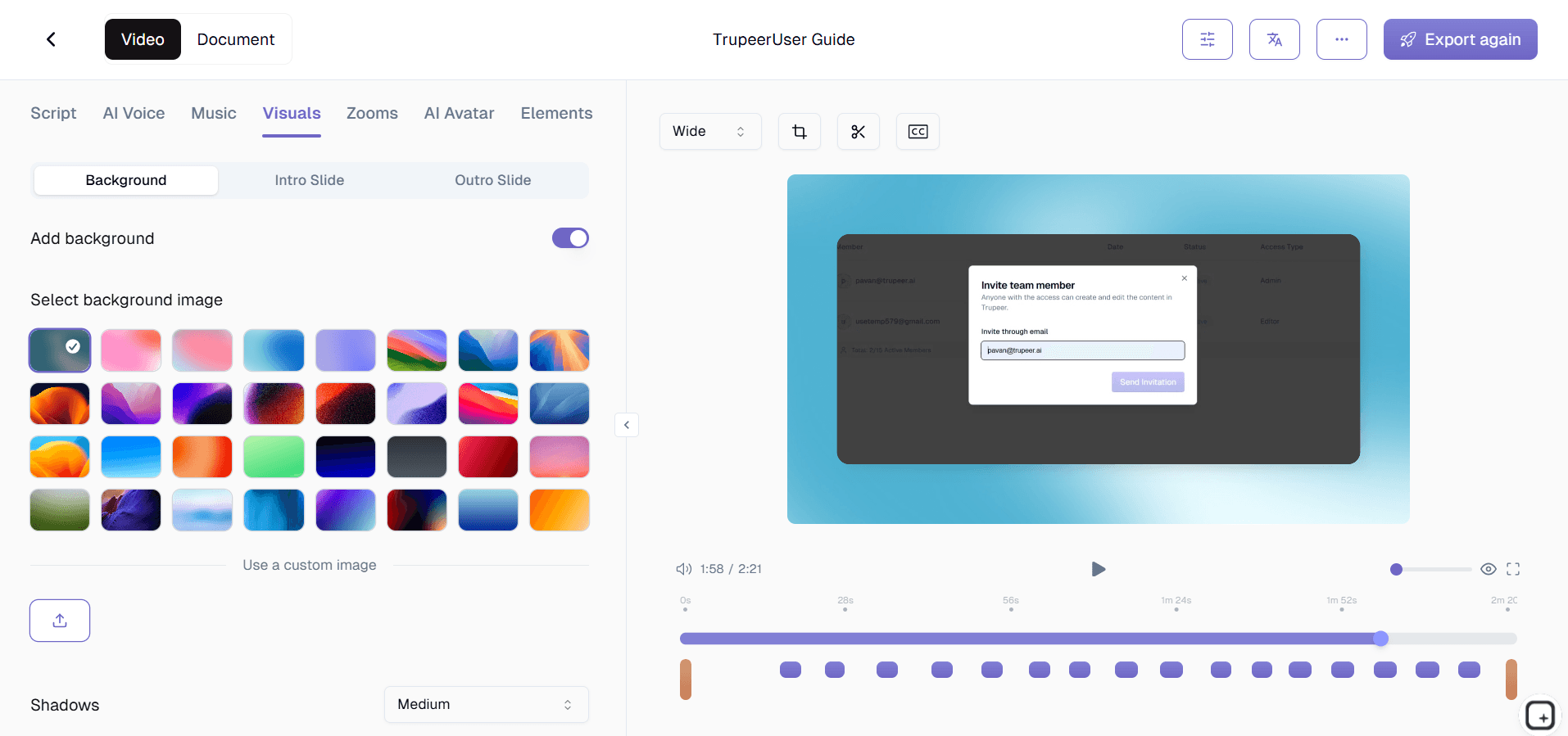
Step 3: Customize and Share
Edit the output, apply your brand kit, and share via link or embed on your website. Updates are just as easy.

Key Features of Trupeer's AI-Powered Training Video Creation Tool
Multi-Stage AI Processing Pipeline: Your recording passes through a sophisticated AI pipeline that handles scene detection, audio cleanup, visual enhancement, and content structuring in sequence. Each stage builds on the previous one, producing output that matches what a professional video editor would deliver after hours of manual work.
Intelligent Content Structuring: The AI identifies the logical structure of your training workflow and organizes the video into clear, digestible segments. It adds chapter markers, transitions between distinct steps, and visual cues that help learners navigate the content and understand where one concept ends and the next begins.
Adaptive Zoom and Annotation Engine: Rather than applying generic zoom effects, the AI understands the UI elements you interact with and applies contextually appropriate zoom levels, highlight boxes, and cursor tracking. When you click a small button in a complex interface, the AI zooms to exactly the right level for clarity.
Professional Audio Enhancement: Beyond removing filler words, the AI normalizes audio levels, reduces background noise, and ensures consistent volume throughout the training video. The result is clean, professional narration that sounds studio-quality regardless of your recording environment or microphone setup.
Why Choose Trupeer's AI-Powered Training Video Creation Tool?
End-to-End Automation: From raw screen recording to published training video, every production step is handled by AI. No intermediate tools, no manual editing software, no post-production bottlenecks.
Expert-Accessible: Subject-matter experts create training content directly without needing video production skills. The best person to teach a process is the person who does it daily, and this tool removes every technical barrier.
Enterprise-Grade Output: AI-produced training videos meet the production standards that enterprise L&D departments require. Professional audio, consistent branding, and structured content delivery are automatic, not aspirational.
Scalable Content Production: A small team produces training video libraries that would previously require dedicated production staff. The AI scales your content creation capacity without scaling your headcount.
AI-Powered Training Video Creation Tool for Internal Teams
1. Democratize training content creation across your organization. Any team member can produce professional training videos, breaking the bottleneck of relying on L&D or video production teams for every piece of training content.
2. Capture and preserve expert knowledge before it walks out the door. When experienced employees record their workflows, the AI transforms their expertise into permanent training assets that benefit every future hire.
3. Maintain a living training library that evolves with your organization. As processes change, update individual training videos in minutes instead of scheduling re-shoots or hiring editors for revision work.
4. Reduce cross-departmental training inconsistencies. When marketing, sales, engineering, and operations all reference AI-produced training videos from the same platform, everyone operates from identical procedural knowledge.
AI-Powered Training Video Creation Tool for SaaS Teams
1. Produce feature-specific training videos that ship alongside product releases. When engineering deploys new functionality, the AI generates customer-facing training content in the same sprint cycle.
2. Scale your customer education program without scaling your content team. AI-powered production lets a small customer success team maintain a comprehensive training video library covering your entire product.
3. Create tiered training content for different user personas. Generate beginner, intermediate, and advanced training videos from different recording sessions, all with consistent production quality and branding.
4. Keep internal support training synchronized with product changes. When features evolve, regenerate support team training videos so agents are always prepared for customer questions about the latest version.
AI-Powered Training Video Creation Tool for Startups
1. Punch above your weight with training content that rivals enterprise competitors. AI-powered production gives startups professional training videos without the budget for video production teams or expensive editing software.
2. Build scalable onboarding from day one. Startups that invest in AI-produced training videos early avoid the knowledge management chaos that derails fast-growing companies when they scale from 10 to 100 employees.
3. Create investor-ready product demonstration videos using the same AI tools. Polish your pitch with professional product walkthroughs that demonstrate your solution clearly and compellingly.
4. Empower every team member to contribute training content. In a startup, everyone wears multiple hats, and AI-powered video creation means anyone can produce training materials without becoming a video editing specialist.
AI-Powered Training Video Creation Tool for Enterprises
1. Standardize training delivery across a global workforce. AI-produced training videos ensure that employees in every region receive identical instruction, eliminating the quality variations inherent in locally delivered live training.
2. Achieve measurable ROI on training investments. Replace costly instructor-led sessions with reusable AI-generated training videos, reducing per-employee training costs while improving knowledge retention through on-demand replay.
3. Support regulatory compliance with documented, versioned training content. AI-produced training videos create auditable records of what training was provided, when it was updated, and how it was distributed across the organization.
4. Accelerate merger and acquisition integration timelines. When organizations combine, AI-produced training videos rapidly align disparate teams on unified processes, reducing the cultural and operational friction of integration.
AI-Powered Training Video Creation Tool for Remote Teams
1. Deliver training experiences that rival in-person instruction. AI-enhanced training videos with zoom effects, captions, and structured content provide the visual clarity that remote workers miss when they cannot shadow colleagues in person.
2. Create timezone-proof training content. Record once, and every remote team member accesses the same AI-produced training video whenever their schedule allows, without coordinating across international time differences.
3. Build remote team culture through consistent shared knowledge. When distributed employees all learn from the same training library, they develop shared language and expectations that strengthen remote team cohesion.
4. Replace synchronous training calls with higher-quality async alternatives. AI-produced training videos are better structured, more visually polished, and more easily referenced than live training calls that participants forget within days.
AI-Powered Training Video Creation Tool for Developers
1. Produce technical training videos that capture complex development workflows in detail. The AI zooms into code editors, terminal commands, and browser dev tools at exactly the right moments, creating developer training content that is genuinely useful.
2. Maintain current engineering onboarding videos as your tech stack evolves. When frameworks, tools, or deployment processes change, re-record the affected sections and let the AI update the training video seamlessly.
3. Create architecture and design decision training videos that preserve technical context. Beyond just showing how, capture why certain technical decisions were made so future developers understand the reasoning behind system design.
4. Build incident response training videos from real incident resolutions. After resolving production issues, record the debugging and resolution process, and let the AI transform it into a training resource for the on-call rotation.
AI-Powered Training Video Creation Tool for Onboarding & Support Teams
1. Create structured onboarding curricula with AI-produced training videos for each role and department. New hires follow a clear video-based learning path that ensures comprehensive coverage without overwhelming them.
2. Standardize customer support training with AI-produced scenario walkthroughs. Every support agent trains on the same high-quality video content, producing consistent customer experiences regardless of which agent handles a ticket.
3. Generate customer-facing training videos that proactively reduce support volume. AI-produced product walkthroughs in your help center answer questions before they become support tickets, freeing your team for complex issues.
4. Keep training content current with minimal effort. When onboarding procedures or support workflows change, the AI regenerates affected training videos in minutes, ensuring your team always trains on up-to-date processes.
Why Teams Choose Trupeer for AI Training Videos
Full Automation
AI handles every step from recording to finished training video
Smart Annotations
Contextual zoom highlights and captions added intelligently
Written Companion
Automatic step-by-step guide generated with every video
How to Create AI-Powered Training Videos
Step 1
Record your training workflow using the browser-based recorder
Step 2
AI processes and produces a polished training video automatically
Step 3
Apply your brand kit and publish to your team or LMS
Frequently Asked Questions
What makes this tool AI-powered versus regular screen recording?
Regular screen recorders capture raw footage that requires manual editing. Trupeer's AI analyzes your recording and automatically applies professional editing including zoom effects, filler removal, captions, and content structuring, delivering a finished training video without manual post-production.
Can I use existing videos or do I need to re-record everything?
You can upload existing video files for AI processing. Trupeer enhances uploaded recordings with the same automated editing, zoom effects, and documentation generation that it applies to new screen recordings.
How does the AI know where to zoom in my training video?
The AI tracks your cursor movements, detects UI elements like buttons, form fields, and menus, and applies contextually appropriate zoom levels. It focuses on the area of the screen where the action is happening, ensuring viewers see exactly what matters at each step.
Is the AI-produced video quality suitable for enterprise use?
Yes. Trupeer's AI produces training videos with professional audio cleanup, consistent branding via brand kits, structured chapters, and high-resolution output that meets enterprise L&D standards for production quality.
Can I update just part of a training video?
Yes. Trupeer supports granular updates where you re-record only the changed section of a workflow. The AI integrates the new footage with existing content, maintaining production continuity without requiring a complete re-recording.
More Tools


