4.8/5
無料のオンラインユーザーガイド作成ツール
プロフェッショナルなユーザーガイド作成を簡単に
ユーザーガイドを無料で作成

Trupeerのオンラインユーザーガイド作成は、企業が包括的なユーザー向けドキュメントを作成する方法を一変させます。AI搭載のこのプラットフォームは、画面録画を洗練された ユーザーガイド に変換し、動画によるデモと文章による手順を組み合わせることで、従来の手作業によるドキュメント作成にかかる時間のかかるプロセスをなくします。多くのチームが直面する中核的な課題は、包括的でありながら、誰でも利用しやすいユーザーガイドを作ることです。
Trupeerが従来のドキュメントツールと異なるのは、デュアルアウトプット(2つの成果物)というアプローチです。他のプラットフォームが文章のガイドだけ、または基本的な画面録画だけに注力するのに対し、Trupeerの ユーザーガイド システムは、1回の録画セッションから、インタラクティブな動画ウォークスルーと詳細な文章手順の両方を生成します。この包括的なアプローチにより、ユーザーは好みの学習形式を選べる一方で、すべてのドキュメントに一貫性を保てます。Trupeerは順番を逆にします。機能を説明する前に録画を開始。クリックしながら話す。あとはAIが次を処理します。重要だった瞬間のズーム効果、不要なつなぎ言葉のカット、クリックごとにキャプチャしたスクリーンショットを文章ガイドへ自動で配置、そしてそれに対応するMP4も生成。ブランドキットもその場で適用します。結果として、同じ午後の終わりまでに出荷可能なユーザーガイドが完成します。さらに次の四半期にUIが変わっても、最初からガイドを作り直すのではなく、変わったステップだけを再録画すれば済みます。
オンラインユーザーガイド作成はどのように機能しますか?
Trupeerのオンラインユーザーガイド作成は、最小限の手作業で済むインテリジェントで自動化されたワークフローにより、ドキュメント作成プロセス全体を効率化しながら、最大限のインパクトを提供します。
ステップ1:コンテンツをキャプチャ
まずは、Trupeerの AI画面レコーダー で画面を直接録画するか、既存の録画をアップロードします。プラットフォームはさまざまなファイル形式に対応しており、入力元の素材に関係なく品質を自動で最適化します。録画中は、対面で誰かをトレーニングするときと同じように、ソフトウェアやプロセスを自然に操作して進めてください

ステップ2:AIによる処理と強化
録画がキャプチャされると、TrupeerのAIが自動的にコンテンツを処理し、背景ノイズを除去し、つなぎ言葉を取り除き、重要なUI要素を強調するためのインテリジェントなズーム効果を追加します。システムは画面上の操作を分析してワークフローを理解し、ユーザーが把握すべき重要な判断ポイントを特定します。

ステップ3:自動ドキュメント生成
AIは同時に、画面上の操作を解釈して、わかりやすく順序立てた文章のドキュメントを生成します。このプロセスにより、視覚的なデモンストレーションが、必要に応じて詳細な説明、ヒント、注意事項を含む包括的なテキストガイドへと変換されます。

ステップ4:テンプレートの適用とカスタマイズ
お好みの ドキュメントテンプレート を適用して、すべてのユーザーガイドで一貫した書式とスタイルを確保します。これらのテンプレートは、組織のスタイルガイドラインを維持しつつ、ガイドを読みやすく、プロフェッショナルに見せるための構造を提供します。
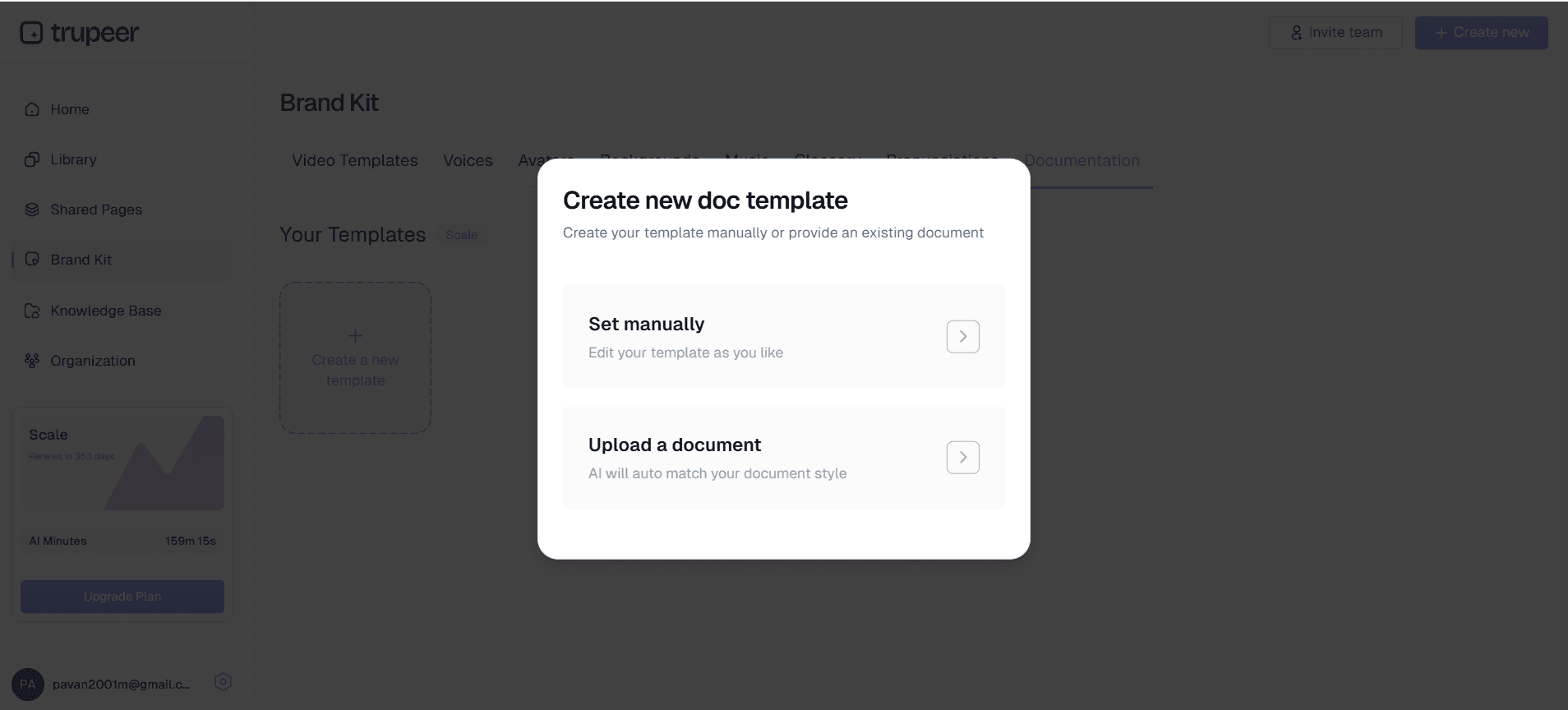
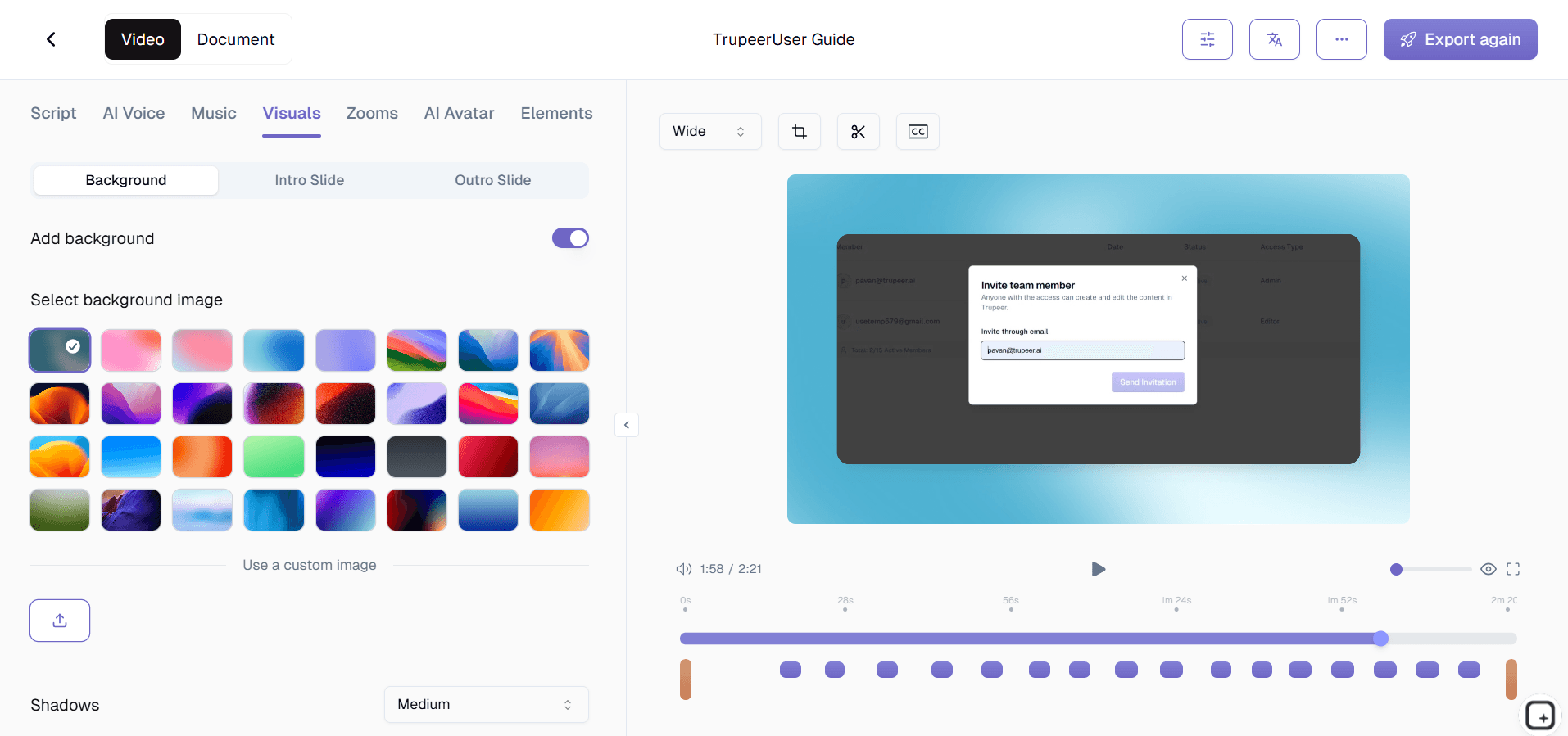
ステップ5:ブランド統合と仕上げ
ロゴ、カスタムカラー、そして会社のビジュアルアイデンティティとの一貫性を保つためのブランド入りのイントロまたはアウトロを追加するために、 ブランドキット を統合します。このステップにより、ユーザーガイドがプロフェッショナルなブランド基準を反映しつつ、ユーザーとの信頼を構築できます。
主な機能と対応範囲
Trupeerのオンラインユーザーガイド作成は、さまざまな業界やユースケースにまたがる多様なドキュメントニーズに対応するために設計された、包括的な機能を提供します。
デュアルフォーマット出力: 1回の録画セッションから、インタラクティブな動画ガイドと包括的な文章ドキュメントの両方を作成できます。このアプローチにより、学習スタイルの違いに対応しつつ、プロセス全体を網羅できます。文章ガイドは、動画コンテンツを詳細な説明や参照資料で補完し、ユーザーが素早く確認または検索できるようにします。
AIによる動画強化: 高度な人工知能が、ノイズ低減、つなぎ言葉の削除、重要なUI要素に注意を引くための戦略的なズーム効果によって、録画を自動的に改善します。これらの強化により、動画編集の専門知識がなくても、撮りっぱなしの画面キャプチャを洗練されたプロフェッショナルなプレゼンテーションへと変換できます。
カスタマイズ可能なドキュメントテンプレート: 再利用できるテンプレートで、好みの書式、スタイル、構造要素を維持しながら、作成時間を短縮し一貫性を確保できます。これらのテンプレートは、従業員向けの トレーニング動画 を作成する場合でも、顧客向けチュートリアルを作成する場合でも、さまざまな種類のガイドに合わせてカスタマイズ可能です。
多言語翻訳: 自動 動画翻訳 機能で、ユーザーガイドを複数言語に変換し、提供範囲を拡大できます。この機能は、グローバル企業や国際的なユーザーベースを持つ製品にとって特に価値があり、言語の壁を越えてアクセシビリティを確保します。
インタラクティブ要素と注釈: クリック可能な要素、コールアウト、注釈を追加して、複雑なプロセスをユーザーが理解しながら進められるようにします。これらのインタラクティブ機能により、受け身の閲覧が魅力的な体験へと変わり、理解度と定着率の向上につながります。
連携と共有オプション: ユーザーガイドを既存のナレッジベース、学習管理システム、またはWebサイトにシームレスに埋め込めます。プラットフォームは、ダイレクトリンク、埋め込みコード、ダウンロード可能な形式など、さまざまな配信ニーズに合う柔軟な共有オプションを提供します。
なぜオンラインユーザーガイド作成を使うべきですか?
Trupeerのオンラインユーザーガイド作成は、組織がドキュメント作成とユーザー教育に取り組む方法を変える、大きなメリットを提供します。
大幅な時間削減: 従来のユーザーガイド作成は、1ドキュメントあたり数時間または数日かかることがあり、複数のツールやチームメンバーが関与します。Trupeerでは、編集、書式設定、執筆のプロセスを自動化することで、これを数分に短縮します。手作業によるドキュメント作成からTrupeerの自動化アプローチに切り替えたチームでは、最大80%の時間削減が報告されています。
一貫したプロ品質: 誰が作成しても、すべてのガイドが同じ高い基準を維持します。AIが一貫した書式、わかりやすい説明、プロフェッショナルな見せ方を担保し、組織の評価にもつながります。この一貫性は、ユーザー向けドキュメントを大量に扱うAI画面レコーダーチームにとって特に重要です。
ユーザーの定着率向上: ユーザーは、自分の好みや状況に応じて、動画デモと文章による手順のどちらかを選べます。この柔軟性により、理解度が大きく向上し、サポートチケットも減らせます。ユーザーは、視覚的に学ぶタイプであっても、素早く参照できる文章を好むタイプであっても、自分に合った形式で情報にアクセスできるためです。
スケーラブルなドキュメントプロセス: 製品やプロセスが進化しても、ガイドの更新は簡単です。新しいワークフローを録画し、ガイドライブラリ全体を作り直すことなく、更新されたドキュメントを即座に生成できます。このスケーラビリティは、頻繁にアップデートがある急成長中の組織や製品にとって欠かせません。
アクセシビリティの強化: 多言語対応とさまざまな形式オプションにより、ガイドが多様なユーザーに効果的に届きます。グローバル顧客に提供する場合でも、学習スタイルの違いに対応する場合でも、Trupeerの包括的な出力オプションがアクセシビリティと使いやすさを最大化します。
オンラインユーザーガイド作成は誰が使えますか?
Trupeerのオンラインユーザーガイド作成は、多様なプロフェッショナルの役割と業界に対応しており、それぞれが異なる形で独自の機能の恩恵を受けられます。
コンテンツ制作者・テクニカルライター: 複雑なプロセスを一度だけキャプチャし、複数のコンテンツ形式を自動で生成することで、ドキュメント作成のワークフローを効率化できます。視覚的なデモンストレーションと詳細な文章手順を組み合わせた包括的な ガイド を作成し、繰り返しの書式設定や編集にかかる時間を削減しながら、高い品質基準を維持できます。
マーケティングチーム: 製品の機能を効果的に紹介する、魅力的なAI動画編集とそれに付随するドキュメントを作成できます。マーケティング担当者は、専門的な動画制作スキルを必要とせずに、営業プレゼンテーションと顧客オンボーディングの両方を支える一貫したブランドコンテンツを作れます。
教育担当者・企業トレーナー: 複雑なトレーニング資料を、魅力的で多形式の学習リソースへと変換します。従業員のオンボーディングコンテンツを作る場合でも、顧客向けの教育プログラムを作る場合でも、トレーナーは、さまざまな学習スタイルやアクセシビリティニーズに対応しながら、一貫したメッセージの伝達を実現できます。
プロダクトチーム・マネージャー: ソフトウェアやサービスの変化に合わせて進化する、最新のプロダクトドキュメントを維持できます。プロダクトチームは、新機能向けのユーザーガイドを素早く作成し、UIが変わったときには既存のドキュメントを更新し、顧客向け資料を手作業の更新に多くのリソースを割かずに常に最新の状態に保てます。
営業担当者: ソリューションの価値を明確でプロフェッショナルなプレゼンテーションで示す、パーソナライズされたAI画面レコーダーの素材を作成できます。営業チームは、見込み顧客ごとのデモンストレーションや、固有のユースケースに対応するサポート資料を開発しながら、一貫したメッセージングとブランド基準を維持できます。
中小企業のオーナー: 専門のコンテンツ制作スタッフを雇わずに、プロフェッショナルなドキュメント基準を確立できます。中小企業は、予算の制約を守りながら、大企業に匹敵する顧客サポート資料、従業員向けトレーニングガイド、プロセスドキュメントを作成できます。
これらの対象者に共通するパターンは、誰も「作る・売る・教える」といった仕事が終わった後に、ユーザーガイドを書く時間がないということです。仕事は進みます。ユーザーガイドは後回しになります。顧客がドキュメントを求めると、チームはその場で対応します。ワークフローの最中に録画すれば、2つのステップが1つに統合されます。ワークフローが終わる時点で、ガイドはすでに存在しています。このパターンに切り替えたほとんどのチームは、最初の1カ月で、前の四半期に出荷した数よりも多くのユーザーガイドを作ります。より頑張ったからではありません。制作コストが、ほぼゼロまで下がったからです。
オンラインユーザーガイド作成のベストプラクティス
Trupeerの機能を最も効果的に活用する、実証済みの戦略に従うことで、ユーザーガイドの効果を最大化できます。
録画セッションを計画する: 録画の前に、カバーする必要がある重要な手順と判断ポイントを整理します。この準備により、ユーザーが追いやすい論理的な流れを維持しながら、包括的な網羅が可能になります。デモを導くために、シンプルな台本やチェックリストを作ることも検討してください。
テンプレートの一貫性を活用する: 組織のスタイルや構造の好みを反映した標準化された ドキュメントテンプレート を作成します。一貫したテンプレートは、ガイドライブラリ全体でのユーザー体験を向上させると同時に、今後のドキュメント作成プロジェクトの作成時間も短縮します。
多形式のメリットを活かす: 1つの形式に限定しないでください。動画ガイドと文章ガイドの組み合わせは、さまざまなユーザーのニーズや状況に対応し、ドキュメント投資の価値を最大化しながら、全体的なユーザー満足度と定着率の向上にもつながります。
検索と参照を最適化する: 文章ガイドは、わかりやすい見出し、箇条書き、検索可能なキーワードで構成し、ユーザーが必要な情報をすぐに見つけられるようにします。このアプローチにより、ガイドは初期の指示目的を超えて、価値ある参照リソースになります。
適切なタイミングで録画する。 多くのチームが見落とすコツ:作業の後ではなく、実際の作業中に録画することです。ドキュメント化したいワークフローを始める前に録画を開始しましょう。新入社員が肩越しに見ている状況を想定して、そのまま手順を説明します。終わったら停止。録画はユーザーガイドの元になります。作業自体は、いずれにせよ発生するものです。ドキュメントに費やす追加の時間は、合計でほぼゼロ。さらに、出荷前に自動生成された下書きを確認するための数分だけで済みます。
初日からカスタム用語集を設定する。 製品に固有の名称がある場合(ダッシュボードは「Pulse」、エクスポート機能は「Bridge」、ワークフローツールは「Studio」など)、最初のガイドのバッチ生成前に、それらの用語をカスタム用語集に追加します。AIは用語集を使って、文字起こしや文章ガイド内でそれらの名称を正しく表記します。これを最初に行うことで、後から40本のガイドにわたって誤字を探して置き換える手間を省けます。
Trupeerのユーザーガイド作成は、Scribe、Tango、Guidde、そして従来のドキュメントツールのどこに位置づけられるか
ユーザーガイド作成ツールの世界には、いくつかの明確な形があります。ScribeとTangoはクリックをキャプチャし、手順を追った文章ガイドを自動生成します。どちらも速く、得意なことは1つです。クリックされたワークフローが、番号付きガイドとスクリーンショットになります。しかし、対応する動画は生成しません。つまり、チームが両方の形式を必要とする場合(ヘルプセンターは両方、LMSは動画、Wikiは文章のウォークスルーが欲しいなど)、ScribeまたはTangoでは作業の半分しかカバーできません。TrupeerとGuiddeはより近い位置にあります。どちらも、1つのソース録画から動画と文章ガイドの両方を生成します。TrupeerとGuiddeの違いは、ブランドキットの扱い、翻訳の処理、エディター体験といった特定の機能の選択にあります。そのため、コミットする前に同じワークフローで両方を試してみる価値があります。
別のクラスター:Document360、GitBook、ReadMe、Confluence、Notionのような従来型のドキュメントツールです。これらはユーザーガイドをホストし、構造(ページ階層、検索、権限、バージョン管理)を提供します。しかし、ユーザーガイドのコンテンツを作ることには役立ちません。そのため、これらのツールを使っている多くのチームは、最終的に制作ツールと組み合わせます。Trupeerはそのパターンに合います。Trupeerでユーザーガイドのコンテンツを作成し、書いた記事をConfluenceまたはNotionに貼り付けます。Shared Pageリンクをインラインの動画プレーヤーとして埋め込みます。MP4とPDFのエクスポートも、ユーザーガイドを自社サイトや自社CMSでホストするチームで機能します。Trupeerと代替案の選択は、通常2つの質問に集約されます。チームは1つのソースから動画と文章の両方の出力が必要かどうか、そしてチームは65+言語の翻訳を内蔵で必要としているかどうか。両方が「はい」なら、Trupeerがより適した選択です。
関連ツールを探す
Trupeerのオンラインユーザーガイド作成ツールを選ぶ理由
デュアルフォーマット出力
単一の録画から、インタラクティブな動画と包括的な書面ガイドの両方を自動的に生成します。
AIの強化
自動ノイズ除去、ズーム効果、そして技術的な専門知識を必要としないプロフェッショナルな編集。
グローバルなリーチ
多言語翻訳機能は、国際市場全体でユーザーベースを効果的に拡大します。
3つの簡単なステップでユーザーガイドを作成
ステップ 1
画面を録画するか、動画をアップロード
ステップ 2
AIはコンテンツを強化し、処理します
ステップ 3
テンプレートをカスタマイズしてガイドを共有する
よくある質問
オンラインのユーザーガイド作成ツールは、通常の画面録画ツールと何が違うのですか?
Trupeerのようなオンラインユーザーガイド作成ツールは、動画デモと文章ドキュメントを同時に生成しますが、従来の画面録画ツールは動画を録画するだけです。TrupeerのAIは、ノイズ除去やインテリジェントなズーム効果などのプロ仕様の編集機能で、録画を自動的に強化します。
オンラインのユーザーガイド作成ツールで既存の録画を使えますか?
はい、Trupeerでは既存の画面録画をアップロードし、AI編集で自動的に強化できます。このプラットフォームは、アップロードしたコンテンツを処理して、雑音を除去し、フィラーワードを取り除き、付随するユーザーガイド/書面ドキュメントを生成します。
AI はユーザーガイドの品質をどのように向上させますか?
AIの強化には、重要なインターフェース要素への影響を示すための自動スクリーンショットと、明確な書面指示の生成が含まれます。これにより、手動での編集や大規模な手作業の書式設定を必要とせずに、プロフェッショナルな品質が確保されます。
オンラインのユーザーガイド作成ツールの恩恵を最も受けるのは、どのような種類の企業ですか?
ソフトウェア企業、SaaSプラットフォーム、教育機関、そして複雑なプロセスを抱えるあらゆる組織は、大きな恩恵を受けます。顧客オンボーディング、従業員研修、または製品ドキュメントを作成するチームは、最も大きな時間短縮と品質向上を実感します。
オンラインツールでユーザーガイドをどれくらい早く作成できますか?
Trupeerを使えば、包括的なユーザーガイドを数時間ではなく数分で作成できます。AIが録画を自動的に処理し、文章コンテンツを生成し、書式を適用するため、従来のドキュメント作成時間を最大80%短縮できます。


